 编程部落
编程部落文章目录
ASP.NET WEB API 中的路由调试与执行过程跟踪
http://www.cnblogs.com/Irving/p/4305493.html
RouteDebugger 是调试 ASP.NET MVC 路由的一个好的工具,在ASP.NET WEB API中相应的有 WebApiRouteDebugger ,Nuget安装
Install-Package WebApiRouteDebugger
后访问:http://localhost:31916/rd ,出现如下错误:
[A]System.Web.WebPages.Razor.Configuration.HostSection 无法强制转换为 [B]System.Web.WebPages.Razor.Configuration.HostSection。类型 A 源自“System.Web.WebPages.Razor, Version=2.0.0.0, Culture=neutral, PublicKeyToken=31bf3856ad364e35”(在上下文“Default”中的“C:Windows Microsoft.NetassemblyGAC_MSILSystem.Web.WebPages.Razor v4.0_2.0.0.0__31bf3856ad364e35System.Web.WebPages.Razor.dll”位置处)。类型 B 源自“System.Web.WebPages.Razor, Version=3.0.0.0, Culture=neutral, PublicKeyToken=31bf3856ad364e35”(在上下文“Default”中的“C:Windows Microsoft.NETFrameworkv4.0.30319Temporary ASP.NET Filesoot821cf8a98af354b8assemblydl3de53057b814b6d44_0253d001 System.Web.WebPages.Razor.dll”位置处)。
是由于现在的WebPages 与GAC中的版本冲突(MS已经把webpages 剥离了.NET Framework ),只需要在webconfig中指定使用的版本即可
<dependentAssembly>
        <assemblyIdentity name="System.Web.WebPages.Razor" publicKeyToken="31bf3856ad364e35" />
        <bindingRedirect oldVersion="1.0.0.0-3.0.0.0" newVersion="3.0.0.0"/>
      </dependentAssembly>
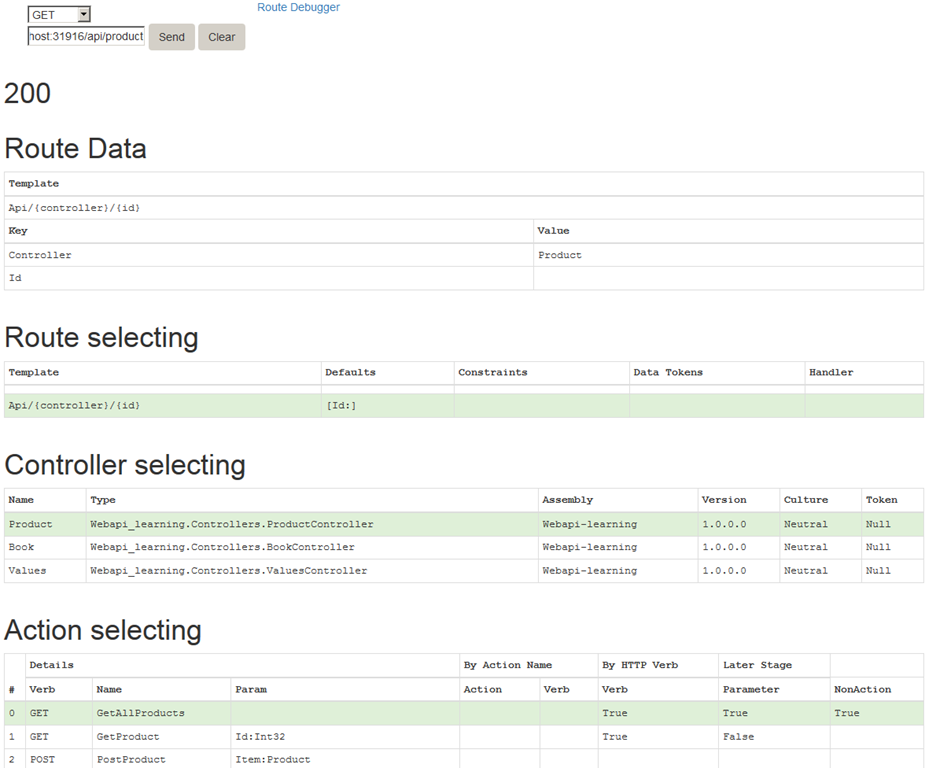
现调试路由就方便多了
Install-Package Microsoft.AspNet.WebApi.Tracing Update-Package Microsoft.AspNet.WebApi.WebHost
Install-Package Microsoft.AspNet.WebApi.Tracing Update-Package Microsoft.AspNet.WebApi.WebHost
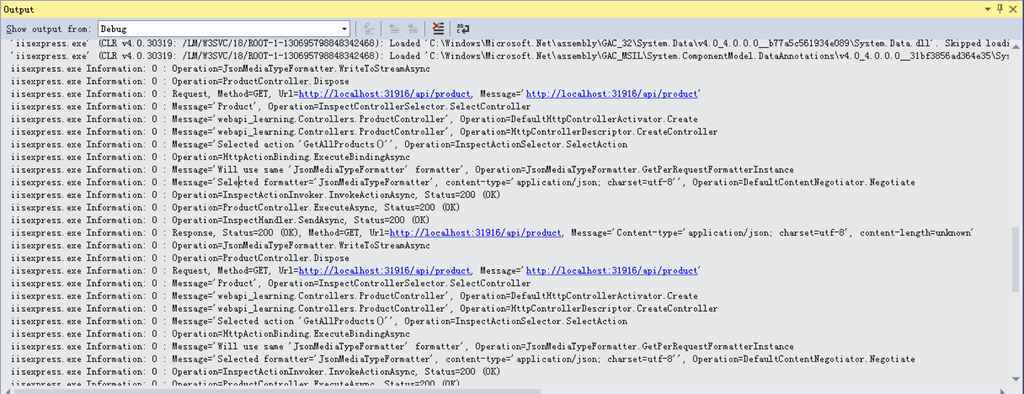
启用代码

public static class WebApiConfig
    {
        public static void Register(HttpConfiguration config)
        {
            // New code
            config.EnableSystemDiagnosticsTracing();
            // Other configuration code not shown.
        }
    }
Refer:
http://www.asp.net/web-api/overview/creating-web-apis/creating-api-help-pages
http://blogs.msdn.com/b/webdev/archive/2013/04/04/debugging-asp-net-web-api-with-route-debugger.aspx
http://www.asp.net/web-api/overview/testing-and-debugging/tracing-in-aspnet-web-api
发表回复