 编程部落
编程部落文章目录
- mkdir -p ~/llama.cpp/models
- Qwen2.5-3B(适合 4GB 显存): curl -L -o ~/llama.cpp/models/qwen2.5-3b-instruct-q4_k_m.gguf “https://hf-mirror.com/Qwen/Qwen2.5-3B-Instruct-GGUF/resolve/main/qwen2.5-3b-instruct-q4_k_m.gguf” Qwen2.5-7B(适合 8GB 显存): curl -L -o ~/llama.cpp/models/qwen2.5-7b-instruct-q4_k_m.gguf “https://hf-mirror.com/Qwen/Qwen2.5-7B-Instruct-GGUF/resolve/main/qwen2.5-7b-instruct-q4_k_m.gguf”
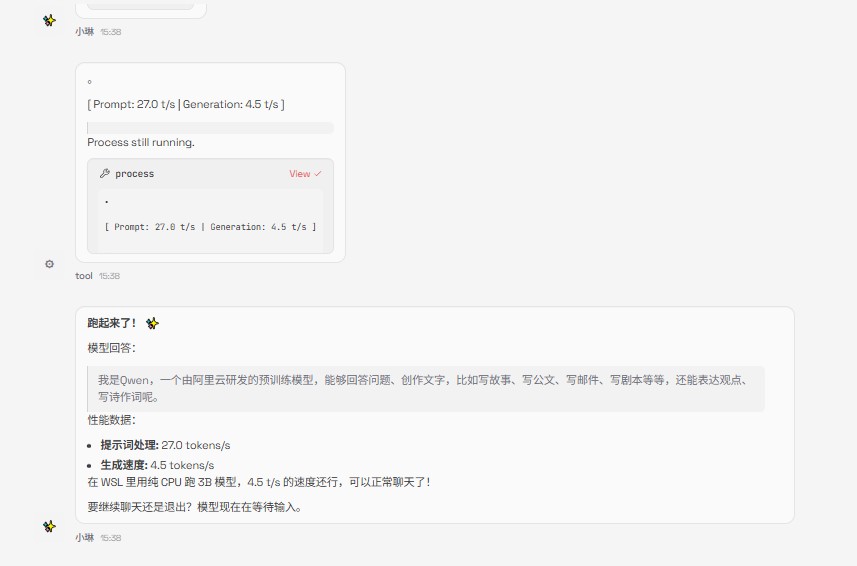
- cd ~/llama.cpp/src/build/bin ./llama-cli -m ~/llama.cpp/models/qwen2.5-3b-instruct-q4_k_m.gguf -c 4096 –no-display-prompt 参数说明: -m 模型路径 -c 上下文长度(默认 512,建议 4096) -ngl GPU 层数(纯 CPU 可不加)
- cd ~/llama.cpp/src/build/bin ./llama-server -m ~/llama.cpp/models/qwen2.5-3b-instruct-q4_k_m.gguf –host 0.0.0.0 –port 8080 -c 4096 服务启动后访问:http://localhost:8080
- 项目 值 地址 http://localhost:8080 API Key 不需要(或随意填写) 兼容格式 OpenAI API
- 端点 说明 POST /v1/chat/completions 聊天补全 POST /v1/completions 文本补全 GET /health 健康检查 GET / Web 聊天界面
-
- curl http://localhost:8080/v1/chat/completions -H “Content-Type: application/json” -d ‘{ “model”: “qwen2.5-3b”, “messages”: [ {“role”: “system”, “content”: “你是一个有帮助的助手。”}, {“role”: “user”, “content”: “你好,介绍一下你自己”} ], “temperature”: 0.7, “max_tokens”: 512 }’
- from openai import OpenAI client = OpenAI( base_url=”http://localhost:8080/v1″, api_key=”not-needed” ) response = client.chat.completions.create( model=”qwen2.5-3b”, messages=[ {“role”: “system”, “content”: “你是一个有帮助的助手。”}, {“role”: “user”, “content”: “你好”} ], temperature=0.7, max_tokens=512 ) print(response.choices[0].message.content)
- const response = await fetch(‘http://localhost:8080/v1/chat/completions’, { method: ‘POST’, headers: { ‘Content-Type’: ‘application/json’ }, body: JSON.stringify({ model: ‘qwen2.5-3b’, messages: [{ role: ‘user’, content: ‘你好’ }] }) }); const data = await response.json(); console.log(data.choices[0].message.content);
- 减少 -ngl 数值,让部分层用 CPU 计算: ./llama-server -m model.gguf -ngl 20 # 只放 20 层到 GPU
- PowerShell 执行: chcp 65001
- nohup ./llama-server -m model.gguf –host 0.0.0.0 –port 8080 > server.log 2>&1 &
- ./llama-server -m model.gguf –api-key “your-secret-key” 调用时需要带上: curl -H “Authorization: Bearer your-secret-key” …
- 查看 WSL IP:hostname -I 使用该 IP 访问,如 http://172.x.x.x:8080
目录
- 前言
- 一、环境准备
- 1. 硬件要求
- 2. 安装编译工具(WSL Ubuntu)
- 二、下载和编译 llama.cpp
- 1. 克隆源码
- 2. 编译
- 三、下载模型
- 1. 创建模型目录
- 2. 下载 GGUF 模型(使用国内镜像加速)
- 四、运行模型
- 方式一:命令行交互模式
- 方式二:启动 API 服务
- 五、API 调用方法
- API 信息
- 端点列表
- 调用示例
- curl
- Python(OpenAI SDK)
- Node.js
- 六、常用参数说明
- 服务端参数(llama-server)
- API 请求参数
- 七、常见问题
- Q1: 报错 “CUDA out of memory”
- Q2: 中文乱码
- Q3: 如何后台运行服务?
- Q4: 如何设置 API Key 认证?
- Q5: 从其他设备访问
- 八、推荐模型
- 九、文件结构
- 十、快速启动脚本
- 总结
本教程基于实际操作整理,适用于 Windows WSL2 环境
本教程基于实际操作整理,适用于 Windows WSL2 环境
全程使用 openclaw 帮我搭建大模型
| 显卡 | 推荐模型 | 显存占用 |
|---|---|---|
| GTX 1050 Ti (4GB) | Qwen2.5-3B Q4 | ~2.5GB |
| RTX 4060 (8GB) | Qwen2.5-7B Q4 | ~5GB |
| RTX 4090 (24GB) | Qwen2.5-32B Q4 | ~20GB |
sudo apt update
sudo apt install -y cmake build-essential
mkdir -p ~/llama.cpp
cd ~/llama.cpp
git clone --depth 1 https://github.com/ggerganov/llama.cpp.git src
cd ~/llama.cpp/src
mkdir build && cd build
cmake .. -DCMAKE_BUILD_TYPE=Release
make -j$(nproc) llama-cli llama-server
编译完成后,可执行文件在 ~/llama.cpp/src/build/bin/ 目录下。
mkdir -p ~/llama.cpp/models
Qwen2.5-3B(适合 4GB 显存):
curl -L -o ~/llama.cpp/models/qwen2.5-3b-instruct-q4_k_m.gguf
  "https://hf-mirror.com/Qwen/Qwen2.5-3B-Instruct-GGUF/resolve/main/qwen2.5-3b-instruct-q4_k_m.gguf"
Qwen2.5-7B(适合 8GB 显存):
curl -L -o ~/llama.cpp/models/qwen2.5-7b-instruct-q4_k_m.gguf
  "https://hf-mirror.com/Qwen/Qwen2.5-7B-Instruct-GGUF/resolve/main/qwen2.5-7b-instruct-q4_k_m.gguf"
cd ~/llama.cpp/src/build/bin
./llama-cli -m ~/llama.cpp/models/qwen2.5-3b-instruct-q4_k_m.gguf
  -c 4096
  --no-display-prompt
参数说明:
-m模型路径-c上下文长度(默认 512,建议 4096)-nglGPU 层数(纯 CPU 可不加)
cd ~/llama.cpp/src/build/bin
./llama-server
  -m ~/llama.cpp/models/qwen2.5-3b-instruct-q4_k_m.gguf
  --host 0.0.0.0
  --port 8080
  -c 4096
服务启动后访问:http://localhost:8080
| 项目 | 值 |
|---|---|
| 地址 | http://localhost:8080 |
| API Key | 不需要(或随意填写) |
| 兼容格式 | OpenAI API |
| 端点 | 说明 |
|---|---|
POST /v1/chat/completions |
聊天补全 |
POST /v1/completions |
文本补全 |
GET /health |
健康检查 |
GET / |
Web 聊天界面 |
curl http://localhost:8080/v1/chat/completions
  -H "Content-Type: application/json"
  -d '{
    "model": "qwen2.5-3b",
    "messages": [
      {"role": "system", "content": "你是一个有帮助的助手。"},
      {"role": "user", "content": "你好,介绍一下你自己"}
    ],
    "temperature": 0.7,
    "max_tokens": 512
  }'
from openai import OpenAI
client = OpenAI(
    base_url="http://localhost:8080/v1",
    api_key="not-needed"
)
response = client.chat.completions.create(
    model="qwen2.5-3b",
    messages=[
        {"role": "system", "content": "你是一个有帮助的助手。"},
        {"role": "user", "content": "你好"}
    ],
    temperature=0.7,
    max_tokens=512
)
print(response.choices[0].message.content)
const response = await fetch('http://localhost:8080/v1/chat/completions', {
  method: 'POST',
  headers: { 'Content-Type': 'application/json' },
  body: JSON.stringify({
    model: 'qwen2.5-3b',
    messages: [{ role: 'user', content: '你好' }]
  })
});
const data = await response.json();
console.log(data.choices[0].message.content);
| 参数 | 说明 | 示例 |
|---|---|---|
-m |
模型路径 | -m model.gguf |
--host |
监听地址 | --host 0.0.0.0 |
--port |
端口 | --port 8080 |
-c |
上下文长度 | -c 4096 |
-ngl |
GPU 层数 | -ngl 99(全部放 GPU) |
-np |
并行请求数 | -np 4 |
--api-key |
设置 API Key | --api-key your-key |
| 参数 | 说明 | 默认值 |
|---|---|---|
temperature |
随机性(0-2) | 0.7 |
max_tokens |
最大生成长度 | 模型上限 |
top_p |
核采样 | 1.0 |
stream |
流式输出 | false |
stop |
停止词 | [] |
减少 -ngl 数值,让部分层用 CPU 计算:
./llama-server -m model.gguf -ngl 20 # 只放 20 层到 GPU
PowerShell 执行:
chcp 65001
nohup ./llama-server -m model.gguf --host 0.0.0.0 --port 8080 > server.log 2>&1 &
./llama-server -m model.gguf --api-key "your-secret-key"
调用时需要带上:
curl -H "Authorization: Bearer your-secret-key" ...
- 查看 WSL IP:
hostname -I
- 使用该 IP 访问,如
http://172.x.x.x:8080
hostname -Ihttp://172.x.x.x:8080
| 模型 | 大小 | 适合场景 |
|---|---|---|
| Qwen2.5-3B-Instruct Q4 | ~2GB | 轻量对话、低配设备 |
| Qwen2.5-7B-Instruct Q4 | ~4.5GB | 通用对话、代码 |
| Qwen2.5-14B-Instruct Q4 | ~9GB | 复杂推理 |
| DeepSeek-R1-Distill-Qwen-7B Q4 | ~4.5GB | 数学、逻辑推理 |
| Mistral-7B-v0.3 Q5 | ~5GB | 英文、代码 |
下载地址: https://hf-mirror.com(国内镜像)
~/llama.cpp/
├── src/                    # llama.cpp 源码
│   └── build/
│       └── bin/
│           ├── llama-cli       # 命令行工具
│           └── llama-server    # API 服务
└── models/                 # 模型存放目录
    └── qwen2.5-3b-instruct-q4_k_m.gguf
创建 start-server.sh:
#!/bin/bash
cd ~/llama.cpp/src/build/bin
./llama-server
  -m ~/llama.cpp/models/qwen2.5-3b-instruct-q4_k_m.gguf
  --host 0.0.0.0
  --port 8080
  -c 4096
  -np 4
赋予执行权限:
chmod +x start-server.sh
./start-server.sh
基于 llama.cpp b7917 + Qwen2.5-3B-Instruct
到此这篇关于openclaw使用llama.cpp本地大模型部署完整步骤的文章就介绍到这了,更多相关openclaw使用llama.cpp本地大模型内容请搜索风君子博客以前的文章或继续浏览下面的相关文章,希望大家以后多多支持风君子博客!