
OpenClaw 指令大全(全网最全)

Written by

in

文章目录
  • # 查看系统状态 openclaw status # 诊断问题 openclaw doctor # 查看日志 openclaw logs –follow # 打开 Web 控制面板 openclaw dashboard # 启动/重启 Gateway openclaw gateway restart # 更新版本 openclaw update
  • 首次使用时的配置向导。 # 基础初始化 openclaw setup # 运行向导 openclaw setup –wizard # 引导式配置 openclaw onboard # 配置向导 openclaw configure # 配置特定部分 openclaw configure –section models openclaw configure –section channels openclaw configure –section web # 查看配置文件路径 openclaw config file # 获取配置值 openclaw config get gateway.port openclaw config get agents.defaults.model.primary # 设置配置值 openclaw config set gateway.port 19001 openclaw config set agents.defaults.model.primary “anthropic/claude-opus-4-6” # 删除配置值 openclaw config unset tools.web.search.apiKey # 验证配置 openclaw config validate openclaw config validate –json 路径语法: # 点号语法 openclaw config get agents.defaults.workspace # 数组索引 openclaw config get agents.list[0].id openclaw config set agents.list[1].tools.exec.node “node-1”
  • # 快速状态概览 openclaw status # 完整诊断(包括深度检查) openclaw status –all –verbose # 深度检测(探测所有渠道) openclaw status –deep # 显示用量信息 openclaw status –usage # JSON 输出 openclaw status –json # 基础健康检查 openclaw health # JSON 格式 openclaw health –json # 指定超时 openclaw health –timeout 5000 # 基础检查 openclaw doctor # 自动修复 openclaw doctor –fix openclaw doctor –repair # 深度检查 openclaw doctor –deep # 非交互模式 openclaw doctor –non-interactive # 实时查看日志 openclaw logs –follow # 查看最近 200 行 openclaw logs –limit 200 # JSON 格式输出 openclaw logs –json # 禁用颜色 openclaw logs –plain # 创建备份 openclaw backup create # 验证备份 openclaw backup verify # 重置配置 openclaw reset –scope config # 重置配置和凭证 openclaw reset –scope config+creds+sessions # 完全重置 openclaw reset –scope full # 非交互模式 openclaw reset –scope config –yes –non-interactive # 卸载服务 openclaw uninstall –service # 卸载状态数据 openclaw uninstall –state # 卸载工作空间 openclaw uninstall –workspace # 完全卸载 openclaw uninstall –all # 非交互模式 openclaw uninstall –all –yes –non-interactive
  • # 启动 Gateway(前台) openclaw gateway # 查看状态 openclaw gateway status # 网关状态(含 RPC 探测) openclaw gateway status –probe # 网关健康检查 openclaw gateway health # 安装为系统服务 openclaw gateway install # 启动服务 openclaw gateway start # 停止服务 openclaw gateway stop # 重启服务 openclaw gateway restart # 卸载服务 openclaw gateway uninstall 启动参数: 参数 说明 –port <port> WebSocket 端口 –bind <loopback|lan|tailnet|auto> 网络绑定模式 –token <token> 访问令牌 –password <password> 访问密码 –tailscale <off|serve|funnel> Tailscale 暴露模式 –dev 开发模式 –verbose 详细日志 –force 强制启动(关闭占用端口的进程) 示例: # 指定端口和令牌启动 openclaw gateway –port 19001 –token my-secret-token # 绑定到局域网 openclaw gateway –bind lan # 通过 Tailscale 暴露 openclaw gateway –tailscale serve
  • # 查看已配置的渠道 openclaw channels list # 查看渠道状态 openclaw channels status # 健康检查(探测渠道) openclaw channels status –probe # 探测渠道能力 openclaw channels capabilities # 添加渠道账号 openclaw channels add –channel telegram –token <bot-token> openclaw channels add –channel discord –token <bot-token> openclaw channels add –channel feishu –app-id <id> –app-secret <secret> # 删除渠道账号 openclaw channels remove –channel telegram –delete # 查看渠道日志 openclaw channels logs –channel all openclaw channels logs –channel telegram –lines 50 # 登录/登出(WhatsApp) openclaw channels login –channel whatsapp openclaw channels logout –channel whatsapp 支持的渠道: 渠道 说明 feishu 飞书 / Lark telegram Telegram discord Discord whatsapp WhatsApp slack Slack signal Signal imessage iMessage msteams Microsoft Teams googlechat Google Chat 管理 DM(私聊)配对请求: # 查看待配对请求 openclaw pairing list feishu # 批准配对 openclaw pairing approve feishu <CODE> # 批准并通知 openclaw pairing approve feishu <CODE> –notify
  • # 查看模型状态 openclaw models status # 测试模型认证 openclaw models status –probe # 列出可用模型 openclaw models list openclaw models list –all # 设置默认模型 openclaw models set anthropic/claude-opus-4-6 # 设置图像模型 openclaw models set-image openai/gpt-4.1 # 扫描可用模型 openclaw models scan # 列出别名 openclaw models aliases list # 添加别名 openclaw models aliases add opus anthropic/claude-opus-4-6 # 删除别名 openclaw models aliases remove opus # 列出 fallback openclaw models fallbacks list # 添加 fallback openclaw models fallbacks add openai/gpt-4.1 # 删除 fallback openclaw models fallbacks remove openai/gpt-4.1 # 清空 fallback openclaw models fallbacks clear # 添加认证 openclaw models auth add # Setup-token openclaw models auth setup-token –provider anthropic # 粘贴 token openclaw models auth paste-token –provider anthropic
  • # 列出所有 Agent openclaw agents list openclaw agents list –bindings # 同时显示路由绑定 # 创建 Agent(进入向导流程) openclaw agents add work # 创建 Agent(指定参数) openclaw agents add personal –workspace ~/.openclaw/workspace-personal # 添加一个专门处理前端开发的代理 openclaw agents add –workspace ~/.openclaw/workspace/fe-dev –model claude-sonnet-4-2 –bind telegram:work # 添加一个专门处理后端开发的代理 openclaw agents add –workspace ~/.openclaw/workspace/be-dev –model claude-sonnet-4-2 –bind slack:backend # 删除 Agent(操作不可恢复) openclaw agents delete work –force # 查看绑定 openclaw agents bindings # 添加绑定 openclaw agents bind –agent work –bind feishu:work-bot # 移除绑定 openclaw agents unbind –agent work –bind feishu:work-bot openclaw agents unbind –agent work –all # 基础对话 openclaw agent –message “你好” # 指定目标 openclaw agent –message “提醒我开会” –to “+15555550123” # 指定渠道 openclaw agent –message “你好” –channel telegram # 本地运行 openclaw agent –message “你好” –local # 设置思考级别 openclaw agent –message “分析这个问题” –thinking high
  • # 列出会话 openclaw sessions # 列出特定 Agent 的会话 openclaw sessions –agent work # 列出所有 Agent 的会话 openclaw sessions –all-agents # 查看最近活跃的会话(最近 120 分钟) openclaw sessions –active 120 # 清理会话(预览) openclaw sessions cleanup –dry-run # 执行清理 openclaw sessions cleanup –enforce
  • # 添加节点 openclaw node add ${name} openclaw node add macos-app # 运行 Node Host(前台) openclaw node run –host <gateway-ip> –port 18789 # 安装为系统服务 openclaw node install –host <gateway-ip> –port 18789 –display-name “Build Node” # 查看状态 openclaw node status # 启动服务 openclaw node start # 停止服务 openclaw node stop # 重启服务 openclaw node restart # 卸载服务 openclaw node uninstall # 查看所有节点状态 openclaw nodes status # 列出节点 openclaw nodes list # 查看待批准请求 openclaw nodes pending # 批准节点 openclaw nodes approve <requestId> # 拒绝节点 openclaw nodes reject <requestId> # 重命名节点 openclaw nodes rename –node <id> –name “New Name” # 查看节点详情 openclaw nodes describe –node <id> # 在节点上执行命令 openclaw nodes run –node <id> — echo “hello” # 发送通知(macOS) openclaw nodes notify –node <id> –title “提醒” –body “会议开始了” # 列出设备 openclaw devices list # 批准设备 openclaw devices approve <requestId> openclaw devices approve –latest # 拒绝设备 openclaw devices reject <requestId> # 移除设备 openclaw devices remove <deviceId> # 清除所有设备 openclaw devices clear –yes
  • OpenClaw 内置了强大的定时任务系统,支持 3 种任务类型: 类型 说明 system-event 在主会话中触发系统事件 agent-turn 在隔离会话中运行 AI 代理任务 message 直接发送消息到指定频道 # 查看状态 openclaw cron status # 列出任务 openclaw cron list # 添加任务(每天早上 9 点) openclaw cron add –name “daily-report” –cron “0 9 * * *” –system-event “生成日报” # 添加每周一早上的周报提醒 openclaw cron add –name “周报提醒” –cron “0 9 * * 1” –system-event “提交周报的日子到了!” # 添加每天早上 9 点的提醒 openclaw cron add –name “晨间提醒” –cron “0 9 * * *” –system-event “记得喝咖啡 ☕️” # 编辑任务 openclaw cron edit <id> # 删除任务 openclaw cron rm <id> # 启用/禁用任务 openclaw cron enable <id> openclaw cron disable <id> # 查看运行记录 openclaw cron runs –id <id> # 立即运行 openclaw cron run <id>
  • 创建 ~/.openclaw/workspace/HEARTBEAT.md 文件: # 心跳检查清单 每次心跳时执行: – [ ] 检查邮件– [ ] 检查日历– [ ] 检查待办事项– [ ] 更新记忆文件 控制心跳: # 查看最后一次心跳 openclaw system heartbeat last # 启用心跳系统 openclaw system heartbeat enable # 禁用心跳系统 openclaw system heartbeat disable
  • OpenClaw 支持通过 CLI 来索引和搜索你的 MEMORY.md 文件,让它记住重要信息。 # 查看记忆状态 openclaw memory status # 重新索引记忆文件 openclaw memory index # 搜索记忆内容 openclaw memory search “项目进度” # 搜索需要密码的内容 openclaw memory search “SSH 凭证”
  • # 发送文本消息 openclaw message send –target “+15555550123” –message “你好” # 发送到 Telegram openclaw message send –channel telegram –target “@your_bot” –message “Hello from OpenClaw!” # 发送到 WhatsApp openclaw message send –channel whatsapp –target “+8613800138000” –message “测试消息” # 发送到 Discord 频道 openclaw message send –channel discord –target “channel:1234567890” –message “@here 重要通知” # 发送图片 openclaw message send –target “+15555550123” –media /path/to/image.jpg # 创建投票 openclaw message poll –channel discord –target “channel:123” –poll-question “这周五聚餐吃什么?” –poll-option “火锅” –poll-option “烧烤” –poll-option “西餐” # 发送表情回应 openclaw message react –channel discord –target “channel:123” –message-id “456” –emoji “👍” 消息子命令: 子命令 说明 send 发送消息 poll 发送投票 react 表情回应 edit 编辑消息 delete 删除消息 pin / unpin 置顶/取消置顶 search 搜索消息
  • # 查看状态 openclaw browser status # 启动浏览器 openclaw browser start # 停止浏览器 openclaw browser stop # 打开网页 openclaw browser open https://example.com # 截图 openclaw browser screenshot # 页面快照 openclaw browser snapshot # 点击元素 openclaw browser click <ref> # 输入文本 openclaw browser type <ref> “hello” # 列出标签页 openclaw browser tabs # 关闭标签页 openclaw browser close <targetId> # 列出配置文件 openclaw browser profiles # 创建配置文件 openclaw browser create-profile –name work –color “#FF0000” # 删除配置文件 openclaw browser delete-profile –name work
  • # 基础审计 openclaw security audit # 深度审计(探测网关) openclaw security audit –deep # 自动修复常见问题 openclaw security audit –fix # 重新加载密钥 openclaw secrets reload # 审计密钥 openclaw secrets audit # 配置密钥 openclaw secrets configure
  • # 列出所有技能 openclaw skills list # 列出可用的技能(依赖已满足) openclaw skills list –eligible # 查看技能详情 openclaw skills info browser # 检查技能依赖 openclaw skills check # 安装技能 openclaw skill install ${name} # 关闭技能 openclaw skill disable ${name}
  • # 列出插件 openclaw plugins list # 查看插件详情 openclaw plugins info <id> # 安装插件 openclaw plugins install <path> # 启用插件 openclaw plugins enable <id> # 禁用插件 openclaw plugins disable <id>
  • # 列出钩子 openclaw hooks list # 查看钩子详情 openclaw hooks info <name> # 检查钩子 openclaw hooks check # 启用钩子 openclaw hooks enable <name> # 禁用钩子 openclaw hooks disable <name>
  • # 列出沙箱 openclaw sandbox list # 重建沙箱 openclaw sandbox recreate –agent <id> # 清理全部沙箱容器 openclaw sandbox recreate –all # 查看沙箱说明 openclaw sandbox explain
  • OpenClaw 有一套斜杠命令系统,在聊天里直接输入 / 开头的指令就能使用。 /status 查看当前状态。 /stop 停止某个任务。 /compact 压缩上下文。 /new 开启新会话,聊完一个话题想换下一个时用,避免上下文污染。 /model <名字> 切换模型。 /think <级别> 调整思考深度。日常闲聊用 off 就行,复杂问题开 high。 到此这篇关于OpenClaw 指令大全(全网最全)的文章就介绍到这了,更多相关OpenClaw 指令内容请搜索风君子博客以前的文章或继续浏览下面的相关文章,希望大家以后多多支持风君子博客!
  • 目录
    • 一、快速入门
    • 二、初始化与配置管理
    • 三、运维指令
    • 四、Gateway 管理
    • 五、Channel 管理
    • 六、Model 管理
    • 七、Multi-Agent 管理
    • 八、Session 管理
    • 九、Node 管理
    • 十、Cron 管理
    • 十一、Heartbeat 管理
    • 十二、Memory 管理
    • 十三、Message 管理
    • 十四、浏览器管理
    • 十五、安全管理
    • 十六、Skills 管理
    • 十七、Plugins 管理
    • 十八、Hooks 管理
    • 十九、Sandbox 管理
    • 二十、其他命令
      • Approvals 管理
      • docs 搜索
      • TUI 界面
      • 二维码
      • ClawHub
    • 二十一、斜杠命令

      # 查看系统状态
      openclaw status
      # 诊断问题
      openclaw doctor
      # 查看日志
      openclaw logs --follow
      # 打开 Web 控制面板
      openclaw dashboard
      # 启动/重启 Gateway
      openclaw gateway restart
      # 更新版本
      openclaw update

      首次使用时的配置向导。

      # 基础初始化
      openclaw setup
      # 运行向导
      openclaw setup --wizard
      # 引导式配置
      openclaw onboard
      # 配置向导
      openclaw configure
      # 配置特定部分
      openclaw configure --section models
      openclaw configure --section channels
      openclaw configure --section web
      # 查看配置文件路径
      openclaw config file
      # 获取配置值
      openclaw config get gateway.port
      openclaw config get agents.defaults.model.primary
      # 设置配置值
      openclaw config set gateway.port 19001
      openclaw config set agents.defaults.model.primary "anthropic/claude-opus-4-6"
      # 删除配置值
      openclaw config unset tools.web.search.apiKey
      # 验证配置
      openclaw config validate
      openclaw config validate --json

      路径语法:

      # 点号语法
      openclaw config get agents.defaults.workspace
      # 数组索引
      openclaw config get agents.list[0].id
      openclaw config set agents.list[1].tools.exec.node "node-1"

      # 快速状态概览
      openclaw status
      # 完整诊断(包括深度检查)
      openclaw status --all --verbose
      # 深度检测(探测所有渠道)
      openclaw status --deep
      # 显示用量信息
      openclaw status --usage
      # JSON 输出
      openclaw status --json
      # 基础健康检查
      openclaw health
      # JSON 格式
      openclaw health --json
      # 指定超时
      openclaw health --timeout 5000
      # 基础检查
      openclaw doctor
      # 自动修复
      openclaw doctor --fix
      openclaw doctor --repair
      # 深度检查
      openclaw doctor --deep
      # 非交互模式
      openclaw doctor --non-interactive
      # 实时查看日志
      openclaw logs --follow
      # 查看最近 200 行
      openclaw logs --limit 200
      # JSON 格式输出
      openclaw logs --json
      # 禁用颜色
      openclaw logs --plain
      # 创建备份
      openclaw backup create
      # 验证备份
      openclaw backup verify
      # 重置配置
      openclaw reset --scope config
      # 重置配置和凭证
      openclaw reset --scope config+creds+sessions
      # 完全重置
      openclaw reset --scope full
      # 非交互模式
      openclaw reset --scope config --yes --non-interactive
      # 卸载服务
      openclaw uninstall --service
      # 卸载状态数据
      openclaw uninstall --state
      # 卸载工作空间
      openclaw uninstall --workspace
      # 完全卸载
      openclaw uninstall --all
      # 非交互模式
      openclaw uninstall --all --yes --non-interactive

      # 启动 Gateway(前台)
      openclaw gateway
      # 查看状态
      openclaw gateway status
      # 网关状态(含 RPC 探测)
      openclaw gateway status --probe
      # 网关健康检查
      openclaw gateway health
      # 安装为系统服务
      openclaw gateway install
      # 启动服务
      openclaw gateway start
      # 停止服务
      openclaw gateway stop
      # 重启服务
      openclaw gateway restart
      # 卸载服务
      openclaw gateway uninstall

      启动参数:

      参数 说明
      –port <port> WebSocket 端口
      –bind <loopback|lan|tailnet|auto> 网络绑定模式
      –token <token> 访问令牌
      –password <password> 访问密码
      –tailscale <off|serve|funnel> Tailscale 暴露模式
      –dev 开发模式
      –verbose 详细日志
      –force 强制启动(关闭占用端口的进程)

      示例:

      # 指定端口和令牌启动
      openclaw gateway --port 19001 --token my-secret-token
      # 绑定到局域网
      openclaw gateway --bind lan
      # 通过 Tailscale 暴露
      openclaw gateway --tailscale serve

      # 查看已配置的渠道
      openclaw channels list
      # 查看渠道状态
      openclaw channels status
      # 健康检查(探测渠道)
      openclaw channels status --probe
      # 探测渠道能力
      openclaw channels capabilities
      # 添加渠道账号
      openclaw channels add --channel telegram --token <bot-token>
      openclaw channels add --channel discord --token <bot-token>
      openclaw channels add --channel feishu --app-id <id> --app-secret <secret>
      # 删除渠道账号
      openclaw channels remove --channel telegram --delete
      # 查看渠道日志
      openclaw channels logs --channel all
      openclaw channels logs --channel telegram --lines 50
      # 登录/登出(WhatsApp)
      openclaw channels login --channel whatsapp
      openclaw channels logout --channel whatsapp

      支持的渠道:

      渠道 说明
      feishu 飞书 / Lark
      telegram Telegram
      discord Discord
      whatsapp WhatsApp
      slack Slack
      signal Signal
      imessage iMessage
      msteams Microsoft Teams
      googlechat Google Chat

      管理 DM(私聊)配对请求:

      # 查看待配对请求
      openclaw pairing list feishu
      # 批准配对
      openclaw pairing approve feishu <CODE>
      # 批准并通知
      openclaw pairing approve feishu <CODE> --notify

      # 查看模型状态
      openclaw models status
      # 测试模型认证
      openclaw models status --probe
      # 列出可用模型
      openclaw models list
      openclaw models list --all
      # 设置默认模型
      openclaw models set anthropic/claude-opus-4-6
      # 设置图像模型
      openclaw models set-image openai/gpt-4.1
      # 扫描可用模型
      openclaw models scan
      # 列出别名
      openclaw models aliases list
      # 添加别名
      openclaw models aliases add opus anthropic/claude-opus-4-6
      # 删除别名
      openclaw models aliases remove opus
      # 列出 fallback
      openclaw models fallbacks list
      # 添加 fallback
      openclaw models fallbacks add openai/gpt-4.1
      # 删除 fallback
      openclaw models fallbacks remove openai/gpt-4.1
      # 清空 fallback
      openclaw models fallbacks clear
      # 添加认证
      openclaw models auth add
      # Setup-token
      openclaw models auth setup-token --provider anthropic
      # 粘贴 token
      openclaw models auth paste-token --provider anthropic

      # 列出所有 Agent
      openclaw agents list
      openclaw agents list --bindings  # 同时显示路由绑定
      # 创建 Agent(进入向导流程)
      openclaw agents add work
      # 创建 Agent(指定参数)
      openclaw agents add personal --workspace ~/.openclaw/workspace-personal
      # 添加一个专门处理前端开发的代理
      openclaw agents add 
        --workspace ~/.openclaw/workspace/fe-dev 
        --model claude-sonnet-4-2 
        --bind telegram:work
      # 添加一个专门处理后端开发的代理
      openclaw agents add 
        --workspace ~/.openclaw/workspace/be-dev 
        --model claude-sonnet-4-2 
        --bind slack:backend
      # 删除 Agent(操作不可恢复)
      openclaw agents delete work --force
      # 查看绑定
      openclaw agents bindings
      # 添加绑定
      openclaw agents bind --agent work --bind feishu:work-bot
      # 移除绑定
      openclaw agents unbind --agent work --bind feishu:work-bot
      openclaw agents unbind --agent work --all
      # 基础对话
      openclaw agent --message "你好"
      # 指定目标
      openclaw agent --message "提醒我开会" --to "+15555550123"
      # 指定渠道
      openclaw agent --message "你好" --channel telegram
      # 本地运行
      openclaw agent --message "你好" --local
      # 设置思考级别
      openclaw agent --message "分析这个问题" --thinking high

      # 列出会话
      openclaw sessions
      # 列出特定 Agent 的会话
      openclaw sessions --agent work
      # 列出所有 Agent 的会话
      openclaw sessions --all-agents
      # 查看最近活跃的会话(最近 120 分钟)
      openclaw sessions --active 120
      # 清理会话(预览)
      openclaw sessions cleanup --dry-run
      # 执行清理
      openclaw sessions cleanup --enforce

      # 添加节点
      openclaw node add ${name}
      openclaw node add macos-app
      # 运行 Node Host(前台)
      openclaw node run --host <gateway-ip> --port 18789
      # 安装为系统服务
      openclaw node install --host <gateway-ip> --port 18789 --display-name "Build Node"
      # 查看状态
      openclaw node status
      # 启动服务
      openclaw node start
      # 停止服务
      openclaw node stop
      # 重启服务
      openclaw node restart
      # 卸载服务
      openclaw node uninstall
      # 查看所有节点状态
      openclaw nodes status
      # 列出节点
      openclaw nodes list
      # 查看待批准请求
      openclaw nodes pending
      # 批准节点
      openclaw nodes approve <requestId>
      # 拒绝节点
      openclaw nodes reject <requestId>
      # 重命名节点
      openclaw nodes rename --node <id> --name "New Name"
      # 查看节点详情
      openclaw nodes describe --node <id>
      # 在节点上执行命令
      openclaw nodes run --node <id> -- echo "hello"
      # 发送通知(macOS)
      openclaw nodes notify --node <id> --title "提醒" --body "会议开始了"
      # 列出设备
      openclaw devices list
      # 批准设备
      openclaw devices approve <requestId>
      openclaw devices approve --latest
      # 拒绝设备
      openclaw devices reject <requestId>
      # 移除设备
      openclaw devices remove <deviceId>
      # 清除所有设备
      openclaw devices clear --yes

      OpenClaw 内置了强大的定时任务系统,支持 3 种任务类型:

      类型 说明
      system-event 在主会话中触发系统事件
      agent-turn 在隔离会话中运行 AI 代理任务
      message 直接发送消息到指定频道
      # 查看状态
      openclaw cron status
      # 列出任务
      openclaw cron list
      # 添加任务(每天早上 9 点)
      openclaw cron add 
        --name "daily-report" 
        --cron "0 9 * * *" 
        --system-event "生成日报"
      # 添加每周一早上的周报提醒
      openclaw cron add 
        --name "周报提醒" 
        --cron "0 9 * * 1" 
        --system-event "提交周报的日子到了!"
      # 添加每天早上 9 点的提醒
      openclaw cron add 
        --name "晨间提醒" 
        --cron "0 9 * * *" 
        --system-event "记得喝咖啡 ☕️"
      # 编辑任务
      openclaw cron edit <id>
      # 删除任务
      openclaw cron rm <id>
      # 启用/禁用任务
      openclaw cron enable <id>
      openclaw cron disable <id>
      # 查看运行记录
      openclaw cron runs --id <id>
      # 立即运行
      openclaw cron run <id>

      创建 ~/.openclaw/workspace/HEARTBEAT.md 文件:

      # 心跳检查清单

      每次心跳时执行:

      – [ ] 检查邮件
      – [ ] 检查日历
      – [ ] 检查待办事项
      – [ ] 更新记忆文件

      控制心跳:

      # 查看最后一次心跳
      openclaw system heartbeat last
      # 启用心跳系统
      openclaw system heartbeat enable
      # 禁用心跳系统
      openclaw system heartbeat disable

      OpenClaw 支持通过 CLI 来索引和搜索你的 MEMORY.md 文件,让它记住重要信息。

      # 查看记忆状态
      openclaw memory status
      # 重新索引记忆文件
      openclaw memory index
      # 搜索记忆内容
      openclaw memory search "项目进度"
      # 搜索需要密码的内容
      openclaw memory search "SSH 凭证"

      # 发送文本消息
      openclaw message send --target "+15555550123" --message "你好"
      # 发送到 Telegram
      openclaw message send 
        --channel telegram 
        --target "@your_bot" 
        --message "Hello from OpenClaw!"
      # 发送到 WhatsApp
      openclaw message send 
        --channel whatsapp 
        --target "+8613800138000" 
        --message "测试消息"
      # 发送到 Discord 频道
      openclaw message send 
        --channel discord 
        --target "channel:1234567890" 
        --message "@here 重要通知"
      # 发送图片
      openclaw message send --target "+15555550123" --media /path/to/image.jpg
      # 创建投票
      openclaw message poll 
        --channel discord 
        --target "channel:123" 
        --poll-question "这周五聚餐吃什么?" 
        --poll-option "火锅" 
        --poll-option "烧烤" 
        --poll-option "西餐"
      # 发送表情回应
      openclaw message react 
        --channel discord 
        --target "channel:123" 
        --message-id "456" 
        --emoji "👍"

      消息子命令:

      子命令 说明
      send 发送消息
      poll 发送投票
      react 表情回应
      edit 编辑消息
      delete 删除消息
      pin / unpin 置顶/取消置顶
      search 搜索消息

      # 查看状态
      openclaw browser status
      # 启动浏览器
      openclaw browser start
      # 停止浏览器
      openclaw browser stop
      # 打开网页
      openclaw browser open https://example.com
      # 截图
      openclaw browser screenshot
      # 页面快照
      openclaw browser snapshot
      # 点击元素
      openclaw browser click <ref>
      # 输入文本
      openclaw browser type <ref> "hello"
      # 列出标签页
      openclaw browser tabs
      # 关闭标签页
      openclaw browser close <targetId>
      # 列出配置文件
      openclaw browser profiles
      # 创建配置文件
      openclaw browser create-profile --name work --color "#FF0000"
      # 删除配置文件
      openclaw browser delete-profile --name work

      # 基础审计
      openclaw security audit
      # 深度审计(探测网关)
      openclaw security audit --deep
      # 自动修复常见问题
      openclaw security audit --fix
      # 重新加载密钥
      openclaw secrets reload
      # 审计密钥
      openclaw secrets audit
      # 配置密钥
      openclaw secrets configure

      # 列出所有技能
      openclaw skills list
      # 列出可用的技能(依赖已满足)
      openclaw skills list --eligible
      # 查看技能详情
      openclaw skills info browser
      # 检查技能依赖
      openclaw skills check
      # 安装技能
      openclaw skill install ${name}
      # 关闭技能
      openclaw skill disable ${name}

      # 列出插件
      openclaw plugins list
      
      # 查看插件详情
      openclaw plugins info <id>
      
      # 安装插件
      openclaw plugins install <path>
      
      # 启用插件
      openclaw plugins enable <id>
      
      # 禁用插件
      openclaw plugins disable <id>
      

      # 列出钩子
      openclaw hooks list
      # 查看钩子详情
      openclaw hooks info <name>
      # 检查钩子
      openclaw hooks check
      # 启用钩子
      openclaw hooks enable <name>
      # 禁用钩子
      openclaw hooks disable <name>

      # 列出沙箱
      openclaw sandbox list
      # 重建沙箱
      openclaw sandbox recreate --agent <id>
      # 清理全部沙箱容器
      openclaw sandbox recreate --all
      # 查看沙箱说明
      openclaw sandbox explain

      # 查看审批设置
      openclaw approvals get
      # 设置审批模式
      openclaw approvals set --mode allowlist
      # 添加白名单
      openclaw approvals allowlist add --node <id> "/usr/bin/git"
      # 移除白名单
      openclaw approvals allowlist remove --node <id> "/usr/bin/git"

      openclaw docs
      openclaw docs "gateway configuration"

      openclaw tui
      openclaw tui --session main

      openclaw qr

      ClawdHub 技能市场:https://clawdhub.com

      # 搜索技能(模糊匹配)
      clawhub search "模糊匹配"
      # 安装技能
      clawdhub install ${skill_name}
      # 更新所有技能
      clawhub update --all
      # 同步已安装技能到最新版本
      npx clawhub sync
      # 发布技能
      npx clawhub publish

      OpenClaw 有一套斜杠命令系统,在聊天里直接输入 / 开头的指令就能使用。
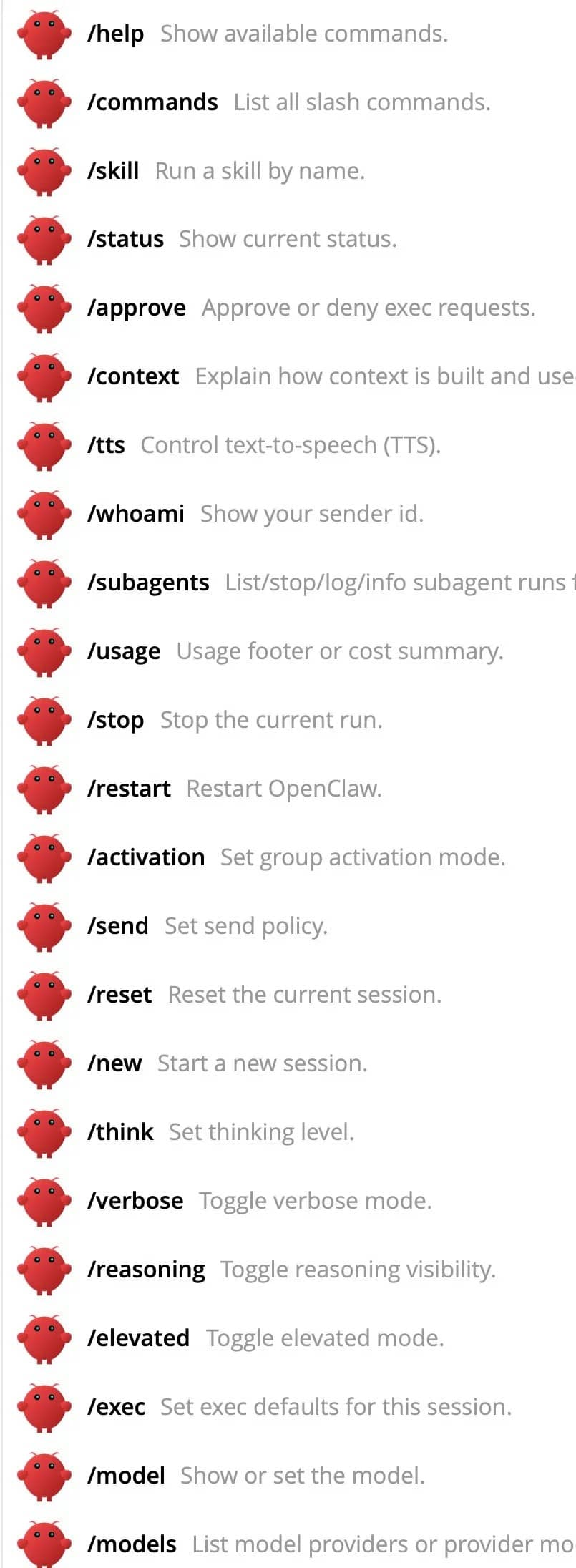
      • /status 查看当前状态。
      • /stop 停止某个任务。
      • /compact 压缩上下文。
      • /new 开启新会话,聊完一个话题想换下一个时用,避免上下文污染。
      • /model <名字> 切换模型。
      • /think <级别> 调整思考深度。日常闲聊用 off 就行,复杂问题开 high。

      到此这篇关于OpenClaw 指令大全(全网最全)的文章就介绍到这了,更多相关OpenClaw 指令内容请搜索风君子博客以前的文章或继续浏览下面的相关文章,希望大家以后多多支持风君子博客!

      站内搜索