 编程部落
编程部落文章目录
- 步骤 1: 打开配置文件 Windows: # 使用记事本打开 notepad C:Users$env:USERNAME.openclawopenclaw.json # 或使用 VS Code 打开 code C:Users$env:USERNAME.openclawopenclaw.json macOS/Linux: # 使用默认编辑器打开 open -e ~/.openclaw/openclaw.json # macOS (TextEdit) # 或使用 VS Code 打开 code ~/.openclaw/openclaw.json 步骤 2: 根据您的模型提供商修改配置 华为云 (MaaS) 配置 获取 API Key 访问: https://developer.huaweicloud.com/space/developerspace/tokens.html 登录华为云账号 创建或复制您的 API Key 配置文件内容 { “auth”: { “profiles”: { “huawei:default”: { “provider”: “huawei”, “mode”: “api_key” } } }, “models”: { “providers”: { “huawei”: { “baseUrl”: “https://api.modelarts-maas.com/openai/v1”, “apiKey”: “在这里粘贴您的华为云API Key”, “api”: “openai-completions”, “models”: [ { “id”: “deepseek-v3.2”, “name”: “deepseek-v3.2” } ] } } }, “agents”: { “defaults”: { “model”: { “primary”: “huawei/deepseek-v3.2” }, “models”: { “huawei/deepseek-v3.2”: {} }, “workspace”: “~/.openclaw/workspace”, “compaction”: { “mode”: “safeguard” }, “maxConcurrent”: 4, “subagents”: { “maxConcurrent”: 8 } } }, “messages”: { “ackReactionScope”: “group-mentions” }, “commands”: { “native”: “auto”, “nativeSkills”: “auto”, “restart”: true, “ownerDisplay”: “raw” }, “session”: { “dmScope”: “per-channel-peer” }, “channels”: {}, “gateway”: { “mode”: “local” }, “plugins”: {} } 关键配置项说明 models.providers.huawei.apiKey: 您的华为云 API Key models.providers.huawei.models[0].id: 模型 ID (如 deepseek-v3.2, glm-5 等) agents.defaults.model.primary: 默认使用的模型,格式为 huawei/<模型ID> Doubao (火山引擎) 配置 获取 API Key 和 Endpoint ID 访问火山引擎控制台 进入"方舟大模型平台" 创建推理接入点,获取 Endpoint ID 获取 API Key 配置文件内容 { “auth”: { “profiles”: { “doubao:default”: { “provider”: “doubao”, “mode”: “api_key” } } }, “models”: { “providers”: { “doubao”: { “baseUrl”: “https://ark.cn-beijing.volces.com/api/v3”, “apiKey”: “在这里粘贴您的Doubao API Key”, “api”: “openai-completions”, “models”: [ { “id”: “在这里粘贴您的Endpoint ID”, “name”: “Doubao-1.8” } ] } } }, “agents”: { “defaults”: { “model”: { “primary”: “doubao/在这里粘贴您的Endpoint ID” }, “models”: { “doubao/在这里粘贴您的Endpoint ID”: {} }, “workspace”: “~/.openclaw/workspace”, “compaction”: { “mode”: “safeguard” }, “maxConcurrent”: 4, “subagents”: { “maxConcurrent”: 8 } } }, “messages”: { “ackReactionScope”: “group-mentions” }, “commands”: { “native”: “auto”, “nativeSkills”: “auto”, “restart”: true, “ownerDisplay”: “raw” }, “session”: { “dmScope”: “per-channel-peer” }, “channels”: {}, “gateway”: { “mode”: “local” }, “plugins”: {} } 关键配置项说明 models.providers.doubao.apiKey: 您的 Doubao API Key models.providers.doubao.models[0].id: 您的 Endpoint ID (如 ep-20240604052306-abcde) agents.defaults.model.primary: 格式为 doubao/<Endpoint ID> Anthropic 配置 获取 API Key 访问: https://console.anthropic.com/ 登录或注册账号 在 API Keys 页面创建新的 API Key 配置文件内容 { “auth”: { “profiles”: { “anthropic:default”: { “provider”: “anthropic”, “mode”: “api_key” } } }, “models”: { “providers”: { “anthropic”: { “baseUrl”: “https://api.anthropic.com”, “apiKey”: “在这里粘贴您的Anthropic API Key”, “api”: “anthropic-chat”, “models”: [ { “id”: “claude-3-5-sonnet-20240620”, “name”: “claude-3-5-sonnet-20240620” } ] } } }, “agents”: { “defaults”: { “model”: { “primary”: “anthropic/claude-3-5-sonnet-20240620” }, “models”: { “anthropic/claude-3-5-sonnet-20240620”: {} }, “workspace”: “~/.openclaw/workspace”, “compaction”: { “mode”: “safeguard” }, “maxConcurrent”: 4, “subagents”: { “maxConcurrent”: 8 } } }, “messages”: { “ackReactionScope”: “group-mentions” }, “commands”: { “native”: “auto”, “nativeSkills”: “auto”, “restart”: true, “ownerDisplay”: “raw” }, “session”: { “dmScope”: “per-channel-peer” }, “channels”: {}, “gateway”: { “mode”: “local” }, “plugins”: {} } 关键配置项说明 models.providers.anthropic.apiKey: 您的 Anthropic API Key models.providers.anthropic.api: 必须是 anthropic-chat models.providers.anthropic.models[0].id: 模型名称 (如 claude-3-5-sonnet-20240620) agents.defaults.model.primary: 格式为 anthropic/<模型名称> 保存配置文件 编辑完成后,保存文件: 记事本: Ctrl + S VS Code: Ctrl + S 或 Cmd + S (macOS)
- 优点: 不需要手动编辑 JSON 文件,减少格式错误。 步骤 1: 设置 gateway 模式 openclaw config set gateway.mode local 步骤 2: 配置华为云 (示例) # 设置 baseUrl openclaw config set models.providers.huawei.baseUrl https://api.modelarts-maas.com/openai/v1 # 设置 API Key openclaw config set models.providers.huawei.apiKey “您的API Key” # 设置 API 类型 openclaw config set models.providers.huawei.api “openai-completions” # 设置模型列表 (JSON 格式) openclaw config set models.providers.huawei.models –json ‘[{“id”:”deepseek-v3.2″,”name”:”deepseek-v3.2″}]’ # 设置默认模型 openclaw config set agents.defaults.model.primary “huawei/deepseek-v3.2” 步骤 3: 验证配置 # 查看完整配置 openclaw config get # 查看特定配置项 openclaw config get models.providers.huawei.apiKey 到此这篇关于OpenClaw(二):配置教程的文章就介绍到这了,更多相关OpenClaw配置教程内容请搜索风君子博客以前的文章或继续浏览下面的相关文章,希望大家以后多多支持风君子博客!
目录
- 1. 配置文件位置
- 2. 配置大模型 API Key
- 方法一: 直接编辑配置文件 (推荐)
- 方法二:使用命令行配置
- Windows:
C:Users<您的用户名>.openclawopenclaw.json
- macOS/Linux:
~/.openclaw/openclaw.json
C:Users<您的用户名>.openclawopenclaw.json~/.openclaw/openclaw.json如何找到配置文件:
Windows:
# 方法一: 直接打开文件夹
explorer C:Users$env:USERNAME.openclaw
# 方法二: 查看配置文件内容
type C:Users$env:USERNAME.openclawopenclaw.json
macOS/Linux:
# 方法一: 打开文件夹
open ~/.openclaw  # macOS
nautilus ~/.openclaw  # Linux (GNOME)
# 方法二: 查看配置文件内容
cat ~/.openclaw/openclaw.json
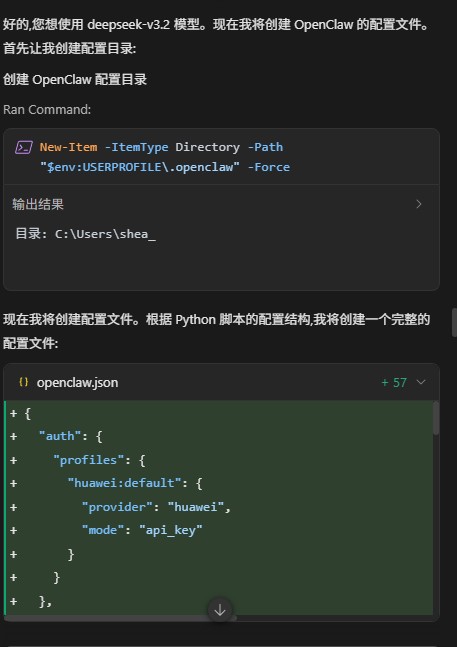
步骤 1: 打开配置文件
Windows:
# 使用记事本打开
notepad C:Users$env:USERNAME.openclawopenclaw.json
# 或使用 VS Code 打开
code C:Users$env:USERNAME.openclawopenclaw.json
macOS/Linux:
# 使用默认编辑器打开
open -e ~/.openclaw/openclaw.json  # macOS (TextEdit)
# 或使用 VS Code 打开
code ~/.openclaw/openclaw.json
步骤 2: 根据您的模型提供商修改配置
华为云 (MaaS) 配置
获取 API Key
- 访问: https://developer.huaweicloud.com/space/developerspace/tokens.html
- 登录华为云账号
- 创建或复制您的 API Key
配置文件内容
{
  "auth": {
    "profiles": {
      "huawei:default": {
        "provider": "huawei",
        "mode": "api_key"
      }
    }
  },
  "models": {
    "providers": {
      "huawei": {
        "baseUrl": "https://api.modelarts-maas.com/openai/v1",
        "apiKey": "在这里粘贴您的华为云API Key",
        "api": "openai-completions",
        "models": [
          {
            "id": "deepseek-v3.2",
            "name": "deepseek-v3.2"
          }
        ]
      }
    }
  },
  "agents": {
    "defaults": {
      "model": {
        "primary": "huawei/deepseek-v3.2"
      },
      "models": {
        "huawei/deepseek-v3.2": {}
      },
      "workspace": "~/.openclaw/workspace",
      "compaction": {
        "mode": "safeguard"
      },
      "maxConcurrent": 4,
      "subagents": {
        "maxConcurrent": 8
      }
    }
  },
  "messages": {
    "ackReactionScope": "group-mentions"
  },
  "commands": {
    "native": "auto",
    "nativeSkills": "auto",
    "restart": true,
    "ownerDisplay": "raw"
  },
  "session": {
    "dmScope": "per-channel-peer"
  },
  "channels": {},
  "gateway": {
    "mode": "local"
  },
  "plugins": {}
}
关键配置项说明
models.providers.huawei.apiKey: 您的华为云 API Keymodels.providers.huawei.models[0].id: 模型 ID (如 deepseek-v3.2, glm-5 等)agents.defaults.model.primary: 默认使用的模型,格式为huawei/<模型ID>
Doubao (火山引擎) 配置
获取 API Key 和 Endpoint ID
- 访问火山引擎控制台
- 进入"方舟大模型平台"
- 创建推理接入点,获取 Endpoint ID
- 获取 API Key
配置文件内容
{
  "auth": {
    "profiles": {
      "doubao:default": {
        "provider": "doubao",
        "mode": "api_key"
      }
    }
  },
  "models": {
    "providers": {
      "doubao": {
        "baseUrl": "https://ark.cn-beijing.volces.com/api/v3",
        "apiKey": "在这里粘贴您的Doubao API Key",
        "api": "openai-completions",
        "models": [
          {
            "id": "在这里粘贴您的Endpoint ID",
            "name": "Doubao-1.8"
          }
        ]
      }
    }
  },
  "agents": {
    "defaults": {
      "model": {
        "primary": "doubao/在这里粘贴您的Endpoint ID"
      },
      "models": {
        "doubao/在这里粘贴您的Endpoint ID": {}
      },
      "workspace": "~/.openclaw/workspace",
      "compaction": {
        "mode": "safeguard"
      },
      "maxConcurrent": 4,
      "subagents": {
        "maxConcurrent": 8
      }
    }
  },
  "messages": {
    "ackReactionScope": "group-mentions"
  },
  "commands": {
    "native": "auto",
    "nativeSkills": "auto",
    "restart": true,
    "ownerDisplay": "raw"
  },
  "session": {
    "dmScope": "per-channel-peer"
  },
  "channels": {},
  "gateway": {
    "mode": "local"
  },
  "plugins": {}
}
关键配置项说明
models.providers.doubao.apiKey: 您的 Doubao API Keymodels.providers.doubao.models[0].id: 您的 Endpoint ID (如ep-20240604052306-abcde)agents.defaults.model.primary: 格式为doubao/<Endpoint ID>
Anthropic 配置
获取 API Key
- 访问: https://console.anthropic.com/
- 登录或注册账号
- 在 API Keys 页面创建新的 API Key
配置文件内容
{
  "auth": {
    "profiles": {
      "anthropic:default": {
        "provider": "anthropic",
        "mode": "api_key"
      }
    }
  },
  "models": {
    "providers": {
      "anthropic": {
        "baseUrl": "https://api.anthropic.com",
        "apiKey": "在这里粘贴您的Anthropic API Key",
        "api": "anthropic-chat",
        "models": [
          {
            "id": "claude-3-5-sonnet-20240620",
            "name": "claude-3-5-sonnet-20240620"
          }
        ]
      }
    }
  },
  "agents": {
    "defaults": {
      "model": {
        "primary": "anthropic/claude-3-5-sonnet-20240620"
      },
      "models": {
        "anthropic/claude-3-5-sonnet-20240620": {}
      },
      "workspace": "~/.openclaw/workspace",
      "compaction": {
        "mode": "safeguard"
      },
      "maxConcurrent": 4,
      "subagents": {
        "maxConcurrent": 8
      }
    }
  },
  "messages": {
    "ackReactionScope": "group-mentions"
  },
  "commands": {
    "native": "auto",
    "nativeSkills": "auto",
    "restart": true,
    "ownerDisplay": "raw"
  },
  "session": {
    "dmScope": "per-channel-peer"
  },
  "channels": {},
  "gateway": {
    "mode": "local"
  },
  "plugins": {}
}
关键配置项说明
models.providers.anthropic.apiKey: 您的 Anthropic API Keymodels.providers.anthropic.api: 必须是anthropic-chatmodels.providers.anthropic.models[0].id: 模型名称 (如claude-3-5-sonnet-20240620)agents.defaults.model.primary: 格式为anthropic/<模型名称>
保存配置文件
编辑完成后,保存文件:
- 记事本:
Ctrl + S - VS Code:
Ctrl + S或Cmd + S(macOS)
优点: 不需要手动编辑 JSON 文件,减少格式错误。
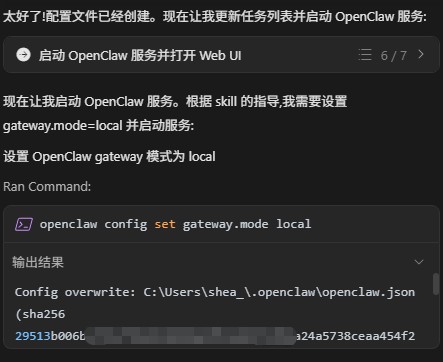
步骤 1: 设置 gateway 模式
openclaw config set gateway.mode local
步骤 2: 配置华为云 (示例)
# 设置 baseUrl
openclaw config set models.providers.huawei.baseUrl https://api.modelarts-maas.com/openai/v1
# 设置 API Key
openclaw config set models.providers.huawei.apiKey "您的API Key"
# 设置 API 类型
openclaw config set models.providers.huawei.api "openai-completions"
# 设置模型列表 (JSON 格式)
openclaw config set models.providers.huawei.models --json '[{"id":"deepseek-v3.2","name":"deepseek-v3.2"}]'
# 设置默认模型
openclaw config set agents.defaults.model.primary "huawei/deepseek-v3.2"
步骤 3: 验证配置
# 查看完整配置
openclaw config get
# 查看特定配置项
openclaw config get models.providers.huawei.apiKey
到此这篇关于OpenClaw(二):配置教程的文章就介绍到这了,更多相关OpenClaw配置教程内容请搜索风君子博客以前的文章或继续浏览下面的相关文章,希望大家以后多多支持风君子博客!