 编程部落
编程部落文章目录
- curl -o- https://raw.githubusercontent.com/nvm-sh/nvm/v0.40.4/install.sh | bash
- 命令行中可以直接使用 nvm。不配置需要进入到 ~/.nvm 目录执行 # 将下面三行放入 .zshrc 中命令行可以直接使用 nvm 命令。 export NVM_DIR=”$HOME/.nvm” [ -s “$NVM_DIR/nvm.sh” ] && . “$NVM_DIR/nvm.sh” # 这行加载 nvm [ -s “$NVM_DIR/bash_completion” ] && . “$NVM_DIR/bash_completion” # 命令补全
- # 查看远程可安装的 node 版本 nvm ls-remote # 安装指定版本 node nvm install v24.12.0 # 使用指定版本 nvm use v24.12.0 # 查看本地已安装版本 nvm ls
- npm install -g openclaw@latest
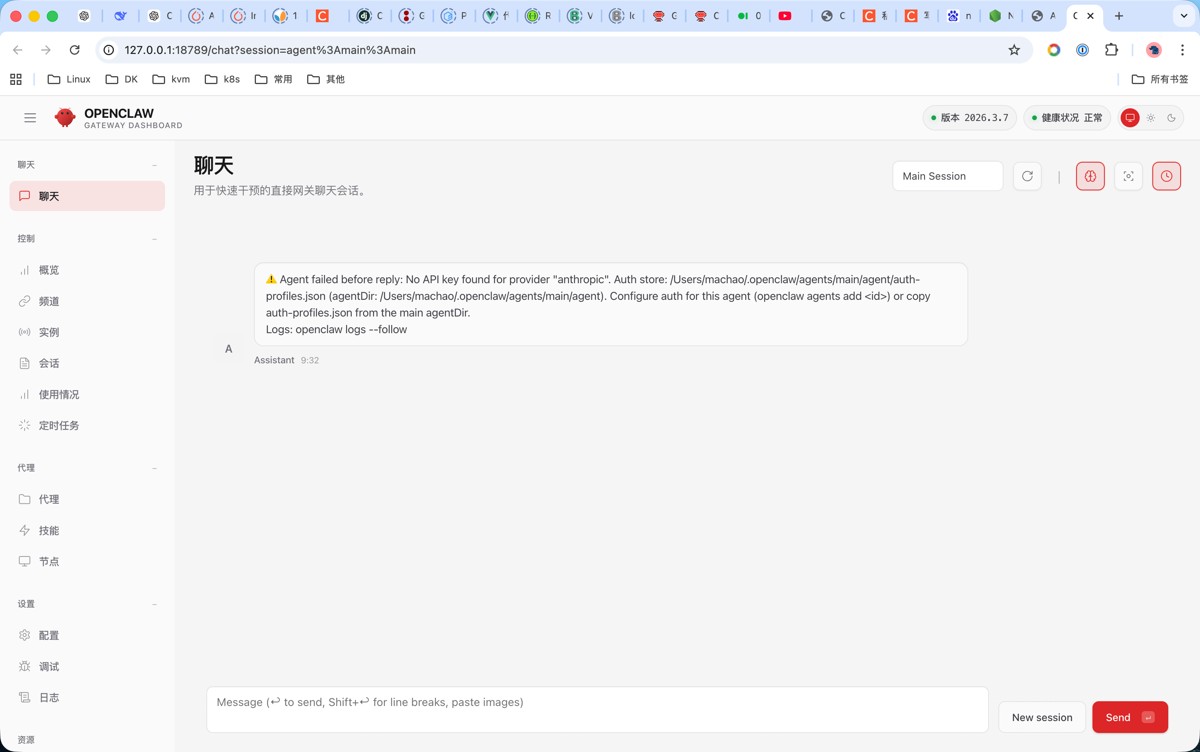
- openclaw onboard –install-daemon 这里选 yes 然后选 QuickStart 这里选择模型,我选择的 OpenAI 这里填写 key 或者使用 open Codex。我使用的是 Codex 这里会在游览器自动打开一个 openai 的登录页面,登录就行。 然后选择模型版本。这里我要用 0011.ai 代理就选默认了。代理稍后在配置中配置。 然后选择使用的聊天选件。我本地用就不选这个了。skip for now 跳过 然后安装 skills。这个可以后面在安装。 然后是安装 hooks,这里面有几个选项 选项 作用 解释 boot-md 启动时运行 BOOT.md当 Gateway 启动且内部钩子启用时,此钩子会执行工作区根目录下的 BOOT.md 文件里的指令。 适合放一些启动时需要自动执行的任务。比如,在 BOOT.md 里写上发送一条“我上线了”的消息,或者初始化某个服务的指令。 bootstrap-extra-files 注入额外的启动文件在 Agent 启动流程 (agent:bootstrap 事件) 中,这个钩子可以将你额外指定的文件注入到 Agent 的工作区上下文中。 适合让每次对话都自动加载一些特定文件。比如一些固定的参考文档、代码片段等,不用每次手动/load。 command-logger 记录所有指令日志它会监听所有的命令事件,并将记录保存到 ~/.openclaw/logs/commands.log 文件中。 相当于一个操作记录员。开启后,在 OpenClaw 里执行过的所有命令都会被记录下来,方便日后排查问题或审计。 session-memory 保存会话记忆当你执行 /new 命令开始一个新会话时,它会自动将当前会话的上下文保存到你的 Agent 工作区中。 可以让OpenClaw拥有跨会话的长期记忆。即使你开启了新对话,它也能回忆起之前聊过的重要信息,让交互更有连续性。 然后他会安装 gateway。等一会儿就行了,然后选择使用命令行对话还是 UI 对话。建议先用 UI 里面很多信息比较清楚。 完成后会自动在游览器打开 UI 页面。没打开也没事,日志里面可以看到。自己打开就行了 现在可以发送聊天尝试。我这里报错,是因为我要使用 0011.ai 代理。没有配。后面在 openclaw.json 中配置
- { “wizard”: { // 上次运行初始化向导的时间 “lastRunAt”: “2026-03-09T01:29:44.906Z”, // 上次运行向导时的 OpenClaw 版本 “lastRunVersion”: “2026.3.2”, // 最后执行的初始化命令(通常是 onboard) “lastRunCommand”: “onboard”, // 运行模式:local / cloud “lastRunMode”: “local” }, “agents”: { “defaults”: { // Agent 的工作目录 // AI 生成文件、执行任务都会在这里 “workspace”: “/Users/xxx/.openclaw/workspace”, “compaction”: { // 上下文压缩策略 // safeguard = 防止上下文爆炸 “mode”: “safeguard” }, // 同时运行的最大 agent 数 “maxConcurrent”: 4, “subagents”: { // 子 agent 最大并发数量 “maxConcurrent”: 8 } } }, “tools”: { // 工具权限配置。这里控制模型是否有权限访问本机电脑。full 为所有权限 // messaging / standard / full “profile”: “messaging” }, “messages”: { // 消息确认范围 // group-mentions = 只响应提及 “ackReactionScope”: “group-mentions” }, “commands”: { // 是否使用本地原生命令 “native”: “auto”, // 是否自动加载 native skills “nativeSkills”: “auto”, // 命令执行失败是否自动重启 “restart”: true, // 命令执行者显示方式 // raw = 显示真实用户名 “ownerDisplay”: “raw” }, “session”: { // DM 会话范围 // per-channel-peer = 每个频道独立会话 “dmScope”: “per-channel-peer” }, “hooks”: { “internal”: { // 是否启用内部 hook 系统 “enabled”: true, “entries”: { “boot-md”: { // 启动时加载 workspace 中的 BOOTSTRAP.md “enabled”: true }, “command-logger”: { // 记录命令执行日志 “enabled”: true }, “session-memory”: { // 启用会话记忆系统 “enabled”: true } } } }, “gateway”: { // OpenClaw Web Dashboard 端口 “port”: 18789, // gateway 运行模式 // local = 仅本地访问 “mode”: “local”, // 监听地址 // loopback = 127.0.0.1 “bind”: “loopback”, “auth”: { // 认证方式 // token / none “mode”: “token”, // Dashboard 登录 token “token”: “372ec8cbcfe557ee947ec76bccd63f33022bb673c282de48” }, “tailscale”: { // 是否启用 Tailscale 远程访问 “mode”: “off”, // 程序退出时是否重置网络 “resetOnExit”: false }, “nodes”: { // 禁止 AI 执行的系统命令 “denyCommands”: [ “camera.snap”, “camera.clip”, “screen.record”, “contacts.add”, “calendar.add”, “reminders.add”, “sms.send” ] } }, “models”: { // provider 合并模式 // merge = 合并多个 provider “mode”: “merge”, “providers”: { “anthropic”: { // API 代理地址 “baseUrl”: “https://aicoding.2233.ai”, // API Key “apiKey”: “sk-c4pBAcG”, // API 类型 // anthropic-messages = Claude Messages API “api”: “anthropic-messages”, “models”: [ { // 模型 ID “id”: “claude-opus-4”, // 模型显示名称 “name”: “claude-opus-4” } ] } } }, “auth”: { “profiles”: { “anthropic:default”: { // 使用哪个 provider “provider”: “anthropic”, // 认证模式 // api_key / oauth “mode”: “api_key” } } }, channels: { // 根据聊天平台 + 频道 ID 自动选择模型 modelByChannel: { discord: { // Discord 频道 ID // 如果用户在这个频道聊天 // OpenClaw 会使用 Claude Opus “123456789012345678”: “anthropic/claude-opus-4-6”, }, slack: { // Slack channel ID // 在这个频道里聊天会使用 GPT-4.1 C1234567890: “openai/gpt-4.1”, }, telegram: { // Telegram 群 ID // 所有消息默认使用 GPT-4.1 mini “-1001234567890”: “openai/gpt-4.1-mini”, // Telegram topic (论坛模式) // 格式: // group_id:topic:topic_id // // 在 topic 99 里使用 Claude Sonnet “-1001234567890:topic:99”: “anthropic/claude-sonnet-4-6”, }, }, }, “meta”: { // 最后修改配置的 OpenClaw 版本 “lastTouchedVersion”: “2026.3.2”, // 最后修改时间 “lastTouchedAt”: “2026-03-09T01:29:44.914Z” } }
- 配置 作用 gateway.port Dashboard 端口 gateway.auth.token 登录 token models.providers AI 模型提供商 agents.defaults.workspace Agent 工作目录 tools.profile 模型权限,full 系统所有权限
- npm install -g clawhub
- 命令 作用 示例 clawhub search 搜索模块 clawhub search discord clawhub install 安装模块 clawhub install discord clawhub remove 删除模块 clawhub remove discord clawhub list 查看已安装模块 clawhub list clawhub info 查看模块信息 clawhub info discord clawhub update 更新模块 clawhub update discord clawhub upgrade 更新所有模块 clawhub upgrade clawhub enable 启用模块 clawhub enable discord clawhub disable 禁用模块 clawhub disable discord clawhub doctor 检查模块问题 clawhub doctor clawhub repo add 添加仓库 clawhub repo add <url> clawhub repo list 查看仓库 clawhub repo list clawhub repo remove 删除仓库 clawhub repo remove <url>
- 命令 作用 示例 openclaw 显示帮助 openclaw openclaw version 查看版本 openclaw version openclaw help 查看帮助 openclaw help openclaw status 查看运行状态 openclaw status
- 命令 作用 示例 openclaw onboard –install-daemon 完整安装向导和安装系统服务 openclaw onboard –install-daemon openclaw onboard 安装向导 openclaw onboard openclaw start 启动 gateway + agent openclaw start openclaw stop 停止 OpenClaw openclaw stop openclaw restart 重启服务 openclaw restart
- 命令 作用 示例 openclaw logs 查看日志 openclaw logs openclaw logs –follow 实时日志 openclaw logs –follow openclaw logs –errors 只看错误日志 openclaw logs –errors
- 命令 作用 示例 openclaw models list 查看可用模型 openclaw models list openclaw models auth login 登录模型 provider openclaw models auth login openclaw models auth logout 退出登录 openclaw models auth logout openclaw models test 测试模型连接 openclaw models test
- 命令 作用 示例 openclaw plugins list 查看插件 openclaw plugins list openclaw plugins install 安装插件 openclaw plugins install discord openclaw plugins remove 删除插件 openclaw plugins remove discord openclaw plugins update 更新插件 openclaw plugins update
- 命令 作用 示例 openclaw agents list 查看 agent openclaw agents list openclaw agents add 添加 agent openclaw agents add coder openclaw agents remove 删除 agent openclaw agents remove coder openclaw agents restart 重启 agent openclaw agents restart
- 命令 作用 示例 openclaw devices list 查看已配对设备 openclaw devices list openclaw devices approve 批准设备 openclaw devices approve openclaw devices remove 移除设备 openclaw devices remove
- 命令 作用 示例 openclaw config show 查看配置 openclaw config show openclaw config edit 编辑配置 openclaw config edit openclaw config reset 重置配置 openclaw config reset
- 命令 作用 示例 openclaw doctor 检查系统问题 openclaw doctor openclaw debug 调试模式 openclaw debug openclaw env 查看环境信息 openclaw env
- 命令 作用 示例 openclaw run 运行 agent 任务 openclaw run openclaw exec 执行命令 openclaw exec openclaw shell 打开 agent shell openclaw shell
- 命令 作用 示例 openclaw update 更新 OpenClaw openclaw update openclaw upgrade 升级组件 openclaw upgrade 到此这篇关于macos部署openclaw的图文步骤的文章就介绍到这了,更多相关macos部署openclaw内容请搜索风君子博客以前的文章或继续浏览下面的相关文章,希望大家以后多多支持风君子博客!
目录
- 一、安装 node
- 1. 安装 node 虚拟环境
- 2. 配置 nvm
- 3. nvm 相关操作
- 二、安装 openclaw
- 1. 使用npm安装 openclaw
- 2. 初始化 openclaw
- 三、openclaw 目录结构
- 四、配置 openclaw。
- 1.openclaw.json配置文件
- 2. 常用配置
- 五、安装 skill
- 1. 安装clawhub
- 2. 常用参数和用法
- 六、openclaw常用命令
- 1. 基础命令
- 2. 初始化
- 3. 日志
- 4. 模型管理
- 5. 系统插件
- 6. Agent 管理
- 7. 设备管理
- 8. 配置管理
- 9. 调试 / 诊断
- 10. 开发工具
- 11. 更新
node官方
node官方
curl -o- https://raw.githubusercontent.com/nvm-sh/nvm/v0.40.4/install.sh | bash
命令行中可以直接使用 nvm。不配置需要进入到 ~/.nvm 目录执行
# 将下面三行放入 .zshrc 中命令行可以直接使用 nvm 命令。
export NVM_DIR="$HOME/.nvm"
[ -s "$NVM_DIR/nvm.sh" ] && . "$NVM_DIR/nvm.sh" # 这行加载 nvm
[ -s "$NVM_DIR/bash_completion" ] && . "$NVM_DIR/bash_completion" # 命令补全
# 查看远程可安装的 node 版本
nvm ls-remote
# 安装指定版本 node
nvm install v24.12.0
# 使用指定版本
nvm use v24.12.0
# 查看本地已安装版本
nvm ls
openclaw 官方
openclaw 官方
npm install -g openclaw@latest
openclaw onboard --install-daemon
这里选 yes

然后选 QuickStart

这里选择模型,我选择的 OpenAI
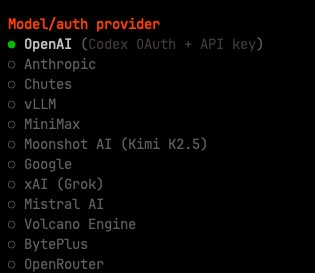
这里填写 key 或者使用 open Codex。
我使用的是 Codex
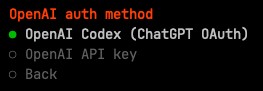
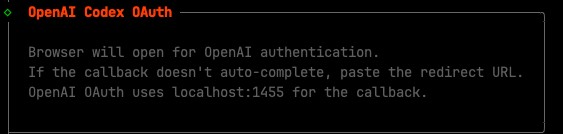
这里会在游览器自动打开一个 openai 的登录页面,登录就行。
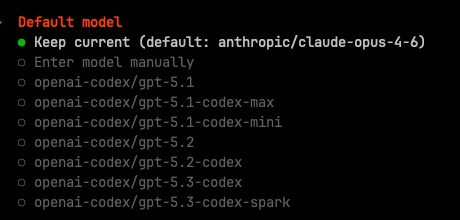
然后选择模型版本。这里我要用 0011.ai 代理就选默认了。代理稍后在配置中配置。
然后选择使用的聊天选件。我本地用就不选这个了。skip for now 跳过
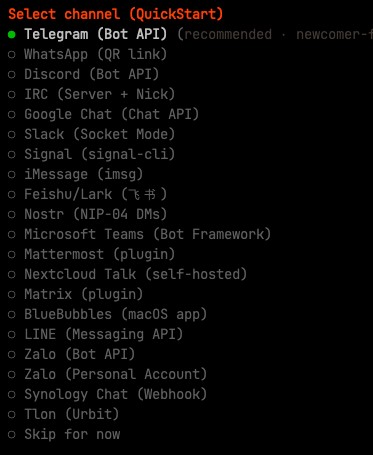
然后安装 skills。这个可以后面在安装。

然后是安装 hooks,这里面有几个选项
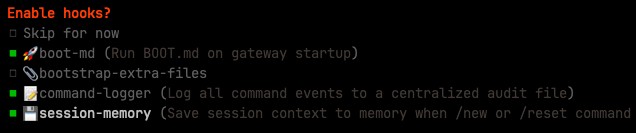
| 选项 | 作用 | 解释 |
|---|---|---|
| boot-md | 启动时运行 BOOT.md 当 Gateway 启动且内部钩子启用时,此钩子会执行工作区根目录下的 BOOT.md 文件里的指令。 |
适合放一些启动时需要自动执行的任务。比如,在 BOOT.md 里写上发送一条“我上线了”的消息,或者初始化某个服务的指令。 |
| bootstrap-extra-files | 注入额外的启动文件 在 Agent 启动流程 (agent:bootstrap 事件) 中,这个钩子可以将你额外指定的文件注入到 Agent 的工作区上下文中。 |
适合让每次对话都自动加载一些特定文件。比如一些固定的参考文档、代码片段等,不用每次手动/load。 |
| command-logger | 记录所有指令日志 它会监听所有的命令事件,并将记录保存到 ~/.openclaw/logs/commands.log 文件中。 |
相当于一个操作记录员。开启后,在 OpenClaw 里执行过的所有命令都会被记录下来,方便日后排查问题或审计。 |
| session-memory | 保存会话记忆 当你执行 /new 命令开始一个新会话时,它会自动将当前会话的上下文保存到你的 Agent 工作区中。 |
可以让OpenClaw拥有跨会话的长期记忆。即使你开启了新对话,它也能回忆起之前聊过的重要信息,让交互更有连续性。 |
然后他会安装 gateway。等一会儿就行了,然后选择使用命令行对话还是 UI 对话。建议先用 UI 里面很多信息比较清楚。
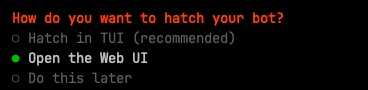
完成后会自动在游览器打开 UI 页面。没打开也没事,日志里面可以看到。自己打开就行了
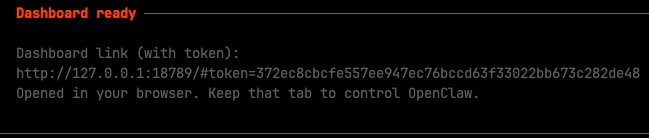
现在可以发送聊天尝试。我这里报错,是因为我要使用 0011.ai 代理。没有配。后面在 openclaw.json 中配置
目录在 ~/.openclaw
.
├── agents
│   └── main
│       ├── agent
│       │   └── models.json
│       └── sessions
│           ├── faf8ec2c-238b-4aa8-88ef-7233dcbcd4e0.jsonl
│           └── sessions.json
├── canvas
│   └── index.html
├── cron
│   └── jobs.json
├── devices
│   ├── paired.json
│   └── pending.json
├── identity
│   ├── device-auth.json
│   └── device.json
├── logs
│   ├── config-audit.jsonl
│   ├── gateway.err.log
│   └── gateway.log
├── memory
│   └── main.sqlite
├── openclaw.json
├── update-check.json
└── workspace
    ├── AGENTS.md
    ├── BOOTSTRAP.md
    ├── HEARTBEAT.md
    ├── IDENTITY.md
    ├── SOUL.md
    ├── TOOLS.md
    └── USER.md
| 路径 | 类型 | 作用 |
|---|---|---|
| openclaw.json | 主配置 | OpenClaw 主配置文件,包含 gateway 端口、token、provider API、models、agents 配置 |
| update-check.json | 更新记录 | 记录 OpenClaw 是否检查过新版本 |
| memory/main.sqlite | 数据库 | Agent 长期记忆数据库(对话、上下文、状态) |
| logs/gateway.log | 日志 | Gateway 正常运行日志 |
| logs/gateway.err.log | 日志 | Gateway 错误日志 |
| logs/config-audit.jsonl | 日志 | 记录配置文件修改历史 |
| workspace/ | 工作区 | Agent 执行任务、生成代码、存放文件的目录 |
| workspace/AGENTS.md | Prompt | 定义 Agent 类型和行为 |
| workspace/BOOTSTRAP.md | Prompt | Agent 启动时的 system prompt |
| workspace/HEARTBEAT.md | Prompt | Agent 心跳 / 状态更新规则 |
| workspace/IDENTITY.md | Prompt | Agent 身份定义 |
| workspace/SOUL.md | Prompt | Agent 行为哲学 / 规则 |
| workspace/TOOLS.md | Prompt | Agent 可用工具说明 |
| workspace/USER.md | Prompt | 用户信息与偏好 |
| identity/ | 认证 | 身份认证 |
| identity/device-auth.json | 认证 | 设备 / 客户端认证信息 |
| identity/device.json | 设备信息 | 记录当前设备标识 |
| cron/ | 调度系统 | OpenClaw 内置 cron scheduler 的配置目录 |
| cron/jobs.json | 定时任务配置 | 存储 OpenClaw 的 定时任务(cron jobs) |
| devices/ | 设备管理 | OpenClaw 的 设备配对系统 |
| devices/paired.json | 设备列表 | 已经授权的设备(Dashboard / CLI / Remote) |
| devices/pending.json | 配对队列 | 等待授权的设备 |
{
  "wizard": {
    // 上次运行初始化向导的时间
    "lastRunAt": "2026-03-09T01:29:44.906Z",
    // 上次运行向导时的 OpenClaw 版本
    "lastRunVersion": "2026.3.2",
    // 最后执行的初始化命令(通常是 onboard)
    "lastRunCommand": "onboard",
    // 运行模式:local / cloud
    "lastRunMode": "local"
  },
  "agents": {
    "defaults": {
      // Agent 的工作目录
      // AI 生成文件、执行任务都会在这里
      "workspace": "/Users/xxx/.openclaw/workspace",
      "compaction": {
        // 上下文压缩策略
        // safeguard = 防止上下文爆炸
        "mode": "safeguard"
      },
      // 同时运行的最大 agent 数
      "maxConcurrent": 4,
      "subagents": {
        // 子 agent 最大并发数量
        "maxConcurrent": 8
      }
    }
  },
  "tools": {
    // 工具权限配置。这里控制模型是否有权限访问本机电脑。full 为所有权限
    // messaging / standard / full
    "profile": "messaging"
  },
  "messages": {
    // 消息确认范围
    // group-mentions = 只响应提及
    "ackReactionScope": "group-mentions"
  },
  "commands": {
    // 是否使用本地原生命令
    "native": "auto",
    // 是否自动加载 native skills
    "nativeSkills": "auto",
    // 命令执行失败是否自动重启
    "restart": true,
    // 命令执行者显示方式
    // raw = 显示真实用户名
    "ownerDisplay": "raw"
  },
  "session": {
    // DM 会话范围
    // per-channel-peer = 每个频道独立会话
    "dmScope": "per-channel-peer"
  },
  "hooks": {
    "internal": {
      // 是否启用内部 hook 系统
      "enabled": true,
      "entries": {
        "boot-md": {
          // 启动时加载 workspace 中的 BOOTSTRAP.md
          "enabled": true
        },
        "command-logger": {
          // 记录命令执行日志
          "enabled": true
        },
        "session-memory": {
          // 启用会话记忆系统
          "enabled": true
        }
      }
    }
  },
  "gateway": {
    // OpenClaw Web Dashboard 端口
    "port": 18789,
    // gateway 运行模式
    // local = 仅本地访问
    "mode": "local",
    // 监听地址
    // loopback = 127.0.0.1
    "bind": "loopback",
    "auth": {
      // 认证方式
      // token / none
      "mode": "token",
      // Dashboard 登录 token
      "token": "372ec8cbcfe557ee947ec76bccd63f33022bb673c282de48"
    },
    "tailscale": {
      // 是否启用 Tailscale 远程访问
      "mode": "off",
      // 程序退出时是否重置网络
      "resetOnExit": false
    },
    "nodes": {
      // 禁止 AI 执行的系统命令
      "denyCommands": [
        "camera.snap",
        "camera.clip",
        "screen.record",
        "contacts.add",
        "calendar.add",
        "reminders.add",
        "sms.send"
      ]
    }
  },
  "models": {
    // provider 合并模式
    // merge = 合并多个 provider
    "mode": "merge",
    "providers": {
      "anthropic": {
        // API 代理地址
        "baseUrl": "https://aicoding.2233.ai",
        // API Key
        "apiKey": "sk-c4pBAcG",
        // API 类型
        // anthropic-messages = Claude Messages API
        "api": "anthropic-messages",
        "models": [
          {
            // 模型 ID
            "id": "claude-opus-4",
            // 模型显示名称
            "name": "claude-opus-4"
          }
        ]
      }
    }
  },
  "auth": {
    "profiles": {
      "anthropic:default": {
        // 使用哪个 provider
        "provider": "anthropic",
        // 认证模式
        // api_key / oauth
        "mode": "api_key"
      }
    }
  },
  channels: {
    // 根据聊天平台 + 频道 ID 自动选择模型
    modelByChannel: {
      discord: {
        // Discord 频道 ID
        // 如果用户在这个频道聊天
        // OpenClaw 会使用 Claude Opus
        "123456789012345678": "anthropic/claude-opus-4-6",
      },
      slack: {
        // Slack channel ID
        // 在这个频道里聊天会使用 GPT-4.1
        C1234567890: "openai/gpt-4.1",
      },
      telegram: {
        // Telegram 群 ID
        // 所有消息默认使用 GPT-4.1 mini
        "-1001234567890": "openai/gpt-4.1-mini",
        // Telegram topic (论坛模式)
        // 格式:
        // group_id:topic:topic_id
        //
        // 在 topic 99 里使用 Claude Sonnet
        "-1001234567890:topic:99": "anthropic/claude-sonnet-4-6",
      },
    },
  },
  "meta": {
    // 最后修改配置的 OpenClaw 版本
    "lastTouchedVersion": "2026.3.2",
    // 最后修改时间
    "lastTouchedAt": "2026-03-09T01:29:44.914Z"
  }
}
| 配置 | 作用 |
|---|---|
| gateway.port | Dashboard 端口 |
| gateway.auth.token | 登录 token |
| models.providers | AI 模型提供商 |
| agents.defaults.workspace | Agent 工作目录 |
| tools.profile | 模型权限,full 系统所有权限 |
ClawHub 是 OpenClaw 生态里的 插件 / 模块仓库管理工具。
ClawHub 是 OpenClaw 生态里的 插件 / 模块仓库管理工具。
npm install -g clawhub
| 命令 | 作用 | 示例 |
|---|---|---|
| clawhub search | 搜索模块 | clawhub search discord |
| clawhub install | 安装模块 | clawhub install discord |
| clawhub remove | 删除模块 | clawhub remove discord |
| clawhub list | 查看已安装模块 | clawhub list |
| clawhub info | 查看模块信息 | clawhub info discord |
| clawhub update | 更新模块 | clawhub update discord |
| clawhub upgrade | 更新所有模块 | clawhub upgrade |
| clawhub enable | 启用模块 | clawhub enable discord |
| clawhub disable | 禁用模块 | clawhub disable discord |
| clawhub doctor | 检查模块问题 | clawhub doctor |
| clawhub repo add | 添加仓库 | clawhub repo add <url> |
| clawhub repo list | 查看仓库 | clawhub repo list |
| clawhub repo remove | 删除仓库 | clawhub repo remove <url> |
| 命令 | 作用 | 示例 |
|---|---|---|
| openclaw | 显示帮助 | openclaw |
| openclaw version | 查看版本 | openclaw version |
| openclaw help | 查看帮助 | openclaw help |
| openclaw status | 查看运行状态 | openclaw status |
| 命令 | 作用 | 示例 |
|---|---|---|
| openclaw onboard –install-daemon | 完整安装向导和安装系统服务 | openclaw onboard –install-daemon |
| openclaw onboard | 安装向导 | openclaw onboard |
| openclaw start | 启动 gateway + agent | openclaw start |
| openclaw stop | 停止 OpenClaw | openclaw stop |
| openclaw restart | 重启服务 | openclaw restart |
| 命令 | 作用 | 示例 |
|---|---|---|
| openclaw logs | 查看日志 | openclaw logs |
| openclaw logs –follow | 实时日志 | openclaw logs –follow |
| openclaw logs –errors | 只看错误日志 | openclaw logs –errors |
| 命令 | 作用 | 示例 |
|---|---|---|
| openclaw models list | 查看可用模型 | openclaw models list |
| openclaw models auth login | 登录模型 provider | openclaw models auth login |
| openclaw models auth logout | 退出登录 | openclaw models auth logout |
| openclaw models test | 测试模型连接 | openclaw models test |
| 命令 | 作用 | 示例 |
|---|---|---|
| openclaw plugins list | 查看插件 | openclaw plugins list |
| openclaw plugins install | 安装插件 | openclaw plugins install discord |
| openclaw plugins remove | 删除插件 | openclaw plugins remove discord |
| openclaw plugins update | 更新插件 | openclaw plugins update |
| 命令 | 作用 | 示例 |
|---|---|---|
| openclaw agents list | 查看 agent | openclaw agents list |
| openclaw agents add | 添加 agent | openclaw agents add coder |
| openclaw agents remove | 删除 agent | openclaw agents remove coder |
| openclaw agents restart | 重启 agent | openclaw agents restart |
| 命令 | 作用 | 示例 |
|---|---|---|
| openclaw devices list | 查看已配对设备 | openclaw devices list |
| openclaw devices approve | 批准设备 | openclaw devices approve |
| openclaw devices remove | 移除设备 | openclaw devices remove |
| 命令 | 作用 | 示例 |
|---|---|---|
| openclaw config show | 查看配置 | openclaw config show |
| openclaw config edit | 编辑配置 | openclaw config edit |
| openclaw config reset | 重置配置 | openclaw config reset |
| 命令 | 作用 | 示例 |
|---|---|---|
| openclaw doctor | 检查系统问题 | openclaw doctor |
| openclaw debug | 调试模式 | openclaw debug |
| openclaw env | 查看环境信息 | openclaw env |
| 命令 | 作用 | 示例 |
|---|---|---|
| openclaw run | 运行 agent 任务 | openclaw run |
| openclaw exec | 执行命令 | openclaw exec |
| openclaw shell | 打开 agent shell | openclaw shell |
| 命令 | 作用 | 示例 |
|---|---|---|
| openclaw update | 更新 OpenClaw | openclaw update |
| openclaw upgrade | 升级组件 | openclaw upgrade |
到此这篇关于macos部署openclaw的图文步骤的文章就介绍到这了,更多相关macos部署openclaw内容请搜索风君子博客以前的文章或继续浏览下面的相关文章,希望大家以后多多支持风君子博客!