文章目录
- # 查看完整配置 openclaw config get # 查看特定配置项 openclaw config get models.default openclaw config get providers.mistral.apiKey # 查看特定部分配置 openclaw config get –section models openclaw config get –section providers 示例输出: { “models”: { “default”: “mistral:mixtral-8x7b” }, “providers”: { “mistral”: { “apiKey”: “***REDACTED***” } } }
- # 设置默认模型 openclaw config set models.default mistral:mixtral-8x7b # 设置快速模型 openclaw config set models.fast mistral:mistral-7b # 配置 Mistral API Key openclaw config set providers.mistral.apiKey YOUR_API_KEY_HERE # 启用缓存 openclaw config set cache.enabled true openclaw config set cache.maxSize 5000
- # 删除特定配置项 openclaw config unset models.fast # 重置某个节点 openclaw config unset models
- # 打开完整配置向导 openclaw configure # 打开特定部分配置向导 openclaw configure –section models openclaw configure –section providers openclaw configure –section channels
- # 启动 Gateway(默认端口 18789) openclaw gateway start # 自定义端口启动 openclaw gateway start –port 19000 # 强制启动(杀死占用进程) openclaw gateway start –force # 停止 Gateway openclaw gateway stop # 重启 Gateway openclaw gateway restart # 查看运行状态 openclaw gateway status
- # 前台运行 Gateway(调试用) openclaw gateway # 开发模式运行(隔离状态) openclaw –dev gateway # 查看健康状态 openclaw health
- # 查看实时日志 openclaw logs # 查看最近 50 行日志 openclaw logs –lines 50 # 查看错误日志 openclaw logs –filter error # 持续监控日志 openclaw logs –follow
- # 使用 systemd 管理(推荐生产环境) sudo systemctl start openclaw-gateway sudo systemctl stop openclaw-gateway sudo systemctl restart openclaw-gateway sudo systemctl status openclaw-gateway # 开机自启动 sudo systemctl enable openclaw-gateway
- # 发送消息到当前会话 openclaw message send –message “Hello” # 发送到特定目标(Telegram) openclaw message send –channel telegram –target @mychat –message “Hello from OpenClaw” # 发送到特定目标(WhatsApp) openclaw message send –channel whatsapp –target +8613800138000 –message “您好” # 发送到 Slack 频道 openclaw message send –channel slack –target C1234567890 –message “@channel 重要通知”
- # 发送图片 openclaw message send –channel telegram –target @mychat –media /tmp/photo.jpg –caption “这是一张图片” # 发送音频 openclaw message send –channel whatsapp –target +8613800138000 –media /tmp/voice.mp3 # 发送文档 openclaw message send –channel telegram –target @mychat –media /tmp/report.pdf
- # 发送 JSON 格式(脚本自动化) openclaw message send –target @mychat –message “Hello” –json # 回复消息 openclaw message send –target @mychat –message “收到” –replyTo 12345 # 指定频道 openclaw message send –channel discord –target channel:1234567890 –message “Hello”
- # 创建投票(Telegram) openclaw message send –channel telegram –target @mychat –pollQuestion “OpenClaw 好用吗?” –pollOption 非常好用 –pollOption 一般 –pollOption 还需要改进 –pollDurationHours 24 # 发送反应(Discord) openclaw message send –channel discord –messageId 1234567890 –emoji 👍 –action react
- # 查看所有已安装技能 openclaw skills list # 搜索技能 openclaw skills search weather # 查看技能详情 openclaw skills show weather
- # 安装技能 openclaw skills install weather # 从指定来源安装 openclaw skills install weather –source github # 指定版本安装 openclaw skills install weather@1.2.0 # 卸载技能 openclaw skills uninstall weather
- # 更新所有技能 openclaw skills update # 更新特定技能 openclaw skills update weather # 同步技能 openclaw skills sync
- # 创建新技能 openclaw skills create my-skill # 验证技能 openclaw skills validate my-skill # 打包技能 openclaw skills pack my-skill
- # 查看所有配置的模型 openclaw models list # 查看默认模型 openclaw models default # 查看模型详情 openclaw models show mistral:mixtral-8x7b
- # 设置默认模型 openclaw models set-default mistral:mixtral-8x7b # 添加新模型 openclaw models add –name my-model –provider mistral –id mistral-medium –maxTokens 8192 # 测试模型 openclaw models test –model mistral:mixtral-8x7b –prompt “Hello, OpenClaw!”
- # 临时指定模型 openclaw agent –model mistral:mistral-7b –message “快速响应” # 使用内置模型别名 openclaw agent –model fast –message “这个用fast模型” openclaw agent –model premium –message “这个用premium模型”
- # 查看所有配置的频道 openclaw channels list # 查看频道状态 openclaw channels status # 查看特定频道详情 openclaw channels show telegram
- # Telegram 登录 openclaw channels login –channel telegram # WhatsApp 登录(会显示 QR 码) openclaw channels login –channel whatsapp –verbose # Slack 登录 openclaw channels login –channel slack # Discord 登录 openclaw channels login –channel discord
- # 测试频道连接 openclaw channels test –channel telegram # 发送测试消息 openclaw channels test –channel telegram –target @mychat –message “测试消息”
- # 配置频道 openclaw channels configure –channel telegram # 更新频道 Token openclaw channels update –channel telegram –token NEW_TOKEN # 启用/禁用频道 openclaw channels enable telegram openclaw channels disable telegram
- # 列出所有会话 openclaw sessions # 列出活跃会话 openclaw sessions –active # 列出特定频道的会话 openclaw sessions –channel telegram # 显示最近 10 个会话 openclaw sessions –limit 10
- # 查看特定会话的历史 openclaw sessions history <session-key> # 查看最近的消息 openclaw sessions history <session-key> –limit 20 # 导出会话历史 openclaw sessions history <session-key> –export > history.json
- # 发送消息到会话 openclaw sessions send –session <session-key> –message “你好” # 重置会话 openclaw sessions reset <session-key> # 删除会话 openclaw sessions delete <session-key>
- # 查看所有配对的节点 openclaw nodes list # 查看节点状态 openclaw nodes status # 描述节点详情 openclaw nodes describe <node-id>
- # 发送通知到节点 openclaw nodes notify –node my-phone –title “提醒” –body “该吃饭了” # 设置推送优先级 openclaw nodes notify –node my-phone –priority timeSensitive –title “紧急通知” –body “快递到了” # 查看相册(手机) openclaw nodes camera-list –node my-phone # 拍照 openclaw nodes camera-snap –node my-phone –facing back –output /tmp/photo.jpg
- # 启动配对 openclaw node pairing start # 查看待配对节点 openclaw nodes pending # 批准配对 openclaw nodes approve –node <node-id> # 拒绝配对 openclaw nodes reject –node <node-id>
- # 搜索记忆 openclaw memory search “OpenClaw 配置” # 搜索并显示多行上下文 openclaw memory search “配置” –lines 5 # 搜索特定路径的记忆 openclaw memory search “配置” –path MEMORY.md # 限制结果数量 openclaw memory search “配置” –maxResults 10
- # 查看记忆统计 openclaw memory stats # 清理过期记忆 openclaw memory clean # 备份记忆 openclaw memory backup –output /tmp/memory-backup.json
- # 列出所有任务 openclaw cron list # 查看任务运行历史 openclaw cron runs <job-id> # 查看调度器状态 openclaw cron status
- # 创建定时任务(每天凌晨触发) openclaw cron add –name “daily-report” –schedule “0 0 * * *” –text “生成每日报告” # 创建重复任务(每 30 分钟) openclaw cron add –name “check-notifications” –schedule “*/30 * * * *” –text “检查通知” # 创建单次任务(特定时间) openclaw cron add –name “special-task” –schedule “at” –at “2026-03-01T10:00:00” –text “执行特殊任务”
- # 立即运行任务 openclaw cron run <job-id> # 更新任务 openclaw cron update <job-id> –schedule “0 6 * * *” # 删除任务 openclaw cron remove <job-id> # 发送唤醒事件 openclaw cron wake –text “检查新消息”
- # 运行健康检查 openclaw doctor # 快速修复常见问题 openclaw doctor –fix # 检查特定组件 openclaw doctor –check gateway openclaw doctor –check channels
- # 查看频道健康状态 openclaw status # 查看系统事件 openclaw system events # 查看心跳状态 openclaw system heartbeat
- # 运行安全检查 openclaw security audit # 检查权限配置 openclaw security check-permissions # 检查 API Key 有效性 openclaw security verify-keys
- # 启动浏览器 openclaw browser start # 停止浏览器 openclaw browser stop # 切换配置 openclaw browser start –profile chrome openclaw browser start –profile openclaw
- # 打开网页 openclaw browser open https://example.com # 截图 openclaw browser screenshot –output /tmp/screenshot.png # 获取快照 openclaw browser snapshot –target main # 查看标签页 openclaw browser tabs
- # 查看更新 openclaw update –dry-run # 执行更新 openclaw update # 更新到特定版本 openclaw update –tag 2026.2.22 # 更新到 Beta 版 openclaw update –channel beta
- # 备份配置 cp ~/.openclaw/config.json ~/.openclaw/config.json.backup # 重置配置(保留 CLI) openclaw reset # 完全卸载(包括数据) openclaw uninstall
- # 生成 Bash 补全脚本 openclaw completion bash > ~/.openclaw-completion # 生成 Zsh 补全脚本 openclaw completion zsh > ~/.zsh-completion # 应用补全(Bash) echo “source ~/.openclaw-completion” >> ~/.bashrc source ~/.bashrc
- # 一键创建、开发、测试技能 openclaw skills create my-new-skill && cd ~/.openclaw/workspace/skills/my-new-skill && vim SKILL.md
- # 发送到多个目标 openclaw message send –target @user1 –message “通知内容” openclaw message send –target @user2 –message “通知内容” openclaw message send –target @user3 –message “通知内容” # 使用循环批量发送(需要脚本配合) for target in user1 user2 user3; do openclaw message send –target @$target –message “通知内容” done
- # 重启并验证 openclaw gateway restart && sleep 5 && openclaw gateway status && openclaw health
- # 安全更新流程 cp ~/.openclaw/config.json ~/.openclaw/config.json.backup && openclaw update –dry-run && openclaw update && openclaw gateway restart
- # 生成每日报告(Cron 脚本) 0 9 * * * openclaw cron add –name daily-report –schedule “0 9 * * *” –text “生成昨日数据分析报告”
- # 检查端口占用 sudo lsof -i :18789 # 强制重启 openclaw gateway start –force # 查看错误日志 openclaw logs –filter error # 运行健康检查 openclaw doctor
- # 检查频道状态 openclaw channels status # 测试频道 openclaw channels test –channel telegram # 重新登录频道 openclaw channels login –channel telegram # 查看详细日志 openclaw message send –target @mychat –message “Test” –verbose
- # 检查 API Key openclaw config get providers.openai.apiKey # 测试模型 openclaw models test –model mistral:mixtral-8x7b –prompt “test” # 检查网络连接 ping api.openai.com # 运行诊断 openclaw doctor –check models
- # 检查技能列表 openclaw skills list # 验证技能 openclaw skills validate my-skill # 重新安装技能 openclaw skills uninstall my-skill openclaw skills install my-skill # 查看错误日志 openclaw logs –filter skill
- # 推荐方式:使用环境变量存储敏感信息 export OPENAI_API_KEY=”sk-xxx” export MISTRAL_API_KEY=”xxx” export TELEGRAM_BOT_TOKEN=”xxx” # 然后启动 Gateway openclaw gateway start
- # 限制配置文件权限 chmod 600 ~/.openclaw/config.json # 检查权限 ls -la ~/.openclaw/config.json
- # 配置日志轮转 sudo tee /etc/logrotate.d/openclaw <<EOF ~/.openclaw/logs/*.log { daily rotate 7 compress missingok notifempty } EOF
- # 检查 Gateway 状态(Cron 脚本) */5 * * * * openclaw health || openclaw message send –target @admin –message “Gateway 宕机!”
- # 添加到 ~/.bashrc 或 ~/.zshrc alias oc=’openclaw’ alias ocg=’openclaw gateway’ alias ocgl=’openclaw logs –follow’ alias ocs=’openclaw sessions’ alias ocm=’openclaw message send’ alias occ=’openclaw channels’ # 应用别名 source ~/.bashrc # Bash source ~/.zshrc # Zsh
- # 启动 Gateway ocg start # 查看实时日志 ocgl # 发送消息 ocm –target @mychat –message “Hello” # 查看会话 ocs
目录
- 一、快速入门
- 1.1 查看帮助信息
- 1.2 初始化配置
- 二、配置管理命令
- 2.1 查看配置
- 2.2 设置配置
- 2.3 删除配置
- 2.4 配置向导
- 三、Gateway 控制命令
- 3.1 启动/停止 Gateway
- 3.2 运行时 Gateway
- 3.3 查看日志
- 3.4 系统服务管理
- 四、消息发送命令
- 4.1 发送消息
- 4.2 发送媒体文件
- 4.3 高级消息功能
- 4.4 频道动作(投票、反应等)
- 五、技能管理命令
- 5.1 查看技能列表
- 5.2 安装/卸载技能
- 5.3 更新技能
- 5.4 技能开发
- 六、模型配置命令
- 6.1 查看模型
- 6.2 配置模型
- 6.3 模型切换
- 七、频道管理命令
- 7.1 查看频道
- 7.2 登录频道
- 7.3 频道测试
- 7.4 频道配置
- 八、会话管理命令
- 8.1 查看会话
- 8.2 查看会话历史
- 8.3 会话操作
- 九、节点管理命令(智能家居控制)
- 9.1 查看节点
- 9.2 节点操作
- 9.3 节点配对
- 十、记忆管理命令
- 10.1 搜索记忆
- 10.2 记忆操作
- 十一、Cron 定时任务命令
- 11.1 查看 Cron 任务
- 11.2 创建 Cron 任务
- 11.3 Cron 任务操作
- 十二、系统命令
- 12.1 健康检查
- 12.2 系统状态
- 12.3 安全检查
- 十三、插件管理命令
- 13.1 查看插件
- 13.2 插件操作
- 十四、浏览器控制命令
- 14.1 启动/停止浏览器
- 14.2 浏览器操作
- 十五、更新与维护命令
- 15.1 更新 OpenClaw
- 15.2 配置文件管理
- 15.3 Shell 自动补全
- 十六、常用组合命令
- 16.1 快速部署新技能
- 16.2 批量发送通知
- 16.3 Gateway 重启 + 验证
- 16.4 配置备份 + 更新
- 16.5 每日报告生成
- 十七、故障排除命令
- 17.1 Gateway 无法启动
- 17.2 消息发送失败
- 17.3 模型调用失败
- 17.4 技能加载失败
- 十八、生产环境最佳实践
- 18.1 使用环境变量
- 18.2 配置文件权限
- 18.3 日志管理
- 18.4 监控与告警
- 十九、快捷别名配置
- 19.1 创建常用别名
- 19.2 使用别名
- 二十、命令速查表
- 总结

OpenClaw 是一个强大的 AI 助手框架,但有 40+ 核心命令,记不住怎么办?
别担心!本文为你整理了 20+ 最常用的 OpenClaw 命令,按功能分类,并提供实战示例,让你的日常工作效率提升 5 倍!
无论是配置管理、消息发送、技能部署,还是 Gateway 控制,都能在这里找到快速答案。
# 查看所有命令
openclaw --help
# 查看版本号
openclaw --version
# 查看特定命令的帮助
openclaw <command> --help
# 示例:查看 config 命令帮助
openclaw config --help
# 首次安装后初始化配置
openclaw setup
# 交互式引导配置(推荐新手)
openclaw onboard
#配置 + 安装系统后台服务(开机自启)
openclaw onboard --install-daemon
# 打开控制面板
openclaw dashboard
# 查看完整配置
openclaw config get
# 查看特定配置项
openclaw config get models.default
openclaw config get providers.mistral.apiKey
# 查看特定部分配置
openclaw config get --section models
openclaw config get --section providers
示例输出:
{
  "models": {
    "default": "mistral:mixtral-8x7b"
  },
  "providers": {
    "mistral": {
      "apiKey": "***REDACTED***"
    }
  }
}
# 设置默认模型
openclaw config set models.default mistral:mixtral-8x7b
# 设置快速模型
openclaw config set models.fast mistral:mistral-7b
# 配置 Mistral API Key
openclaw config set providers.mistral.apiKey YOUR_API_KEY_HERE
# 启用缓存
openclaw config set cache.enabled true
openclaw config set cache.maxSize 5000
# 删除特定配置项
openclaw config unset models.fast
# 重置某个节点
openclaw config unset models
# 打开完整配置向导
openclaw configure
# 打开特定部分配置向导
openclaw configure --section models
openclaw configure --section providers
openclaw configure --section channels
# 启动 Gateway(默认端口 18789)
openclaw gateway start
# 自定义端口启动
openclaw gateway start --port 19000
# 强制启动(杀死占用进程)
openclaw gateway start --force
# 停止 Gateway
openclaw gateway stop
# 重启 Gateway
openclaw gateway restart
# 查看运行状态
openclaw gateway status
# 前台运行 Gateway(调试用)
openclaw gateway
# 开发模式运行(隔离状态)
openclaw --dev gateway
# 查看健康状态
openclaw health
# 查看实时日志
openclaw logs
# 查看最近 50 行日志
openclaw logs --lines 50
# 查看错误日志
openclaw logs --filter error
# 持续监控日志
openclaw logs --follow
# 使用 systemd 管理(推荐生产环境)
sudo systemctl start openclaw-gateway
sudo systemctl stop openclaw-gateway
sudo systemctl restart openclaw-gateway
sudo systemctl status openclaw-gateway
# 开机自启动
sudo systemctl enable openclaw-gateway
# 发送消息到当前会话
openclaw message send --message "Hello"
# 发送到特定目标(Telegram)
openclaw message send
  --channel telegram
  --target @mychat
  --message "Hello from OpenClaw"
# 发送到特定目标(WhatsApp)
openclaw message send
  --channel whatsapp
  --target +8613800138000
  --message "您好"
# 发送到 Slack 频道
openclaw message send
  --channel slack
  --target C1234567890
  --message "@channel 重要通知"
# 发送图片
openclaw message send
  --channel telegram
  --target @mychat
  --media /tmp/photo.jpg
  --caption "这是一张图片"
# 发送音频
openclaw message send
  --channel whatsapp
  --target +8613800138000
  --media /tmp/voice.mp3
# 发送文档
openclaw message send
  --channel telegram
  --target @mychat
  --media /tmp/report.pdf
# 发送 JSON 格式(脚本自动化)
openclaw message send
  --target @mychat
  --message "Hello"
  --json
# 回复消息
openclaw message send
  --target @mychat
  --message "收到"
  --replyTo 12345
# 指定频道
openclaw message send
  --channel discord
  --target channel:1234567890
  --message "Hello"
# 创建投票(Telegram)
openclaw message send
  --channel telegram
  --target @mychat
  --pollQuestion "OpenClaw 好用吗?"
  --pollOption 非常好用
  --pollOption 一般
  --pollOption 还需要改进
  --pollDurationHours 24
# 发送反应(Discord)
openclaw message send
  --channel discord
  --messageId 1234567890
  --emoji 👍
  --action react
# 查看所有已安装技能
openclaw skills list
# 搜索技能
openclaw skills search weather
# 查看技能详情
openclaw skills show weather
# 安装技能
openclaw skills install weather
# 从指定来源安装
openclaw skills install weather --source github
# 指定版本安装
openclaw skills install weather@1.2.0
# 卸载技能
openclaw skills uninstall weather
# 更新所有技能
openclaw skills update
# 更新特定技能
openclaw skills update weather
# 同步技能
openclaw skills sync
# 创建新技能
openclaw skills create my-skill
# 验证技能
openclaw skills validate my-skill
# 打包技能
openclaw skills pack my-skill
# 查看所有配置的模型
openclaw models list
# 查看默认模型
openclaw models default
# 查看模型详情
openclaw models show mistral:mixtral-8x7b
# 设置默认模型
openclaw models set-default mistral:mixtral-8x7b
# 添加新模型
openclaw models add
  --name my-model
  --provider mistral
  --id mistral-medium
  --maxTokens 8192
# 测试模型
openclaw models test
  --model mistral:mixtral-8x7b
  --prompt "Hello, OpenClaw!"
# 临时指定模型
openclaw agent
  --model mistral:mistral-7b
  --message "快速响应"
# 使用内置模型别名
openclaw agent --model fast --message "这个用fast模型"
openclaw agent --model premium --message "这个用premium模型"
# 查看所有配置的频道
openclaw channels list
# 查看频道状态
openclaw channels status
# 查看特定频道详情
openclaw channels show telegram
# Telegram 登录
openclaw channels login --channel telegram
# WhatsApp 登录(会显示 QR 码)
openclaw channels login --channel whatsapp --verbose
# Slack 登录
openclaw channels login --channel slack
# Discord 登录
openclaw channels login --channel discord
# 测试频道连接
openclaw channels test --channel telegram
# 发送测试消息
openclaw channels test
  --channel telegram
  --target @mychat
  --message "测试消息"
# 配置频道
openclaw channels configure --channel telegram
# 更新频道 Token
openclaw channels update
  --channel telegram
  --token NEW_TOKEN
# 启用/禁用频道
openclaw channels enable telegram
openclaw channels disable telegram
# 列出所有会话
openclaw sessions
# 列出活跃会话
openclaw sessions --active
# 列出特定频道的会话
openclaw sessions --channel telegram
# 显示最近 10 个会话
openclaw sessions --limit 10
# 查看特定会话的历史
openclaw sessions history <session-key>
# 查看最近的消息
openclaw sessions history <session-key> --limit 20
# 导出会话历史
openclaw sessions history <session-key> --export > history.json
# 发送消息到会话
openclaw sessions send
  --session <session-key>
  --message "你好"
# 重置会话
openclaw sessions reset <session-key>
# 删除会话
openclaw sessions delete <session-key>
# 查看所有配对的节点
openclaw nodes list
# 查看节点状态
openclaw nodes status
# 描述节点详情
openclaw nodes describe <node-id>
# 发送通知到节点
openclaw nodes notify
  --node my-phone
  --title "提醒"
  --body "该吃饭了"
# 设置推送优先级
openclaw nodes notify
  --node my-phone
  --priority timeSensitive
  --title "紧急通知"
  --body "快递到了"
# 查看相册(手机)
openclaw nodes camera-list --node my-phone
# 拍照
openclaw nodes camera-snap
  --node my-phone
  --facing back
  --output /tmp/photo.jpg
# 启动配对
openclaw node pairing start
# 查看待配对节点
openclaw nodes pending
# 批准配对
openclaw nodes approve --node <node-id>
# 拒绝配对
openclaw nodes reject --node <node-id>
# 搜索记忆
openclaw memory search "OpenClaw 配置"
# 搜索并显示多行上下文
openclaw memory search "配置" --lines 5
# 搜索特定路径的记忆
openclaw memory search "配置" --path MEMORY.md
# 限制结果数量
openclaw memory search "配置" --maxResults 10
# 查看记忆统计
openclaw memory stats
# 清理过期记忆
openclaw memory clean
# 备份记忆
openclaw memory backup --output /tmp/memory-backup.json
# 列出所有任务
openclaw cron list
# 查看任务运行历史
openclaw cron runs <job-id>
# 查看调度器状态
openclaw cron status
# 创建定时任务(每天凌晨触发)
openclaw cron add
  --name "daily-report"
  --schedule "0 0 * * *"
  --text "生成每日报告"
# 创建重复任务(每 30 分钟)
openclaw cron add
  --name "check-notifications"
  --schedule "*/30 * * * *"
  --text "检查通知"
# 创建单次任务(特定时间)
openclaw cron add
  --name "special-task"
  --schedule "at"
  --at "2026-03-01T10:00:00"
  --text "执行特殊任务"
# 立即运行任务
openclaw cron run <job-id>
# 更新任务
openclaw cron update <job-id> --schedule "0 6 * * *"
# 删除任务
openclaw cron remove <job-id>
# 发送唤醒事件
openclaw cron wake --text "检查新消息"
# 运行健康检查
openclaw doctor
# 快速修复常见问题
openclaw doctor --fix
# 检查特定组件
openclaw doctor --check gateway
openclaw doctor --check channels
# 查看频道健康状态
openclaw status
# 查看系统事件
openclaw system events
# 查看心跳状态
openclaw system heartbeat
# 运行安全检查
openclaw security audit
# 检查权限配置
openclaw security check-permissions
# 检查 API Key 有效性
openclaw security verify-keys
# 查看已安装插件
openclaw plugins list
# 查看插件详情
openclaw plugins show <plugin-name>
# 检查插件状态
openclaw plugins status
# 启用插件
openclaw plugins enable feishu
# 禁用插件
openclaw plugins disable feishu
# 重启插件
openclaw plugins restart feishu
# 更新插件
openclaw plugins update
# 启动浏览器
openclaw browser start
# 停止浏览器
openclaw browser stop
# 切换配置
openclaw browser start --profile chrome
openclaw browser start --profile openclaw
# 打开网页
openclaw browser open https://example.com
# 截图
openclaw browser screenshot --output /tmp/screenshot.png
# 获取快照
openclaw browser snapshot --target main
# 查看标签页
openclaw browser tabs
# 查看更新
openclaw update --dry-run
# 执行更新
openclaw update
# 更新到特定版本
openclaw update --tag 2026.2.22
# 更新到 Beta 版
openclaw update --channel beta
# 备份配置
cp ~/.openclaw/config.json ~/.openclaw/config.json.backup
# 重置配置(保留 CLI)
openclaw reset
# 完全卸载(包括数据)
openclaw uninstall
# 生成 Bash 补全脚本
openclaw completion bash > ~/.openclaw-completion
# 生成 Zsh 补全脚本
openclaw completion zsh > ~/.zsh-completion
# 应用补全(Bash)
echo "source ~/.openclaw-completion" >> ~/.bashrc
source ~/.bashrc
# 一键创建、开发、测试技能
openclaw skills create my-new-skill
  && cd ~/.openclaw/workspace/skills/my-new-skill
  && vim SKILL.md
# 发送到多个目标
openclaw message send --target @user1 --message "通知内容"
openclaw message send --target @user2 --message "通知内容"
openclaw message send --target @user3 --message "通知内容"
# 使用循环批量发送(需要脚本配合)
for target in user1 user2 user3; do
  openclaw message send --target @$target --message "通知内容"
done
# 重启并验证
openclaw gateway restart
  && sleep 5
  && openclaw gateway status
  && openclaw health
# 安全更新流程
cp ~/.openclaw/config.json ~/.openclaw/config.json.backup
  && openclaw update --dry-run
  && openclaw update
  && openclaw gateway restart
# 生成每日报告(Cron 脚本)
0 9 * * * openclaw cron add
  --name daily-report
  --schedule "0 9 * * *"
  --text "生成昨日数据分析报告"
# 检查端口占用
sudo lsof -i :18789
# 强制重启
openclaw gateway start --force
# 查看错误日志
openclaw logs --filter error
# 运行健康检查
openclaw doctor
# 检查频道状态
openclaw channels status
# 测试频道
openclaw channels test --channel telegram
# 重新登录频道
openclaw channels login --channel telegram
# 查看详细日志
openclaw message send --target @mychat --message "Test" --verbose
# 检查 API Key
openclaw config get providers.openai.apiKey
# 测试模型
openclaw models test --model mistral:mixtral-8x7b --prompt "test"
# 检查网络连接
ping api.openai.com
# 运行诊断
openclaw doctor --check models
# 检查技能列表
openclaw skills list
# 验证技能
openclaw skills validate my-skill
# 重新安装技能
openclaw skills uninstall my-skill
openclaw skills install my-skill
# 查看错误日志
openclaw logs --filter skill
# 推荐方式:使用环境变量存储敏感信息
export OPENAI_API_KEY="sk-xxx"
export MISTRAL_API_KEY="xxx"
export TELEGRAM_BOT_TOKEN="xxx"
# 然后启动 Gateway
openclaw gateway start
# 限制配置文件权限
chmod 600 ~/.openclaw/config.json
# 检查权限
ls -la ~/.openclaw/config.json
# 配置日志轮转
sudo tee /etc/logrotate.d/openclaw <<EOF
~/.openclaw/logs/*.log {
    daily
    rotate 7
    compress
    missingok
    notifempty
}
EOF
# 检查 Gateway 状态(Cron 脚本)
*/5 * * * * openclaw health ||
  openclaw message send --target @admin --message "Gateway 宕机!"
# 添加到 ~/.bashrc 或 ~/.zshrc
alias oc='openclaw'
alias ocg='openclaw gateway'
alias ocgl='openclaw logs --follow'
alias ocs='openclaw sessions'
alias ocm='openclaw message send'
alias occ='openclaw channels'
# 应用别名
source ~/.bashrc  # Bash
source ~/.zshrc   # Zsh
# 启动 Gateway
ocg start
# 查看实时日志
ocgl
# 发送消息
ocm --target @mychat --message "Hello"
# 查看会话
ocs
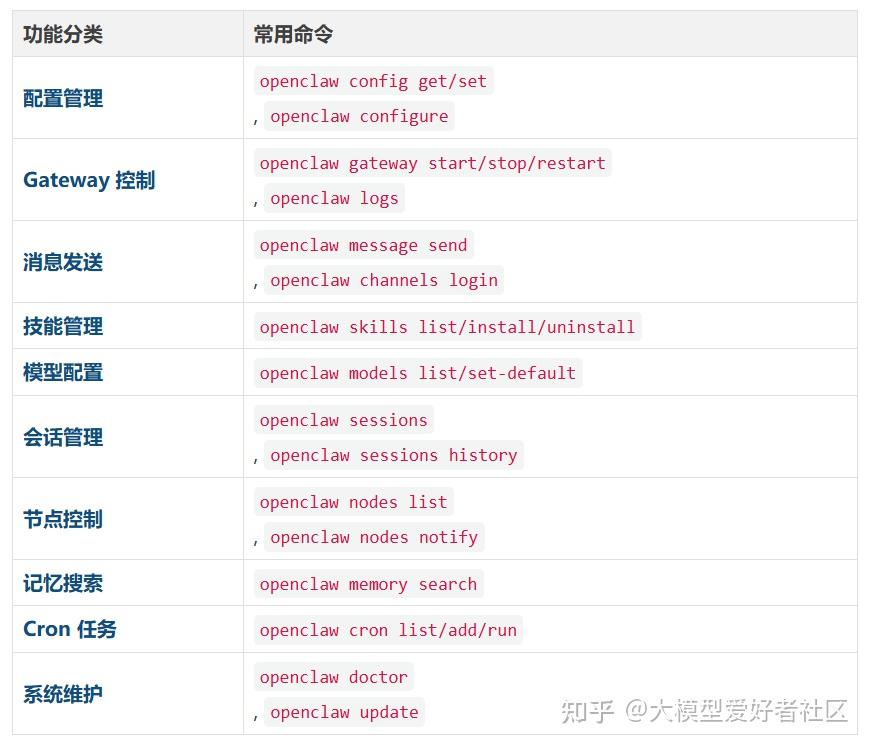
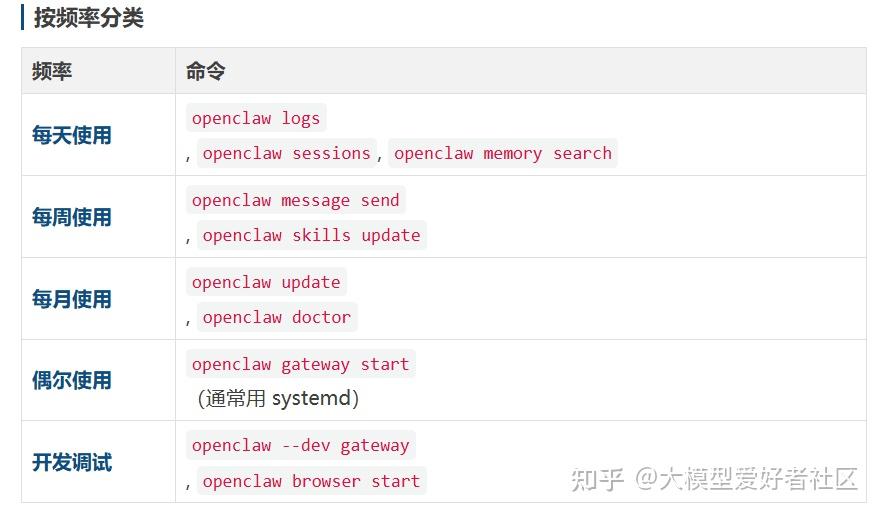
OpenClaw 提供了丰富的命令行工具,掌握这些命令可以大幅提升工作效率。