 编程部落
编程部落文章目录
目录
- 效果演示
- 一、引言
- 二、效果预览与功能介绍
- 三、数学原理-心形曲线方程
- 四、粒子系统设计
- 五、烟花物理模拟
- 六、鼠标交互与用户界面
- 七、优化与扩展建议
- 八、总结
- 九、完整代码
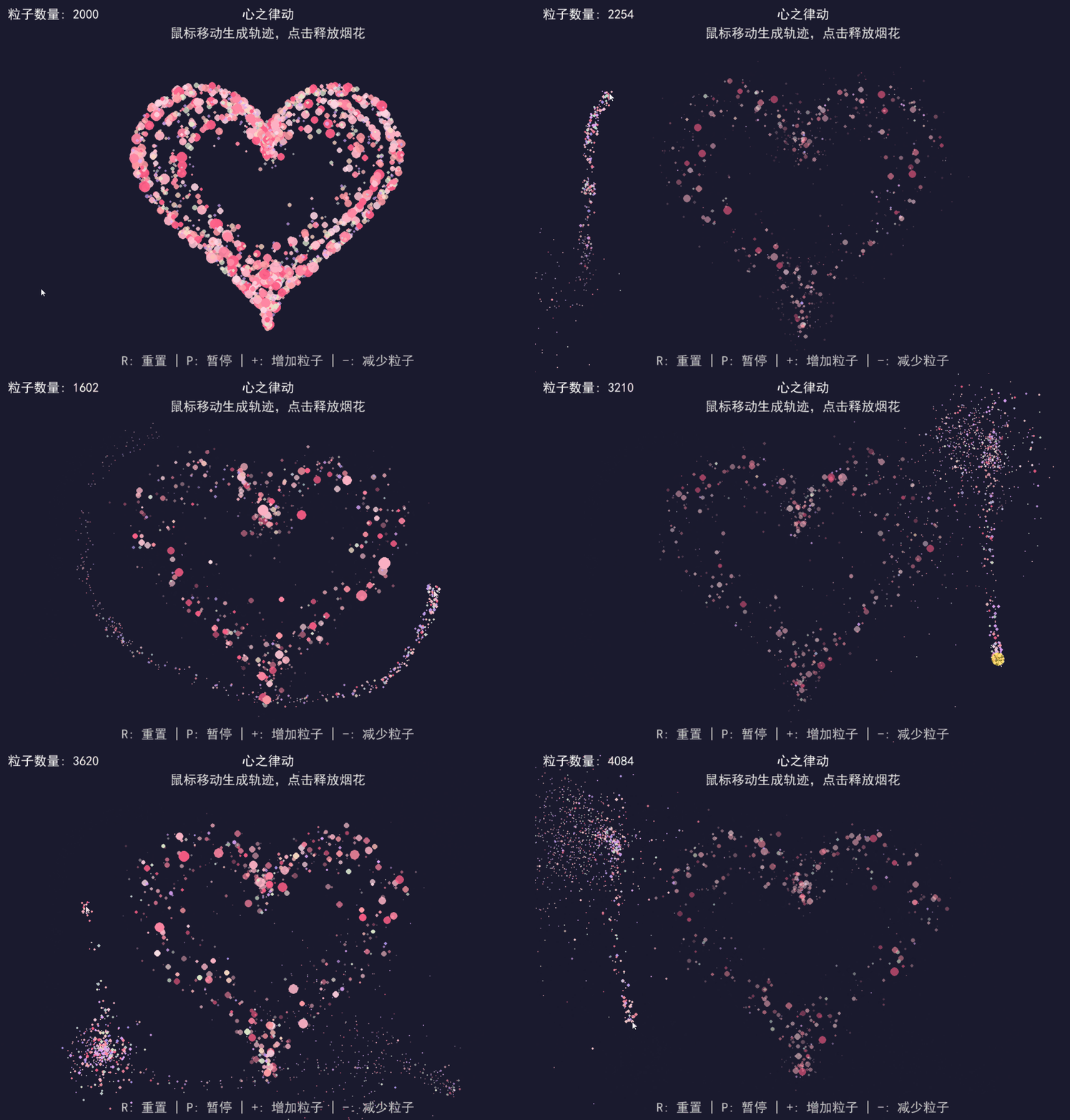
在数字世界中,如何用代码创造出浪漫而富有生命力的视觉效果?本文将带你探索如何使用 Python 的 Pygame 库实现一个名为"心之律动"的粒子动画,通过数学公式生成心形轨迹,并加入烟花爆炸、鼠标交互等元素,打造出一个充满活力的动态心形场景。
我们的动画将实现以下核心功能:
- 基于数学公式生成的动态心形粒子分布
- 随时间变化的心跳效果,让心形呈现呼吸感
- 鼠标移动时产生彩色拖尾轨迹
- 鼠标点击时触发绚丽的烟花爆炸效果
- 可交互的控制界面,支持重置、暂停和调整粒子数量
下面让我们一步步实现这个动画效果。
要生成心形图案,我们需要使用数学中的心形线(Cardioid)方程。心形线是一个圆上的固定点在该圆绕着与其相切且半径相同的另外一个圆滚动时所形成的轨迹,其参数方程通常表示为:
x = 16 * sin³(t)
y = 13 * cos(t) – 5 * cos(2t) – 2 * cos(3t) – cos(4t)
其中 t 是参数,范围通常为 0 到 2π。这个方程可以生成一个标准的心形曲线。在我们的代码中,将使用这个方程来确定粒子的位置:
def generate_heart_point(self, t: float, scale: float = 1.0) -> Dict[str, float]:
    """生成心形参数方程的点"""
    # 心形参数方程: x=16sin³t, y=13cost-5cos2t-2cos3t-cos4t
    x = 16 * math.sin(t)**3
    y = 13 * math.cos(t) - 5 * math.cos(2*t) - 2 * math.cos(3*t) - math.cos(4*t)
    # 映射到画布中心并缩放
    center_x, center_y = WIDTH // 2, HEIGHT // 2
    heart_scale = min(WIDTH, HEIGHT) * 0.35 * scale
    return {
        "x": center_x + x * heart_scale / 16,
        "y": center_y - y * heart_scale / 16  # 反转y轴
    }
粒子系统是实现这个动画的核心,我们定义了四种类型的粒子:
- 心形粒子:构成基础心形图案的粒子
- 鼠标轨迹粒子:跟随鼠标移动产生的拖尾效果
- 烟花粒子:鼠标点击时爆炸产生的粒子
- 坠落粒子:从烟花粒子转变而来,模拟坠落效果
每个粒子都有自己的属性,包括位置、速度、颜色、生命周期等。以下是粒子类的核心代码:
class Particle:
    def __init__(self, x: float, y: float, particle_type: str = "heart"):
        self.x = x
        self.y = y
        self.type = particle_type
        # 初始化属性
        self.current_size = 0
        self.current_alpha = 0
        # 根据粒子类型设置属性
        if particle_type == "heart":
            self.setup_heart_particle()
        elif particle_type == "mouse":
            self.setup_mouse_particle()
        elif particle_type == "firework":
            self.setup_firework_particle()
        else:  # falling
            self.setup_falling_particle()
        # 烟花粒子延迟效果
        if particle_type == "firework":
            self.delay = random.random() * 15
            self.is_active = False
    def update(self) -> None:
        """更新粒子状态"""
        # 根据粒子类型执行不同的物理模拟
        # ... (省略具体实现)
    def draw(self) -> None:
        """绘制粒子"""
        if self.type == "firework" and not self.is_active:
            return
        # 确保透明度在有效范围内
        r, g, b = self.color
        alpha = max(0, min(255, int(255 * self.current_alpha)))
        if alpha > 0:  # 只绘制可见粒子
            # 创建带透明度的表面
            size = max(0.5, self.current_size)
            surf = pygame.Surface((int(size * 2), int(size * 2)), pygame.SRCALPHA)
            pygame.draw.circle(surf, (r, g, b, alpha), (int(size), int(size)), int(size))
            screen.blit(surf, (self.x - size, self.y - size))
烟花效果是动画的一大亮点,我们使用物理引擎模拟烟花的爆炸和坠落过程。主要考虑以下物理因素:
- 重力:使粒子向下坠落
- 摩擦力:使粒子速度逐渐减慢
- 延迟激活:实现多层爆炸效果
def setup_firework_particle(self) -> None:
    """初始化烟花粒子属性"""
    self.color = random.choice(particle_colors)
    self.size = 1.5 + random.random() * 4
    self.base_speed = 2 + random.random() * 3  # 较高初始速度
    self.angle = random.random() * math.pi * 2
    self.life = 100 + random.random() * 80
    self.max_life = self.life
    self.gravity = 0.05  # 重力
    self.friction = 0.97 + random.random() * 0.01  # 摩擦力
    # 笛卡尔坐标速度
    self.vx = math.cos(self.angle) * self.base_speed
    self.vy = math.sin(self.angle) * self.base_speed
def update(self) -> None:
    # 烟花粒子物理模拟
    if self.type == "firework" and self.is_active:
        self.vx *= self.friction  # 摩擦力
        self.vy += self.gravity  # 重力
        self.x += self.vx
        self.y += self.vy
        # 转换为坠落粒子
        if abs(self.vy) > 0.3 and random.random() < 0.08 and self.life > 40:
            self.type = "falling"
            self.setup_falling_particle()
为了增强用户体验,我们添加了鼠标交互和简单的控制面板:
- 鼠标移动时生成彩色轨迹
- 鼠标点击时触发烟花爆炸
- 通过键盘控制重置、暂停和调整粒子数量
def handle_mouse_move(self, x: int, y: int) -> None:
    """处理鼠标移动"""
    self.mouse["x"] = x
    self.mouse["y"] = y
    # 生成鼠标轨迹粒子
    for _ in range(6):
        offset_x = (random.random() - 0.5) * 20
        offset_y = (random.random() - 0.5) * 20
        self.particles.append(Particle(
            self.mouse["x"] + offset_x,
            self.mouse["y"] + offset_y,
            "mouse"
        ))
def handle_mouse_down(self) -> None:
    """处理鼠标按下 - 创建烟花"""
    self.mouse["is_down"] = True
    self.create_firework(self.mouse["x"], self.mouse["y"])
def draw_ui(self) -> None:
    """绘制用户界面"""
    # 标题
    title = font.render("心之律动", True, (255, 255, 255))
    subtitle = font.render("鼠标移动生成轨迹,点击释放烟花", True, (230, 230, 230))
    screen.blit(title, (WIDTH//2 - title.get_width()//2, 20))
    screen.blit(subtitle, (WIDTH//2 - subtitle.get_width()//2, 55))
    # 粒子数量
    particle_count_text = font.render(f"粒子数量: {self.particle_count}", True, (255, 255, 255))
    screen.blit(particle_count_text, (20, 20))
    # 操作提示
    help_text1 = font.render("R: 重置 | P: 暂停 | +: 增加粒子 | -: 减少粒子", True, (200, 200, 200))
    screen.blit(help_text1, (WIDTH//2 - help_text1.get_width()//2, HEIGHT - 40))
- 性能优化:当粒子数量较多时,可能会影响性能。可以考虑使用批处理渲染或粒子池技术来提高效率。
- 视觉增强:可以添加背景图片、背景音乐或更多的粒子效果,增强整体视觉冲击力。
- 交互扩展:可以添加更多的交互方式,如键盘控制烟花颜色、调整物理参数等。
- 艺术风格:可以尝试不同的颜色方案或粒子形状,创造出不同的艺术风格。
通过这个项目,我们不仅学习了如何使用 Pygame 创建动态粒子系统,还探索了数学公式在图形渲染中的应用。从心形曲线方程到物理模拟,每一步都展示了代码与艺术的完美结合。希望这个教程能激发你更多的创意,用代码创造出更多美丽而有趣的视觉效果!
import pygame
import math
import random
import sys
from typing import List, Dict, Tuple
# 初始化Pygame
pygame.init()
# 确保中文正常显示
pygame.font.init()
font = pygame.font.SysFont(["SimHei", "WenQuanYi Micro Hei", "Heiti TC"], 24)
# 屏幕设置
WIDTH, HEIGHT = 1000, 700
screen = pygame.display.set_mode((WIDTH, HEIGHT))
pygame.display.set_caption("心之律动 - Pygame粒子动画")
# 颜色定义
particle_colors = [
    (255, 94, 135),
    (255, 133, 162),
    (255, 179, 198),
    (255, 194, 209),
    (255, 215, 228),
    (255, 154, 162),
    (255, 183, 178),
    (255, 218, 193),
    (226, 240, 203),
    (181, 234, 215),
    (199, 206, 234),
    (167, 154, 255),
    (194, 167, 255),
    (216, 167, 255),
    (234, 167, 255),
    (245, 167, 255),
]
# 粒子类
class Particle:
    def __init__(self, x: float, y: float, particle_type: str = "heart"):
        self.x = x
        self.y = y
        self.type = particle_type  # heart, mouse, firework, falling
        # 初始化属性
        self.current_size = 0
        self.current_alpha = 0
        # 根据粒子类型设置属性
        if particle_type == "heart":
            self.setup_heart_particle()
        elif particle_type == "mouse":
            self.setup_mouse_particle()
        elif particle_type == "firework":
            self.setup_firework_particle()
        else:  # falling
            self.setup_falling_particle()
        # 烟花粒子延迟效果
        if particle_type == "firework":
            self.delay = random.random() * 15
            self.is_active = False
    def setup_heart_particle(self) -> None:
        """初始化心形粒子属性"""
        self.layer = random.randint(0, 3)  # 粒子层次
        # 根据层次选择颜色
        color_pools = [
            particle_colors[0:3],  # 外层
            particle_colors[3:6],  # 中层
            particle_colors[6:9],  # 内层
            particle_colors[9:],  # 中心
        ]
        self.color = random.choice(color_pools[self.layer])
        # 根据层次设置大小和速度
        self.size = 2 + random.random() * (8 - self.layer * 2)
        self.speed = 0.1 + random.random() * 0.3 + self.layer * 0.05
        self.angle = random.random() * math.pi * 2  # 随机方向
        # 生命周期
        self.life = 150 + random.random() * 100 - self.layer * 30
        self.max_life = self.life
    def setup_mouse_particle(self) -> None:
        """初始化鼠标轨迹粒子属性"""
        self.color = random.choice(particle_colors)
        self.size = 1 + random.random() * 3
        self.speed = 0.05 + random.random() * 0.1  # 较慢速度
        self.angle = random.random() * math.pi * 2
        self.life = 100 + random.random() * 80  # 较长寿命
        self.max_life = self.life
    def setup_firework_particle(self) -> None:
        """初始化烟花粒子属性"""
        self.color = random.choice(particle_colors)
        self.size = 1.5 + random.random() * 4
        self.base_speed = 2 + random.random() * 3  # 较高初始速度
        self.angle = random.random() * math.pi * 2
        self.life = 100 + random.random() * 80
        self.max_life = self.life
        self.gravity = 0.05  # 重力
        self.friction = 0.97 + random.random() * 0.01  # 摩擦力
        # 笛卡尔坐标速度
        self.vx = math.cos(self.angle) * self.base_speed
        self.vy = math.sin(self.angle) * self.base_speed
    def setup_falling_particle(self) -> None:
        """初始化坠落粒子属性"""
        self.color = random.choice(particle_colors)
        self.size = 0.5 + random.random() * 2
        self.speed = 0.5 + random.random() * 1.5
        # 主要向下的角度
        self.angle = math.pi + (random.random() - 0.5) * math.pi * 0.6
        self.life = 80 + random.random() * 120
        self.max_life = self.life
        self.gravity = 0.03  # 重力
        self.wind = (random.random() - 0.5) * 0.003  # 风力
    def update(self) -> None:
        """更新粒子状态"""
        # 烟花粒子延迟激活
        if self.type == "firework" and not self.is_active:
            self.delay -= 1
            if self.delay <= 0:
                self.is_active = True
            return
        # 烟花粒子物理模拟
        if self.type == "firework" and self.is_active:
            self.vx *= self.friction  # 摩擦力
            self.vy += self.gravity  # 重力
            self.x += self.vx
            self.y += self.vy
            # 转换为坠落粒子
            if abs(self.vy) > 0.3 and random.random() < 0.08 and self.life > 40:
                self.type = "falling"
                self.setup_falling_particle()
        else:
            # 其他粒子使用极坐标移动
            self.x += math.cos(self.angle) * self.speed
            self.y += math.sin(self.angle) * self.speed
        # 坠落粒子额外处理
        if self.type == "falling":
            self.speed += self.gravity
            self.x += self.wind
        # 生命周期递减
        self.life -= 1
        # 心跳效果 - 大小和透明度变化
        heartbeat_phase = (pygame.time.get_ticks() / 800) % (math.pi * 2)
        heartbeat_factor = 1.0 + 0.15 * math.sin(heartbeat_phase)
        if self.type == "heart":
            self.current_size = (
                self.size * heartbeat_factor * (self.life / self.max_life)
            )
            self.current_alpha = (self.life / self.max_life) * (
                0.8 + 0.2 * math.sin(heartbeat_phase + self.layer * 0.5)
            )
        else:
            self.current_size = self.size * (self.life / self.max_life)
            self.current_alpha = self.life / self.max_life
    def draw(self) -> None:
        """绘制粒子"""
        if self.type == "firework" and not self.is_active:
            return
        # 确保透明度在有效范围内
        r, g, b = self.color
        alpha = max(0, min(255, int(255 * self.current_alpha)))
        if alpha > 0:  # 只绘制可见粒子
            # 创建带透明度的表面
            size = max(0.5, self.current_size)  # 确保大小至少为0.5
            surf = pygame.Surface((int(size * 2), int(size * 2)), pygame.SRCALPHA)
            pygame.draw.circle(
                surf, (r, g, b, alpha), (int(size), int(size)), int(size)
            )
            screen.blit(surf, (self.x - size, self.y - size))
    def is_alive(self) -> bool:
        """检查粒子是否存活"""
        return self.life > 0
# 心形动画类
class HeartAnimation:
    def __init__(self):
        self.particles: List[Particle] = []
        self.is_paused = False
        self.mouse = {"x": WIDTH // 2, "y": HEIGHT // 2, "is_down": False}
        self.particle_count = 0
        self.heart_particle_count = 1000  # 心形粒子目标数量
        self.heart_regen_rate = 5  # 每帧再生数量
        # 生成初始心形粒子
        self.generate_heart_particles(self.heart_particle_count)
    def is_inside_heart(self, x: float, y: float, scale: float = 1.0) -> bool:
        """判断点是否在心形内部"""
        center_x, center_y = WIDTH // 2, HEIGHT // 2
        nx = (x - center_x) / (WIDTH / 2)
        ny = (y - center_y) / (HEIGHT / 2)
        # 心形方程: (x² + y² - 1)³ - x²y³ ≤ 0
        heart_eq = (nx**2 + ny**2 - 1) ** 3 - nx**2 * ny**3
        return heart_eq <= 0
    def generate_heart_point(self, t: float, scale: float = 1.0) -> Dict[str, float]:
        """生成心形参数方程的点"""
        # 心形参数方程: x=16sin³t, y=13cost-5cos2t-2cos3t-cos4t
        x = 16 * math.sin(t) ** 3
        y = (
            13 * math.cos(t)
            - 5 * math.cos(2 * t)
            - 2 * math.cos(3 * t)
            - math.cos(4 * t)
        )
        # 映射到画布中心并缩放
        center_x, center_y = WIDTH // 2, HEIGHT // 2
        heart_scale = min(WIDTH, HEIGHT) * 0.35 * scale
        return {
            "x": center_x + x * heart_scale / 16,
            "y": center_y - y * heart_scale / 16,  # 反转y轴
        }
    def generate_heart_particles(self, count: int) -> None:
        """生成心形粒子"""
        for _ in range(count):
            layer = random.randint(0, 3)  # 随机层次
            # 根据层次设置缩放
            if layer == 0:
                scale = 1.0  # 外层
            elif layer == 1:
                scale = 0.95  # 中层
            elif layer == 2:
                scale = 0.85  # 内层
            else:
                scale = 0.7  # 中心层
            t = random.random() * math.pi * 2  # 随机角度
            point = self.generate_heart_point(t, scale)
            # 中心层添加随机偏移
            if layer == 3:
                offset = random.random() * 0.2 * (WIDTH / 2)
                point["x"] += (random.random() - 0.5) * offset
                point["y"] += (random.random() - 0.5) * offset
                # 确保点在心形内
                if not self.is_inside_heart(point["x"], point["y"]):
                    continue
            # 创建粒子
            self.particles.append(Particle(point["x"], point["y"], "heart"))
        self.update_particle_count()
    def regenerate_heart_particles(self, count: int) -> None:
        """再生心形粒子"""
        for _ in range(count):
            layer = random.randint(0, 3)
            scale = (
                1.0
                if layer == 0
                else 0.95 if layer == 1 else 0.85 if layer == 2 else 0.7
            )
            t = random.random() * math.pi * 2
            point = self.generate_heart_point(t, scale)
            if layer == 3:
                offset = random.random() * 0.2 * (WIDTH / 2)
                point["x"] += (random.random() - 0.5) * offset
                point["y"] += (random.random() - 0.5) * offset
                if not self.is_inside_heart(point["x"], point["y"]):
                    continue
            self.particles.append(Particle(point["x"], point["y"], "heart"))
    def handle_mouse_move(self, x: int, y: int) -> None:
        """处理鼠标移动"""
        self.mouse["x"] = x
        self.mouse["y"] = y
        # 生成鼠标轨迹粒子
        for _ in range(6):  # 生成多个粒子形成连续轨迹
            offset_x = (random.random() - 0.5) * 20
            offset_y = (random.random() - 0.5) * 20
            self.particles.append(
                Particle(
                    self.mouse["x"] + offset_x, self.mouse["y"] + offset_y, "mouse"
                )
            )
        self.update_particle_count()
    def handle_mouse_down(self) -> None:
        """处理鼠标按下 - 创建烟花"""
        self.mouse["is_down"] = True
        self.create_firework(self.mouse["x"], self.mouse["y"])
    def handle_mouse_up(self) -> None:
        """处理鼠标释放"""
        self.mouse["is_down"] = False
    def create_firework(self, x: float, y: float) -> None:
        """创建烟花效果"""
        # 主爆炸
        self.create_firework_wave(x, y, 180, 0)
        # 延迟爆炸 - 外层
        pygame.time.set_timer(pygame.USEREVENT + 1, 150, True)
        # 精细粒子
        pygame.time.set_timer(pygame.USEREVENT + 2, 250, True)
        self.update_particle_count()
    def create_firework_wave(
        self,
        x: float,
        y: float,
        count: int,
        base_delay: int,
        fine_particles: bool = False,
        speed_multiplier: float = 1.0,
    ) -> None:
        """创建一波烟花粒子"""
        for _ in range(count):
            p = Particle(x, y, "firework")
            if fine_particles:
                p.size = 0.5 + random.random() * 1.5
                p.base_speed = 1.5 + random.random() * 2
                p.life = 80 + random.random() * 60
            else:
                p.size = 1 + random.random() * 3
                p.base_speed = (2 + random.random() * 3) * speed_multiplier
            p.delay = base_delay + random.random() * 10
            p.vx = math.cos(p.angle) * p.base_speed
            p.vy = math.sin(p.angle) * p.base_speed
            self.particles.append(p)
    def handle_reset(self) -> None:
        """重置动画"""
        self.particles = []
        self.generate_heart_particles(self.heart_particle_count)
    def handle_pause(self) -> None:
        """暂停/继续动画"""
        self.is_paused = not self.is_paused
    def handle_increase(self) -> None:
        """增加粒子数量"""
        self.heart_particle_count += 200
        self.generate_heart_particles(200)
    def handle_decrease(self) -> None:
        """减少粒子数量"""
        if self.heart_particle_count > 200:
            self.heart_particle_count -= 200
            # 移除旧的心形粒子
            removed = 0
            for i in range(len(self.particles) - 1, -1, -1):
                if self.particles[i].type == "heart":
                    self.particles.pop(i)
                    removed += 1
                    if removed >= 200:
                        break
            self.update_particle_count()
    def update_particle_count(self) -> None:
        """更新粒子数量显示"""
        self.particle_count = len(self.particles)
    def draw_ui(self) -> None:
        """绘制用户界面"""
        # 标题
        title = font.render("心之律动", True, (255, 255, 255))
        subtitle = font.render("鼠标移动生成轨迹,点击释放烟花", True, (230, 230, 230))
        screen.blit(title, (WIDTH // 2 - title.get_width() // 2, 20))
        screen.blit(subtitle, (WIDTH // 2 - subtitle.get_width() // 2, 55))
        # 粒子数量
        particle_count_text = font.render(
            f"粒子数量: {self.particle_count}", True, (255, 255, 255)
        )
        screen.blit(particle_count_text, (20, 20))
        # 操作提示
        help_text1 = font.render(
            "R: 重置 | P: 暂停 | +: 增加粒子 | -: 减少粒子", True, (200, 200, 200)
        )
        screen.blit(help_text1, (WIDTH // 2 - help_text1.get_width() // 2, HEIGHT - 40))
# 主函数
def main():
    clock = pygame.time.Clock()
    heart_animation = HeartAnimation()
    # 主循环
    running = True
    while running:
        # 事件处理
        for event in pygame.event.get():
            if event.type == pygame.QUIT:
                running = False
            elif event.type == pygame.MOUSEMOTION:
                heart_animation.handle_mouse_move(event.pos[0], event.pos[1])
            elif event.type == pygame.MOUSEBUTTONDOWN:
                heart_animation.handle_mouse_down()
            elif event.type == pygame.MOUSEBUTTONUP:
                heart_animation.handle_mouse_up()
            elif event.type == pygame.KEYDOWN:
                if event.key == pygame.K_r:
                    heart_animation.handle_reset()
                elif event.key == pygame.K_p:
                    heart_animation.handle_pause()
                elif event.key == pygame.K_PLUS or event.key == pygame.K_KP_PLUS:
                    heart_animation.handle_increase()
                elif event.key == pygame.K_MINUS or event.key == pygame.K_KP_MINUS:
                    heart_animation.handle_decrease()
            elif event.type == pygame.USEREVENT + 1:  # 延迟烟花
                heart_animation.create_firework_wave(
                    heart_animation.mouse["x"],
                    heart_animation.mouse["y"],
                    120,
                    10,
                    False,
                    1.5,
                )
            elif event.type == pygame.USEREVENT + 2:  # 精细粒子
                heart_animation.create_firework_wave(
                    heart_animation.mouse["x"],
                    heart_animation.mouse["y"],
                    150,
                    15,
                    True,
                )
        # 填充背景
        screen.fill((26, 26, 46))  # 深色背景
        # 更新和绘制粒子
        if not heart_animation.is_paused:
            # 更新粒子
            for i in range(len(heart_animation.particles) - 1, -1, -1):
                heart_animation.particles[i].update()
                if not heart_animation.particles[i].is_alive():
                    heart_animation.particles.pop(i)
            # 补充心形粒子
            heart_count = sum(1 for p in heart_animation.particles if p.type == "heart")
            if heart_count < heart_animation.heart_particle_count:
                to_add = min(
                    heart_animation.heart_regen_rate,
                    heart_animation.heart_particle_count - heart_count,
                )
                heart_animation.regenerate_heart_particles(to_add)
        # 绘制所有粒子
        for particle in heart_animation.particles:
            particle.draw()
        # 绘制UI
        heart_animation.draw_ui()
        # 更新显示
        pygame.display.flip()
        # 控制帧率
        clock.tick(60)
    pygame.quit()
    sys.exit()
if __name__ == "__main__":
    main()
以上就是Pygame用数学公式实现心之律动动画的详细内容,更多关于Pygame心之律动动画的资料请关注风君子博客其它相关文章!
您可能感兴趣的文章:
- Python 基于 pygame 实现轮播图动画效果
- 使用python+pygame实现中秋节动画效果
- Pygame浅析动画精灵和碰撞检测实现方法
- Python+Pygame实现代码雨动画效果
- Python pygame 动画游戏循环游戏时钟实现原理
- Python pygame项目实战英雄动画特效实现