 编程部落
编程部落文章目录
- # problematic_subprocess.py import sys import os import time def func(): for i in range(3): print(f”Iteration {i}”) # 正常输出 print(“This is a normal stdout message.”) print(“Another stdout message.”, file=sys.stdout) time.sleep(1) # 错误输出 print(“This is a stderr message.”, file=sys.stderr) print(“Another stderr message.”, file=sys.stderr) return 0 if __name__ == “__main__”: ret = 0 # 作为后面预留使用 try: ret = func() print(f”{__file__}: Return code: {ret}”) except Exception as e: print(f”{__file__}: Exception: {e}”) ret = -1 finally: print(f”{__file__}: Finally block executed.”) print(f”{__file__}: Exiting with return code: {ret}”) 这里使用try执行func函数, func函数中没间隔1s秒使用标准输出和标准错误输出打印,最后返回0。 若有异常则打印异常信息。最后执行finally逻辑,不论是否有异常,这里都会执行。 结果输出 Iteration 0This is a normal stdout message.Another stdout message.This is a stderr message.Another stderr message.Iteration 1This is a normal stdout message.Another stdout message.This is a stderr message.Another stderr message.Iteration 2This is a normal stdout message.Another stdout message.This is a stderr message.Another stderr message.c:UsersadminDesktopprocess_popenproblematic_subprocess.py: Return code: 0c:UsersadminDesktopprocess_popenproblematic_subprocess.py: Finally block executed.c:UsersadminDesktopprocess_popenproblematic_subprocess.py: Exiting with return code: 0
- 在前面例子上, 将 main 的返回语句修改 # return 0 raise Exception(“An exception occurred.”) 执行结果,这里忽略func函数的输出。 异常抛出被捕获,之后,继续执行了finally部分。 c:UsersadminDesktopprocess_popenproblematic_subprocess.py: Exception: An exception occurred. c:UsersadminDesktopprocess_popenproblematic_subprocess.py: Finally block executed. c:UsersadminDesktopprocess_popenproblematic_subprocess.py: Exiting with return code: -1
- 进程退出,有 os._exit() 与 sys.exit() (不建议在生产中使用 exit()函数 )两种,可以附带返回值,作为整个进程的返回值。
首先。虽然主要是说明异常,但为了说明后续问题,这里提供一个进程调用方式,来判断进程退出的返回值。
- import subprocess if __name__ == “__main__”: process = subprocess.Popen([“python”, “problematic_subprocess.py”]) ret_code = process.wait() print(“Return code: {}”.format(ret_code)) 使用 subprocess 启动一个进程, 使用python 执行脚本 problematic_subprocess.py,之后使用 wait() 等待结束获取返回值。 # problematic_subprocess.py print(“hello world!”) 运行后,打印输出信息, 获取得到的返回值为 0 。 正常结束、且不执行返回码的进程,返回值为 0。 hello world! Return code: 0
- 继续修改前述测试代码,调用 sys.exit 中断 func 函数执行 # return 0 # raise Exception(“An exception occurred.”) sys.exit(2) 运行进程测试脚本,func程序提前退出,但执行了try…finally… 的部分,且进程返回码为指定值。 C:UsersadminDesktopprocess_popenproblematic_subprocess.py: Finally block executed. C:UsersadminDesktopprocess_popenproblematic_subprocess.py: Exiting with return code: 0 Return code: 2
- 继续修改前述测试代码,调用 os._exit 中断 func 函数执行 # return 0 # raise Exception(“An exception occurred.”) # sys.exit(2) os._exit(3) 执行进程测试脚本,func程序退出,没有执行了try…finally… 的部分,进程返回码为指定值 Return code: 3
- abort比较特殊,主要是发送终止信号,由于这里没有编写信号处理部分,不做讨论。 继续修改前述测试代码,调用 os.abort() 中断 func 函数执行 # return 0 # raise Exception(“An exception occurred.”) # sys.exit(2) # os._exit(3) os.abort() 执行进程测试脚本,func程序退出,没有执行了try…finally… 的部分,且返回指为一个很大的数值 Return code: 3221226505
- 特性 sys.exit() os._exit() os.abort() 模块来源 sys 模块 os 模块 os 模块 实现机制 抛出 SystemExit 异常 直接调用系统 _exit() 函数 发送 SIGABRT 信号 清理操作 ✅ 执行(finally 块、上下文管理器等) ❌ 不执行任何清理 ❌ 不执行任何清理 可被捕获 ✅ 可通过捕获 SystemExit 异常 ❌ 无法捕获 ❌ 无法捕获 退出码控制 ✅ 可指定(默认 0) ✅ 可指定 ❌ 固定(通常为 134) 核心转储 ❌ 不生成 ❌ 不生成 ✅ 可能生成(取决于系统配置) 适用场景 正常程序退出、脚本终止 子进程退出、避免资源泄漏 严重错误、调试崩溃 跨平台一致性 ✅ 高 ✅ 高 ⚠️ 行为可能因平台而异 Pythonic 程度 ✅ 官方推荐方式 ⚠️ 特殊场景使用 ⚠️ 调试/异常场景使用 对缓冲区影响 ✅ 正常刷新 stdout/stderr ❌ 可能丢失未刷新的输出 ❌ 可能丢失未刷新的输出
- 日常开发:优先使用 sys.exit() 多进程编程:子进程中使用 os._exit() 避免干扰父进程 调试/崩溃分析:使用 os.abort() 触发核心转储进行事后分析
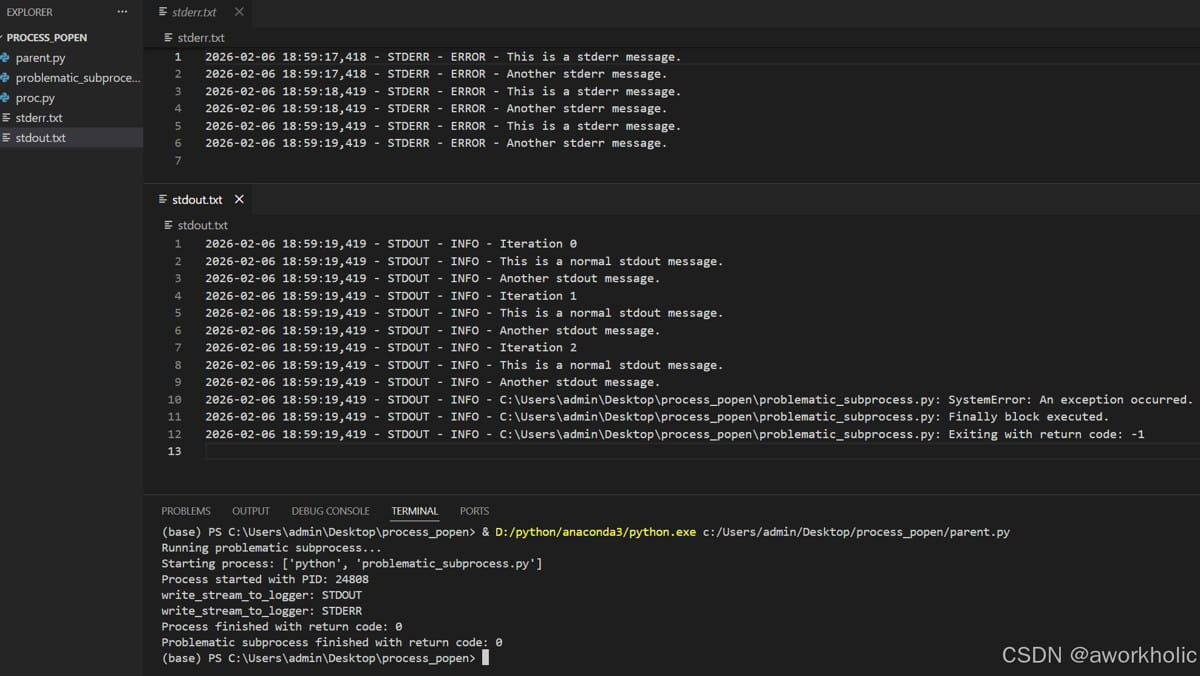
- 注意,这里在使用popen打开进程,使用了2个线程读取标准输出、标准错误输出, 将原进程输出分别重定向到对应的日志文件中。日志的的写入,使用了logging库。最后等待进程退出。 日志控制中,可以要求按照指定格式进行正则化匹配,例如 进度,程序运行结果,程序异常的结果等。自行扩展。 import subprocess import threading import logging def setup_loggers(stdout_log_file=”stdout.log”, stderr_log_file=”stderr.log”): “”” 为 stdout 和 stderr 创建独立的日志记录器 “”” # 配置日志格式 log_format = logging.Formatter( ‘%(asctime)s – %(name)s – %(levelname)s – %(message)s’ ) # 设置 stdout 日志记录器 stdout_logger = logging.getLogger(“STDOUT”) stdout_logger.setLevel(logging.INFO) stdout_handler = logging.FileHandler(stdout_log_file, mode=’w’, encoding=’utf-8′) stdout_handler.setFormatter(log_format) stdout_logger.addHandler(stdout_handler) # 设置 stderr 日志记录器 stderr_logger = logging.getLogger(“STDERR”) stderr_logger.setLevel(logging.ERROR) stderr_handler = logging.FileHandler(stderr_log_file, mode=’w’, encoding=’utf-8′) stderr_handler.setFormatter(log_format) stderr_logger.addHandler(stderr_handler) # 防止日志传播到根记录器 stdout_logger.propagate = False stderr_logger.propagate = False return stdout_logger, stderr_logger def write_stream_to_logger(stream, logger, level=logging.INFO): “””将流中的数据实时写入日志记录器””” print(f”write_stream_to_logger: {logger.name}”) for line in stream: # 去除行尾的换行符 log_message = line.rstrip(‘nr’) logger.log(level, log_message) def run_process_and_log_output(command, stdout_file=”stdout.txt”, stderr_file=”stderr.txt”): “”” 使用 Popen 执行命令,并实时将标准输出和标准错误写入指定文件, 无论进程是否正常结束。 “”” # 设置日志记录器 stdout_logger, stderr_logger = setup_loggers(stdout_file, stderr_file) try: print(f”Starting process: {command}”) # 启动子进程 process = subprocess.Popen( command, stdout=subprocess.PIPE, stderr=subprocess.PIPE, text=True, # bufsize=1, universal_newlines=True, shell=isinstance(command, str) ) # 输出进程相关信息 print(f”Process started with PID: {process.pid}”) # 创建线程来处理 stdout 和 stderr stdout_thread = threading.Thread( target=write_stream_to_logger, args=(process.stdout, stdout_logger, logging.INFO) ) stderr_thread = threading.Thread( target=write_stream_to_logger, args=(process.stderr, stderr_logger, logging.ERROR) ) # 启动线程 stdout_thread.start() stderr_thread.start() # 等待进程结束 return_code = process.wait() # 等待线程完成 stdout_thread.join() stderr_thread.join() print(f”Process finished with return code: {return_code}”) return return_code except Exception as e: print(f”An error occurred: {e}”) with open(stdout_file, ‘w’, encoding=’utf-8′) as f: f.write(“”) with open(stderr_file, ‘w’, encoding=’utf-8′) as f: f.write(f”An error occurred: {e}”) return -2 # raise finally: # 确保文件被关闭 if process.stdout: process.stdout.close() if process.stderr: process.stderr.close() # 示例用法 if __name__ == “__main__”: problematic_cmd = [“python”, “problematic_subprocess.py”] print(“Running problematic subprocess…”) ret_code = run_process_and_log_output(problematic_cmd, “stdout.txt”, “stderr.txt”) print(f”Problematic subprocess finished with return code: {ret_code}”) “` 以上代码中,不论前述problematic_subprocess.py是如何执行,return_code = process.wait() 都会成功,接收到进程的返回值。 例如在 func 中 抛出异常, 进程不显式指定返回指,那么进程默认返回值为0。 实际输出也符合预期 “`py Running problematic subprocess… Starting process: [‘python’, ‘problematic_subprocess.py’] Process started with PID: 24808 write_stream_to_logger: STDOUT write_stream_to_logger: STDERR Process finished with return code: 0 Problematic subprocess finished with return code: 0 其中2个文件内容如下,也同样满足预期
- 进程控制可以使用 psutil 库 # 等待1s,通知退出 time.sleep(1) import psutil master_process = psutil.Process(process.pid) if master_process.is_running(): print(“Process is still running, sending SIGTERM…”) master_process.terminate() time.sleep(1) if master_process.is_running(): print(“Process is still running, sending SIGKILL…”) master_process.kill() time.sleep(1) if master_process.is_running(): print(“Process is still running, giving up…”) return -1 到此这篇关于python 异常、捕获和退出,进程调用输出示例解析的文章就介绍到这了,更多相关python 异常捕获内容请搜索风君子博客以前的文章或继续浏览下面的相关文章希望大家以后多多支持风君子博客! 您可能感兴趣的文章: Python捕获全局的KeyboardInterrupt异常的方法实现 快速进修Python指南之异常捕获 python捕获异常后继续执行问题 Python中异常的捕获与处理详解 Python十类常见异常类型总结(附捕获及异常处理方式) Python中异常捕获与处理的方法总结 详解python的异常捕获 python 异常捕获详解流程 python实现超时退出的三种方式总结
目录
- 1、异常和捕获
- 1.1、常规示例
- 1.2、抛出异常
- 1.3、进程退出与异常
- 1.3.1、进程调用获取程序的返回值
- 1.3.2、sys.exit(status: int)
- 1.3.3、os._exit(status: int)
- 1.3.4、os.abort()
- 1.4、sys.exit()、os._exit()与os.abort()对比表
- 使用建议
- 2、进程调用与输出解析
- 2.1、进程调用
- 2.2、进程控制 psutil
第一部分,说明 try … except … finally 之间的逻辑,并且在 使用 exit函数的区别。
第二部分,进程调用,使用popen 解析标准输出、标准错误输出,获取进程返回值的问题。
# problematic_subprocess.py
import sys
import os
import time
def func():
    for i in range(3):
        print(f"Iteration {i}")
        # 正常输出
        print("This is a normal stdout message.")
        print("Another stdout message.", file=sys.stdout)
        time.sleep(1)
        # 错误输出
        print("This is a stderr message.", file=sys.stderr)
        print("Another stderr message.", file=sys.stderr)
    return 0
if __name__ == "__main__":
    ret = 0 # 作为后面预留使用
    try:
        ret = func()
        print(f"{__file__}: Return code: {ret}")
    except Exception as e:
        print(f"{__file__}: Exception: {e}")
        ret = -1
    finally:
        print(f"{__file__}: Finally block executed.")
        print(f"{__file__}: Exiting with return code: {ret}")
这里使用try执行func函数, func函数中没间隔1s秒使用标准输出和标准错误输出打印,最后返回0。 若有异常则打印异常信息。最后执行finally逻辑,不论是否有异常,这里都会执行。
结果输出
Iteration 0
This is a normal stdout message.
Another stdout message.
This is a stderr message.
Another stderr message.
Iteration 1
This is a normal stdout message.
Another stdout message.
This is a stderr message.
Another stderr message.
Iteration 2
This is a normal stdout message.
Another stdout message.
This is a stderr message.
Another stderr message.
c:UsersadminDesktopprocess_popenproblematic_subprocess.py: Return code: 0
c:UsersadminDesktopprocess_popenproblematic_subprocess.py: Finally block executed.
c:UsersadminDesktopprocess_popenproblematic_subprocess.py: Exiting with return code: 0
在前面例子上, 将 main 的返回语句修改
    # return 0
    raise Exception("An exception occurred.")
执行结果,这里忽略func函数的输出。 异常抛出被捕获,之后,继续执行了finally部分。
c:UsersadminDesktopprocess_popenproblematic_subprocess.py: Exception: An exception occurred.
c:UsersadminDesktopprocess_popenproblematic_subprocess.py: Finally block executed.
c:UsersadminDesktopprocess_popenproblematic_subprocess.py: Exiting with return code: -1
进程退出,有 os._exit() 与 sys.exit() (不建议在生产中使用 exit()函数 )两种,可以附带返回值,作为整个进程的返回值。
首先。虽然主要是说明异常,但为了说明后续问题,这里提供一个进程调用方式,来判断进程退出的返回值。
import subprocess
if __name__ == "__main__":
    process = subprocess.Popen(["python", "problematic_subprocess.py"])
    ret_code = process.wait()
    print("Return code: {}".format(ret_code))
使用 subprocess 启动一个进程, 使用python 执行脚本 problematic_subprocess.py,之后使用 wait() 等待结束获取返回值。
# problematic_subprocess.py
print("hello world!")
运行后,打印输出信息, 获取得到的返回值为 0 。 正常结束、且不执行返回码的进程,返回值为 0。
hello world!
Return code: 0
继续修改前述测试代码,调用 sys.exit 中断 func 函数执行
    # return 0
    # raise Exception("An exception occurred.")
    sys.exit(2)
运行进程测试脚本,func程序提前退出,但执行了try…finally… 的部分,且进程返回码为指定值。
C:UsersadminDesktopprocess_popenproblematic_subprocess.py: Finally block executed.
C:UsersadminDesktopprocess_popenproblematic_subprocess.py: Exiting with return code: 0
Return code: 2
继续修改前述测试代码,调用 os._exit 中断 func 函数执行
    # return 0
    # raise Exception("An exception occurred.")
    # sys.exit(2)
    os._exit(3)
执行进程测试脚本,func程序退出,没有执行了try…finally… 的部分,进程返回码为指定值
Return code: 3
abort比较特殊,主要是发送终止信号,由于这里没有编写信号处理部分,不做讨论。
继续修改前述测试代码,调用 os.abort() 中断 func 函数执行
    # return 0
    # raise Exception("An exception occurred.")
    # sys.exit(2)
    # os._exit(3)
    os.abort()
执行进程测试脚本,func程序退出,没有执行了try…finally… 的部分,且返回指为一个很大的数值
Return code: 3221226505
| 特性 | sys.exit() | os._exit() | os.abort() |
|---|---|---|---|
| 模块来源 | sys 模块 |
os 模块 |
os 模块 |
| 实现机制 | 抛出 SystemExit 异常 |
直接调用系统 _exit() 函数 |
发送 SIGABRT 信号 |
| 清理操作 | ✅ 执行(finally 块、上下文管理器等) | ❌ 不执行任何清理 | ❌ 不执行任何清理 |
| 可被捕获 | ✅ 可通过捕获 SystemExit 异常 |
❌ 无法捕获 | ❌ 无法捕获 |
| 退出码控制 | ✅ 可指定(默认 0) | ✅ 可指定 | ❌ 固定(通常为 134) |
| 核心转储 | ❌ 不生成 | ❌ 不生成 | ✅ 可能生成(取决于系统配置) |
| 适用场景 | 正常程序退出、脚本终止 | 子进程退出、避免资源泄漏 | 严重错误、调试崩溃 |
| 跨平台一致性 | ✅ 高 | ✅ 高 | ⚠️ 行为可能因平台而异 |
| Pythonic 程度 | ✅ 官方推荐方式 | ⚠️ 特殊场景使用 | ⚠️ 调试/异常场景使用 |
| 对缓冲区影响 | ✅ 正常刷新 stdout/stderr | ❌ 可能丢失未刷新的输出 | ❌ 可能丢失未刷新的输出 |
- 日常开发:优先使用
sys.exit()
- 多进程编程:子进程中使用
os._exit() 避免干扰父进程
- 调试/崩溃分析:使用
os.abort() 触发核心转储进行事后分析
sys.exit()os._exit() 避免干扰父进程os.abort() 触发核心转储进行事后分析
注意,这里在使用popen打开进程,使用了2个线程读取标准输出、标准错误输出, 将原进程输出分别重定向到对应的日志文件中。日志的的写入,使用了logging库。最后等待进程退出。
日志控制中,可以要求按照指定格式进行正则化匹配,例如 进度,程序运行结果,程序异常的结果等。自行扩展。
import subprocess
import threading
import logging
def setup_loggers(stdout_log_file="stdout.log", stderr_log_file="stderr.log"):
    """
    为 stdout 和 stderr 创建独立的日志记录器
    """
    # 配置日志格式
    log_format = logging.Formatter(
        '%(asctime)s - %(name)s - %(levelname)s - %(message)s'
    )
    # 设置 stdout 日志记录器
    stdout_logger = logging.getLogger("STDOUT")
    stdout_logger.setLevel(logging.INFO)
    stdout_handler = logging.FileHandler(stdout_log_file, mode='w', encoding='utf-8')
    stdout_handler.setFormatter(log_format)
    stdout_logger.addHandler(stdout_handler)
    # 设置 stderr 日志记录器
    stderr_logger = logging.getLogger("STDERR")
    stderr_logger.setLevel(logging.ERROR)
    stderr_handler = logging.FileHandler(stderr_log_file, mode='w', encoding='utf-8')
    stderr_handler.setFormatter(log_format)
    stderr_logger.addHandler(stderr_handler)
    # 防止日志传播到根记录器
    stdout_logger.propagate = False
    stderr_logger.propagate = False
    return stdout_logger, stderr_logger
def write_stream_to_logger(stream, logger, level=logging.INFO):
    """将流中的数据实时写入日志记录器"""
    print(f"write_stream_to_logger: {logger.name}")
    for line in stream:
        # 去除行尾的换行符
        log_message = line.rstrip('nr')
        logger.log(level, log_message)
def run_process_and_log_output(command, stdout_file="stdout.txt", stderr_file="stderr.txt"):
    """
    使用 Popen 执行命令,并实时将标准输出和标准错误写入指定文件,
    无论进程是否正常结束。
    """
    # 设置日志记录器
    stdout_logger, stderr_logger = setup_loggers(stdout_file, stderr_file)
    try:
        print(f"Starting process: {command}")
        # 启动子进程
        process = subprocess.Popen(
            command,
            stdout=subprocess.PIPE,
            stderr=subprocess.PIPE,
            text=True,
            # bufsize=1,
            universal_newlines=True,
            shell=isinstance(command, str)
        )
        # 输出进程相关信息
        print(f"Process started with PID: {process.pid}")
        # 创建线程来处理 stdout 和 stderr
        stdout_thread = threading.Thread(
            target=write_stream_to_logger,
            args=(process.stdout, stdout_logger, logging.INFO)
        )
        stderr_thread = threading.Thread(
            target=write_stream_to_logger,
            args=(process.stderr, stderr_logger, logging.ERROR)
        )
        # 启动线程
        stdout_thread.start()
        stderr_thread.start()
        # 等待进程结束
        return_code = process.wait()
        # 等待线程完成
        stdout_thread.join()
        stderr_thread.join()
        print(f"Process finished with return code: {return_code}")
        return return_code
    except Exception as e:
        print(f"An error occurred: {e}")
        with open(stdout_file, 'w', encoding='utf-8') as f:
            f.write("")
        with open(stderr_file, 'w', encoding='utf-8') as f:
            f.write(f"An error occurred: {e}")
        return -2
        # raise
    finally:
        # 确保文件被关闭
        if process.stdout:
            process.stdout.close()
        if process.stderr:
            process.stderr.close()
# 示例用法
if __name__ == "__main__":
    problematic_cmd = ["python", "problematic_subprocess.py"]
    print("Running problematic subprocess...")
    ret_code = run_process_and_log_output(problematic_cmd, "stdout.txt", "stderr.txt")
    print(f"Problematic subprocess finished with return code: {ret_code}")
    ```
以上代码中,不论前述problematic_subprocess.py是如何执行,return_code = process.wait() 都会成功,接收到进程的返回值。
例如在 func 中 抛出异常, 进程不显式指定返回指,那么进程默认返回值为0。 实际输出也符合预期
```py
Running problematic subprocess...
Starting process: ['python', 'problematic_subprocess.py']
Process started with PID: 24808
write_stream_to_logger: STDOUT
write_stream_to_logger: STDERR
Process finished with return code: 0
Problematic subprocess finished with return code: 0
其中2个文件内容如下,也同样满足预期
进程控制可以使用 psutil 库
        # 等待1s,通知退出
        time.sleep(1)
        import psutil
        master_process = psutil.Process(process.pid)
        if master_process.is_running():
            print("Process is still running, sending SIGTERM...")
            master_process.terminate()
            time.sleep(1)
            if master_process.is_running():
                print("Process is still running, sending SIGKILL...")
                master_process.kill()
                time.sleep(1)
                if master_process.is_running():
                    print("Process is still running, giving up...")
                    return -1
到此这篇关于python 异常、捕获和退出,进程调用输出示例解析的文章就介绍到这了,更多相关python 异常捕获内容请搜索风君子博客以前的文章或继续浏览下面的相关文章希望大家以后多多支持风君子博客!
您可能感兴趣的文章:
- Python捕获全局的KeyboardInterrupt异常的方法实现
- 快速进修Python指南之异常捕获
- python捕获异常后继续执行问题
- Python中异常的捕获与处理详解
- Python十类常见异常类型总结(附捕获及异常处理方式)
- Python中异常捕获与处理的方法总结
- 详解python的异常捕获
- python 异常捕获详解流程
- python实现超时退出的三种方式总结