 编程部落
编程部落文章目录
- smartctl -c /dev/sda === START OF READ SMART DATA SECTION === General SMART Values: Offline data collection status: (0x82) Offline data collection activity was completed without error. Auto Offline Data Collection: Enabled. Self-test execution status: ( 0) The previous self-test routine completed without error or no self-test has ever been run. Total time to complete Offline data collection: ( 128) seconds. Offline data collection capabilities: (0x7b) SMART execute Offline immediate. Auto Offline data collection on/off support. Suspend Offline collection upon new command. Offline surface scan supported. Self-test supported. Conveyance Self-test supported. Selective Self-test supported. SMART capabilities: (0x0003) Saves SMART data before entering power-saving mode. Supports SMART auto save timer. Error logging capability: (0x01) Error logging supported. General Purpose Logging supported. Short self-test routine recommended polling time: ( 1) minutes. Extended self-test routine recommended polling time: ( 527) minutes. Conveyance self-test routine recommended polling time: ( 2) minutes. SCT capabilities: (0x10b9) SCT Status supported. SCT Error Recovery Control supported. SCT Feature Control supported. SCT Data Table supported.
- 1-2 分钟 smartctl -t short /dev/sda
- 几十分钟到几小时 smartctl -t long /dev/sda
- smartctl -l selftest /dev/sda === START OF READ SMART DATA SECTION === SMART Self-test log structure revision number 1 Num Test_Description Status Remaining LifeTime(hours) LBA_of_first_error # 1 Short offline Completed without error 00% 31977 – 到此这篇关于Python读取硬盘所有信息的完整方法的文章就介绍到这了,更多相关Python读取硬盘信息内容请搜索风君子博客以前的文章或继续浏览下面的相关文章希望大家以后多多支持风君子博客! 您可能感兴趣的文章: python使用wmi模块获取windows下硬盘信息的方法 python使用WMI检测windows系统信息、硬盘信息、网卡信息的方法 使用Python获取CPU、内存和硬盘等windowns系统信息的2个例子
目录
- 简介
- 安装
- Windows
- Linux
- 列出系统中的硬盘
- 查看硬盘基本信息
- 查看硬盘所有信息
- 检查硬盘健康状态
- 查看详细属性
- 硬盘自检
- 查看支持哪些测试
- 短自检
- 长自检
- 查看测试结果
smartmontools 包含两个程序 smartctl 和 smartd,用于控制和监控存储系统:
- 检查硬盘(HDD/SSD)的健康状态
- 预测硬盘故障风险
- 执行硬盘自检(如短/长测试)
- 查看温度、通电时间、坏扇区等关键指标
SMART 指的是 Self-Monitoring, Analysis and Reporting Technology System
pySMART 是 smartctl 的 Python 封装,兼容 Linux 和 Windows
建议使用管理员权限运行
pip install pySMART
下载 smartmontools 或从 releases 下载
apt-get install smartmontools

yum install smartmontools
lsblk

NAME MAJ:MIN RM  SIZE RO TYPE MOUNTPOINT
sda    8:0    0  256G  0 disk
sdb    8:16   0  256G  0 disk /
或
smartctl --scan

/dev/sda -d ata # /dev/sda, ATA device
/dev/sdb -d ata # /dev/sdb, ATA device
/dev/sdc -d nvme # /dev/sdc, NVMe device
/dev/sdd -d scsi # /dev/sdd, SCSI device
实现代码
from pySMART import DeviceList

device_list = DeviceList()
devices = device_list.devices
print(devices)
# [<ATA device on /dev/sda mod:ST4000VX000-1F4168 sn:Z302B410>,
# <ATA device on /dev/sdb mod:ST8000NM0055-1RM112 sn:ZA1F6NQX>,
# <NVME device on /dev/sdc mod:Samsung SSD 970 EVO 500GB sn:S466NX0M733342K>]
smartctl -i /dev/sda

=== START OF INFORMATION SECTION ===
Model Family:     Seagate Surveillance  # 硬盘系列
Device Model:     ST4000VX000-1F4168  # 具体型号
Serial Number:    Z302B410  # 序列号
LU WWN Device Id: 5 000c50 0793e2e21  # 逻辑单元全球名称
Firmware Version: CV12  # 固件版本号
User Capacity:    4,015,189,831,680 bytes [4.01 TB]  # 可用容量
Sector Sizes:     512 bytes logical, 4096 bytes physical  # 逻辑扇区大小512字节,物理扇区大小4096字节(4KB)
Rotation Rate:    5900 rpm  # 转速
Form Factor:      3.5 inches  # 外形规格
Device is:        In smartctl database  #
ATA Version is:   ACS-2, ACS-3 T13/2161-D revision 3b  # 支持的ATA标准版本
SATA Version is:  SATA 3.1, 6.0 Gb/s (current: 6.0 Gb/s)  # SATA接口版本及传输速率
Local Time is:    Tue Jan 27 12:05:24 2026  # 系统本地时间
SMART support is: Available - device has SMART capability.  # 具备SMART监测功能
SMART support is: Enabled  # 已启用SMART功能
实现代码
from pySMART import Device

device = Device('/dev/sda')
device.all_attributes()
# ID# ATTRIBUTE_NAME          CUR WST THR TYPE     UPDATED WHEN_FAIL   RAW
#   1 Raw_Read_Error_Rate     113  92   6 Pre-fail Always  -           55785344
#   3 Spin_Up_Time            091  91   0 Pre-fail Always  -           0
#   4 Start_Stop_Count        037  37  20 Old_age  Always  -           65535
#   5 Reallocated_Sector_Ct   100 100  10 Pre-fail Always  -           0
#   7 Seek_Error_Rate         088  60  30 Pre-fail Always  -           713434302
#   9 Power_On_Hours          064  64   0 Old_age  Always  -           31980
#  10 Spin_Retry_Count        100 100  97 Pre-fail Always  -           0
#  12 Power_Cycle_Count       087  37  20 Old_age  Always  -           13611
# 184 End-to-End_Error        100 100  99 Old_age  Always  -           0
# 187 Reported_Uncorrect      001   1   0 Old_age  Always  -           348
# 188 Command_Timeout         100  99   0 Old_age  Always  -           8590065666
# 189 High_Fly_Writes         100 100   0 Old_age  Always  -           0
# 190 Airflow_Temperature_Cel 064  45  45 Old_age  Always  In_the_past 36 (Min/Max 27/36)
# 191 G-Sense_Error_Rate      100 100   0 Old_age  Always  -           0
# 192 Power-Off_Retract_Count 029  29   0 Old_age  Always  -           143207
# 193 Load_Cycle_Count        024  24   0 Old_age  Always  -           152378
# 194 Temperature_Celsius     036  55   0 Old_age  Always  -           36 (0 12 0 0 0)
# 197 Current_Pending_Sector  100 100   0 Old_age  Always  -           96
# 198 Offline_Uncorrectable   100 100   0 Old_age  Offline -           96
# 199 UDMA_CRC_Error_Count    200 200   0 Old_age  Always  -           0
smartctl -a /dev/pd0

smartctl -a /dev/sda
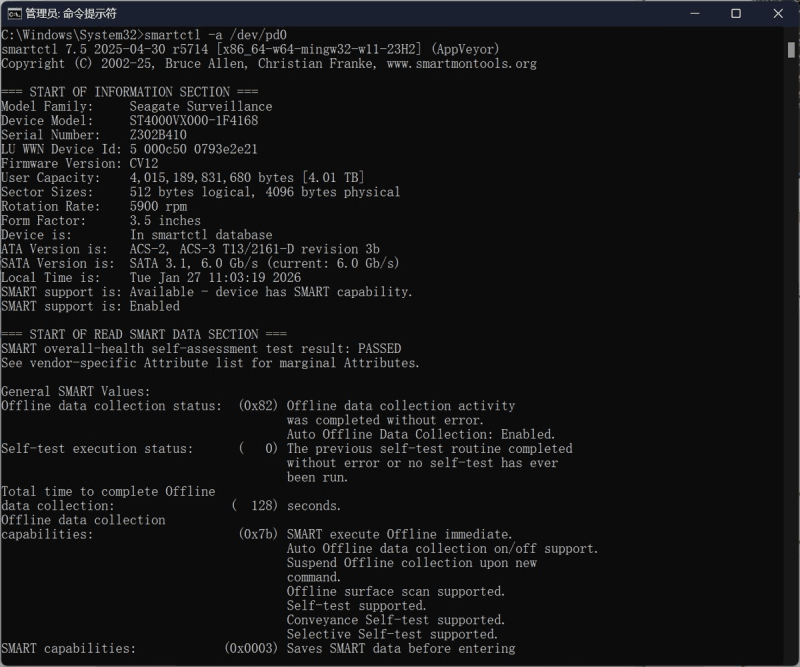
实现代码
from pySMART import Device

sda = Device('/dev/sda')
print(sda)
# <ATA device on /dev/sda mod:ST4000VX000-1F4168 sn:Z302B410>
smartctl -H /dev/sda

=== START OF READ SMART DATA SECTION ===
SMART overall-health self-assessment test result: PASSED
Please note the following marginal Attributes:
ID# ATTRIBUTE_NAME          FLAG     VALUE WORST THRESH TYPE      UPDATED  WHEN_FAILED RAW_VALUE
190 Airflow_Temperature_Cel 0x0022   063   045   045    Old_age   Always   In_the_past 37 (Min/Max 20/37)
smartctl -A /dev/sda

=== START OF READ SMART DATA SECTION ===
SMART Attributes Data Structure revision number: 10
Vendor Specific SMART Attributes with Thresholds:
ID# ATTRIBUTE_NAME          FLAG     VALUE WORST THRESH TYPE      UPDATED  WHEN_FAILED RAW_VALUE
  1 Raw_Read_Error_Rate     0x000f   108   092   006    Pre-fail  Always       -       16945048
  3 Spin_Up_Time            0x0003   091   091   000    Pre-fail  Always       -       0
  4 Start_Stop_Count        0x0032   037   037   020    Old_age   Always       -       65535
  5 Reallocated_Sector_Ct   0x0033   100   100   010    Pre-fail  Always       -       0
  7 Seek_Error_Rate         0x000f   088   060   030    Pre-fail  Always       -       713392046
  9 Power_On_Hours          0x0032   064   064   000    Old_age   Always       -       31977
 10 Spin_Retry_Count        0x0013   100   100   097    Pre-fail  Always       -       0
 12 Power_Cycle_Count       0x0032   087   037   020    Old_age   Always       -       13610
184 End-to-End_Error        0x0032   100   100   099    Old_age   Always       -       0
187 Reported_Uncorrect      0x0032   001   001   000    Old_age   Always       -       348
188 Command_Timeout         0x0032   100   099   000    Old_age   Always       -       8590065666
189 High_Fly_Writes         0x003a   100   100   000    Old_age   Always       -       0
190 Airflow_Temperature_Cel 0x0022   063   045   045    Old_age   Always   In_the_past 37 (Min/Max 20/37)
191 G-Sense_Error_Rate      0x0032   100   100   000    Old_age   Always       -       0
192 Power-Off_Retract_Count 0x0032   029   029   000    Old_age   Always       -       143207
193 Load_Cycle_Count        0x0032   024   024   000    Old_age   Always       -       152355
194 Temperature_Celsius     0x0022   037   055   000    Old_age   Always       -       37 (0 12 0 0 0)
197 Current_Pending_Sector  0x0012   100   100   000    Old_age   Always       -       96
198 Offline_Uncorrectable   0x0010   100   100   000    Old_age   Offline      -       96
199 UDMA_CRC_Error_Count    0x003e   200   200   000    Old_age   Always       -       0
Reallocated_Sector_Ct(ID 5):坏道重映射数量
Current_Pending_Sector(ID 197):待处理坏扇区
Temperature(ID 194):温度是否过高
smartctl -c /dev/sda

=== START OF READ SMART DATA SECTION ===
General SMART Values:
Offline data collection status:  (0x82) Offline data collection activity
                                        was completed without error.
                                        Auto Offline Data Collection: Enabled.
Self-test execution status:      (   0) The previous self-test routine completed
                                        without error or no self-test has ever
                                        been run.
Total time to complete Offline
data collection:                (  128) seconds.
Offline data collection
capabilities:                    (0x7b) SMART execute Offline immediate.
                                        Auto Offline data collection on/off support.
                                        Suspend Offline collection upon new
                                        command.
                                        Offline surface scan supported.
                                        Self-test supported.
                                        Conveyance Self-test supported.
                                        Selective Self-test supported.
SMART capabilities:            (0x0003) Saves SMART data before entering
                                        power-saving mode.
                                        Supports SMART auto save timer.
Error logging capability:        (0x01) Error logging supported.
                                        General Purpose Logging supported.
Short self-test routine
recommended polling time:        (   1) minutes.
Extended self-test routine
recommended polling time:        ( 527) minutes.
Conveyance self-test routine
recommended polling time:        (   2) minutes.
SCT capabilities:              (0x10b9) SCT Status supported.
                                        SCT Error Recovery Control supported.
                                        SCT Feature Control supported.
                                        SCT Data Table supported.
1-2 分钟
smartctl -t short /dev/sda
几十分钟到几小时
smartctl -t long /dev/sda
smartctl -l selftest /dev/sda

=== START OF READ SMART DATA SECTION ===
SMART Self-test log structure revision number 1
Num  Test_Description    Status                  Remaining  LifeTime(hours)  LBA_of_first_error
# 1  Short offline       Completed without error       00%     31977         -
到此这篇关于Python读取硬盘所有信息的完整方法的文章就介绍到这了,更多相关Python读取硬盘信息内容请搜索风君子博客以前的文章或继续浏览下面的相关文章希望大家以后多多支持风君子博客!
您可能感兴趣的文章:
- python使用wmi模块获取windows下硬盘信息的方法
- python使用WMI检测windows系统信息、硬盘信息、网卡信息的方法
- 使用Python获取CPU、内存和硬盘等windowns系统信息的2个例子