文章目录
- 示例如下: def testQueryStudent(playwright: Playwright): “”” 查询学生 “”” url = ‘http://localhost:8090/studentFindById’ param = { ‘id’: 105 } request_context = playwright.request.new_context() response = request_context.get(url=url, params=param) assert response.ok assert response.json() print(‘n’, response.json()) 效果:
- 示例代码: def testAddStudent(playwright: Playwright): “”” 新增学生 :return: “”” url = ‘http://localhost:8090/studentAdd’ request_body = { “className”: “banji”, “courseName”: “wuli”, “email”: “ales@qq.com”, “name”: “ales”, “score”: 70, “sex”: “boy”, “studentId”: “92908290” } header = {“Content-Type”: “application/json”} request_context = playwright.request.new_context() response = request_context.post(url=url, headers=header, data=request_body) assert response.ok assert response.json() print(‘n’, response.json()) 效果:
- 示例代码: def testUpdateStudents(playwright: Playwright): “”” 修改学生 “”” url = ‘http://localhost:8090/studentUpdate/100’ param = { ‘studentId’: “id” + str(100), ‘name’: “name” + str(100), ‘score’: 100, “sex”: “girl”, “className”: “class” + str(100), “courseName”: “course” + str(100), “email”: str(100) + “email@qq.com” } request_context = playwright.request.new_context() response = request_context.put(url=url, form=param) assert response.ok assert response.json() print(‘n’, response.json()) 效果:
- 示例代码: def testDeleteStudents(playwright: Playwright): “”” 删除学生 “”” url = ‘http://localhost:8090/studentDelete/’ + str(105) request_context = playwright.request.new_context() response = request_context.delete(url=url) assert response.ok assert response.json() print(‘n’, response.json()) 效果:
- 这个是特例吧,按照官方给的方法,我真的是死活也不能成功,一直都是提示上上传文件不能为空,也不到为啥,结果我用了一个替代方案,就是抓包模拟的构造入参,才成功,也是曲折呀。 示例代码: def test_upload_file(playwright: Playwright): ”’ 上传文件 :param playwright: :return: ”’ # 创建请求上下文 request_context = playwright.request.new_context() # 定义上传文件的URL upload_url = “http://localhost:8090/fileUpload” # 文件路径 file_path = “d:/demo.txt” # 获取文件名和MIME类型 filename = file_path.split(‘/’)[-1] mime_type, _ = mimetypes.guess_type(file_path) if not mime_type: mime_type = ‘application/octet-stream’ # 读取文件内容 with open(file_path, ‘rb’) as file: file_content = file.read() # 构造multipart/form-data的边界字符串 boundary = ‘———————‘ + str(random.randint(1e28, 1e29 – 1)) # 构造请求体 body = ( f’–{boundary}rn’ f’Content-Disposition: form-data; name=”file”; filename=”{filename}”rn’ f’Content-Type: {mime_type}rnrn’ f'{file_content.decode(“utf-8”) if mime_type.startswith(“text/”) else file_content.hex()}’ f’rn–{boundary}–rn’ ).encode(‘utf-8’) # 设置请求头 headers = { ‘Content-Type’: f’multipart/form-data; boundary={boundary}’, } # 发起POST请求 response = request_context.post(upload_url, data=body, headers=headers) # 检查响应 assert response.status == 200, f”Upload failed with status: {response.status}” assert response.ok assert response.json() print(‘n’, response.json()) 效果: 官方写法: # 读取文件内容 with open(file_path, ‘rb’) as file: file_content = file.read() response = request_context.post(upload_url, multipart={ “fileField”: { “name”: “demo.txt”, “mimeType”: “text/plain”, “buffer”: file_content, } }) print(‘n’, response.json()) 效果: 官方写法,我不知道为啥就是不成功,有大侠知道吗,还请帮忙给个例子,小弟不胜感激!
目录
- 怎么用
- 实例化request对象
- 实战举栗
- 1、GET请求
- 2、POST请求
- 3、PUT请求
- 4、DELETE请求
- 5、上传文件
- 写在最后
在当今的自动化测试领域,结合Web UI和API接口测试已成为提升测试覆盖率和效率的关键。Playwright作为一个强大的自动化测试工具,除了在Web UI测试中大放异彩,还能与Python结合,实现强大的API接口测试功能。本文将带你探索如何使用Playwright和Python进行高效的API接口测试。
Playwright除了在Web UI测试中的出色表现,如何通过与Python结合,开展API接口测试,并实现高效的自动化测试?
playwright也是可以做接口测试的,但个人觉得还是没有requests库强大,但和selenium相比的话,略胜一筹,毕竟支持API登录,也就是说可以不用交互直接调用接口操作了。
既然是API的测试了,那肯定就别搞UI自动化那套,搞什么浏览器交互,那叫啥API测试,纯属扯淡。
也不像有些博主更懒,直接贴的官方例子,难道我用你再帮我复制一次?
来下面,说明下使用playwright如何做API测试?
示例代码如下:
playwright.request.new_context()
没错,实例化后,就是调API,看吧,其实也不是很难是不是?
这里用我自己写的学生管理系统的部分接口来做演示,并对部分常用api做以说明,代码示例都是用同步的写法。
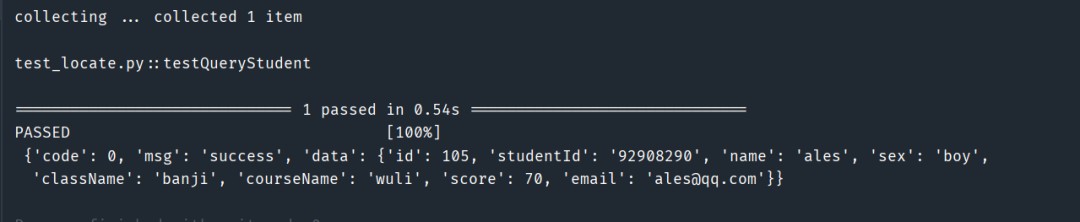
示例如下:
def testQueryStudent(playwright: Playwright):
    """
    查询学生
    """
    url = 'http://localhost:8090/studentFindById'
    param = {
        'id': 105
    }
    request_context = playwright.request.new_context()
    response = request_context.get(url=url, params=param)
    assert response.ok
    assert response.json()
    print('n', response.json())
效果:
示例代码:
def testAddStudent(playwright: Playwright):
    """
    新增学生
    :return:
    """
    url = 'http://localhost:8090/studentAdd'
    request_body = {
        "className": "banji",
        "courseName": "wuli",
        "email": "ales@qq.com",
        "name": "ales",
        "score": 70,
        "sex": "boy",
        "studentId": "92908290"
    }
    header = {"Content-Type": "application/json"}
    request_context = playwright.request.new_context()
    response = request_context.post(url=url, headers=header, data=request_body)
    assert response.ok
    assert response.json()
    print('n', response.json())
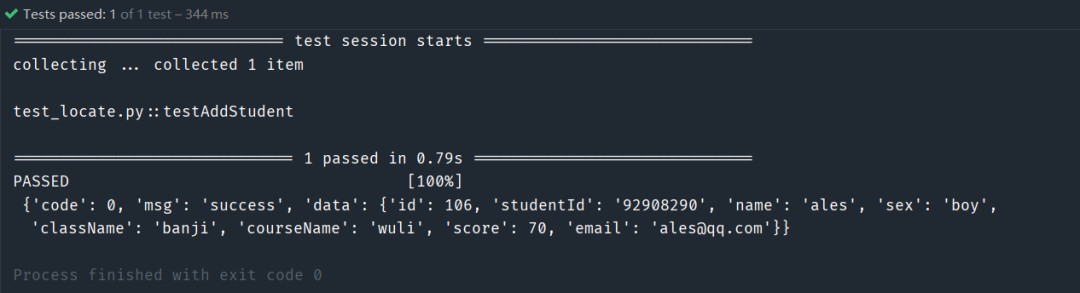
效果:
示例代码:
def testUpdateStudents(playwright: Playwright):
    """
    修改学生
    """
    url = 'http://localhost:8090/studentUpdate/100'
    param = {
        'studentId': "id" + str(100),
        'name': "name" + str(100),
        'score': 100,
        "sex": "girl",
        "className": "class" + str(100),
        "courseName": "course" + str(100),
        "email": str(100) + "email@qq.com"

    }
    request_context = playwright.request.new_context()
    response = request_context.put(url=url, form=param)
    assert response.ok
    assert response.json()
    print('n', response.json())
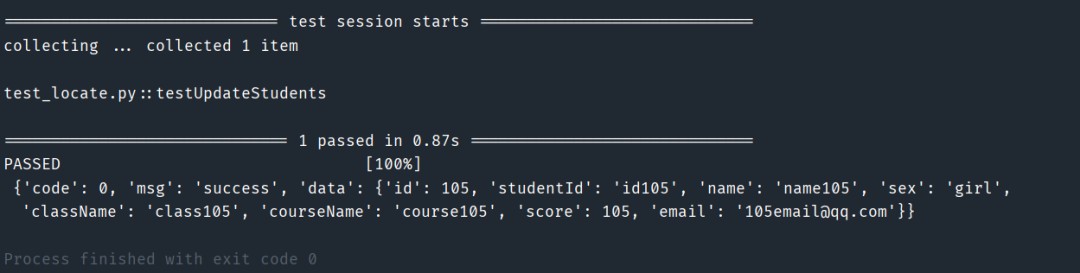
效果:
示例代码:
def testDeleteStudents(playwright: Playwright):
    """
    删除学生
    """
    url = 'http://localhost:8090/studentDelete/' + str(105)
    request_context = playwright.request.new_context()
    response = request_context.delete(url=url)
    assert response.ok
    assert response.json()
    print('n', response.json())
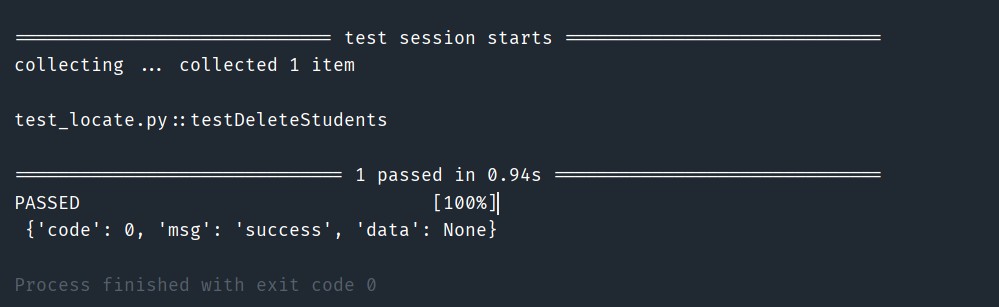
效果:
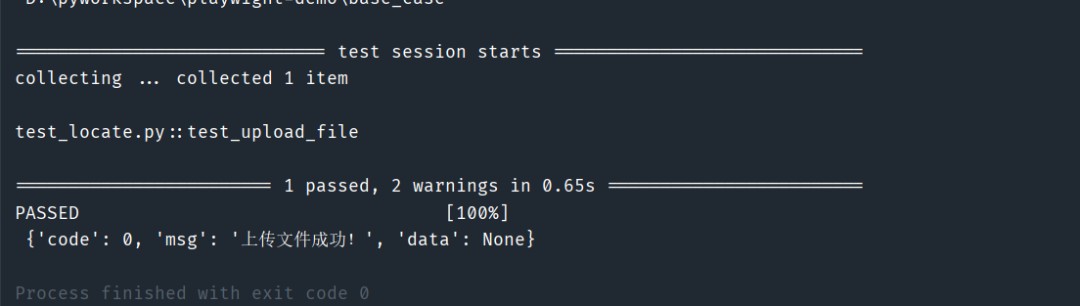
这个是特例吧,按照官方给的方法,我真的是死活也不能成功,一直都是提示上上传文件不能为空,也不到为啥,结果我用了一个替代方案,就是抓包模拟的构造入参,才成功,也是曲折呀。
示例代码:
def test_upload_file(playwright: Playwright):
    '''
    上传文件
    :param playwright:
    :return:
    '''
    # 创建请求上下文
    request_context = playwright.request.new_context()

    # 定义上传文件的URL
    upload_url = "http://localhost:8090/fileUpload"

    # 文件路径
    file_path = "d:/demo.txt"

    # 获取文件名和MIME类型
    filename = file_path.split('/')[-1]
    mime_type, _ = mimetypes.guess_type(file_path)
    if not mime_type:
        mime_type = 'application/octet-stream'

    # 读取文件内容
    with open(file_path, 'rb') as file:
        file_content = file.read()

    # 构造multipart/form-data的边界字符串
    boundary = '---------------------' + str(random.randint(1e28, 1e29 - 1))

    # 构造请求体
    body = (
        f'--{boundary}rn'
        f'Content-Disposition: form-data; name="file"; filename="{filename}"rn'
        f'Content-Type: {mime_type}rnrn'
        f'{file_content.decode("utf-8") if mime_type.startswith("text/") else file_content.hex()}'
        f'rn--{boundary}--rn'
    ).encode('utf-8')

    # 设置请求头
    headers = {
        'Content-Type': f'multipart/form-data; boundary={boundary}',
    }
    # 发起POST请求
    response = request_context.post(upload_url, data=body, headers=headers)

    # 检查响应
    assert response.status == 200, f"Upload failed with status: {response.status}"
    assert response.ok
    assert response.json()
    print('n', response.json())
效果:
官方写法:
# 读取文件内容
with open(file_path, 'rb') as file:
    file_content = file.read()
    response = request_context.post(upload_url, multipart={
        "fileField": {
            "name": "demo.txt",
            "mimeType": "text/plain",
            "buffer": file_content,
        }
    })
print('n', response.json())
效果:

官方写法,我不知道为啥就是不成功,有大侠知道吗,还请帮忙给个例子,小弟不胜感激!
随着Web应用的发展,API接口测试的重要性日益突出。开发人员和测试人员必须确保API接口的可靠性和稳定性,以保证应用的正常运行和用户体验的提升。通过使用Playwright进行全面的API接口测试,可以有效提高测试效率和覆盖率。
使用Playwright进行API接口测试,不仅能够高效地验证API的各项功能,还能确保Web应用的整体性能和可靠性。通过本文的介绍,你已经掌握了如何使用Playwright进行GET、POST、PUT、DELETE和上传文件的API接口测试。
通过本文的详细解析,我们展示了如何使用Playwright进行各种常见的API接口测,掌握Playwright,让你的API测试如虎添翼,轻松应对各种复杂的测试场景。
到此这篇关于Python使用Playwright进行API接口测试的文章就介绍到这了,更多相关Python Playwright API接口测试内容请搜索风君子博客以前的文章或继续浏览下面的相关文章希望大家以后多多支持风君子博客!
您可能感兴趣的文章:
- 基于Python Playwright进行前端性能测试的脚本实现
- Node.js使用Playwright自动化测试页面性能
- Playwright中Web自动化测试的实现
- Python中Playwright模块进行自动化测试的实现
- 使用Python中的Playwright制作测试视频的实现步骤
- 一款强大的端到端测试工具Playwright介绍
- 如何使用Playwright对Java API实现自动视觉测试
- 使用Playwright进行移动端模拟测试的实现