 编程部落
编程部落文章目录
- #!/usr/bin/python # coding:utf8 class GetHtml(object): def __init__(self): self._html_head = “””<html><body style=”background-color:#FAEBD7;”>””” self._format_html_foot = “””<p style=”font-family: verdana,arial, sans-serif;font-size:10px;font-weight:lighter;”>%s</p> “”” self._format_html_head = “””<p style=”font-family: verdana,arial, sans-serif;font-size:%dpx;font-weight:bold;align=center”>%s</p> “”” self._html_tail = “</body></html>” self._html_p_head = “””<p style=”font-family: verdana,arial, sans-serif;font-size:12px;font-weight:bold;”>%s</p> “”” self._table_caption = “”” <caption style=”caption-side:top;font-size:12px;font-weight:bold;”>%s</caption> “”” self._table_head = “””<table style=”font-family: verdana,arial, sans-serif;font-size:11px;color:#000000;border-width: 1px;border-color: #222C44;border-collapse: collapse;” border=”1″><tr> “”” self._format_table_th = “””<th style=”border-width: 1px;padding: 8px;border-style: solid;border-color: #98bf21;background-color: #A7C942;” nowrap>%s</th> “”” self._format_table_td = “””<td style=”border-width: 1px;padding: 8px;text-align: right;border-style: solid;border-color: #98bf21;background-color: #EAF2D3;” align=”center” nowrap>%s</td> “”” self._table_tail = “</table>” self._content = “” self._table_html = [] def add_table(self, table_title, th_info, td_info_list): table_str = “” table_p_head = self._html_p_head % (str(table_title)) table_str = table_p_head + self._table_head # th table_str += “<tr>” for th in th_info: temp_str = self._format_table_th % (str(th)) table_str += temp_str table_str += “</tr>” # td for td_info in td_info_list: table_str += “<tr>” for td in td_info: temp_str = self._format_table_td % (str(td)) table_str += temp_str table_str += “</tr>” table_str += self._table_tail self._table_html.append(table_str) def add_head(self, head, found_size=18): head_str = self._format_html_head % (found_size, str(head)) self._table_html.append(head_str) def add_foot(self, foot): foot_str = self._format_html_foot % (str(foot)) self._table_html.append(foot_str) @staticmethod def concat_color(a, b): “””通过a,b对比给a增加高亮显示””” cmp_a, cmp_b = float(str(a).strip(‘%’)), float(str(b).strip(‘%’)) if cmp_a > cmp_b: new_a = ‘<font color=”red”>’ + ‘{}↑’.format(a) + ‘</font>’ elif cmp_a < cmp_b: new_a = ‘<font color=”green”>’ + ‘{}↓’.format(a) + ‘</font>’ else: new_a = a return new_a def output_html(self): “””输出HTML文件””” html_content = self._html_head for s in self._table_html: html_content += s html_content += self._html_tail return html_content
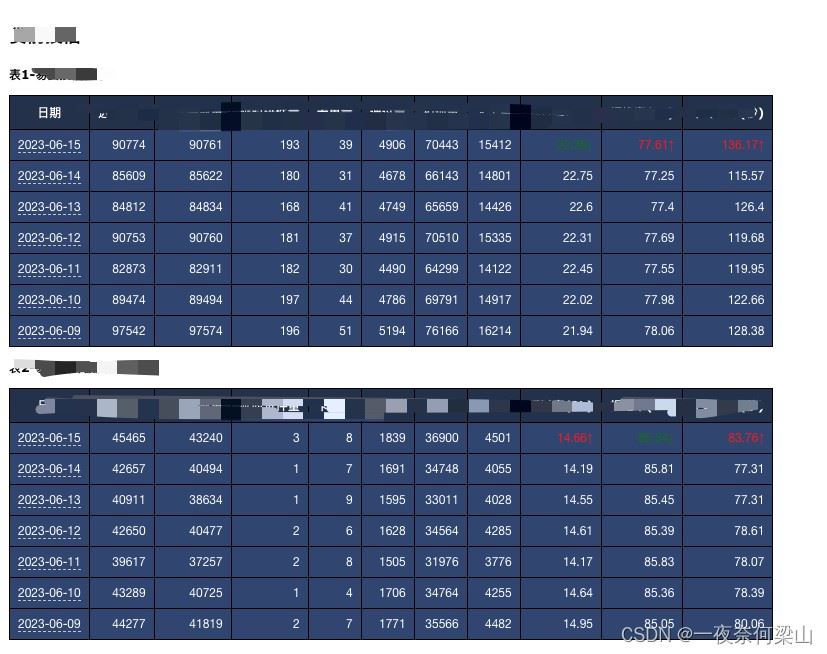
- 生成html对象: html = GetHtml() 给html新增标题: html.add_head(“标题”) html种增加统计表格: total_table = list() total_header = [“日期”, “进件总量”, “进件完成量”, “延时进件量”, “卡单量”, “通过量”, “拒绝量”, “人工量”, “通过率(%)”, “拒绝率(%)”, “平均耗时(秒)”] # TODO: 查询数据逻辑, 追加到total_table中 if len(total_table) >= 2: # 通过率 拒绝率 平均耗时 增加高亮显示 total_table[0][8] = html.concat_color(a=total_table[0][8], b=total_table[1][8]) total_table[0][9] = html.concat_color(a=total_table[0][9], b=total_table[1][9]) total_table[0][10] = html.concat_color(a=total_table[0][10], b=total_table[1][10]) html.add_table(“表{}-{}授信机审”.format(num, get_product_chinese_name(product_name)), total_header, total_table) 输出html整个页面:html.output_html()
目录
- python生成日报
- 一:日报生成工具
- 二:日报工具使用方式
- 三:最终日报生成展示
- 总结
#!/usr/bin/python
# coding:utf8

class GetHtml(object):
    def __init__(self):
        self._html_head = """<html><body style="background-color:#FAEBD7;">"""
        self._format_html_foot = """<p style="font-family: verdana,arial,
        sans-serif;font-size:10px;font-weight:lighter;">%s</p> """
        self._format_html_head = """<p style="font-family: verdana,arial,
        sans-serif;font-size:%dpx;font-weight:bold;align=center">%s</p> """
        self._html_tail = "</body></html>"
        self._html_p_head = """<p style="font-family: verdana,arial,
        sans-serif;font-size:12px;font-weight:bold;">%s</p> """

        self._table_caption = """ <caption style="caption-side:top;font-size:12px;font-weight:bold;">%s</caption> """

        self._table_head = """<table style="font-family: verdana,arial,
        sans-serif;font-size:11px;color:#000000;border-width: 1px;border-color: #222C44;border-collapse: collapse;"
        border="1"><tr> """
        self._format_table_th = """<th style="border-width: 1px;padding: 8px;border-style: solid;border-color:
        #98bf21;background-color: #A7C942;" nowrap>%s</th> """

        self._format_table_td = """<td style="border-width: 1px;padding: 8px;text-align: right;border-style:
        solid;border-color: #98bf21;background-color: #EAF2D3;" align="center" nowrap>%s</td> """
        self._table_tail = "</table>"
        self._content = ""

        self._table_html = []

    def add_table(self, table_title, th_info, td_info_list):
        table_str = ""
        table_p_head = self._html_p_head % (str(table_title))
        table_str = table_p_head + self._table_head
        # th
        table_str += "<tr>"
        for th in th_info:
            temp_str = self._format_table_th % (str(th))
            table_str += temp_str
        table_str += "</tr>"
        # td
        for td_info in td_info_list:
            table_str += "<tr>"
            for td in td_info:
                temp_str = self._format_table_td % (str(td))
                table_str += temp_str
            table_str += "</tr>"
        table_str += self._table_tail
        self._table_html.append(table_str)

    def add_head(self, head, found_size=18):
        head_str = self._format_html_head % (found_size, str(head))
        self._table_html.append(head_str)

    def add_foot(self, foot):
        foot_str = self._format_html_foot % (str(foot))
        self._table_html.append(foot_str)

    @staticmethod
    def concat_color(a, b):
        """通过a,b对比给a增加高亮显示"""
        cmp_a, cmp_b = float(str(a).strip('%')), float(str(b).strip('%'))
        if cmp_a > cmp_b:
            new_a = '<font color="red">' + '{}↑'.format(a) + '</font>'
        elif cmp_a < cmp_b:
            new_a = '<font color="green">' + '{}↓'.format(a) + '</font>'
        else:
            new_a = a
        return new_a

    def output_html(self):
        """输出HTML文件"""
        html_content = self._html_head
        for s in self._table_html:
            html_content += s
        html_content += self._html_tail
        return html_content
- 生成html对象: html = GetHtml()
- 给html新增标题: html.add_head(“标题”)
html种增加统计表格:
total_table = list()
        total_header = ["日期", "进件总量", "进件完成量", "延时进件量", "卡单量", "通过量", "拒绝量", "人工量",
                        "通过率(%)", "拒绝率(%)", "平均耗时(秒)"]

        # TODO: 查询数据逻辑, 追加到total_table中

        if len(total_table) >= 2:
            # 通过率 拒绝率 平均耗时 增加高亮显示
            total_table[0][8] = html.concat_color(a=total_table[0][8], b=total_table[1][8])
            total_table[0][9] = html.concat_color(a=total_table[0][9], b=total_table[1][9])
            total_table[0][10] = html.concat_color(a=total_table[0][10], b=total_table[1][10])

        html.add_table("表{}-{}授信机审".format(num, get_product_chinese_name(product_name)), total_header, total_table)
- 输出html整个页面:html.output_html()
以上为个人经验,希望能给大家一个参考,也希望大家多多支持风君子博客。
您可能感兴趣的文章:
- Python使用Pandas生成日报的实现代码
- Python实现生成日报的示例代码
- 利用Python实现自动生成数据日报
- python生成每日报表数据(Excel)并邮件发送的实例