 编程部落
编程部落文章目录
- 创建1_快速复制JPG文件.py文件 “”” 功能:快速复制JPG文件 作者:华卫 日期:2025年10月31日 “”” import os import shutil “”” shutil是”shell utilities”(shell 工具)的缩写,它提供了 一系列高级的文件和目录操作函数,让你可以方便地在Python程序 中执行类似于操作系统命令行中的文件管理操作,比如复制、移动、 删除、打包等。 “”” # 获取当前目录下的所有条目 all_items = os.listdir(os.getcwd()) # 过滤:只保留文件,排除文件夹 dir_files = [item for item in all_items if os.path.isfile(item)] print(f’当前文件夹里有{len(dir_files)}个文件:{dir_files}’) new_dir = input(‘n输入目标文件夹:’) while os.path.exists(new_dir): print(f”温馨提示:[{new_dir}]已存在~”) new_dir = input(‘n输入目标文件夹:’) os.mkdir(new_dir) print(‘nJPG图片文件开始复制……’) for file in dir_files: if file.endswith(‘.jpg’): shutil.copy(file, new_dir + ‘/’ + file) print(f'[{file}]文件已复制~’) print(f’n[{new_dir}]文件夹里的文件:{os.listdir(new_dir)}’) 代码说明:本程序用于快速筛选并复制当前目录下的所有 JPG 图片文件到新建的目标文件夹。通过os.listdir()获取文件列表,过滤出文件后,用户输入新文件夹名,程序自动创建并复制所有以 .jpg 结尾的文件,最后显示目标文件夹内容,实现简单高效的图片批量复制功能。 运行程序,测试效果 查看复制在指定文件夹里的图片文件
- 创建2_复制并统计图片文件.py文件 “”” 功能:复制并统计图片 作者:华卫 日期:2025年10月31日 “”” import os import shutil # 获取当前目录下的所有条目 all_items = os.listdir(os.getcwd()) # 过滤:只保留文件,排除文件夹 dir_files = [item for item in all_items if os.path.isfile(item)] print(f’当前文件夹里有{len(dir_files)}个文件:{dir_files}’) cn_jpg = 0 cn_jpeg = 0 cn_png = 0 cn_gif = 0 cn_webp = 0 cn_bmp = 0 new_dir = input(‘n输入目标文件夹:’) while os.path.exists(new_dir): print(f”温馨提示:[{new_dir}]已存在~”) new_dir = input(‘n输入目标文件夹:’) os.mkdir(new_dir) print(‘n图片文件开始复制……’) for file in dir_files: if file.endswith(‘.jpg’): cn_jpg += 1 shutil.copy(file, new_dir + ‘/’ + file) print(f'[{file}]文件已复制~’) elif file.endswith(‘.jpeg’): cn_jpeg += 1 shutil.copy(file, new_dir + ‘/’ + file) print(f'[{file}]文件已复制~’) elif file.endswith(‘.png’): cn_png += 1 shutil.copy(file, new_dir + ‘/’ + file) print(f'[{file}]文件已复制~’) elif file.endswith(‘.gif’): cn_gif += 1 shutil.copy(file, new_dir + ‘/’ + file) print(f'[{file}]文件已复制~’) elif file.endswith(‘.webp’): cn_webp += 1 shutil.copy(file, new_dir + ‘/’ + file) print(f'[{file}]文件已复制~’) elif file.endswith(‘.bmp’): cn_bmp += 1 shutil.copy(file, new_dir + ‘/’ + file) print(f'[{file}]已复制~’) cn = cn_jpg + cn_jpeg + cn_png + cn_gif + cn_webp + cn_bmp print(f’n共复制了{cn}个图片文件~’) print(f'[jpg]文件个数:{cn_jpg}’) print(f'[jpeg]文件个数:{cn_jpeg}’) print(f'[png]文件个数:{cn_png}’) print(f'[gif]文件个数:{cn_gif}’) print(f'[webp]文件个数:{cn_webp}’) print(f'[bmp]文件个数:{cn_bmp}’) print(f’n[{new_dir}]文件夹里的文件:{os.listdir(new_dir)}’) 代码说明:本程序扫描当前目录,统计并复制常见格式的图片文件(JPG、PNG、GIF等)到新建的目标文件夹。复制过程中分类计数,最后输出各类图片数量及总复制数,并列出目标文件夹内容,实现图片文件的批量整理与统计功能。 运行程序,测试效果 查看复制到指定文件夹的各种图片文件
- 创建3_图片文件统一改名.py文件 “”” 功能:图片文件统一改名 作者:华卫 日期:2025年10月31日 “”” import os import shutil # 获取当前目录下的所有条目 all_items = os.listdir(os.getcwd()) # 过滤:只保留文件,排除文件夹 dir_files = [item for item in all_items if os.path.isfile(item)] print(f’当前文件夹里有{len(dir_files)}个文件:{dir_files}’) cn_jpg = 0 cn_jpeg = 0 cn_png = 0 cn_gif = 0 cn_webp = 0 cn_bmp = 0 counter = 0 new_dir = input(‘n输入目标文件夹:’) while os.path.exists(new_dir): print(f”温馨提示:[{new_dir}]已存在~”) new_dir = input(‘n输入目标文件夹:’) os.mkdir(new_dir) print(‘n图片文件开始复制……’) for file in dir_files: if file.endswith(‘.jpg’): counter += 1 cn_jpg += 1 shutil.copy(file, new_dir + ‘/’ + ‘file_’ + str(counter) + ‘.jpg’) print(f'[{file}]文件已复制~’) elif file.endswith(‘.jpeg’): counter += 1 cn_jpeg += 1 shutil.copy(file, new_dir + ‘/’ + ‘file_’ + str(counter) + ‘.jpeg’) print(f'[{file}]文件已复制~’) elif file.endswith(‘.png’): counter += 1 cn_png += 1 shutil.copy(file, new_dir + ‘/’ + ‘file_’ + str(counter) + ‘.png’) print(f'[{file}]文件已复制~’) elif file.endswith(‘.gif’): counter += 1 cn_gif += 1 shutil.copy(file, new_dir + ‘/’ + ‘file_’ + str(counter) + ‘.gif’) print(f'[{file}]文件已复制~’) elif file.endswith(‘.webp’): counter += 1 cn_webp += 1 shutil.copy(file, new_dir + ‘/’ + ‘file_’ + str(counter) + ‘.webp’) print(f'[{file}]文件已复制~’) elif file.endswith(‘.bmp’): counter += 1 cn_bmp += 1 shutil.copy(file, new_dir + ‘/’ + ‘file_’ + str(counter) + ‘.bmp’) print(f'[{file}]已复制~’) print(f’n共复制了{counter}个图片文件~’) print(f'[jpg]文件个数:{cn_jpg}’) print(f'[jpeg]文件个数:{cn_jpeg}’) print(f'[png]文件个数:{cn_png}’) print(f'[gif]文件个数:{cn_gif}’) print(f'[webp]文件个数:{cn_webp}’) print(f'[bmp]文件个数:{cn_bmp}’) print(f’n[{new_dir}]文件夹里的文件:{os.listdir(new_dir)}’) 代码说明:本程序将当前目录中的图片文件按类型统计,并复制到新建目标文件夹中,统一重命名为 file_1.jpg、file_2.png 等格式,实现文件名标准化。复制过程中分类计数,最后输出各类图片数量及总数量,并显示目标文件夹内容,便于统一管理图片文件。 运行程序,测试效果 查看复制到指定文件夹并规范命名的图片文件
目录
- 1. 实战概述
- 2. 实战任务
- 2.1 快速复制JPG文件
- 2.2 复制并统计图片文件
- 2.3 图片文件统一改名
- 3. 实战总结
本实战通过三个Python脚本,实现图片文件的批量复制、分类统计与统一重命名。利用os和shutil模块高效操作文件,自动化整理图片资源,提升文件管理效率,适用于日常数据整理与批量处理场景。
创建1_快速复制JPG文件.py文件
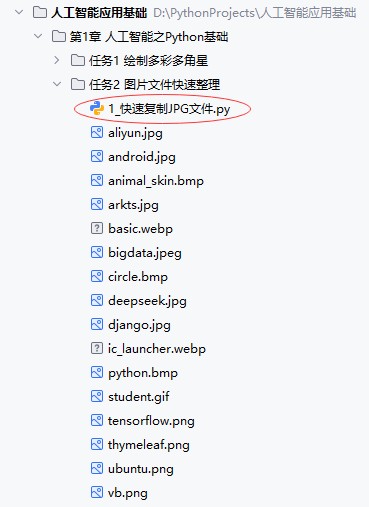
"""
功能:快速复制JPG文件
作者:华卫
日期:2025年10月31日
"""

import os
import shutil

"""
shutil是"shell utilities"(shell 工具)的缩写,它提供了
一系列高级的文件和目录操作函数,让你可以方便地在Python程序
中执行类似于操作系统命令行中的文件管理操作,比如复制、移动、
删除、打包等。
"""

# 获取当前目录下的所有条目
all_items = os.listdir(os.getcwd())

# 过滤:只保留文件,排除文件夹
dir_files = [item for item in all_items if os.path.isfile(item)]

print(f'当前文件夹里有{len(dir_files)}个文件:{dir_files}')

new_dir = input('n输入目标文件夹:')
while os.path.exists(new_dir):
    print(f"温馨提示:[{new_dir}]已存在~")
    new_dir = input('n输入目标文件夹:')
os.mkdir(new_dir)

print('nJPG图片文件开始复制……')
for file in dir_files:
    if file.endswith('.jpg'):
        shutil.copy(file, new_dir + '/' + file)
        print(f'[{file}]文件已复制~')

print(f'n[{new_dir}]文件夹里的文件:{os.listdir(new_dir)}')
代码说明:本程序用于快速筛选并复制当前目录下的所有 JPG 图片文件到新建的目标文件夹。通过os.listdir()获取文件列表,过滤出文件后,用户输入新文件夹名,程序自动创建并复制所有以 .jpg 结尾的文件,最后显示目标文件夹内容,实现简单高效的图片批量复制功能。
运行程序,测试效果

查看复制在指定文件夹里的图片文件
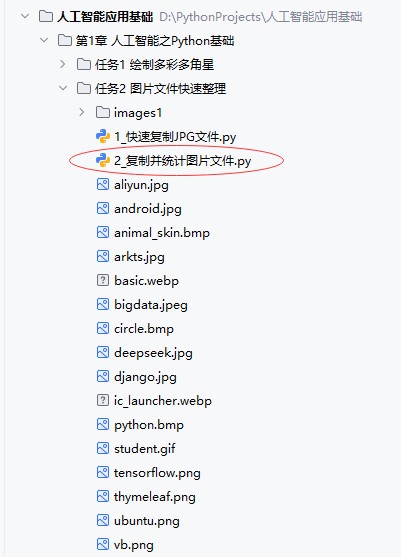
创建2_复制并统计图片文件.py文件
"""
功能:复制并统计图片
作者:华卫
日期:2025年10月31日
"""

import os
import shutil

# 获取当前目录下的所有条目
all_items = os.listdir(os.getcwd())

# 过滤:只保留文件,排除文件夹
dir_files = [item for item in all_items if os.path.isfile(item)]

print(f'当前文件夹里有{len(dir_files)}个文件:{dir_files}')

cn_jpg = 0
cn_jpeg = 0
cn_png = 0
cn_gif = 0
cn_webp = 0
cn_bmp = 0

new_dir = input('n输入目标文件夹:')
while os.path.exists(new_dir):
    print(f"温馨提示:[{new_dir}]已存在~")
    new_dir = input('n输入目标文件夹:')
os.mkdir(new_dir)

print('n图片文件开始复制……')
for file in dir_files:
    if file.endswith('.jpg'):
        cn_jpg += 1
        shutil.copy(file, new_dir + '/' + file)
        print(f'[{file}]文件已复制~')
    elif file.endswith('.jpeg'):
        cn_jpeg += 1
        shutil.copy(file, new_dir + '/' + file)
        print(f'[{file}]文件已复制~')
    elif file.endswith('.png'):
        cn_png += 1
        shutil.copy(file, new_dir + '/' + file)
        print(f'[{file}]文件已复制~')
    elif file.endswith('.gif'):
        cn_gif += 1
        shutil.copy(file, new_dir + '/' + file)
        print(f'[{file}]文件已复制~')
    elif file.endswith('.webp'):
        cn_webp += 1
        shutil.copy(file, new_dir + '/' + file)
        print(f'[{file}]文件已复制~')
    elif file.endswith('.bmp'):
        cn_bmp += 1
        shutil.copy(file, new_dir + '/' + file)
        print(f'[{file}]已复制~')

cn = cn_jpg + cn_jpeg + cn_png + cn_gif + cn_webp + cn_bmp
print(f'n共复制了{cn}个图片文件~')
print(f'[jpg]文件个数:{cn_jpg}')
print(f'[jpeg]文件个数:{cn_jpeg}')
print(f'[png]文件个数:{cn_png}')
print(f'[gif]文件个数:{cn_gif}')
print(f'[webp]文件个数:{cn_webp}')
print(f'[bmp]文件个数:{cn_bmp}')
print(f'n[{new_dir}]文件夹里的文件:{os.listdir(new_dir)}')
代码说明:本程序扫描当前目录,统计并复制常见格式的图片文件(JPG、PNG、GIF等)到新建的目标文件夹。复制过程中分类计数,最后输出各类图片数量及总复制数,并列出目标文件夹内容,实现图片文件的批量整理与统计功能。
运行程序,测试效果

查看复制到指定文件夹的各种图片文件

创建3_图片文件统一改名.py文件
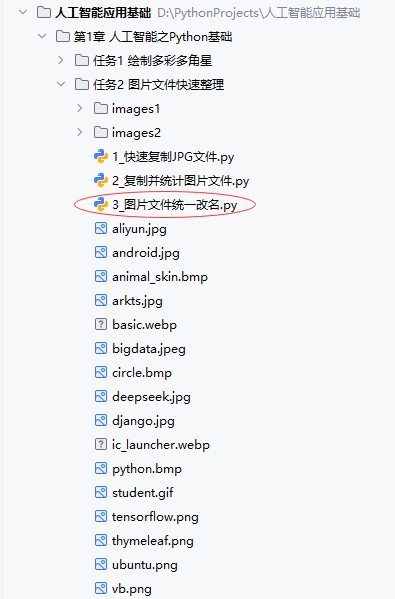
"""
功能:图片文件统一改名
作者:华卫
日期:2025年10月31日
"""

import os
import shutil

# 获取当前目录下的所有条目
all_items = os.listdir(os.getcwd())

# 过滤:只保留文件,排除文件夹
dir_files = [item for item in all_items if os.path.isfile(item)]

print(f'当前文件夹里有{len(dir_files)}个文件:{dir_files}')

cn_jpg = 0
cn_jpeg = 0
cn_png = 0
cn_gif = 0
cn_webp = 0
cn_bmp = 0
counter = 0

new_dir = input('n输入目标文件夹:')
while os.path.exists(new_dir):
    print(f"温馨提示:[{new_dir}]已存在~")
    new_dir = input('n输入目标文件夹:')
os.mkdir(new_dir)

print('n图片文件开始复制……')
for file in dir_files:
    if file.endswith('.jpg'):
        counter += 1
        cn_jpg += 1
        shutil.copy(file, new_dir + '/' + 'file_' + str(counter) + '.jpg')
        print(f'[{file}]文件已复制~')
    elif file.endswith('.jpeg'):
        counter += 1
        cn_jpeg += 1
        shutil.copy(file, new_dir + '/' + 'file_' + str(counter) + '.jpeg')
        print(f'[{file}]文件已复制~')
    elif file.endswith('.png'):
        counter += 1
        cn_png += 1
        shutil.copy(file, new_dir + '/' + 'file_' + str(counter) + '.png')
        print(f'[{file}]文件已复制~')
    elif file.endswith('.gif'):
        counter += 1
        cn_gif += 1
        shutil.copy(file, new_dir + '/' + 'file_' + str(counter) + '.gif')
        print(f'[{file}]文件已复制~')
    elif file.endswith('.webp'):
        counter += 1
        cn_webp += 1
        shutil.copy(file, new_dir + '/' + 'file_' + str(counter) + '.webp')
        print(f'[{file}]文件已复制~')
    elif file.endswith('.bmp'):
        counter += 1
        cn_bmp += 1
        shutil.copy(file, new_dir + '/' + 'file_' + str(counter) + '.bmp')
        print(f'[{file}]已复制~')

print(f'n共复制了{counter}个图片文件~')
print(f'[jpg]文件个数:{cn_jpg}')
print(f'[jpeg]文件个数:{cn_jpeg}')
print(f'[png]文件个数:{cn_png}')
print(f'[gif]文件个数:{cn_gif}')
print(f'[webp]文件个数:{cn_webp}')
print(f'[bmp]文件个数:{cn_bmp}')
print(f'n[{new_dir}]文件夹里的文件:{os.listdir(new_dir)}')
代码说明:本程序将当前目录中的图片文件按类型统计,并复制到新建目标文件夹中,统一重命名为 file_1.jpg、file_2.png 等格式,实现文件名标准化。复制过程中分类计数,最后输出各类图片数量及总数量,并显示目标文件夹内容,便于统一管理图片文件。
运行程序,测试效果
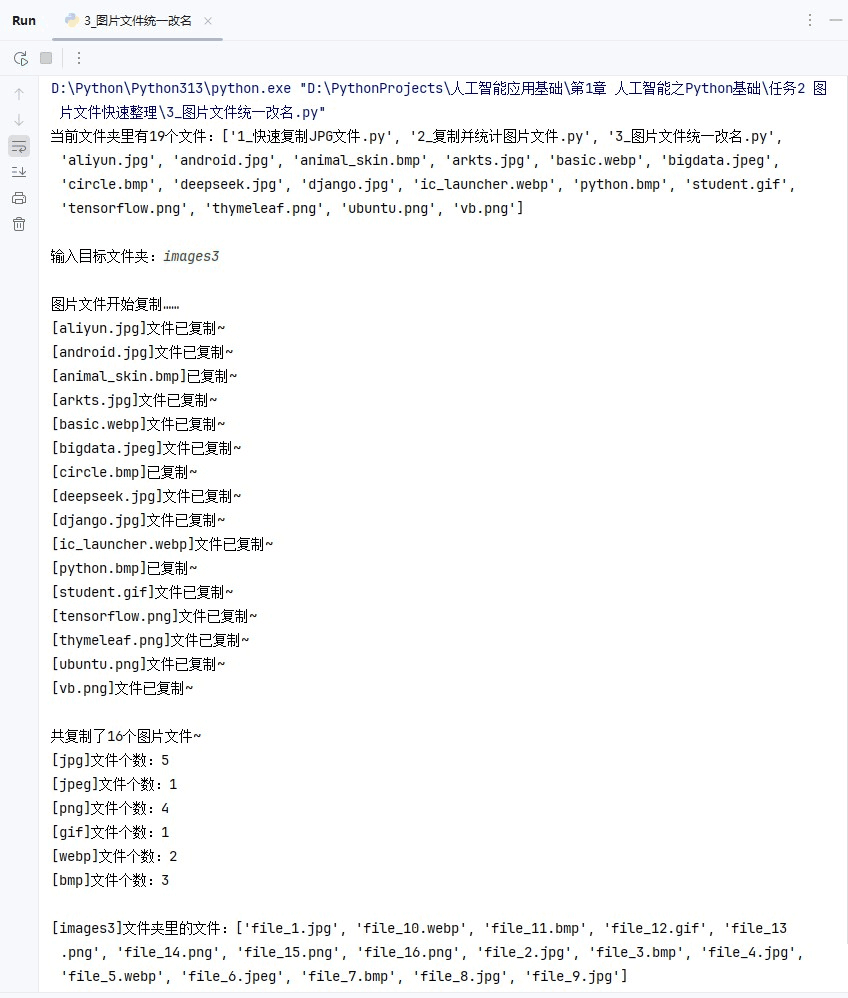
查看复制到指定文件夹并规范命名的图片文件

本次Python文件操作实战通过三个递进式项目,系统掌握了利用os和shutil模块进行自动化文件管理的核心技能。从基础的JPG文件复制,到支持多格式图片的分类统计与批量复制,再到实现统一编号重命名,逐步提升了文件处理的智能化水平。实践过程中,深入理解了os.listdir()、os.path.isfile()、shutil.copy()等关键函数的应用,学会了如何通过条件判断、循环控制和字符串操作实现复杂逻辑。整个流程实现了图片资源的高效整理与标准化管理,不仅提升了数据处理效率,也强化了Python在实际工作中的应用能力,为后续开发更复杂的文件管理工具奠定了坚实基础。
以上就是Python脚本实现快速整理图片文件的详细内容,更多关于Python文件整理的资料请关注风君子博客其它相关文章!
您可能感兴趣的文章:
- 使用Python编写一个简单的自动整理文件脚本
- Python实现全自动文件整理的操作教程
- 基于Python开发一个交互式文件分类整理工具
- 使用Python进行一键整理文件,自动分类DOCX与PDF
- 使用Python实现自动化整理文件的详细教程
- Python自动化批量重命名与整理文件系统
- Python重复文件批量整理工具的设计与实现
- Python基于面向对象做一个文件夹整理工具
- 详解Python如何通过文件后缀整理文件夹