
Python连接MySQL、PostgreSQL数据库实现过程

Written by

in

文章目录
  • Python连接MySQL、PostgreSQL数据库需要导入相关的模块,分别是”pymysql“和”psycopg2“模块,我们可以在Pycharm工具中直接搜索安装对应的库然后导入即可,两个数据库连接方式基本一致,所以只拿其中一个作为演示。 如果工具安装失败(有可能是网络原因),也可以使用pip命令进行安装 >>> pip3 install pymysql,psycopg2 >>> #多环境用户需要主要pip版本 如果你的系统不支持 pip 命令,可以使用以下方式安装: 1、使用 git 命令下载安装包安装(你也可以手动下载): >>> git clone https://github.com/PyMySQL/PyMySQL >>> cd PyMySQL/ >>> python3 setup.py install 2、如果需要制定版本号,可以使用 curl 命令来安装: >>> # X.X 为 PyMySQL 的版本号 >>> curl -L https://github.com/PyMySQL/PyMySQL/tarball/pymysql-X.X | tar xz >>> cd PyMySQL* >>> python3 setup.py install >>> # 现在你可以删除 PyMySQL* 目录
  • 连接数据库会用到的参数: database – 数据库名称 user – 用户名 password – 密码 host – 服务器地址 (如果不提供默认连接Unix Socket) port – 连接端口 (默认5432) 用pymysql模块中的connect连接数据库,同时用cursor()函数创建游标,用于接收返回的结果。 这里返回了一个游标实例对象,说明你已经连接成功了。
  • 接下来我们可以使用 .execute 对数据库进行一系列的增删改查操作 运行成功后就可以在电脑上的数据库中查找到相应的变化啦,最后记得关闭数据库的连接,以下是查询结果:
  • 我是通过读取配置文件读取数据库信息进行连接的,一并付上代码,有需要的可以参考,不需要的直接忽略 #setting.ini配置文件 [mysql] # MySQL配置 MYSQL_HOST = 39.101.000.0 MYSQL_PORT = 5432 MYSQL_USER = test MYSQL_PASSWD = xxxx MYSQL_DB = xxxx_dev [postgresql] # postgresql配置 PG_HOST = 39.101.000.0 PG_PORT = 5432 PG_USER = test PG_PASSWD = xxxxx PG_DB = xxxxxx_dev # load_ini.py文件,读取ini配置文件方法 def load_ini(file_path): log.info(“加载 {} 文件……”.format(file_path)) config = MyConfigParser() config.read(file_path, encoding=”UTF-8″) data = dict(config._sections) return data #run.py文件 #导入所需包 import os import pymysql import psycopg2 from common.load_ini import load_ini #拼接路径以列表的形式进行读取配置文件 BASE_PATH = os.path.dirname(os.path.dirname(os.path.realpath(__file__))) data_file_path = os.path.join(BASE_PATH, “config”, “setting.ini”) mysql_data = load_ini(data_file_path)[‘mysql’] pg_data = load_ini(data_file_path)[‘postgresql’] #对库信息进行赋值,此方法只作为演示,大佬可自行编写最优写法 mysql_host = mysql_data[“MYSQL_HOST”] mysql_port = int(mysql_data[“MYSQL_PORT”]) mysql_username = mysql_data[“MYSQL_USER”] mysql_password = mysql_data[“MYSQL_PASSWD”] mysql_database = mysql_data[“MYSQL_DB”] pg_host = pg_data[“PG_HOST”] pg_port = int(pg_data[“PG_PORT”]) pg_username = pg_data[“PG_USER”] pg_password = pg_data[“PG_PASSWD”] pg_database = pg_data[“PG_DB”] #连接MySQL数据库函数 def my_sql_database(): #连库相关信息 mydb = pymysql.connect( host=mysql_host, port=mysql_port, user=mysql_username, passwd=mysql_password, db=mysql_database, charset=’utf8′ ) mycursor = mydb.cursor() # 写入SQL语句对数据库进行增删改操作即可 sql = “select * from jg_staff where staff_name = ‘测试1华北项目组'” # mycursor.execute(“SHOW DATABASES”) mycursor.execute(sql) print(mycursor.fetchall()) mydb.commit() # 查询时不需需调用,此方法用于提交当前事务。如果不调用这个方法,无论做了什么修改,自从上次调用#commit()是不可见的 # 关闭数据库 mycursor.close() # 关闭游标 mycursor.close() # 关闭数据库连接 #连接PostgreSQL数据库函数 def pg_sql_database(): #PostgreSQL数据库连接方法和MySQL方法基本一致 conn = psycopg2.connect( host=pg_host, port=pg_port, user=pg_username, password=pg_password, database=pg_database ) cur = conn.cursor() sql = “select area from b_lands_attribute_2021 bla where id = ‘20545521’” cur.execute(sql) print(cur.fetchall()) #打印结果 conn.commit() # 查询时不需需调用,此方法用于提交当前事务。如果不调用这个方法,无论做了什么修改,自从上次调用#commit()是不可见的 # 关闭数据库 cur.close() # 关闭游标 cur.close() # 关闭数据库连接 def my_sql_insert(sql_case): “”” 往sql插入数据 :param sql_case: :return: “”” mydb = pymysql.connect( host=mysql_host, port=mysql_port, user=mysql_username, passwd=mysql_password, db=mysql_database, charset=’utf8mb4′ ) mycursor = mydb.cursor() mycursor.execute(sql_case) mydb.commit() mydb.close() def mysql_select(sql_case): “”” 查询sql以列表形式输出 :param sql_case: :return: “”” try: connection = pymysql.connect( host=mysql_host, port=mysql_port, user=mysql_username, passwd=mysql_password, db=mysql_database, charset=’utf8mb4′ ) with connection.cursor() as cursor: cursor.execute(sql_case) results = [] for row in cursor.fetchall(): # 将包含Decimal的列转换为浮点数 processed_row = [float(item) if isinstance(item, Decimal) else item for item in row] results.append(processed_row) except MySQLError as e: print(f”Error: {e}”) results = [] finally: if connection: connection.close() return results def my_sql_select(sql_select): “”” 查询sql以数据类型输出 :param sql_select: :return: “”” mydb = pymysql.connect( host=mysql_host, port=mysql_port, user=mysql_username, passwd=mysql_password, db=mysql_database, charset=’utf8mb4′ ) mycursor = mydb.cursor() mycursor.execute(sql_select) nested_list = [list(row) for row in mycursor.fetchall()] mydb.close() return nested_list
  • 以上为个人经验,希望能给大家一个参考,也希望大家多多支持风君子博客。  您可能感兴趣的文章: Python进行SQLite和MySQL数据库连接与操作的完整指南 Python连接数据库的3种方法对比(SQLiteMySQLPostgreSQL) Python连接MySQL数据库连接池的操作详解 Python3.6连接MySQL的详细步骤 Python中使用pymysql连接MySQL数据库进行数据查询 Python连接MySQL数据库的四种方法 Python安装后测试连接MySQL数据库方式
  • 目录
    • 一、安装库
    • 二、连接数据库
    • 三、数据库操作
    • 四、代码奉上
    • 总结

    Python连接MySQL、PostgreSQL数据库需要导入相关的模块,分别是”pymysql“和”psycopg2“模块,我们可以在Pycharm工具中直接搜索安装对应的库然后导入即可,两个数据库连接方式基本一致,所以只拿其中一个作为演示。
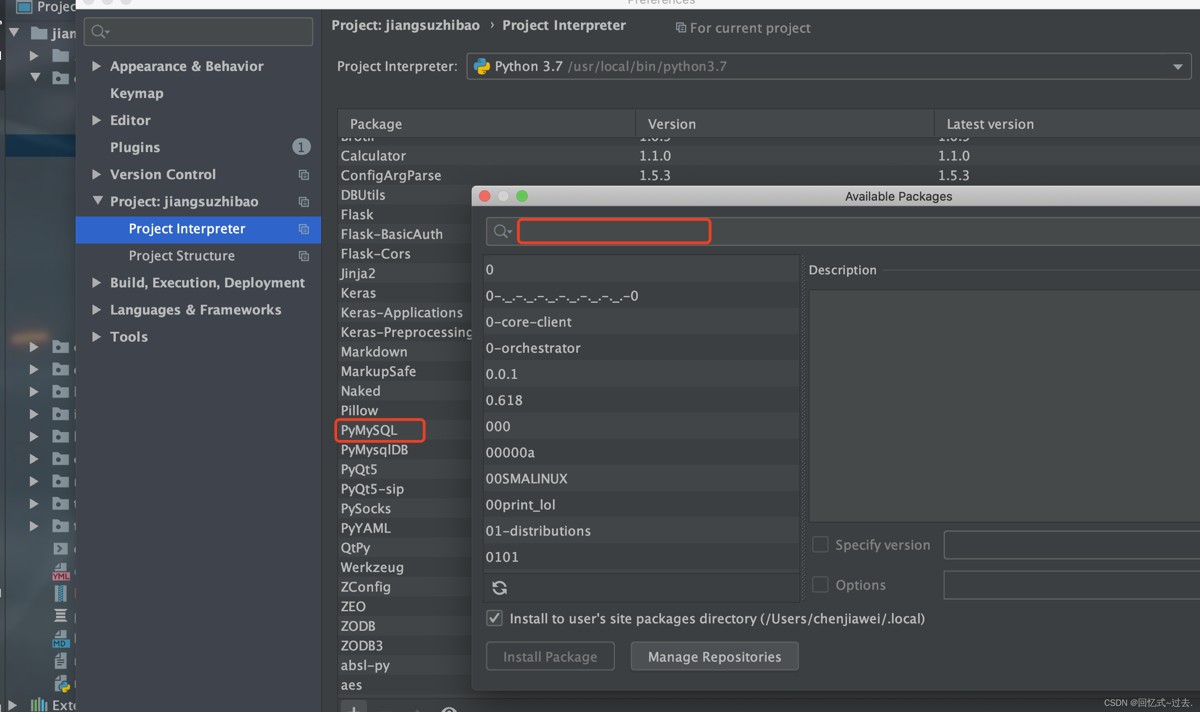
    如果工具安装失败(有可能是网络原因),也可以使用pip命令进行安装

    >>> pip3 install pymysql,psycopg2
    >>> #多环境用户需要主要pip版本
    

    如果你的系统不支持 pip 命令,可以使用以下方式安装:

    1、使用 git 命令下载安装包安装(你也可以手动下载):

    >>> git clone https://github.com/PyMySQL/PyMySQL
    >>> cd PyMySQL/
    >>> python3 setup.py install
    

    2、如果需要制定版本号,可以使用 curl 命令来安装:

    >>> # X.X 为 PyMySQL 的版本号
    >>> curl -L https://github.com/PyMySQL/PyMySQL/tarball/pymysql-X.X | tar xz
    >>> cd PyMySQL*
    >>> python3 setup.py install
    >>> # 现在你可以删除 PyMySQL* 目录
    

    连接数据库会用到的参数:

    database – 数据库名称
    
    user – 用户名
    
    password – 密码
    
    host – 服务器地址 (如果不提供默认连接Unix Socket)
    
    port – 连接端口 (默认5432)
    

    用pymysql模块中的connect连接数据库,同时用cursor()函数创建游标,用于接收返回的结果。
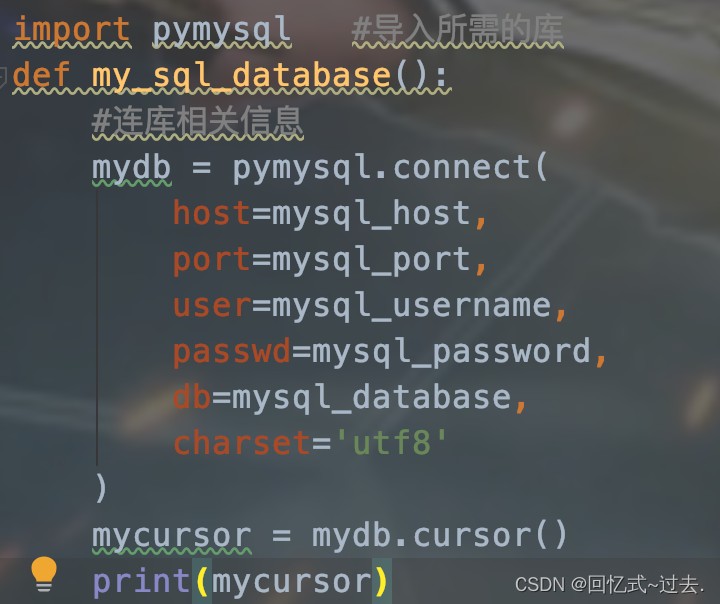
    这里返回了一个游标实例对象,说明你已经连接成功了。

    接下来我们可以使用 .execute 对数据库进行一系列的增删改查操作
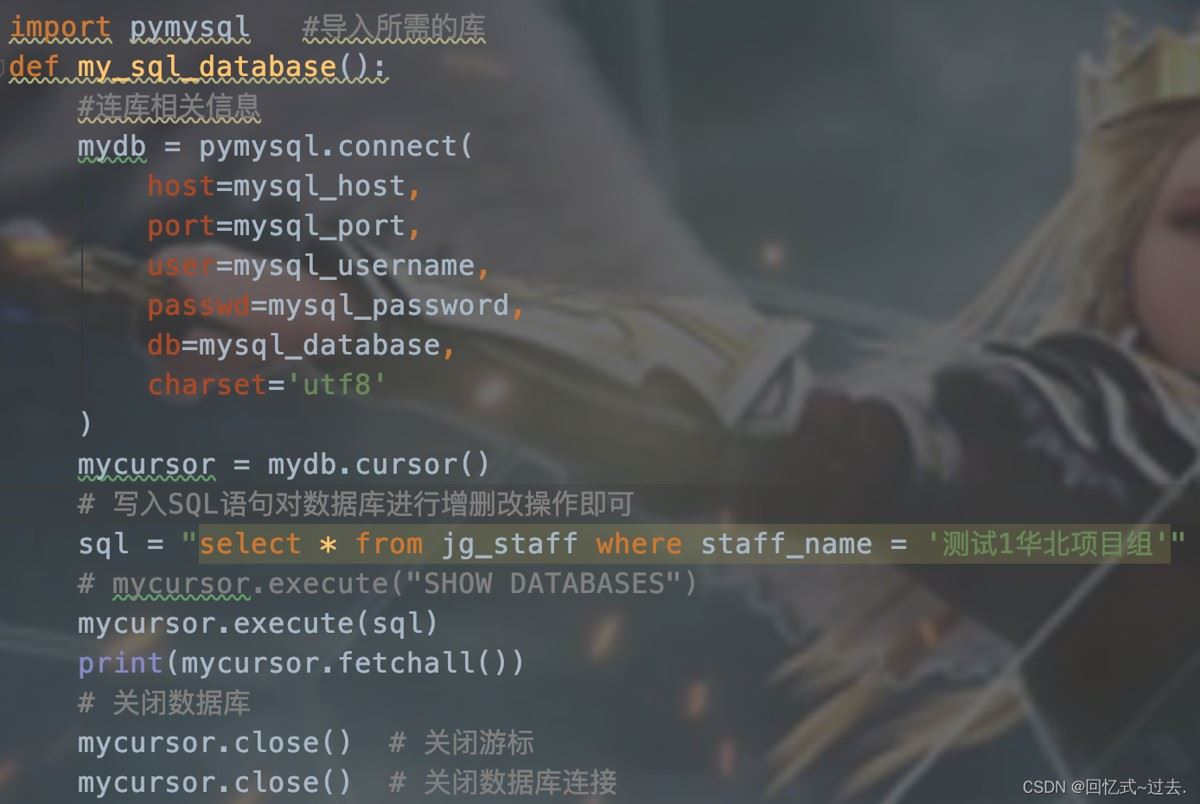
    运行成功后就可以在电脑上的数据库中查找到相应的变化啦,最后记得关闭数据库的连接,以下是查询结果:

    我是通过读取配置文件读取数据库信息进行连接的,一并付上代码,有需要的可以参考,不需要的直接忽略

    #setting.ini配置文件
    [mysql]
    # MySQL配置
    MYSQL_HOST = 39.101.000.0
    MYSQL_PORT = 5432
    MYSQL_USER = test
    MYSQL_PASSWD = xxxx
    MYSQL_DB = xxxx_dev
    
    [postgresql]
    # postgresql配置
    PG_HOST = 39.101.000.0
    PG_PORT = 5432
    PG_USER = test
    PG_PASSWD = xxxxx
    PG_DB = xxxxxx_dev
    
    # load_ini.py文件,读取ini配置文件方法
    def load_ini(file_path):
        log.info("加载 {} 文件......".format(file_path))
        config = MyConfigParser()
        config.read(file_path, encoding="UTF-8")
        data = dict(config._sections)
        return data
    
    #run.py文件
    #导入所需包
    import os
    import pymysql
    import psycopg2
    from common.load_ini import load_ini
    
    #拼接路径以列表的形式进行读取配置文件
    BASE_PATH = os.path.dirname(os.path.dirname(os.path.realpath(__file__)))
    data_file_path = os.path.join(BASE_PATH, "config", "setting.ini")
    mysql_data = load_ini(data_file_path)['mysql']
    pg_data = load_ini(data_file_path)['postgresql']
    #对库信息进行赋值,此方法只作为演示,大佬可自行编写最优写法
    mysql_host = mysql_data["MYSQL_HOST"]
    mysql_port = int(mysql_data["MYSQL_PORT"])
    mysql_username = mysql_data["MYSQL_USER"]
    mysql_password = mysql_data["MYSQL_PASSWD"]
    mysql_database = mysql_data["MYSQL_DB"]
    pg_host = pg_data["PG_HOST"]
    pg_port = int(pg_data["PG_PORT"])
    pg_username = pg_data["PG_USER"]
    pg_password = pg_data["PG_PASSWD"]
    pg_database = pg_data["PG_DB"]
    
    #连接MySQL数据库函数
    def my_sql_database():
        #连库相关信息
        mydb = pymysql.connect(
            host=mysql_host,
            port=mysql_port,
            user=mysql_username,
            passwd=mysql_password,
            db=mysql_database,
            charset='utf8'
        )
        mycursor = mydb.cursor()
        # 写入SQL语句对数据库进行增删改操作即可
        sql = "select * from jg_staff where staff_name = '测试1华北项目组'"
        # mycursor.execute("SHOW DATABASES")
        mycursor.execute(sql)
        print(mycursor.fetchall())
        mydb.commit()  # 查询时不需需调用,此方法用于提交当前事务。如果不调用这个方法,无论做了什么修改,自从上次调用#commit()是不可见的
    
        # 关闭数据库
        mycursor.close()  # 关闭游标
        mycursor.close()  # 关闭数据库连接
    
    #连接PostgreSQL数据库函数
    def pg_sql_database():
    	#PostgreSQL数据库连接方法和MySQL方法基本一致
        conn = psycopg2.connect(
                host=pg_host,
                port=pg_port,
                user=pg_username,
                password=pg_password,
                database=pg_database
        )
        cur = conn.cursor()
        sql = "select area from b_lands_attribute_2021 bla where id = '20545521'"
        cur.execute(sql)
        print(cur.fetchall()) #打印结果
        conn.commit()  # 查询时不需需调用,此方法用于提交当前事务。如果不调用这个方法,无论做了什么修改,自从上次调用#commit()是不可见的
        # 关闭数据库
        cur.close()  # 关闭游标
        cur.close()  # 关闭数据库连接
    
    def my_sql_insert(sql_case):
        """
        往sql插入数据
        :param sql_case:
        :return:
        """
        mydb = pymysql.connect(
            host=mysql_host,
            port=mysql_port,
            user=mysql_username,
            passwd=mysql_password,
            db=mysql_database,
            charset='utf8mb4'
        )
        mycursor = mydb.cursor()
        mycursor.execute(sql_case)
        mydb.commit()
        mydb.close()
    
    def mysql_select(sql_case):
        """
        查询sql以列表形式输出
        :param sql_case:
        :return:
        """
        try:
            connection = pymysql.connect(
            host=mysql_host,
            port=mysql_port,
            user=mysql_username,
            passwd=mysql_password,
            db=mysql_database,
            charset='utf8mb4'
        )
    
            with connection.cursor() as cursor:
                cursor.execute(sql_case)
    
                results = []
                for row in cursor.fetchall():
                    # 将包含Decimal的列转换为浮点数
                    processed_row = [float(item) if isinstance(item, Decimal) else item for item in row]
                    results.append(processed_row)
    
        except MySQLError as e:
            print(f"Error: {e}")
            results = []
    
        finally:
            if connection:
                connection.close()
    
        return results
    
    
    def my_sql_select(sql_select):
        """
        查询sql以数据类型输出
        :param sql_select:
        :return:
        """
        mydb = pymysql.connect(
            host=mysql_host,
            port=mysql_port,
            user=mysql_username,
            passwd=mysql_password,
            db=mysql_database,
            charset='utf8mb4'
        )
        mycursor = mydb.cursor()
        mycursor.execute(sql_select)
        nested_list = [list(row) for row in mycursor.fetchall()]
        mydb.close()
        return nested_list
    

    以上为个人经验,希望能给大家一个参考,也希望大家多多支持风君子博客。 

    您可能感兴趣的文章:

    • Python进行SQLite和MySQL数据库连接与操作的完整指南
    • Python连接数据库的3种方法对比(SQLiteMySQLPostgreSQL)
    • Python连接MySQL数据库连接池的操作详解
    • Python3.6连接MySQL的详细步骤
    • Python中使用pymysql连接MySQL数据库进行数据查询
    • Python连接MySQL数据库的四种方法
    • Python安装后测试连接MySQL数据库方式

    站内搜索
