 编程部落
编程部落文章目录
- import wx import wx.adv import wx.lib.mixins.listctrl as listmix import json import os from datetime import datetime, date 关键模块说明: wx:wxPython核心模块 wx.adv:高级控件模块,提供DatePickerCtrl等控件 wx.lib.mixins.listctrl:ListCtrl的混入类,提供自动列宽调整功能 json:用于数据的序列化和持久化 datetime:处理日期时间
- class TodoListCtrl(wx.ListCtrl, listmix.ListCtrlAutoWidthMixin): def __init__(self, parent): wx.ListCtrl.__init__(self, parent, style=wx.LC_REPORT | wx.LC_SINGLE_SEL) listmix.ListCtrlAutoWidthMixin.__init__(self) 设计要点: 1.多重继承:同时继承wx.ListCtrl和ListCtrlAutoWidthMixin wx.ListCtrl:提供列表显示功能 ListCtrlAutoWidthMixin:自动调整最后一列宽度,优化显示效果 2.样式设置: wx.LC_REPORT:报表视图模式,支持多列显示 wx.LC_SINGLE_SEL:单选模式,一次只能选择一个项目 3.列定义: self.InsertColumn(0, “完成”, width=50) # 完成状态标记 self.InsertColumn(1, “任务”, width=250) # 任务名称 self.InsertColumn(2, “优先级”, width=70) # 优先级 self.InsertColumn(3, “分类”, width=100) # 任务分类 self.InsertColumn(4, “截止日期”, width=100) # 截止日期 self.InsertColumn(5, “创建日期”, width=100) # 创建时间
- 这是整个程序中最复杂的类,负责任务的添加和编辑。
- def __init__(self, parent, title=”添加任务”, task_data=None): super().__init__(None, title=title, size=(450, 400)) self.task_data = task_data self.init_ui() if task_data: self.load_task_data(task_data) # 绑定键盘事件 self.Bind(wx.EVT_CHAR_HOOK, self.on_key_press) 关键点: parent参数设为None:使对话框独立显示,不受主窗口约束 task_data:如果提供则为编辑模式,否则为添加模式 EVT_CHAR_HOOK:全局键盘事件,实现回车键导航功能
- def on_key_press(self, event): keycode = event.GetKeyCode() # 回车键模拟Tab键(切换焦点) if keycode == wx.WXK_RETURN or keycode == wx.WXK_NUMPAD_ENTER: focused = self.FindFocus() # 如果焦点在确定按钮上,则提交对话框 if isinstance(focused, wx.Button) and focused.GetId() == wx.ID_OK: self.EndModal(wx.ID_OK) return # 如果焦点在多行文本框,允许换行 if isinstance(focused, wx.TextCtrl) and focused.HasFlag(wx.TE_MULTILINE): event.Skip() return # 否则模拟Tab键,切换到下一个控件 focused.Navigate() else: event.Skip() 实现原理: 捕获回车键事件 判断当前焦点控件类型 根据不同控件采取不同行为: 确定按钮:提交对话框 多行文本框:允许换行 其他控件:切换到下一个控件
- 对话框使用垂直BoxSizer布局,包含以下控件: 任务名称输入框: self.task_input = wx.TextCtrl(panel, size=(300, -1)) 任务描述(多行文本): self.desc_input = wx.TextCtrl(panel, size=(300, 80), style=wx.TE_MULTILINE) 优先级选择: self.priority_choice = wx.Choice(panel, choices=[“高”, “中”, “低”]) self.priority_choice.SetSelection(1) # 默认选择”中” 日期选择器: self.date_picker = wx.adv.DatePickerCtrl(panel, style=wx.adv.DP_DROPDOWN | wx.adv.DP_SHOWCENTURY) self.no_date_cb = wx.CheckBox(panel, label=”无截止日期”) 设计亮点: 提供"无截止日期"复选框,满足不同需求 日期选择器使用下拉样式,操作便捷
- 加载任务数据(编辑模式): def load_task_data(self, data): self.task_input.SetValue(data.get(‘name’, ”)) self.desc_input.SetValue(data.get(‘description’, ”)) priority_map = {“高”: 0, “中”: 1, “低”: 2} self.priority_choice.SetSelection(priority_map.get(data.get(‘priority’, ‘中’), 1)) self.category_input.SetValue(data.get(‘category’, ”)) if data.get(‘due_date’): try: due_date = datetime.strptime(data[‘due_date’], “%Y-%m-%d”).date() wx_date = wx.DateTime() wx_date.Set(due_date.day, due_date.month – 1, due_date.year) self.date_picker.SetValue(wx_date) except: pass self.no_date_cb.SetValue(not data.get(‘due_date’)) 注意事项: wxPython的月份从0开始,需要减1 使用try-except处理日期解析异常 获取任务数据: def get_task_data(self): due_date = None if not self.no_date_cb.GetValue(): wx_date = self.date_picker.GetValue() due_date = f”{wx_date.GetYear()}-{wx_date.GetMonth()+1:02d}-{wx_date.GetDay():02d}” return { ‘name’: self.task_input.GetValue(), ‘description’: self.desc_input.GetValue(), ‘priority’: self.priority_choice.GetStringSelection(), ‘category’: self.category_input.GetValue(), ‘due_date’: due_date, ‘completed’: self.task_data.get(‘completed’, False) if self.task_data else False, ‘created_date’: self.task_data.get(‘created_date’) if self.task_data else datetime.now().strftime(“%Y-%m-%d %H:%M:%S”) } 数据结构设计: 使用字典存储任务信息 日期格式统一为YYYY-MM-DD 创建时间精确到秒
- 这是程序的核心类,管理整个应用的UI和逻辑。
- def __init__(self): super().__init__(None, title=”Todo List 任务管理器”, size=(900, 650)) self.tasks = [] self.data_file = “todolist_data.json” self.load_data() self.init_ui() self.Centre() self.Show() 初始化流程: 创建窗口(900×650像素) 初始化任务列表 加载持久化数据 构建UI界面 居中显示窗口
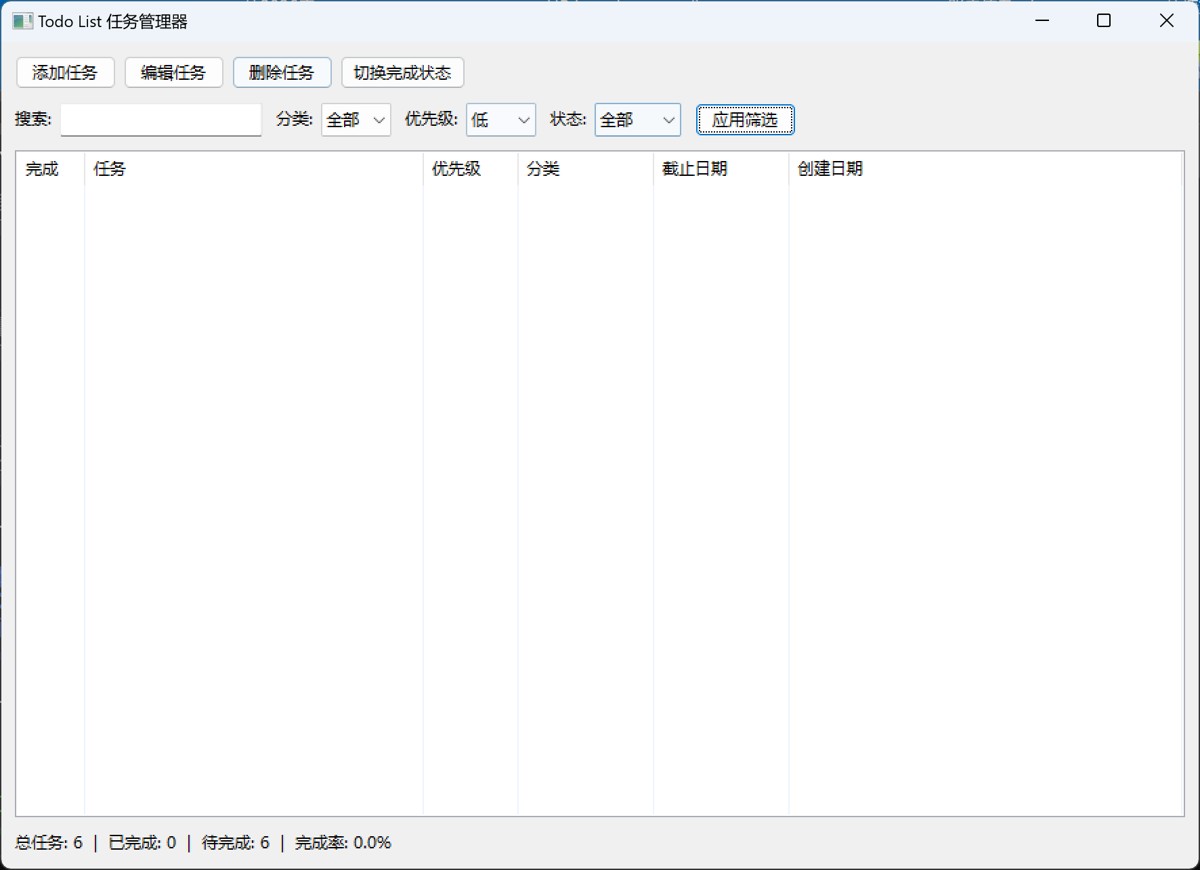
- 主窗口采用垂直布局,从上到下包含: 1. 工具栏(操作按钮): toolbar = wx.BoxSizer(wx.HORIZONTAL) add_btn = wx.Button(panel, label=”添加任务”) edit_btn = wx.Button(panel, label=”编辑任务”) delete_btn = wx.Button(panel, label=”删除任务”) toggle_btn = wx.Button(panel, label=”切换完成状态”) 2. 筛选栏: # 搜索框 self.search_input = wx.TextCtrl(panel, size=(150, -1)) # 分类筛选 self.category_filter = wx.Choice(panel, choices=[“全部”]) # 优先级筛选 self.priority_filter = wx.Choice(panel, choices=[“全部”, “高”, “中”, “低”]) # 状态筛选 self.status_filter = wx.Choice(panel, choices=[“全部”, “未完成”, “已完成”]) 3. 任务列表: self.list_ctrl = TodoListCtrl(panel) vbox.Add(self.list_ctrl, proportion=1, flag=wx.EXPAND | wx.LEFT | wx.RIGHT, border=10) proportion=1:占据剩余所有空间 wx.EXPAND:填充水平和垂直方向 4. 统计信息栏: self.stats_text = wx.StaticText(panel, label=””)
- 添加任务: def on_add_task(self, event): dlg = TaskDialog(self, “添加任务”) if dlg.ShowModal() == wx.ID_OK: task_data = dlg.get_task_data() if task_data[‘name’]: self.tasks.append(task_data) self.save_data() self.refresh_list() else: wx.MessageBox(“任务名称不能为空!”, “错误”, wx.OK | wx.ICON_ERROR) dlg.Destroy() 关键步骤: 创建并显示模态对话框 检查用户操作(确定/取消) 验证任务名称非空 添加到任务列表 保存数据并刷新界面 销毁对话框释放资源 编辑任务: def on_edit_task(self, event): idx = self.list_ctrl.GetFirstSelected() if idx == -1: wx.MessageBox(“请先选择要编辑的任务!”, “提示”, wx.OK | wx.ICON_INFORMATION) return task_idx = self.list_ctrl.GetItemData(idx) task = self.tasks[task_idx] dlg = TaskDialog(self, “编辑任务”, task) if dlg.ShowModal() == wx.ID_OK: task_data = dlg.get_task_data() if task_data[‘name’]: self.tasks[task_idx] = task_data self.save_data() self.refresh_list() else: wx.MessageBox(“任务名称不能为空!”, “错误”, wx.OK | wx.ICON_ERROR) dlg.Destroy() 重要技巧: 使用GetItemData()存储和获取任务在原始列表中的索引 这样即使列表经过筛选排序,仍能准确定位任务 删除任务: def on_delete_task(self, event): idx = self.list_ctrl.GetFirstSelected() if idx == -1: wx.MessageBox(“请先选择要删除的任务!”, “提示”, wx.OK | wx.ICON_INFORMATION) return result = wx.MessageBox(“确定要删除选中的任务吗?”, “确认删除”, wx.YES_NO | wx.ICON_QUESTION) if result == wx.YES: task_idx = self.list_ctrl.GetItemData(idx) del self.tasks[task_idx] self.save_data() self.refresh_list() 用户体验优化: 删除前弹出确认对话框 防止误操作造成数据丢失 切换完成状态: def on_toggle_complete(self, event): idx = self.list_ctrl.GetFirstSelected() if idx == -1: wx.MessageBox(“请先选择要操作的任务!”, “提示”, wx.OK | wx.ICON_INFORMATION) return task_idx = self.list_ctrl.GetItemData(idx) self.tasks[task_idx][‘completed’] = not self.tasks[task_idx][‘completed’] self.save_data() self.refresh_list()
- 核心筛选逻辑: def refresh_list(self): self.list_ctrl.DeleteAllItems() # 更新分类筛选列表 self.update_category_filter() # 获取筛选条件 search_text = self.search_input.GetValue().lower() category = self.category_filter.GetStringSelection() priority = self.priority_filter.GetStringSelection() status = self.status_filter.GetStringSelection() filtered_tasks = [] for i, task in enumerate(self.tasks): # 搜索过滤 if search_text and search_text not in task[‘name’].lower(): continue # 分类过滤 if category != “全部” and task.get(‘category’, ”) != category: continue # 优先级过滤 if priority != “全部” and task[‘priority’] != priority: continue # 状态过滤 if status == “未完成” and task[‘completed’]: continue if status == “已完成” and not task[‘completed’]: continue filtered_tasks.append((i, task)) 筛选器联动: def update_category_filter(self): “””动态更新分类筛选下拉列表””” current_selection = self.category_filter.GetStringSelection() # 获取所有不重复的分类 categories = set() for task in self.tasks: cat = task.get(‘category’, ”).strip() if cat: categories.add(cat) # 更新下拉列表 category_list = [“全部”] + sorted(list(categories)) self.category_filter.Clear() self.category_filter.AppendItems(category_list) # 恢复之前的选择 if current_selection in category_list: self.category_filter.SetStringSelection(current_selection) else: self.category_filter.SetSelection(0) 智能化设计: 自动从任务中提取所有分类 去重并排序 保持用户的选择状态
- 任务显示逻辑: for original_idx, task in filtered_tasks: index = self.list_ctrl.InsertItem(self.list_ctrl.GetItemCount(), “✓” if task[‘completed’] else “”) self.list_ctrl.SetItem(index, 1, task.get(‘name’, ”)) self.list_ctrl.SetItem(index, 2, task.get(‘priority’, ”)) self.list_ctrl.SetItem(index, 3, task.get(‘category’, ”)) self.list_ctrl.SetItem(index, 4, task.get(‘due_date’) or ”) created = task.get(‘created_date’, ”) self.list_ctrl.SetItem(index, 5, created.split()[0] if created else ”) self.list_ctrl.SetItemData(index, original_idx) # 设置颜色 if task[‘completed’]: self.list_ctrl.SetItemTextColour(index, wx.Colour(150, 150, 150)) elif task[‘priority’] == “高”: self.list_ctrl.SetItemTextColour(index, wx.Colour(255, 0, 0)) elif task[‘priority’] == “中”: self.list_ctrl.SetItemTextColour(index, wx.Colour(255, 140, 0)) 视觉设计: ✓ 标记已完成任务 灰色显示已完成任务(RGB: 150, 150, 150) 红色显示高优先级任务(RGB: 255, 0, 0) 橙色显示中优先级任务(RGB: 255, 140, 0) 默认黑色显示低优先级任务 数据关联技巧: self.list_ctrl.SetItemData(index, original_idx) 使用SetItemData存储原始索引 即使列表项顺序改变,仍能找到对应的任务数据
- def update_stats(self): total = len(self.tasks) completed = sum(1 for t in self.tasks if t[‘completed’]) pending = total – completed stats = f”总任务: {total} | 已完成: {completed} | 待完成: {pending}” if total > 0: percentage = (completed / total) * 100 stats += f” | 完成率: {percentage:.1f}%” self.stats_text.SetLabel(stats) 统计指标: 总任务数 已完成数量 待完成数量 完成率百分比
- 保存数据: def save_data(self): with open(self.data_file, ‘w’, encoding=’utf-8′) as f: json.dump(self.tasks, f, ensure_ascii=False, indent=2) 关键参数: ensure_ascii=False:支持中文字符 indent=2:格式化输出,便于查看和调试 加载数据: def load_data(self): if os.path.exists(self.data_file): try: with open(self.data_file, ‘r’, encoding=’utf-8′) as f: self.tasks = json.load(f) except: self.tasks = [] 容错处理: 检查文件是否存在 使用try-except捕获解析异常 异常时初始化为空列表
- wxPython采用事件驱动模型: # 绑定按钮点击事件 add_btn.Bind(wx.EVT_BUTTON, self.on_add_task) # 绑定列表项双击事件 self.list_ctrl.Bind(wx.EVT_LIST_ITEM_ACTIVATED, self.on_edit_task) # 绑定键盘事件 self.Bind(wx.EVT_CHAR_HOOK, self.on_key_press) 事件处理函数签名: def on_event(self, event): # 处理逻辑 pass
- wxPython使用Sizer进行布局: BoxSizer(盒式布局): vbox = wx.BoxSizer(wx.VERTICAL) # 垂直布局 hbox = wx.BoxSizer(wx.HORIZONTAL) # 水平布局 # 添加控件 vbox.Add(widget, proportion=0, flag=wx.EXPAND, border=10) 参数说明: proportion:分配剩余空间的比例(0表示不分配) flag:布局标志(wx.EXPAND, wx.ALIGN_CENTER等) border:边距大小
- 模态对话框: dlg = TaskDialog(self, “添加任务”) if dlg.ShowModal() == wx.ID_OK: # 用户点击确定 data = dlg.get_task_data() dlg.Destroy() # 必须销毁对话框 消息框: wx.MessageBox(“提示信息”, “标题”, wx.OK | wx.ICON_INFORMATION)
- 插入项目: index = list_ctrl.InsertItem(row, “第一列内容”) list_ctrl.SetItem(index, 1, “第二列内容”) list_ctrl.SetItem(index, 2, “第三列内容”) 存储关联数据: list_ctrl.SetItemData(index, data_id) data_id = list_ctrl.GetItemData(index) 获取选中项: idx = list_ctrl.GetFirstSelected() 设置颜色: list_ctrl.SetItemTextColour(index, wx.Colour(255, 0, 0))
- wxPython日期与Python日期转换: # Python date转wxDateTime wx_date = wx.DateTime() wx_date.Set(day, month-1, year) # 注意月份要减1 # wxDateTime转Python格式 date_str = f”{wx_date.GetYear()}-{wx_date.GetMonth()+1:02d}-{wx_date.GetDay():02d}”
- 当任务数量超过1000条时,可以考虑: # 使用虚拟列表(Virtual ListCtrl) class VirtualTodoListCtrl(wx.ListCtrl): def __init__(self, parent): wx.ListCtrl.__init__(self, parent, style=wx.LC_REPORT | wx.LC_VIRTUAL) def OnGetItemText(self, item, col): # 动态返回指定位置的文本 return self.data[item][col]
- # 批量操作时暂停刷新 self.list_ctrl.Freeze() # … 批量操作 self.list_ctrl.Thaw()
- 对于更大规模的应用,建议使用SQLite: import sqlite3 def init_database(self): conn = sqlite3.connect(‘tasks.db’) cursor = conn.cursor() cursor.execute(”’ CREATE TABLE IF NOT EXISTS tasks ( id INTEGER PRIMARY KEY, name TEXT NOT NULL, description TEXT, priority TEXT, category TEXT, due_date TEXT, completed INTEGER, created_date TEXT ) ”’) conn.commit() conn.close()
- import threading from datetime import datetime, timedelta def check_reminders(self): while True: now = datetime.now() for task in self.tasks: if task.get(‘due_date’): due = datetime.strptime(task[‘due_date’], “%Y-%m-%d”) if 0 <= (due – now).days <= 1: self.show_notification(task) time.sleep(3600) # 每小时检查一次
- def export_to_csv(self): import csv with open(‘tasks_export.csv’, ‘w’, newline=”, encoding=’utf-8′) as f: writer = csv.DictWriter(f, fieldnames=[‘name’, ‘priority’, ‘category’, ‘due_date’, ‘completed’]) writer.writeheader() writer.writerows(self.tasks)
- class ThemeManager: THEMES = { ‘light’: { ‘bg’: wx.Colour(255, 255, 255), ‘fg’: wx.Colour(0, 0, 0), }, ‘dark’: { ‘bg’: wx.Colour(30, 30, 30), ‘fg’: wx.Colour(200, 200, 200), } } def apply_theme(self, panel, theme_name): theme = self.THEMES[theme_name] panel.SetBackgroundColour(theme[‘bg’]) panel.SetForegroundColour(theme[‘fg’])
- # 为任务添加多个标签 task_data = { ‘name’: ‘项目开发’, ‘tags’: [‘紧急’, ‘重要’, ‘技术’], # … 其他字段 } # 支持按标签筛选 def filter_by_tags(self, selected_tags): return [t for t in self.tasks if any(tag in t.get(‘tags’, []) for tag in selected_tags)]
- # 确保所有文件操作使用UTF-8编码 with open(file, ‘w’, encoding=’utf-8′) as f: json.dump(data, f, ensure_ascii=False)
- # 错误:对话框跟随父窗口最小化 dlg = TaskDialog(self, “添加任务”) # 正确:对话框独立显示 dlg = TaskDialog(None, “添加任务”)
- # 使用Freeze/Thaw减少闪烁 self.list_ctrl.Freeze() self.list_ctrl.DeleteAllItems() # … 添加项目 self.list_ctrl.Thaw()
- # 统一使用ISO格式 date_str = datetime.now().strftime(“%Y-%m-%d”) date_obj = datetime.strptime(date_str, “%Y-%m-%d”)
- 使用PyInstaller: pip install pyinstaller pyinstaller –onefile –windowed todolist_app.py
- pyinstaller –onefile –windowed –icon=app.ico todolist_app.py
- 创建config.ini: [Settings] data_file = todolist_data.json window_width = 900 window_height = 650 theme = light 以上就是Python基于wxPython实现TodoList任务管理器开发详解的详细内容,更多关于Python TodoList任务管理器的资料请关注风君子博客其它相关文章! 您可能感兴趣的文章: Python利用PyQt6开发一个全能的任务管理器 Python+PyQt5实现自动化任务管理 如何使用Python实现一个简单的window任务管理器 基于Python进行定时任务管理封装 使用Python构建一个简单的任务管理器 使用Python创建一个简单的任务管理器应用程序
目录
- 前言
- 项目概述
- 核心功能
- 技术栈
- 运行结果
- 代码结构分析
- 1. 模块导入
- 2. TodoListCtrl类 – 自定义列表控件
- 3. TaskDialog类 – 任务编辑对话框
- 3.1 初始化方法
- 3.2 键盘导航实现
- 3.3 UI布局
- 3.4 数据加载和获取
- 4. TodoListFrame类 – 主窗口
- 4.1 初始化
- 4.2 UI布局结构
- 4.3 任务管理功能
- 4.4 筛选和搜索功能
- 4.5 列表显示和视觉效果
- 4.6 统计信息
- 4.7 数据持久化
- 技术要点总结
- 1. wxPython事件系统
- 2. 布局管理器(Sizer)
- 3. 对话框的使用
- 4. ListCtrl的使用技巧
- 5. 日期控件处理
- 性能优化建议
- 1. 大数据量优化
- 2. 延迟刷新
- 3. 数据库存储
- 功能扩展建议
- 1. 任务提醒功能
- 2. 任务导出功能
- 3. 主题切换
- 4. 任务标签系统
- 常见问题解决
- 1. 中文乱码问题
- 2. 对话框父窗口问题
- 3. ListCtrl刷新闪烁
- 4. 日期格式问题
- 项目部署
- 1. 打包成可执行文件
- 2. 添加图标
- 3. 配置文件
在日常工作和学习中,任务管理是提高效率的重要工具。本文将详细介绍如何使用Python的wxPython GUI框架开发一个功能完善的TodoList任务管理器。这个项目不仅适合wxPython初学者学习GUI编程,也能作为实用工具直接使用。
- 任务的增删改查(CRUD)操作
- 任务优先级管理(高/中/低)
- 任务分类管理
- 截止日期设置
- 多条件筛选和搜索
- 任务完成状态切换
- 数据持久化存储
- 实时统计信息显示
- 键盘快捷操作
- Python 3.x
- wxPython:跨平台GUI框架
- JSON:数据存储格式
import wx
import wx.adv
import wx.lib.mixins.listctrl as listmix
import json
import os
from datetime import datetime, date
关键模块说明:
wx:wxPython核心模块wx.adv:高级控件模块,提供DatePickerCtrl等控件wx.lib.mixins.listctrl:ListCtrl的混入类,提供自动列宽调整功能json:用于数据的序列化和持久化datetime:处理日期时间
class TodoListCtrl(wx.ListCtrl, listmix.ListCtrlAutoWidthMixin):
    def __init__(self, parent):
        wx.ListCtrl.__init__(self, parent, style=wx.LC_REPORT | wx.LC_SINGLE_SEL)
        listmix.ListCtrlAutoWidthMixin.__init__(self)
设计要点:
1.多重继承:同时继承wx.ListCtrl和ListCtrlAutoWidthMixin
wx.ListCtrl:提供列表显示功能ListCtrlAutoWidthMixin:自动调整最后一列宽度,优化显示效果
2.样式设置:
wx.LC_REPORT:报表视图模式,支持多列显示wx.LC_SINGLE_SEL:单选模式,一次只能选择一个项目
3.列定义:
self.InsertColumn(0, "完成", width=50)    # 完成状态标记
self.InsertColumn(1, "任务", width=250)   # 任务名称
self.InsertColumn(2, "优先级", width=70)  # 优先级
self.InsertColumn(3, "分类", width=100)   # 任务分类
self.InsertColumn(4, "截止日期", width=100) # 截止日期
self.InsertColumn(5, "创建日期", width=100) # 创建时间
这是整个程序中最复杂的类,负责任务的添加和编辑。
def __init__(self, parent, title="添加任务", task_data=None):
    super().__init__(None, title=title, size=(450, 400))

    self.task_data = task_data
    self.init_ui()

    if task_data:
        self.load_task_data(task_data)

    # 绑定键盘事件
    self.Bind(wx.EVT_CHAR_HOOK, self.on_key_press)
关键点:
parent参数设为None:使对话框独立显示,不受主窗口约束task_data:如果提供则为编辑模式,否则为添加模式EVT_CHAR_HOOK:全局键盘事件,实现回车键导航功能
def on_key_press(self, event):
    keycode = event.GetKeyCode()

    # 回车键模拟Tab键(切换焦点)
    if keycode == wx.WXK_RETURN or keycode == wx.WXK_NUMPAD_ENTER:
        focused = self.FindFocus()

        # 如果焦点在确定按钮上,则提交对话框
        if isinstance(focused, wx.Button) and focused.GetId() == wx.ID_OK:
            self.EndModal(wx.ID_OK)
            return

        # 如果焦点在多行文本框,允许换行
        if isinstance(focused, wx.TextCtrl) and focused.HasFlag(wx.TE_MULTILINE):
            event.Skip()
            return

        # 否则模拟Tab键,切换到下一个控件
        focused.Navigate()
    else:
        event.Skip()
实现原理:
捕获回车键事件
判断当前焦点控件类型
根据不同控件采取不同行为:
- 确定按钮:提交对话框
- 多行文本框:允许换行
- 其他控件:切换到下一个控件
对话框使用垂直BoxSizer布局,包含以下控件:
任务名称输入框:
self.task_input = wx.TextCtrl(panel, size=(300, -1))
任务描述(多行文本):
self.desc_input = wx.TextCtrl(panel, size=(300, 80),
                              style=wx.TE_MULTILINE)
优先级选择:
self.priority_choice = wx.Choice(panel, choices=["高", "中", "低"])
self.priority_choice.SetSelection(1)  # 默认选择"中"
日期选择器:
self.date_picker = wx.adv.DatePickerCtrl(panel,
                                         style=wx.adv.DP_DROPDOWN | wx.adv.DP_SHOWCENTURY)
self.no_date_cb = wx.CheckBox(panel, label="无截止日期")
设计亮点:
- 提供"无截止日期"复选框,满足不同需求
- 日期选择器使用下拉样式,操作便捷
加载任务数据(编辑模式):
def load_task_data(self, data):
    self.task_input.SetValue(data.get('name', ''))
    self.desc_input.SetValue(data.get('description', ''))

    priority_map = {"高": 0, "中": 1, "低": 2}
    self.priority_choice.SetSelection(priority_map.get(data.get('priority', '中'), 1))

    self.category_input.SetValue(data.get('category', ''))

    if data.get('due_date'):
        try:
            due_date = datetime.strptime(data['due_date'], "%Y-%m-%d").date()
            wx_date = wx.DateTime()
            wx_date.Set(due_date.day, due_date.month - 1, due_date.year)
            self.date_picker.SetValue(wx_date)
        except:
            pass

    self.no_date_cb.SetValue(not data.get('due_date'))
注意事项:
- wxPython的月份从0开始,需要减1
- 使用try-except处理日期解析异常
获取任务数据:
def get_task_data(self):
    due_date = None
    if not self.no_date_cb.GetValue():
        wx_date = self.date_picker.GetValue()
        due_date = f"{wx_date.GetYear()}-{wx_date.GetMonth()+1:02d}-{wx_date.GetDay():02d}"

    return {
        'name': self.task_input.GetValue(),
        'description': self.desc_input.GetValue(),
        'priority': self.priority_choice.GetStringSelection(),
        'category': self.category_input.GetValue(),
        'due_date': due_date,
        'completed': self.task_data.get('completed', False) if self.task_data else False,
        'created_date': self.task_data.get('created_date') if self.task_data else datetime.now().strftime("%Y-%m-%d %H:%M:%S")
    }
数据结构设计:
- 使用字典存储任务信息
- 日期格式统一为
YYYY-MM-DD - 创建时间精确到秒
这是程序的核心类,管理整个应用的UI和逻辑。
def __init__(self):
    super().__init__(None, title="Todo List 任务管理器", size=(900, 650))

    self.tasks = []
    self.data_file = "todolist_data.json"
    self.load_data()

    self.init_ui()
    self.Centre()
    self.Show()
初始化流程:
- 创建窗口(900×650像素)
- 初始化任务列表
- 加载持久化数据
- 构建UI界面
- 居中显示窗口
主窗口采用垂直布局,从上到下包含:
1. 工具栏(操作按钮):
toolbar = wx.BoxSizer(wx.HORIZONTAL)

add_btn = wx.Button(panel, label="添加任务")
edit_btn = wx.Button(panel, label="编辑任务")
delete_btn = wx.Button(panel, label="删除任务")
toggle_btn = wx.Button(panel, label="切换完成状态")
2. 筛选栏:
# 搜索框
self.search_input = wx.TextCtrl(panel, size=(150, -1))

# 分类筛选
self.category_filter = wx.Choice(panel, choices=["全部"])

# 优先级筛选
self.priority_filter = wx.Choice(panel, choices=["全部", "高", "中", "低"])

# 状态筛选
self.status_filter = wx.Choice(panel, choices=["全部", "未完成", "已完成"])
3. 任务列表:
self.list_ctrl = TodoListCtrl(panel)
vbox.Add(self.list_ctrl, proportion=1, flag=wx.EXPAND | wx.LEFT | wx.RIGHT, border=10)
proportion=1:占据剩余所有空间wx.EXPAND:填充水平和垂直方向
4. 统计信息栏:
self.stats_text = wx.StaticText(panel, label="")
添加任务:
def on_add_task(self, event):
    dlg = TaskDialog(self, "添加任务")
    if dlg.ShowModal() == wx.ID_OK:
        task_data = dlg.get_task_data()
        if task_data['name']:
            self.tasks.append(task_data)
            self.save_data()
            self.refresh_list()
        else:
            wx.MessageBox("任务名称不能为空!", "错误", wx.OK | wx.ICON_ERROR)
    dlg.Destroy()
关键步骤:
- 创建并显示模态对话框
- 检查用户操作(确定/取消)
- 验证任务名称非空
- 添加到任务列表
- 保存数据并刷新界面
- 销毁对话框释放资源
编辑任务:
def on_edit_task(self, event):
    idx = self.list_ctrl.GetFirstSelected()
    if idx == -1:
        wx.MessageBox("请先选择要编辑的任务!", "提示", wx.OK | wx.ICON_INFORMATION)
        return

    task_idx = self.list_ctrl.GetItemData(idx)
    task = self.tasks[task_idx]

    dlg = TaskDialog(self, "编辑任务", task)
    if dlg.ShowModal() == wx.ID_OK:
        task_data = dlg.get_task_data()
        if task_data['name']:
            self.tasks[task_idx] = task_data
            self.save_data()
            self.refresh_list()
        else:
            wx.MessageBox("任务名称不能为空!", "错误", wx.OK | wx.ICON_ERROR)
    dlg.Destroy()
重要技巧:
- 使用
GetItemData()存储和获取任务在原始列表中的索引 - 这样即使列表经过筛选排序,仍能准确定位任务
删除任务:
def on_delete_task(self, event):
    idx = self.list_ctrl.GetFirstSelected()
    if idx == -1:
        wx.MessageBox("请先选择要删除的任务!", "提示", wx.OK | wx.ICON_INFORMATION)
        return

    result = wx.MessageBox("确定要删除选中的任务吗?", "确认删除",
                          wx.YES_NO | wx.ICON_QUESTION)
    if result == wx.YES:
        task_idx = self.list_ctrl.GetItemData(idx)
        del self.tasks[task_idx]
        self.save_data()
        self.refresh_list()
用户体验优化:
- 删除前弹出确认对话框
- 防止误操作造成数据丢失
切换完成状态:
def on_toggle_complete(self, event):
    idx = self.list_ctrl.GetFirstSelected()
    if idx == -1:
        wx.MessageBox("请先选择要操作的任务!", "提示", wx.OK | wx.ICON_INFORMATION)
        return

    task_idx = self.list_ctrl.GetItemData(idx)
    self.tasks[task_idx]['completed'] = not self.tasks[task_idx]['completed']
    self.save_data()
    self.refresh_list()
核心筛选逻辑:
def refresh_list(self):
    self.list_ctrl.DeleteAllItems()

    # 更新分类筛选列表
    self.update_category_filter()

    # 获取筛选条件
    search_text = self.search_input.GetValue().lower()
    category = self.category_filter.GetStringSelection()
    priority = self.priority_filter.GetStringSelection()
    status = self.status_filter.GetStringSelection()

    filtered_tasks = []
    for i, task in enumerate(self.tasks):
        # 搜索过滤
        if search_text and search_text not in task['name'].lower():
            continue

        # 分类过滤
        if category != "全部" and task.get('category', '') != category:
            continue

        # 优先级过滤
        if priority != "全部" and task['priority'] != priority:
            continue

        # 状态过滤
        if status == "未完成" and task['completed']:
            continue
        if status == "已完成" and not task['completed']:
            continue

        filtered_tasks.append((i, task))
筛选器联动:
def update_category_filter(self):
    """动态更新分类筛选下拉列表"""
    current_selection = self.category_filter.GetStringSelection()

    # 获取所有不重复的分类
    categories = set()
    for task in self.tasks:
        cat = task.get('category', '').strip()
        if cat:
            categories.add(cat)

    # 更新下拉列表
    category_list = ["全部"] + sorted(list(categories))
    self.category_filter.Clear()
    self.category_filter.AppendItems(category_list)

    # 恢复之前的选择
    if current_selection in category_list:
        self.category_filter.SetStringSelection(current_selection)
    else:
        self.category_filter.SetSelection(0)
智能化设计:
- 自动从任务中提取所有分类
- 去重并排序
- 保持用户的选择状态
任务显示逻辑:
for original_idx, task in filtered_tasks:
    index = self.list_ctrl.InsertItem(self.list_ctrl.GetItemCount(),
                                      "✓" if task['completed'] else "")
    self.list_ctrl.SetItem(index, 1, task.get('name', ''))
    self.list_ctrl.SetItem(index, 2, task.get('priority', ''))
    self.list_ctrl.SetItem(index, 3, task.get('category', ''))
    self.list_ctrl.SetItem(index, 4, task.get('due_date') or '')
    created = task.get('created_date', '')
    self.list_ctrl.SetItem(index, 5, created.split()[0] if created else '')
    self.list_ctrl.SetItemData(index, original_idx)

    # 设置颜色
    if task['completed']:
        self.list_ctrl.SetItemTextColour(index, wx.Colour(150, 150, 150))
    elif task['priority'] == "高":
        self.list_ctrl.SetItemTextColour(index, wx.Colour(255, 0, 0))
    elif task['priority'] == "中":
        self.list_ctrl.SetItemTextColour(index, wx.Colour(255, 140, 0))
视觉设计:
- ✓ 标记已完成任务
- 灰色显示已完成任务(RGB: 150, 150, 150)
- 红色显示高优先级任务(RGB: 255, 0, 0)
- 橙色显示中优先级任务(RGB: 255, 140, 0)
- 默认黑色显示低优先级任务
数据关联技巧:
self.list_ctrl.SetItemData(index, original_idx)
- 使用
SetItemData存储原始索引 - 即使列表项顺序改变,仍能找到对应的任务数据
def update_stats(self):
    total = len(self.tasks)
    completed = sum(1 for t in self.tasks if t['completed'])
    pending = total - completed

    stats = f"总任务: {total}  |  已完成: {completed}  |  待完成: {pending}"
    if total > 0:
        percentage = (completed / total) * 100
        stats += f"  |  完成率: {percentage:.1f}%"

    self.stats_text.SetLabel(stats)
统计指标:
- 总任务数
- 已完成数量
- 待完成数量
- 完成率百分比
保存数据:
def save_data(self):
    with open(self.data_file, 'w', encoding='utf-8') as f:
        json.dump(self.tasks, f, ensure_ascii=False, indent=2)
关键参数:
ensure_ascii=False:支持中文字符indent=2:格式化输出,便于查看和调试
加载数据:
def load_data(self):
    if os.path.exists(self.data_file):
        try:
            with open(self.data_file, 'r', encoding='utf-8') as f:
                self.tasks = json.load(f)
        except:
            self.tasks = []
容错处理:
- 检查文件是否存在
- 使用try-except捕获解析异常
- 异常时初始化为空列表
wxPython采用事件驱动模型:
# 绑定按钮点击事件
add_btn.Bind(wx.EVT_BUTTON, self.on_add_task)

# 绑定列表项双击事件
self.list_ctrl.Bind(wx.EVT_LIST_ITEM_ACTIVATED, self.on_edit_task)

# 绑定键盘事件
self.Bind(wx.EVT_CHAR_HOOK, self.on_key_press)
事件处理函数签名:
def on_event(self, event):
    # 处理逻辑
    pass
wxPython使用Sizer进行布局:
BoxSizer(盒式布局):
vbox = wx.BoxSizer(wx.VERTICAL)    # 垂直布局
hbox = wx.BoxSizer(wx.HORIZONTAL)  # 水平布局

# 添加控件
vbox.Add(widget, proportion=0, flag=wx.EXPAND, border=10)
参数说明:
proportion:分配剩余空间的比例(0表示不分配)flag:布局标志(wx.EXPAND, wx.ALIGN_CENTER等)border:边距大小
模态对话框:
dlg = TaskDialog(self, "添加任务")
if dlg.ShowModal() == wx.ID_OK:
    # 用户点击确定
    data = dlg.get_task_data()
dlg.Destroy()  # 必须销毁对话框
消息框:
wx.MessageBox("提示信息", "标题", wx.OK | wx.ICON_INFORMATION)
插入项目:
index = list_ctrl.InsertItem(row, "第一列内容")
list_ctrl.SetItem(index, 1, "第二列内容")
list_ctrl.SetItem(index, 2, "第三列内容")
存储关联数据:
list_ctrl.SetItemData(index, data_id)
data_id = list_ctrl.GetItemData(index)
获取选中项:
idx = list_ctrl.GetFirstSelected()
设置颜色:
list_ctrl.SetItemTextColour(index, wx.Colour(255, 0, 0))
wxPython日期与Python日期转换:
# Python date转wxDateTime
wx_date = wx.DateTime()
wx_date.Set(day, month-1, year)  # 注意月份要减1

# wxDateTime转Python格式
date_str = f"{wx_date.GetYear()}-{wx_date.GetMonth()+1:02d}-{wx_date.GetDay():02d}"
当任务数量超过1000条时,可以考虑:
# 使用虚拟列表(Virtual ListCtrl)
class VirtualTodoListCtrl(wx.ListCtrl):
    def __init__(self, parent):
        wx.ListCtrl.__init__(self, parent,
                           style=wx.LC_REPORT | wx.LC_VIRTUAL)

    def OnGetItemText(self, item, col):
        # 动态返回指定位置的文本
        return self.data[item][col]
# 批量操作时暂停刷新
self.list_ctrl.Freeze()
# ... 批量操作
self.list_ctrl.Thaw()
对于更大规模的应用,建议使用SQLite:
import sqlite3

def init_database(self):
    conn = sqlite3.connect('tasks.db')
    cursor = conn.cursor()
    cursor.execute('''
        CREATE TABLE IF NOT EXISTS tasks (
            id INTEGER PRIMARY KEY,
            name TEXT NOT NULL,
            description TEXT,
            priority TEXT,
            category TEXT,
            due_date TEXT,
            completed INTEGER,
            created_date TEXT
        )
    ''')
    conn.commit()
    conn.close()
import threading
from datetime import datetime, timedelta

def check_reminders(self):
    while True:
        now = datetime.now()
        for task in self.tasks:
            if task.get('due_date'):
                due = datetime.strptime(task['due_date'], "%Y-%m-%d")
                if 0 <= (due - now).days <= 1:
                    self.show_notification(task)
        time.sleep(3600)  # 每小时检查一次
def export_to_csv(self):
    import csv
    with open('tasks_export.csv', 'w', newline='', encoding='utf-8') as f:
        writer = csv.DictWriter(f, fieldnames=['name', 'priority', 'category', 'due_date', 'completed'])
        writer.writeheader()
        writer.writerows(self.tasks)
class ThemeManager:
    THEMES = {
        'light': {
            'bg': wx.Colour(255, 255, 255),
            'fg': wx.Colour(0, 0, 0),
        },
        'dark': {
            'bg': wx.Colour(30, 30, 30),
            'fg': wx.Colour(200, 200, 200),
        }
    }

    def apply_theme(self, panel, theme_name):
        theme = self.THEMES[theme_name]
        panel.SetBackgroundColour(theme['bg'])
        panel.SetForegroundColour(theme['fg'])
# 为任务添加多个标签
task_data = {
    'name': '项目开发',
    'tags': ['紧急', '重要', '技术'],
    # ... 其他字段
}

# 支持按标签筛选
def filter_by_tags(self, selected_tags):
    return [t for t in self.tasks
            if any(tag in t.get('tags', []) for tag in selected_tags)]
# 确保所有文件操作使用UTF-8编码
with open(file, 'w', encoding='utf-8') as f:
    json.dump(data, f, ensure_ascii=False)
# 错误:对话框跟随父窗口最小化
dlg = TaskDialog(self, "添加任务")

# 正确:对话框独立显示
dlg = TaskDialog(None, "添加任务")
# 使用Freeze/Thaw减少闪烁
self.list_ctrl.Freeze()
self.list_ctrl.DeleteAllItems()
# ... 添加项目
self.list_ctrl.Thaw()
# 统一使用ISO格式
date_str = datetime.now().strftime("%Y-%m-%d")
date_obj = datetime.strptime(date_str, "%Y-%m-%d")
使用PyInstaller:
pip install pyinstaller
pyinstaller --onefile --windowed todolist_app.py
pyinstaller --onefile --windowed --icon=app.ico todolist_app.py
创建config.ini:
[Settings]
data_file = todolist_data.json
window_width = 900
window_height = 650
theme = light
以上就是Python基于wxPython实现TodoList任务管理器开发详解的详细内容,更多关于Python TodoList任务管理器的资料请关注风君子博客其它相关文章!
您可能感兴趣的文章:
- Python利用PyQt6开发一个全能的任务管理器
- Python+PyQt5实现自动化任务管理
- 如何使用Python实现一个简单的window任务管理器
- 基于Python进行定时任务管理封装
- 使用Python构建一个简单的任务管理器
- 使用Python创建一个简单的任务管理器应用程序