文章目录
- class MergeThread(QThread): “””后台处理Excel合并的线程类,避免界面卡顿””” # 定义线程信号 progress_signal = pyqtSignal(int) # 进度信号 finished_signal = pyqtSignal(str) # 完成信号(带输出路径) error_signal = pyqtSignal(str) # 错误信号 def __init__(self, file_path, sheet_name, start_row, columns, merge_same_content, output_path, parent=None): super().__init__(parent) # 初始化参数 self.file_path = file_path self.sheet_name = sheet_name self.start_row = start_row self.columns = columns # 格式:[{‘col’: ‘A’}, {‘col’: ‘B’}] self.merge_same_content = merge_same_content self.output_path = output_path def run(self): “””线程执行的主逻辑””” try: # 1. 加载Excel文件 wb = load_workbook(self.file_path) ws = wb[self.sheet_name] # 2. 计算总进度步数(基于列数) total_steps = len(self.columns) current_step = 0 # 3. 遍历处理每一列 for col_info in self.columns: col = col_info[‘col’] target_list = [] # 3.1 收集该列所有单元格数据 for row in range(self.start_row, ws.max_row + 1): cell_value = ws[f”{col}{row}”].value target_list.append(cell_value if cell_value is not None else “”) # 3.2 执行单元格合并 self._merge_cells(ws, target_list, self.start_row, col) # 3.3 更新进度 current_step += 1 progress = int(current_step / total_steps * 100) self.progress_signal.emit(progress) # 4. 保存结果 wb.save(self.output_path) self.finished_signal.emit(self.output_path) except Exception as e: self.error_signal.emit(str(e)) def _merge_cells(self, ws, target_list, start_row, col): “”” 实际执行单元格合并的算法: :param ws: 工作表对象 :param target_list: 该列所有单元格值列表 :param start_row: 起始行号 :param col: 列字母 “”” start = 0 reference = target_list[0] for i in range(len(target_list)): if not self.merge_same_content and i > 0: # 模式1:强制合并(无论内容是否相同) if i > 0 and start != i – 1: ws.merge_cells(f'{col}{start + start_row}:{col}{i – 1 + start_row}’) start = i else: # 模式2:仅合并相同内容 if i < len(target_list) – 1 and target_list[i] == target_list[i + 1]: continue # 相同内容则继续扩展合并范围 if start == i: pass # 单个单元格无需合并 else: if target_list[start] == target_list[i]: ws.merge_cells(f'{col}{start + start_row}:{col}{i + start_row}’) start = i + 1
- class ExcelMergeTool(QMainWindow): “””主窗口类,负责UI展示和用户交互””” def __init__(self): super().__init__() self.setWindowTitle(“Excel 单元格合并工具”) self.setGeometry(100, 100, 600, 450) self.file_path = “” self.sheet_names = [] self.columns = [] # 存储用户添加的列设置 self.init_ui() def init_ui(self): “””初始化用户界面””” main_widget = QWidget() main_layout = QVBoxLayout() # ——- 文件选择区域 ——- file_layout = QHBoxLayout() file_layout.addWidget(QLabel(“Excel文件:”)) self.file_edit = QLineEdit() self.file_edit.setReadOnly(True) file_layout.addWidget(self.file_edit) browse_btn = QPushButton(“浏览…”) browse_btn.clicked.connect(self.browse_file) file_layout.addWidget(browse_btn) main_layout.addLayout(file_layout) # ——- 工作表选择区域 ——- sheet_layout = QHBoxLayout() sheet_layout.addWidget(QLabel(“工作表:”)) self.sheet_combo = QComboBox() self.sheet_combo.setEnabled(False) # 初始禁用,直到选择文件 sheet_layout.addWidget(self.sheet_combo) main_layout.addLayout(sheet_layout) # ——- 起始行设置 ——- row_layout = QHBoxLayout() row_layout.addWidget(QLabel(“起始行:”)) self.start_row_spin = QSpinBox() self.start_row_spin.setMinimum(1) self.start_row_spin.setMaximum(9999) self.start_row_spin.setValue(1) row_layout.addWidget(self.start_row_spin) main_layout.addLayout(row_layout) # ——- 列设置区域 ——- col_layout = QVBoxLayout() col_layout.addWidget(QLabel(“需要合并的列:”)) # 动态列设置容器 self.col_list_widget = QWidget() self.col_list_layout = QVBoxLayout() self.col_list_widget.setLayout(self.col_list_layout) col_layout.addWidget(self.col_list_widget) add_col_btn = QPushButton(“添加列”) add_col_btn.clicked.connect(self.add_column_setting) col_layout.addWidget(add_col_btn) main_layout.addLayout(col_layout) # ——- 选项设置 ——- option_layout = QHBoxLayout() self.merge_same_check = QCheckBox(“仅合并相同内容”) self.merge_same_check.setChecked(True) option_layout.addWidget(self.merge_same_check) main_layout.addLayout(option_layout) # ——- 输出设置 ——- output_layout = QHBoxLayout() output_layout.addWidget(QLabel(“输出文件名:”)) self.output_edit = QLineEdit() self.output_edit.setPlaceholderText(“自动在原文件名后添加’_wenqingzhou'”) output_layout.addWidget(self.output_edit) main_layout.addLayout(output_layout) # ——- 进度条 ——- self.progress_bar = QProgressBar() self.progress_bar.setValue(0) main_layout.addWidget(self.progress_bar) # ——- 执行按钮 ——- execute_btn = QPushButton(“执行合并”) execute_btn.clicked.connect(self.execute_merge) main_layout.addWidget(execute_btn) main_widget.setLayout(main_layout) self.setCentralWidget(main_widget)
- def browse_file(self): “””打开文件对话框选择Excel文件””” file_path, _ = QFileDialog.getOpenFileName( self, “选择Excel文件”, “”, “Excel文件 (*.xlsx *.xls)” ) if file_path: self.file_path = file_path self.file_edit.setText(file_path) try: # 读取工作表列表 wb = load_workbook(file_path, read_only=True) self.sheet_names = wb.sheetnames self.sheet_combo.clear() self.sheet_combo.addItems(self.sheet_names) self.sheet_combo.setEnabled(True) # 设置默认输出文件名 base, ext = os.path.splitext(file_path) default_output = f”{base}_wenqingzhou{ext}” self.output_edit.setText(default_output) # 清空已有列设置 for i in reversed(range(self.col_list_layout.count())): widget = self.col_list_layout.itemAt(i).widget() if widget is not None: widget.deleteLater() self.columns = [] except Exception as e: QMessageBox.critical(self, “错误”, f”无法读取Excel文件:n{str(e)}”) def add_column_setting(self): “””添加一列合并设置””” if not self.sheet_names: QMessageBox.warning(self, “警告”, “请先选择Excel文件”) return # 创建列设置控件组 col_widget = QWidget() col_layout = QHBoxLayout() col_layout.addWidget(QLabel(“列:”)) # 列选择下拉框(A-CZ) col_combo = QComboBox() col_combo.addItems([get_column_letter(i) for i in range(1, 100)]) col_layout.addWidget(col_combo) # 删除按钮 del_btn = QPushButton(“删除”) del_btn.clicked.connect(lambda: self.remove_column_setting(col_widget)) col_layout.addWidget(del_btn) col_widget.setLayout(col_layout) self.col_list_layout.addWidget(col_widget) # 记录到列设置列表 self.columns.append({ ‘widget’: col_widget, ‘col_combo’: col_combo, }) def remove_column_setting(self, widget): “””删除指定的列设置””” self.col_list_layout.removeWidget(widget) widget.deleteLater() self.columns = [col for col in self.columns if col[‘widget’] != widget] def execute_merge(self): “””执行合并操作””” # 参数验证 if not self.file_path: QMessageBox.warning(self, “警告”, “请先选择Excel文件”) return if not self.columns: QMessageBox.warning(self, “警告”, “请至少添加一列需要合并的列”) return # 收集参数 sheet_name = self.sheet_combo.currentText() start_row = self.start_row_spin.value() merge_same_content = self.merge_same_check.isChecked() # 准备列信息 columns_info = [] for col in self.columns: col_letter = col[‘col_combo’].currentText() columns_info.append({‘col’: col_letter, ‘name’: ”}) # name保留字段 # 处理输出路径 output_path = self.output_edit.text().strip() if not output_path: base, ext = os.path.splitext(self.file_path) output_path = f”{base}_wenqingzhou{ext}” # 创建并启动后台线程 self.thread = MergeThread( file_path=self.file_path, sheet_name=sheet_name, start_row=start_row, columns=columns_info, merge_same_content=merge_same_content, output_path=output_path ) # 连接信号槽 self.thread.progress_signal.connect(self.update_progress) self.thread.finished_signal.connect(self.merge_completed) self.thread.error_signal.connect(self.merge_failed) self.thread.start()
- def update_progress(self, value): “””更新进度条””” self.progress_bar.setValue(value) def merge_completed(self, output_path): “””合并完成处理””” QMessageBox.information( self, “完成”, f”单元格合并完成!n输出文件已保存为:n{output_path}” ) self.progress_bar.setValue(0) def merge_failed(self, error_msg): “””合并失败处理””” QMessageBox.critical( self, “错误”, f”合并过程中发生错误:n{error_msg}” ) self.progress_bar.setValue(0) 以上就是Python基于PyQt5和openpyxl实现Excel单元格合并工具的详细内容,更多关于Python Excel单元格合并的资料请关注风君子博客其它相关文章! 您可能感兴趣的文章: Python使用openpyxl设置Excel单元格公式和工作簿合并 使用Python合并 Excel单元格指定行列或单元格范围 Python excel合并居中值相同的单元格实例代码 Python实现Excel自动分组合并单元格 python操作openpyxl导出Excel 设置单元格格式及合并处理代码实例
目录
- 一:效果展示:
- 二:功能描述:
- 1. 文件选择与工作表选择
- 2. 合并设置
- (1)起始行设置
- (2)列选择
- (3)合并选项
- 3. 合并执行
- (1)后台线程处
- (2)进度显示
- (3)结果反馈
- 4. 输出控制
- 三:完整代码:
- 四:代码分析:
- 1. 线程处理模块
- 2. 主界面模块
- 3. 功能方法
- 4. 回调方法
本项目是基于 PyQt5 和 openpyxl 的图形化界面工具。用于合并 Excel 文件中指定列的相同内容单元格,允许用户选择 Excel 文件、指定工作表、设置起始行、选择要合并的列,并控制合并行为
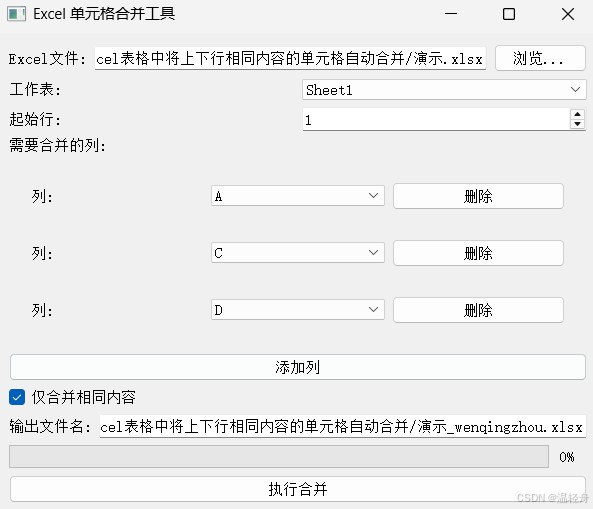
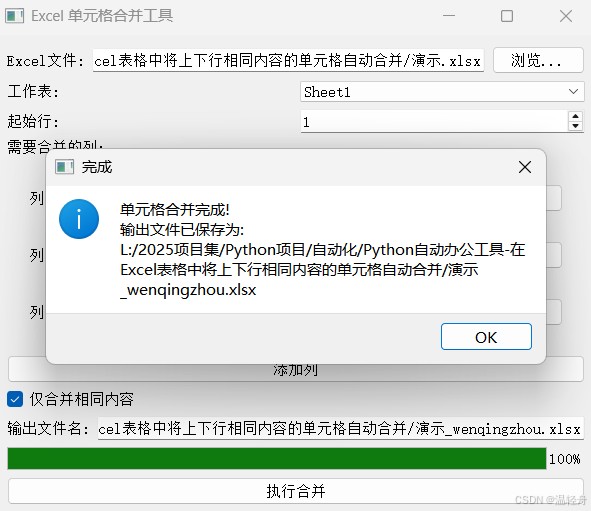
- 浏览按钮:允许用户通过文件对话框选择 Excel 文件(支持
.xlsx 和 .xls 格式)
- 自动读取工作表:选中文件后自动读取并显示所有工作表名称
- 默认输出文件名:自动在原文件名后添加 “_wenqingzhou” 作为默认输出文件名
.xlsx 和 .xls 格式)
- 通过
QSpinBox 设置从哪一行开始处理数据
QSpinBox 设置从哪一行开始处理数据
- 可以动态添加多个列选择控件
- 每个列选择控件允许选择
A-CU 的列标识
- 提供删除按钮移除不需要的列设置
A-CU 的列标识
- "仅合并相同内容"复选框:控制是否只合并内容相同的相邻单元格
- 如果勾选:只合并内容相同的相邻单元格
- 如果未勾选:每个单元格单独处理(实际不合并,但保留结构以便统一处理)
- 使用
QThread 在后台执行合并操作,避免界面卡死
QThread 在后台执行合并操作,避免界面卡死
- 通过
QProgressBar 显示合并进度
QProgressBar 显示合并进度
- 成功时显示完成消息和输出文件路径
- 失败时显示错误详情
- 可自定义输出文件名
- 默认在原文件名后添加后缀保存
import sys
from PyQt5.QtWidgets import (QApplication, QMainWindow, QWidget, QVBoxLayout, QHBoxLayout,
                             QLabel, QLineEdit, QPushButton, QFileDialog, QComboBox,
                             QCheckBox, QMessageBox, QSpinBox, QProgressBar)
from PyQt5.QtCore import QThread, pyqtSignal
from openpyxl import load_workbook
from openpyxl.utils import get_column_letter
import os

class MergeThread(QThread):
    progress_signal = pyqtSignal(int)
    finished_signal = pyqtSignal(str)
    error_signal = pyqtSignal(str)

    def __init__(self, file_path, sheet_name, start_row, columns, merge_same_content, output_path, parent=None):
        super().__init__(parent)
        self.file_path = file_path
        self.sheet_name = sheet_name
        self.start_row = start_row
        self.columns = columns
        self.merge_same_content = merge_same_content
        self.output_path = output_path

    def run(self):
        try:
            wb = load_workbook(self.file_path)
            ws = wb[self.sheet_name]
            total_steps = len(self.columns)
            current_step = 0

            for col_info in self.columns:
                col = col_info['col']
                target_list = []

                for row in range(self.start_row, ws.max_row + 1):
                    cell_value = ws[f"{col}{row}"].value
                    target_list.append(cell_value if cell_value is not None else "")

                self._merge_cells(ws, target_list, self.start_row, col)
                current_step += 1
                progress = int(current_step / total_steps * 100)
                self.progress_signal.emit(progress)

            wb.save(self.output_path)
            self.finished_signal.emit(self.output_path)

        except Exception as e:
            self.error_signal.emit(str(e))

    def _merge_cells(self, ws, target_list, start_row, col):
        start = 0
        end = 0
        reference = target_list[0]

        for i in range(len(target_list)):
            if not self.merge_same_content and i > 0:
                if i > 0 and start != i - 1:
                    ws.merge_cells(f'{col}{start + start_row}:{col}{i - 1 + start_row}')
                start = i
            else:
                if i < len(target_list) - 1 and target_list[i] == target_list[i + 1]:
                    end = i
                    continue

                if start == i:
                    pass
                else:
                    if target_list[start] == target_list[i]:
                        ws.merge_cells(f'{col}{start + start_row}:{col}{i + start_row}')

                start = i + 1

class ExcelMergeTool(QMainWindow):
    def __init__(self):
        super().__init__()
        self.setWindowTitle("Excel 单元格合并工具")
        self.setGeometry(100, 100, 600, 450)
        self.file_path = ""
        self.sheet_names = []
        self.columns = []
        self.init_ui()

    def init_ui(self):
        main_widget = QWidget()
        main_layout = QVBoxLayout()
        file_layout = QHBoxLayout()
        file_layout.addWidget(QLabel("Excel文件:"))
        self.file_edit = QLineEdit()
        self.file_edit.setReadOnly(True)
        file_layout.addWidget(self.file_edit)
        browse_btn = QPushButton("浏览...")
        browse_btn.clicked.connect(self.browse_file)
        file_layout.addWidget(browse_btn)
        main_layout.addLayout(file_layout)
        sheet_layout = QHBoxLayout()
        sheet_layout.addWidget(QLabel("工作表:"))
        self.sheet_combo = QComboBox()
        self.sheet_combo.setEnabled(False)
        sheet_layout.addWidget(self.sheet_combo)
        main_layout.addLayout(sheet_layout)
        row_layout = QHBoxLayout()
        row_layout.addWidget(QLabel("起始行:"))
        self.start_row_spin = QSpinBox()
        self.start_row_spin.setMinimum(1)
        self.start_row_spin.setMaximum(9999)
        self.start_row_spin.setValue(1)
        row_layout.addWidget(self.start_row_spin)
        main_layout.addLayout(row_layout)
        col_layout = QVBoxLayout()
        col_layout.addWidget(QLabel("需要合并的列:"))
        self.col_list_widget = QWidget()
        self.col_list_layout = QVBoxLayout()
        self.col_list_widget.setLayout(self.col_list_layout)
        col_layout.addWidget(self.col_list_widget)
        add_col_btn = QPushButton("添加列")
        add_col_btn.clicked.connect(self.add_column_setting)
        col_layout.addWidget(add_col_btn)
        main_layout.addLayout(col_layout)
        option_layout = QHBoxLayout()
        self.merge_same_check = QCheckBox("仅合并相同内容")
        self.merge_same_check.setChecked(True)
        option_layout.addWidget(self.merge_same_check)
        main_layout.addLayout(option_layout)
        output_layout = QHBoxLayout()
        output_layout.addWidget(QLabel("输出文件名:"))
        self.output_edit = QLineEdit()
        self.output_edit.setPlaceholderText("自动在原文件名后添加'_wenqingzhou'")
        output_layout.addWidget(self.output_edit)
        main_layout.addLayout(output_layout)
        self.progress_bar = QProgressBar()
        self.progress_bar.setValue(0)
        main_layout.addWidget(self.progress_bar)
        execute_btn = QPushButton("执行合并")
        execute_btn.clicked.connect(self.execute_merge)
        main_layout.addWidget(execute_btn)
        main_widget.setLayout(main_layout)
        self.setCentralWidget(main_widget)

    def browse_file(self):
        file_path, _ = QFileDialog.getOpenFileName(
            self, "选择Excel文件", "", "Excel文件 (*.xlsx *.xls)"
        )

        if file_path:
            self.file_path = file_path
            self.file_edit.setText(file_path)

            try:
                wb = load_workbook(file_path, read_only=True)
                self.sheet_names = wb.sheetnames
                self.sheet_combo.clear()
                self.sheet_combo.addItems(self.sheet_names)
                self.sheet_combo.setEnabled(True)
                base, ext = os.path.splitext(file_path)
                default_output = f"{base}_wenqingzhou{ext}"
                self.output_edit.setText(default_output)

                for i in reversed(range(self.col_list_layout.count())):
                    widget = self.col_list_layout.itemAt(i).widget()
                    if widget is not None:
                        widget.deleteLater()

                self.columns = []

            except Exception as e:
                QMessageBox.critical(self, "错误", f"无法读取Excel文件:n{str(e)}")

    def add_column_setting(self):
        if not self.sheet_names:
            QMessageBox.warning(self, "警告", "请先选择Excel文件")
            return

        col_widget = QWidget()
        col_layout = QHBoxLayout()
        col_layout.addWidget(QLabel("列:"))
        col_combo = QComboBox()
        col_combo.addItems([get_column_letter(i) for i in range(1, 100)])  # A-CZ
        col_layout.addWidget(col_combo)
        del_btn = QPushButton("删除")
        del_btn.clicked.connect(lambda: self.remove_column_setting(col_widget))
        col_layout.addWidget(del_btn)
        col_widget.setLayout(col_layout)
        self.col_list_layout.addWidget(col_widget)
        self.columns.append({
            'widget': col_widget,
            'col_combo': col_combo,
        })

    def remove_column_setting(self, widget):
        self.col_list_layout.removeWidget(widget)
        widget.deleteLater()
        self.columns = [col for col in self.columns if col['widget'] != widget]

    def execute_merge(self):
        if not self.file_path:
            QMessageBox.warning(self, "警告", "请先选择Excel文件")
            return

        if not self.columns:
            QMessageBox.warning(self, "警告", "请至少添加一列需要合并的列")
            return

        sheet_name = self.sheet_combo.currentText()
        start_row = self.start_row_spin.value()
        merge_same_content = self.merge_same_check.isChecked()

        columns_info = []
        for col in self.columns:
            col_letter = col['col_combo'].currentText()
            columns_info.append({'col': col_letter, 'name': ''})

        output_path = self.output_edit.text().strip()
        if not output_path:
            base, ext = os.path.splitext(self.file_path)
            output_path = f"{base}_wenqingzhou{ext}"

        self.thread = MergeThread(
            file_path=self.file_path,
            sheet_name=sheet_name,
            start_row=start_row,
            columns=columns_info,
            merge_same_content=merge_same_content,
            output_path=output_path
        )

        self.thread.progress_signal.connect(self.update_progress)
        self.thread.finished_signal.connect(self.merge_completed)
        self.thread.error_signal.connect(self.merge_failed)
        self.thread.start()

    def update_progress(self, value):
        self.progress_bar.setValue(value)

    def merge_completed(self, output_path):
        QMessageBox.information(
            self,
            "完成",
            f"单元格合并完成!n输出文件已保存为:n{output_path}"
        )
        self.progress_bar.setValue(0)

    def merge_failed(self, error_msg):
        QMessageBox.critical(
            self,
            "错误",
            f"合并过程中发生错误:n{error_msg}"
        )
        self.progress_bar.setValue(0)

if __name__ == "__main__":
    app = QApplication(sys.argv)
    window = ExcelMergeTool()
    window.show()
    sys.exit(app.exec_())
class MergeThread(QThread):

    """后台处理Excel合并的线程类,避免界面卡顿"""

    # 定义线程信号
    progress_signal = pyqtSignal(int)  # 进度信号
    finished_signal = pyqtSignal(str)  # 完成信号(带输出路径)
    error_signal = pyqtSignal(str)     # 错误信号

    def __init__(self, file_path, sheet_name, start_row, columns, merge_same_content, output_path, parent=None):
        super().__init__(parent)
        # 初始化参数
        self.file_path = file_path
        self.sheet_name = sheet_name
        self.start_row = start_row
        self.columns = columns  # 格式:[{'col': 'A'}, {'col': 'B'}]
        self.merge_same_content = merge_same_content
        self.output_path = output_path

    def run(self):
        """线程执行的主逻辑"""
        try:
            # 1. 加载Excel文件
            wb = load_workbook(self.file_path)
            ws = wb[self.sheet_name]

            # 2. 计算总进度步数(基于列数)
            total_steps = len(self.columns)
            current_step = 0

            # 3. 遍历处理每一列
            for col_info in self.columns:
                col = col_info['col']
                target_list = []

                # 3.1 收集该列所有单元格数据
                for row in range(self.start_row, ws.max_row + 1):
                    cell_value = ws[f"{col}{row}"].value
                    target_list.append(cell_value if cell_value is not None else "")

                # 3.2 执行单元格合并
                self._merge_cells(ws, target_list, self.start_row, col)

                # 3.3 更新进度
                current_step += 1
                progress = int(current_step / total_steps * 100)
                self.progress_signal.emit(progress)

            # 4. 保存结果
            wb.save(self.output_path)
            self.finished_signal.emit(self.output_path)

        except Exception as e:
            self.error_signal.emit(str(e))

    def _merge_cells(self, ws, target_list, start_row, col):
        """
        实际执行单元格合并的算法:
        :param ws: 工作表对象
        :param target_list: 该列所有单元格值列表
        :param start_row: 起始行号
        :param col: 列字母
        """
        start = 0
        reference = target_list[0]

        for i in range(len(target_list)):
            if not self.merge_same_content and i > 0:
                # 模式1:强制合并(无论内容是否相同)
                if i > 0 and start != i - 1:
                    ws.merge_cells(f'{col}{start + start_row}:{col}{i - 1 + start_row}')
                start = i
            else:
                # 模式2:仅合并相同内容
                if i < len(target_list) - 1 and target_list[i] == target_list[i + 1]:
                    continue  # 相同内容则继续扩展合并范围

                if start == i:
                    pass  # 单个单元格无需合并
                else:
                    if target_list[start] == target_list[i]:
                        ws.merge_cells(f'{col}{start + start_row}:{col}{i + start_row}')
                start = i + 1
class ExcelMergeTool(QMainWindow):

    """主窗口类,负责UI展示和用户交互"""
    def __init__(self):
        super().__init__()
        self.setWindowTitle("Excel 单元格合并工具")
        self.setGeometry(100, 100, 600, 450)
        self.file_path = ""
        self.sheet_names = []
        self.columns = []  # 存储用户添加的列设置
        self.init_ui()

    def init_ui(self):

        """初始化用户界面"""
        main_widget = QWidget()
        main_layout = QVBoxLayout()

        # ------- 文件选择区域 -------
        file_layout = QHBoxLayout()
        file_layout.addWidget(QLabel("Excel文件:"))
        self.file_edit = QLineEdit()
        self.file_edit.setReadOnly(True)
        file_layout.addWidget(self.file_edit)

        browse_btn = QPushButton("浏览...")
        browse_btn.clicked.connect(self.browse_file)
        file_layout.addWidget(browse_btn)
        main_layout.addLayout(file_layout)

        # ------- 工作表选择区域 -------
        sheet_layout = QHBoxLayout()
        sheet_layout.addWidget(QLabel("工作表:"))
        self.sheet_combo = QComboBox()
        self.sheet_combo.setEnabled(False)  # 初始禁用,直到选择文件
        sheet_layout.addWidget(self.sheet_combo)
        main_layout.addLayout(sheet_layout)

        # ------- 起始行设置 -------
        row_layout = QHBoxLayout()
        row_layout.addWidget(QLabel("起始行:"))
        self.start_row_spin = QSpinBox()
        self.start_row_spin.setMinimum(1)
        self.start_row_spin.setMaximum(9999)
        self.start_row_spin.setValue(1)
        row_layout.addWidget(self.start_row_spin)
        main_layout.addLayout(row_layout)

        # ------- 列设置区域 -------
        col_layout = QVBoxLayout()
        col_layout.addWidget(QLabel("需要合并的列:"))

        # 动态列设置容器
        self.col_list_widget = QWidget()
        self.col_list_layout = QVBoxLayout()
        self.col_list_widget.setLayout(self.col_list_layout)
        col_layout.addWidget(self.col_list_widget)

        add_col_btn = QPushButton("添加列")
        add_col_btn.clicked.connect(self.add_column_setting)
        col_layout.addWidget(add_col_btn)
        main_layout.addLayout(col_layout)

        # ------- 选项设置 -------
        option_layout = QHBoxLayout()
        self.merge_same_check = QCheckBox("仅合并相同内容")
        self.merge_same_check.setChecked(True)
        option_layout.addWidget(self.merge_same_check)
        main_layout.addLayout(option_layout)

        # ------- 输出设置 -------
        output_layout = QHBoxLayout()
        output_layout.addWidget(QLabel("输出文件名:"))
        self.output_edit = QLineEdit()
        self.output_edit.setPlaceholderText("自动在原文件名后添加'_wenqingzhou'")
        output_layout.addWidget(self.output_edit)
        main_layout.addLayout(output_layout)

        # ------- 进度条 -------
        self.progress_bar = QProgressBar()
        self.progress_bar.setValue(0)
        main_layout.addWidget(self.progress_bar)

        # ------- 执行按钮 -------
        execute_btn = QPushButton("执行合并")
        execute_btn.clicked.connect(self.execute_merge)
        main_layout.addWidget(execute_btn)

        main_widget.setLayout(main_layout)
        self.setCentralWidget(main_widget)
    def browse_file(self):

        """打开文件对话框选择Excel文件"""
        file_path, _ = QFileDialog.getOpenFileName(
            self, "选择Excel文件", "", "Excel文件 (*.xlsx *.xls)"
        )

        if file_path:
            self.file_path = file_path
            self.file_edit.setText(file_path)

            try:
                # 读取工作表列表
                wb = load_workbook(file_path, read_only=True)
                self.sheet_names = wb.sheetnames
                self.sheet_combo.clear()
                self.sheet_combo.addItems(self.sheet_names)
                self.sheet_combo.setEnabled(True)

                # 设置默认输出文件名
                base, ext = os.path.splitext(file_path)
                default_output = f"{base}_wenqingzhou{ext}"
                self.output_edit.setText(default_output)

                # 清空已有列设置
                for i in reversed(range(self.col_list_layout.count())):
                    widget = self.col_list_layout.itemAt(i).widget()
                    if widget is not None:
                        widget.deleteLater()
                self.columns = []

            except Exception as e:
                QMessageBox.critical(self, "错误", f"无法读取Excel文件:n{str(e)}")

    def add_column_setting(self):

        """添加一列合并设置"""
        if not self.sheet_names:
            QMessageBox.warning(self, "警告", "请先选择Excel文件")
            return

        # 创建列设置控件组
        col_widget = QWidget()
        col_layout = QHBoxLayout()
        col_layout.addWidget(QLabel("列:"))

        # 列选择下拉框(A-CZ)
        col_combo = QComboBox()
        col_combo.addItems([get_column_letter(i) for i in range(1, 100)])
        col_layout.addWidget(col_combo)

        # 删除按钮
        del_btn = QPushButton("删除")
        del_btn.clicked.connect(lambda: self.remove_column_setting(col_widget))
        col_layout.addWidget(del_btn)

        col_widget.setLayout(col_layout)
        self.col_list_layout.addWidget(col_widget)

        # 记录到列设置列表
        self.columns.append({
            'widget': col_widget,
            'col_combo': col_combo,
        })

    def remove_column_setting(self, widget):

        """删除指定的列设置"""
        self.col_list_layout.removeWidget(widget)
        widget.deleteLater()
        self.columns = [col for col in self.columns if col['widget'] != widget]

    def execute_merge(self):

        """执行合并操作"""
        # 参数验证
        if not self.file_path:
            QMessageBox.warning(self, "警告", "请先选择Excel文件")
            return

        if not self.columns:
            QMessageBox.warning(self, "警告", "请至少添加一列需要合并的列")
            return

        # 收集参数
        sheet_name = self.sheet_combo.currentText()
        start_row = self.start_row_spin.value()
        merge_same_content = self.merge_same_check.isChecked()

        # 准备列信息
        columns_info = []
        for col in self.columns:
            col_letter = col['col_combo'].currentText()
            columns_info.append({'col': col_letter, 'name': ''})  # name保留字段

        # 处理输出路径
        output_path = self.output_edit.text().strip()
        if not output_path:
            base, ext = os.path.splitext(self.file_path)
            output_path = f"{base}_wenqingzhou{ext}"

        # 创建并启动后台线程
        self.thread = MergeThread(
            file_path=self.file_path,
            sheet_name=sheet_name,
            start_row=start_row,
            columns=columns_info,
            merge_same_content=merge_same_content,
            output_path=output_path
        )

        # 连接信号槽
        self.thread.progress_signal.connect(self.update_progress)
        self.thread.finished_signal.connect(self.merge_completed)
        self.thread.error_signal.connect(self.merge_failed)
        self.thread.start()
    def update_progress(self, value):

        """更新进度条"""
        self.progress_bar.setValue(value)

    def merge_completed(self, output_path):

        """合并完成处理"""
        QMessageBox.information(
            self,
            "完成",
            f"单元格合并完成!n输出文件已保存为:n{output_path}"
        )
        self.progress_bar.setValue(0)

    def merge_failed(self, error_msg):

        """合并失败处理"""
        QMessageBox.critical(
            self,
            "错误",
            f"合并过程中发生错误:n{error_msg}"
        )
        self.progress_bar.setValue(0)
以上就是Python基于PyQt5和openpyxl实现Excel单元格合并工具的详细内容,更多关于Python Excel单元格合并的资料请关注风君子博客其它相关文章!
您可能感兴趣的文章:
- Python使用openpyxl设置Excel单元格公式和工作簿合并
- 使用Python合并 Excel单元格指定行列或单元格范围
- Python excel合并居中值相同的单元格实例代码
- Python实现Excel自动分组合并单元格
- python操作openpyxl导出Excel 设置单元格格式及合并处理代码实例