
Python使用PaddleOCR实现PDF/图片文字识别与版面还原

作者:

文章目录
  • 本文介绍了如何利用 PaddleOCR 实现对 PDF 文件或图片 的文字识别,并在识别后将文本内容按照 原始版面位置 进行还原重建。文章详细讲解了实现流程,包括 图像预处理、OCR 识别、版面坐标提取与重排、以及最终生成 可编辑的 PDF 或可视化输出 的过程。 本文将带你使用 PaddleOCR 实现一个完整流程: # 升级 pip python -m pip install –upgrade pip # 设置清华源加速下载(可选) pip config set global.index-url https://pypi.tuna.tsinghua.edu.cn/simple # 安装 PaddlePaddle CPU 版本 python -m pip install paddlepaddle==3.2.0 -i https://www.paddlepaddle.org.cn/packages/stable/cpu/ # 安装辅助库 python -m pip install PyMuPDF Pillow reportlab tqdm beautifulsoup4 # 安装指定版本 PaddleOCR python -m pip install paddleocr==3.2.0
  • import os import cv2 import json import numpy as np import base64 from xml.etree.ElementTree import Element, SubElement, tostring from paddleocr import PaddleOCR ocr = PaddleOCR( text_detection_model_name=”PP-OCRv5_server_det”, text_recognition_model_name=”PP-OCRv5_server_rec”, use_doc_orientation_classify=False, use_doc_unwarping=False, use_textline_orientation=False )
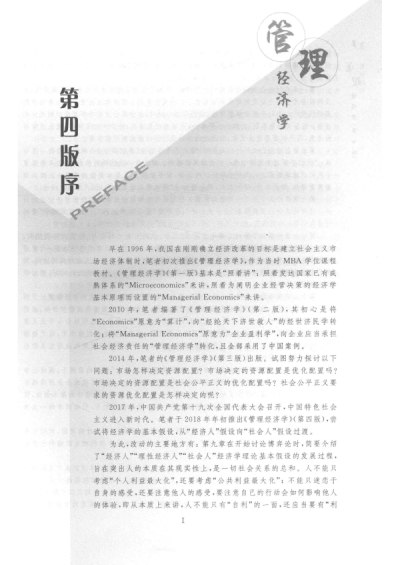
  • INPUT_IMG = “./page_4.png” result = ocr.predict(INPUT_IMG) data = result[0] # 取第一页结果 返回结构包含: rec_texts: 识别的文本列表 rec_polys: 每个文本的多边形坐标(4个点) input_path: 原图路径
  • orig_img = cv2.imread(data[“input_path”]) img_h, img_w = orig_img.shape[:2] print(f”原图尺寸: {img_w} x {img_h}”)
  • svg = Element(“svg”, { “xmlns”: “http://www.w3.org/2000/svg”, “width”: str(img_w), “height”: str(img_h), “viewBox”: f”0 0 {img_w} {img_h}”, “style”: “background:none” })
  • FONT_PATH = os.path.expanduser(“~/.paddlex/fonts/simfang.ttf”) with open(FONT_PATH, “rb”) as f: font_data = base64.b64encode(f.read()).decode(“utf-8”) style_el = SubElement(svg, “style”) style_el.text = f””” @font-face {{ font-family: ‘SimFang’; src: url(data:font/truetype;charset=utf-8;base64,{font_data}) format(‘truetype’); }} text {{ font-family: ‘SimFang’; fill: rgb(0,0,0); dominant-baseline: middle; text-anchor: middle; white-space: pre; }}
  • for text, poly in zip(data[“rec_texts”], data[“rec_polys”]): if not text.strip(): continue box = np.array(poly, dtype=np.float32).reshape(4, 2) x0, y0 = box.min(axis=0) x1, y1 = box.max(axis=0) w_box, h_box = x1 – x0, y1 – y0 # 计算旋转角度(以左下→右下边为基准) angle = np.degrees(np.arctan2(box[1][1] – box[0][1], box[1][0] – box[0][0])) font_size = max(8, int(min(w_box, h_box) * 0.8)) # 判断是否为竖排文字 vertical = h_box > 2.5 * w_box and h_box > 60 if vertical: # 竖排:逐字垂直排列 cx = (x0 + x1) / 2 y = y0 gap = h_box / max(len(text), 1) for ch in text: text_el = SubElement(svg, “text”, { “x”: str(cx), “y”: str(y + gap / 2), “font-size”: str(font_size), “transform”: f”rotate({angle},{cx},{y + gap / 2})” }) text_el.text = ch y += gap else: # 横排:整体旋转 cx = (x0 + x1) / 2 cy = (y0 + y1) / 2 text_el = SubElement(svg, “text”, { “x”: str(cx), “y”: str(cy), “font-size”: str(font_size), “transform”: f”rotate({angle},{cx},{cy})” }) text_el.text = text
  • OUTPUT_SVG = “page_1_transparent.svg” with open(OUTPUT_SVG, “wb”) as f: f.write(tostring(svg, encoding=”utf-8″, xml_declaration=True)) print(f”已生成透明可复制文字 SVG: {OUTPUT_SVG}”)
  • import os import cv2 import json import numpy as np import base64 from xml.etree.ElementTree import Element, SubElement, tostring from paddleocr import PaddleOCR # ================== 配置 ================== ocr = PaddleOCR( text_detection_model_name=”PP-OCRv5_server_det”, text_recognition_model_name=”PP-OCRv5_server_rec”, use_doc_orientation_classify=False, use_doc_unwarping=False, use_textline_orientation=False ) INPUT_IMG = “./page_4.png” OUTPUT_PDF = “page_1_restored.pdf” INPUT_JSON = “./page_4_res.json” FONT_PATH = os.path.expanduser(“~/.paddlex/fonts/simfang.ttf”) SCALE = 3 # ================== 1. OCR 使用 predict ================== print(“正在执行 OCR: result = ocr.predict(INPUT_IMG)”) try: results = ocr.predict(INPUT_IMG) except Exception as e: print(f”nOCR 失败页: {e}”) continue # ———- 保存 JSON + 带框图 ———- for res_idx, res in enumerate(results): res.save_to_img(os.path.join(f”page_boxed.png”)) res.save_to_json(INPUT_JSON) # ================== 配置 ================== FONT_PATH = os.path.expanduser(“~/.paddlex/fonts/simfang.ttf”) OUTPUT_SVG = “page_1_transparent.svg” TEXT_COLOR = (0, 0, 0) # 黑色文字 if not os.path.exists(FONT_PATH): raise FileNotFoundError(f”字体未找到: {FONT_PATH}”) # ================== 1. 加载 OCR JSON ================== if not os.path.exists(INPUT_JSON): raise FileNotFoundError(f”OCR 结果未找到: {INPUT_JSON}”) with open(INPUT_JSON, “r”, encoding=”utf-8″) as f: data = json.load(f) texts = data[“rec_texts”] polys = data[“rec_polys”] input_path = data.get(“input_path”) if not input_path or not os.path.exists(input_path): raise FileNotFoundError(f”原图未找到: {input_path}”) # ================== 2. 获取原图尺寸 ================== orig_img = cv2.imread(input_path) if orig_img is None: raise ValueError(f”无法读取原图: {input_path}”) img_h, img_w = orig_img.shape[:2] print(f”原图尺寸: {img_w} x {img_h}”) # ================== 3. 创建 SVG 根节点 ================== svg = Element(“svg”, { “xmlns”: “http://www.w3.org/2000/svg”, “width”: str(img_w), “height”: str(img_h), “viewBox”: f”0 0 {img_w} {img_h}”, “style”: “background:none” }) # ================== 4. 内嵌字体(SimFang) ================== if not os.path.exists(FONT_PATH): raise FileNotFoundError(f”字体未找到: {FONT_PATH}”) with open(FONT_PATH, “rb”) as f: font_data = base64.b64encode(f.read()).decode(“utf-8”) style_el = SubElement(svg, “style”) style_el.text = f””” @font-face {{ font-family: ‘SimFang’; src: url(data:font/truetype;charset=utf-8;base64,{font_data}) format(‘truetype’); }} text {{ font-family: ‘SimFang’; fill: rgb({TEXT_COLOR[0]}, {TEXT_COLOR[1]}, {TEXT_COLOR[2]}); dominant-baseline: middle; text-anchor: middle; white-space: pre; }} “”” # ================== 5. 绘制文字(透明背景) ================== for text, poly in zip(texts, polys): if not text.strip(): continue box = np.array(poly, dtype=np.float32).reshape(4, 2) x0, y0 = box.min(axis=0) x1, y1 = box.max(axis=0) w_box, h_box = x1 – x0, y1 – y0 angle = np.degrees(np.arctan2(box[1][1] – box[0][1], box[1][0] – box[0][0])) font_size = max(8, int(min(w_box, h_box) * 0.8)) vertical = h_box > 2.5 * w_box and h_box > 60 if vertical: # 竖排文字 cx = (x0 + x1) / 2 y = y0 gap = h_box / max(len(text), 1) for ch in text: text_el = SubElement(svg, “text”, { “x”: str(cx), “y”: str(y + gap / 2), “font-size”: str(font_size), “transform”: f”rotate({angle},{cx},{y + gap / 2})” }) text_el.text = ch y += gap else: # 横排文字 cx = (x0 + x1) / 2 cy = (y0 + y1) / 2 text_el = SubElement(svg, “text”, { “x”: str(cx), “y”: str(cy), “font-size”: str(font_size), “transform”: f”rotate({angle},{cx},{cy})” }) text_el.text = text # ================== 6. 保存透明可复制 SVG ================== with open(OUTPUT_SVG, “wb”) as f: f.write(tostring(svg, encoding=”utf-8″, xml_declaration=True)) print(f”已生成透明可复制文字 SVG: {OUTPUT_SVG}”) 以上就是Python使用PaddleOCR实现PDF/图片文字识别与版面还原的详细内容,更多关于Python PaddleOCR文字识别的资料请关注风君子博客其它相关文章! 您可能感兴趣的文章: Python调用paddleocr编写一个桌面端PDF识别工具 使用Python和PaddleOCR实现图文识别的代码和步骤 Python使用paddleOCR批量识别pdf的方法 Python 图片文字识别的实现之PaddleOCR
  • 目录
    • 摘要
    • 1. 初始化 PaddleOCR(使用高精度服务器模型)
    • 2. 执行 OCR 识别
    • 3. 读取原图获取尺寸
    • 4. 创建 SVG 根节点(透明背景)
    • 5. 内嵌仿宋字体(Base64 编码)
    • 6. 智能绘制文字(支持旋转 + 竖排)
    • 7. 保存 SVG 文件
    • 8.效果展示
    • 9.完整代码

    本文介绍了如何利用 PaddleOCR 实现对 PDF 文件或图片 的文字识别,并在识别后将文本内容按照 原始版面位置 进行还原重建。文章详细讲解了实现流程,包括 图像预处理OCR 识别版面坐标提取与重排、以及最终生成 可编辑的 PDF 或可视化输出 的过程。

    本文将带你使用 PaddleOCR 实现一个完整流程:

    # 升级 pip
    python -m pip install --upgrade pip
     
    # 设置清华源加速下载(可选)
    pip config set global.index-url https://pypi.tuna.tsinghua.edu.cn/simple
     
    # 安装 PaddlePaddle CPU 版本
    python -m pip install paddlepaddle==3.2.0 -i https://www.paddlepaddle.org.cn/packages/stable/cpu/
     
    # 安装辅助库
    python -m pip install PyMuPDF Pillow reportlab tqdm beautifulsoup4
     
    # 安装指定版本 PaddleOCR
    python -m pip install paddleocr==3.2.0

    import os
    import cv2
    import json
    import numpy as np
    import base64
    from xml.etree.ElementTree import Element, SubElement, tostring
    from paddleocr import PaddleOCR
    ocr = PaddleOCR(
        text_detection_model_name="PP-OCRv5_server_det",
        text_recognition_model_name="PP-OCRv5_server_rec",
        use_doc_orientation_classify=False,
        use_doc_unwarping=False,
        use_textline_orientation=False
    )

    INPUT_IMG = "./page_4.png"
    result = ocr.predict(INPUT_IMG)
    data = result[0]  # 取第一页结果

    返回结构包含:

    • rec_texts: 识别的文本列表
    • rec_polys: 每个文本的多边形坐标(4个点)
    • input_path: 原图路径

    orig_img = cv2.imread(data["input_path"])
    img_h, img_w = orig_img.shape[:2]
    print(f"原图尺寸: {img_w} x {img_h}")

    svg = Element("svg", {
        "xmlns": "http://www.w3.org/2000/svg",
        "width": str(img_w),
        "height": str(img_h),
        "viewBox": f"0 0 {img_w} {img_h}",
        "style": "background:none"
    })

    FONT_PATH = os.path.expanduser("~/.paddlex/fonts/simfang.ttf")
    
    with open(FONT_PATH, "rb") as f:
        font_data = base64.b64encode(f.read()).decode("utf-8")
    
    style_el = SubElement(svg, "style")
    style_el.text = f"""
    @font-face {{
      font-family: 'SimFang';
      src: url(data:font/truetype;charset=utf-8;base64,{font_data}) format('truetype');
    }}
    text {{
      font-family: 'SimFang';
      fill: rgb(0,0,0);
      dominant-baseline: middle;
      text-anchor: middle;
      white-space: pre;
    }}

    for text, poly in zip(data["rec_texts"], data["rec_polys"]):
        if not text.strip(): 
            continue
    
        box = np.array(poly, dtype=np.float32).reshape(4, 2)
        x0, y0 = box.min(axis=0)
        x1, y1 = box.max(axis=0)
        w_box, h_box = x1 - x0, y1 - y0
    
        # 计算旋转角度(以左下→右下边为基准)
        angle = np.degrees(np.arctan2(box[1][1] - box[0][1], box[1][0] - box[0][0]))
        font_size = max(8, int(min(w_box, h_box) * 0.8))
    
        # 判断是否为竖排文字
        vertical = h_box > 2.5 * w_box and h_box > 60
    
        if vertical:
            # 竖排:逐字垂直排列
            cx = (x0 + x1) / 2
            y = y0
            gap = h_box / max(len(text), 1)
            for ch in text:
                text_el = SubElement(svg, "text", {
                    "x": str(cx),
                    "y": str(y + gap / 2),
                    "font-size": str(font_size),
                    "transform": f"rotate({angle},{cx},{y + gap / 2})"
                })
                text_el.text = ch
                y += gap
        else:
            # 横排:整体旋转
            cx = (x0 + x1) / 2
            cy = (y0 + y1) / 2
            text_el = SubElement(svg, "text", {
                "x": str(cx),
                "y": str(cy),
                "font-size": str(font_size),
                "transform": f"rotate({angle},{cx},{cy})"
            })
            text_el.text = text

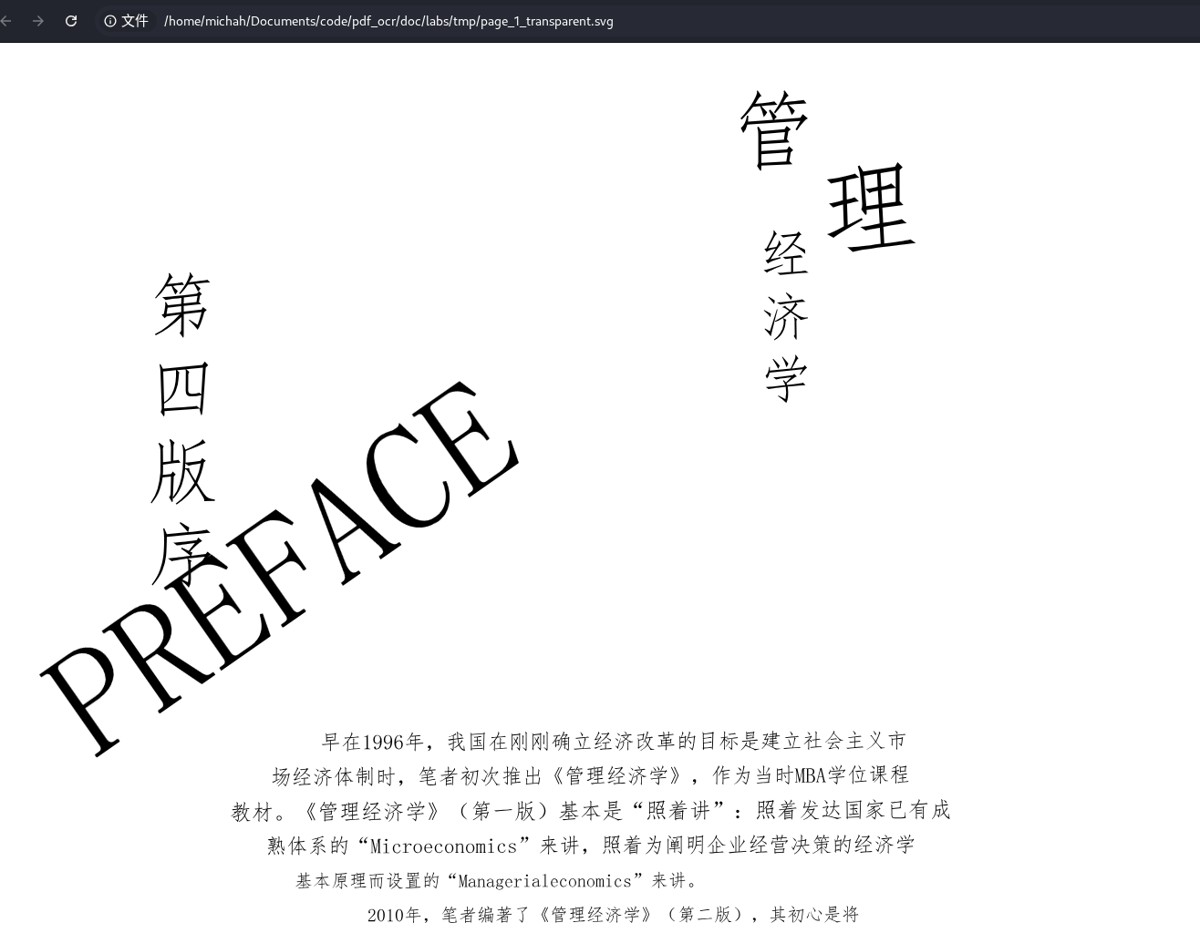
    OUTPUT_SVG = "page_1_transparent.svg"
    with open(OUTPUT_SVG, "wb") as f:
        f.write(tostring(svg, encoding="utf-8", xml_declaration=True))
    
    print(f"已生成透明可复制文字 SVG: {OUTPUT_SVG}")
    import os
    import cv2
    import json
    import numpy as np
    import base64
    from xml.etree.ElementTree import Element, SubElement, tostring
    from paddleocr import PaddleOCR
    # ================== 配置 ==================
    ocr = PaddleOCR(
        text_detection_model_name="PP-OCRv5_server_det",
        text_recognition_model_name="PP-OCRv5_server_rec",
        use_doc_orientation_classify=False,
        use_doc_unwarping=False,
        use_textline_orientation=False
    )
    
    INPUT_IMG   = "./page_4.png"
    OUTPUT_PDF  = "page_1_restored.pdf"
    INPUT_JSON = "./page_4_res.json"
    FONT_PATH   = os.path.expanduser("~/.paddlex/fonts/simfang.ttf")
    SCALE       = 3
    
    
    # ================== 1. OCR 使用 predict ==================
    print("正在执行 OCR: result = ocr.predict(INPUT_IMG)")
    try:
        results = ocr.predict(INPUT_IMG)
    except Exception as e:
        print(f"nOCR 失败页: {e}")
        continue
    
    # ---------- 保存 JSON + 带框图 ----------
    for res_idx, res in enumerate(results):
        res.save_to_img(os.path.join(f"page_boxed.png"))
        res.save_to_json(INPUT_JSON)
    
    # ================== 配置 ==================
    FONT_PATH  = os.path.expanduser("~/.paddlex/fonts/simfang.ttf")
    OUTPUT_SVG = "page_1_transparent.svg"
    TEXT_COLOR = (0, 0, 0)  # 黑色文字
    if not os.path.exists(FONT_PATH):
        raise FileNotFoundError(f"字体未找到: {FONT_PATH}")
    
    # ================== 1. 加载 OCR JSON ==================
    if not os.path.exists(INPUT_JSON):
        raise FileNotFoundError(f"OCR 结果未找到: {INPUT_JSON}")
    with open(INPUT_JSON, "r", encoding="utf-8") as f:
         data = json.load(f)
    
    texts = data["rec_texts"]
    polys = data["rec_polys"]
    
    input_path = data.get("input_path")
    if not input_path or not os.path.exists(input_path):
        raise FileNotFoundError(f"原图未找到: {input_path}")
    
    # ================== 2. 获取原图尺寸 ==================
    orig_img = cv2.imread(input_path)
    if orig_img is None:
        raise ValueError(f"无法读取原图: {input_path}")
    img_h, img_w = orig_img.shape[:2]
    print(f"原图尺寸: {img_w} x {img_h}")
    
    # ================== 3. 创建 SVG 根节点 ==================
    svg = Element("svg", {
        "xmlns": "http://www.w3.org/2000/svg",
        "width": str(img_w),
        "height": str(img_h),
        "viewBox": f"0 0 {img_w} {img_h}",
        "style": "background:none"
    })
    
    # ================== 4. 内嵌字体(SimFang) ==================
    if not os.path.exists(FONT_PATH):
        raise FileNotFoundError(f"字体未找到: {FONT_PATH}")
    
    with open(FONT_PATH, "rb") as f:
        font_data = base64.b64encode(f.read()).decode("utf-8")
    
    style_el = SubElement(svg, "style")
    style_el.text = f"""
    @font-face {{
      font-family: 'SimFang';
      src: url(data:font/truetype;charset=utf-8;base64,{font_data}) format('truetype');
    }}
    text {{
      font-family: 'SimFang';
      fill: rgb({TEXT_COLOR[0]}, {TEXT_COLOR[1]}, {TEXT_COLOR[2]});
      dominant-baseline: middle;
      text-anchor: middle;
      white-space: pre;
    }}
    """
    
    # ================== 5. 绘制文字(透明背景) ==================
    for text, poly in zip(texts, polys):
        if not text.strip():
            continue
    
        box = np.array(poly, dtype=np.float32).reshape(4, 2)
        x0, y0 = box.min(axis=0)
        x1, y1 = box.max(axis=0)
        w_box, h_box = x1 - x0, y1 - y0
        angle = np.degrees(np.arctan2(box[1][1] - box[0][1], box[1][0] - box[0][0]))
        font_size = max(8, int(min(w_box, h_box) * 0.8))
    
        vertical = h_box > 2.5 * w_box and h_box > 60
    
        if vertical:
            # 竖排文字
            cx = (x0 + x1) / 2
            y = y0
            gap = h_box / max(len(text), 1)
            for ch in text:
                text_el = SubElement(svg, "text", {
                    "x": str(cx),
                    "y": str(y + gap / 2),
                    "font-size": str(font_size),
                    "transform": f"rotate({angle},{cx},{y + gap / 2})"
                })
                text_el.text = ch
                y += gap
        else:
            # 横排文字
            cx = (x0 + x1) / 2
            cy = (y0 + y1) / 2
            text_el = SubElement(svg, "text", {
                "x": str(cx),
                "y": str(cy),
                "font-size": str(font_size),
                "transform": f"rotate({angle},{cx},{cy})"
            })
            text_el.text = text
    
    # ================== 6. 保存透明可复制 SVG ==================
    with open(OUTPUT_SVG, "wb") as f:
        f.write(tostring(svg, encoding="utf-8", xml_declaration=True))
    
    print(f"已生成透明可复制文字 SVG: {OUTPUT_SVG}")
    

    以上就是Python使用PaddleOCR实现PDF/图片文字识别与版面还原的详细内容,更多关于Python PaddleOCR文字识别的资料请关注风君子博客其它相关文章!

    您可能感兴趣的文章:

    • Python调用paddleocr编写一个桌面端PDF识别工具
    • 使用Python和PaddleOCR实现图文识别的代码和步骤
    • Python使用paddleOCR批量识别pdf的方法
    • Python 图片文字识别的实现之PaddleOCR

    站内搜索