文章目录
- Python版本需要为3.8-3.14(pywin32的要求)通过pip下载pywin32: pip install pywin32
- import os from win32com import client as wc def convert_word_to_pdf(word_path: str) -> str: “”” 将单个Word文档(doc/docx)转换为PDF格式,并返回转换后的文件路径 Args: word_path (str): Word文件路径 Returns: str: 转换后的PDF文件路径 Raises: FileNotFoundError: 如果文件不存在 ValueError: 如果文件不是Word格式或路径无效 Exception: 转换过程中的其他错误 “”” # 参数验证 if not word_path or not isinstance(word_path, str): raise ValueError(“文件路径不能为空且必须是字符串”) # 检查文件是否存在 if not os.path.exists(word_path): raise FileNotFoundError(f”文件不存在: {word_path}”) # 检查文件扩展名 valid_extensions = (‘.doc’, ‘.docx’) if not word_path.lower().endswith(valid_extensions): raise ValueError(f”文件不是Word格式(.doc/.docx): {word_path}”) # 检查文件是否被占用(临时文件) if os.path.basename(word_path).startswith(‘~’): raise ValueError(f”文件可能是临时文件: {word_path}”) # 检查文件大小(避免处理空文件或损坏文件) file_size = os.path.getsize(word_path) if file_size == 0: raise ValueError(f”文件为空: {word_path}”) word = None doc = None try: # 创建Word应用实例 word = wc.Dispatch(“Word.Application”) word.Visible = False # 打开文档 doc = word.Documents.Open(word_path) # 生成新的PDF文件路径 base_path = os.path.splitext(word_path)[0] new_path = base_path + “.pdf” # 处理文件名冲突 count = 0 while os.path.exists(new_path): count += 1 new_path = f”{base_path}({count}).pdf” # 保存为PDF格式(17代表PDF格式) doc.SaveAs(new_path, 17) # 验证转换后的文件 if not os.path.exists(new_path): raise Exception(“转换后的PDF文件未创建成功”) # 检查转换后的文件大小 if os.path.getsize(new_path) == 0: raise Exception(“转换后的PDF文件为空”) return new_path except Exception as e: # 清理可能创建的部分文件 if ‘new_path’ in locals() and os.path.exists(new_path): try: os.remove(new_path) except: pass raise e finally: # 确保资源被正确释放 try: if doc: doc.Close() except: pass try: if word: word.Quit() except: pass def main(): “””主函数:转换单个文件并显示结果””” # 直接在代码中设置要转换的文件路径 word_file_path = r”D:word_filesexample.docx” # 修改为您要转换的Word文件路径 try: print(f”开始转换文件: {word_file_path}”) # 转换文件 pdf_path = convert_word_to_pdf(word_file_path) # 输出成功信息 print(“n” + “=”*50) print(“✓ 文件转换成功!”) print(f”原始文件: {word_file_path}”) print(f”转换后文件: {pdf_path}”) print(f”文件大小: {os.path.getsize(pdf_path)} 字节”) print(“=”*50) except FileNotFoundError as e: print(f”✗ 错误: {e}”) print(“请检查文件路径是否正确”) except ValueError as e: print(f”✗ 错误: {e}”) print(“请确保文件是有效的Word文档(.doc/.docx)”) except Exception as e: print(f”✗ 转换失败: {e}”) print(“可能是Word应用问题或文件损坏”) if __name__ == “__main__”: main() 将代码复制到你的Python编辑器中,并修改D:word_filesexample.docx为您需要转换的Word文件路径即可。转换后的PDF文件与Word文件同名(如果已经存在了同名PDF文件,将加上(count)后缀以避免冲突)
- Word文档导出为PDF的核心功能代码为: import os from win32com import client as wc word = wc.Dispatch(“Word.Application”) word.Visible = False doc = word.Documents.Open(word_path) doc.SaveAs(new_path, 17) doc.Close() word.Quit() 将word_path对应的Word文档转换为new_path对应的PDF文档。支持doc和docx格式的Word文档。 doc.SaveAs(file_name, file_format)中file_format这个参数表示另存为文档的格式。 17: wdFormatPDF – PDF格式 0: wdFormatDocument – Microsoft Office Word 97-2003文档格式(.doc) 16: wdFormatDocumentDefault – Word默认文档格式(.docx) 7: wdFormatPDF – PDF格式(与17相同) 8: wdFormatXPS – XPS格式
- 通过pip下载python-docx: pip install python-docx
- 通过pip下载faker: pip install faker 执行代码(简历文件会下载到工作路径下的resumes文件夹下):(如果您需要执行这一部分代码的话,还需要注意的是,生成的Word文件默认使用中文宋体+英文Times New Roman格式,一般以中文为默认语言的Windows电脑中都已内置了这两种字体,如果您的电脑设置为其它语言需要注意) import os import random from docx import Document from docx.shared import Pt from docx.enum.text import WD_ALIGN_PARAGRAPH from docx.oxml.ns import qn from faker import Faker def set_document_font(doc): “”” 设置文档的默认字体为宋体和Times New Roman “”” # 设置全局样式 style = doc.styles[‘Normal’] font = style.font font.name = ‘Times New Roman’ font._element.rPr.rFonts.set(qn(‘w:eastAsia’), u’宋体’) font.size = Pt(12) def set_paragraph_font(paragraph, bold=False, size=12): “”” 设置段落的字体 “”” for run in paragraph.runs: run.font.name = ‘Times New Roman’ run._element.rPr.rFonts.set(qn(‘w:eastAsia’), u’宋体’) run.font.size = Pt(size) run.font.bold = bold def generate_resume_docx(filename, resume_data): “”” 生成单个简历Word文档 Args: filename (str): 保存的文件名 resume_data (dict): 简历数据 “”” doc = Document() # 设置文档字体 set_document_font(doc) # 添加标题 title = doc.add_heading(‘个人简历’, 0) title.alignment = WD_ALIGN_PARAGRAPH.CENTER set_paragraph_font(title, bold=True, size=16) # 添加个人信息表格 doc.add_heading(‘基本信息’, level=1) table = doc.add_table(rows=6, cols=4) table.style = ‘Table Grid’ # 填充基本信息表格 info_cells = [ (“姓名”, resume_data[‘name’]), (“性别”, resume_data[‘gender’]), (“年龄”, str(resume_data[‘age’])), (“联系电话”, resume_data[‘phone’]), (“邮箱”, resume_data[’email’]), (“现居地”, resume_data[‘address’]) ] for i, (label, value) in enumerate(info_cells): table.cell(i, 0).text = label table.cell(i, 1).text = value table.cell(i, 2).text = “求职意向” if i == 0 else “” table.cell(i, 3).text = resume_data[‘job_intention’] if i == 0 else “” # 设置表格单元格字体 for j in range(4): for paragraph in table.cell(i, j).paragraphs: set_paragraph_font(paragraph, bold=(j == 0 or j == 2)) # 教育背景 doc.add_heading(‘教育背景’, level=1) edu_table = doc.add_table(rows=2, cols=4) edu_table.style = ‘Table Grid’ # 表头 headers = [“时间”, “学校”, “专业”, “学历”] for i, header in enumerate(headers): edu_table.cell(0, i).text = header for paragraph in edu_table.cell(0, i).paragraphs: set_paragraph_font(paragraph, bold=True) # 教育信息 edu_table.cell(1, 0).text = resume_data[‘education’][‘period’] edu_table.cell(1, 1).text = resume_data[‘education’][‘school’] edu_table.cell(1, 2).text = resume_data[‘education’][‘major’] edu_table.cell(1, 3).text = resume_data[‘education’][‘degree’] # 设置教育信息行的字体 for i in range(4): for paragraph in edu_table.cell(1, i).paragraphs: set_paragraph_font(paragraph) # 工作经历 doc.add_heading(‘工作经历’, level=1) for exp in resume_data[‘work_experience’]: p = doc.add_paragraph() company_run = p.add_run(f”{exp[‘company’]} | “) company_run.bold = True position_run = p.add_run(f”{exp[‘position’]} | “) position_run.bold = True period_run = p.add_run(exp[‘period’]) period_run.bold = True set_paragraph_font(p, bold=True) desc_para = doc.add_paragraph(exp[‘description’]) set_paragraph_font(desc_para) # 技能特长 doc.add_heading(‘技能特长’, level=1) skills_para = doc.add_paragraph() for skill in resume_data[‘skills’]: skills_para.add_run(f”• {skill}n”) set_paragraph_font(skills_para) # 自我评价 doc.add_heading(‘自我评价’, level=1) self_eval_para = doc.add_paragraph(resume_data[‘self_evaluation’]) set_paragraph_font(self_eval_para) # 保存文档 doc.save(filename) print(f”已生成简历: {filename}”) def generate_sample_resumes(num=10): “”” 生成指定数量的模拟简历 Args: num (int): 简历数量,默认为10 “”” fake = Faker(‘zh_CN’) # 创建保存目录 – 使用os.path.join处理路径 resume_dir = os.path.join(‘resumes’) os.makedirs(resume_dir, exist_ok=True) # 职位列表 jobs = [‘软件工程师’, ‘数据分析师’, ‘产品经理’, ‘UI设计师’, ‘市场营销’, ‘人力资源’, ‘财务专员’, ‘运营专员’] # 技能列表 skill_sets = { ‘软件工程师’: [‘Python’, ‘Java’, ‘SQL’, ‘Linux’, ‘Git’, ‘Docker’], ‘数据分析师’: [‘Python’, ‘SQL’, ‘Excel’, ‘Tableau’, ‘统计学’, ‘机器学习’], ‘产品经理’: [‘Axure’, ‘Visio’, ‘项目管理’, ‘需求分析’, ‘用户研究’, ‘PRD编写’], ‘UI设计师’: [‘Photoshop’, ‘Sketch’, ‘Figma’, ‘Illustrator’, ‘用户体验设计’, ‘交互设计’], ‘市场营销’: [‘市场分析’, ‘营销策划’, ‘社交媒体运营’, ‘内容创作’, ‘数据分析’, ‘品牌管理’], ‘人力资源’: [‘招聘’, ‘培训’, ‘绩效管理’, ‘员工关系’, ‘HR系统’, ‘劳动法’], ‘财务专员’: [‘会计’, ‘财务报表’, ‘税务’, ‘成本控制’, ‘财务分析’, ‘ERP系统’], ‘运营专员’: [‘内容运营’, ‘用户运营’, ‘活动策划’, ‘数据分析’, ‘社交媒体’, ‘SEO/SEM’] } # 生成简历 for i in range(num): # 随机选择一个职位 job = random.choice(jobs) # 生成简历数据 resume_data = { ‘name’: fake.name(), ‘gender’: random.choice([‘男’, ‘女’]), ‘age’: random.randint(22, 35), ‘phone’: fake.phone_number(), ’email’: fake.email(), ‘address’: fake.city(), ‘job_intention’: job, ‘education’: { ‘period’: f”{fake.year()}-{fake.year()}”, ‘school’: fake.company() + “大学”, ‘major’: fake.job() + “专业”, ‘degree’: random.choice([‘本科’, ‘硕士’, ‘博士’]) }, ‘work_experience’: [], ‘skills’: random.sample(skill_sets[job], random.randint(4, 6)), ‘self_evaluation’: fake.paragraph(nb_sentences=3) } # 生成工作经历 num_experiences = random.randint(1, 3) for j in range(num_experiences): start_year = 2020 – j * 2 resume_data[‘work_experience’].append({ ‘company’: fake.company(), ‘position’: job, ‘period’: f”{start_year}-{start_year+2}”, ‘description’: fake.paragraph(nb_sentences=2) }) # 生成文档 – 使用os.path.join处理路径 safe_name = resume_data[‘name’].replace(‘ ‘, ‘_’) filename = os.path.join(resume_dir, f”简历_{safe_name}_{job}.docx”) generate_resume_docx(filename, resume_data) if __name__ == “__main__”: print(“开始生成模拟简历…”) generate_sample_resumes(10) print(“简历生成完成!”)
- 简历Word文档在resumes文件夹中,生成的resumes_data.csv就直接在工作路径下: import os import re import csv from docx import Document def extract_resume_info(filepath): “”” 从Word简历中提取信息 Args: filepath (str): Word文档路径 Returns: dict: 提取的简历信息 “”” try: doc = Document(filepath) resume_data = { ‘filename’: os.path.basename(filepath), ‘name’: ”, ‘gender’: ”, ‘age’: ”, ‘phone’: ”, ’email’: ”, ‘address’: ”, ‘job_intention’: ”, ‘education_period’: ”, ‘education_school’: ”, ‘education_major’: ”, ‘education_degree’: ”, ‘work_experience’: ”, ‘skills’: ”, ‘self_evaluation’: ” } # 提取基本信息 basic_info_extracted = False education_extracted = False in_work_experience = False in_skills = False in_self_evaluation = False work_experiences = [] skills_list = [] for i, paragraph in enumerate(doc.paragraphs): text = paragraph.text.strip() # 跳过空段落 if not text: continue # 提取基本信息表格 if text == ‘基本信息’ and not basic_info_extracted: # 查找所有表格 for table in doc.tables: # 检查表格是否包含基本信息 try: if table.cell(0, 0).text == ‘姓名’: resume_data[‘name’] = table.cell(0, 1).text resume_data[‘gender’] = table.cell(1, 1).text resume_data[‘age’] = table.cell(2, 1).text resume_data[‘phone’] = table.cell(3, 1).text resume_data[’email’] = table.cell(4, 1).text resume_data[‘address’] = table.cell(5, 1).text resume_data[‘job_intention’] = table.cell(0, 3).text basic_info_extracted = True break except: continue if not basic_info_extracted: # 如果没有找到表格,尝试从段落中提取 extract_basic_info_from_text(doc, resume_data) basic_info_extracted = True # 提取教育背景 elif text == ‘教育背景’ and not education_extracted: # 查找教育背景表格 for table in doc.tables: try: if table.cell(0, 0).text == ‘时间’ and ‘学校’ in table.cell(0, 1).text: resume_data[‘education_period’] = table.cell(1, 0).text resume_data[‘education_school’] = table.cell(1, 1).text resume_data[‘education_major’] = table.cell(1, 2).text resume_data[‘education_degree’] = table.cell(1, 3).text education_extracted = True break except: continue # 提取工作经历 elif text == ‘工作经历’: in_work_experience = True continue elif in_work_experience and text and not text.startswith(‘技能特长’) and not text.startswith(‘自我评价’): # 检查是否是工作经历标题(包含公司、职位、时间,用 | 分隔) if ‘ | ‘ in text: parts = text.split(‘ | ‘) if len(parts) >= 3: # 提取公司、职位和时间 company = parts[0].strip() position = parts[1].strip() period = parts[2].strip() work_experiences.append({ ‘company’: company, ‘position’: position, ‘period’: period }) # 否则,可能是工作描述,但我们主要关注标题信息 # 提取技能特长 elif text == ‘技能特长’: in_skills = True in_work_experience = False continue elif in_skills and text and not text.startswith(‘自我评价’): # 技能特长部分是以 • 开头的列表项 lines = text.split(‘n’) for line in lines: line = line.strip() if line.startswith(‘•’): skill = line[1:].strip() # 移除 • 符号 if skill: skills_list.append(skill) # 提取自我评价 elif text == ‘自我评价’: in_self_evaluation = True in_skills = False continue elif in_self_evaluation and text: resume_data[‘self_evaluation’] = text in_self_evaluation = False # 如果没有提取到基本信息,尝试其他方法 if not basic_info_extracted: extract_basic_info_from_text(doc, resume_data) # 将工作经历和技能列表转换为字符串 if work_experiences: work_exp_str = ” | “.join([ f”{exp[‘company’]} ({exp[‘position’]}, {exp[‘period’]})” for exp in work_experiences ]) resume_data[‘work_experience’] = work_exp_str if skills_list: resume_data[‘skills’] = “; “.join(skills_list) # 清理数据 clean_resume_data(resume_data) return resume_data except Exception as e: print(f”提取简历信息时出错 {filepath}: {e}”) return None def extract_basic_info_from_text(doc, resume_data): “”” 从文档文本中提取基本信息 “”” for paragraph in doc.paragraphs: text = paragraph.text # 提取姓名 if not resume_data[‘name’] and len(text) <= 4 and not any(keyword in text for keyword in [‘基本信息’, ‘教育背景’, ‘工作经历’]): resume_data[‘name’] = text # 提取电话 phone_match = re.search(r’1[3-9]d{9}’, text) if phone_match and not resume_data[‘phone’]: resume_data[‘phone’] = phone_match.group() # 提取邮箱 email_match = re.search(r’b[A-Za-z0-9._%+-]+@[A-Za-z0-9.-]+.[A-Z|a-z]{2,}b’, text) if email_match and not resume_data[’email’]: resume_data[’email’] = email_match.group() def clean_resume_data(resume_data): “”” 清理提取的简历数据 “”” # 清理年龄,只保留数字 if resume_data[‘age’]: age_match = re.search(r’d+’, resume_data[‘age’]) if age_match: resume_data[‘age’] = age_match.group() def save_to_csv(resumes, csv_filename=’resumes_data.csv’): “”” 将简历数据保存为CSV文件 Args: resumes (list): 简历数据列表 csv_filename (str): CSV文件名 “”” if not resumes: print(“没有简历数据可保存”) return # 定义CSV列名 fieldnames = [ ‘filename’, ‘name’, ‘gender’, ‘age’, ‘phone’, ’email’, ‘address’, ‘job_intention’, ‘education_period’, ‘education_school’, ‘education_major’, ‘education_degree’, ‘work_experience’, ‘skills’, ‘self_evaluation’ ] with open(csv_filename, ‘w’, newline=”, encoding=’utf-8-sig’) as csvfile: writer = csv.DictWriter(csvfile, fieldnames=fieldnames) writer.writeheader() for resume in resumes: writer.writerow(resume) print(f”简历数据已保存到: {csv_filename}”) def analyze_resumes(directory=’resumes’): “”” 分析目录中的所有简历 Args: directory (str): 简历目录路径 “”” if not os.path.exists(directory): print(f”目录不存在: {directory}”) return resumes = [] # 遍历目录中的所有Word文档 for filename in os.listdir(directory): if filename.endswith(‘.docx’): filepath = os.path.join(directory, filename) print(f”正在处理: {filename}”) resume_data = extract_resume_info(filepath) if resume_data: resumes.append(resume_data) # 输出分析结果 print(“n” + “=”*50) print(“简历分析结果”) print(“=”*50) # 统计基本信息 print(f”共处理简历: {len(resumes)} 份”) if not resumes: return # 按职位意向统计 job_counts = {} for resume in resumes: job = resume.get(‘job_intention’, ‘未知’) job_counts[job] = job_counts.get(job, 0) + 1 print(“n职位意向分布:”) for job, count in job_counts.items(): print(f” {job}: {count} 人”) # 平均年龄 ages = [] for resume in resumes: if resume[‘age’] and resume[‘age’].isdigit(): ages.append(int(resume[‘age’])) if ages: avg_age = sum(ages) / len(ages) print(f”n平均年龄: {avg_age:.1f} 岁”) # 学历分布 degree_counts = {} for resume in resumes: degree = resume.get(‘education_degree’, ‘未知’) degree_counts[degree] = degree_counts.get(degree, 0) + 1 print(“n学历分布:”) for degree, count in degree_counts.items(): print(f” {degree}: {count} 人”) # 工作经历统计 work_exp_counts = {} for resume in resumes: work_exp = resume.get(‘work_experience’, ”) if work_exp: # 计算工作经历数量(通过 | 分隔符) count = work_exp.count(‘|’) + 1 work_exp_counts[count] = work_exp_counts.get(count, 0) + 1 print(“n工作经历数量分布:”) for count, freq in sorted(work_exp_counts.items()): print(f” {count} 段经历: {freq} 人”) # 技能统计 skill_counts = {} for resume in resumes: skills_str = resume.get(‘skills’, ”) if skills_str: # 按分号分隔技能 skills = [skill.strip() for skill in skills_str.split(‘;’) if skill.strip()] for skill in skills: skill_counts[skill] = skill_counts.get(skill, 0) + 1 # 取前10个最常用技能 top_skills = sorted(skill_counts.items(), key=lambda x: x[1], reverse=True)[:10] print(“n最常用技能(前10):”) for skill, count in top_skills: print(f” {skill}: {count} 次”) # 保存详细数据到CSV文件 save_to_csv(resumes, ‘resumes_data.csv’) print(f”n详细数据已保存到: resumes_data.csv”) if __name__ == “__main__”: print(“开始提取简历信息…”) analyze_resumes() print(“简历分析完成!”) 生成的resumes_data.csv为: 在生成过程中还会在终端输出: 开始提取简历信息… 正在处理: 简历_刘桂花_数据分析师.docx 正在处理: 简历_吴婷_数据分析师.docx 正在处理: 简历_吴建平_UI设计师.docx 正在处理: 简历_孙婷_软件工程师.docx 正在处理: 简历_张丽丽_市场营销.docx 正在处理: 简历_李建军_运营专员.docx 正在处理: 简历_欧宁_数据分析师.docx 正在处理: 简历_王利_运营专员.docx 正在处理: 简历_罗欢_运营专员.docx 正在处理: 简历_韩岩_财务专员.docx ================================================== 简历分析结果 ================================================== 共处理简历: 10 份 职位意向分布: 数据分析师: 3 人 UI设计师: 1 人 软件工程师: 1 人 市场营销: 1 人 运营专员: 3 人 财务专员: 1 人 平均年龄: 28.3 岁 学历分布: 博士: 4 人 硕士: 3 人 本科: 3 人 工作经历数量分布: 1 段经历: 2 人 2 段经历: 4 人 3 段经历: 4 人 最常用技能(前10): 数据分析: 4 次 Excel: 3 次 机器学习: 3 次 SQL: 3 次 Python: 3 次 用户运营: 3 次 活动策划: 3 次 SEO/SEM: 3 次 Tableau: 2 次 统计学: 2 次 简历数据已保存到: resumes_data.csv 详细数据已保存到: resumes_data.csv 简历分析完成!
-
- 引入环境:from docx import Document初始化文档对象:doc=Document(filepath)Document对象就是一个Word文档对象,由一个个段落(paragraph)组成。paragraph中的属性text就是文本(字符串)从Document对象中,也可以通过tables属性获得表格列表,表格是Table对象。表格可以通过cell(行,列)(行列数都从0开始)获取单元格,每个单元格的属性text就是文本(字符串)
- 初始化写入对象: writer = csv.DictWriter(csv文件流, fieldnames=列名列表) writer.writeheader() 写入一行:writer.writerow(dict) 传入字典参数,以列名为键,值会写入CSV
- 从整个文件路径里获取文件名:os.path.basename(filepath) 获取文件夹下所有文件的文件名:os.listdir(directory) 将文件夹路径和文件名组合为文件路径:os.path.join(directory, filename)(事实上这个函数可以叠好几层路径,可以从父文件夹叠子文件夹名再叠文件名这样叠成完整路径)
- 对正则表达式的详细介绍不在本专栏涉及的范围中。 re.search(pattern,text):搜索文本中第一个符合指定正则表达式pattern的文本,返回值的group()函数返回匹配的字符串 phone_match = re.search(r'1[3-9]d{9}', text) 匹配中国大陆手机号码格式总长度:11位数字第一位:必须是1第二位:必须是3-9(排除12开头的特殊号码)后面9位:任意数字 email_match = re.search(r'b[A-Za-z0-9._%+-]+@[A-Za-z0-9.-]+.[A-Z|a-z]{2,}b', text) 匹配标准邮箱格式:用户名@域名.顶级域名用户名:字母、数字、特殊字符域名:字母、数字、点、减号顶级域名:至少2个字母
- 字符串处理 strip():去除文本开头与结尾的空格、回车等控制符 startswith(str):文本开头是否是特定字符串 split(分隔符):将文本用分隔符切分开。如果不显式设置分隔符,默认用空格、回车等控制符来切分 join(list):将字符串列表组合成一个字符串,用对象文本作为连接词 isdigit():如果字符串中所有字符都是数字,返回True 容器对象处理 列表 直接通过索引切片([index])获取对象 append(obj):添加一个对象到列表末尾 字典 通过键值对格式可以直接创建字典对象: { ‘company’: company, ‘position’: position, ‘period’: period } 通过键名切片可以直接获取值和赋值(如果键名不存在,会直接创建键值对),如resume_data['self_evaluation'] 通过get(key,default_value) 获取值,在键(key)不存在时可以返回一个默认值(default_value) any(obj)如果obj中任何一个元素为True,就返回True 以上就是使用Python将Word文档导出为PDF格式并从Word文档中提取数据的详细内容,更多关于Python Word导出为PDF并提取数据的资料请关注风君子博客其它相关文章! 您可能感兴趣的文章: Python实现Word转PDF全攻略(从入门到实战) Python脚本自动化实现Word转PDF全攻略(建议收藏) Python高效实现PDF批量转Word的示例代码 python把pdf转word几种可行的方法及详细步骤 Python实现一键PDF转Word(附完整代码及详细步骤)
目录
- 1. 将Word文档导出为PDF文档
- 准备环境
- 复制即可运行的完整代码
- 核心功能代码
- 2. 如何用Python从Word中提取数据:以处理简历为例
- 准备环境
- 准备测试数据
- 复制即可运行的完整代码
- 核心功能代码
- python-docx包
- csv包
- os包
- re包(正则表达式)
- Python对象处理
Python版本需要为3.8-3.14(pywin32的要求)
通过pip下载pywin32:
pip install pywin32
import os
from win32com import client as wc

def convert_word_to_pdf(word_path: str) -> str:
    """
    将单个Word文档(doc/docx)转换为PDF格式,并返回转换后的文件路径

    Args:
        word_path (str): Word文件路径

    Returns:
        str: 转换后的PDF文件路径

    Raises:
        FileNotFoundError: 如果文件不存在
        ValueError: 如果文件不是Word格式或路径无效
        Exception: 转换过程中的其他错误
    """
    # 参数验证
    if not word_path or not isinstance(word_path, str):
        raise ValueError("文件路径不能为空且必须是字符串")

    # 检查文件是否存在
    if not os.path.exists(word_path):
        raise FileNotFoundError(f"文件不存在: {word_path}")

    # 检查文件扩展名
    valid_extensions = ('.doc', '.docx')
    if not word_path.lower().endswith(valid_extensions):
        raise ValueError(f"文件不是Word格式(.doc/.docx): {word_path}")

    # 检查文件是否被占用(临时文件)
    if os.path.basename(word_path).startswith('~'):
        raise ValueError(f"文件可能是临时文件: {word_path}")

    # 检查文件大小(避免处理空文件或损坏文件)
    file_size = os.path.getsize(word_path)
    if file_size == 0:
        raise ValueError(f"文件为空: {word_path}")

    word = None
    doc = None

    try:
        # 创建Word应用实例
        word = wc.Dispatch("Word.Application")
        word.Visible = False

        # 打开文档
        doc = word.Documents.Open(word_path)

        # 生成新的PDF文件路径
        base_path = os.path.splitext(word_path)[0]
        new_path = base_path + ".pdf"

        # 处理文件名冲突
        count = 0
        while os.path.exists(new_path):
            count += 1
            new_path = f"{base_path}({count}).pdf"

        # 保存为PDF格式(17代表PDF格式)
        doc.SaveAs(new_path, 17)

        # 验证转换后的文件
        if not os.path.exists(new_path):
            raise Exception("转换后的PDF文件未创建成功")

        # 检查转换后的文件大小
        if os.path.getsize(new_path) == 0:
            raise Exception("转换后的PDF文件为空")

        return new_path

    except Exception as e:
        # 清理可能创建的部分文件
        if 'new_path' in locals() and os.path.exists(new_path):
            try:
                os.remove(new_path)
            except:
                pass
        raise e

    finally:
        # 确保资源被正确释放
        try:
            if doc:
                doc.Close()
        except:
            pass

        try:
            if word:
                word.Quit()
        except:
            pass


def main():
    """主函数:转换单个文件并显示结果"""
    # 直接在代码中设置要转换的文件路径
    word_file_path = r"D:word_filesexample.docx"  # 修改为您要转换的Word文件路径

    try:
        print(f"开始转换文件: {word_file_path}")

        # 转换文件
        pdf_path = convert_word_to_pdf(word_file_path)

        # 输出成功信息
        print("n" + "="*50)
        print("✓ 文件转换成功!")
        print(f"原始文件: {word_file_path}")
        print(f"转换后文件: {pdf_path}")
        print(f"文件大小: {os.path.getsize(pdf_path)} 字节")
        print("="*50)

    except FileNotFoundError as e:
        print(f"✗ 错误: {e}")
        print("请检查文件路径是否正确")
    except ValueError as e:
        print(f"✗ 错误: {e}")
        print("请确保文件是有效的Word文档(.doc/.docx)")
    except Exception as e:
        print(f"✗ 转换失败: {e}")
        print("可能是Word应用问题或文件损坏")


if __name__ == "__main__":
    main()
将代码复制到你的Python编辑器中,并修改D:word_filesexample.docx为您需要转换的Word文件路径即可。转换后的PDF文件与Word文件同名(如果已经存在了同名PDF文件,将加上(count)后缀以避免冲突)
Word文档导出为PDF的核心功能代码为:
import os
from win32com import client as wc

word = wc.Dispatch("Word.Application")
word.Visible = False

doc = word.Documents.Open(word_path)
doc.SaveAs(new_path, 17)
doc.Close()

word.Quit()
将word_path对应的Word文档转换为new_path对应的PDF文档。支持doc和docx格式的Word文档。
doc.SaveAs(file_name, file_format)中file_format这个参数表示另存为文档的格式。
- 17:
wdFormatPDF– PDF格式 - 0:
wdFormatDocument– Microsoft Office Word 97-2003文档格式(.doc) - 16:
wdFormatDocumentDefault– Word默认文档格式(.docx) - 7:
wdFormatPDF– PDF格式(与17相同) - 8:
wdFormatXPS– XPS格式
这个简单案例的数据是随机生成的10个格式相同的简历:
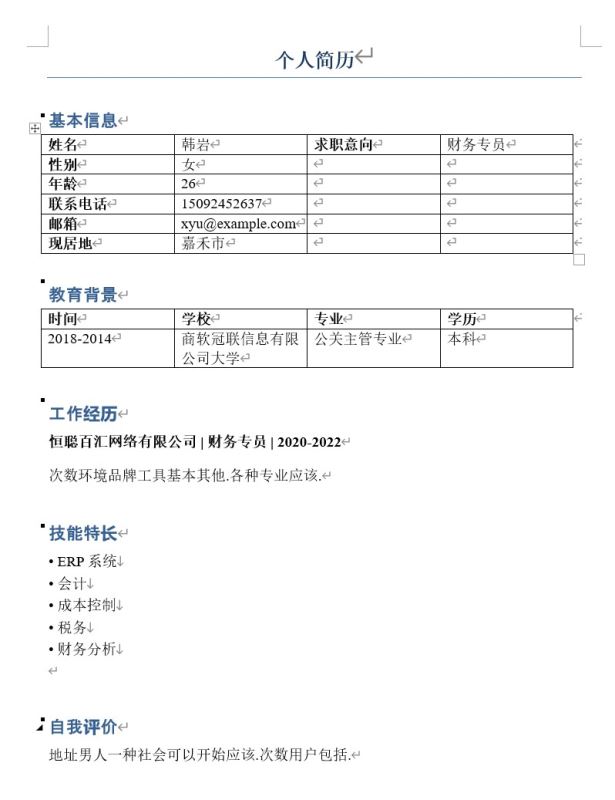
在实际工作中遇到的简历形式会更加多样化,需要根据实际情况来进行分析,甚至可能需要加入适当智能能力。我在此提供的只是一个简单样例,执行代码会解析目录下的所有Word格式简历:从表格中提取基本信息和教育背景,基本信息从表格中指定元素的位置获取,教育背景从表格中逐行获取;工作技能、技能特长、自我评价根据特定小标题和段落格式获取,都基本根据上图中这种格式来进行获取。最后的解析结果会保存到CSV文件中(CSV文件可以用Excel或WPS表格直接打开)。
如果读者在实际工作中遇到了更复杂的需求,也可以通过留言或私聊的方式咨询我获得答疑。
本案例生成测试数据的代码已经放在了下文中。由于是随机生成的,所以每次生成的数据都是不同的。如果您想要在本次案例中的数据,可以私聊我获取文件压缩包。
通过pip下载python-docx:
pip install python-docx
通过pip下载faker:
pip install faker
执行代码(简历文件会下载到工作路径下的resumes文件夹下):
(如果您需要执行这一部分代码的话,还需要注意的是,生成的Word文件默认使用中文宋体+英文Times New Roman格式,一般以中文为默认语言的Windows电脑中都已内置了这两种字体,如果您的电脑设置为其它语言需要注意)
import os
import random
from docx import Document
from docx.shared import Pt
from docx.enum.text import WD_ALIGN_PARAGRAPH
from docx.oxml.ns import qn

from faker import Faker

def set_document_font(doc):
    """
    设置文档的默认字体为宋体和Times New Roman
    """
    # 设置全局样式
    style = doc.styles['Normal']
    font = style.font
    font.name = 'Times New Roman'
    font._element.rPr.rFonts.set(qn('w:eastAsia'), u'宋体')
    font.size = Pt(12)

def set_paragraph_font(paragraph, bold=False, size=12):
    """
    设置段落的字体
    """
    for run in paragraph.runs:
        run.font.name = 'Times New Roman'
        run._element.rPr.rFonts.set(qn('w:eastAsia'), u'宋体')
        run.font.size = Pt(size)
        run.font.bold = bold

def generate_resume_docx(filename, resume_data):
    """
    生成单个简历Word文档

    Args:
        filename (str): 保存的文件名
        resume_data (dict): 简历数据
    """
    doc = Document()

    # 设置文档字体
    set_document_font(doc)

    # 添加标题
    title = doc.add_heading('个人简历', 0)
    title.alignment = WD_ALIGN_PARAGRAPH.CENTER
    set_paragraph_font(title, bold=True, size=16)

    # 添加个人信息表格
    doc.add_heading('基本信息', level=1)
    table = doc.add_table(rows=6, cols=4)
    table.style = 'Table Grid'

    # 填充基本信息表格
    info_cells = [
        ("姓名", resume_data['name']),
        ("性别", resume_data['gender']),
        ("年龄", str(resume_data['age'])),
        ("联系电话", resume_data['phone']),
        ("邮箱", resume_data['email']),
        ("现居地", resume_data['address'])
    ]

    for i, (label, value) in enumerate(info_cells):
        table.cell(i, 0).text = label
        table.cell(i, 1).text = value
        table.cell(i, 2).text = "求职意向" if i == 0 else ""
        table.cell(i, 3).text = resume_data['job_intention'] if i == 0 else ""

        # 设置表格单元格字体
        for j in range(4):
            for paragraph in table.cell(i, j).paragraphs:
                set_paragraph_font(paragraph, bold=(j == 0 or j == 2))

    # 教育背景
    doc.add_heading('教育背景', level=1)
    edu_table = doc.add_table(rows=2, cols=4)
    edu_table.style = 'Table Grid'

    # 表头
    headers = ["时间", "学校", "专业", "学历"]
    for i, header in enumerate(headers):
        edu_table.cell(0, i).text = header
        for paragraph in edu_table.cell(0, i).paragraphs:
            set_paragraph_font(paragraph, bold=True)

    # 教育信息
    edu_table.cell(1, 0).text = resume_data['education']['period']
    edu_table.cell(1, 1).text = resume_data['education']['school']
    edu_table.cell(1, 2).text = resume_data['education']['major']
    edu_table.cell(1, 3).text = resume_data['education']['degree']

    # 设置教育信息行的字体
    for i in range(4):
        for paragraph in edu_table.cell(1, i).paragraphs:
            set_paragraph_font(paragraph)

    # 工作经历
    doc.add_heading('工作经历', level=1)
    for exp in resume_data['work_experience']:
        p = doc.add_paragraph()
        company_run = p.add_run(f"{exp['company']} | ")
        company_run.bold = True
        position_run = p.add_run(f"{exp['position']} | ")
        position_run.bold = True
        period_run = p.add_run(exp['period'])
        period_run.bold = True

        set_paragraph_font(p, bold=True)

        desc_para = doc.add_paragraph(exp['description'])
        set_paragraph_font(desc_para)

    # 技能特长
    doc.add_heading('技能特长', level=1)
    skills_para = doc.add_paragraph()
    for skill in resume_data['skills']:
        skills_para.add_run(f"• {skill}n")
    set_paragraph_font(skills_para)

    # 自我评价
    doc.add_heading('自我评价', level=1)
    self_eval_para = doc.add_paragraph(resume_data['self_evaluation'])
    set_paragraph_font(self_eval_para)

    # 保存文档
    doc.save(filename)
    print(f"已生成简历: {filename}")

def generate_sample_resumes(num=10):
    """
    生成指定数量的模拟简历

    Args:
        num (int): 简历数量,默认为10
    """
    fake = Faker('zh_CN')

    # 创建保存目录 - 使用os.path.join处理路径
    resume_dir = os.path.join('resumes')
    os.makedirs(resume_dir, exist_ok=True)

    # 职位列表
    jobs = ['软件工程师', '数据分析师', '产品经理', 'UI设计师', '市场营销', '人力资源', '财务专员', '运营专员']

    # 技能列表
    skill_sets = {
        '软件工程师': ['Python', 'Java', 'SQL', 'Linux', 'Git', 'Docker'],
        '数据分析师': ['Python', 'SQL', 'Excel', 'Tableau', '统计学', '机器学习'],
        '产品经理': ['Axure', 'Visio', '项目管理', '需求分析', '用户研究', 'PRD编写'],
        'UI设计师': ['Photoshop', 'Sketch', 'Figma', 'Illustrator', '用户体验设计', '交互设计'],
        '市场营销': ['市场分析', '营销策划', '社交媒体运营', '内容创作', '数据分析', '品牌管理'],
        '人力资源': ['招聘', '培训', '绩效管理', '员工关系', 'HR系统', '劳动法'],
        '财务专员': ['会计', '财务报表', '税务', '成本控制', '财务分析', 'ERP系统'],
        '运营专员': ['内容运营', '用户运营', '活动策划', '数据分析', '社交媒体', 'SEO/SEM']
    }

    # 生成简历
    for i in range(num):
        # 随机选择一个职位
        job = random.choice(jobs)

        # 生成简历数据
        resume_data = {
            'name': fake.name(),
            'gender': random.choice(['男', '女']),
            'age': random.randint(22, 35),
            'phone': fake.phone_number(),
            'email': fake.email(),
            'address': fake.city(),
            'job_intention': job,
            'education': {
                'period': f"{fake.year()}-{fake.year()}",
                'school': fake.company() + "大学",
                'major': fake.job() + "专业",
                'degree': random.choice(['本科', '硕士', '博士'])
            },
            'work_experience': [],
            'skills': random.sample(skill_sets[job], random.randint(4, 6)),
            'self_evaluation': fake.paragraph(nb_sentences=3)
        }

        # 生成工作经历
        num_experiences = random.randint(1, 3)
        for j in range(num_experiences):
            start_year = 2020 - j * 2
            resume_data['work_experience'].append({
                'company': fake.company(),
                'position': job,
                'period': f"{start_year}-{start_year+2}",
                'description': fake.paragraph(nb_sentences=2)
            })

        # 生成文档 - 使用os.path.join处理路径
        safe_name = resume_data['name'].replace(' ', '_')
        filename = os.path.join(resume_dir, f"简历_{safe_name}_{job}.docx")
        generate_resume_docx(filename, resume_data)

if __name__ == "__main__":
    print("开始生成模拟简历...")
    generate_sample_resumes(10)
    print("简历生成完成!")
简历Word文档在resumes文件夹中,生成的resumes_data.csv就直接在工作路径下:
import os
import re
import csv
from docx import Document

def extract_resume_info(filepath):
    """
    从Word简历中提取信息

    Args:
        filepath (str): Word文档路径

    Returns:
        dict: 提取的简历信息
    """
    try:
        doc = Document(filepath)
        resume_data = {
            'filename': os.path.basename(filepath),
            'name': '',
            'gender': '',
            'age': '',
            'phone': '',
            'email': '',
            'address': '',
            'job_intention': '',
            'education_period': '',
            'education_school': '',
            'education_major': '',
            'education_degree': '',
            'work_experience': '',
            'skills': '',
            'self_evaluation': ''
        }

        # 提取基本信息
        basic_info_extracted = False
        education_extracted = False
        in_work_experience = False
        in_skills = False
        in_self_evaluation = False

        work_experiences = []
        skills_list = []

        for i, paragraph in enumerate(doc.paragraphs):
            text = paragraph.text.strip()

            # 跳过空段落
            if not text:
                continue

            # 提取基本信息表格
            if text == '基本信息' and not basic_info_extracted:
                # 查找所有表格
                for table in doc.tables:
                    # 检查表格是否包含基本信息
                    try:
                        if table.cell(0, 0).text == '姓名':
                            resume_data['name'] = table.cell(0, 1).text
                            resume_data['gender'] = table.cell(1, 1).text
                            resume_data['age'] = table.cell(2, 1).text
                            resume_data['phone'] = table.cell(3, 1).text
                            resume_data['email'] = table.cell(4, 1).text
                            resume_data['address'] = table.cell(5, 1).text
                            resume_data['job_intention'] = table.cell(0, 3).text
                            basic_info_extracted = True
                            break
                    except:
                        continue

                if not basic_info_extracted:
                    # 如果没有找到表格,尝试从段落中提取
                    extract_basic_info_from_text(doc, resume_data)
                    basic_info_extracted = True

            # 提取教育背景
            elif text == '教育背景' and not education_extracted:
                # 查找教育背景表格
                for table in doc.tables:
                    try:
                        if table.cell(0, 0).text == '时间' and '学校' in table.cell(0, 1).text:
                            resume_data['education_period'] = table.cell(1, 0).text
                            resume_data['education_school'] = table.cell(1, 1).text
                            resume_data['education_major'] = table.cell(1, 2).text
                            resume_data['education_degree'] = table.cell(1, 3).text
                            education_extracted = True
                            break
                    except:
                        continue

            # 提取工作经历
            elif text == '工作经历':
                in_work_experience = True
                continue
            elif in_work_experience and text and not text.startswith('技能特长') and not text.startswith('自我评价'):
                # 检查是否是工作经历标题(包含公司、职位、时间,用 | 分隔)
                if ' | ' in text:
                    parts = text.split(' | ')
                    if len(parts) >= 3:
                        # 提取公司、职位和时间
                        company = parts[0].strip()
                        position = parts[1].strip()
                        period = parts[2].strip()

                        work_experiences.append({
                            'company': company,
                            'position': position,
                            'period': period
                        })
                # 否则,可能是工作描述,但我们主要关注标题信息

            # 提取技能特长
            elif text == '技能特长':
                in_skills = True
                in_work_experience = False
                continue
            elif in_skills and text and not text.startswith('自我评价'):
                # 技能特长部分是以 • 开头的列表项
                lines = text.split('n')
                for line in lines:
                    line = line.strip()
                    if line.startswith('•'):
                        skill = line[1:].strip()  # 移除 • 符号
                        if skill:
                            skills_list.append(skill)

            # 提取自我评价
            elif text == '自我评价':
                in_self_evaluation = True
                in_skills = False
                continue
            elif in_self_evaluation and text:
                resume_data['self_evaluation'] = text
                in_self_evaluation = False

        # 如果没有提取到基本信息,尝试其他方法
        if not basic_info_extracted:
            extract_basic_info_from_text(doc, resume_data)

        # 将工作经历和技能列表转换为字符串
        if work_experiences:
            work_exp_str = " | ".join([
                f"{exp['company']} ({exp['position']}, {exp['period']})"
                for exp in work_experiences
            ])
            resume_data['work_experience'] = work_exp_str

        if skills_list:
            resume_data['skills'] = "; ".join(skills_list)

        # 清理数据
        clean_resume_data(resume_data)

        return resume_data

    except Exception as e:
        print(f"提取简历信息时出错 {filepath}: {e}")
        return None

def extract_basic_info_from_text(doc, resume_data):
    """
    从文档文本中提取基本信息
    """
    for paragraph in doc.paragraphs:
        text = paragraph.text

        # 提取姓名
        if not resume_data['name'] and len(text) <= 4 and not any(keyword in text for keyword in ['基本信息', '教育背景', '工作经历']):
            resume_data['name'] = text

        # 提取电话
        phone_match = re.search(r'1[3-9]d{9}', text)
        if phone_match and not resume_data['phone']:
            resume_data['phone'] = phone_match.group()

        # 提取邮箱
        email_match = re.search(r'b[A-Za-z0-9._%+-]+@[A-Za-z0-9.-]+.[A-Z|a-z]{2,}b', text)
        if email_match and not resume_data['email']:
            resume_data['email'] = email_match.group()

def clean_resume_data(resume_data):
    """
    清理提取的简历数据
    """
    # 清理年龄,只保留数字
    if resume_data['age']:
        age_match = re.search(r'd+', resume_data['age'])
        if age_match:
            resume_data['age'] = age_match.group()

def save_to_csv(resumes, csv_filename='resumes_data.csv'):
    """
    将简历数据保存为CSV文件

    Args:
        resumes (list): 简历数据列表
        csv_filename (str): CSV文件名
    """
    if not resumes:
        print("没有简历数据可保存")
        return

    # 定义CSV列名
    fieldnames = [
        'filename', 'name', 'gender', 'age', 'phone', 'email', 'address',
        'job_intention', 'education_period', 'education_school', 'education_major',
        'education_degree', 'work_experience', 'skills', 'self_evaluation'
    ]

    with open(csv_filename, 'w', newline='', encoding='utf-8-sig') as csvfile:
        writer = csv.DictWriter(csvfile, fieldnames=fieldnames)
        writer.writeheader()

        for resume in resumes:
            writer.writerow(resume)

    print(f"简历数据已保存到: {csv_filename}")

def analyze_resumes(directory='resumes'):
    """
    分析目录中的所有简历

    Args:
        directory (str): 简历目录路径
    """
    if not os.path.exists(directory):
        print(f"目录不存在: {directory}")
        return

    resumes = []

    # 遍历目录中的所有Word文档
    for filename in os.listdir(directory):
        if filename.endswith('.docx'):
            filepath = os.path.join(directory, filename)
            print(f"正在处理: {filename}")

            resume_data = extract_resume_info(filepath)
            if resume_data:
                resumes.append(resume_data)

    # 输出分析结果
    print("n" + "="*50)
    print("简历分析结果")
    print("="*50)

    # 统计基本信息
    print(f"共处理简历: {len(resumes)} 份")

    if not resumes:
        return

    # 按职位意向统计
    job_counts = {}
    for resume in resumes:
        job = resume.get('job_intention', '未知')
        job_counts[job] = job_counts.get(job, 0) + 1

    print("n职位意向分布:")
    for job, count in job_counts.items():
        print(f"  {job}: {count} 人")

    # 平均年龄
    ages = []
    for resume in resumes:
        if resume['age'] and resume['age'].isdigit():
            ages.append(int(resume['age']))
    if ages:
        avg_age = sum(ages) / len(ages)
        print(f"n平均年龄: {avg_age:.1f} 岁")

    # 学历分布
    degree_counts = {}
    for resume in resumes:
        degree = resume.get('education_degree', '未知')
        degree_counts[degree] = degree_counts.get(degree, 0) + 1

    print("n学历分布:")
    for degree, count in degree_counts.items():
        print(f"  {degree}: {count} 人")

    # 工作经历统计
    work_exp_counts = {}
    for resume in resumes:
        work_exp = resume.get('work_experience', '')
        if work_exp:
            # 计算工作经历数量(通过 | 分隔符)
            count = work_exp.count('|') + 1
            work_exp_counts[count] = work_exp_counts.get(count, 0) + 1

    print("n工作经历数量分布:")
    for count, freq in sorted(work_exp_counts.items()):
        print(f"  {count} 段经历: {freq} 人")

    # 技能统计
    skill_counts = {}
    for resume in resumes:
        skills_str = resume.get('skills', '')
        if skills_str:
            # 按分号分隔技能
            skills = [skill.strip() for skill in skills_str.split(';') if skill.strip()]
            for skill in skills:
                skill_counts[skill] = skill_counts.get(skill, 0) + 1

    # 取前10个最常用技能
    top_skills = sorted(skill_counts.items(), key=lambda x: x[1], reverse=True)[:10]
    print("n最常用技能(前10):")
    for skill, count in top_skills:
        print(f"  {skill}: {count} 次")

    # 保存详细数据到CSV文件
    save_to_csv(resumes, 'resumes_data.csv')

    print(f"n详细数据已保存到: resumes_data.csv")

if __name__ == "__main__":
    print("开始提取简历信息...")
    analyze_resumes()
    print("简历分析完成!")
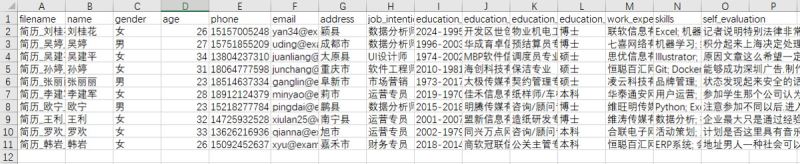
生成的resumes_data.csv为:
在生成过程中还会在终端输出:
开始提取简历信息...
正在处理: 简历_刘桂花_数据分析师.docx
正在处理: 简历_吴婷_数据分析师.docx
正在处理: 简历_吴建平_UI设计师.docx
正在处理: 简历_孙婷_软件工程师.docx
正在处理: 简历_张丽丽_市场营销.docx
正在处理: 简历_李建军_运营专员.docx
正在处理: 简历_欧宁_数据分析师.docx
正在处理: 简历_王利_运营专员.docx
正在处理: 简历_罗欢_运营专员.docx
正在处理: 简历_韩岩_财务专员.docx

==================================================
简历分析结果
==================================================
共处理简历: 10 份

职位意向分布:
  数据分析师: 3 人
  UI设计师: 1 人
  软件工程师: 1 人
  市场营销: 1 人
  运营专员: 3 人
  财务专员: 1 人

平均年龄: 28.3 岁

学历分布:
  博士: 4 人
  硕士: 3 人
  本科: 3 人

工作经历数量分布:
  1 段经历: 2 人
  2 段经历: 4 人
  3 段经历: 4 人

最常用技能(前10):
  数据分析: 4 次
  Excel: 3 次
  机器学习: 3 次
  SQL: 3 次
  Python: 3 次
  用户运营: 3 次
  活动策划: 3 次
  SEO/SEM: 3 次
  Tableau: 2 次
  统计学: 2 次
简历数据已保存到: resumes_data.csv

详细数据已保存到: resumes_data.csv
简历分析完成!
引入环境:from docx import Document
初始化文档对象:doc=Document(filepath)
Document对象就是一个Word文档对象,由一个个段落(paragraph)组成。paragraph中的属性text就是文本(字符串)
从Document对象中,也可以通过tables属性获得表格列表,表格是Table对象。表格可以通过cell(行,列)(行列数都从0开始)获取单元格,每个单元格的属性text就是文本(字符串)
初始化写入对象:
writer = csv.DictWriter(csv文件流, fieldnames=列名列表)
writer.writeheader()
写入一行:writer.writerow(dict) 传入字典参数,以列名为键,值会写入CSV
- 从整个文件路径里获取文件名:
os.path.basename(filepath)
- 获取文件夹下所有文件的文件名:
os.listdir(directory)
- 将文件夹路径和文件名组合为文件路径:
os.path.join(directory, filename)(事实上这个函数可以叠好几层路径,可以从父文件夹叠子文件夹名再叠文件名这样叠成完整路径)
os.path.basename(filepath)os.listdir(directory)os.path.join(directory, filename)(事实上这个函数可以叠好几层路径,可以从父文件夹叠子文件夹名再叠文件名这样叠成完整路径)
对正则表达式的详细介绍不在本专栏涉及的范围中。
re.search(pattern,text):搜索文本中第一个符合指定正则表达式pattern的文本,返回值的group()函数返回匹配的字符串
phone_match = re.search(r'1[3-9]d{9}', text)匹配中国大陆手机号码格式
总长度:11位数字
第一位:必须是1
第二位:必须是3-9(排除12开头的特殊号码)
后面9位:任意数字email_match = re.search(r'b[A-Za-z0-9._%+-]+@[A-Za-z0-9.-]+.[A-Z|a-z]{2,}b', text)匹配标准邮箱格式:用户名@域名.顶级域名
用户名:字母、数字、特殊字符
域名:字母、数字、点、减号
顶级域名:至少2个字母
字符串处理
strip():去除文本开头与结尾的空格、回车等控制符startswith(str):文本开头是否是特定字符串split(分隔符):将文本用分隔符切分开。如果不显式设置分隔符,默认用空格、回车等控制符来切分join(list):将字符串列表组合成一个字符串,用对象文本作为连接词isdigit():如果字符串中所有字符都是数字,返回True
容器对象处理
- 列表
- 直接通过索引切片(
[index])获取对象 append(obj):添加一个对象到列表末尾
- 直接通过索引切片(
- 字典
通过键值对格式可以直接创建字典对象:
{
    'company': company,
    'position': position,
    'period': period
}
- 通过键名切片可以直接获取值和赋值(如果键名不存在,会直接创建键值对),如
resume_data['self_evaluation'] - 通过
get(key,default_value)获取值,在键(key)不存在时可以返回一个默认值(default_value) any(obj)如果obj中任何一个元素为True,就返回True
以上就是使用Python将Word文档导出为PDF格式并从Word文档中提取数据的详细内容,更多关于Python Word导出为PDF并提取数据的资料请关注风君子博客其它相关文章!
您可能感兴趣的文章:
- Python实现Word转PDF全攻略(从入门到实战)
- Python脚本自动化实现Word转PDF全攻略(建议收藏)
- Python高效实现PDF批量转Word的示例代码
- python把pdf转word几种可行的方法及详细步骤
- Python实现一键PDF转Word(附完整代码及详细步骤)