文章目录
目录
- 前言
- 项目效果
- 完整代码
- 总结
今天我要分享一个有趣的 Python 项目——使用 Tkinter 创建满屏随机弹出的温馨提示对话框。这个项目结合了 GUI 编程、多线程和动画效果,最终实现了一个视觉上很吸引人的效果。
运行程序后,你会看到无数个小小的对话框随机从屏幕各处跳出来,每个对话框都显示着不同的温馨话语,比如"多喝水哦~💧"、"保持微笑呀😊"等。这些对话框以柔和的颜色显示,在屏幕上停留2-4秒后自动消失,点击任意对话框可以立即关闭。
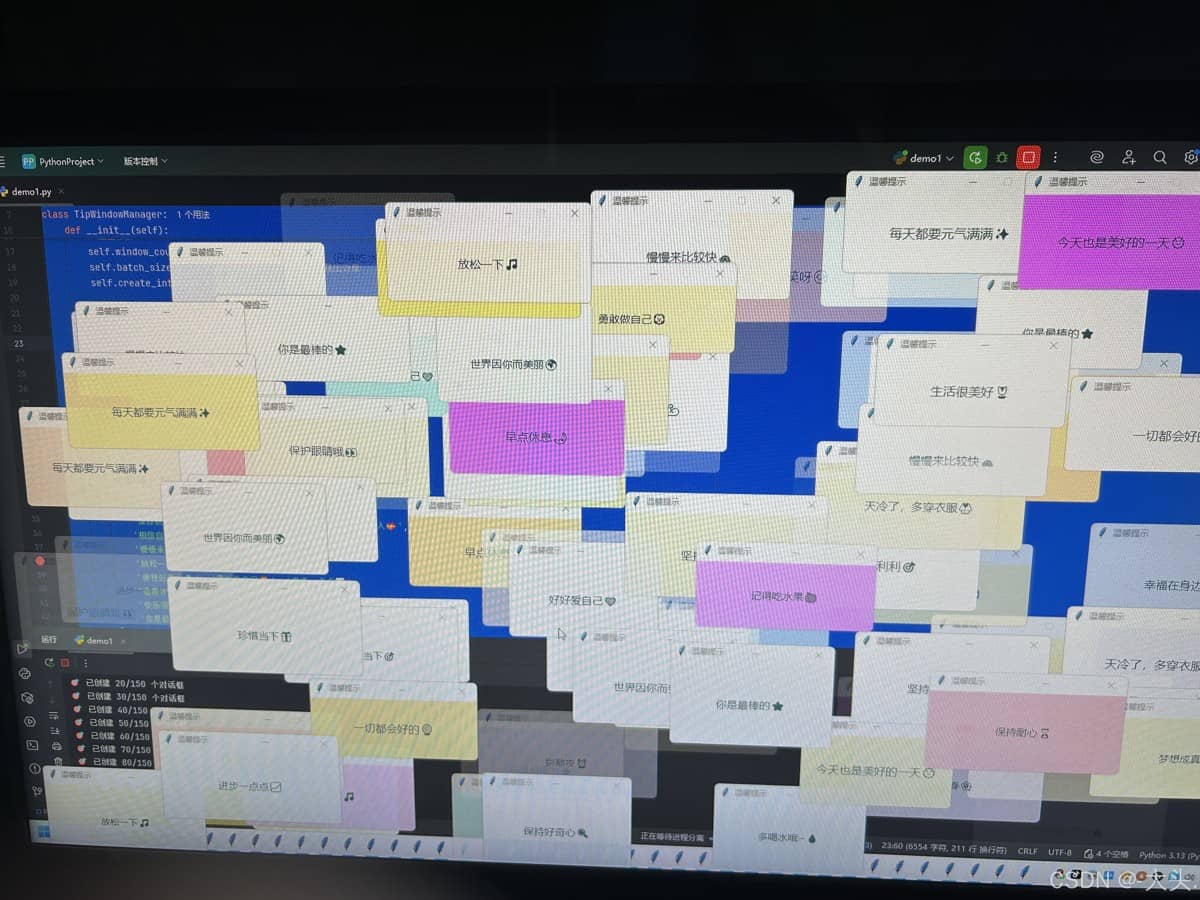
import tkinter as tk
import random
import time
import threading

class TipWindowManager:
    """温馨提示窗口管理器"""

    def __init__(self):
        self.root = tk.Tk()
        self.root.withdraw()
        self.active_windows = []
        self.windows_created = 0

        # 配置参数
        self.window_count = 150  # 窗口数量
        self.batch_size = 1      # 每次只创建一个,实现随机跳出效果
        self.create_interval = 0.05  # 创建间隔

        # 获取屏幕尺寸
        self.screen_width = self.root.winfo_screenwidth()
        self.screen_height = self.root.winfo_screenheight()

        print(f"🖥️ 屏幕尺寸: {self.screen_width} x {self.screen_height}")

        # 丰富的提示内容库
        self.tips = [
            '多喝水哦~💧', '保持微笑呀😊', '每天都要元气满满✨',
            '记得吃水果🍎', '保持好心情🌞', '好好爱自己❤️',
            '期待下一次见面👋', '顺顺利利🎯', '早点休息🌙',
            '愿所有烦恼都消失🌈', '别熬夜⏰', '今天过得开心嘛🎉',
            '天冷了,多穿衣服🧥',  '保护眼睛哦👀',
            '深呼吸放松一下🌬️', '你真棒!🎊', '一切都会好的🌻',
            '保持积极心态⚡',  '加油!🚀',
            '相信自己💪', '今天也是美好的一天🌞', '保持耐心⏳',
            '慢慢来比较快🐢', '你很特别🌟', '世界因你而美丽🌍',
            '放松一下🎵', '享受当下🎯', '感恩生活🙏',
            '保持好奇心🔍', '勇敢做自己🦁', '进步一点点📈',
            '温暖如春🌺', '心平气和🍃', '梦想成真🎠',
            '快乐很简单😄', '阳光总在风雨后🌦️', '坚持就是胜利🏆',
            '你是最棒的⭐', '生活很美好🌷', '向前看👣',
            '温柔待人💝', '珍惜当下🎁', '幸福在身边🎈'
        ]

        # 柔和的背景颜色库
        self.bg_colors = [
            '#FFF0F5', '#F0FFFF', '#F5FFFA', '#FFF8DC', '#F0F8FF',
            '#F8F8FF', '#F5F5F5', '#FAFAD2', '#E6E6FA', '#FFE4E1',
            '#FFFAF0', '#FDF5E6', '#FAF0E6', '#FFF5EE', '#F0FFF0',
            '#F5F5DC', '#FFEFD5', '#FFE4B5', '#FAF0E6', '#F8F8FF',
            '#F0F8FF', '#E0FFFF', '#E6E6FA', '#FFF0F5', '#FFE4E1',
            '#FFFAFA', '#F5F5F5', '#F0F0F0', '#FFF8DC', '#FFE4C4',
            '#FFDAB9', '#FFEFD5', '#FFFACD', '#F0E68C', '#E6E6FA',
            '#D8BFD8', '#DDA0DD', '#EE82EE', '#DA70D6', '#FFB6C1'
        ]

    def create_random_window(self):
        """随机创建一个对话框"""
        if self.windows_created >= self.window_count:
            return

        try:
            window = tk.Toplevel()
            self.active_windows.append(window)
            self.windows_created += 1

            # 随机窗口尺寸
            window_width = random.randint(220, 300)
            window_height = random.randint(90, 130)

            # 完全随机位置 - 确保在屏幕内
            x = random.randint(10, max(20, self.screen_width - window_width - 10))
            y = random.randint(10, max(20, self.screen_height - window_height - 10))

            # 对话框设置
            window.title('温馨提示')
            window.geometry(f"{window_width}x{window_height}+{x}+{y}")
            window.resizable(False, False)

            # 随机选择内容和颜色
            tip_text = random.choice(self.tips)
            bg_color = random.choice(self.bg_colors)

            # 创建内容
            label = tk.Label(
                window,
                text=tip_text,
                bg=bg_color,
                fg='#2F4F4F',
                font=('微软雅黑', random.randint(11, 13)),
                padx=18,
                pady=22,
                wraplength=window_width - 36,
                justify='center',
                relief='flat',
                bd=1
            )
            label.pack(expand=True, fill='both')

            # 窗口置顶
            window.attributes('-topmost', True)
            window.attributes('-alpha', 0.95)

            # 关闭时间:2-4秒
            close_time = random.randint(2000, 4000)

            def close_window():
                try:
                    if window.winfo_exists():
                        # 快速淡出
                        for alpha in range(95, 0, -10):
                            if window.winfo_exists():
                                window.attributes('-alpha', alpha/100)
                                window.update()
                                time.sleep(0.01)
                        window.destroy()
                        if window in self.active_windows:
                            self.active_windows.remove(window)
                except:
                    pass

            window.after(close_time, close_window)

            # 点击立即关闭
            def on_click(event):
                try:
                    if window.winfo_exists():
                        window.destroy()
                        if window in self.active_windows:
                            self.active_windows.remove(window)
                except:
                    pass

            window.bind('<Button-1>', on_click)
            label.bind('<Button-1>', on_click)

            # 显示创建进度
            if self.windows_created % 10 == 0:
                print(f"🎯 已创建 {self.windows_created}/{self.window_count} 个对话框")

        except Exception as e:
            print(f"创建窗口时出错: {e}")

    def check_completion(self):
        """检查是否所有窗口都已关闭"""
        if len(self.active_windows) == 0 and self.windows_created >= self.window_count:
            print("🎉 所有温馨提示已显示完毕!")
            self.root.quit()
        else:
            self.root.after(500, self.check_completion)

    def start_random_creation(self):
        """开始随机创建窗口"""
        def create_loop():
            print("🚀 开始随机弹出对话框...")
            start_time = time.time()

            # 持续创建直到达到目标数量
            while self.windows_created < self.window_count:
                # 在主线程中创建窗口
                self.root.after(0, self.create_random_window)
                # 随机间隔,创造更自然的弹出效果
                time.sleep(random.uniform(0.03, 0.08))

            end_time = time.time()
            print(f"⏱️ 所有 {self.window_count} 个对话框创建完成!耗时: {end_time-start_time:.2f}秒")
            print("🖥️ 屏幕已被随机弹出的对话框铺满!")

            # 开始检查完成状态
            self.root.after(2000, self.check_completion)

        return create_loop

    def main(self):
        """主程序"""

        # 显示开始信息
        print("=" * 60)
        print("🎲 随机弹出温馨提示开始!")
        print(f"🎯 目标: {self.window_count} 个对话框")
        print("⏱️  每个对话框显示2-4秒")
        print("💡 点击任意对话框立即关闭")
        print("=" * 60)

        # 在新线程中控制随机创建
        thread = threading.Thread(target=self.start_random_creation(), daemon=True)
        thread.start()

        try:
            self.root.mainloop()
        except KeyboardInterrupt:
            print("n⏹️ 程序被用户中断")
        finally:
            print("🧹 清理剩余对话框...")
            for window in self.active_windows[:]:
                try:
                    window.destroy()
                except:
                    pass
            self.root.quit()

def main():
    """主函数"""
    manager = TipWindowManager()
    manager.main()

if __name__ == "__main__":
    main()
这个项目展示了如何使用 Python 的 Tkinter 库创建有趣的 GUI 效果。通过结合多线程、随机化和动画效果,我们实现了一个既美观又实用的应用程序。代码结构清晰,易于理解和修改,适合初学者学习 GUI 编程。
不想运行的也可以下载exe文件。
到此这篇关于Python Tkinter实现满屏随机弹出温馨提示对话框的文章就介绍到这了,更多相关Python Tkinter满屏随机弹出温馨提示对话框内容请搜索风君子博客以前的文章或继续浏览下面的相关文章希望大家以后多多支持风君子博客!
您可能感兴趣的文章:
- Python tkinter模块弹出窗口及传值回到主窗口操作详解
- python中的tkinter库弹窗messagebox详解
- 对python tkinter窗口弹出置顶的方法详解
- python tkinter实现弹窗的输入输出
- python 使用tkinter与messagebox写界面和弹窗
- Python Tkinter美化弹窗的示例详解
- 使用Python Tkinter创建一个动态祝福弹窗的详细教程