 编程部落
编程部落文章目录
目录
- requests处理token鉴权接口和jsonpath使用
- json数据提取工具
- 总结
第一步:登陆,提取token保存起来
# 登陆接口的地址
url = 'http://www.adf.com/futureloan/member/login'
# 登陆接口的参数
params = {
    "mobile_phone": "123456789",
    "pwd": "123456",
}
# 请求头
headers = {"X-Media-Type": "DuSSS.v1"}
# 发送请求进行登陆
response = requests.post(url=url, headers=headers, json=params)
res = response.json()
token = res['data']['token_info']['token']
第二步:访问需要鉴权的接口时,带上token就可以了
# 提取登陆用户的id
member_id = res['data']['id']
params2 = {
    "member_id": member_id,
    "amount": "2000",
}
# 充值接口的地址
url2 = 'http://www.adf.com/futureloan/member/recharge'
# 请求头
headers2 = {"X-Media-Type": "DuSSS.v2",
           "Authorization": "Bearer " + token}
response2 = requests.post(url=url2, headers=headers2, json=params2)
response.json()
pip install jsonpath
例子:通过jsonpath提取token值
data = {
    "content": {
        "data": {
            "titleMsg": "登录名或登录密码不正确",
            "resultCode": 100
        },
        "status": 0,
        "success": 'true'
    },
    "hasError": 'false'
}
resultCode = jsonpath(data, "$..resultCode")
print(resultCode)
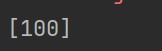
注:返回的是列表,可以通过resultCode[0]提取
jsonpath需要两个参数:
- 参数1:数据
- 参数2:jsonpath表达式
注:
- ①匹配不到返回false
- ②匹配到数据返回的是包含数据的列表
jsonpath表达式语法:
- $———————根节点
- 。——————–选择子节点(直接子节点)
- 。。—————–选择子孙节点(不考虑层级)
- []———————选择子节点/选择索引
- [,]——————–选择多个字段
- @——————-当前选中的节点(和条件过滤使用)
- [?(过滤条件)]—-通过条件过滤数据
{
    "store": {
        "book": [
            {
                "category": "reference",
                "author": "Nigel Rees",
                "title": "Sayings of the Century",
                "price": 8.95
            },
            {
                "category": "fiction",
                "author": "Evelyn Waugh",
                "title": "Sword of Honour",
                "price": 12.99
            },
            {
                "category": "fiction",
                "author": "Herman Melville",
                "title": "Moby Dick",
                "isbn": "0-553-21311-3",
                "price": 8.99
            },
            {
                "category": "fiction",
                "author": "J. R. R. Tolkien",
                "title": "The Lord of the Rings",
                "isbn": "0-395-19395-8",
                "price": 22.99
            }
        ],
        "bicycle": {
            "color": "red",
            "price": 19.95
        }
    },
    "expensive": 10
}
| JsonPath (点击链接测试) | 结果 |
|---|---|
| $.store.book[*].author | 获取json中store下book下的所有author值 |
| $…author | 获取所有json中所有author的值 |
| $.store.* | 所有的东西,书籍和自行车 |
| $.store…price | 获取json中store下所有price的值 |
| $…book[2] | 获取json中book数组的第3个值 |
| $…book[-2] | 倒数的第二本书 |
| $…book[0,1] | 前两本书 |
| $…book[:2] | 从索引0(包括)到索引2(排除)的所有图书 |
| $…book[1:2] | 从索引1(包括)到索引2(排除)的所有图书 |
| $…book[-2:] | 获取json中book数组的最后两个值 |
| $…book[2:] | 获取json中book数组的第3个到最后一个的区间值 |
| $…book[?(@.isbn)] | 获取json中book数组中包含isbn的所有值 |
| $.store.book[?(@.price < 10)] | 获取json中book数组中price<10的所有值 |
| $…book[?(@.price <= $[‘expensive’])] | 获取json中book数组中price<=expensive的所有值 |
| $…book[?(@.price <= $[‘expensive’])] | 获取json中book数组中price<=expensive的所有值 |
| $…book[?(@.author =~ /.*REES/i)] | 获取json中book数组中的作者以REES结尾的所有值(REES不区分大小写) |
| $…* | 逐层列出json中的所有值,层级由外到内 |
| $…book.length() | 获取json中book数组的长度 |
通过索引选择数组(列表中的数据)
- 同一层级有相同数据
jsonpath(data,'.data[1]′)jsonpath(data,′.data[1]') jsonpath(data,'.data[1]′)jsonpath(data,′.data[1].name')
- 选择多个字段
jsonpath(data,'$.data[0][uid,name]')
- 通过条件过滤:
jsonpath(data,'.data[?(@.uid==4)]′)jsonpath(data,′.data[?(@.uid==4)]') jsonpath(data,'.data[?(@.uid==4)]′)jsonpath(data,′.data[?(@.name==‘后台')]')
定位到data之后uid的数据
- 若:
jsonpath(data,'$…name')
获取所有name,需使用上面过滤
以上为个人经验,希望能给大家一个参考,也希望大家多多支持风君子博客。
您可能感兴趣的文章:
- python离线安装requests模块并且在pycharm中实现使用
- Python requests请求响应以流stream的方式实现打印输出
- Python爬虫HTTPS使用requests,httpx,aiohttp实战中的证书异步等问题
- 使用Python的requests库来发送HTTP请求的操作指南
- Python requests库轻松发送HTTP请求的终极指南
- 使用Python的requests库调用API接口的详细步骤