 编程部落
编程部落文章目录
- 初学者经常混淆可变对象和不可变对象的概念,导致在修改数据时出现意外行为。
- # 错误示例1:列表的意外修改 def add_item(my_list, item): my_list.append(item) return my_list original_list = [1, 2, 3] new_list = add_item(original_list, 4) print(“Original list:”, original_list) # [1, 2, 3, 4] print(“New list:”, new_list) # [1, 2, 3, 4] # 两个列表都被修改了! # 错误示例2:字符串”修改”的困惑 text = “hello” text.upper() # 初学者可能认为这会修改text print(text) # 输出仍然是”hello”,不是”HELLO”
- 可变对象(列表、字典、集合):可以在原地修改,多个变量可能指向同一个对象 不可变对象(数字、字符串、元组):创建后不能修改,任何"修改"操作都会创建新对象
- # 正确做法1:创建列表的副本 def add_item_safe(my_list, item): new_list = my_list.copy() # 或者使用 my_list[:] new_list.append(item) return new_list original_list = [1, 2, 3] new_list = add_item_safe(original_list, 4) print(“Original list:”, original_list) # [1, 2, 3] print(“New list:”, new_list) # [1, 2, 3, 4] # 正确做法2:理解不可变对象的操作 text = “hello” uppercase_text = text.upper() # 创建新字符串 print(“Original:”, text) # hello print(“Uppercase:”, uppercase_text) # HELLO # 正确做法3:使用元组保护数据 coordinates = (10, 20) # 不可变,不会被意外修改 # coordinates[0] = 5 # 这会报错,防止意外修改
- 记住常见数据类型的可变性: 可变:list, dict, set 不可变:int, float, str, tuple, bool 在函数中修改参数时,先创建副本 使用不可变对象来保护重要数据
- 初学者经常不理解默认参数在函数定义时只计算一次,导致意外的行为。
- # 错误示例:使用可变对象作为默认参数 def add_to_list(item, my_list=[]): # 危险!默认参数在定义时创建 my_list.append(item) return my_list # 第一次调用看起来正常 result1 = add_to_list(1) print(result1) # [1] # 第二次调用出现问题! result2 = add_to_list(2) print(result2) # [1, 2] 而不是期望的 [2]
- Python的函数默认参数在函数定义时计算,而不是在每次调用时计算。这意味着所有调用共享同一个默认参数对象。
- # 正确做法1:使用None作为默认值 def add_to_list_safe(item, my_list=None): if my_list is None: my_list = [] # 每次调用时创建新列表 my_list.append(item) return my_list result1 = add_to_list_safe(1) print(result1) # [1] result2 = add_to_list_safe(2) print(result2) # [2] – 符合预期! # 正确做法2:使用不可变默认值 def greet(name, prefix=”Hello”): return f”{prefix}, {name}!” print(greet(“Alice”)) # Hello, Alice! print(greet(“Bob”, “Hi”)) # Hi, Bob!
- 永远不要使用可变对象作为函数默认参数 使用None作为默认值,在函数内部检查并创建新对象 对于需要复杂默认值的情况,使用工厂函数
- 初学者经常混淆局部变量和全局变量,导致UnboundLocalError或其他意外行为。
- # 错误示例1:在赋值前使用变量 count = 0 def increment(): count += 1 # UnboundLocalError! return count # 错误示例2:混淆局部和全局变量 x = 10 def confusing_function(): print(x) # 这能工作吗? x = 5 # 这行导致问题 confusing_function() # UnboundLocalError!
- Python的作用域规则(LEGB): Local:局部作用域 Enclosing:闭包作用域 Global:全局作用域 Built-in:内置作用域 在函数内对变量赋值会使其成为局部变量,即使在外部有同名全局变量。
- # 正确做法1:明确使用global关键字 count = 0 def increment(): global count # 明确声明使用全局变量 count += 1 return count print(increment()) # 1 print(increment()) # 2 # 正确做法2:避免使用全局变量,通过参数传递 def better_increment(current_count): return current_count + 1 count = 0 count = better_increment(count) print(count) # 1 # 正确做法3:使用返回值而不是修改全局状态 def process_data(data): # 处理数据并返回结果,不修改输入 return [x * 2 for x in data] original_data = [1, 2, 3] new_data = process_data(original_data) print(“Original:”, original_data) # [1, 2, 3] print(“New:”, new_data) # [2, 4, 6]
- 尽量避免使用全局变量 如果需要修改全局变量,明确使用global关键字 优先使用函数参数和返回值来传递数据 理解Python的LEGB作用域规则
- 初学者在循环中经常犯错误,特别是在修改正在迭代的集合时。
- # 错误示例1:在迭代时修改列表 numbers = [1, 2, 3, 4, 5] for num in numbers: if num % 2 == 0: numbers.remove(num) # 危险!在迭代时修改列表 print(numbers) # [1, 3, 5] – 但可能跳过一些元素 # 错误示例2:错误使用range和索引 fruits = [‘apple’, ‘banana’, ‘cherry’] # 不必要的复杂方式 for i in range(len(fruits)): print(fruits[i]) # 错误示例3:无限循环 count = 0 while count < 5: print(count) # 忘记增加count,导致无限循环!
- # 正确做法1:创建新列表而不是修改原列表 numbers = [1, 2, 3, 4, 5] # 方法1:列表推导式 odd_numbers = [num for num in numbers if num % 2 != 0] print(odd_numbers) # [1, 3, 5] # 方法2:迭代副本,修改原列表 numbers = [1, 2, 3, 4, 5] for num in numbers[:]: # 迭代副本 if num % 2 == 0: numbers.remove(num) print(numbers) # [1, 3, 5] # 正确做法2:直接迭代元素 fruits = [‘apple’, ‘banana’, ‘cherry’] # Pythonic的方式 for fruit in fruits: print(fruit) # 如果需要索引,使用enumerate for i, fruit in enumerate(fruits): print(f”{i}: {fruit}”) # 正确做法3:确保循环有明确的退出条件 count = 0 while count < 5: print(count) count += 1 # 重要:更新循环变量
- 不要在迭代时直接修改集合,创建副本或新集合 优先使用直接迭代而不是索引迭代 使用enumerate()当需要索引时 确保循环有明确的退出条件
- 初学者经常混淆==(值相等)和is(身份相等)操作符。
- # 错误示例1:错误使用is比较值 a = [1, 2, 3] b = [1, 2, 3] print(a == b) # True – 值相等 print(a is b) # False – 不是同一个对象 # 错误示例2:小整数的缓存陷阱 x = 256 y = 256 print(x is y) # True – Python缓存小整数 x = 257 y = 257 print(x is y) # False – 大整数不缓存 # 错误示例3:与None比较 value = None # 错误的做法(但有时能工作) if value is None: print(“Value is None”) # 更糟的做法 if value == None: # 不推荐 print(“Value is None”)
- ==检查值是否相等 is检查是否是同一个对象(内存地址相同) Python对小整数(-5到256)进行缓存优化
- # 正确做法1:理解使用场景 # 比较值是否相等 – 使用 == list1 = [1, 2, 3] list2 = [1, 2, 3] list3 = list1 print(“list1 == list2:”, list1 == list2) # True – 值相等 print(“list1 is list2:”, list1 is list2) # False – 不同对象 print(“list1 is list3:”, list1 is list3) # True – 同一个对象 # 正确做法2:与单例对象比较使用is # 与None, True, False比较时使用is value = None if value is None: # 正确的方式 print(“Value is None”) if value is True: # 而不是 value == True print(“Value is True”) # 正确做法3:字符串驻留 str1 = “hello” str2 = “hello” str3 = “hell” + “o” print(“str1 is str2:”, str1 is str2) # True – 字符串驻留 print(“str1 is str3:”, str1 is str3) # True – 编译时优化 # 但不要依赖这种行为! str4 = “hell” str5 = str4 + “o” print(“str1 is str5:”, str1 is str5) # False – 运行时创建
- 比较值使用==,检查身份使用is 与None、True、False比较时总是使用is 不要依赖小整数缓存或字符串驻留行为 理解Python的对象模型和内存管理
- 初学者要么忽略错误处理,要么使用过于宽泛的异常捕获。
- # 错误示例1:过于宽泛的异常捕获 try: number = int(input(“Enter a number: “)) result = 10 / number print(f”Result: {result}”) except: # 捕获所有异常 – 危险! print(“Something went wrong”) # 错误示例2:静默忽略异常 try: risky_operation() except: pass # 静默忽略 – 非常危险! # 错误示例3:不提供有用的错误信息 try: file = open(“nonexistent.txt”) except FileNotFoundError: print(“Error”) # 没有有用的信息
- # 正确做法1:具体捕获预期的异常 try: number = int(input(“Enter a number: “)) result = 10 / number print(f”Result: {result}”) except ValueError: print(“Please enter a valid number!”) except ZeroDivisionError: print(“Cannot divide by zero!”) except Exception as e: print(f”An unexpected error occurred: {e}”) # 正确做法2:提供有用的错误信息 try: with open(“data.txt”, “r”) as file: content = file.read() except FileNotFoundError: print(“Error: data.txt file not found. Please check the file path.”) except PermissionError: print(“Error: Permission denied. Check file permissions.”) except IOError as e: print(f”Error reading file: {e}”) # 正确做法3:使用else和finally try: file = open(“data.txt”, “r”) content = file.read() except FileNotFoundError as e: print(f”File not found: {e}”) else: # 只有在没有异常时执行 print(“File read successfully”) print(f”Content length: {len(content)}”) finally: # 无论是否发生异常都执行 file.close() # 确保资源被清理 print(“Cleanup completed”) # 更Pythonic的方式:使用上下文管理器 try: with open(“data.txt”, “r”) as file: # 自动处理文件关闭 content = file.read() except FileNotFoundError: print(“File not found”) else: print(“File processed successfully”)
- 总是捕获具体的异常类型,避免裸except: 提供有用的错误信息帮助调试 使用else处理成功的情况,finally清理资源 优先使用上下文管理器自动处理资源清理
- 初学者经常混淆赋值、浅拷贝和深拷贝,导致意外的数据共享。
- # 错误示例1:赋值不是拷贝 original = [[1, 2], [3, 4]] assigned = original # 这只是创建引用,不是拷贝 assigned[0][0] = 99 print(“Original:”, original) # [[99, 2], [3, 4]] – 也被修改了! # 错误示例2:浅拷贝的局限性 import copy original = [[1, 2], [3, 4]] shallow_copied = original.copy() # 或 original[:] shallow_copied.append([5, 6]) # 修改第一层没问题 print(“Original after append:”, original) # [[1, 2], [3, 4]] shallow_copied[0][0] = 99 # 修改嵌套对象会影响原对象! print(“Original after nested modification:”, original) # [[99, 2], [3, 4]]
- # 正确做法1:理解三种”拷贝”的区别 import copy original = [[1, 2], [3, 4]] # 1. 赋值 – 创建引用 assigned = original # 2. 浅拷贝 – 只拷贝第一层 shallow_copied = copy.copy(original) # 或 original.copy() # 3. 深拷贝 – 递归拷贝所有层次 deep_copied = copy.deepcopy(original) # 测试修改的影响 assigned[0][0] = “assigned” shallow_copied[0][0] = “shallow” deep_copied[0][0] = “deep” print(“Original:”, original) # [[‘assigned’, 2], [3, 4]] print(“Assigned:”, assigned) # [[‘assigned’, 2], [3, 4]] print(“Shallow:”, shallow_copied) # [[‘shallow’, 2], [3, 4]] print(“Deep:”, deep_copied) # [[‘deep’, 2], [3, 4]] # 正确做法2:根据需求选择拷贝方式 # 情况1:只有一层结构,使用浅拷贝 simple_list = [1, 2, 3, 4] copied_list = simple_list.copy() # 浅拷贝足够 copied_list[0] = 99 print(“Simple original:”, simple_list) # [1, 2, 3, 4] – 不受影响 # 情况2:嵌套结构,使用深拷贝 nested_list = [[1, 2], [3, 4]] deep_copied_list = copy.deepcopy(nested_list) deep_copied_list[0][0] = 99 print(“Nested original:”, nested_list) # [[1, 2], [3, 4]] – 不受影响
- 理解赋值、浅拷贝、深拷贝的区别 对于简单扁平结构,浅拷贝足够 对于嵌套结构,使用深拷贝 使用copy模块而不是自己实现拷贝逻辑
- 初学者经常混淆类变量和实例变量,导致意外的数据共享 between instances。
- # 错误示例:意外共享的类变量 class Student: grades = [] # 类变量 – 所有实例共享! def __init__(self, name): self.name = name def add_grade(self, grade): self.grades.append(grade) # 修改的是类变量! # 测试 student1 = Student(“Alice”) student2 = Student(“Bob”) student1.add_grade(90) student2.add_grade(85) print(“Alice’s grades:”, student1.grades) # [90, 85] print(“Bob’s grades:”, student2.grades) # [90, 85] – 意外共享!
- # 正确做法1:正确使用实例变量 class Student: def __init__(self, name): self.name = name self.grades = [] # 实例变量 – 每个实例独有 def add_grade(self, grade): self.grades.append(grade) # 测试 student1 = Student(“Alice”) student2 = Student(“Bob”) student1.add_grade(90) student2.add_grade(85) print(“Alice’s grades:”, student1.grades) # [90] print(“Bob’s grades:”, student2.grades) # [85] – 正确! # 正确做法2:理解类变量的正确用途 class Circle: # 类变量 – 用于所有实例共享的常量或默认值 pi = 3.14159 count = 0 # 跟踪创建的实例数 def __init__(self, radius): self.radius = radius # 实例变量 Circle.count += 1 # 通过类名访问类变量 def area(self): return Circle.pi * self.radius ** 2 # 使用类变量 @classmethod def get_count(cls): return cls.count # 使用 circle1 = Circle(5) circle2 = Circle(3) print(“Circle 1 area:”, circle1.area()) # 使用类变量pi print(“Circle 2 area:”, circle2.area()) print(“Total circles:”, Circle.get_count()) # 2
- graph TD A[定义类属性] –> B{需要所有实例共享吗?} B –>|是| C[使用类变量] B –>|否| D[使用实例变量] C –> E{是常量或配置吗?} E –>|是| F[在类中直接定义] E –>|否| G[考虑使用类方法管理] D –> H[在__init__中定义] H –> I[每个实例有独立副本] F –> J[通过类名或实例访问] G –> K[使用@classmethod管理]
- 在__init__方法中初始化实例变量 类变量用于真正的共享数据或常量 通过类名访问类变量,避免意外创建实例变量 使用@classmethod和@staticmethod处理类级别操作
- 初学者经常使用+操作符在循环中拼接字符串,这在Python中效率很低。
- # 错误示例:在循环中使用+拼接字符串 words = [“hello”, “world”, “python”, “programming”] # 低效的方式 result = “” for word in words: result += word + ” ” # 每次循环创建新字符串 print(result) # 对于大量数据,这会非常慢! large_list = [“word”] * 10000 result = “” for word in large_list: # 非常低效! result += word
- # 正确做法1:使用join方法 words = [“hello”, “world”, “python”, “programming”] # 高效的方式 result = ” “.join(words) print(result) # 正确做法2:使用列表推导式 + join numbers = [1, 2, 3, 4, 5] # 将数字转换为字符串并拼接 result = “, “.join(str(num) for num in numbers) print(result) # “1, 2, 3, 4, 5” # 正确做法3:使用f-string(Python 3.6+) name = “Alice” age = 25 # 现代Python的方式 message = f”My name is {name} and I’m {age} years old.” print(message) # 正确做法4:使用字符串格式化 # 当需要复杂格式化时 template = “Name: {}, Age: {}, Score: {:.2f}” formatted = template.format(“Bob”, 30, 95.5678) print(formatted) # 性能对比 import time # 低效方法 start_time = time.time() result = “” for i in range(10000): result += str(i) end_time = time.time() print(f”Using + operator: {end_time – start_time:.4f} seconds”) # 高效方法 start_time = time.time() result = “”.join(str(i) for i in range(10000)) end_time = time.time() print(f”Using join: {end_time – start_time:.4f} seconds”)
- 总是使用join()方法拼接字符串序列 使用f-string进行字符串插值(Python 3.6+) 避免在循环中使用+拼接字符串 对于复杂格式化,使用format()方法
- 初学者经常编写非Pythonic的代码,忽略了Python的哲学和最佳实践。
- # 错误示例1:非Pythonic的循环 fruits = [“apple”, “banana”, “cherry”] # C风格循环 for i in range(len(fruits)): print(fruits[i]) # 错误示例2:不必要的复杂条件 if x > 0 and x < 10 and x != 5: # 冗长 pass # 错误示例3:手动管理资源 file = open(“data.txt”) try: content = file.read() finally: file.close() # 容易忘记
- # 正确做法1:编写Pythonic的代码 fruits = [“apple”, “banana”, “cherry”] # Pythonic的循环 for fruit in fruits: print(fruit) # 需要索引时使用enumerate for i, fruit in enumerate(fruits): print(f”{i}: {fruit}”) # 正确做法2:利用Python的表达能力 # 链式比较 if 0 < x < 10 and x != 5: # 更清晰 pass # 使用真值测试 name = “” if not name: # 而不是 if name == “” print(“Name is empty”) # 列表推导式 squares = [x**2 for x in range(10) if x % 2 == 0] # 正确做法3:使用上下文管理器 # 自动资源管理 with open(“data.txt”) as file: content = file.read() # 文件自动关闭 # 正确做法4:使用zip同时迭代多个序列 names = [“Alice”, “Bob”, “Charlie”] scores = [85, 92, 78] for name, score in zip(names, scores): print(f”{name}: {score}”) # 正确做法5:使用内置函数 numbers = [3, 1, 4, 1, 5, 9, 2] # 而不是手动实现 max_value = max(numbers) min_value = min(numbers) total = sum(numbers) print(f”Max: {max_value}, Min: {min_value}, Sum: {total}”)
- “”” Pythonic代码检查清单 “”” # ✅ 使用描述性变量名 student_name = “Alice” # 而不是 snm # ✅ 使用列表推导式代替简单循环 squares = [x**2 for x in range(10)] # ✅ 使用enumerate获取索引和值 for i, value in enumerate(my_list): pass # ✅ 使用with语句管理资源 with open(“file.txt”) as f: content = f.read() # ✅ 使用zip并行迭代 for a, b in zip(list_a, list_b): pass # ✅ 使用if __name__ == “__main__” if __name__ == “__main__”: main() # ✅ 使用异常处理而不是返回错误代码 try: risky_operation() except SpecificError as e: handle_error(e) # ✅ 使用默认参数和关键字参数 def greet(name, message=”Hello”): return f”{message}, {name}” # ✅ 使用属性而不是getter/setter方法 class Person: def __init__(self, name): self.name = name # 而不是set_name方法
- 阅读并理解Python之禅(import this) 学习Python标准库和内置函数 阅读优秀的Python代码(如requests库源码) 使用工具如pylint、flake8检查代码风格 遵循PEP 8风格指南
- 错误 关键学习点 预防策略 可变/不可变对象 理解对象可变性 创建副本,使用不可变对象 默认参数 默认参数只计算一次 使用None作为默认值 变量作用域 理解LEGB规则 避免全局变量,使用参数 循环和迭代 不要修改正在迭代的集合 创建副本,使用Pythonic循环 == vs is 值相等 vs 身份相等 比较值用==,身份用is 错误处理 具体异常捕获 避免裸except,提供有用信息 拷贝机制 理解深浅拷贝区别 根据结构选择拷贝方式 类/实例变量 区分共享和独有数据 在__init__中初始化实例变量 字符串拼接 避免循环中使用+ 使用join和f-string 编码风格 编写Pythonic代码 遵循PEP 8,使用内置功能
- 阅读官方文档:Python文档是学习的最佳资源 实践项目:通过实际项目巩固知识 代码审查:请有经验的开发者审查你的代码 学习工具:掌握pylint、black、mypy等工具 参与社区:加入Python社区,学习最佳实践 记住,成为优秀的Python开发者是一个持续学习的过程。每个错误都是一个学习机会,通过理解和避免这些常见错误,你已经在成为更好的Python开发者的道路上迈出了重要的一步! 以上就是10个常见的Python初学者错误及避免方法的详细内容,更多关于Python初学者常见错误避免的资料请关注风君子博客其它相关文章! 您可能感兴趣的文章: 新手常犯的10个Python错误及解决方法总结 Python 错误处理的最佳实践 Python多线程并发时出现503错误的最佳处理 10个Python运行时的常见错误及解决方法 深入了解python中的常见错误类型与解决 Python常见的错误以及其解决方案 Python常见错误类型及解决方法
目录
- 1. 引言:为什么初学者会犯这些错误
- 2. 错误1:错误理解可变和不可变对象
- 2.1 问题描述
- 2.2 错误示例
- 2.3 原因分析
- 2.4 正确解决方案
- 2.5 预防策略
- 3. 错误2:错误使用默认参数
- 3.1 问题描述
- 3.2 错误示例
- 3.3 原因分析
- 3.4 正确解决方案
- 3.5 预防策略
- 4. 错误3:误解变量作用域
- 4.1 问题描述
- 4.2 错误示例
- 4.3 原因分析
- 4.4 正确解决方案
- 4.5 预防策略
- 5. 错误4:错误使用循环和迭代
- 5.1 问题描述
- 5.2 错误示例
- 5.3 正确解决方案
- 5.4 迭代最佳实践流程图
- 5.5 预防策略
- 6. 错误5:误解==和is的区别
- 6.1 问题描述
- 6.2 错误示例
- 6.3 原因分析
- 6.4 正确解决方案
- 6.5 预防策略
- 7. 错误6:不当的错误处理
- 7.1 问题描述
- 7.2 错误示例
- 7.3 正确解决方案
- 7.4 错误处理决策流程图
- 7.5 预防策略
- 8. 错误7:不理解浅拷贝和深拷贝
- 8.1 问题描述
- 8.2 错误示例
- 8.3 正确解决方案
- 8.4 预防策略
- 9. 错误8:错误使用类变量和实例变量
- 9.1 问题描述
- 9.2 错误示例
- 9.3 正确解决方案
- 9.4 类变量与实例变量决策图
- 9.5 预防策略
- 10. 错误9:低效的字符串拼接
- 10.1 问题描述
- 10.2 错误示例
- 10.3 正确解决方案
- 10.4 预防策略
- 11. 错误10:忽略Pythonic的编码风格
- 11.1 问题描述
- 11.2 错误示例
- 11.3 正确解决方案
- 11.4 Pythonic代码检查清单
- 11.5 预防策略
- 12. 完整示例:重构初学者代码
- 13. 总结
- 13.1 错误总结表
- 13.2 学习路径建议
- 13.3 后续学习建议
Python以其简洁易读的语法而闻名,是初学者的理想编程语言。然而,即使是简单的语言也有其陷阱。根据Stack Overflow的调查,超过30%的Python问题来自于常见的初学者错误。理解这些错误不仅可以帮助你避免它们,还能让你更深入地理解Python的工作原理。
本文将探讨10个最常见的Python初学者错误,为每个错误提供:
- 具体的错误示例
- 错误的原因分析
- 正确的解决方法
- 预防策略
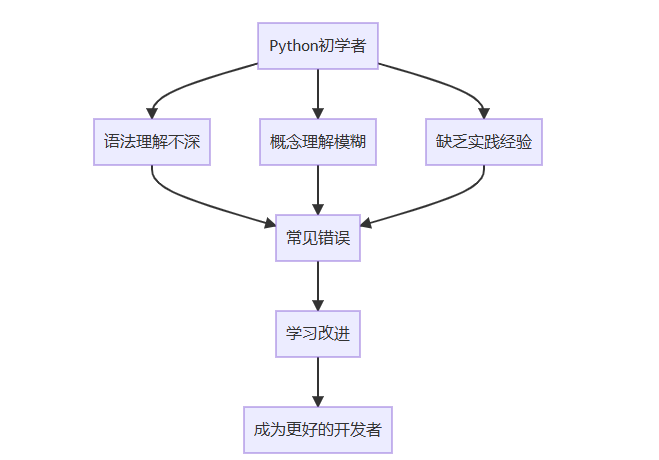
让我们开始探索这些错误,并学习如何避免它们!
初学者经常混淆可变对象和不可变对象的概念,导致在修改数据时出现意外行为。
# 错误示例1:列表的意外修改
def add_item(my_list, item):
    my_list.append(item)
    return my_list

original_list = [1, 2, 3]
new_list = add_item(original_list, 4)

print("Original list:", original_list)  # [1, 2, 3, 4]
print("New list:", new_list)           # [1, 2, 3, 4]
# 两个列表都被修改了!

# 错误示例2:字符串"修改"的困惑
text = "hello"
text.upper()  # 初学者可能认为这会修改text
print(text)   # 输出仍然是"hello",不是"HELLO"
- 可变对象(列表、字典、集合):可以在原地修改,多个变量可能指向同一个对象
- 不可变对象(数字、字符串、元组):创建后不能修改,任何"修改"操作都会创建新对象
# 正确做法1:创建列表的副本
def add_item_safe(my_list, item):
    new_list = my_list.copy()  # 或者使用 my_list[:]
    new_list.append(item)
    return new_list

original_list = [1, 2, 3]
new_list = add_item_safe(original_list, 4)

print("Original list:", original_list)  # [1, 2, 3]
print("New list:", new_list)           # [1, 2, 3, 4]

# 正确做法2:理解不可变对象的操作
text = "hello"
uppercase_text = text.upper()  # 创建新字符串
print("Original:", text)              # hello
print("Uppercase:", uppercase_text)   # HELLO

# 正确做法3:使用元组保护数据
coordinates = (10, 20)  # 不可变,不会被意外修改
# coordinates[0] = 5   # 这会报错,防止意外修改
记住常见数据类型的可变性:
- 可变:
list,dict,set - 不可变:
int,float,str,tuple,bool
在函数中修改参数时,先创建副本
使用不可变对象来保护重要数据
初学者经常不理解默认参数在函数定义时只计算一次,导致意外的行为。
# 错误示例:使用可变对象作为默认参数
def add_to_list(item, my_list=[]):  # 危险!默认参数在定义时创建
    my_list.append(item)
    return my_list

# 第一次调用看起来正常
result1 = add_to_list(1)
print(result1)  # [1]

# 第二次调用出现问题!
result2 = add_to_list(2)
print(result2)  # [1, 2] 而不是期望的 [2]
Python的函数默认参数在函数定义时计算,而不是在每次调用时计算。这意味着所有调用共享同一个默认参数对象。
# 正确做法1:使用None作为默认值
def add_to_list_safe(item, my_list=None):
    if my_list is None:
        my_list = []  # 每次调用时创建新列表
    my_list.append(item)
    return my_list

result1 = add_to_list_safe(1)
print(result1)  # [1]

result2 = add_to_list_safe(2)
print(result2)  # [2] - 符合预期!

# 正确做法2:使用不可变默认值
def greet(name, prefix="Hello"):
    return f"{prefix}, {name}!"

print(greet("Alice"))  # Hello, Alice!
print(greet("Bob", "Hi"))  # Hi, Bob!
- 永远不要使用可变对象作为函数默认参数
- 使用
None作为默认值,在函数内部检查并创建新对象
- 对于需要复杂默认值的情况,使用工厂函数
None作为默认值,在函数内部检查并创建新对象
初学者经常混淆局部变量和全局变量,导致UnboundLocalError或其他意外行为。
# 错误示例1:在赋值前使用变量
count = 0

def increment():
    count += 1  # UnboundLocalError!
    return count

# 错误示例2:混淆局部和全局变量
x = 10

def confusing_function():
    print(x)  # 这能工作吗?
    x = 5     # 这行导致问题

confusing_function()  # UnboundLocalError!
Python的作用域规则(LEGB):
- Local:局部作用域
- Enclosing:闭包作用域
- Global:全局作用域
- Built-in:内置作用域
在函数内对变量赋值会使其成为局部变量,即使在外部有同名全局变量。
# 正确做法1:明确使用global关键字
count = 0

def increment():
    global count  # 明确声明使用全局变量
    count += 1
    return count

print(increment())  # 1
print(increment())  # 2

# 正确做法2:避免使用全局变量,通过参数传递
def better_increment(current_count):
    return current_count + 1

count = 0
count = better_increment(count)
print(count)  # 1

# 正确做法3:使用返回值而不是修改全局状态
def process_data(data):
    # 处理数据并返回结果,不修改输入
    return [x * 2 for x in data]

original_data = [1, 2, 3]
new_data = process_data(original_data)
print("Original:", original_data)  # [1, 2, 3]
print("New:", new_data)           # [2, 4, 6]
- 尽量避免使用全局变量
- 如果需要修改全局变量,明确使用
global关键字
- 优先使用函数参数和返回值来传递数据
- 理解Python的LEGB作用域规则
global关键字
初学者在循环中经常犯错误,特别是在修改正在迭代的集合时。
# 错误示例1:在迭代时修改列表
numbers = [1, 2, 3, 4, 5]

for num in numbers:
    if num % 2 == 0:
        numbers.remove(num)  # 危险!在迭代时修改列表

print(numbers)  # [1, 3, 5] - 但可能跳过一些元素

# 错误示例2:错误使用range和索引
fruits = ['apple', 'banana', 'cherry']

# 不必要的复杂方式
for i in range(len(fruits)):
    print(fruits[i])

# 错误示例3:无限循环
count = 0
while count < 5:
    print(count)
    # 忘记增加count,导致无限循环!
# 正确做法1:创建新列表而不是修改原列表
numbers = [1, 2, 3, 4, 5]

# 方法1:列表推导式
odd_numbers = [num for num in numbers if num % 2 != 0]
print(odd_numbers)  # [1, 3, 5]

# 方法2:迭代副本,修改原列表
numbers = [1, 2, 3, 4, 5]
for num in numbers[:]:  # 迭代副本
    if num % 2 == 0:
        numbers.remove(num)
print(numbers)  # [1, 3, 5]

# 正确做法2:直接迭代元素
fruits = ['apple', 'banana', 'cherry']

# Pythonic的方式
for fruit in fruits:
    print(fruit)

# 如果需要索引,使用enumerate
for i, fruit in enumerate(fruits):
    print(f"{i}: {fruit}")

# 正确做法3:确保循环有明确的退出条件
count = 0
while count < 5:
    print(count)
    count += 1  # 重要:更新循环变量
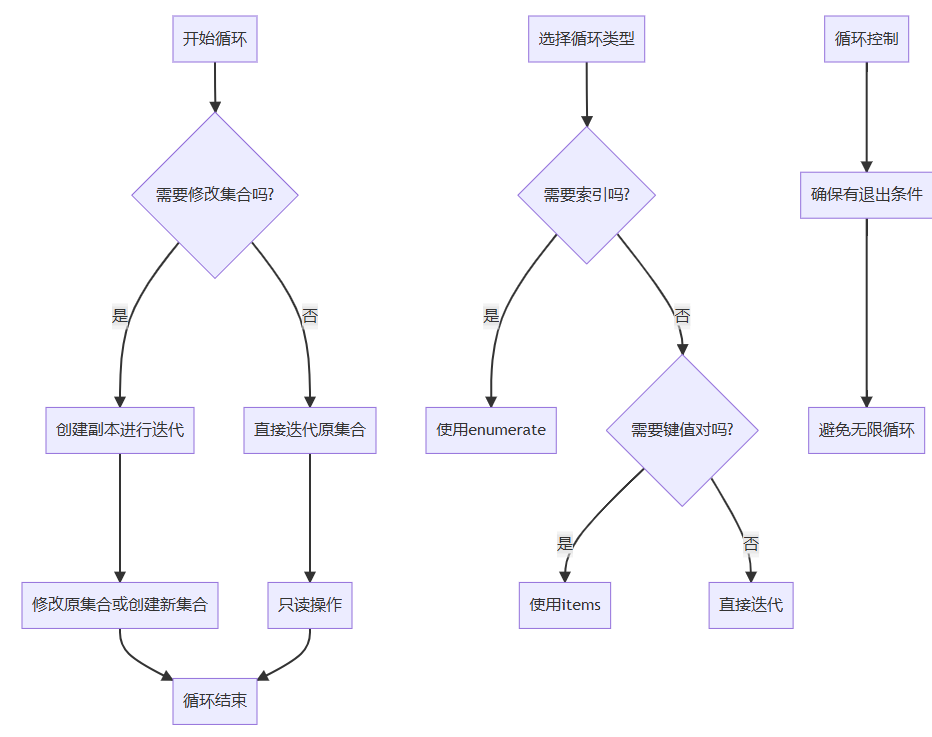
- 不要在迭代时直接修改集合,创建副本或新集合
- 优先使用直接迭代而不是索引迭代
- 使用
enumerate()当需要索引时
- 确保循环有明确的退出条件
enumerate()当需要索引时
初学者经常混淆==(值相等)和is(身份相等)操作符。
# 错误示例1:错误使用is比较值
a = [1, 2, 3]
b = [1, 2, 3]

print(a == b)  # True - 值相等
print(a is b)  # False - 不是同一个对象

# 错误示例2:小整数的缓存陷阱
x = 256
y = 256
print(x is y)  # True - Python缓存小整数

x = 257
y = 257
print(x is y)  # False - 大整数不缓存

# 错误示例3:与None比较
value = None

# 错误的做法(但有时能工作)
if value is None:
    print("Value is None")

# 更糟的做法
if value == None:  # 不推荐
    print("Value is None")
==检查值是否相等is检查是否是同一个对象(内存地址相同)- Python对小整数(-5到256)进行缓存优化
==检查值是否相等is检查是否是同一个对象(内存地址相同)
# 正确做法1:理解使用场景
# 比较值是否相等 - 使用 ==
list1 = [1, 2, 3]
list2 = [1, 2, 3]
list3 = list1

print("list1 == list2:", list1 == list2)  # True - 值相等
print("list1 is list2:", list1 is list2)  # False - 不同对象
print("list1 is list3:", list1 is list3)  # True - 同一个对象

# 正确做法2:与单例对象比较使用is
# 与None, True, False比较时使用is
value = None

if value is None:  # 正确的方式
    print("Value is None")

if value is True:  # 而不是 value == True
    print("Value is True")

# 正确做法3:字符串驻留
str1 = "hello"
str2 = "hello"
str3 = "hell" + "o"

print("str1 is str2:", str1 is str2)  # True - 字符串驻留
print("str1 is str3:", str1 is str3)  # True - 编译时优化

# 但不要依赖这种行为!
str4 = "hell"
str5 = str4 + "o"
print("str1 is str5:", str1 is str5)  # False - 运行时创建
- 比较值使用
==,检查身份使用is
- 与
None、True、False比较时总是使用is
- 不要依赖小整数缓存或字符串驻留行为
- 理解Python的对象模型和内存管理
==,检查身份使用isNone、True、False比较时总是使用is
初学者要么忽略错误处理,要么使用过于宽泛的异常捕获。
# 错误示例1:过于宽泛的异常捕获
try:
    number = int(input("Enter a number: "))
    result = 10 / number
    print(f"Result: {result}")
except:  # 捕获所有异常 - 危险!
    print("Something went wrong")

# 错误示例2:静默忽略异常
try:
    risky_operation()
except:
    pass  # 静默忽略 - 非常危险!

# 错误示例3:不提供有用的错误信息
try:
    file = open("nonexistent.txt")
except FileNotFoundError:
    print("Error")  # 没有有用的信息
# 正确做法1:具体捕获预期的异常
try:
    number = int(input("Enter a number: "))
    result = 10 / number
    print(f"Result: {result}")
except ValueError:
    print("Please enter a valid number!")
except ZeroDivisionError:
    print("Cannot divide by zero!")
except Exception as e:
    print(f"An unexpected error occurred: {e}")

# 正确做法2:提供有用的错误信息
try:
    with open("data.txt", "r") as file:
        content = file.read()
except FileNotFoundError:
    print("Error: data.txt file not found. Please check the file path.")
except PermissionError:
    print("Error: Permission denied. Check file permissions.")
except IOError as e:
    print(f"Error reading file: {e}")

# 正确做法3:使用else和finally
try:
    file = open("data.txt", "r")
    content = file.read()
except FileNotFoundError as e:
    print(f"File not found: {e}")
else:
    # 只有在没有异常时执行
    print("File read successfully")
    print(f"Content length: {len(content)}")
finally:
    # 无论是否发生异常都执行
    file.close()  # 确保资源被清理
    print("Cleanup completed")

# 更Pythonic的方式:使用上下文管理器
try:
    with open("data.txt", "r") as file:  # 自动处理文件关闭
        content = file.read()
except FileNotFoundError:
    print("File not found")
else:
    print("File processed successfully")
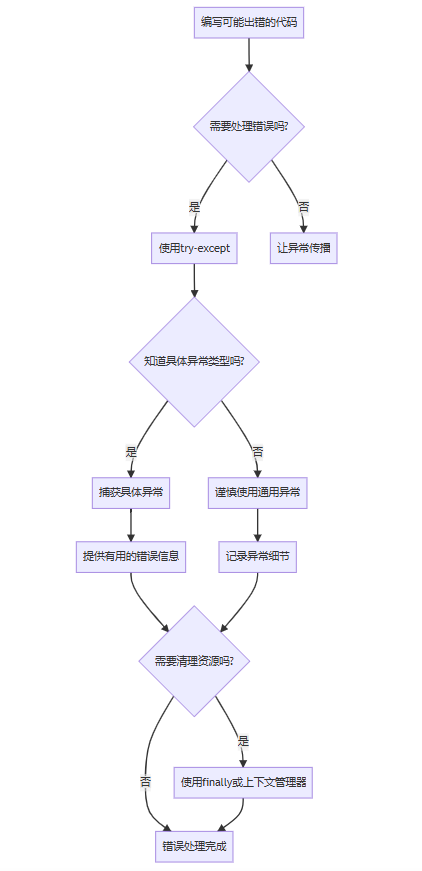
- 总是捕获具体的异常类型,避免裸
except:
- 提供有用的错误信息帮助调试
- 使用
else处理成功的情况,finally清理资源
- 优先使用上下文管理器自动处理资源清理
except:else处理成功的情况,finally清理资源
初学者经常混淆赋值、浅拷贝和深拷贝,导致意外的数据共享。
# 错误示例1:赋值不是拷贝
original = [[1, 2], [3, 4]]
assigned = original  # 这只是创建引用,不是拷贝

assigned[0][0] = 99
print("Original:", original)  # [[99, 2], [3, 4]] - 也被修改了!

# 错误示例2:浅拷贝的局限性
import copy

original = [[1, 2], [3, 4]]
shallow_copied = original.copy()  # 或 original[:]

shallow_copied.append([5, 6])  # 修改第一层没问题
print("Original after append:", original)  # [[1, 2], [3, 4]]

shallow_copied[0][0] = 99  # 修改嵌套对象会影响原对象!
print("Original after nested modification:", original)  # [[99, 2], [3, 4]]
# 正确做法1:理解三种"拷贝"的区别
import copy

original = [[1, 2], [3, 4]]

# 1. 赋值 - 创建引用
assigned = original

# 2. 浅拷贝 - 只拷贝第一层
shallow_copied = copy.copy(original)  # 或 original.copy()

# 3. 深拷贝 - 递归拷贝所有层次
deep_copied = copy.deepcopy(original)

# 测试修改的影响
assigned[0][0] = "assigned"
shallow_copied[0][0] = "shallow"
deep_copied[0][0] = "deep"

print("Original:", original)        # [['assigned', 2], [3, 4]]
print("Assigned:", assigned)        # [['assigned', 2], [3, 4]]
print("Shallow:", shallow_copied)   # [['shallow', 2], [3, 4]]
print("Deep:", deep_copied)         # [['deep', 2], [3, 4]]

# 正确做法2:根据需求选择拷贝方式
# 情况1:只有一层结构,使用浅拷贝
simple_list = [1, 2, 3, 4]
copied_list = simple_list.copy()  # 浅拷贝足够
copied_list[0] = 99
print("Simple original:", simple_list)  # [1, 2, 3, 4] - 不受影响

# 情况2:嵌套结构,使用深拷贝
nested_list = [[1, 2], [3, 4]]
deep_copied_list = copy.deepcopy(nested_list)
deep_copied_list[0][0] = 99
print("Nested original:", nested_list)  # [[1, 2], [3, 4]] - 不受影响
- 理解赋值、浅拷贝、深拷贝的区别
- 对于简单扁平结构,浅拷贝足够
- 对于嵌套结构,使用深拷贝
- 使用
copy模块而不是自己实现拷贝逻辑
copy模块而不是自己实现拷贝逻辑
初学者经常混淆类变量和实例变量,导致意外的数据共享 between instances。
# 错误示例:意外共享的类变量
class Student:
    grades = []  # 类变量 - 所有实例共享!

    def __init__(self, name):
        self.name = name

    def add_grade(self, grade):
        self.grades.append(grade)  # 修改的是类变量!

# 测试
student1 = Student("Alice")
student2 = Student("Bob")

student1.add_grade(90)
student2.add_grade(85)

print("Alice's grades:", student1.grades)  # [90, 85]
print("Bob's grades:", student2.grades)    # [90, 85] - 意外共享!
# 正确做法1:正确使用实例变量
class Student:
    def __init__(self, name):
        self.name = name
        self.grades = []  # 实例变量 - 每个实例独有

    def add_grade(self, grade):
        self.grades.append(grade)

# 测试
student1 = Student("Alice")
student2 = Student("Bob")

student1.add_grade(90)
student2.add_grade(85)

print("Alice's grades:", student1.grades)  # [90]
print("Bob's grades:", student2.grades)    # [85] - 正确!

# 正确做法2:理解类变量的正确用途
class Circle:
    # 类变量 - 用于所有实例共享的常量或默认值
    pi = 3.14159
    count = 0  # 跟踪创建的实例数

    def __init__(self, radius):
        self.radius = radius  # 实例变量
        Circle.count += 1     # 通过类名访问类变量

    def area(self):
        return Circle.pi * self.radius ** 2  # 使用类变量

    @classmethod
    def get_count(cls):
        return cls.count

# 使用
circle1 = Circle(5)
circle2 = Circle(3)

print("Circle 1 area:", circle1.area())  # 使用类变量pi
print("Circle 2 area:", circle2.area())
print("Total circles:", Circle.get_count())  # 2
graph TD
A[定义类属性] –> B{需要所有实例共享吗?}
B –>|是| C[使用类变量]
B –>|否| D[使用实例变量]
C –> E{是常量或配置吗?}
E –>|是| F[在类中直接定义]
E –>|否| G[考虑使用类方法管理]
D –> H[在__init__中定义]
H –> I[每个实例有独立副本]
F –> J[通过类名或实例访问]
G –> K[使用@classmethod管理]
graph TD
A[定义类属性] –> B{需要所有实例共享吗?}
B –>|是| C[使用类变量]
B –>|否| D[使用实例变量]
C –> E{是常量或配置吗?}
E –>|是| F[在类中直接定义]
E –>|否| G[考虑使用类方法管理]
D –> H[在__init__中定义]
H –> I[每个实例有独立副本]
F –> J[通过类名或实例访问]
G –> K[使用@classmethod管理]
- 在
__init__方法中初始化实例变量
- 类变量用于真正的共享数据或常量
- 通过类名访问类变量,避免意外创建实例变量
- 使用
@classmethod和@staticmethod处理类级别操作
__init__方法中初始化实例变量@classmethod和@staticmethod处理类级别操作
初学者经常使用+操作符在循环中拼接字符串,这在Python中效率很低。
# 错误示例:在循环中使用+拼接字符串
words = ["hello", "world", "python", "programming"]

# 低效的方式
result = ""
for word in words:
    result += word + " "  # 每次循环创建新字符串

print(result)

# 对于大量数据,这会非常慢!
large_list = ["word"] * 10000
result = ""
for word in large_list:  # 非常低效!
    result += word
# 正确做法1:使用join方法
words = ["hello", "world", "python", "programming"]

# 高效的方式
result = " ".join(words)
print(result)

# 正确做法2:使用列表推导式 + join
numbers = [1, 2, 3, 4, 5]
# 将数字转换为字符串并拼接
result = ", ".join(str(num) for num in numbers)
print(result)  # "1, 2, 3, 4, 5"

# 正确做法3:使用f-string(Python 3.6+)
name = "Alice"
age = 25

# 现代Python的方式
message = f"My name is {name} and I'm {age} years old."
print(message)

# 正确做法4:使用字符串格式化
# 当需要复杂格式化时
template = "Name: {}, Age: {}, Score: {:.2f}"
formatted = template.format("Bob", 30, 95.5678)
print(formatted)

# 性能对比
import time

# 低效方法
start_time = time.time()
result = ""
for i in range(10000):
    result += str(i)
end_time = time.time()
print(f"Using + operator: {end_time - start_time:.4f} seconds")

# 高效方法
start_time = time.time()
result = "".join(str(i) for i in range(10000))
end_time = time.time()
print(f"Using join: {end_time - start_time:.4f} seconds")
- 总是使用
join()方法拼接字符串序列
- 使用f-string进行字符串插值(Python 3.6+)
- 避免在循环中使用
+拼接字符串
- 对于复杂格式化,使用
format()方法
join()方法拼接字符串序列+拼接字符串format()方法
初学者经常编写非Pythonic的代码,忽略了Python的哲学和最佳实践。
# 错误示例1:非Pythonic的循环
fruits = ["apple", "banana", "cherry"]

# C风格循环
for i in range(len(fruits)):
    print(fruits[i])

# 错误示例2:不必要的复杂条件
if x > 0 and x < 10 and x != 5:  # 冗长
    pass

# 错误示例3:手动管理资源
file = open("data.txt")
try:
    content = file.read()
finally:
    file.close()  # 容易忘记
# 正确做法1:编写Pythonic的代码
fruits = ["apple", "banana", "cherry"]

# Pythonic的循环
for fruit in fruits:
    print(fruit)

# 需要索引时使用enumerate
for i, fruit in enumerate(fruits):
    print(f"{i}: {fruit}")

# 正确做法2:利用Python的表达能力
# 链式比较
if 0 < x < 10 and x != 5:  # 更清晰
    pass

# 使用真值测试
name = ""
if not name:  # 而不是 if name == ""
    print("Name is empty")

# 列表推导式
squares = [x**2 for x in range(10) if x % 2 == 0]

# 正确做法3:使用上下文管理器
# 自动资源管理
with open("data.txt") as file:
    content = file.read()
# 文件自动关闭

# 正确做法4:使用zip同时迭代多个序列
names = ["Alice", "Bob", "Charlie"]
scores = [85, 92, 78]

for name, score in zip(names, scores):
    print(f"{name}: {score}")

# 正确做法5:使用内置函数
numbers = [3, 1, 4, 1, 5, 9, 2]

# 而不是手动实现
max_value = max(numbers)
min_value = min(numbers)
total = sum(numbers)

print(f"Max: {max_value}, Min: {min_value}, Sum: {total}")
"""
Pythonic代码检查清单
"""

# ✅ 使用描述性变量名
student_name = "Alice"  # 而不是 snm

# ✅ 使用列表推导式代替简单循环
squares = [x**2 for x in range(10)]

# ✅ 使用enumerate获取索引和值
for i, value in enumerate(my_list):
    pass

# ✅ 使用with语句管理资源
with open("file.txt") as f:
    content = f.read()

# ✅ 使用zip并行迭代
for a, b in zip(list_a, list_b):
    pass

# ✅ 使用if __name__ == "__main__"
if __name__ == "__main__":
    main()

# ✅ 使用异常处理而不是返回错误代码
try:
    risky_operation()
except SpecificError as e:
    handle_error(e)

# ✅ 使用默认参数和关键字参数
def greet(name, message="Hello"):
    return f"{message}, {name}"

# ✅ 使用属性而不是getter/setter方法
class Person:
    def __init__(self, name):
        self.name = name  # 而不是set_name方法
- 阅读并理解Python之禅(
import this)
- 学习Python标准库和内置函数
- 阅读优秀的Python代码(如requests库源码)
- 使用工具如pylint、flake8检查代码风格
- 遵循PEP 8风格指南
import this)
让我们通过一个完整的示例,将初学者的代码重构为Pythonic的代码:
"""
重构示例:从初学者代码到Pythonic代码
"""

# 初学者版本
def process_data_beginner(data):
    """初学者版本的数据处理函数"""
    result = []
    for i in range(len(data)):
        if data[i] % 2 == 0:  # 检查偶数
            temp = data[i] * 2  # 乘以2
            result.append(temp)  # 添加到结果

    total = 0
    for j in range(len(result)):
        total = total + result[j]  # 计算总和

    avg = 0
    if len(result) > 0:
        avg = total / len(result)  # 计算平均值

    output = {"numbers": result, "total": total, "average": avg}
    return output

# Pythonic版本
from typing import List, Dict, Union
from numbers import Number

def process_data_pythonic(data: List[Number]) -> Dict[str, Union[List[Number], Number]]:
    """
    Pythonic版本的数据处理函数

    参数:
        data: 数字列表

    返回:
        包含处理结果、总和、平均值的字典
    """
    # 使用列表推导式过滤和转换数据
    processed_numbers = [x * 2 for x in data if x % 2 == 0]

    # 使用内置函数计算统计信息
    total = sum(processed_numbers) if processed_numbers else 0
    average = total / len(processed_numbers) if processed_numbers else 0

    return {
        "numbers": processed_numbers,
        "total": total,
        "average": average
    }

# 测试对比
test_data = [1, 2, 3, 4, 5, 6, 7, 8, 9, 10]

beginner_result = process_data_beginner(test_data)
pythonic_result = process_data_pythonic(test_data)

print("初学者版本结果:")
print(beginner_result)

print("nPythonic版本结果:")
print(pythonic_result)

print("n结果是否相同:", beginner_result == pythonic_result)

# 性能测试
import timeit

beginner_time = timeit.timeit(
    'process_data_beginner([1, 2, 3, 4, 5, 6, 7, 8, 9, 10])',
    globals=globals(),
    number=10000
)

pythonic_time = timeit.timeit(
    'process_data_pythonic([1, 2, 3, 4, 5, 6, 7, 8, 9, 10])',
    globals=globals(),
    number=10000
)

print(f"n性能对比:")
print(f"初学者版本: {beginner_time:.4f}秒")
print(f"Pythonic版本: {pythonic_time:.4f}秒")
print(f"速度提升: {beginner_time/pythonic_time:.1f}倍")
通过本文的学习,我们了解了10个最常见的Python初学者错误以及如何避免它们。让我们回顾一下关键要点:
| 错误 | 关键学习点 | 预防策略 |
|---|---|---|
| 可变/不可变对象 | 理解对象可变性 | 创建副本,使用不可变对象 |
| 默认参数 | 默认参数只计算一次 | 使用None作为默认值 |
| 变量作用域 | 理解LEGB规则 | 避免全局变量,使用参数 |
| 循环和迭代 | 不要修改正在迭代的集合 | 创建副本,使用Pythonic循环 |
| == vs is | 值相等 vs 身份相等 | 比较值用==,身份用is |
| 错误处理 | 具体异常捕获 | 避免裸except,提供有用信息 |
| 拷贝机制 | 理解深浅拷贝区别 | 根据结构选择拷贝方式 |
| 类/实例变量 | 区分共享和独有数据 | 在__init__中初始化实例变量 |
| 字符串拼接 | 避免循环中使用+ | 使用join和f-string |
| 编码风格 | 编写Pythonic代码 | 遵循PEP 8,使用内置功能 |
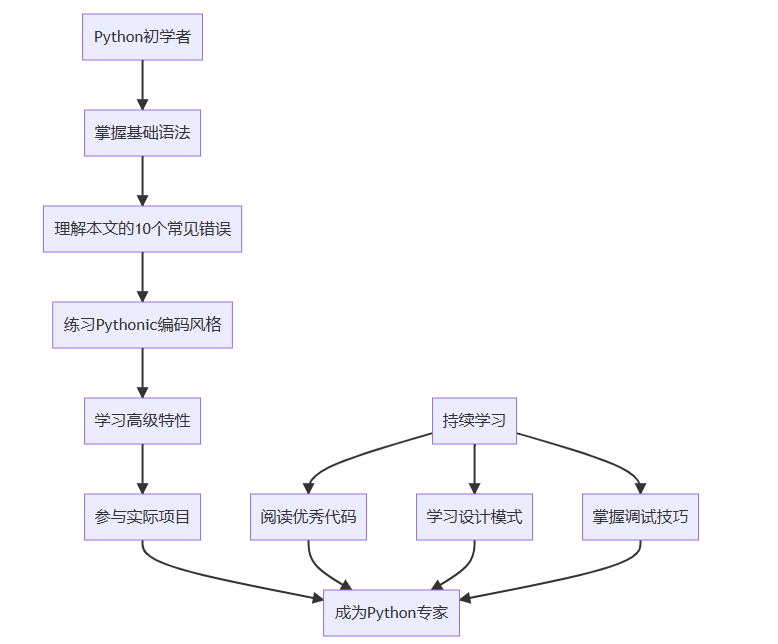
- 阅读官方文档:Python文档是学习的最佳资源
- 实践项目:通过实际项目巩固知识
- 代码审查:请有经验的开发者审查你的代码
- 学习工具:掌握pylint、black、mypy等工具
- 参与社区:加入Python社区,学习最佳实践
记住,成为优秀的Python开发者是一个持续学习的过程。每个错误都是一个学习机会,通过理解和避免这些常见错误,你已经在成为更好的Python开发者的道路上迈出了重要的一步!
以上就是10个常见的Python初学者错误及避免方法的详细内容,更多关于Python初学者常见错误避免的资料请关注风君子博客其它相关文章!
您可能感兴趣的文章:
- 新手常犯的10个Python错误及解决方法总结
- Python 错误处理的最佳实践
- Python多线程并发时出现503错误的最佳处理
- 10个Python运行时的常见错误及解决方法
- 深入了解python中的常见错误类型与解决
- Python常见的错误以及其解决方案
- Python常见错误类型及解决方法