 编程部落
编程部落文章目录
- 这里以“360浏览器.exe”为实例,选择相应启动方式,若时间未过期,点击“开始倒计时”,即可在对应时间到达后自动打开360浏览器。
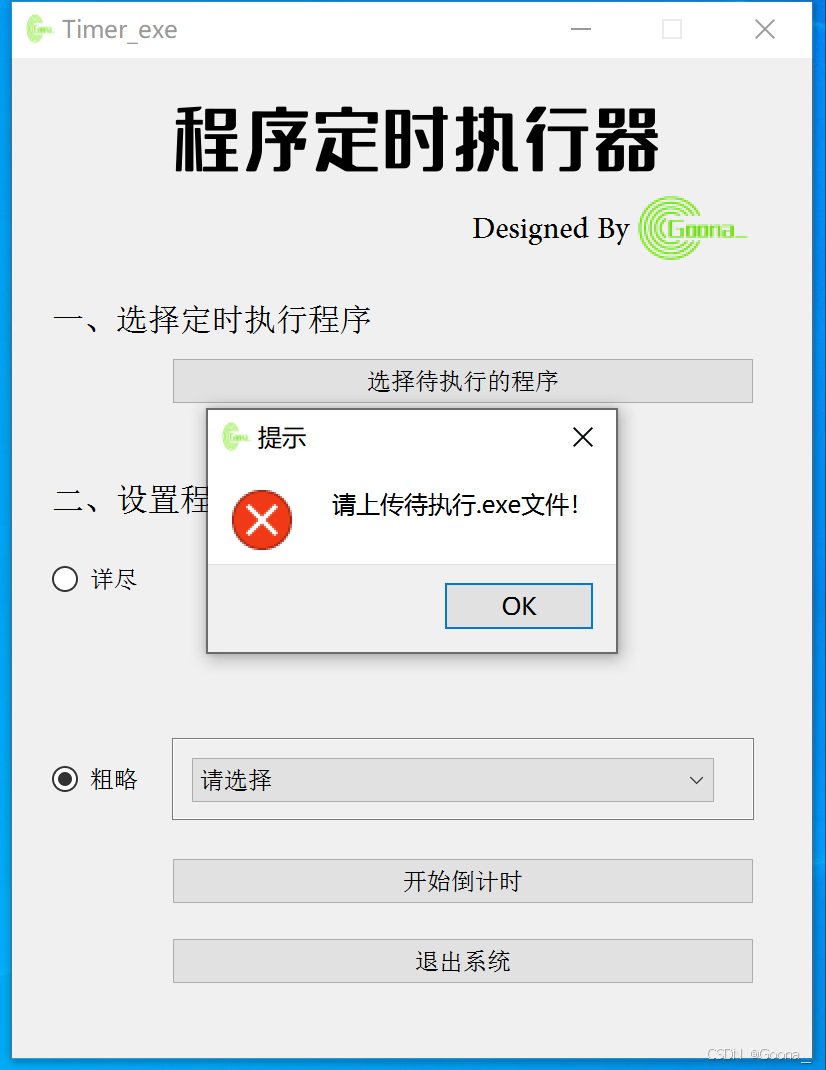
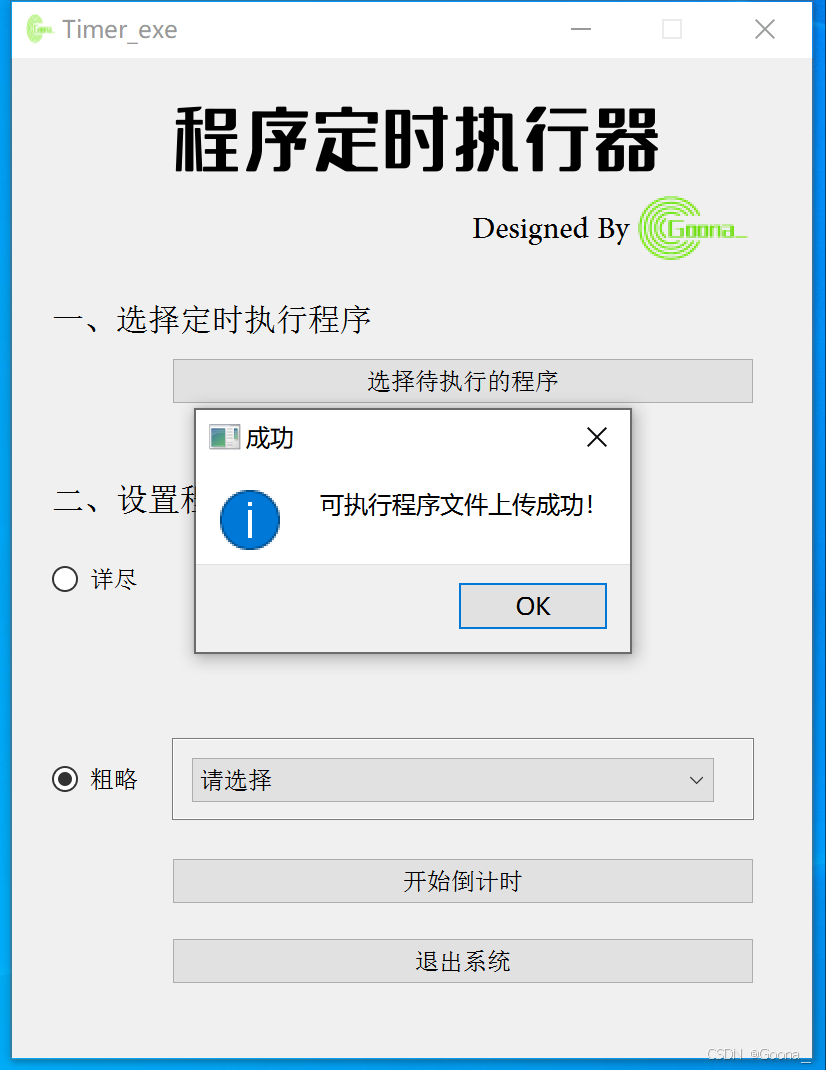
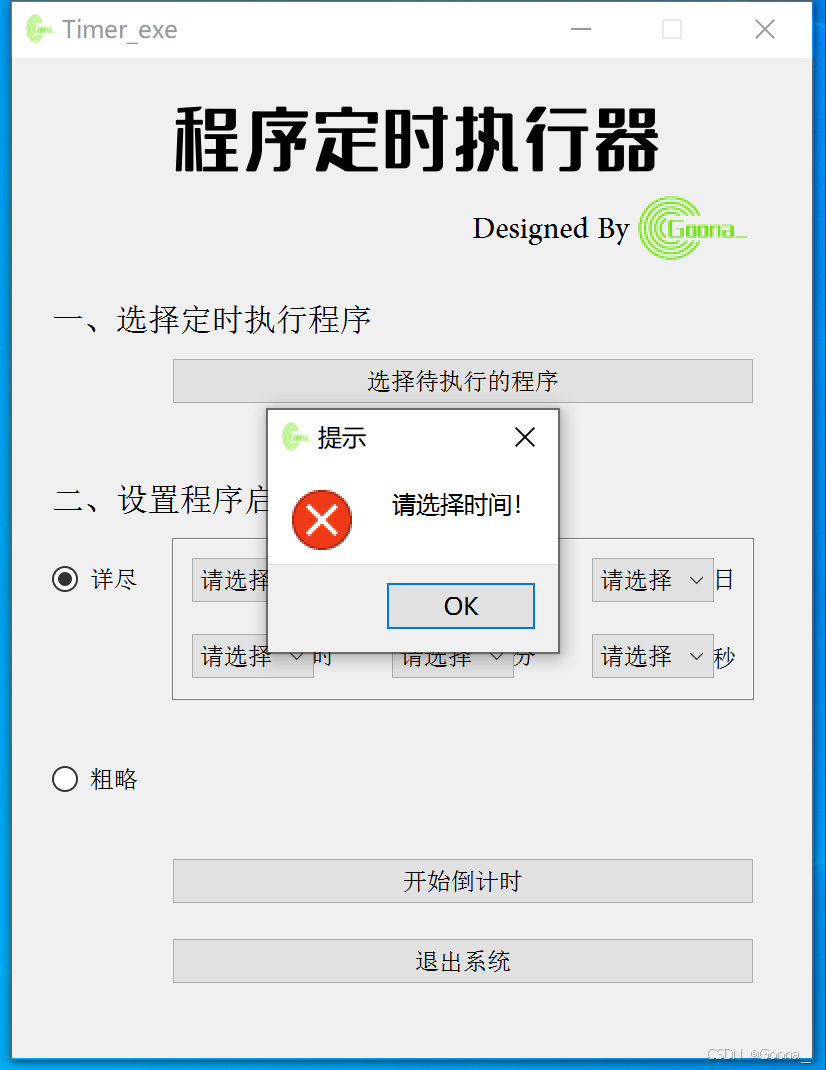
- 若未上传.exe可执行文件,直接点击“开始倒计时”,会有以下提示。 若未设置时间(两种方式任选其一),直接点击“开始倒计时”,会有以下提示。 若设置时间符合要求,直接点击“开始倒计时”,会有以下提示。 针对“详尽”方式,尤其要把握精确时间,若自定义的时间小于当前时间,则程序不能成功执行,且会有以下提示。
- 通过pyuic5产生的GUI界面代码UI_Main.py如下: # -*- coding: utf-8 -*- # Form implementation generated from reading ui file ‘UI_main.ui’ # # Created by: PyQt5 UI code generator 5.15.11 # # WARNING: Any manual changes made to this file will be lost when pyuic5 is # run again. Do not edit this file unless you know what you are doing. from PyQt5 import QtCore, QtGui, QtWidgets class Main_Form(object): def setupUi(self, Form): Form.setObjectName(“Form”) Form.setEnabled(True) Form.resize(400, 500) Form.setMinimumSize(QtCore.QSize(400, 500)) Form.setMaximumSize(QtCore.QSize(400, 500)) icon = QtGui.QIcon() icon.addPixmap(QtGui.QPixmap(“:/image1.png”), QtGui.QIcon.Normal, QtGui.QIcon.Off) Form.setWindowIcon(icon) self.label_5 = QtWidgets.QLabel(Form) self.label_5.setGeometry(QtCore.QRect(230, 70, 141, 31)) font = QtGui.QFont() font.setFamily(“Adobe Arabic”) font.setPointSize(16) self.label_5.setFont(font) self.label_5.setObjectName(“label_5”) self.label_8 = QtWidgets.QLabel(Form) self.label_8.setGeometry(QtCore.QRect(80, 10, 261, 61)) font = QtGui.QFont() font.setFamily(“字魂5号-无外润黑体”) font.setPointSize(26) font.setBold(False) font.setWeight(50) self.label_8.setFont(font) self.label_8.setObjectName(“label_8”) self.label_10 = QtWidgets.QLabel(Form) self.label_10.setGeometry(QtCore.QRect(310, 60, 71, 51)) self.label_10.setText(“”) self.label_10.setPixmap(QtGui.QPixmap(“:/image1.png”)) self.label_10.setObjectName(“label_10”) self.label_3 = QtWidgets.QLabel(Form) self.label_3.setGeometry(QtCore.QRect(20, 210, 181, 21)) font = QtGui.QFont() font.setFamily(“新宋体”) font.setPointSize(12) self.label_3.setFont(font) self.label_3.setObjectName(“label_3”) self.pushButton_2 = QtWidgets.QPushButton(Form) self.pushButton_2.setGeometry(QtCore.QRect(80, 400, 291, 23)) font = QtGui.QFont() font.setFamily(“新宋体”) self.pushButton_2.setFont(font) self.pushButton_2.setObjectName(“pushButton_2”) self.label_4 = QtWidgets.QLabel(Form) self.label_4.setGeometry(QtCore.QRect(150, 288, 21, 21)) font = QtGui.QFont() font.setFamily(“新宋体”) self.label_4.setFont(font) self.label_4.setObjectName(“label_4”) self.comboBox = QtWidgets.QComboBox(Form) self.comboBox.setGeometry(QtCore.QRect(90, 288, 61, 22)) font = QtGui.QFont() font.setFamily(“新宋体”) self.comboBox.setFont(font) self.comboBox.setObjectName(“comboBox”) self.label_6 = QtWidgets.QLabel(Form) self.label_6.setGeometry(QtCore.QRect(250, 288, 21, 21)) font = QtGui.QFont() font.setFamily(“新宋体”) self.label_6.setFont(font) self.label_6.setObjectName(“label_6”) self.comboBox_2 = QtWidgets.QComboBox(Form) self.comboBox_2.setGeometry(QtCore.QRect(190, 288, 61, 22)) font = QtGui.QFont() font.setFamily(“新宋体”) self.comboBox_2.setFont(font) self.comboBox_2.setObjectName(“comboBox_2”) self.label_7 = QtWidgets.QLabel(Form) self.label_7.setGeometry(QtCore.QRect(350, 290, 16, 20)) font = QtGui.QFont() font.setFamily(“新宋体”) self.label_7.setFont(font) self.label_7.setObjectName(“label_7”) self.radioButton = QtWidgets.QRadioButton(Form) self.radioButton.setGeometry(QtCore.QRect(20, 250, 51, 21)) font = QtGui.QFont() font.setFamily(“新宋体”) self.radioButton.setFont(font) self.radioButton.setObjectName(“radioButton”) self.radioButton_2 = QtWidgets.QRadioButton(Form) self.radioButton_2.setGeometry(QtCore.QRect(20, 350, 51, 21)) font = QtGui.QFont() font.setFamily(“新宋体”) self.radioButton_2.setFont(font) self.radioButton_2.setObjectName(“radioButton_2”) self.comboBox_4 = QtWidgets.QComboBox(Form) self.comboBox_4.setGeometry(QtCore.QRect(90, 350, 261, 22)) font = QtGui.QFont() font.setFamily(“新宋体”) self.comboBox_4.setFont(font) self.comboBox_4.setObjectName(“comboBox_4”) self.comboBox_4.addItem(“”) self.comboBox_4.addItem(“”) self.comboBox_4.addItem(“”) self.comboBox_4.addItem(“”) self.comboBox_4.addItem(“”) self.comboBox_4.addItem(“”) self.comboBox_4.addItem(“”) self.comboBox_4.addItem(“”) self.comboBox_4.addItem(“”) self.comboBox_4.addItem(“”) self.comboBox_4.addItem(“”) self.comboBox_3 = QtWidgets.QComboBox(Form) self.comboBox_3.setGeometry(QtCore.QRect(290, 288, 61, 22)) font = QtGui.QFont() font.setFamily(“新宋体”) self.comboBox_3.setFont(font) self.comboBox_3.setObjectName(“comboBox_3”) self.pushButton_4 = QtWidgets.QPushButton(Form) self.pushButton_4.setGeometry(QtCore.QRect(80, 440, 291, 23)) font = QtGui.QFont() font.setFamily(“新宋体”) self.pushButton_4.setFont(font) self.pushButton_4.setObjectName(“pushButton_4”) self.label_9 = QtWidgets.QLabel(Form) self.label_9.setGeometry(QtCore.QRect(80, 240, 291, 81)) self.label_9.setFrameShape(QtWidgets.QFrame.StyledPanel) self.label_9.setText(“”) self.label_9.setObjectName(“label_9”) self.label_11 = QtWidgets.QLabel(Form) self.label_11.setGeometry(QtCore.QRect(80, 340, 291, 41)) self.label_11.setFrameShape(QtWidgets.QFrame.StyledPanel) self.label_11.setText(“”) self.label_11.setObjectName(“label_11”) self.label_13 = QtWidgets.QLabel(Form) self.label_13.setGeometry(QtCore.QRect(20, 120, 201, 21)) font = QtGui.QFont() font.setFamily(“新宋体”) font.setPointSize(12) self.label_13.setFont(font) self.label_13.setObjectName(“label_13”) self.pushButton_5 = QtWidgets.QPushButton(Form) self.pushButton_5.setGeometry(QtCore.QRect(80, 150, 291, 23)) font = QtGui.QFont() font.setFamily(“新宋体”) self.pushButton_5.setFont(font) self.pushButton_5.setObjectName(“pushButton_5”) self.comboBox_5 = QtWidgets.QComboBox(Form) self.comboBox_5.setGeometry(QtCore.QRect(90, 250, 61, 22)) font = QtGui.QFont() font.setFamily(“新宋体”) self.comboBox_5.setFont(font) self.comboBox_5.setObjectName(“comboBox_5”) self.label_14 = QtWidgets.QLabel(Form) self.label_14.setGeometry(QtCore.QRect(150, 250, 21, 21)) font = QtGui.QFont() font.setFamily(“新宋体”) self.label_14.setFont(font) self.label_14.setObjectName(“label_14”) self.comboBox_6 = QtWidgets.QComboBox(Form) self.comboBox_6.setGeometry(QtCore.QRect(190, 250, 61, 22)) font = QtGui.QFont() font.setFamily(“新宋体”) self.comboBox_6.setFont(font) self.comboBox_6.setObjectName(“comboBox_6”) self.label_15 = QtWidgets.QLabel(Form) self.label_15.setGeometry(QtCore.QRect(250, 250, 21, 21)) font = QtGui.QFont() font.setFamily(“新宋体”) self.label_15.setFont(font) self.label_15.setObjectName(“label_15”) self.label_16 = QtWidgets.QLabel(Form) self.label_16.setGeometry(QtCore.QRect(350, 250, 21, 21)) font = QtGui.QFont() font.setFamily(“新宋体”) self.label_16.setFont(font) self.label_16.setObjectName(“label_16”) self.comboBox_7 = QtWidgets.QComboBox(Form) self.comboBox_7.setGeometry(QtCore.QRect(290, 250, 61, 22)) font = QtGui.QFont() font.setFamily(“新宋体”) self.comboBox_7.setFont(font) self.comboBox_7.setObjectName(“comboBox_7”) self.label_11.raise_() self.label_9.raise_() self.label_5.raise_() self.label_8.raise_() self.label_10.raise_() self.label_3.raise_() self.pushButton_2.raise_() self.label_4.raise_() self.comboBox.raise_() self.label_6.raise_() self.comboBox_2.raise_() self.label_7.raise_() self.radioButton.raise_() self.radioButton_2.raise_() self.comboBox_4.raise_() self.comboBox_3.raise_() self.pushButton_4.raise_() self.label_13.raise_() self.pushButton_5.raise_() self.comboBox_5.raise_() self.label_14.raise_() self.comboBox_6.raise_() self.label_15.raise_() self.label_16.raise_() self.comboBox_7.raise_() self.retranslateUi(Form) self.pushButton_4.clicked.connect(Form.close) # type: ignore QtCore.QMetaObject.connectSlotsByName(Form) def retranslateUi(self, Form): _translate = QtCore.QCoreApplication.translate Form.setWindowTitle(_translate(“Form”, “Timer_exe”)) self.label_5.setText(_translate(“Form”, “Designed By”)) self.label_8.setText(_translate(“Form”, “程序定时执行器”)) self.label_3.setText(_translate(“Form”, “二、设置程序启动时间”)) self.pushButton_2.setText(_translate(“Form”, “开始倒计时”)) self.label_4.setText(_translate(“Form”, “时”)) self.label_6.setText(_translate(“Form”, “分”)) self.label_7.setText(_translate(“Form”, “秒”)) self.radioButton.setText(_translate(“Form”, “详尽”)) self.radioButton_2.setText(_translate(“Form”, “粗略”)) self.comboBox_4.setItemText(0, _translate(“Form”, “请选择”)) self.comboBox_4.setItemText(1, _translate(“Form”, “3秒后”)) self.comboBox_4.setItemText(2, _translate(“Form”, “5秒后”)) self.comboBox_4.setItemText(3, _translate(“Form”, “10秒后”)) self.comboBox_4.setItemText(4, _translate(“Form”, “30秒后”)) self.comboBox_4.setItemText(5, _translate(“Form”, “1分钟后”)) self.comboBox_4.setItemText(6, _translate(“Form”, “3分钟后”)) self.comboBox_4.setItemText(7, _translate(“Form”, “5分钟后”)) self.comboBox_4.setItemText(8, _translate(“Form”, “10分钟后”)) self.comboBox_4.setItemText(9, _translate(“Form”, “30分钟后”)) self.comboBox_4.setItemText(10, _translate(“Form”, “1个小时后”)) self.pushButton_4.setText(_translate(“Form”, “退出系统”)) self.label_13.setText(_translate(“Form”, “一、选择定时执行程序”)) self.pushButton_5.setText(_translate(“Form”, “选择待执行的程序”)) self.label_14.setText(_translate(“Form”, “年”)) self.label_15.setText(_translate(“Form”, “月”)) self.label_16.setText(_translate(“Form”, “日”)) import ziyuan_rc
- import sys, time, os from UI_main import * from PyQt5.QtWidgets import QApplication, QWidget # 保持窗口大小和qtdesigner中的一致 from PyQt5 import QtCore QtCore.QCoreApplication.setAttribute(QtCore.Qt.AA_EnableHighDpiScaling) time模块与时间设置有关;os模块与启动运行程序文件有关;UI_main是界面设计文件; 不懂为啥需要导入Qtcore的,请看。
- def __init__(self): super(QWidget, self).__init__() self.setupUi(self) # 设置显示状态 self.comboBox.setVisible(False) # 时 self.comboBox_2.setVisible(False) # 分 self.comboBox_3.setVisible(False) # 秒 self.comboBox_5.setVisible(False) # 年 self.comboBox_6.setVisible(False) # 月 self.comboBox_7.setVisible(False) # 日 self.label_14.setVisible(False) # 年 self.label_15.setVisible(False) # 月 self.label_16.setVisible(False) # 日 self.label_4.setVisible(False) # 时 self.label_7.setVisible(False) # 秒 self.label_6.setVisible(False) # 分 self.label_9.setVisible(False) # 详尽框 self.comboBox_4.setVisible(False) # 粗略选项 self.label_11.setVisible(False) # 粗略框 # 绑定信号 self.pushButton_5.clicked.connect(self.xuanze) # 上传exe self.pushButton_2.clicked.connect(self.kaishi) # 开始执行 self.radioButton.clicked.connect(self.xiangjin) # 选择详尽 self.radioButton_2.clicked.connect(self.culue) # 选择粗略 self.comboBox_4.currentIndexChanged.connect(self.culue_change) # 粗略选项发生改变 self.comboBox_5.currentIndexChanged.connect(self.day_show) # 年份选项发生改变 self.comboBox_6.currentIndexChanged.connect(self.day_show) # 月份选项发生改变 self.shangchuan_flag = False # 是否成功上传exe文件的标志位 self.deng_time = -1 # 默认等待时间 为实现“选择不同radio button切换显示相应控件”的不同效果,在界面初始化前,需隐藏两种方式(详尽与粗略)下的所有控件(主要是combobox与对应的label); 接着将信号绑定于对应函数:pushbutton_5为“上传.exe文件”,绑定于xuanze;pushbutton_2为“开始倒计时”,绑定于kaishi;radiobutton表示“详尽”,绑定于xiangjin;radiobutton_2为“粗略”,绑定于culue;combobox_4表示“粗略下拉框”,当用户改变其选项时,将其绑定于culue_change;combobox_5表示“年份选择框”,当用户选择不同年份时,将其绑定于day_show;combobox_6表示“月份选择框”,当用户选择不同月份时,同样将其绑定于day_show,从而显示当前月份的不同天数(既与年份有关,又与月份有关)。 最后,设置是否上传成功的标志位shangchuan_flag;设定程序倒计时时间初始值deng_time为-1。
- def xuanze(self): # 上传.exe执行文件 self.file, self.shangchuan_flag = shangchuan() 通过调用自定义函数shangchuan实现,并返回已选择文件的文件路径与上传成功与否的标志位。
- def xiangjin(self): “””详尽按钮””” # 隐藏掉与粗略选项相关的 self.comboBox_4.setVisible(False) self.label_11.setVisible(False) # 显示出与详尽选项相关的 self.comboBox_5.setVisible(True) self.comboBox_6.setVisible(True) self.comboBox_7.setVisible(True) self.comboBox.setVisible(True) self.comboBox_2.setVisible(True) self.comboBox_3.setVisible(True) self.label_14.setVisible(True) self.label_15.setVisible(True) self.label_16.setVisible(True) self.label_4.setVisible(True) self.label_6.setVisible(True) self.label_7.setVisible(True) self.label_9.setVisible(True) # 重置所有,防止切换radio button时出现重复堆叠 self.comboBox_5.clear() self.comboBox_6.clear() self.comboBox_7.clear() self.comboBox.clear() self.comboBox_2.clear() self.comboBox_3.clear() # 设置所有首选项为“请选择” self.comboBox_5.addItem(‘请选择’) self.comboBox_6.addItem(‘请选择’) self.comboBox_7.addItem(‘请选择’) self.comboBox.addItem(‘请选择’) self.comboBox_2.addItem(‘请选择’) self.comboBox_3.addItem(‘请选择’) # 针对“年” self.cur_nian = time.strftime(“%Y”, time.localtime()) # 使用列表推导式增添选项 self.comboBox_5.addItems([str(int(self.cur_nian)+i) for i in range(0, 6)]) # 年 self.comboBox_6.addItems([str(i) for i in range(1, 13)]) # 月 self.comboBox.addItems([str(i) for i in range(0, 24)]) # 时 self.comboBox_2.addItems([str(i) for i in range(0, 60)]) # 分 self.comboBox_3.addItems([str(i) for i in range(0, 60)]) # 秒 当用户选择radiobutton时(既选择“详尽”),需要显示出“详尽”下的所有控件,同时隐藏掉“粗略”下的所有控件(因为用户可能会来回切换方式);为防止用户来回切换方式而造成combobox内容重复堆叠,所以每次需将“详尽”下的所有combobox内容清空,接着设置“详尽”下的所有combobox首选项为“请选择”;为实现年份的自适应更新,这里需要获取当前年份,并使用列表推导式写入往后6年的年份数字;再使用同样的方法写入月(1-12)、时(0-23)、分(0-59)、秒(0-59)数字选项。
- def day_show(self): “””主要对日进行设置,因为其不仅与月份有关,还与年份有关(闰年的2月)””” self.comboBox_7.clear() self.comboBox_7.addItem(‘请选择!’) yue_text = self.comboBox_6.currentText() # 判断用户选择的是哪个月 if yue_text in [‘1′,’3′,’5′,’7′,’8′,’10’,’12’]: # 31天的月份 self.comboBox_7.addItems([str(i) for i in range(1,32)]) elif yue_text in [‘4′,’6′,’9′,’11’]: # 30天的月份 self.comboBox_7.addItems(str(i) for i in range(1,31)) elif yue_text == ‘2’: # 针对2月要特殊处理 if self.comboBox_5.currentIndex() != 0: # 除去年份为“请选择”的特殊情况 if year_judge(self.comboBox_5.currentText()): # 为闰年,2月为29天 self.comboBox_7.addItems([str(i) for i in range(1,30)]) else: # 不为闰年,2月为28天 self.comboBox_7.addItems([str(i) for i in range(1,29)]) else: # 表示月份的“请选择”选项 pass 与其他combobox一样,combobox_7“日下拉框”也需要clear()和添加首选项“请选择”;combobox_7其不仅取决于“年下拉框”combobox_5是否为闰年,而且还取决于“月下拉框”combobox_6的选择(有31天的月份,也有30天的月份);所以先判断combobox_6的text是否在31天和30天的月份中,如果存在,直接使用列表推导式additems即可;否则如果为2月,还需通过自定义函数year_judge判断当前年份是否为闰年;如果为闰年,则列表推导式产生29天,否则产生28天;此时,combobox_6未讨论情况只剩下“请选择”选项,pass即可。
- def culue(self): “””粗略按钮””” # 显示出与粗略选项相关的 self.comboBox_4.setVisible(True) self.label_11.setVisible(True) # 隐藏掉与详尽选项相关的 self.comboBox.setVisible(False) self.comboBox_2.setVisible(False) self.comboBox_3.setVisible(False) self.comboBox_3.setVisible(False) self.comboBox_5.setVisible(False) self.comboBox_6.setVisible(False) self.comboBox_7.setVisible(False) self.label_14.setVisible(False) self.label_15.setVisible(False) self.label_16.setVisible(False) self.label_4.setVisible(False) self.label_7.setVisible(False) self.label_6.setVisible(False) self.label_9.setVisible(False) 当用户选择radiobutton_2时(既选择“粗略”),需要显示出“粗略”下的所有控件,同时隐藏掉“详尽”下的所有控件(因为用户可能会来回切换方式)。
- def culue_change(self): “””以index为标识,实时检测用户是否改变粗略选项””” selected_index = self.comboBox_4.currentIndex() match selected_index: case 1: self.deng_time = 3 # 3秒钟,后面依此类推,其余特殊情况为默认值(-1) case 2: self.deng_time = 5 case 3: self.deng_time = 10 case 4: self.deng_time = 30 case 5: self.deng_time = 60 case 6: self.deng_time = 180 case 7: self.deng_time = 300 case 8: self.deng_time = 600 case 9: self.deng_time = 1800 case 10: self.deng_time = 3600 以combobox_4的index变化来判断用户选择多长时间后开始运行程序;使用match语句匹配,并将时间单位统一转换为“秒”。
- def kaishi(self): “””用户点击开始倒计时后,执行操作””” if self.shangchuan_flag == False: # 判断是否成功上传exe文件 QtWidgets.QMessageBox.critical(self, “提示”, “请上传待执行.exe文件!”) else: if self.radioButton.isChecked(): # 详尽选择 # 所有详尽选项均不为“请选择”时 if (self.comboBox_5.currentIndex()!=0) and (self.comboBox_6.currentIndex()!=0) and (self.comboBox_7.currentIndex()!=0) and (self.comboBox.currentIndex()!=0) and (self.comboBox_2.currentIndex()!=0) and (self.comboBox_3.currentIndex()!=0): time_choice = self.comboBox_5.currentText()+”-“+self.comboBox_6.currentText()+”-“+self.comboBox_7.currentText()+” “+self.comboBox.currentText()+”:”+self.comboBox_2.currentText()+”:”+self.comboBox_3.currentText() time_output = self.comboBox_5.currentText() + “年” + self.comboBox_6.currentText() + “月” + self.comboBox_7.currentText() + “日” + self.comboBox.currentText() + “时” + self.comboBox_2.currentText() + “分” + self.comboBox_3.currentText()+”秒” # 将日期时间字符串转换为结构化时间 time_struct = time.strptime(time_choice, “%Y-%m-%d %H:%M:%S”) # 将结构化时间转换为时间戳 time_target = time.mktime(time_struct) # 预定时间与当前时间作差 time_cha = time_target-time.time() if time_cha<0: # 差值小于0,用户输入时间已过期 QtWidgets.QMessageBox.critical(self, “提示”, “时间已过期,请重新选择!”) else: QtWidgets.QMessageBox.information(self, “准备”,” 点击OKn程序将在” + time_output + “开始执行!”) time.sleep(time_cha) os.system(self.file) else: QtWidgets.QMessageBox.critical(self, “提示”, “请选择时间!”) elif self.radioButton_2.isChecked(): # 粗略选择 if self.deng_time == -1: # 证明用户未选择时间 QtWidgets.QMessageBox.critical(self, “提示”, “请选择时间!”) else: QtWidgets.QMessageBox.information(self, “准备”, ” 点击OK n开始” + str(self.deng_time) + “秒倒计时!”) time.sleep(self.deng_time) os.system(self.file) else: QtWidgets.QMessageBox.critical(self, “提示”, “请选择定时方式!”) 首先判断用户是否成功上传待执行的.exe程序文件,接着判断用户选择的是哪个radiobutton(radiobutton表示“详尽”,radiobutton_2表示"粗略")。 在“详尽”方式中,需要先保证用户对所有combobox的值都进行了自定义,接着读取并拼接所有combobox的内容并将其转换为结构化时间;为得到预定时间与当前时间的差值(秒),需再将其转换为时间戳;如果两者差小于0,则说明用户预定时间小于当前时间,即过期,否则弹出友好提示,准备通过time.sleep()延迟函数实现倒计时执行。 在“粗略”方式中,首先排除“请选择”的默认选项这一特殊情况,接着直接通过time.sleep()延迟函数实现倒计时执行。
- def shangchuan(): “””用于上传.exe文件,最终返回文件路径和标志位””” flag = False filepath, _ = QtWidgets.QFileDialog.getOpenFileName(None, “请选择可执行程序文件”, “”, “可执行文件 (*.exe)”) # 获取文件路径 if filepath: QtWidgets.QMessageBox.information(None, “成功”, “可执行程序文件上传成功!”) flag = True return filepath, flag else: QtWidgets.QMessageBox.critical(None, “提示”, “请上传待执行.exe文件!”) return filepath, flag 首先,定义标志位flag初始值为False,接着通过QFileDialog返回上传文件的路径至filepath;判断filepath是否为空来验证用户是否成功选取,最后返回路径filepath和标志位flag。 def year_judge(year): “””判断用户输入是否为闰年””” if (int(year)%4==0) and (int(year)%100!=0): return True elif int(year)%400==0: return True else: return False 闰年的标志:能被4整除的同时,但不能被100整除;或者是能被400直接整除。
目录
- 一、引言
- 二、GUI界面设计
- 1.效果演示
- 2.相关提示
- 3.界面设计.py
- 三、主要程序详解
- 1.导入相关模块
- 2.初始化设置
- 3.上传待执行程序文件
- 4.时间选择方式——详尽
- 5.时间选择方式——详尽(“日”选项的设置)
- 6.时间选择方式——粗略
- 7.时间选择方式——粗略(检测选项变化)
- 8.开始倒计时
- 9.自定义函数
- 四、总程序代码
- 总结
在数字化转型加速的今天,自动化执行程序已成为提升工作效率的关键技术。Python凭借其简洁灵活的语法和丰富的生态库,成为开发定时任务工具的首选语言;而PyQt作为成熟的跨平台GUI框架,则为工具提供了直观的用户交互界面。将二者结合构建的自动化定时任务执行器,不仅能实现精准的任务触发与循环控制,还能通过可视化配置降低使用门槛。
使用PyQt5进行界面的搭建,界面如下:
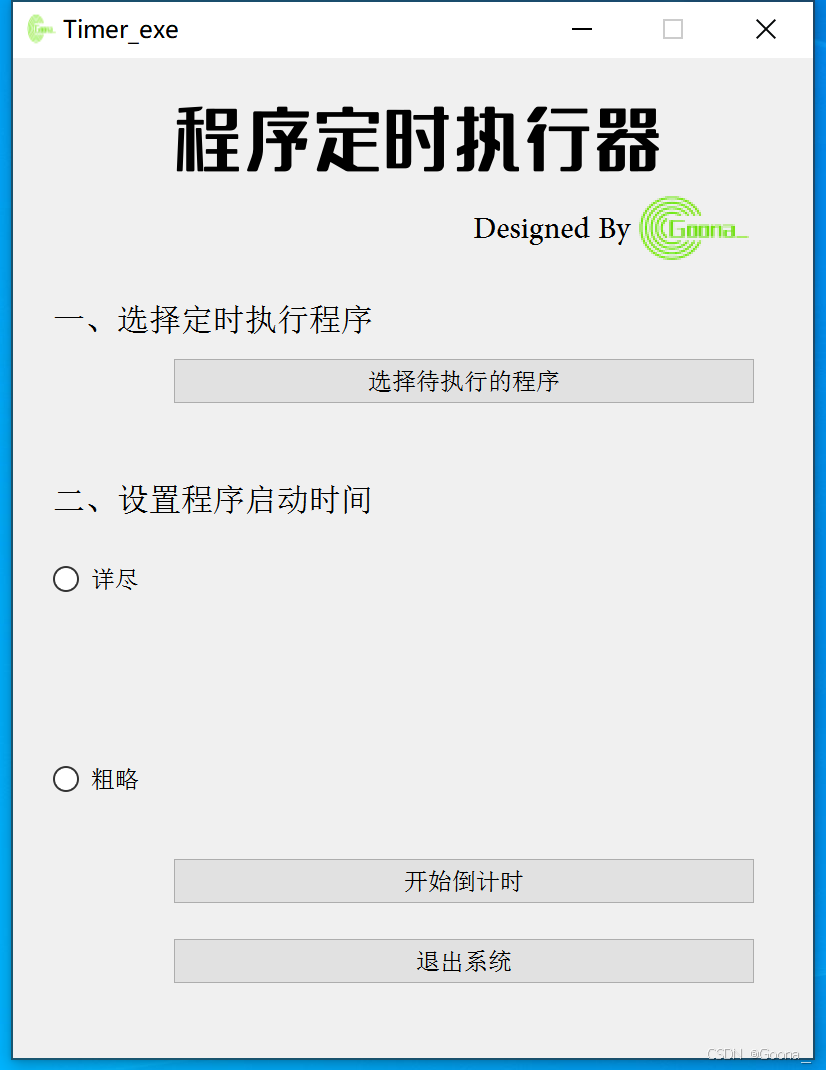
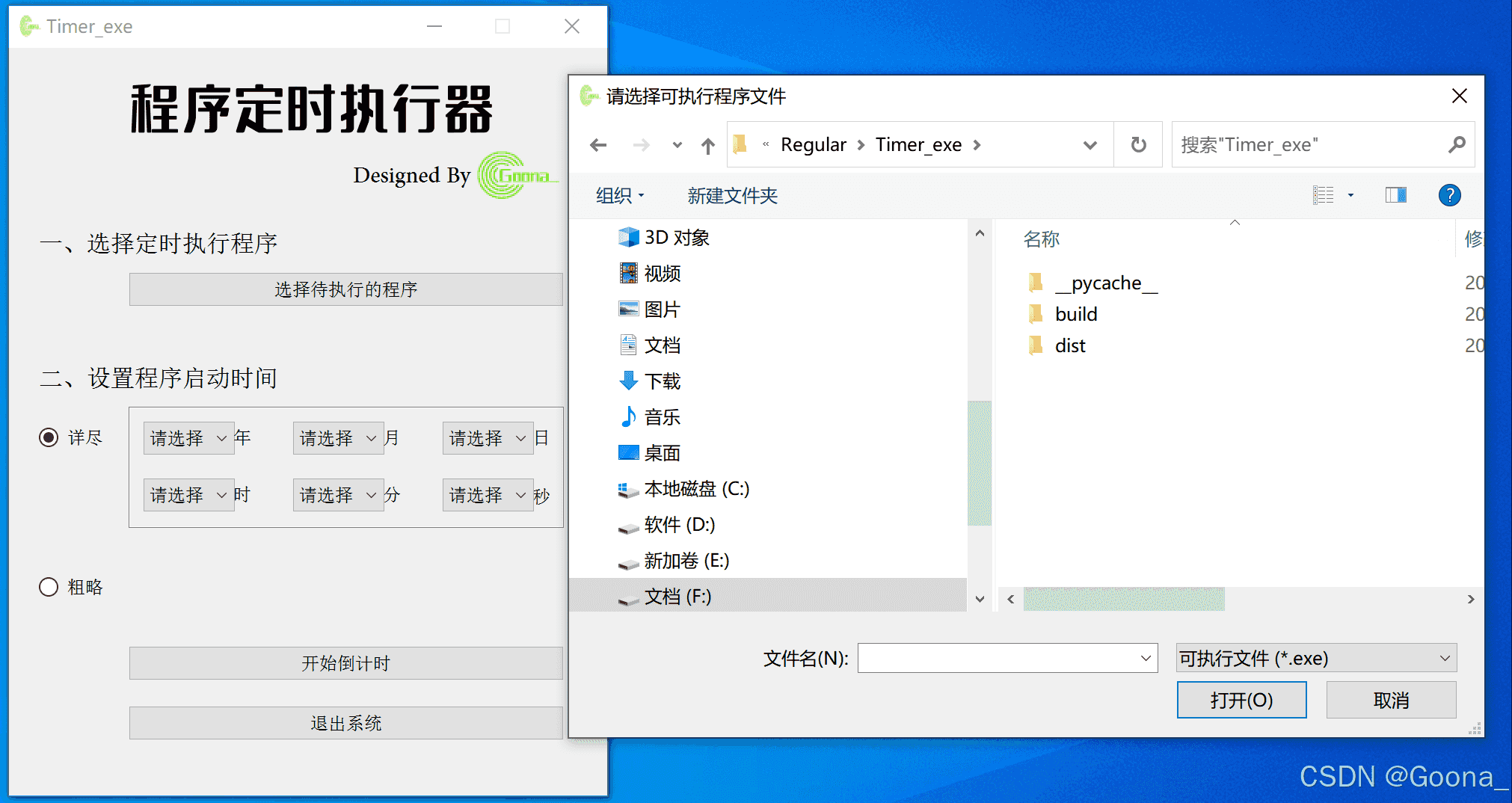
初始界面搭建采用极简风格。用户通过点击“上传待执行的程序”上传.exe程序文件(自动弹出文件选择对话框),再选择不同的定时方式(详尽:精确到年月日时分秒,均可自定义;粗略:提供3秒后、5秒后、10秒后、30秒后、1分钟后、3分钟后、5分钟后、10分钟后、30分钟后、1小时后多种选项),最后点击“开始倒计时”,即可在实现在指定时间运行指定程序的功能。
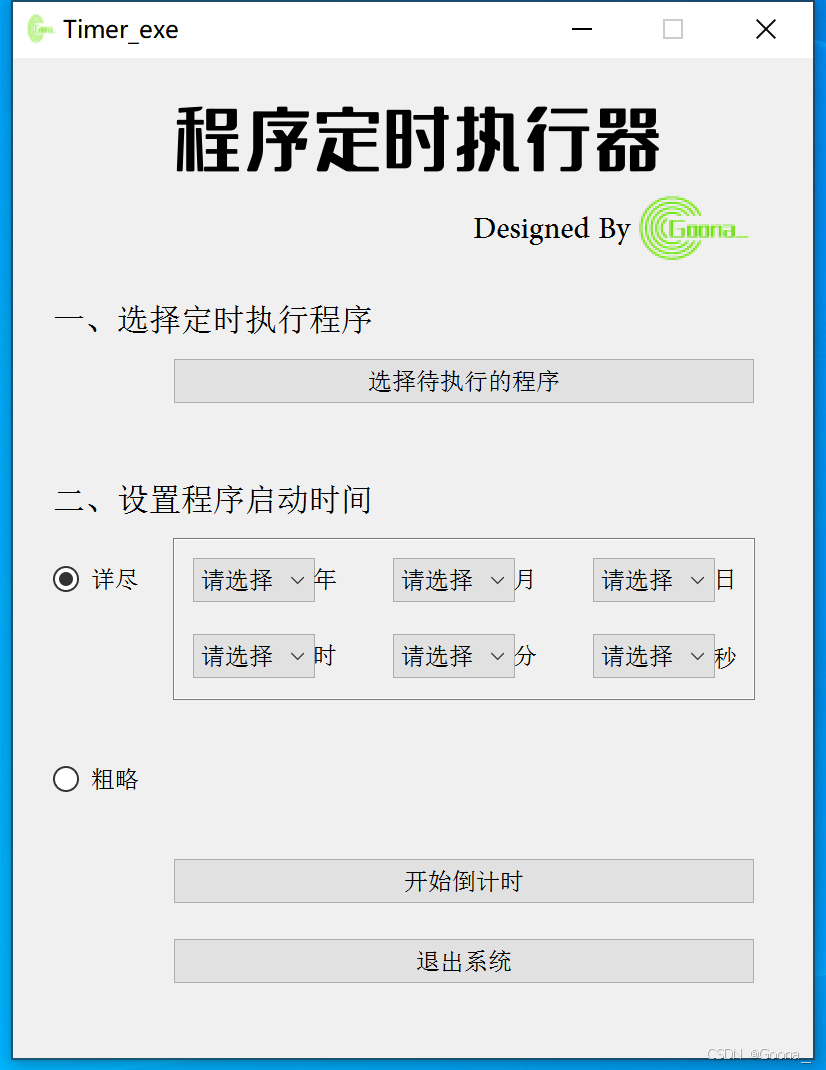
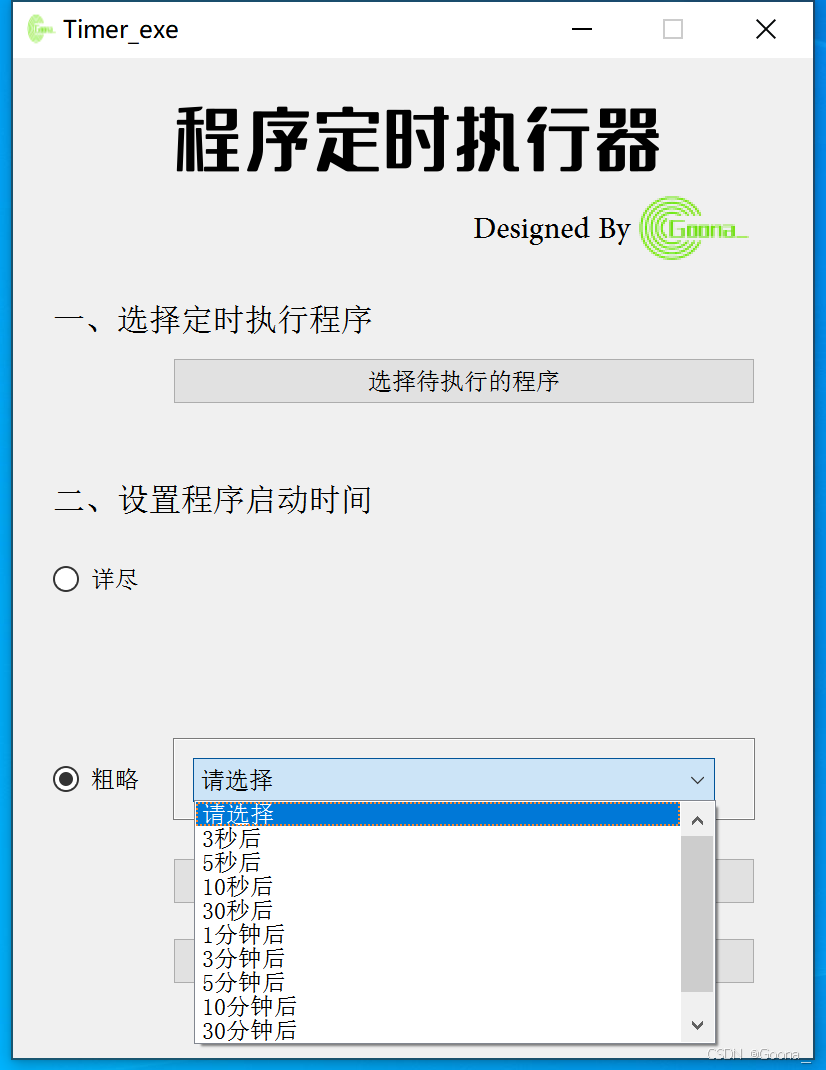
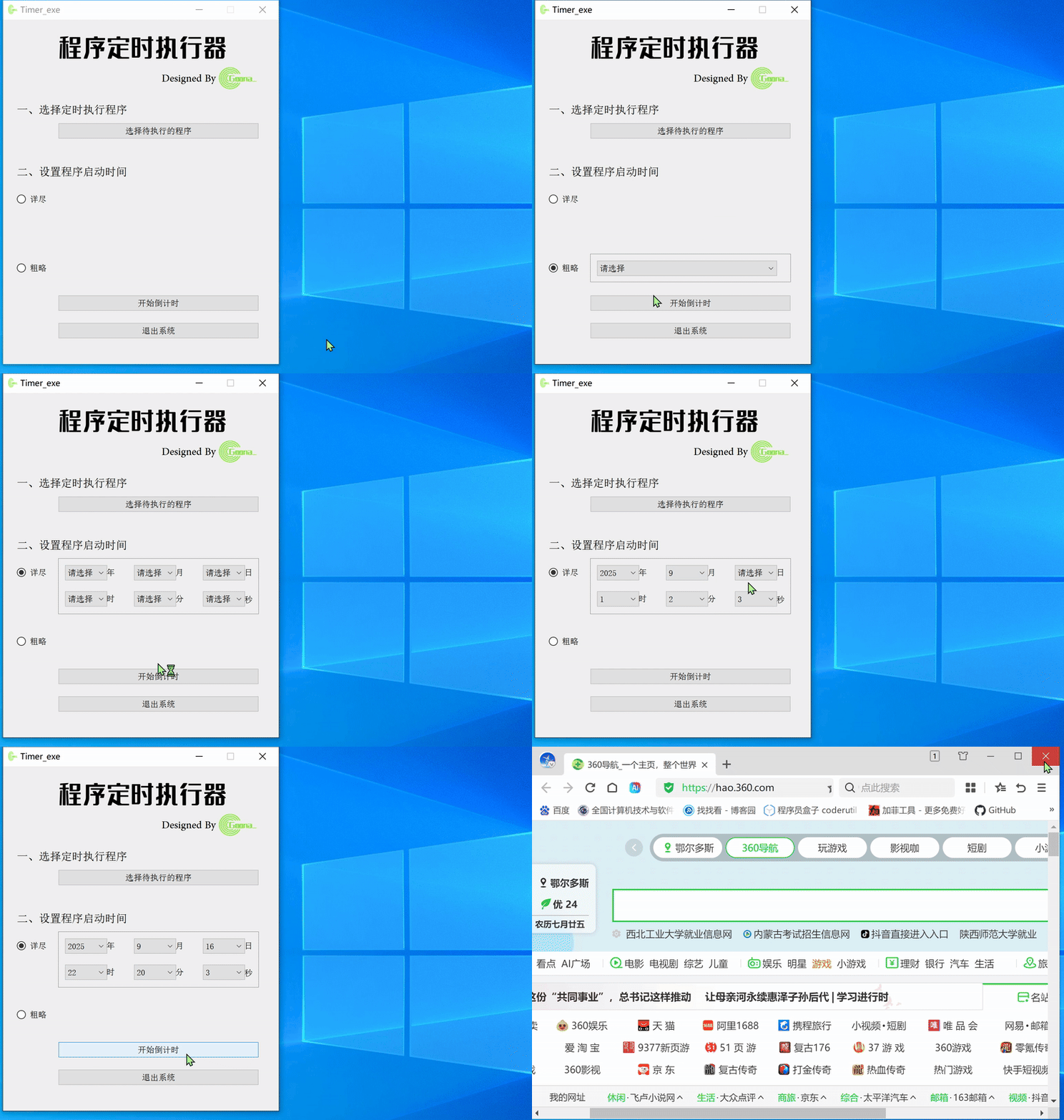
这里以“360浏览器.exe”为实例,选择相应启动方式,若时间未过期,点击“开始倒计时”,即可在对应时间到达后自动打开360浏览器。
若未上传.exe可执行文件,直接点击“开始倒计时”,会有以下提示。
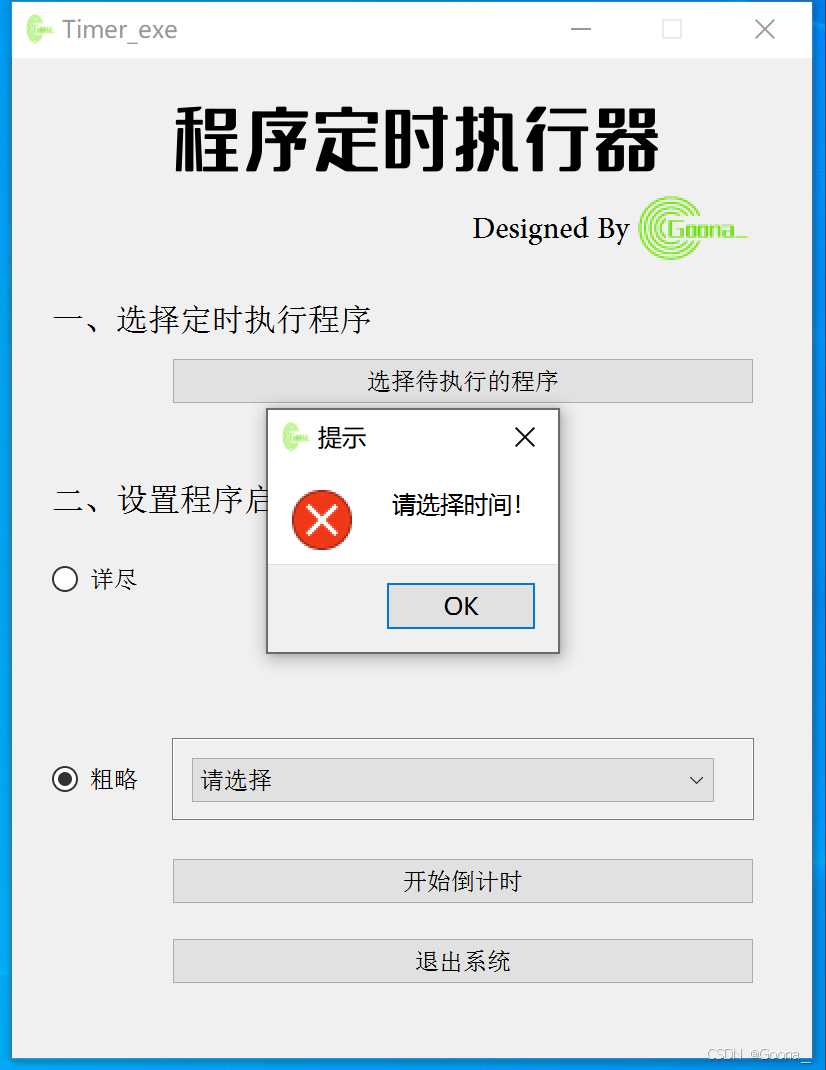
若未设置时间(两种方式任选其一),直接点击“开始倒计时”,会有以下提示。
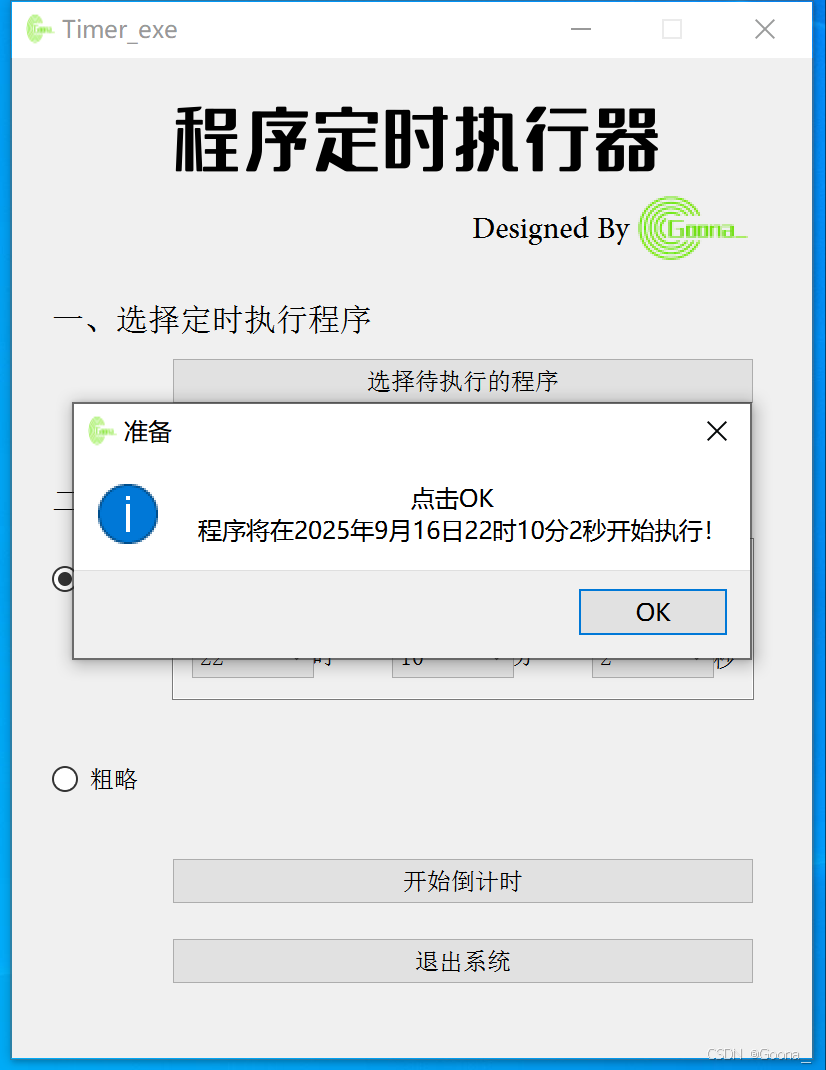
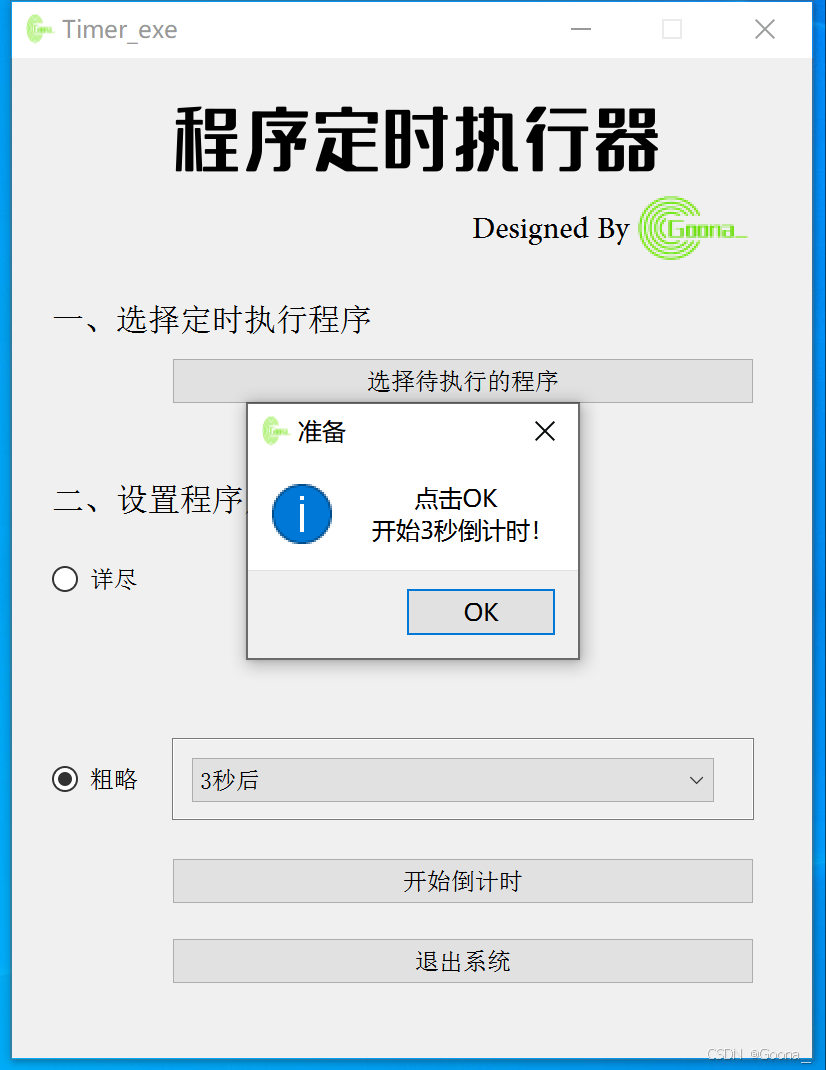
若设置时间符合要求,直接点击“开始倒计时”,会有以下提示。
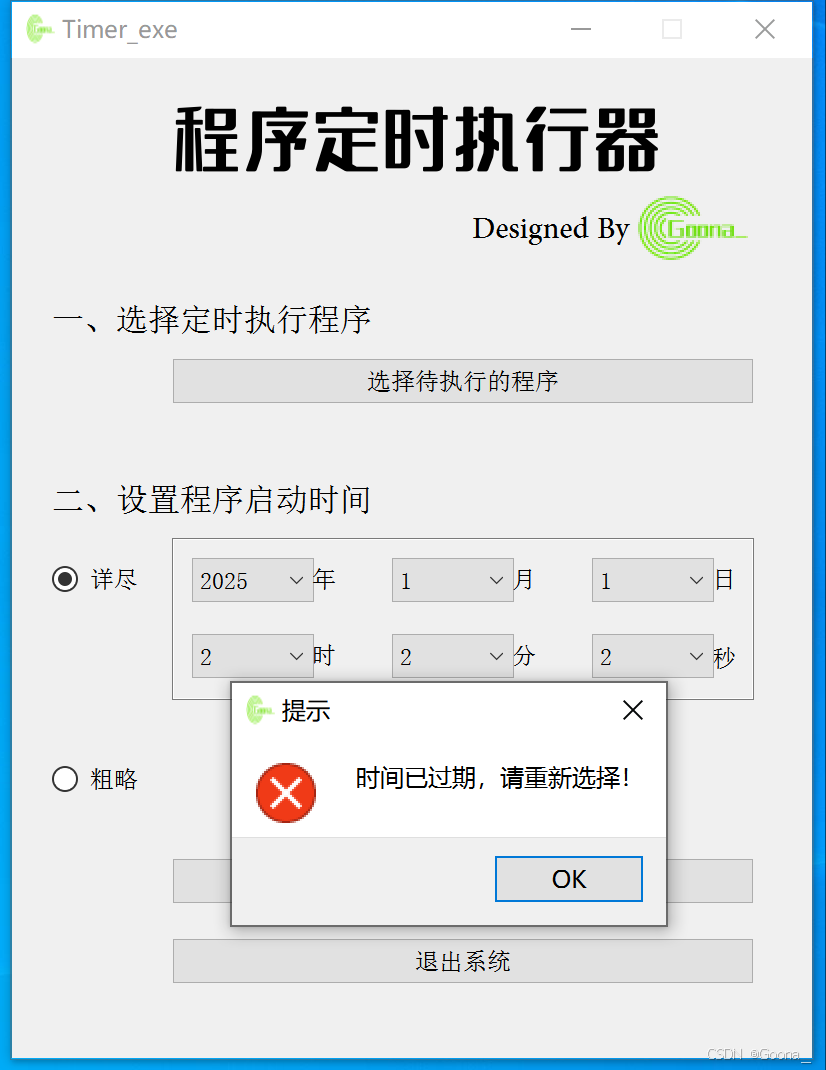
针对“详尽”方式,尤其要把握精确时间,若自定义的时间小于当前时间,则程序不能成功执行,且会有以下提示。
通过pyuic5产生的GUI界面代码UI_Main.py如下:
# -*- coding: utf-8 -*-

# Form implementation generated from reading ui file 'UI_main.ui'
#
# Created by: PyQt5 UI code generator 5.15.11
#
# WARNING: Any manual changes made to this file will be lost when pyuic5 is
# run again.  Do not edit this file unless you know what you are doing.


from PyQt5 import QtCore, QtGui, QtWidgets


class Main_Form(object):
    def setupUi(self, Form):
        Form.setObjectName("Form")
        Form.setEnabled(True)
        Form.resize(400, 500)
        Form.setMinimumSize(QtCore.QSize(400, 500))
        Form.setMaximumSize(QtCore.QSize(400, 500))
        icon = QtGui.QIcon()
        icon.addPixmap(QtGui.QPixmap(":/image1.png"), QtGui.QIcon.Normal, QtGui.QIcon.Off)
        Form.setWindowIcon(icon)
        self.label_5 = QtWidgets.QLabel(Form)
        self.label_5.setGeometry(QtCore.QRect(230, 70, 141, 31))
        font = QtGui.QFont()
        font.setFamily("Adobe Arabic")
        font.setPointSize(16)
        self.label_5.setFont(font)
        self.label_5.setObjectName("label_5")
        self.label_8 = QtWidgets.QLabel(Form)
        self.label_8.setGeometry(QtCore.QRect(80, 10, 261, 61))
        font = QtGui.QFont()
        font.setFamily("字魂5号-无外润黑体")
        font.setPointSize(26)
        font.setBold(False)
        font.setWeight(50)
        self.label_8.setFont(font)
        self.label_8.setObjectName("label_8")
        self.label_10 = QtWidgets.QLabel(Form)
        self.label_10.setGeometry(QtCore.QRect(310, 60, 71, 51))
        self.label_10.setText("")
        self.label_10.setPixmap(QtGui.QPixmap(":/image1.png"))
        self.label_10.setObjectName("label_10")
        self.label_3 = QtWidgets.QLabel(Form)
        self.label_3.setGeometry(QtCore.QRect(20, 210, 181, 21))
        font = QtGui.QFont()
        font.setFamily("新宋体")
        font.setPointSize(12)
        self.label_3.setFont(font)
        self.label_3.setObjectName("label_3")
        self.pushButton_2 = QtWidgets.QPushButton(Form)
        self.pushButton_2.setGeometry(QtCore.QRect(80, 400, 291, 23))
        font = QtGui.QFont()
        font.setFamily("新宋体")
        self.pushButton_2.setFont(font)
        self.pushButton_2.setObjectName("pushButton_2")
        self.label_4 = QtWidgets.QLabel(Form)
        self.label_4.setGeometry(QtCore.QRect(150, 288, 21, 21))
        font = QtGui.QFont()
        font.setFamily("新宋体")
        self.label_4.setFont(font)
        self.label_4.setObjectName("label_4")
        self.comboBox = QtWidgets.QComboBox(Form)
        self.comboBox.setGeometry(QtCore.QRect(90, 288, 61, 22))
        font = QtGui.QFont()
        font.setFamily("新宋体")
        self.comboBox.setFont(font)
        self.comboBox.setObjectName("comboBox")
        self.label_6 = QtWidgets.QLabel(Form)
        self.label_6.setGeometry(QtCore.QRect(250, 288, 21, 21))
        font = QtGui.QFont()
        font.setFamily("新宋体")
        self.label_6.setFont(font)
        self.label_6.setObjectName("label_6")
        self.comboBox_2 = QtWidgets.QComboBox(Form)
        self.comboBox_2.setGeometry(QtCore.QRect(190, 288, 61, 22))
        font = QtGui.QFont()
        font.setFamily("新宋体")
        self.comboBox_2.setFont(font)
        self.comboBox_2.setObjectName("comboBox_2")
        self.label_7 = QtWidgets.QLabel(Form)
        self.label_7.setGeometry(QtCore.QRect(350, 290, 16, 20))
        font = QtGui.QFont()
        font.setFamily("新宋体")
        self.label_7.setFont(font)
        self.label_7.setObjectName("label_7")
        self.radioButton = QtWidgets.QRadioButton(Form)
        self.radioButton.setGeometry(QtCore.QRect(20, 250, 51, 21))
        font = QtGui.QFont()
        font.setFamily("新宋体")
        self.radioButton.setFont(font)
        self.radioButton.setObjectName("radioButton")
        self.radioButton_2 = QtWidgets.QRadioButton(Form)
        self.radioButton_2.setGeometry(QtCore.QRect(20, 350, 51, 21))
        font = QtGui.QFont()
        font.setFamily("新宋体")
        self.radioButton_2.setFont(font)
        self.radioButton_2.setObjectName("radioButton_2")
        self.comboBox_4 = QtWidgets.QComboBox(Form)
        self.comboBox_4.setGeometry(QtCore.QRect(90, 350, 261, 22))
        font = QtGui.QFont()
        font.setFamily("新宋体")
        self.comboBox_4.setFont(font)
        self.comboBox_4.setObjectName("comboBox_4")
        self.comboBox_4.addItem("")
        self.comboBox_4.addItem("")
        self.comboBox_4.addItem("")
        self.comboBox_4.addItem("")
        self.comboBox_4.addItem("")
        self.comboBox_4.addItem("")
        self.comboBox_4.addItem("")
        self.comboBox_4.addItem("")
        self.comboBox_4.addItem("")
        self.comboBox_4.addItem("")
        self.comboBox_4.addItem("")
        self.comboBox_3 = QtWidgets.QComboBox(Form)
        self.comboBox_3.setGeometry(QtCore.QRect(290, 288, 61, 22))
        font = QtGui.QFont()
        font.setFamily("新宋体")
        self.comboBox_3.setFont(font)
        self.comboBox_3.setObjectName("comboBox_3")
        self.pushButton_4 = QtWidgets.QPushButton(Form)
        self.pushButton_4.setGeometry(QtCore.QRect(80, 440, 291, 23))
        font = QtGui.QFont()
        font.setFamily("新宋体")
        self.pushButton_4.setFont(font)
        self.pushButton_4.setObjectName("pushButton_4")
        self.label_9 = QtWidgets.QLabel(Form)
        self.label_9.setGeometry(QtCore.QRect(80, 240, 291, 81))
        self.label_9.setFrameShape(QtWidgets.QFrame.StyledPanel)
        self.label_9.setText("")
        self.label_9.setObjectName("label_9")
        self.label_11 = QtWidgets.QLabel(Form)
        self.label_11.setGeometry(QtCore.QRect(80, 340, 291, 41))
        self.label_11.setFrameShape(QtWidgets.QFrame.StyledPanel)
        self.label_11.setText("")
        self.label_11.setObjectName("label_11")
        self.label_13 = QtWidgets.QLabel(Form)
        self.label_13.setGeometry(QtCore.QRect(20, 120, 201, 21))
        font = QtGui.QFont()
        font.setFamily("新宋体")
        font.setPointSize(12)
        self.label_13.setFont(font)
        self.label_13.setObjectName("label_13")
        self.pushButton_5 = QtWidgets.QPushButton(Form)
        self.pushButton_5.setGeometry(QtCore.QRect(80, 150, 291, 23))
        font = QtGui.QFont()
        font.setFamily("新宋体")
        self.pushButton_5.setFont(font)
        self.pushButton_5.setObjectName("pushButton_5")
        self.comboBox_5 = QtWidgets.QComboBox(Form)
        self.comboBox_5.setGeometry(QtCore.QRect(90, 250, 61, 22))
        font = QtGui.QFont()
        font.setFamily("新宋体")
        self.comboBox_5.setFont(font)
        self.comboBox_5.setObjectName("comboBox_5")
        self.label_14 = QtWidgets.QLabel(Form)
        self.label_14.setGeometry(QtCore.QRect(150, 250, 21, 21))
        font = QtGui.QFont()
        font.setFamily("新宋体")
        self.label_14.setFont(font)
        self.label_14.setObjectName("label_14")
        self.comboBox_6 = QtWidgets.QComboBox(Form)
        self.comboBox_6.setGeometry(QtCore.QRect(190, 250, 61, 22))
        font = QtGui.QFont()
        font.setFamily("新宋体")
        self.comboBox_6.setFont(font)
        self.comboBox_6.setObjectName("comboBox_6")
        self.label_15 = QtWidgets.QLabel(Form)
        self.label_15.setGeometry(QtCore.QRect(250, 250, 21, 21))
        font = QtGui.QFont()
        font.setFamily("新宋体")
        self.label_15.setFont(font)
        self.label_15.setObjectName("label_15")
        self.label_16 = QtWidgets.QLabel(Form)
        self.label_16.setGeometry(QtCore.QRect(350, 250, 21, 21))
        font = QtGui.QFont()
        font.setFamily("新宋体")
        self.label_16.setFont(font)
        self.label_16.setObjectName("label_16")
        self.comboBox_7 = QtWidgets.QComboBox(Form)
        self.comboBox_7.setGeometry(QtCore.QRect(290, 250, 61, 22))
        font = QtGui.QFont()
        font.setFamily("新宋体")
        self.comboBox_7.setFont(font)
        self.comboBox_7.setObjectName("comboBox_7")
        self.label_11.raise_()
        self.label_9.raise_()
        self.label_5.raise_()
        self.label_8.raise_()
        self.label_10.raise_()
        self.label_3.raise_()
        self.pushButton_2.raise_()
        self.label_4.raise_()
        self.comboBox.raise_()
        self.label_6.raise_()
        self.comboBox_2.raise_()
        self.label_7.raise_()
        self.radioButton.raise_()
        self.radioButton_2.raise_()
        self.comboBox_4.raise_()
        self.comboBox_3.raise_()
        self.pushButton_4.raise_()
        self.label_13.raise_()
        self.pushButton_5.raise_()
        self.comboBox_5.raise_()
        self.label_14.raise_()
        self.comboBox_6.raise_()
        self.label_15.raise_()
        self.label_16.raise_()
        self.comboBox_7.raise_()

        self.retranslateUi(Form)
        self.pushButton_4.clicked.connect(Form.close) # type: ignore
        QtCore.QMetaObject.connectSlotsByName(Form)

    def retranslateUi(self, Form):
        _translate = QtCore.QCoreApplication.translate
        Form.setWindowTitle(_translate("Form", "Timer_exe"))
        self.label_5.setText(_translate("Form", "Designed By"))
        self.label_8.setText(_translate("Form", "程序定时执行器"))
        self.label_3.setText(_translate("Form", "二、设置程序启动时间"))
        self.pushButton_2.setText(_translate("Form", "开始倒计时"))
        self.label_4.setText(_translate("Form", "时"))
        self.label_6.setText(_translate("Form", "分"))
        self.label_7.setText(_translate("Form", "秒"))
        self.radioButton.setText(_translate("Form", "详尽"))
        self.radioButton_2.setText(_translate("Form", "粗略"))
        self.comboBox_4.setItemText(0, _translate("Form", "请选择"))
        self.comboBox_4.setItemText(1, _translate("Form", "3秒后"))
        self.comboBox_4.setItemText(2, _translate("Form", "5秒后"))
        self.comboBox_4.setItemText(3, _translate("Form", "10秒后"))
        self.comboBox_4.setItemText(4, _translate("Form", "30秒后"))
        self.comboBox_4.setItemText(5, _translate("Form", "1分钟后"))
        self.comboBox_4.setItemText(6, _translate("Form", "3分钟后"))
        self.comboBox_4.setItemText(7, _translate("Form", "5分钟后"))
        self.comboBox_4.setItemText(8, _translate("Form", "10分钟后"))
        self.comboBox_4.setItemText(9, _translate("Form", "30分钟后"))
        self.comboBox_4.setItemText(10, _translate("Form", "1个小时后"))
        self.pushButton_4.setText(_translate("Form", "退出系统"))
        self.label_13.setText(_translate("Form", "一、选择定时执行程序"))
        self.pushButton_5.setText(_translate("Form", "选择待执行的程序"))
        self.label_14.setText(_translate("Form", "年"))
        self.label_15.setText(_translate("Form", "月"))
        self.label_16.setText(_translate("Form", "日"))
import ziyuan_rc
import sys, time, os
from UI_main import *
from PyQt5.QtWidgets import QApplication, QWidget
# 保持窗口大小和qtdesigner中的一致
from PyQt5 import QtCore
QtCore.QCoreApplication.setAttribute(QtCore.Qt.AA_EnableHighDpiScaling)
time模块与时间设置有关;os模块与启动运行程序文件有关;UI_main是界面设计文件; 不懂为啥需要导入Qtcore的,请看。
    def __init__(self):
        super(QWidget, self).__init__()
        self.setupUi(self)
        # 设置显示状态
        self.comboBox.setVisible(False) # 时
        self.comboBox_2.setVisible(False) # 分
        self.comboBox_3.setVisible(False) # 秒
        self.comboBox_5.setVisible(False) # 年
        self.comboBox_6.setVisible(False) # 月
        self.comboBox_7.setVisible(False) # 日
        self.label_14.setVisible(False) # 年
        self.label_15.setVisible(False) # 月
        self.label_16.setVisible(False) # 日
        self.label_4.setVisible(False) # 时
        self.label_7.setVisible(False) # 秒
        self.label_6.setVisible(False) # 分
        self.label_9.setVisible(False) # 详尽框

        self.comboBox_4.setVisible(False) # 粗略选项
        self.label_11.setVisible(False) # 粗略框
        # 绑定信号
        self.pushButton_5.clicked.connect(self.xuanze) # 上传exe
        self.pushButton_2.clicked.connect(self.kaishi) # 开始执行
        self.radioButton.clicked.connect(self.xiangjin) # 选择详尽
        self.radioButton_2.clicked.connect(self.culue) # 选择粗略
        self.comboBox_4.currentIndexChanged.connect(self.culue_change) # 粗略选项发生改变
        self.comboBox_5.currentIndexChanged.connect(self.day_show) # 年份选项发生改变
        self.comboBox_6.currentIndexChanged.connect(self.day_show) # 月份选项发生改变

        self.shangchuan_flag = False # 是否成功上传exe文件的标志位
        self.deng_time = -1 # 默认等待时间
为实现“选择不同radio button切换显示相应控件”的不同效果,在界面初始化前,需隐藏两种方式(详尽与粗略)下的所有控件(主要是combobox与对应的label);
接着将信号绑定于对应函数:pushbutton_5为“上传.exe文件”,绑定于xuanze;pushbutton_2为“开始倒计时”,绑定于kaishi;radiobutton表示“详尽”,绑定于xiangjin;radiobutton_2为“粗略”,绑定于culue;combobox_4表示“粗略下拉框”,当用户改变其选项时,将其绑定于culue_change;combobox_5表示“年份选择框”,当用户选择不同年份时,将其绑定于day_show;combobox_6表示“月份选择框”,当用户选择不同月份时,同样将其绑定于day_show,从而显示当前月份的不同天数(既与年份有关,又与月份有关)。
最后,设置是否上传成功的标志位shangchuan_flag;设定程序倒计时时间初始值deng_time为-1。
    def xuanze(self):
        # 上传.exe执行文件
        self.file, self.shangchuan_flag = shangchuan()
通过调用自定义函数shangchuan实现,并返回已选择文件的文件路径与上传成功与否的标志位。
    def xiangjin(self):
        """详尽按钮"""
        # 隐藏掉与粗略选项相关的
        self.comboBox_4.setVisible(False)
        self.label_11.setVisible(False)
        # 显示出与详尽选项相关的
        self.comboBox_5.setVisible(True)
        self.comboBox_6.setVisible(True)
        self.comboBox_7.setVisible(True)
        self.comboBox.setVisible(True)
        self.comboBox_2.setVisible(True)
        self.comboBox_3.setVisible(True)
        self.label_14.setVisible(True)
        self.label_15.setVisible(True)
        self.label_16.setVisible(True)
        self.label_4.setVisible(True)
        self.label_6.setVisible(True)
        self.label_7.setVisible(True)
        self.label_9.setVisible(True)

        # 重置所有,防止切换radio button时出现重复堆叠
        self.comboBox_5.clear()
        self.comboBox_6.clear()
        self.comboBox_7.clear()
        self.comboBox.clear()
        self.comboBox_2.clear()
        self.comboBox_3.clear()

        # 设置所有首选项为“请选择”
        self.comboBox_5.addItem('请选择')
        self.comboBox_6.addItem('请选择')
        self.comboBox_7.addItem('请选择')
        self.comboBox.addItem('请选择')
        self.comboBox_2.addItem('请选择')
        self.comboBox_3.addItem('请选择')

        # 针对“年”
        self.cur_nian = time.strftime("%Y", time.localtime())
        # 使用列表推导式增添选项
        self.comboBox_5.addItems([str(int(self.cur_nian)+i) for i in range(0, 6)]) # 年
        self.comboBox_6.addItems([str(i) for i in range(1, 13)]) # 月
        self.comboBox.addItems([str(i) for i in range(0, 24)]) # 时
        self.comboBox_2.addItems([str(i) for i in range(0, 60)]) # 分
        self.comboBox_3.addItems([str(i) for i in range(0, 60)]) # 秒
当用户选择radiobutton时(既选择“详尽”),需要显示出“详尽”下的所有控件,同时隐藏掉“粗略”下的所有控件(因为用户可能会来回切换方式);为防止用户来回切换方式而造成combobox内容重复堆叠,所以每次需将“详尽”下的所有combobox内容清空,接着设置“详尽”下的所有combobox首选项为“请选择”;为实现年份的自适应更新,这里需要获取当前年份,并使用列表推导式写入往后6年的年份数字;再使用同样的方法写入月(1-12)、时(0-23)、分(0-59)、秒(0-59)数字选项。
    def day_show(self):
        """主要对日进行设置,因为其不仅与月份有关,还与年份有关(闰年的2月)"""
        self.comboBox_7.clear()
        self.comboBox_7.addItem('请选择!')
        yue_text = self.comboBox_6.currentText() # 判断用户选择的是哪个月
        if yue_text in ['1','3','5','7','8','10','12']: # 31天的月份
            self.comboBox_7.addItems([str(i) for i in range(1,32)])
        elif yue_text in ['4','6','9','11']: # 30天的月份
            self.comboBox_7.addItems(str(i) for i in range(1,31))
        elif yue_text == '2': # 针对2月要特殊处理
            if self.comboBox_5.currentIndex() != 0: # 除去年份为“请选择”的特殊情况
                if year_judge(self.comboBox_5.currentText()): # 为闰年,2月为29天
                    self.comboBox_7.addItems([str(i) for i in range(1,30)])
                else: # 不为闰年,2月为28天
                    self.comboBox_7.addItems([str(i) for i in range(1,29)])
        else: # 表示月份的“请选择”选项
            pass
与其他combobox一样,combobox_7“日下拉框”也需要clear()和添加首选项“请选择”;combobox_7其不仅取决于“年下拉框”combobox_5是否为闰年,而且还取决于“月下拉框”combobox_6的选择(有31天的月份,也有30天的月份);所以先判断combobox_6的text是否在31天和30天的月份中,如果存在,直接使用列表推导式additems即可;否则如果为2月,还需通过自定义函数year_judge判断当前年份是否为闰年;如果为闰年,则列表推导式产生29天,否则产生28天;此时,combobox_6未讨论情况只剩下“请选择”选项,pass即可。
    def culue(self):
        """粗略按钮"""
        # 显示出与粗略选项相关的
        self.comboBox_4.setVisible(True)
        self.label_11.setVisible(True)
        # 隐藏掉与详尽选项相关的
        self.comboBox.setVisible(False)
        self.comboBox_2.setVisible(False)
        self.comboBox_3.setVisible(False)
        self.comboBox_3.setVisible(False)
        self.comboBox_5.setVisible(False)
        self.comboBox_6.setVisible(False)
        self.comboBox_7.setVisible(False)
        self.label_14.setVisible(False)
        self.label_15.setVisible(False)
        self.label_16.setVisible(False)
        self.label_4.setVisible(False)
        self.label_7.setVisible(False)
        self.label_6.setVisible(False)
        self.label_9.setVisible(False)
当用户选择radiobutton_2时(既选择“粗略”),需要显示出“粗略”下的所有控件,同时隐藏掉“详尽”下的所有控件(因为用户可能会来回切换方式)。
    def culue_change(self):
        """以index为标识,实时检测用户是否改变粗略选项"""
        selected_index = self.comboBox_4.currentIndex()
        match selected_index:
            case 1:
                self.deng_time = 3 # 3秒钟,后面依此类推,其余特殊情况为默认值(-1)
            case 2:
                self.deng_time = 5
            case 3:
                self.deng_time = 10
            case 4:
                self.deng_time = 30
            case 5:
                self.deng_time = 60
            case 6:
                self.deng_time = 180
            case 7:
                self.deng_time = 300
            case 8:
                self.deng_time = 600
            case 9:
                self.deng_time = 1800
            case 10:
                self.deng_time = 3600
以combobox_4的index变化来判断用户选择多长时间后开始运行程序;使用match语句匹配,并将时间单位统一转换为“秒”。
    def kaishi(self):
        """用户点击开始倒计时后,执行操作"""
        if self.shangchuan_flag == False: # 判断是否成功上传exe文件
            QtWidgets.QMessageBox.critical(self, "提示", "请上传待执行.exe文件!")
        else:
            if self.radioButton.isChecked(): # 详尽选择
                # 所有详尽选项均不为“请选择”时
                if (self.comboBox_5.currentIndex()!=0) and (self.comboBox_6.currentIndex()!=0) and (self.comboBox_7.currentIndex()!=0) and (self.comboBox.currentIndex()!=0) and (self.comboBox_2.currentIndex()!=0) and (self.comboBox_3.currentIndex()!=0):
                    time_choice = self.comboBox_5.currentText()+"-"+self.comboBox_6.currentText()+"-"+self.comboBox_7.currentText()+" "+self.comboBox.currentText()+":"+self.comboBox_2.currentText()+":"+self.comboBox_3.currentText()
                    time_output = self.comboBox_5.currentText() + "年" + self.comboBox_6.currentText() + "月" + self.comboBox_7.currentText() + "日" + self.comboBox.currentText() + "时" + self.comboBox_2.currentText() + "分" + self.comboBox_3.currentText()+"秒"
                    # 将日期时间字符串转换为结构化时间
                    time_struct = time.strptime(time_choice, "%Y-%m-%d %H:%M:%S")
                    # 将结构化时间转换为时间戳
                    time_target = time.mktime(time_struct)
                    # 预定时间与当前时间作差
                    time_cha = time_target-time.time()
                    if time_cha<0: # 差值小于0,用户输入时间已过期
                        QtWidgets.QMessageBox.critical(self, "提示", "时间已过期,请重新选择!")
                    else:
                        QtWidgets.QMessageBox.information(self, "准备","                              点击OKn程序将在" + time_output + "开始执行!")
                        time.sleep(time_cha)
                        os.system(self.file)
                else:
                    QtWidgets.QMessageBox.critical(self, "提示", "请选择时间!")

            elif self.radioButton_2.isChecked(): # 粗略选择
                if self.deng_time == -1: # 证明用户未选择时间
                    QtWidgets.QMessageBox.critical(self, "提示", "请选择时间!")
                else:
                    QtWidgets.QMessageBox.information(self, "准备", "      点击OK    n开始" + str(self.deng_time) + "秒倒计时!")
                    time.sleep(self.deng_time)
                    os.system(self.file)
            else:
                QtWidgets.QMessageBox.critical(self, "提示", "请选择定时方式!")
首先判断用户是否成功上传待执行的.exe程序文件,接着判断用户选择的是哪个radiobutton(radiobutton表示“详尽”,radiobutton_2表示"粗略")。
在“详尽”方式中,需要先保证用户对所有combobox的值都进行了自定义,接着读取并拼接所有combobox的内容并将其转换为结构化时间;为得到预定时间与当前时间的差值(秒),需再将其转换为时间戳;如果两者差小于0,则说明用户预定时间小于当前时间,即过期,否则弹出友好提示,准备通过time.sleep()延迟函数实现倒计时执行。
在“粗略”方式中,首先排除“请选择”的默认选项这一特殊情况,接着直接通过time.sleep()延迟函数实现倒计时执行。
def shangchuan():
    """用于上传.exe文件,最终返回文件路径和标志位"""
    flag = False
    filepath, _ = QtWidgets.QFileDialog.getOpenFileName(None, "请选择可执行程序文件", "", "可执行文件 (*.exe)")  # 获取文件路径
    if filepath:
        QtWidgets.QMessageBox.information(None, "成功", "可执行程序文件上传成功!")
        flag = True
        return filepath, flag
    else:
        QtWidgets.QMessageBox.critical(None, "提示", "请上传待执行.exe文件!")
        return filepath, flag
首先,定义标志位flag初始值为False,接着通过QFileDialog返回上传文件的路径至filepath;判断filepath是否为空来验证用户是否成功选取,最后返回路径filepath和标志位flag。
def year_judge(year):
    """判断用户输入是否为闰年"""
    if (int(year)%4==0) and (int(year)%100!=0):
        return True
    elif int(year)%400==0:
        return True
    else:
        return False
闰年的标志:能被4整除的同时,但不能被100整除;或者是能被400直接整除。
import sys, time, os
from UI_main import *
from PyQt5.QtWidgets import QApplication, QWidget
# 保持窗口大小和qtdesigner中的一致
from PyQt5 import QtCore
QtCore.QCoreApplication.setAttribute(QtCore.Qt.AA_EnableHighDpiScaling)

class main_interface(QWidget, Main_Form):
    def __init__(self):
        super(QWidget, self).__init__()
        self.setupUi(self)
        # 设置显示状态
        self.comboBox.setVisible(False) # 时
        self.comboBox_2.setVisible(False) # 分
        self.comboBox_3.setVisible(False) # 秒
        self.comboBox_5.setVisible(False) # 年
        self.comboBox_6.setVisible(False) # 月
        self.comboBox_7.setVisible(False) # 日
        self.label_14.setVisible(False) # 年
        self.label_15.setVisible(False) # 月
        self.label_16.setVisible(False) # 日
        self.label_4.setVisible(False) # 时
        self.label_7.setVisible(False) # 秒
        self.label_6.setVisible(False) # 分
        self.label_9.setVisible(False) # 详尽框

        self.comboBox_4.setVisible(False) # 粗略选项
        self.label_11.setVisible(False) # 粗略框
        # 绑定信号
        self.pushButton_5.clicked.connect(self.xuanze) # 上传exe
        self.pushButton_2.clicked.connect(self.kaishi) # 开始执行
        self.radioButton.clicked.connect(self.xiangjin) # 选择详尽
        self.radioButton_2.clicked.connect(self.culue) # 选择粗略
        self.comboBox_4.currentIndexChanged.connect(self.culue_change) # 粗略选项发生改变
        self.comboBox_5.currentIndexChanged.connect(self.day_show) # 年份选项发生改变
        self.comboBox_6.currentIndexChanged.connect(self.day_show) # 月份选项发生改变

        self.shangchuan_flag = False # 是否成功上传exe文件的标志位
        self.deng_time = -1 # 默认等待时间

    def xuanze(self):
        # 上传.exe执行文件
        self.file, self.shangchuan_flag = shangchuan()

    def xiangjin(self):
        """详尽按钮"""
        # 隐藏掉与粗略选项相关的
        self.comboBox_4.setVisible(False)
        self.label_11.setVisible(False)
        # 显示出与详尽选项相关的
        self.comboBox_5.setVisible(True)
        self.comboBox_6.setVisible(True)
        self.comboBox_7.setVisible(True)
        self.comboBox.setVisible(True)
        self.comboBox_2.setVisible(True)
        self.comboBox_3.setVisible(True)
        self.label_14.setVisible(True)
        self.label_15.setVisible(True)
        self.label_16.setVisible(True)
        self.label_4.setVisible(True)
        self.label_6.setVisible(True)
        self.label_7.setVisible(True)
        self.label_9.setVisible(True)

        # 重置所有,防止切换radio button时出现重复堆叠
        self.comboBox_5.clear()
        self.comboBox_6.clear()
        self.comboBox_7.clear()
        self.comboBox.clear()
        self.comboBox_2.clear()
        self.comboBox_3.clear()

        # 设置所有首选项为“请选择”
        self.comboBox_5.addItem('请选择')
        self.comboBox_6.addItem('请选择')
        self.comboBox_7.addItem('请选择')
        self.comboBox.addItem('请选择')
        self.comboBox_2.addItem('请选择')
        self.comboBox_3.addItem('请选择')

        # 针对“年”
        self.cur_nian = time.strftime("%Y", time.localtime())
        # 使用列表推导式增添选项
        self.comboBox_5.addItems([str(int(self.cur_nian)+i) for i in range(0, 6)]) # 年
        self.comboBox_6.addItems([str(i) for i in range(1, 13)]) # 月
        self.comboBox.addItems([str(i) for i in range(0, 24)]) # 时
        self.comboBox_2.addItems([str(i) for i in range(0, 60)]) # 分
        self.comboBox_3.addItems([str(i) for i in range(0, 60)]) # 秒

    def day_show(self):
        """主要对日进行设置,因为其不仅与月份有关,还与年份有关(闰年的2月)"""
        self.comboBox_7.clear()
        self.comboBox_7.addItem('请选择!')
        yue_text = self.comboBox_6.currentText() # 判断用户选择的是哪个月
        if yue_text in ['1','3','5','7','8','10','12']: # 31天的月份
            self.comboBox_7.addItems([str(i) for i in range(1,32)])
        elif yue_text in ['4','6','9','11']: # 30天的月份
            self.comboBox_7.addItems(str(i) for i in range(1,31))
        elif yue_text == '2': # 针对2月要特殊处理
            if self.comboBox_5.currentIndex() != 0: # 除去年份为“请选择”的特殊情况
                if year_judge(self.comboBox_5.currentText()): # 为闰年,2月为29天
                    self.comboBox_7.addItems([str(i) for i in range(1,30)])
                else: # 不为闰年,2月为28天
                    self.comboBox_7.addItems([str(i) for i in range(1,29)])
        else: # 表示月份的“请选择”选项
            pass

    def culue(self):
        """粗略按钮"""
        # 显示出与粗略选项相关的
        self.comboBox_4.setVisible(True)
        self.label_11.setVisible(True)
        # 隐藏掉与详尽选项相关的
        self.comboBox.setVisible(False)
        self.comboBox_2.setVisible(False)
        self.comboBox_3.setVisible(False)
        self.comboBox_3.setVisible(False)
        self.comboBox_5.setVisible(False)
        self.comboBox_6.setVisible(False)
        self.comboBox_7.setVisible(False)
        self.label_14.setVisible(False)
        self.label_15.setVisible(False)
        self.label_16.setVisible(False)
        self.label_4.setVisible(False)
        self.label_7.setVisible(False)
        self.label_6.setVisible(False)
        self.label_9.setVisible(False)

    def culue_change(self):
        """以index为标识,实时检测用户是否改变粗略选项"""
        selected_index = self.comboBox_4.currentIndex()
        match selected_index:
            case 1:
                self.deng_time = 3 # 3秒钟,后面依此类推,其余特殊情况为默认值(-1)
            case 2:
                self.deng_time = 5
            case 3:
                self.deng_time = 10
            case 4:
                self.deng_time = 30
            case 5:
                self.deng_time = 60
            case 6:
                self.deng_time = 180
            case 7:
                self.deng_time = 300
            case 8:
                self.deng_time = 600
            case 9:
                self.deng_time = 1800
            case 10:
                self.deng_time = 3600

    def kaishi(self):
        """用户点击开始倒计时后,执行操作"""
        if self.shangchuan_flag == False: # 判断是否成功上传exe文件
            QtWidgets.QMessageBox.critical(self, "提示", "请上传待执行.exe文件!")
        else:
            if self.radioButton.isChecked(): # 详尽选择
                # 所有详尽选项均不为“请选择”时
                if (self.comboBox_5.currentIndex()!=0) and (self.comboBox_6.currentIndex()!=0) and (self.comboBox_7.currentIndex()!=0) and (self.comboBox.currentIndex()!=0) and (self.comboBox_2.currentIndex()!=0) and (self.comboBox_3.currentIndex()!=0):
                    time_choice = self.comboBox_5.currentText()+"-"+self.comboBox_6.currentText()+"-"+self.comboBox_7.currentText()+" "+self.comboBox.currentText()+":"+self.comboBox_2.currentText()+":"+self.comboBox_3.currentText()
                    time_output = self.comboBox_5.currentText() + "年" + self.comboBox_6.currentText() + "月" + self.comboBox_7.currentText() + "日" + self.comboBox.currentText() + "时" + self.comboBox_2.currentText() + "分" + self.comboBox_3.currentText()+"秒"
                    # 将日期时间字符串转换为结构化时间
                    time_struct = time.strptime(time_choice, "%Y-%m-%d %H:%M:%S")
                    # 将结构化时间转换为时间戳
                    time_target = time.mktime(time_struct)
                    # 预定时间与当前时间作差
                    time_cha = time_target-time.time()
                    if time_cha<0: # 差值小于0,用户输入时间已过期
                        QtWidgets.QMessageBox.critical(self, "提示", "时间已过期,请重新选择!")
                    else:
                        QtWidgets.QMessageBox.information(self, "准备","                              点击OKn程序将在" + time_output + "开始执行!")
                        time.sleep(time_cha)
                        os.system(self.file)
                else:
                    QtWidgets.QMessageBox.critical(self, "提示", "请选择时间!")

            elif self.radioButton_2.isChecked(): # 粗略选择
                if self.deng_time == -1: # 证明用户未选择时间
                    QtWidgets.QMessageBox.critical(self, "提示", "请选择时间!")
                else:
                    QtWidgets.QMessageBox.information(self, "准备", "      点击OK    n开始" + str(self.deng_time) + "秒倒计时!")
                    time.sleep(self.deng_time)
                    os.system(self.file)
            else:
                QtWidgets.QMessageBox.critical(self, "提示", "请选择定时方式!")

def shangchuan():
    """用于上传.exe文件,最终返回文件路径和标志位"""
    flag = False
    filepath, _ = QtWidgets.QFileDialog.getOpenFileName(None, "请选择可执行程序文件", "", "可执行文件 (*.exe)")  # 获取文件路径
    if filepath:
        QtWidgets.QMessageBox.information(None, "成功", "可执行程序文件上传成功!")
        flag = True
        return filepath, flag
    else:
        QtWidgets.QMessageBox.critical(None, "提示", "请上传待执行.exe文件!")
        return filepath, flag

def year_judge(year):
    """判断用户输入是否为闰年"""
    if (int(year)%4==0) and (int(year)%100!=0):
        return True
    elif int(year)%400==0:
        return True
    else:
        return False

if __name__ == '__main__':
    app = QApplication(sys.argv)
    w = main_interface()
    w.show()
    sys.exit(app.exec_())
到此这篇关于Python+PyQt构建自动化定时任务执行工具的文章就介绍到这了,更多相关Python PyQt构建自动化定时任务执行内容请搜索风君子博客以前的文章或继续浏览下面的相关文章希望大家以后多多支持风君子博客!
您可能感兴趣的文章:
- PyQt5内嵌浏览器注入JavaScript脚本实现自动化操作的代码实例
- python 办公自动化——基于pyqt5和openpyxl统计符合要求的名单
- Python+PyQt5实现自动化任务管理