 编程部落
编程部落文章目录
目录
- 软件介绍
- 软件功能
- Python文件路径
- ico路径
- 输出程序路径
- 是否运行程序时出现cmd界面
- 源码提供
因为我最近一直在用Python制作程序,每次都在cmd界面进行打包,每次都要输出py文件路径,感觉效率比较低,所以就做了这么一个小工具。
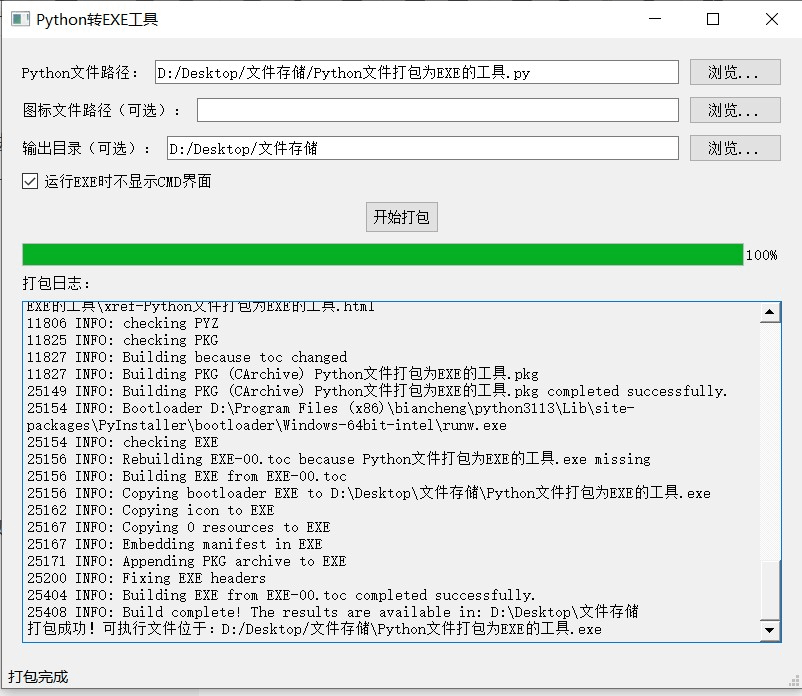
这里是输入你要打包的py文件,路径是可以有中文的。
这个是你打包的exe程序的图标,默认没有,当然你也可以直接输入其路径。
这个就是你打包好的可执行程序路径,默认路径是:C:UsersAdministratordist
不过我这个增加了可以自定义输出路径,也是支持中文路径的,然后打包完成之后会弹窗提醒你是否打开文件路径。
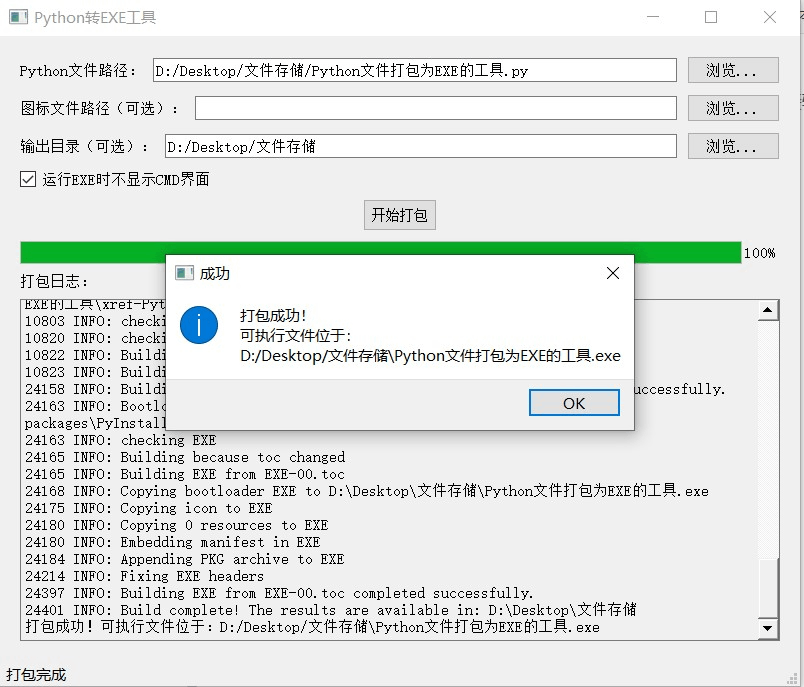
目前不支持输出程序路径名字自定义,后面有时间再加进去吧。
这个一般是建议不用出现
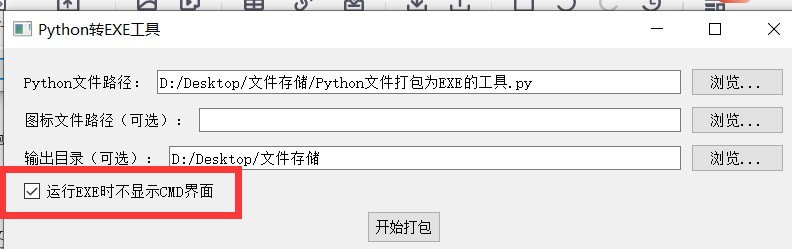
要不然会额外多一个cmd界面,看着也不舒服,没必要。
下面是我提供的源码,你们可以直接用,然后就是我文末也提供了打包好了的成品,有需要也可以获取。
import sys
import os
import subprocess
from PyQt5.QtWidgets import (QApplication, QMainWindow, QLabel, QLineEdit,
                            QPushButton, QVBoxLayout, QHBoxLayout, QWidget,
                            QFileDialog, QTextEdit, QMessageBox, QProgressBar,
                            QCheckBox)  # 新增QCheckBox导入
from PyQt5.QtCore import Qt, QThread, pyqtSignal
from PyQt5.QtGui import QIcon

class PackagerThread(QThread):
    """打包进程的线程类,避免UI卡顿"""
    log_signal = pyqtSignal(str)
    progress_signal = pyqtSignal(int)
    finished_signal = pyqtSignal(bool, str)

    def __init__(self, python_file, icon_file=None, no_console=False, output_dir=None):
        super().__init__()
        self.python_file = python_file
        self.icon_file = icon_file
        self.no_console = no_console  # 是否不显示CMD界面
        self.output_dir = output_dir  # 自定义输出目录

    def run(self):
        try:
            # 检查文件是否存在
            if not os.path.exists(self.python_file):
                self.log_signal.emit(f"错误:文件 {self.python_file} 不存在")
                self.finished_signal.emit(False, "文件不存在")
                return

            # 检查是否安装了pyinstaller
            try:
                subprocess.check_output(["pyinstaller", "--version"],
                                       stderr=subprocess.STDOUT,
                                       text=True)
            except (subprocess.CalledProcessError, FileNotFoundError):
                self.log_signal.emit("错误:未安装pyinstaller,请先安装:pip install pyinstaller")
                self.finished_signal.emit(False, "未安装pyinstaller")
                return

            # 构建pyinstaller命令
            cmd = ["pyinstaller", "--onefile", "--name", os.path.splitext(os.path.basename(self.python_file))[0]]

            # 添加无控制台参数(-w)
            if self.no_console:
                cmd.append("--windowed")  # 等价于-w,不显示控制台
                self.log_signal.emit("已启用:运行时不显示CMD界面")

            # 添加自定义输出目录(--distpath)
            if self.output_dir and os.path.isdir(self.output_dir):
                cmd.extend(["--distpath", self.output_dir])
                self.log_signal.emit(f"自定义输出目录:{self.output_dir}")
            else:
                self.log_signal.emit("使用默认输出目录(当前目录下的dist文件夹)")

            # 如果提供了图标文件,则添加图标参数
            if self.icon_file and os.path.exists(self.icon_file):
                cmd.extend(["--icon", self.icon_file])
                self.log_signal.emit(f"使用图标文件:{self.icon_file}")

            # 添加要打包的Python文件
            cmd.append(self.python_file)

            self.log_signal.emit(f"开始打包,命令:{' '.join(cmd)}")
            self.progress_signal.emit(20)

            # 执行打包命令
            process = subprocess.Popen(cmd, stdout=subprocess.PIPE,
                                      stderr=subprocess.STDOUT,
                                      text=True,
                                      bufsize=1)

            # 实时输出日志
            while True:
                output = process.stdout.readline()
                if output == '' and process.poll() is not None:
                    break
                if output:
                    self.log_signal.emit(output.strip())

            self.progress_signal.emit(80)

            # 检查执行结果
            exit_code = process.poll()
            if exit_code == 0:
                # 确定最终输出目录(优先使用自定义目录)
                dist_dir = self.output_dir if (self.output_dir and os.path.isdir(self.output_dir)) else os.path.join(os.getcwd(), "dist")
                exe_path = os.path.join(dist_dir, os.path.splitext(os.path.basename(self.python_file))[0] + ".exe")
                self.log_signal.emit(f"打包成功!可执行文件位于:{exe_path}")
                self.progress_signal.emit(100)
                self.finished_signal.emit(True, exe_path)
            else:
                self.log_signal.emit(f"打包失败,返回代码:{exit_code}")
                self.finished_signal.emit(False, f"打包失败,返回代码:{exit_code}")

        except Exception as e:
            self.log_signal.emit(f"发生错误:{str(e)}")
            self.finished_signal.emit(False, str(e))

class PyToExeConverter(QMainWindow):
    """主窗口类"""
    def __init__(self):
        super().__init__()
        self.init_ui()

    def init_ui(self):
        # 设置窗口标题和大小
        self.setWindowTitle("Python转EXE工具@阿幸")
        self.setGeometry(100, 100, 800, 650)  # 适当增加高度容纳新控件

        # 创建中心部件
        central_widget = QWidget()
        self.setCentralWidget(central_widget)

        # 主布局
        main_layout = QVBoxLayout(central_widget)
        main_layout.setSpacing(10)
        main_layout.setContentsMargins(20, 20, 20, 20)

        # Python文件路径选择
        python_file_layout = QHBoxLayout()
        self.python_file_label = QLabel("Python文件路径:")
        self.python_file_edit = QLineEdit()
        self.python_file_btn = QPushButton("浏览...")
        self.python_file_btn.clicked.connect(self.select_python_file)

        python_file_layout.addWidget(self.python_file_label)
        python_file_layout.addWidget(self.python_file_edit)
        python_file_layout.addWidget(self.python_file_btn)

        # 图标文件路径选择
        icon_file_layout = QHBoxLayout()
        self.icon_file_label = QLabel("图标文件路径(可选):")
        self.icon_file_edit = QLineEdit()
        self.icon_file_btn = QPushButton("浏览...")
        self.icon_file_btn.clicked.connect(self.select_icon_file)

        icon_file_layout.addWidget(self.icon_file_label)
        icon_file_layout.addWidget(self.icon_file_edit)
        icon_file_layout.addWidget(self.icon_file_btn)

        # 输出目录选择(新增)
        output_dir_layout = QHBoxLayout()
        self.output_dir_label = QLabel("输出目录(可选):")
        self.output_dir_edit = QLineEdit()
        self.output_dir_btn = QPushButton("浏览...")
        self.output_dir_btn.clicked.connect(self.select_output_dir)

        output_dir_layout.addWidget(self.output_dir_label)
        output_dir_layout.addWidget(self.output_dir_edit)
        output_dir_layout.addWidget(self.output_dir_btn)

        # 无控制台选项(新增)
        self.no_console_check = QCheckBox("运行EXE时不显示CMD界面")
        self.no_console_check.setChecked(True)  # 默认勾选

        # 打包按钮
        self.pack_btn = QPushButton("开始打包")
        self.pack_btn.clicked.connect(self.start_packaging)
        self.pack_btn.setStyleSheet("font-size: 14px; padding: 8px;")

        # 进度条
        self.progress_bar = QProgressBar()
        self.progress_bar.setVisible(False)

        # 日志输出区域
        self.log_label = QLabel("打包日志:")
        self.log_edit = QTextEdit()
        self.log_edit.setReadOnly(True)
        self.log_edit.setStyleSheet("background-color: #f0f0f0;")

        # 添加所有部件到主布局(新增了输出目录和复选框)
        main_layout.addLayout(python_file_layout)
        main_layout.addLayout(icon_file_layout)
        main_layout.addLayout(output_dir_layout)
        main_layout.addWidget(self.no_console_check)
        main_layout.addWidget(self.pack_btn, alignment=Qt.AlignCenter)
        main_layout.addWidget(self.progress_bar)
        main_layout.addWidget(self.log_label)
        main_layout.addWidget(self.log_edit)

        # 状态提示
        self.statusBar().showMessage("就绪")

    # 新增:选择输出目录
    def select_output_dir(self):
        dir_path = QFileDialog.getExistingDirectory(
            self, "选择输出目录", os.getcwd()
        )
        if dir_path:
            self.output_dir_edit.setText(dir_path)

    def select_python_file(self):
        """选择Python文件"""
        file_path, _ = QFileDialog.getOpenFileName(
            self, "选择Python文件", "", "Python Files (*.py);;All Files (*)"
        )
        if file_path:
            self.python_file_edit.setText(file_path)

    def select_icon_file(self):
        """选择图标文件"""
        file_path, _ = QFileDialog.getOpenFileName(
            self, "选择图标文件", "", "Icon Files (*.ico);;All Files (*)"
        )
        if file_path:
            self.icon_file_edit.setText(file_path)

    def append_log(self, text):
        """添加日志到日志区域"""
        self.log_edit.append(text)
        # 自动滚动到底部
        self.log_edit.verticalScrollBar().setValue(
            self.log_edit.verticalScrollBar().maximum()
        )

    def update_progress(self, value):
        """更新进度条"""
        self.progress_bar.setValue(value)

    def start_packaging(self):
        """开始打包过程"""
        python_file = self.python_file_edit.text().strip()
        icon_file = self.icon_file_edit.text().strip() if self.icon_file_edit.text().strip() else None
        no_console = self.no_console_check.isChecked()  # 获取复选框状态
        output_dir = self.output_dir_edit.text().strip() if self.output_dir_edit.text().strip() else None  # 获取输出目录

        # 验证输入
        if not python_file:
            QMessageBox.warning(self, "输入错误", "请选择要打包的Python文件")
            return

        if not python_file.endswith(".py"):
            QMessageBox.warning(self, "文件错误", "请选择扩展名为.py的Python文件")
            return

        # 检查图标文件是否存在(如果提供了的话)
        if icon_file and not os.path.exists(icon_file):
            QMessageBox.warning(self, "文件错误", f"图标文件不存在:{icon_file}")
            return

        # 检查输出目录是否存在(如果提供了的话)
        if output_dir and not os.path.isdir(output_dir):
            QMessageBox.warning(self, "目录错误", f"输出目录不存在:{output_dir}")
            return

        # 准备打包
        self.log_edit.clear()
        self.pack_btn.setEnabled(False)
        self.progress_bar.setVisible(True)
        self.progress_bar.setValue(0)
        self.statusBar().showMessage("正在打包...")

        # 创建并启动打包线程(传入新参数)
        self.packager_thread = PackagerThread(
            python_file,
            icon_file,
            no_console=no_console,
            output_dir=output_dir
        )
        self.packager_thread.log_signal.connect(self.append_log)
        self.packager_thread.progress_signal.connect(self.update_progress)
        self.packager_thread.finished_signal.connect(self.on_packaging_finished)
        self.packager_thread.start()

    def on_packaging_finished(self, success, message):
        """打包完成后的处理"""
        self.pack_btn.setEnabled(True)
        self.statusBar().showMessage("打包完成" if success else "打包失败")

        if success:
            QMessageBox.information(self, "成功", f"打包成功!n可执行文件位于:n{message}")
            # 询问是否打开输出目录
            if QMessageBox.question(self, "打开目录", "是否打开输出目录?",
                                   QMessageBox.Yes | QMessageBox.No) == QMessageBox.Yes:
                output_dir = os.path.dirname(message)
                if os.name == 'nt':  # Windows系统
                    os.startfile(output_dir)
                elif os.name == 'posix':  # Linux或macOS
                    subprocess.run(['open' if sys.platform == 'darwin' else 'xdg-open', output_dir])
        else:
            QMessageBox.critical(self, "失败", f"打包失败:n{message}")

if __name__ == "__main__":
    app = QApplication(sys.argv)
    window = PyToExeConverter()
    window.show()
    sys.exit(app.exec_())
到此这篇关于Python实现将文件打包为exe的完整指南的文章就介绍到这了,更多相关Python文件打包为exe内容请搜索风君子博客以前的文章或继续浏览下面的相关文章希望大家以后多多支持风君子博客!
您可能感兴趣的文章:
- Python程序打包成EXE的四种方法详解与实战
- Python程序打包exe,单文件和多文件方式
- Python中将脚本打包成独立EXE的实现示例
- Python程序打包成exe的保姆教程
- Python打包代码成exe可执行文件的方法总结
- Python打包成exe的两种方法
- Python打包成.exe可执行文件的详细步骤
- 将python代码打包成.exe文件直接运行的具体步骤