 编程部落
编程部落文章目录
- from flask import Flask, request, jsonify import requests import base64 import logging import os from logging.handlers import TimedRotatingFileHandler from datetime import datetime import mimetypes app = Flask(__name__) # 配置日志目录 LOG_DIR = os.path.join(os.path.dirname(os.path.abspath(__file__)), ‘logs’) if not os.path.exists(LOG_DIR): os.makedirs(LOG_DIR) # 按年月日构建日志文件路径 current_date = datetime.now().strftime(‘%Y%m%d’) LOG_FILE = os.path.join(LOG_DIR, f’file-to-base64-{current_date}.log’) # 配置日志 logging.basicConfig( level=logging.INFO, format=’%(asctime)s – %(levelname)s – %(message)s’, handlers=[ logging.StreamHandler(), TimedRotatingFileHandler( LOG_FILE, when=’midnight’, interval=1, backupCount=30, encoding=’utf-8′ ) ] ) # 输入:{fileUrl:xxx} 输出:{fileExt:文件类型,len:字符串长度,str:base64字符串} @app.route(‘/file-to-base64’, methods=[‘POST’]) def file_to_base64(): “””根据文件URL(本地路径或网络路径)将文件转换为Base64字符串””” # 每次请求时打印日志,分割 logging.info(“—————————————————————————————————————–“) # 1.获取请求头中的 Authorization 字段(可选) authorization = request.headers.get(‘Authorization’) if authorization != ‘dPvnRNtrQhHMxDfGoOEa’: logging.warning(f”Authorization 字段验证失败: {authorization}”) return jsonify({“error”: “Authorization verification failed”}), 401 # 2.获取请求参数 data = request.json if not data or ‘file_url’ not in data: logging.warning(“请求参数缺失”) return jsonify({“error”: “file_url is required”}), 400 # 3. 开始处理文件转换 file_url = data[‘file_url’] logging.info(f”开始处理文件转换,URL: {file_url}”) try: # 3.1 读取本地文件或网络文件 if file_url.startswith(‘file://’) or os.path.exists(file_url): # 3.1.1 处理本地文件 if file_url.startswith(‘file://’): file_path = file_url[7:] else: file_path = file_url with open(file_path, ‘rb’) as f: file_bytes = f.read() content_type = mimetypes.guess_type(file_path)[0] or ‘application/octet-stream’ else: # 3.1.2 处理网络文件 # 问题:HTTPSConnectionPool(host=’xx.xx.xx.xx’, port=443): Max retries exceeded with url # 解决方法:添加 verify=False 忽略证书验证 response = requests.get(file_url, verify=False) response.raise_for_status() file_bytes = response.content content_type = response.headers.get(‘Content-Type’, ”) # 3.2 通过Content-Type判断文件类型 file_extension = get_file_extension_from_content_type(content_type) # 3.3 将文件转换为Base64字符串 base64_encoded = base64.b64encode(file_bytes).decode(‘utf-8’) # 3.4 添加MIME类型前缀返回(可选) if content_type: base64_encoded = f”data:{content_type};base64,{base64_encoded}” # 3.5 记录转换结果 logging.info(f”转换成功!文件类型:{file_extension},Base64字符串长度: {len(base64_encoded)}”) return jsonify({ “fileExt”:file_extension, “len”:len(base64_encoded), “str”: base64_encoded }) # 4. 异常处理 except requests.RequestException as e: logging.error(f”请求URL: {file_url}时出错: {e}”) return jsonify({“error”: str(e)}), 500 except Exception as e: logging.error(f”请求URL: {file_url}转换发生未知错误: {e}”) return jsonify({“error”: “Internal server error”}), 500 def get_file_extension_from_content_type(content_type): “””根据Content-Type获取文件扩展名””” # 去除字符集信息,只保留MIME类型部分 mime_type = content_type.split(‘;’)[0].strip().lower() mime_to_extension = { # 图片类型 ‘image/jpeg’: ‘jpg’, ‘image/png’: ‘png’, ‘image/gif’: ‘gif’, ‘image/bmp’: ‘bmp’, ‘image/webp’: ‘webp’, ‘image/svg+xml’: ‘svg’, # 音频类型 ‘audio/wav’: ‘wav’, ‘audio/mpeg’: ‘mp3’, ‘audio/ogg’: ‘ogg’, ‘audio/webm’: ‘weba’, # 视频类型 ‘video/mp4’: ‘mp4’, ‘video/webm’: ‘webm’, ‘video/ogg’: ‘ogv’, # 文档类型 ‘application/pdf’: ‘pdf’, ‘application/msword’: ‘doc’, ‘application/vnd.openxmlformats-officedocument.wordprocessingml.document’: ‘docx’, ‘application/vnd.ms-excel’: ‘xls’, ‘application/vnd.openxmlformats-officedocument.spreadsheetml.sheet’: ‘xlsx’, ‘application/vnd.ms-powerpoint’: ‘ppt’, ‘application/vnd.openxmlformats-officedocument.presentationml.presentation’: ‘pptx’, # 文本类型 ‘text/plain’: ‘txt’, ‘text/html’: ‘html’, ‘text/css’: ‘css’, ‘text/javascript’: ‘js’, ‘application/javascript’: ‘js’, ‘application/json’: ‘json’, ‘application/xml’: ‘xml’, # 压缩文件 ‘application/zip’: ‘zip’, ‘application/x-rar-compressed’: ‘rar’, ‘application/x-tar’: ‘tar’, ‘application/x-gzip’: ‘gz’, # 其他常见类型 ‘application/octet-stream’: ‘bin’, ‘application/x-shockwave-flash’: ‘swf’, ‘application/x-font-ttf’: ‘ttf’, ‘application/x-font-woff’: ‘woff’, ‘application/x-font-woff2’: ‘woff2’ } return mime_to_extension.get(mime_type, ‘unknown’) if __name__ == “__main__”: app.run(host=’0.0.0.0′, port=5000)
- cd /usr/ai/codes/fileutil # 运行 python3 fileToBase64.py # 后台运行 nohup python3 fileToBase64.py > /dev/null 2>&1 & # 查看进程 ps -ef | grep fileToBase64.py
- 注意Header中Authorization=dPvnRNtrQhHMxDfGoOEa目前是写死的。 curl –location –request POST ‘http://127.0.0.1:5000/file-to-base64’ –header ‘Authorization: dPvnRNtrQhHMxDfGoOEa’ –header ‘Content-Type: application/json’ –data-raw ‘{“file_url”:”https://lf-flow-web-cdn.doubao.com/obj/flow-doubao/samantha/logo-icon-white-bg.png”}’ file_url:必填,需要转换的文件地址(公网http地址,或服务器所在文件的绝对路径) 举例: {"file_url":"https://lf-flow-web-cdn.doubao.com/obj/flow-doubao/samantha/logo-icon-white-bg.png"} {"file_url":"/usr/ai/codes/fileutil/readMe1.0.0.txt"} json输出: { “fileExt”: “txt”, “len”: 131, “str”: “data:text/plain;base64,5LiL6L295Zyw5Z2A77yaDQpodHRwczovL2NvZGVsb2FkLmdpdGh1Yi5jb20vbGFuZ2dlbml1cy9kaWZ5L3ppcC9yZWZzL2hlYWRzL21haW4=” } 异常json输出示例: { “error”: “file_url is required” } { “errmsg”: “Invalid URL ‘none’: No scheme supplied. Perhaps you meant https://none?” } 到此这篇关于Python根据文件URL将文件转为Base64字符串的文章就介绍到这了,更多相关Python文件转Base64内容请搜索风君子博客以前的文章或继续浏览下面的相关文章希望大家以后多多支持风君子博客! 您可能感兴趣的文章: python将图片文件转换成base64编码的方法 python关于图片和base64互转的三种方式 Python实现图片和base64转换详解 Python 中如何将十六进制转换为 Base64 Python实现将内容转为base64编码与解码 Python实现图像的二进制与base64互转
目录
- 1.效果
- 1.1本地文件
- 1.2网络文件
- 2.fileToBase64.py
- 2.1脚本内容
- 2.2启动查询服务
- 2.3访问
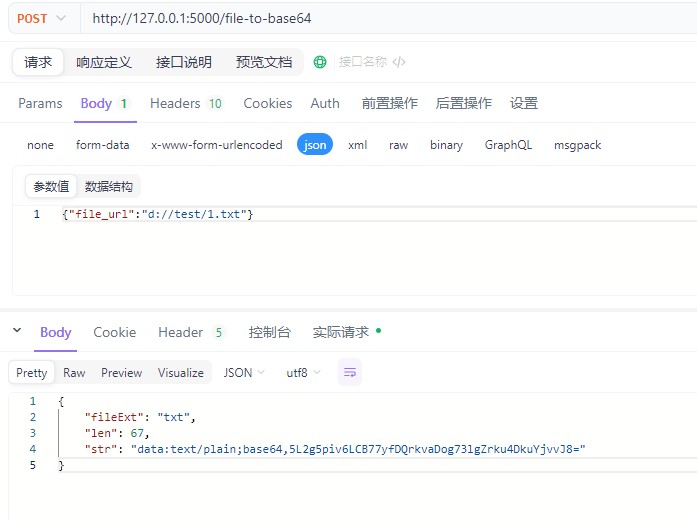
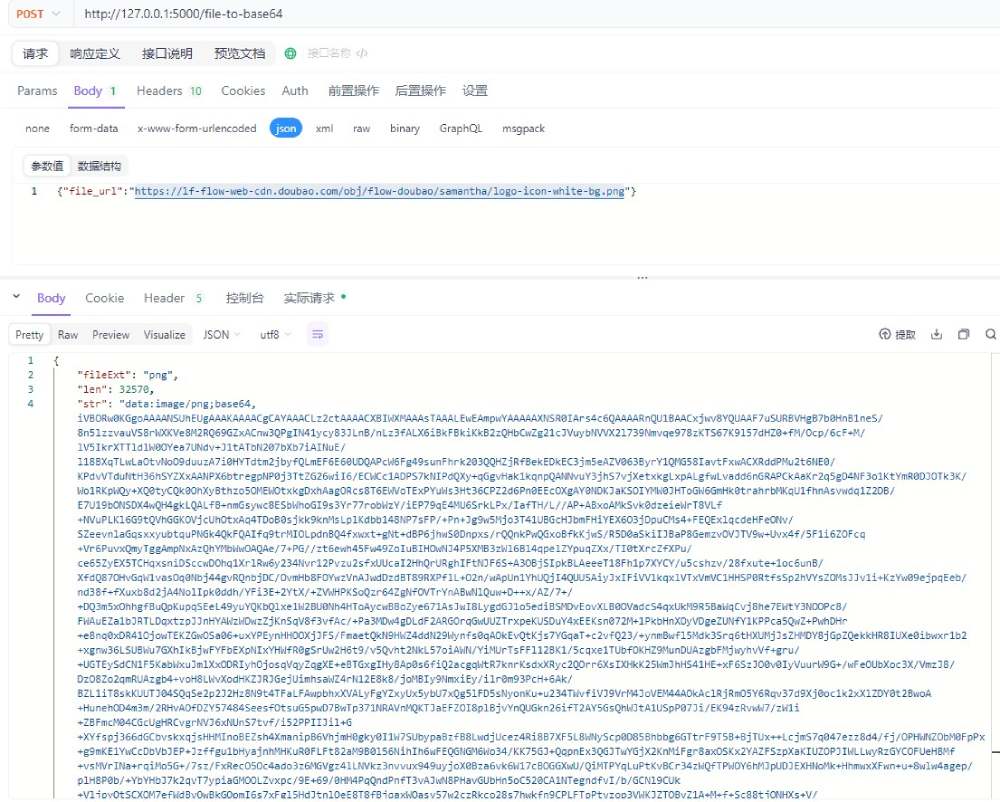
输出日志:/logs/file-to-base64–{当前时间}.log
开放端口:5000
from flask import Flask, request, jsonify
import requests
import base64
import logging
import os
from logging.handlers import TimedRotatingFileHandler
from datetime import datetime
import mimetypes

app = Flask(__name__)

# 配置日志目录
LOG_DIR = os.path.join(os.path.dirname(os.path.abspath(__file__)), 'logs')
if not os.path.exists(LOG_DIR):
    os.makedirs(LOG_DIR)

# 按年月日构建日志文件路径
current_date = datetime.now().strftime('%Y%m%d')
LOG_FILE = os.path.join(LOG_DIR, f'file-to-base64-{current_date}.log')

# 配置日志
logging.basicConfig(
    level=logging.INFO,
    format='%(asctime)s - %(levelname)s - %(message)s',
    handlers=[
        logging.StreamHandler(),
        TimedRotatingFileHandler(
            LOG_FILE,
            when='midnight',
            interval=1,
            backupCount=30,
            encoding='utf-8'
        )
    ]
)

# 输入:{fileUrl:xxx} 输出:{fileExt:文件类型,len:字符串长度,str:base64字符串}
@app.route('/file-to-base64', methods=['POST'])
def file_to_base64():
    """根据文件URL(本地路径或网络路径)将文件转换为Base64字符串"""
    # 每次请求时打印日志,分割
    logging.info("-----------------------------------------------------------------------------------------------------------------")
    # 1.获取请求头中的 Authorization 字段(可选)
    authorization = request.headers.get('Authorization')
    if authorization != 'dPvnRNtrQhHMxDfGoOEa':
        logging.warning(f"Authorization 字段验证失败: {authorization}")
        return jsonify({"error": "Authorization verification failed"}), 401
    # 2.获取请求参数
    data = request.json
    if not data or 'file_url' not in data:
        logging.warning("请求参数缺失")
        return jsonify({"error": "file_url is required"}), 400
    # 3. 开始处理文件转换
    file_url = data['file_url']
    logging.info(f"开始处理文件转换,URL: {file_url}")

    try:

        # 3.1 读取本地文件或网络文件
        if file_url.startswith('file://') or os.path.exists(file_url):
            # 3.1.1 处理本地文件
            if file_url.startswith('file://'):
                file_path = file_url[7:]
            else:
                file_path = file_url

            with open(file_path, 'rb') as f:
                file_bytes = f.read()
            content_type = mimetypes.guess_type(file_path)[0] or 'application/octet-stream'
        else:
            # 3.1.2 处理网络文件
            # 问题:HTTPSConnectionPool(host='xx.xx.xx.xx', port=443): Max retries exceeded with url
            # 解决方法:添加 verify=False 忽略证书验证
            response = requests.get(file_url, verify=False)
            response.raise_for_status()
            file_bytes = response.content
            content_type = response.headers.get('Content-Type', '')

        # 3.2 通过Content-Type判断文件类型
        file_extension = get_file_extension_from_content_type(content_type)
        # 3.3 将文件转换为Base64字符串
        base64_encoded = base64.b64encode(file_bytes).decode('utf-8')
        # 3.4 添加MIME类型前缀返回(可选)
        if content_type:
            base64_encoded = f"data:{content_type};base64,{base64_encoded}"
        # 3.5 记录转换结果
        logging.info(f"转换成功!文件类型:{file_extension},Base64字符串长度: {len(base64_encoded)}")
        return jsonify({
            "fileExt":file_extension,
            "len":len(base64_encoded),
            "str": base64_encoded
        })
    # 4. 异常处理
    except requests.RequestException as e:
        logging.error(f"请求URL: {file_url}时出错: {e}")
        return jsonify({"error": str(e)}), 500
    except Exception as e:
        logging.error(f"请求URL: {file_url}转换发生未知错误: {e}")
        return jsonify({"error": "Internal server error"}), 500

def get_file_extension_from_content_type(content_type):
    """根据Content-Type获取文件扩展名"""
    # 去除字符集信息,只保留MIME类型部分
    mime_type = content_type.split(';')[0].strip().lower()
    mime_to_extension = {
        # 图片类型
        'image/jpeg': 'jpg',
        'image/png': 'png',
        'image/gif': 'gif',
        'image/bmp': 'bmp',
        'image/webp': 'webp',
        'image/svg+xml': 'svg',

        # 音频类型
        'audio/wav': 'wav',
        'audio/mpeg': 'mp3',
        'audio/ogg': 'ogg',
        'audio/webm': 'weba',

        # 视频类型
        'video/mp4': 'mp4',
        'video/webm': 'webm',
        'video/ogg': 'ogv',

        # 文档类型
        'application/pdf': 'pdf',
        'application/msword': 'doc',
        'application/vnd.openxmlformats-officedocument.wordprocessingml.document': 'docx',
        'application/vnd.ms-excel': 'xls',
        'application/vnd.openxmlformats-officedocument.spreadsheetml.sheet': 'xlsx',
        'application/vnd.ms-powerpoint': 'ppt',
        'application/vnd.openxmlformats-officedocument.presentationml.presentation': 'pptx',

        # 文本类型
        'text/plain': 'txt',
        'text/html': 'html',
        'text/css': 'css',
        'text/javascript': 'js',
        'application/javascript': 'js',
        'application/json': 'json',
        'application/xml': 'xml',

        # 压缩文件
        'application/zip': 'zip',
        'application/x-rar-compressed': 'rar',
        'application/x-tar': 'tar',
        'application/x-gzip': 'gz',

        # 其他常见类型
        'application/octet-stream': 'bin',
        'application/x-shockwave-flash': 'swf',
        'application/x-font-ttf': 'ttf',
        'application/x-font-woff': 'woff',
        'application/x-font-woff2': 'woff2'
    }
    return mime_to_extension.get(mime_type, 'unknown')

if __name__ == "__main__":
    app.run(host='0.0.0.0', port=5000)
cd /usr/ai/codes/fileutil
# 运行
python3 fileToBase64.py

# 后台运行
nohup python3 fileToBase64.py > /dev/null 2>&1 &

# 查看进程
ps -ef | grep fileToBase64.py
注意Header中Authorization=dPvnRNtrQhHMxDfGoOEa目前是写死的。
curl --location --request POST 'http://127.0.0.1:5000/file-to-base64'
--header 'Authorization: dPvnRNtrQhHMxDfGoOEa'
--header 'Content-Type: application/json'
--data-raw '{"file_url":"https://lf-flow-web-cdn.doubao.com/obj/flow-doubao/samantha/logo-icon-white-bg.png"}'
file_url:必填,需要转换的文件地址(公网http地址,或服务器所在文件的绝对路径)
举例:
{"file_url":"https://lf-flow-web-cdn.doubao.com/obj/flow-doubao/samantha/logo-icon-white-bg.png"}
{"file_url":"/usr/ai/codes/fileutil/readMe1.0.0.txt"}
json输出:
{
  "fileExt": "txt",
  "len": 131,
  "str": "data:text/plain;base64,5LiL6L295Zyw5Z2A77yaDQpodHRwczovL2NvZGVsb2FkLmdpdGh1Yi5jb20vbGFuZ2dlbml1cy9kaWZ5L3ppcC9yZWZzL2hlYWRzL21haW4="
}
异常json输出示例:
{
  "error": "file_url is required"
}

{
    "errmsg": "Invalid URL 'none': No scheme supplied. Perhaps you meant https://none?"
}
到此这篇关于Python根据文件URL将文件转为Base64字符串的文章就介绍到这了,更多相关Python文件转Base64内容请搜索风君子博客以前的文章或继续浏览下面的相关文章希望大家以后多多支持风君子博客!
您可能感兴趣的文章:
- python将图片文件转换成base64编码的方法
- python关于图片和base64互转的三种方式
- Python实现图片和base64转换详解
- Python 中如何将十六进制转换为 Base64
- Python实现将内容转为base64编码与解码
- Python实现图像的二进制与base64互转