
基于python简单实现文字转语音和语音识别

Written by

in

文章目录
  • 需要安装 pip3 install pyttsx3 pip3 install pypiwin32 安装pyttsx3的时候出错,结果重装了一次python才行。。。 tips:最后本人安装的版本是3.6 import pyttsx3 # 初始化 engine = pyttsx3.init() engine.say(‘我要开始语音合成’) engine.say(‘好好学习,天天向上’) engine.say(‘hello world’) engine.runAndWait()
  • 依赖安装 pip3 install comtypes 代码  from comtypes.client import CreateObject from comtypes.gen import SpeechLib engine = CreateObject(“SAPI.SpVoice”) stream = CreateObject(‘SAPI.SpFileStream’) infile = ‘demo.txt’ outfile = ‘demo_audio.wav’ stream.Open(outfile,SpeechLib.SSFMCreateForWrite) engine.AudioOutputStream = stream f = open(infile,’r’,encoding=’utf-8′) #中文得用utf-8格式 theText = f.read() f.close() engine.speak(theText) stream.close() print(“合成成功”)
  • pip3 install PocketSphinx pip3 install SpeechRecognition 安装PocketSphinx可能出现错误 后来查了半天,,也下载了swig但是不会弄。看到pocketsphinx的文档 我猜可能是python3.8装不了?然后我装了python3.6版本,一下就安装好了。。。 import speech_recognition as sr audio_file = ‘demo_audio.wav’ r = sr.Recognizer() with sr.AudioFile(audio_file) as source: audio = r.record(source) print(‘文本内容:’,r.recognize_sphinx(audio)) 因为pocketsphinx只装有英文语音包,只能识别英文,识别率还算可以 安装中文语言包 下载之后解压到安装python的路径里,如下 E:Python3.6Libsite-packagesspeech_recognitionpocketsphinx-data 更改文件夹名 zh-CN 并把文件里面的名字改成和en-US的相同 然后在代码中修改 print(‘文本内容:’,r.recognize_sphinx(audio,language=’zh-CN’)) 转换过程没英文那么快(毕竟中文博大精深),自己录音的识别率不高,我是用前面的文本转语音wav文件识别的。 到此这篇关于基于python简单实现文字转语音和语音识别的文章就介绍到这了,更多相关python文字转语音内容请搜索风君子博客以前的文章或继续浏览下面的相关文章希望大家以后多多支持风君子博客! 您可能感兴趣的文章: Python实现中文字转中文语音 使用Python实现文字转语音并播放功能 基于Python实现语音识别和语音转文字 Python语音识别API实现文字转语音的几种方法 Python详解文字转语音的实现 基于Python实现语音识别功能 Python实现简单的语音识别系统
  • 目录
    • 直接语音合成
    • 文本文件语音合成wav
    • 语音转文本

    需要安装

    pip3 install pyttsx3
    pip3 install pypiwin32

    安装pyttsx3的时候出错,结果重装了一次python才行。。。

    tips:最后本人安装的版本是3.6

    import pyttsx3
    # 初始化
    engine = pyttsx3.init()
    
    engine.say('我要开始语音合成')
    engine.say('好好学习,天天向上')
    engine.say('hello world')
    
    engine.runAndWait()
    

    依赖安装

    pip3 install comtypes

    代码 

    from comtypes.client import CreateObject
    from comtypes.gen import SpeechLib
    engine = CreateObject("SAPI.SpVoice")
    stream = CreateObject('SAPI.SpFileStream')
    infile = 'demo.txt'
    outfile = 'demo_audio.wav'
    stream.Open(outfile,SpeechLib.SSFMCreateForWrite)
    engine.AudioOutputStream = stream
    f = open(infile,'r',encoding='utf-8') #中文得用utf-8格式
    theText = f.read()
    f.close()
    engine.speak(theText)
    stream.close()
    print("合成成功")
    

    pip3 install PocketSphinx
    pip3 install SpeechRecognition

    安装PocketSphinx可能出现错误
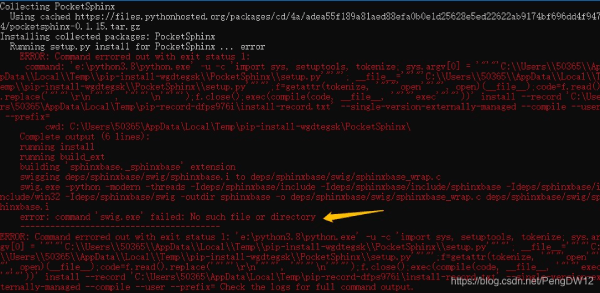
    后来查了半天,,也下载了swig但是不会弄。看到pocketsphinx的文档
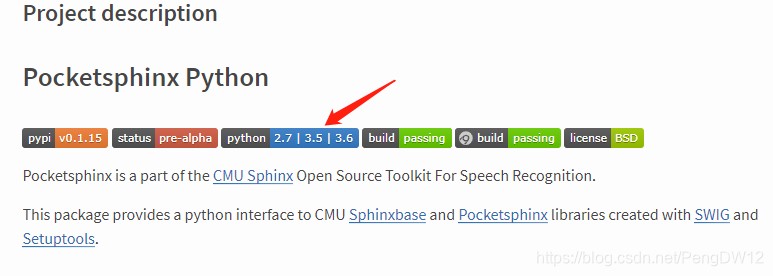
    我猜可能是python3.8装不了?然后我装了python3.6版本,一下就安装好了。。。

    import speech_recognition as sr
    audio_file = 'demo_audio.wav'
    r = sr.Recognizer()
    
    with sr.AudioFile(audio_file) as source:
        audio = r.record(source)
    
    print('文本内容:',r.recognize_sphinx(audio))
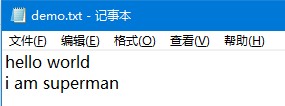
    

    因为pocketsphinx只装有英文语音包,只能识别英文,识别率还算可以

    安装中文语言包
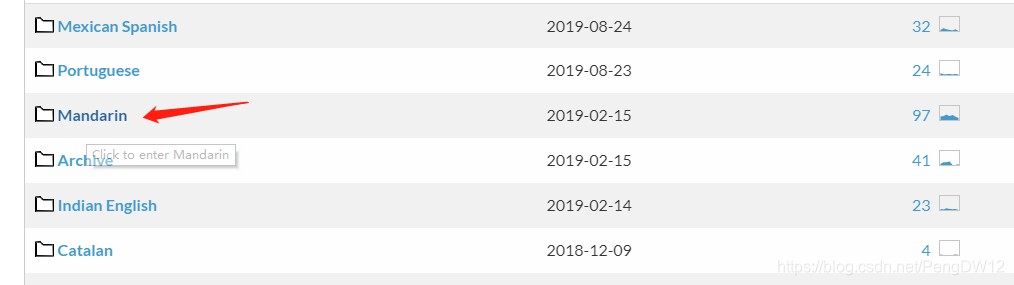
    下载之后解压到安装python的路径里,如下

    E:Python3.6Libsite-packagesspeech_recognitionpocketsphinx-data

    更改文件夹名 zh-CN

    并把文件里面的名字改成和en-US的相同

    然后在代码中修改

    print('文本内容:',r.recognize_sphinx(audio,language='zh-CN'))

    

    转换过程没英文那么快(毕竟中文博大精深),自己录音的识别率不高,我是用前面的文本转语音wav文件识别的。

    到此这篇关于基于python简单实现文字转语音和语音识别的文章就介绍到这了,更多相关python文字转语音内容请搜索风君子博客以前的文章或继续浏览下面的相关文章希望大家以后多多支持风君子博客!

    您可能感兴趣的文章:

    • Python实现中文字转中文语音
    • 使用Python实现文字转语音并播放功能
    • 基于Python实现语音识别和语音转文字
    • Python语音识别API实现文字转语音的几种方法
    • Python详解文字转语音的实现
    • 基于Python实现语音识别功能
    • Python实现简单的语音识别系统

    站内搜索


