 编程部落
编程部落文章目录
- BeautifulSoup是一个Python库,专门用于从HTML和XML文档中提取数据。它能够将复杂的HTML文档转换成一个复杂的树形结构,每个节点都是Python对象。 from bs4 import BeautifulSoup import requests # 获取网页内容 url = “https://example.com” response = requests.get(url) soup = BeautifulSoup(response.content, ‘html.parser’) # 现在你可以像操作Python对象一样操作HTML title = soup.title.text print(f”网页标题:{title}”)
- 1. 容错能力强BeautifulSoup能够处理各种不规范的HTML,就像一个经验丰富的医生,即使面对"病症复杂"的网页也能准确诊断。 2. API设计直观它的语法设计非常人性化,读代码就像读英语一样自然。 3. 解析器灵活支持多种解析器,可以根据需求选择最合适的工具。
- BeautifulSoup支持多种解析器,每种都有其特点: from bs4 import BeautifulSoup html_doc = “”” <html> <head><title>测试页面</title></head> <body> <p class=”story”>这是一个段落</p> </body> </html> “”” # Python内置解析器(推荐入门使用) soup1 = BeautifulSoup(html_doc, ‘html.parser’) # lxml解析器(推荐生产环境使用) soup2 = BeautifulSoup(html_doc, ‘lxml’) # html5lib解析器(最准确但最慢) soup3 = BeautifulSoup(html_doc, ‘html5lib’)
- 开发学习阶段:使用html.parser,无需额外安装 生产环境:使用lxml,速度快且功能强大 严格HTML5标准:使用html5lib,准确度最高
- BeautifulSoup提供了多种定位元素的方法,就像GPS定位一样精准: from bs4 import BeautifulSoup html = “”” <html> <body> <div class=”container”> <h1 id=”main-title”>新闻标题</h1> <p class=”content”>新闻内容第一段</p> <p class=”content”>新闻内容第二段</p> <a href=”https://example.com” rel=”external nofollow” class=”link”>相关链接</a> </div> </body> </html> “”” soup = BeautifulSoup(html, ‘html.parser’) # 1. 通过标签名定位 title = soup.h1 print(f”标题:{title.text}”) # 2. 通过ID定位 main_title = soup.find(‘h1′, id=’main-title’) print(f”主标题:{main_title.text}”) # 3. 通过类名定位 content_list = soup.find_all(‘p’, class_=’content’) for content in content_list: print(f”内容:{content.text}”) # 4. 通过属性定位 link = soup.find(‘a’, href=’https://example.com’) print(f”链接文本:{link.text}”) print(f”链接地址:{link[‘href’]}”)
-
- CSS选择器就像GPS坐标,能够精确定位到任何元素: # CSS选择器示例 soup = BeautifulSoup(html, ‘html.parser’) # 类选择器 contents = soup.select(‘.content’) # ID选择器 title = soup.select(‘#main-title’)[0] # 层级选择器 container_p = soup.select(‘div.container p’) # 属性选择器 external_links = soup.select(‘a[href^=”http”]’) # 伪类选择器 first_p = soup.select(‘p:first-child’)
- 有时候我们需要进行模糊匹配,正则表达式就是最好的工具: import re # 使用正则表达式匹配属性 email_links = soup.find_all(‘a’, href=re.compile(r’mailto:’)) phone_numbers = soup.find_all(string=re.compile(r’d{3}-d{4}-d{4}’))
- from bs4 import BeautifulSoup import requests def extract_news_data(url): “”” 新闻数据提取示例 “”” response = requests.get(url) soup = BeautifulSoup(response.content, ‘html.parser’) # 提取标题 title = soup.find(‘h1′, class_=’article-title’) title_text = title.text.strip() if title else “无标题” # 提取发布时间 time_elem = soup.find(‘time’) publish_time = time_elem.get(‘datetime’) if time_elem else “未知时间” # 提取正文内容 content_divs = soup.find_all(‘div’, class_=’article-content’) content = ‘n’.join([div.text.strip() for div in content_divs]) # 提取图片链接 images = [] for img in soup.find_all(‘img’): src = img.get(‘src’) if src: # 处理相对链接 if src.startswith(‘//’): src = ‘https:’ + src elif src.startswith(‘/’): src = ‘https://example.com’ + src images.append(src) return { ‘title’: title_text, ‘publish_time’: publish_time, ‘content’: content, ‘images’: images }
- 实际的网页往往结构复杂,我们需要更加精细的处理: def extract_product_info(html): “”” 电商产品信息提取示例 “”” soup = BeautifulSoup(html, ‘html.parser’) product_info = {} # 提取产品名称 name_elem = soup.find(‘h1′, class_=’product-name’) product_info[‘name’] = name_elem.text.strip() if name_elem else “” # 提取价格(处理多种价格格式) price_elem = soup.find(‘span’, class_=’price’) if price_elem: price_text = price_elem.text # 使用正则表达式提取数字 import re price_match = re.search(r'[d,]+.?d*’, price_text) product_info[‘price’] = float(price_match.group().replace(‘,’, ”)) if price_match else 0 # 提取产品参数 specs = {} spec_table = soup.find(‘table’, class_=’specifications’) if spec_table: for row in spec_table.find_all(‘tr’): cells = row.find_all([‘td’, ‘th’]) if len(cells) >= 2: key = cells[0].text.strip() value = cells[1].text.strip() specs[key] = value product_info[‘specifications’] = specs # 提取评论数据 reviews = [] review_elements = soup.find_all(‘div’, class_=’review-item’) for review in review_elements: rating_elem = review.find(‘span’, class_=’rating’) content_elem = review.find(‘p’, class_=’review-content’) if rating_elem and content_elem: reviews.append({ ‘rating’: len(rating_elem.find_all(‘span’, class_=’star-filled’)), ‘content’: content_elem.text.strip() }) product_info[‘reviews’] = reviews return product_info
- 当需要处理大量数据时,性能优化就变得至关重要: import concurrent.futures from typing import List, Dict import time class WebScraper: def __init__(self, max_workers: int = 5): self.max_workers = max_workers self.session = requests.Session() # 设置通用请求头 self.session.headers.update({ ‘User-Agent’: ‘Mozilla/5.0 (Windows NT 10.0; Win64; x64) AppleWebKit/537.36’ }) def fetch_single_page(self, url: str) -> Dict: “”” 获取单个页面数据 “”” try: response = self.session.get(url, timeout=10) response.raise_for_status() soup = BeautifulSoup(response.content, ‘lxml’) # 提取数据 return self.extract_page_data(soup, url) except Exception as e: print(f”处理 {url} 时出错: {e}”) return {‘url’: url, ‘error’: str(e)} def extract_page_data(self, soup: BeautifulSoup, url: str) -> Dict: “”” 从soup对象中提取数据 “”” title = soup.find(‘title’) title_text = title.text.strip() if title else “” # 提取所有链接 links = [] for link in soup.find_all(‘a’, href=True): href = link[‘href’] text = link.text.strip() if href and text: links.append({‘url’: href, ‘text’: text}) return { ‘url’: url, ‘title’: title_text, ‘links’: links, ‘link_count’: len(links) } def batch_scrape(self, urls: List[str]) -> List[Dict]: “”” 批量抓取数据 “”” results = [] with concurrent.futures.ThreadPoolExecutor(max_workers=self.max_workers) as executor: # 提交所有任务 future_to_url = {executor.submit(self.fetch_single_page, url): url for url in urls} # 收集结果 for future in concurrent.futures.as_completed(future_to_url): result = future.result() results.append(result) print(f”已完成: {result.get(‘url’, ‘Unknown’)}”) return results # 使用示例 scraper = WebScraper(max_workers=3) urls = [ ‘https://example1.com’, ‘https://example2.com’, ‘https://example3.com’ ] results = scraper.batch_scrape(urls)
- 提取出的数据往往需要进一步清洗: import re from datetime import datetime class DataCleaner: @staticmethod def clean_text(text: str) -> str: “”” 清洗文本数据 “”” if not text: return “” # 移除多余空白字符 text = re.sub(r’s+’, ‘ ‘, text) # 移除HTML实体 text = text.replace(‘ ’, ‘ ‘) text = text.replace(‘<’, ‘<‘) text = text.replace(‘>’, ‘>’) text = text.replace(‘&’, ‘&’) return text.strip() @staticmethod def extract_numbers(text: str) -> List[float]: “”” 从文本中提取数字 “”” numbers = re.findall(r’d+.?d*’, text) return [float(num) for num in numbers] @staticmethod def parse_date(date_string: str) -> datetime: “”” 解析各种日期格式 “”” date_patterns = [ ‘%Y-%m-%d’, ‘%Y/%m/%d’, ‘%d-%m-%Y’, ‘%d/%m/%Y’, ‘%Y-%m-%d %H:%M:%S’ ] for pattern in date_patterns: try: return datetime.strptime(date_string.strip(), pattern) except ValueError: continue raise ValueError(f”无法解析日期: {date_string}”) # 使用示例 cleaner = DataCleaner() # 清洗提取的数据 def process_scraped_data(raw_data: Dict) -> Dict: “”” 处理爬取的原始数据 “”” processed = {} # 清洗标题 processed[‘title’] = cleaner.clean_text(raw_data.get(‘title’, ”)) # 提取和清洗价格 price_text = raw_data.get(‘price_text’, ”) prices = cleaner.extract_numbers(price_text) processed[‘price’] = prices[0] if prices else 0.0 # 处理日期 date_text = raw_data.get(‘date’, ”) try: processed[‘date’] = cleaner.parse_date(date_text) except ValueError: processed[‘date’] = None return processed
- 让我们构建一个完整的新闻聚合器: import json from dataclasses import dataclass from typing import List import sqlite3 @dataclass class NewsArticle: title: str content: str url: str publish_time: str source: str tags: List[str] class NewsAggregator: def __init__(self, db_path: str = ‘news.db’): self.db_path = db_path self.init_database() def init_database(self): “”” 初始化数据库 “”” conn = sqlite3.connect(self.db_path) cursor = conn.cursor() cursor.execute(”’ CREATE TABLE IF NOT EXISTS articles ( id INTEGER PRIMARY KEY AUTOINCREMENT, title TEXT NOT NULL, content TEXT, url TEXT UNIQUE, publish_time TEXT, source TEXT, tags TEXT, created_at TIMESTAMP DEFAULT CURRENT_TIMESTAMP ) ”’) conn.commit() conn.close() def scrape_news_site(self, base_url: str, site_config: Dict) -> List[NewsArticle]: “”” 根据配置抓取新闻站点 “”” articles = [] try: response = requests.get(base_url) soup = BeautifulSoup(response.content, ‘lxml’) # 根据配置提取文章链接 article_links = soup.select(site_config[‘article_selector’]) for link in article_links[:10]: # 限制抓取数量 article_url = link.get(‘href’) if not article_url.startswith(‘http’): article_url = base_url + article_url # 抓取具体文章 article = self.scrape_article(article_url, site_config) if article: articles.append(article) # 避免请求过快 time.sleep(1) except Exception as e: print(f”抓取 {base_url} 失败: {e}”) return articles def scrape_article(self, url: str, config: Dict) -> NewsArticle: “”” 抓取单篇文章 “”” try: response = requests.get(url) soup = BeautifulSoup(response.content, ‘lxml’) # 提取标题 title_elem = soup.select_one(config[‘title_selector’]) title = title_elem.text.strip() if title_elem else “” # 提取内容 content_elems = soup.select(config[‘content_selector’]) content = ‘n’.join([elem.text.strip() for elem in content_elems]) # 提取发布时间 time_elem = soup.select_one(config.get(‘time_selector’, ”)) publish_time = time_elem.text.strip() if time_elem else “” # 提取标签 tag_elems = soup.select(config.get(‘tag_selector’, ”)) tags = [tag.text.strip() for tag in tag_elems] return NewsArticle( title=title, content=content, url=url, publish_time=publish_time, source=config[‘source_name’], tags=tags ) except Exception as e: print(f”抓取文章 {url} 失败: {e}”) return None def save_articles(self, articles: List[NewsArticle]): “”” 保存文章到数据库 “”” conn = sqlite3.connect(self.db_path) cursor = conn.cursor() for article in articles: try: cursor.execute(”’ INSERT OR IGNORE INTO articles (title, content, url, publish_time, source, tags) VALUES (?, ?, ?, ?, ?, ?) ”’, ( article.title, article.content, article.url, article.publish_time, article.source, json.dumps(article.tags) )) except Exception as e: print(f”保存文章失败: {e}”) conn.commit() conn.close() # 使用示例 aggregator = NewsAggregator() # 配置不同新闻站点 sites_config = { ‘tech_news’: { ‘url’: ‘https://technews.example.com’, ‘source_name’: ‘科技新闻’, ‘article_selector’: ‘a.article-link’, ‘title_selector’: ‘h1.article-title’, ‘content_selector’: ‘div.article-content p’, ‘time_selector’: ‘time.publish-time’, ‘tag_selector’: ‘span.tag’ } } # 抓取和保存新闻 for site_name, config in sites_config.items(): print(f”正在抓取 {site_name}…”) articles = aggregator.scrape_news_site(config[‘url’], config) aggregator.save_articles(articles) print(f”完成 {site_name},共抓取 {len(articles)} 篇文章”)
- 在实际应用中,网络请求经常会失败,我们需要建立完善的错误处理机制: import time import random from functools import wraps def retry_on_failure(max_retries: int = 3, delay: float = 1.0): “”” 失败重试装饰器 “”” def decorator(func): @wraps(func) def wrapper(*args, **kwargs): last_exception = None for attempt in range(max_retries + 1): try: return func(*args, **kwargs) except Exception as e: last_exception = e if attempt < max_retries: wait_time = delay * (2 ** attempt) + random.uniform(0, 1) print(f”第 {attempt + 1} 次尝试失败,{wait_time:.2f}秒后重试…”) time.sleep(wait_time) else: print(f”所有重试都失败了,最后的错误: {e}”) raise last_exception return wrapper return decorator class RobustScraper: def __init__(self): self.session = requests.Session() self.session.headers.update({ ‘User-Agent’: ‘Mozilla/5.0 (Windows NT 10.0; Win64; x64) AppleWebKit/537.36’ }) @retry_on_failure(max_retries=3, delay=1.0) def fetch_page(self, url: str) -> BeautifulSoup: “”” 获取页面内容,带重试机制 “”” response = self.session.get(url, timeout=10) response.raise_for_status() if response.status_code == 200: return BeautifulSoup(response.content, ‘lxml’) else: raise Exception(f”HTTP状态码: {response.status_code}”) def safe_extract_text(self, soup: BeautifulSoup, selector: str, default: str = “”) -> str: “”” 安全地提取文本,避免元素不存在的错误 “”” try: element = soup.select_one(selector) return element.text.strip() if element else default except Exception as e: print(f”提取文本失败 ({selector}): {e}”) return default def safe_extract_attr(self, soup: BeautifulSoup, selector: str, attr: str, default: str = “”) -> str: “”” 安全地提取属性值 “”” try: element = soup.select_one(selector) return element.get(attr, default) if element else default except Exception as e: print(f”提取属性失败 ({selector}, {attr}): {e}”) return default
- 处理大量数据时,内存管理变得至关重要: import gc from contextlib import contextmanager @contextmanager def memory_efficient_parsing(html_content: str, parser: str = ‘lxml’): “”” 内存高效的HTML解析上下文管理器 “”” soup = None try: soup = BeautifulSoup(html_content, parser) yield soup finally: if soup: soup.decompose() # 释放内存 del soup gc.collect() # 强制垃圾回收 def process_large_html_file(file_path: str): “”” 处理大型HTML文件的示例 “”” with open(file_path, ‘r’, encoding=’utf-8′) as f: html_content = f.read() with memory_efficient_parsing(html_content) as soup: # 只提取需要的数据 results = [] # 使用生成器避免一次性加载所有数据 for element in soup.find_all(‘div’, class_=’data-item’): data = { ‘id’: element.get(‘id’), ‘text’: element.text.strip() } results.append(data) # 定期清理已处理的元素 if len(results) % 1000 == 0: element.decompose() return results
- import asyncio import aiohttp from aiohttp import ClientSession from bs4 import BeautifulSoup class AsyncScraper: def __init__(self, max_concurrent: int = 10): self.max_concurrent = max_concurrent self.semaphore = asyncio.Semaphore(max_concurrent) async def fetch_page(self, session: ClientSession, url: str) -> Dict: “”” 异步获取页面 “”” async with self.semaphore: try: async with session.get(url) as response: if response.status == 200: html = await response.text() return await self.parse_page(html, url) else: return {‘url’: url, ‘error’: f’HTTP {response.status}’} except Exception as e: return {‘url’: url, ‘error’: str(e)} async def parse_page(self, html: str, url: str) -> Dict: “”” 异步解析页面(在线程池中运行) “”” loop = asyncio.get_event_loop() return await loop.run_in_executor(None, self._parse_html, html, url) def _parse_html(self, html: str, url: str) -> Dict: “”” 同步HTML解析函数 “”” soup = BeautifulSoup(html, ‘lxml’) title = soup.find(‘title’) title_text = title.text.strip() if title else “” return { ‘url’: url, ‘title’: title_text, ‘success’: True } async def scrape_urls(self, urls: List[str]) -> List[Dict]: “”” 批量异步抓取URL “”” async with aiohttp.ClientSession() as session: tasks = [self.fetch_page(session, url) for url in urls] results = await asyncio.gather(*tasks, return_exceptions=True) # 处理异常结果 processed_results = [] for result in results: if isinstance(result, Exception): processed_results.append({‘error’: str(result)}) else: processed_results.append(result) return processed_results # 使用示例 async def main(): scraper = AsyncScraper(max_concurrent=5) urls = [f’https://example.com/page/{i}’ for i in range(1, 21)] results = await scraper.scrape_urls(urls) successful = [r for r in results if r.get(‘success’)] failed = [r for r in results if ‘error’ in r] print(f”成功: {len(successful)}, 失败: {len(failed)}”) # 运行异步代码 # asyncio.run(main())
- import chardet def smart_decode(content: bytes) -> str: “”” 智能解码HTML内容 “”” # 先尝试检测编码 detected = chardet.detect(content) encoding = detected.get(‘encoding’, ‘utf-8’) try: return content.decode(encoding) except UnicodeDecodeError: # 如果检测失败,尝试常见编码 encodings = [‘utf-8’, ‘gbk’, ‘gb2312’, ‘big5’, ‘latin1’] for enc in encodings: try: return content.decode(enc) except UnicodeDecodeError: continue # 最后使用错误处理 return content.decode(‘utf-8′, errors=’ignore’) # 使用示例 response = requests.get(‘https://example.com’) html_content = smart_decode(response.content) soup = BeautifulSoup(html_content, ‘lxml’)
- 有些网站使用JavaScript动态加载内容,BeautifulSoup无法直接处理: from selenium import webdriver from selenium.webdriver.common.by import By from selenium.webdriver.support.ui import WebDriverWait from selenium.webdriver.support import expected_conditions as EC class DynamicContentScraper: def __init__(self, headless: bool = True): options = webdriver.ChromeOptions() if headless: options.add_argument(‘–headless’) options.add_argument(‘–no-sandbox’) options.add_argument(‘–disable-dev-shm-usage’) self.driver = webdriver.Chrome(options=options) self.wait = WebDriverWait(self.driver, 10) def scrape_dynamic_page(self, url: str) -> BeautifulSoup: “”” 抓取动态加载的页面 “”” self.driver.get(url) # 等待特定元素加载完成 self.wait.until( EC.presence_of_element_located((By.CLASS_NAME, “dynamic-content”)) ) # 获取完整的HTML html = self.driver.page_source return BeautifulSoup(html, ‘lxml’) def close(self): “”” 关闭浏览器 “”” self.driver.quit() # 使用示例 scraper = DynamicContentScraper() try: soup = scraper.scrape_dynamic_page(‘https://dynamic-example.com’) # 现在可以用BeautifulSoup处理动态加载的内容了 data = soup.find_all(‘div’, class_=’dynamic-content’) finally: scraper.close()
目录
- 引言:为什么说BeautifulSoup是网页数据提取的"瑞士军刀"?
- 第一部分:BeautifulSoup核心概念解析
- 1.1 什么是BeautifulSoup?
- 1.2 BeautifulSoup的核心优势
- 第二部分:选择合适的解析器
- 2.1 解析器对比分析
- 2.2 解析器选择建议
- 第三部分:元素定位的艺术
- 3.1 基础定位方法
- 3.2 高级定位技巧
- CSS选择器:精准制导
- 正则表达式:模糊匹配
- 第四部分:数据提取实战技巧
- 4.1 文本提取的艺术
- 4.2 处理复杂HTML结构
- 第五部分:高效数据处理技巧
- 5.1 批量处理与性能优化
- 5.2 数据清洗与格式化
- 第六部分:实战项目案例
- 6.1 新闻聚合器
- 6.2 错误处理与重试机制
- 第七部分:性能优化与最佳实践
- 7.1 内存优化技巧
- 7.2 并发处理优化
- 第八部分:常见问题与解决方案
- 8.1 编码问题处理
- 8.2 动态内容处理
- 结语:掌握BeautifulSoup的艺术
想象一下,你面前有一本厚厚的电话簿,你需要找到所有姓"张"的人的电话号码。如果用手一页页翻找,那得花多长时间?但如果有一个智能助手,能够瞬间帮你定位并提取所有相关信息,那该多么高效!
BeautifulSoup就是这样一个"智能助手",专门帮我们从复杂的HTML网页中精准提取所需的数据。它就像一把瑞士军刀,功能强大、使用简单,是每个Python开发者都应该掌握的利器。
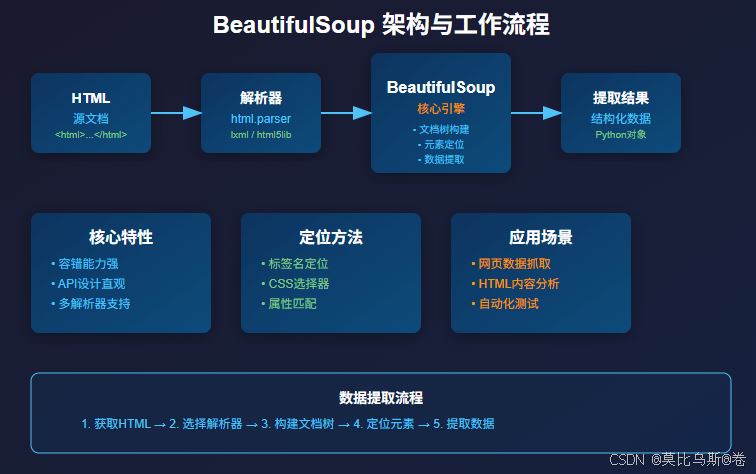
BeautifulSoup是一个Python库,专门用于从HTML和XML文档中提取数据。它能够将复杂的HTML文档转换成一个复杂的树形结构,每个节点都是Python对象。
from bs4 import BeautifulSoup
import requests

# 获取网页内容
url = "https://example.com"
response = requests.get(url)
soup = BeautifulSoup(response.content, 'html.parser')

# 现在你可以像操作Python对象一样操作HTML
title = soup.title.text
print(f"网页标题:{title}")
1. 容错能力强
BeautifulSoup能够处理各种不规范的HTML,就像一个经验丰富的医生,即使面对"病症复杂"的网页也能准确诊断。
2. API设计直观
它的语法设计非常人性化,读代码就像读英语一样自然。
3. 解析器灵活
支持多种解析器,可以根据需求选择最合适的工具。
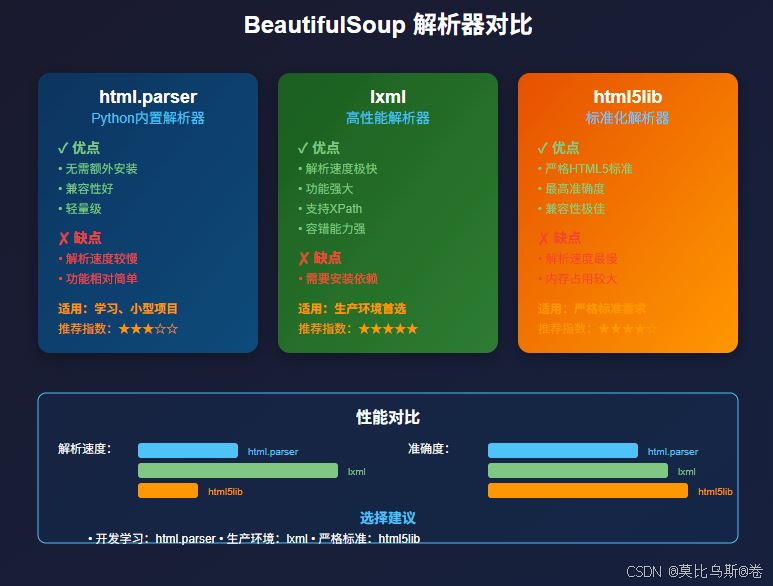
BeautifulSoup支持多种解析器,每种都有其特点:
from bs4 import BeautifulSoup

html_doc = """
<html>
<head><title>测试页面</title></head>
<body>
<p class="story">这是一个段落</p>
</body>
</html>
"""

# Python内置解析器(推荐入门使用)
soup1 = BeautifulSoup(html_doc, 'html.parser')

# lxml解析器(推荐生产环境使用)
soup2 = BeautifulSoup(html_doc, 'lxml')

# html5lib解析器(最准确但最慢)
soup3 = BeautifulSoup(html_doc, 'html5lib')
- 开发学习阶段:使用
html.parser,无需额外安装
- 生产环境:使用
lxml,速度快且功能强大
- 严格HTML5标准:使用
html5lib,准确度最高
html.parser,无需额外安装lxml,速度快且功能强大html5lib,准确度最高
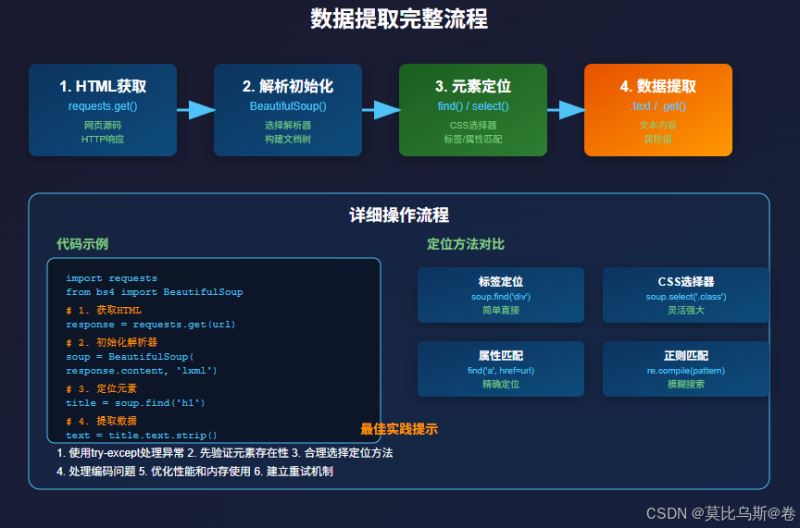
BeautifulSoup提供了多种定位元素的方法,就像GPS定位一样精准:
from bs4 import BeautifulSoup

html = """
<html>
<body>
    <div class="container">
        <h1 id="main-title">新闻标题</h1>
        <p class="content">新闻内容第一段</p>
        <p class="content">新闻内容第二段</p>
        <a href="https://example.com" rel="external nofollow"  class="link">相关链接</a>
    </div>
</body>
</html>
"""

soup = BeautifulSoup(html, 'html.parser')

# 1. 通过标签名定位
title = soup.h1
print(f"标题:{title.text}")

# 2. 通过ID定位
main_title = soup.find('h1', id='main-title')
print(f"主标题:{main_title.text}")

# 3. 通过类名定位
content_list = soup.find_all('p', class_='content')
for content in content_list:
    print(f"内容:{content.text}")

# 4. 通过属性定位
link = soup.find('a', href='https://example.com')
print(f"链接文本:{link.text}")
print(f"链接地址:{link['href']}")
CSS选择器就像GPS坐标,能够精确定位到任何元素:
# CSS选择器示例
soup = BeautifulSoup(html, 'html.parser')

# 类选择器
contents = soup.select('.content')

# ID选择器
title = soup.select('#main-title')[0]

# 层级选择器
container_p = soup.select('div.container p')

# 属性选择器
external_links = soup.select('a[href^="http"]')

# 伪类选择器
first_p = soup.select('p:first-child')
有时候我们需要进行模糊匹配,正则表达式就是最好的工具:
import re

# 使用正则表达式匹配属性
email_links = soup.find_all('a', href=re.compile(r'mailto:'))
phone_numbers = soup.find_all(string=re.compile(r'd{3}-d{4}-d{4}'))
from bs4 import BeautifulSoup
import requests

def extract_news_data(url):
    """
    新闻数据提取示例
    """
    response = requests.get(url)
    soup = BeautifulSoup(response.content, 'html.parser')

    # 提取标题
    title = soup.find('h1', class_='article-title')
    title_text = title.text.strip() if title else "无标题"

    # 提取发布时间
    time_elem = soup.find('time')
    publish_time = time_elem.get('datetime') if time_elem else "未知时间"

    # 提取正文内容
    content_divs = soup.find_all('div', class_='article-content')
    content = 'n'.join([div.text.strip() for div in content_divs])

    # 提取图片链接
    images = []
    for img in soup.find_all('img'):
        src = img.get('src')
        if src:
            # 处理相对链接
            if src.startswith('//'):
                src = 'https:' + src
            elif src.startswith('/'):
                src = 'https://example.com' + src
            images.append(src)

    return {
        'title': title_text,
        'publish_time': publish_time,
        'content': content,
        'images': images
    }
实际的网页往往结构复杂,我们需要更加精细的处理:
def extract_product_info(html):
    """
    电商产品信息提取示例
    """
    soup = BeautifulSoup(html, 'html.parser')

    product_info = {}

    # 提取产品名称
    name_elem = soup.find('h1', class_='product-name')
    product_info['name'] = name_elem.text.strip() if name_elem else ""

    # 提取价格(处理多种价格格式)
    price_elem = soup.find('span', class_='price')
    if price_elem:
        price_text = price_elem.text
        # 使用正则表达式提取数字
        import re
        price_match = re.search(r'[d,]+.?d*', price_text)
        product_info['price'] = float(price_match.group().replace(',', '')) if price_match else 0

    # 提取产品参数
    specs = {}
    spec_table = soup.find('table', class_='specifications')
    if spec_table:
        for row in spec_table.find_all('tr'):
            cells = row.find_all(['td', 'th'])
            if len(cells) >= 2:
                key = cells[0].text.strip()
                value = cells[1].text.strip()
                specs[key] = value

    product_info['specifications'] = specs

    # 提取评论数据
    reviews = []
    review_elements = soup.find_all('div', class_='review-item')
    for review in review_elements:
        rating_elem = review.find('span', class_='rating')
        content_elem = review.find('p', class_='review-content')

        if rating_elem and content_elem:
            reviews.append({
                'rating': len(rating_elem.find_all('span', class_='star-filled')),
                'content': content_elem.text.strip()
            })

    product_info['reviews'] = reviews

    return product_info
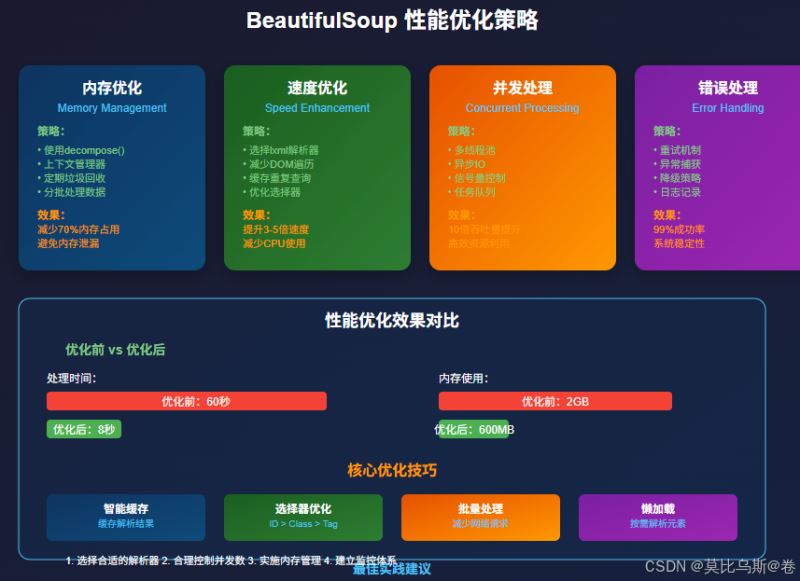
当需要处理大量数据时,性能优化就变得至关重要:
import concurrent.futures
from typing import List, Dict
import time

class WebScraper:
    def __init__(self, max_workers: int = 5):
        self.max_workers = max_workers
        self.session = requests.Session()
        # 设置通用请求头
        self.session.headers.update({
            'User-Agent': 'Mozilla/5.0 (Windows NT 10.0; Win64; x64) AppleWebKit/537.36'
        })

    def fetch_single_page(self, url: str) -> Dict:
        """
        获取单个页面数据
        """
        try:
            response = self.session.get(url, timeout=10)
            response.raise_for_status()

            soup = BeautifulSoup(response.content, 'lxml')

            # 提取数据
            return self.extract_page_data(soup, url)

        except Exception as e:
            print(f"处理 {url} 时出错: {e}")
            return {'url': url, 'error': str(e)}

    def extract_page_data(self, soup: BeautifulSoup, url: str) -> Dict:
        """
        从soup对象中提取数据
        """
        title = soup.find('title')
        title_text = title.text.strip() if title else ""

        # 提取所有链接
        links = []
        for link in soup.find_all('a', href=True):
            href = link['href']
            text = link.text.strip()
            if href and text:
                links.append({'url': href, 'text': text})

        return {
            'url': url,
            'title': title_text,
            'links': links,
            'link_count': len(links)
        }

    def batch_scrape(self, urls: List[str]) -> List[Dict]:
        """
        批量抓取数据
        """
        results = []

        with concurrent.futures.ThreadPoolExecutor(max_workers=self.max_workers) as executor:
            # 提交所有任务
            future_to_url = {executor.submit(self.fetch_single_page, url): url for url in urls}

            # 收集结果
            for future in concurrent.futures.as_completed(future_to_url):
                result = future.result()
                results.append(result)
                print(f"已完成: {result.get('url', 'Unknown')}")

        return results

# 使用示例
scraper = WebScraper(max_workers=3)
urls = [
    'https://example1.com',
    'https://example2.com',
    'https://example3.com'
]

results = scraper.batch_scrape(urls)
提取出的数据往往需要进一步清洗:
import re
from datetime import datetime
class DataCleaner:
@staticmethod
def clean_text(text: str) -> str:
"""
清洗文本数据
"""
if not text:
return ""
# 移除多余空白字符
text = re.sub(r's+', ' ', text)
# 移除HTML实体
text = text.replace(' ', ' ')
text = text.replace('<', '<')
text = text.replace('>', '>')
text = text.replace('&', '&')
return text.strip()
@staticmethod
def extract_numbers(text: str) -> List[float]:
"""
从文本中提取数字
"""
numbers = re.findall(r'd+.?d*', text)
return [float(num) for num in numbers]
@staticmethod
def parse_date(date_string: str) -> datetime:
"""
解析各种日期格式
"""
date_patterns = [
'%Y-%m-%d',
'%Y/%m/%d',
'%d-%m-%Y',
'%d/%m/%Y',
'%Y-%m-%d %H:%M:%S'
]
for pattern in date_patterns:
try:
return datetime.strptime(date_string.strip(), pattern)
except ValueError:
continue
raise ValueError(f"无法解析日期: {date_string}")
# 使用示例
cleaner = DataCleaner()
# 清洗提取的数据
def process_scraped_data(raw_data: Dict) -> Dict:
"""
处理爬取的原始数据
"""
processed = {}
# 清洗标题
processed['title'] = cleaner.clean_text(raw_data.get('title', ''))
# 提取和清洗价格
price_text = raw_data.get('price_text', '')
prices = cleaner.extract_numbers(price_text)
processed['price'] = prices[0] if prices else 0.0
# 处理日期
date_text = raw_data.get('date', '')
try:
processed['date'] = cleaner.parse_date(date_text)
except ValueError:
processed['date'] = None
return processed
让我们构建一个完整的新闻聚合器:
import json
from dataclasses import dataclass
from typing import List
import sqlite3

@dataclass
class NewsArticle:
    title: str
    content: str
    url: str
    publish_time: str
    source: str
    tags: List[str]

class NewsAggregator:
    def __init__(self, db_path: str = 'news.db'):
        self.db_path = db_path
        self.init_database()

    def init_database(self):
        """
        初始化数据库
        """
        conn = sqlite3.connect(self.db_path)
        cursor = conn.cursor()

        cursor.execute('''
            CREATE TABLE IF NOT EXISTS articles (
                id INTEGER PRIMARY KEY AUTOINCREMENT,
                title TEXT NOT NULL,
                content TEXT,
                url TEXT UNIQUE,
                publish_time TEXT,
                source TEXT,
                tags TEXT,
                created_at TIMESTAMP DEFAULT CURRENT_TIMESTAMP
            )
        ''')

        conn.commit()
        conn.close()

    def scrape_news_site(self, base_url: str, site_config: Dict) -> List[NewsArticle]:
        """
        根据配置抓取新闻站点
        """
        articles = []

        try:
            response = requests.get(base_url)
            soup = BeautifulSoup(response.content, 'lxml')

            # 根据配置提取文章链接
            article_links = soup.select(site_config['article_selector'])

            for link in article_links[:10]:  # 限制抓取数量
                article_url = link.get('href')
                if not article_url.startswith('http'):
                    article_url = base_url + article_url

                # 抓取具体文章
                article = self.scrape_article(article_url, site_config)
                if article:
                    articles.append(article)

                # 避免请求过快
                time.sleep(1)

        except Exception as e:
            print(f"抓取 {base_url} 失败: {e}")

        return articles

    def scrape_article(self, url: str, config: Dict) -> NewsArticle:
        """
        抓取单篇文章
        """
        try:
            response = requests.get(url)
            soup = BeautifulSoup(response.content, 'lxml')

            # 提取标题
            title_elem = soup.select_one(config['title_selector'])
            title = title_elem.text.strip() if title_elem else ""

            # 提取内容
            content_elems = soup.select(config['content_selector'])
            content = 'n'.join([elem.text.strip() for elem in content_elems])

            # 提取发布时间
            time_elem = soup.select_one(config.get('time_selector', ''))
            publish_time = time_elem.text.strip() if time_elem else ""

            # 提取标签
            tag_elems = soup.select(config.get('tag_selector', ''))
            tags = [tag.text.strip() for tag in tag_elems]

            return NewsArticle(
                title=title,
                content=content,
                url=url,
                publish_time=publish_time,
                source=config['source_name'],
                tags=tags
            )

        except Exception as e:
            print(f"抓取文章 {url} 失败: {e}")
            return None

    def save_articles(self, articles: List[NewsArticle]):
        """
        保存文章到数据库
        """
        conn = sqlite3.connect(self.db_path)
        cursor = conn.cursor()

        for article in articles:
            try:
                cursor.execute('''
                    INSERT OR IGNORE INTO articles
                    (title, content, url, publish_time, source, tags)
                    VALUES (?, ?, ?, ?, ?, ?)
                ''', (
                    article.title,
                    article.content,
                    article.url,
                    article.publish_time,
                    article.source,
                    json.dumps(article.tags)
                ))
            except Exception as e:
                print(f"保存文章失败: {e}")

        conn.commit()
        conn.close()

# 使用示例
aggregator = NewsAggregator()

# 配置不同新闻站点
sites_config = {
    'tech_news': {
        'url': 'https://technews.example.com',
        'source_name': '科技新闻',
        'article_selector': 'a.article-link',
        'title_selector': 'h1.article-title',
        'content_selector': 'div.article-content p',
        'time_selector': 'time.publish-time',
        'tag_selector': 'span.tag'
    }
}

# 抓取和保存新闻
for site_name, config in sites_config.items():
    print(f"正在抓取 {site_name}...")
    articles = aggregator.scrape_news_site(config['url'], config)
    aggregator.save_articles(articles)
    print(f"完成 {site_name},共抓取 {len(articles)} 篇文章")
在实际应用中,网络请求经常会失败,我们需要建立完善的错误处理机制:
import time
import random
from functools import wraps

def retry_on_failure(max_retries: int = 3, delay: float = 1.0):
    """
    失败重试装饰器
    """
    def decorator(func):
        @wraps(func)
        def wrapper(*args, **kwargs):
            last_exception = None

            for attempt in range(max_retries + 1):
                try:
                    return func(*args, **kwargs)
                except Exception as e:
                    last_exception = e
                    if attempt < max_retries:
                        wait_time = delay * (2 ** attempt) + random.uniform(0, 1)
                        print(f"第 {attempt + 1} 次尝试失败,{wait_time:.2f}秒后重试...")
                        time.sleep(wait_time)
                    else:
                        print(f"所有重试都失败了,最后的错误: {e}")

            raise last_exception
        return wrapper
    return decorator

class RobustScraper:
    def __init__(self):
        self.session = requests.Session()
        self.session.headers.update({
            'User-Agent': 'Mozilla/5.0 (Windows NT 10.0; Win64; x64) AppleWebKit/537.36'
        })

    @retry_on_failure(max_retries=3, delay=1.0)
    def fetch_page(self, url: str) -> BeautifulSoup:
        """
        获取页面内容,带重试机制
        """
        response = self.session.get(url, timeout=10)
        response.raise_for_status()

        if response.status_code == 200:
            return BeautifulSoup(response.content, 'lxml')
        else:
            raise Exception(f"HTTP状态码: {response.status_code}")

    def safe_extract_text(self, soup: BeautifulSoup, selector: str, default: str = "") -> str:
        """
        安全地提取文本,避免元素不存在的错误
        """
        try:
            element = soup.select_one(selector)
            return element.text.strip() if element else default
        except Exception as e:
            print(f"提取文本失败 ({selector}): {e}")
            return default

    def safe_extract_attr(self, soup: BeautifulSoup, selector: str, attr: str, default: str = "") -> str:
        """
        安全地提取属性值
        """
        try:
            element = soup.select_one(selector)
            return element.get(attr, default) if element else default
        except Exception as e:
            print(f"提取属性失败 ({selector}, {attr}): {e}")
            return default
处理大量数据时,内存管理变得至关重要:
import gc
from contextlib import contextmanager

@contextmanager
def memory_efficient_parsing(html_content: str, parser: str = 'lxml'):
    """
    内存高效的HTML解析上下文管理器
    """
    soup = None
    try:
        soup = BeautifulSoup(html_content, parser)
        yield soup
    finally:
        if soup:
            soup.decompose()  # 释放内存
            del soup
            gc.collect()  # 强制垃圾回收

def process_large_html_file(file_path: str):
    """
    处理大型HTML文件的示例
    """
    with open(file_path, 'r', encoding='utf-8') as f:
        html_content = f.read()

    with memory_efficient_parsing(html_content) as soup:
        # 只提取需要的数据
        results = []

        # 使用生成器避免一次性加载所有数据
        for element in soup.find_all('div', class_='data-item'):
            data = {
                'id': element.get('id'),
                'text': element.text.strip()
            }
            results.append(data)

            # 定期清理已处理的元素
            if len(results) % 1000 == 0:
                element.decompose()

        return results
import asyncio
import aiohttp
from aiohttp import ClientSession
from bs4 import BeautifulSoup

class AsyncScraper:
    def __init__(self, max_concurrent: int = 10):
        self.max_concurrent = max_concurrent
        self.semaphore = asyncio.Semaphore(max_concurrent)

    async def fetch_page(self, session: ClientSession, url: str) -> Dict:
        """
        异步获取页面
        """
        async with self.semaphore:
            try:
                async with session.get(url) as response:
                    if response.status == 200:
                        html = await response.text()
                        return await self.parse_page(html, url)
                    else:
                        return {'url': url, 'error': f'HTTP {response.status}'}
            except Exception as e:
                return {'url': url, 'error': str(e)}

    async def parse_page(self, html: str, url: str) -> Dict:
        """
        异步解析页面(在线程池中运行)
        """
        loop = asyncio.get_event_loop()
        return await loop.run_in_executor(None, self._parse_html, html, url)

    def _parse_html(self, html: str, url: str) -> Dict:
        """
        同步HTML解析函数
        """
        soup = BeautifulSoup(html, 'lxml')

        title = soup.find('title')
        title_text = title.text.strip() if title else ""

        return {
            'url': url,
            'title': title_text,
            'success': True
        }

    async def scrape_urls(self, urls: List[str]) -> List[Dict]:
        """
        批量异步抓取URL
        """
        async with aiohttp.ClientSession() as session:
            tasks = [self.fetch_page(session, url) for url in urls]
            results = await asyncio.gather(*tasks, return_exceptions=True)

            # 处理异常结果
            processed_results = []
            for result in results:
                if isinstance(result, Exception):
                    processed_results.append({'error': str(result)})
                else:
                    processed_results.append(result)

            return processed_results

# 使用示例
async def main():
    scraper = AsyncScraper(max_concurrent=5)
    urls = [f'https://example.com/page/{i}' for i in range(1, 21)]

    results = await scraper.scrape_urls(urls)

    successful = [r for r in results if r.get('success')]
    failed = [r for r in results if 'error' in r]

    print(f"成功: {len(successful)}, 失败: {len(failed)}")

# 运行异步代码
# asyncio.run(main())
import chardet

def smart_decode(content: bytes) -> str:
    """
    智能解码HTML内容
    """
    # 先尝试检测编码
    detected = chardet.detect(content)
    encoding = detected.get('encoding', 'utf-8')

    try:
        return content.decode(encoding)
    except UnicodeDecodeError:
        # 如果检测失败,尝试常见编码
        encodings = ['utf-8', 'gbk', 'gb2312', 'big5', 'latin1']
        for enc in encodings:
            try:
                return content.decode(enc)
            except UnicodeDecodeError:
                continue

        # 最后使用错误处理
        return content.decode('utf-8', errors='ignore')

# 使用示例
response = requests.get('https://example.com')
html_content = smart_decode(response.content)
soup = BeautifulSoup(html_content, 'lxml')
有些网站使用JavaScript动态加载内容,BeautifulSoup无法直接处理:
from selenium import webdriver
from selenium.webdriver.common.by import By
from selenium.webdriver.support.ui import WebDriverWait
from selenium.webdriver.support import expected_conditions as EC

class DynamicContentScraper:
    def __init__(self, headless: bool = True):
        options = webdriver.ChromeOptions()
        if headless:
            options.add_argument('--headless')
        options.add_argument('--no-sandbox')
        options.add_argument('--disable-dev-shm-usage')

        self.driver = webdriver.Chrome(options=options)
        self.wait = WebDriverWait(self.driver, 10)

    def scrape_dynamic_page(self, url: str) -> BeautifulSoup:
        """
        抓取动态加载的页面
        """
        self.driver.get(url)

        # 等待特定元素加载完成
        self.wait.until(
            EC.presence_of_element_located((By.CLASS_NAME, "dynamic-content"))
        )

        # 获取完整的HTML
        html = self.driver.page_source
        return BeautifulSoup(html, 'lxml')

    def close(self):
        """
        关闭浏览器
        """
        self.driver.quit()

# 使用示例
scraper = DynamicContentScraper()
try:
    soup = scraper.scrape_dynamic_page('https://dynamic-example.com')
    # 现在可以用BeautifulSoup处理动态加载的内容了
    data = soup.find_all('div', class_='dynamic-content')
finally:
    scraper.close()
通过本文的学习,你已经掌握了BeautifulSoup的核心技能:
- 理解HTML解析的本质:从文档树结构到元素定位
- 掌握数据提取技巧:从基础选择器到高级CSS选择器
- 学会性能优化:从单线程到异步并发处理
- 建立最佳实践:从错误处理到内存管理
BeautifulSoup不仅仅是一个工具,更是一种思维方式。它教会我们如何系统化地分析和处理结构化数据,这种能力在数据科学、爬虫开发、自动化测试等多个领域都非常有价值。
记住,技术的掌握需要实践。建议你选择一个感兴趣的网站,运用本文介绍的技巧,构建自己的数据提取项目。在实践中遇到问题时,回头查阅本文的相关章节,相信你会有更深的理解。
最后,随着网络技术的发展,网页结构也在不断变化。保持学习的心态,关注新技术的发展,才能在数据提取的道路上走得更远。
以上就是Python使用BeautifulSoup提取网页数据的完整指南的详细内容,更多关于Python BeautifulSoup提取网页数据的资料请关注风君子博客其它相关文章!
您可能感兴趣的文章:
- python数据提取BeautifulSoup的概念语法及使用优点详解
- Python BeautifulSoup4实现数据解析与提取
- Python使用BeautifulSoup实现网页链接的提取与分析
- Python使用BeautifulSoup和Scrapy抓取网页数据的具体教程
- Python使用BeautifulSoup(bs4)解析复杂的HTML内容