 编程部落
编程部落文章目录
- 将以下代码,复制到开发工具中,通过CMD,这个应用程序可以直接运行,无需额外安装库。如需扩展功能,可以在代码中添加更多的按钮和对应的计算方法。 import tkinter as tk from tkinter import font import math import re class Calculator: def __init__(self, root): self.root = root self.root.title(“高级计算器”) self.root.geometry(“400×600″) self.root.resizable(False, False) self.root.configure(bg=”#f0f0f0″) # 设置字体 self.display_font = font.Font(family=”SimHei”, size=24) self.button_font = font.Font(family=”SimHei”, size=14) # 计算变量 self.current_expression = “” self.last_result = “” self.is_new_calculation = True # 创建界面 self._create_display() self._create_buttons() # 绑定键盘事件 self.root.bind(“<Key>”, self._handle_key_event) def _create_display(self): # 历史记录显示 self.history_frame = tk.Frame(self.root, bg=”#f0f0f0″, height=50) self.history_frame.pack(fill=tk.X, padx=10, pady=(10, 0)) self.history_frame.pack_propagate(0) self.history_label = tk.Label( self.history_frame, text=””, bg=”#f0f0f0″, fg=”#888″, font=self.display_font, anchor=tk.E ) self.history_label.pack(fill=tk.BOTH, padx=5) # 当前表达式显示 self.display_frame = tk.Frame(self.root, bg=”#f0f0f0″, height=80) self.display_frame.pack(fill=tk.X, padx=10, pady=5) self.display_frame.pack_propagate(0) self.display = tk.Entry( self.display_frame, font=self.display_font, bg=”white”, fg=”black”, justify=tk.RIGHT, bd=5, relief=tk.SUNKEN ) self.display.pack(fill=tk.BOTH, padx=5, pady=5) self.display.insert(0, “0”) self.display.configure(state=”readonly”) def _create_buttons(self): button_frame = tk.Frame(self.root, bg=”#f0f0f0″) button_frame.pack(fill=tk.BOTH, expand=True, padx=10, pady=10) # 定义按钮布局 buttons = [ (“7”, 1, 0), (“8”, 1, 1), (“9”, 1, 2), (“/”, 1, 3), (“C”, 1, 4), (“4”, 2, 0), (“5”, 2, 1), (“6”, 2, 2), (“*”, 2, 3), (“⌫”, 2, 4), (“1”, 3, 0), (“2”, 3, 1), (“3”, 3, 2), (“-“, 3, 3), (“(“, 3, 4), (“0”, 4, 0), (“.”, 4, 1), (“=”, 4, 2), (“+”, 4, 3), (“)”, 4, 4), (“%”, 5, 0), (“√”, 5, 1), (“^”, 5, 2), (“π”, 5, 3), (“sin”, 5, 4), (“cos”, 6, 0), (“tan”, 6, 1), (“ln”, 6, 2), (“log”, 6, 3), (“1/x”, 6, 4) ] # 创建按钮 for button_data in buttons: text, row, col = button_data # 设置按钮样式 if text == “=”: bg_color = “#4CAF50” fg_color = “white” elif text == “C” or text == “⌫”: bg_color = “#f44336” fg_color = “white” elif col == 3 or col == 4: bg_color = “#2196F3” fg_color = “white” else: bg_color = “#e0e0e0” fg_color = “black” # 创建按钮 button = tk.Button( button_frame, text=text, font=self.button_font, bg=bg_color, fg=fg_color, relief=tk.RAISED, bd=3, padx=10, pady=10, command=lambda txt=text: self._button_click(txt) ) # 设置按钮网格 button.grid(row=row, column=col, padx=5, pady=5, sticky=”nsew”) # 设置网格权重,使按钮均匀分布 for i in range(7): button_frame.grid_rowconfigure(i, weight=1) for i in range(5): button_frame.grid_columnconfigure(i, weight=1) def _button_click(self, text): # 处理按钮点击事件 if text == “C”: self._clear_all() elif text == “⌫”: self._backspace() elif text == “=”: self._calculate() elif text == “π”: self._append_value(str(math.pi)) elif text == “√”: self._calculate_sqrt() elif text == “^”: self._append_value(“**”) elif text == “sin”: self._calculate_trig(“sin”) elif text == “cos”: self._calculate_trig(“cos”) elif text == “tan”: self._calculate_trig(“tan”) elif text == “ln”: self._calculate_ln() elif text == “log”: self._calculate_log() elif text == “1/x”: self._calculate_reciprocal() elif text == “%”: self._calculate_percentage() else: self._append_value(text) def _handle_key_event(self, event): # 处理键盘事件 key = event.char if key.isdigit() or key in “+-*/().”: self._append_value(key) elif key == “r” or key == “=”: self._calculate() elif key == “x08”: # Backspace self._backspace() elif key.lower() == “c”: self._clear_all() def _append_value(self, value): # 追加值到当前表达式 if self.is_new_calculation: self.current_expression = “” self.is_new_calculation = False if self.current_expression == “0” and value.isdigit(): self.current_expression = value else: self.current_expression += value self._update_display() def _clear_all(self): # 清除所有内容 self.current_expression = “” self.history_label.config(text=””) self.is_new_calculation = True self._update_display() def _backspace(self): # 删除最后一个字符 if not self.is_new_calculation and self.current_expression: self.current_expression = self.current_expression[:-1] self._update_display() def _update_display(self): # 更新显示内容 self.display.configure(state=”normal”) self.display.delete(0, tk.END) # 格式化显示内容 display_text = self.current_expression # 检查表达式长度,如果太长则缩小字体 if len(display_text) > 15: self.display_font.configure(size=18) else: self.display_font.configure(size=24) self.display.insert(0, display_text) self.display.configure(state=”readonly”) def _calculate(self): # 计算表达式结果 if not self.current_expression or self.is_new_calculation: return try: # 替换π和e expression = self.current_expression expression = re.sub(r’π’, str(math.pi), expression) expression = re.sub(r’e’, str(math.e), expression) # 计算结果 result = eval(expression) # 格式化结果 if isinstance(result, float): # 处理浮点数精度 if result.is_integer(): result = int(result) else: result = round(result, 10) # 更新历史记录 self.history_label.config(text=f”{self.current_expression} = {result}”) # 更新当前表达式 self.current_expression = str(result) self.last_result = str(result) self.is_new_calculation = True self._update_display() except Exception as e: self.display.configure(state=”normal”) self.display.delete(0, tk.END) self.display.insert(0, “错误”) self.display.configure(state=”readonly”) self.current_expression = “” self.is_new_calculation = True def _calculate_sqrt(self): # 计算平方根 if not self.current_expression or self.is_new_calculation: return try: value = float(self.current_expression) if value < 0: raise ValueError(“平方根不能为负数”) result = math.sqrt(value) # 更新历史记录 self.history_label.config(text=f”√{self.current_expression} = {result}”) # 更新当前表达式 self.current_expression = str(result) self.last_result = str(result) self.is_new_calculation = True self._update_display() except Exception as e: self.display.configure(state=”normal”) self.display.delete(0, tk.END) self.display.insert(0, “错误”) self.display.configure(state=”readonly”) self.current_expression = “” self.is_new_calculation = True def _calculate_trig(self, func): # 计算三角函数 if not self.current_expression or self.is_new_calculation: return try: value = float(self.current_expression) # 假设输入是角度,转换为弧度 radians = math.radians(value) if func == “sin”: result = math.sin(radians) elif func == “cos”: result = math.cos(radians) elif func == “tan”: result = math.tan(radians) else: result = “错误” # 更新历史记录 self.history_label.config(text=f”{func}({self.current_expression}°) = {result}”) # 更新当前表达式 self.current_expression = str(result) self.last_result = str(result) self.is_new_calculation = True self._update_display() except Exception as e: self.display.configure(state=”normal”) self.display.delete(0, tk.END) self.display.insert(0, “错误”) self.display.configure(state=”readonly”) self.current_expression = “” self.is_new_calculation = True def _calculate_ln(self): # 计算自然对数 if not self.current_expression or self.is_new_calculation: return try: value = float(self.current_expression) if value <= 0: raise ValueError(“对数的真数必须大于0″) result = math.log(value) # 更新历史记录 self.history_label.config(text=f”ln({self.current_expression}) = {result}”) # 更新当前表达式 self.current_expression = str(result) self.last_result = str(result) self.is_new_calculation = True self._update_display() except Exception as e: self.display.configure(state=”normal”) self.display.delete(0, tk.END) self.display.insert(0, “错误”) self.display.configure(state=”readonly”) self.current_expression = “” self.is_new_calculation = True def _calculate_log(self): # 计算常用对数 if not self.current_expression or self.is_new_calculation: return try: value = float(self.current_expression) if value <= 0: raise ValueError(“对数的真数必须大于0″) result = math.log10(value) # 更新历史记录 self.history_label.config(text=f”log({self.current_expression}) = {result}”) # 更新当前表达式 self.current_expression = str(result) self.last_result = str(result) self.is_new_calculation = True self._update_display() except Exception as e: self.display.configure(state=”normal”) self.display.delete(0, tk.END) self.display.insert(0, “错误”) self.display.configure(state=”readonly”) self.current_expression = “” self.is_new_calculation = True def _calculate_reciprocal(self): # 计算倒数 if not self.current_expression or self.is_new_calculation: return try: value = float(self.current_expression) if value == 0: raise ZeroDivisionError(“不能除以零”) result = 1 / value # 更新历史记录 self.history_label.config(text=f”1/{self.current_expression} = {result}”) # 更新当前表达式 self.current_expression = str(result) self.last_result = str(result) self.is_new_calculation = True self._update_display() except Exception as e: self.display.configure(state=”normal”) self.display.delete(0, tk.END) self.display.insert(0, “错误”) self.display.configure(state=”readonly”) self.current_expression = “” self.is_new_calculation = True def _calculate_percentage(self): # 计算百分比 if not self.current_expression or self.is_new_calculation: return try: value = float(self.current_expression) result = value / 100 # 更新历史记录 self.history_label.config(text=f”{self.current_expression}% = {result}”) # 更新当前表达式 self.current_expression = str(result) self.last_result = str(result) self.is_new_calculation = True self._update_display() except Exception as e: self.display.configure(state=”normal”) self.display.delete(0, tk.END) self.display.insert(0, “错误”) self.display.configure(state=”readonly”) self.current_expression = “” self.is_new_calculation = True if __name__ == “__main__”: root = tk.Tk() app = Calculator(root) root.mainloop()
- 打开CMD,写上“py+空格”,将文件拖入,回车运行即可。
- 代码采用面向对象的方式组织,核心是Calculator类,它负责: 创建和管理图形界面 处理用户输入(按钮点击和键盘事件) 执行计算逻辑 更新显示内容
- Calculator类中有一个初始化方法__init__(),实例化了一个GUI对象,并设置标题、窗体大小、是否可放大缩小,以及背景颜色配置。 class Calculator: def __init__(self, root): self.root = root self.root.title(“高级计算器”) self.root.geometry(“400×600″) self.root.resizable(False, False) self.root.configure(bg=”#f0f0f0″) # 设置字体 self.display_font = font.Font(family=”SimHei”, size=24) self.button_font = font.Font(family=”SimHei”, size=14) # 计算变量 self.current_expression = “” self.last_result = “” self.is_new_calculation = True # 创建界面 self._create_display() self._create_buttons() # 绑定键盘事件 self.root.bind(“<Key>”, self._handle_key_event) 代码说明: 窗口大小固定为 400×600 像素,不可调整 使用两种字体分别显示表达式和按钮文本 三个关键变量: current_expression:当前输入的表达式 last_result:上一次计算的结果 is_new_calculation:标记是否开始新的计算
- 包括当前输入的内容和上一次的计算记录,上一次的计算记录放在输入框上面。 def _create_display(self): # 历史记录显示 self.history_frame = tk.Frame(self.root, bg=”#f0f0f0″, height=50) self.history_frame.pack(fill=tk.X, padx=10, pady=(10, 0)) self.history_frame.pack_propagate(0) self.history_label = tk.Label( self.history_frame, text=””, bg=”#f0f0f0″, fg=”#888″, font=self.display_font, anchor=tk.E ) self.history_label.pack(fill=tk.BOTH, padx=5) # 当前表达式显示 self.display_frame = tk.Frame(self.root, bg=”#f0f0f0″, height=80) self.display_frame.pack(fill=tk.X, padx=10, pady=5) self.display_frame.pack_propagate(0) self.display = tk.Entry( self.display_frame, font=self.display_font, bg=”white”, fg=”black”, justify=tk.RIGHT, bd=5, relief=tk.SUNKEN ) self.display.pack(fill=tk.BOTH, padx=5, pady=5) self.display.insert(0, “0”) self.display.configure(state=”readonly”) 代码说明: 分为两个显示区域: 历史记录:显示上一次的计算表达式和结果 当前表达式:显示正在输入的内容 使用pack_propagate(0)固定框架大小 显示区域使用凹陷边框 (relief=tk.SUNKEN) 增强视觉效果
- 所有的按钮用列表保存。 def _create_buttons(self): button_frame = tk.Frame(self.root, bg=”#f0f0f0″) button_frame.pack(fill=tk.BOTH, expand=True, padx=10, pady=10) # 定义按钮布局 buttons = [ (“7”, 1, 0), (“8”, 1, 1), (“9”, 1, 2), (“/”, 1, 3), (“C”, 1, 4), (“4”, 2, 0), (“5”, 2, 1), (“6”, 2, 2), (“*”, 2, 3), (“⌫”, 2, 4), (“1”, 3, 0), (“2”, 3, 1), (“3”, 3, 2), (“-“, 3, 3), (“(“, 3, 4), (“0”, 4, 0), (“.”, 4, 1), (“=”, 4, 2), (“+”, 4, 3), (“)”, 4, 4), (“%”, 5, 0), (“√”, 5, 1), (“^”, 5, 2), (“π”, 5, 3), (“sin”, 5, 4), (“cos”, 6, 0), (“tan”, 6, 1), (“ln”, 6, 2), (“log”, 6, 3), (“1/x”, 6, 4) ] # 创建按钮 for button_data in buttons: text, row, col = button_data # 设置按钮样式 if text == “=”: bg_color = “#4CAF50” # 绿色 fg_color = “white” elif text == “C” or text == “⌫”: bg_color = “#f44336” # 红色 fg_color = “white” elif col == 3 or col == 4: bg_color = “#2196F3” # 蓝色 fg_color = “white” else: bg_color = “#e0e0e0” # 灰色 fg_color = “black” # 创建按钮并绑定事件 … 代码说明: 使用 6×5 网格布局所有按钮 不同功能的按钮使用不同颜色区分: 等号:绿色 清除和退格:红色 运算符和功能键:蓝色 数字键:灰色 使用grid方法排列按钮,并设置sticky="nsew"使其填充整个单元格
- def _calculate(self): # 计算表达式结果 if not self.current_expression or self.is_new_calculation: return try: # 替换π和e expression = self.current_expression expression = re.sub(r’π’, str(math.pi), expression) expression = re.sub(r’e’, str(math.e), expression) # 计算结果 result = eval(expression) # 格式化结果 if isinstance(result, float): if result.is_integer(): result = int(result) else: result = round(result, 10) # 更新历史记录和显示 … except Exception as e: self.display.configure(state=”normal”) self.display.delete(0, tk.END) self.display.insert(0, “错误”) self.display.configure(state=”readonly”) self.current_expression = “” self.is_new_calculation = True 代码说明: 使用 Python 内置的eval()函数计算表达式 支持 π 和 e 等数学常数 处理浮点数精度问题,避免显示过长的小数 包含异常处理,当表达式错误时显示 "错误"
- 计算器能实现多种基本的数学运算。 def _calculate_sqrt(self): # 计算平方根 if not self.current_expression or self.is_new_calculation: return try: value = float(self.current_expression) if value < 0: raise ValueError(“平方根不能为负数”) result = math.sqrt(value) # 更新历史记录和显示 … except Exception as e: self.display.configure(state=”normal”) self.display.delete(0, tk.END) self.display.insert(0, “错误”) self.display.configure(state=”readonly”) self.current_expression = “” self.is_new_calculation = True def _calculate_trig(self, func): # 计算三角函数 if not self.current_expression or self.is_new_calculation: return try: value = float(self.current_expression) # 假设输入是角度,转换为弧度 radians = math.radians(value) if func == “sin”: result = math.sin(radians) elif func == “cos”: result = math.cos(radians) elif func == “tan”: result = math.tan(radians) else: result = “错误” # 更新历史记录和显示 … except Exception as e: self.display.configure(state=”normal”) self.display.delete(0, tk.END) self.display.insert(0, “错误”) self.display.configure(state=”readonly”) self.current_expression = “” self.is_new_calculation = True 代码说明: 平方根计算:检查输入是否为非负数 三角函数:将角度转换为弧度进行计算 所有高级功能都有错误处理机制
- def _button_click(self, text): # 处理按钮点击事件 if text == “C”: self._clear_all() elif text == “⌫”: self._backspace() elif text == “=”: self._calculate() elif text == “π”: self._append_value(str(math.pi)) elif text == “√”: self._calculate_sqrt() elif text == “^”: self._append_value(“**”) elif text in [“sin”, “cos”, “tan”]: self._calculate_trig(text) elif text == “ln”: self._calculate_ln() elif text == “log”: self._calculate_log() elif text == “1/x”: self._calculate_reciprocal() elif text == “%”: self._calculate_percentage() else: self._append_value(text) def _handle_key_event(self, event): # 处理键盘事件 key = event.char if key.isdigit() or key in “+-*/().”: self._append_value(key) elif key == “r” or key == “=”: self._calculate() elif key == “x08”: # Backspace self._backspace() elif key.lower() == “c”: self._clear_all() 代码说明: 按钮点击和键盘输入都有相应的处理函数 支持数字、运算符和特殊字符输入 回车键和等号都可以触发计算
- 输入框长度是有限的,有时希望尽量能看清所有输入的字符,所以做了动态字体调整。 def _update_display(self): # 更新显示内容 self.display.configure(state=”normal”) self.display.delete(0, tk.END) # 格式化显示内容 display_text = self.current_expression # 检查表达式长度,如果太长则缩小字体 if len(display_text) > 15: self.display_font.configure(size=18) else: self.display_font.configure(size=24) self.display.insert(0, display_text) self.display.configure(state=”readonly”) 代码说明: 当表达式长度超过 15 个字符时,自动缩小字体大小 保证长表达式也能完整显示在屏幕上
- if __name__ == “__main__”: root = tk.Tk() app = Calculator(root) root.mainloop() 代码说明: 创建主窗口并启动应用程序 通过mainloop()方法进入事件循环,等待用户交互
- 添加记忆功能:增加 M+、M-、MR、MC 按钮用于存储和调用数值 支持科学计数法:对于极大或极小的计算结果,使用科学计数法显示 添加进制转换:支持二进制、八进制、十进制、十六进制之间的转换 增加括号匹配提示:在输入括号时,用不同颜色提示匹配的括号 历史记录扩展:保存多条历史计算记录,并支持查看和重复使用 这个计算器已经具备了基本和高级的计算功能,界面友好且易于使用。通过进一步扩展,可以使其成为更加强大的科学计算器。 以上就是基于Python的tkinter库开发一个计算器的完整代码的详细内容,更多关于Python tkinter计算器的资料请关注风君子博客其它相关文章! 您可能感兴趣的文章: 基于Python+tkinter实现简易计算器桌面软件 python基于tkinter图形化编程实现简易计算器功能 python tkinter实现简单计算器功能 Python tkinter实现计算器功能 基于Python+Tkinter实现一个简易计算器
目录
- 一、功能需求
- 1.功能齐全:
- 2.用户界面友好:
- 3.使用说明:
- 二、完整代码以及运行效果
- 1.完整代码
- 2.运行效果
- 三、代码详细解析
- 1.整体架构
- 2.初始化与界面设置
- 3.显示区域设计
- 4.按钮布局与设计
- 5.核心计算功能
- 6.高级数学功能
- 7.用户输入处理
- 8.动态字体调整
- 9.程序入口
- 10.功能扩展建议
我们希望实现的这个计算器应用程序,具有以下特点:
- 基本运算:加、减、乘、除
- 高级运算:平方根、百分比、幂运算
- 三角函数:sin、cos、tan
- 对数运算:自然对数 (ln)、常用对数 (log)
- 常数:π
- 清晰的显示区域,分为历史记录和当前表达式
- 颜色区分不同类型的按钮(数字、运算符、功能键)
- 响应式字体大小,适应长表达式
- 支持键盘输入,提高操作效率
- 点击按钮或使用键盘输入表达式
- 按 "=" 或回车键计算结果
- "C" 键清除所有内容
- "⌫" 键删除最后一个字符
- 三角函数接受角度值
将以下代码,复制到开发工具中,通过CMD,这个应用程序可以直接运行,无需额外安装库。如需扩展功能,可以在代码中添加更多的按钮和对应的计算方法。
import tkinter as tk
from tkinter import font
import math
import re

class Calculator:
    def __init__(self, root):
        self.root = root
        self.root.title("高级计算器")
        self.root.geometry("400x600")
        self.root.resizable(False, False)
        self.root.configure(bg="#f0f0f0")

        # 设置字体
        self.display_font = font.Font(family="SimHei", size=24)
        self.button_font = font.Font(family="SimHei", size=14)

        # 计算变量
        self.current_expression = ""
        self.last_result = ""
        self.is_new_calculation = True

        # 创建界面
        self._create_display()
        self._create_buttons()

        # 绑定键盘事件
        self.root.bind("<Key>", self._handle_key_event)

    def _create_display(self):
        # 历史记录显示
        self.history_frame = tk.Frame(self.root, bg="#f0f0f0", height=50)
        self.history_frame.pack(fill=tk.X, padx=10, pady=(10, 0))
        self.history_frame.pack_propagate(0)

        self.history_label = tk.Label(
            self.history_frame,
            text="",
            bg="#f0f0f0",
            fg="#888",
            font=self.display_font,
            anchor=tk.E
        )
        self.history_label.pack(fill=tk.BOTH, padx=5)

        # 当前表达式显示
        self.display_frame = tk.Frame(self.root, bg="#f0f0f0", height=80)
        self.display_frame.pack(fill=tk.X, padx=10, pady=5)
        self.display_frame.pack_propagate(0)

        self.display = tk.Entry(
            self.display_frame,
            font=self.display_font,
            bg="white",
            fg="black",
            justify=tk.RIGHT,
            bd=5,
            relief=tk.SUNKEN
        )
        self.display.pack(fill=tk.BOTH, padx=5, pady=5)
        self.display.insert(0, "0")
        self.display.configure(state="readonly")

    def _create_buttons(self):
        button_frame = tk.Frame(self.root, bg="#f0f0f0")
        button_frame.pack(fill=tk.BOTH, expand=True, padx=10, pady=10)

        # 定义按钮布局
        buttons = [
            ("7", 1, 0), ("8", 1, 1), ("9", 1, 2), ("/", 1, 3), ("C", 1, 4),
            ("4", 2, 0), ("5", 2, 1), ("6", 2, 2), ("*", 2, 3), ("⌫", 2, 4),
            ("1", 3, 0), ("2", 3, 1), ("3", 3, 2), ("-", 3, 3), ("(", 3, 4),
            ("0", 4, 0), (".", 4, 1), ("=", 4, 2), ("+", 4, 3), (")", 4, 4),
            ("%", 5, 0), ("√", 5, 1), ("^", 5, 2), ("π", 5, 3), ("sin", 5, 4),
            ("cos", 6, 0), ("tan", 6, 1), ("ln", 6, 2), ("log", 6, 3), ("1/x", 6, 4)
        ]

        # 创建按钮
        for button_data in buttons:
            text, row, col = button_data

            # 设置按钮样式
            if text == "=":
                bg_color = "#4CAF50"
                fg_color = "white"
            elif text == "C" or text == "⌫":
                bg_color = "#f44336"
                fg_color = "white"
            elif col == 3 or col == 4:
                bg_color = "#2196F3"
                fg_color = "white"
            else:
                bg_color = "#e0e0e0"
                fg_color = "black"

            # 创建按钮
            button = tk.Button(
                button_frame,
                text=text,
                font=self.button_font,
                bg=bg_color,
                fg=fg_color,
                relief=tk.RAISED,
                bd=3,
                padx=10,
                pady=10,
                command=lambda txt=text: self._button_click(txt)
            )

            # 设置按钮网格
            button.grid(row=row, column=col, padx=5, pady=5, sticky="nsew")

        # 设置网格权重,使按钮均匀分布
        for i in range(7):
            button_frame.grid_rowconfigure(i, weight=1)
        for i in range(5):
            button_frame.grid_columnconfigure(i, weight=1)

    def _button_click(self, text):
        # 处理按钮点击事件
        if text == "C":
            self._clear_all()
        elif text == "⌫":
            self._backspace()
        elif text == "=":
            self._calculate()
        elif text == "π":
            self._append_value(str(math.pi))
        elif text == "√":
            self._calculate_sqrt()
        elif text == "^":
            self._append_value("**")
        elif text == "sin":
            self._calculate_trig("sin")
        elif text == "cos":
            self._calculate_trig("cos")
        elif text == "tan":
            self._calculate_trig("tan")
        elif text == "ln":
            self._calculate_ln()
        elif text == "log":
            self._calculate_log()
        elif text == "1/x":
            self._calculate_reciprocal()
        elif text == "%":
            self._calculate_percentage()
        else:
            self._append_value(text)

    def _handle_key_event(self, event):
        # 处理键盘事件
        key = event.char

        if key.isdigit() or key in "+-*/().":
            self._append_value(key)
        elif key == "r" or key == "=":
            self._calculate()
        elif key == "x08":  # Backspace
            self._backspace()
        elif key.lower() == "c":
            self._clear_all()

    def _append_value(self, value):
        # 追加值到当前表达式
        if self.is_new_calculation:
            self.current_expression = ""
            self.is_new_calculation = False

        if self.current_expression == "0" and value.isdigit():
            self.current_expression = value
        else:
            self.current_expression += value

        self._update_display()

    def _clear_all(self):
        # 清除所有内容
        self.current_expression = ""
        self.history_label.config(text="")
        self.is_new_calculation = True
        self._update_display()

    def _backspace(self):
        # 删除最后一个字符
        if not self.is_new_calculation and self.current_expression:
            self.current_expression = self.current_expression[:-1]
            self._update_display()

    def _update_display(self):
        # 更新显示内容
        self.display.configure(state="normal")
        self.display.delete(0, tk.END)

        # 格式化显示内容
        display_text = self.current_expression

        # 检查表达式长度,如果太长则缩小字体
        if len(display_text) > 15:
            self.display_font.configure(size=18)
        else:
            self.display_font.configure(size=24)

        self.display.insert(0, display_text)
        self.display.configure(state="readonly")

    def _calculate(self):
        # 计算表达式结果
        if not self.current_expression or self.is_new_calculation:
            return

        try:
            # 替换π和e
            expression = self.current_expression
            expression = re.sub(r'π', str(math.pi), expression)
            expression = re.sub(r'e', str(math.e), expression)

            # 计算结果
            result = eval(expression)

            # 格式化结果
            if isinstance(result, float):
                # 处理浮点数精度
                if result.is_integer():
                    result = int(result)
                else:
                    result = round(result, 10)

            # 更新历史记录
            self.history_label.config(text=f"{self.current_expression} = {result}")

            # 更新当前表达式
            self.current_expression = str(result)
            self.last_result = str(result)
            self.is_new_calculation = True

            self._update_display()

        except Exception as e:
            self.display.configure(state="normal")
            self.display.delete(0, tk.END)
            self.display.insert(0, "错误")
            self.display.configure(state="readonly")
            self.current_expression = ""
            self.is_new_calculation = True

    def _calculate_sqrt(self):
        # 计算平方根
        if not self.current_expression or self.is_new_calculation:
            return

        try:
            value = float(self.current_expression)
            if value < 0:
                raise ValueError("平方根不能为负数")

            result = math.sqrt(value)

            # 更新历史记录
            self.history_label.config(text=f"√{self.current_expression} = {result}")

            # 更新当前表达式
            self.current_expression = str(result)
            self.last_result = str(result)
            self.is_new_calculation = True

            self._update_display()

        except Exception as e:
            self.display.configure(state="normal")
            self.display.delete(0, tk.END)
            self.display.insert(0, "错误")
            self.display.configure(state="readonly")
            self.current_expression = ""
            self.is_new_calculation = True

    def _calculate_trig(self, func):
        # 计算三角函数
        if not self.current_expression or self.is_new_calculation:
            return

        try:
            value = float(self.current_expression)
            # 假设输入是角度,转换为弧度
            radians = math.radians(value)

            if func == "sin":
                result = math.sin(radians)
            elif func == "cos":
                result = math.cos(radians)
            elif func == "tan":
                result = math.tan(radians)
            else:
                result = "错误"

            # 更新历史记录
            self.history_label.config(text=f"{func}({self.current_expression}°) = {result}")

            # 更新当前表达式
            self.current_expression = str(result)
            self.last_result = str(result)
            self.is_new_calculation = True

            self._update_display()

        except Exception as e:
            self.display.configure(state="normal")
            self.display.delete(0, tk.END)
            self.display.insert(0, "错误")
            self.display.configure(state="readonly")
            self.current_expression = ""
            self.is_new_calculation = True

    def _calculate_ln(self):
        # 计算自然对数
        if not self.current_expression or self.is_new_calculation:
            return

        try:
            value = float(self.current_expression)
            if value <= 0:
                raise ValueError("对数的真数必须大于0")

            result = math.log(value)

            # 更新历史记录
            self.history_label.config(text=f"ln({self.current_expression}) = {result}")

            # 更新当前表达式
            self.current_expression = str(result)
            self.last_result = str(result)
            self.is_new_calculation = True

            self._update_display()

        except Exception as e:
            self.display.configure(state="normal")
            self.display.delete(0, tk.END)
            self.display.insert(0, "错误")
            self.display.configure(state="readonly")
            self.current_expression = ""
            self.is_new_calculation = True

    def _calculate_log(self):
        # 计算常用对数
        if not self.current_expression or self.is_new_calculation:
            return

        try:
            value = float(self.current_expression)
            if value <= 0:
                raise ValueError("对数的真数必须大于0")

            result = math.log10(value)

            # 更新历史记录
            self.history_label.config(text=f"log({self.current_expression}) = {result}")

            # 更新当前表达式
            self.current_expression = str(result)
            self.last_result = str(result)
            self.is_new_calculation = True

            self._update_display()

        except Exception as e:
            self.display.configure(state="normal")
            self.display.delete(0, tk.END)
            self.display.insert(0, "错误")
            self.display.configure(state="readonly")
            self.current_expression = ""
            self.is_new_calculation = True

    def _calculate_reciprocal(self):
        # 计算倒数
        if not self.current_expression or self.is_new_calculation:
            return

        try:
            value = float(self.current_expression)
            if value == 0:
                raise ZeroDivisionError("不能除以零")

            result = 1 / value

            # 更新历史记录
            self.history_label.config(text=f"1/{self.current_expression} = {result}")

            # 更新当前表达式
            self.current_expression = str(result)
            self.last_result = str(result)
            self.is_new_calculation = True

            self._update_display()

        except Exception as e:
            self.display.configure(state="normal")
            self.display.delete(0, tk.END)
            self.display.insert(0, "错误")
            self.display.configure(state="readonly")
            self.current_expression = ""
            self.is_new_calculation = True

    def _calculate_percentage(self):
        # 计算百分比
        if not self.current_expression or self.is_new_calculation:
            return

        try:
            value = float(self.current_expression)
            result = value / 100

            # 更新历史记录
            self.history_label.config(text=f"{self.current_expression}% = {result}")

            # 更新当前表达式
            self.current_expression = str(result)
            self.last_result = str(result)
            self.is_new_calculation = True

            self._update_display()

        except Exception as e:
            self.display.configure(state="normal")
            self.display.delete(0, tk.END)
            self.display.insert(0, "错误")
            self.display.configure(state="readonly")
            self.current_expression = ""
            self.is_new_calculation = True

if __name__ == "__main__":
    root = tk.Tk()
    app = Calculator(root)
    root.mainloop()
打开CMD,写上“py+空格”,将文件拖入,回车运行即可。
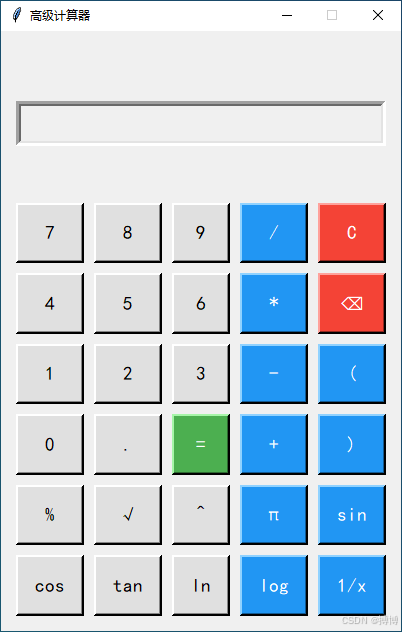
这个计算器应用程序基于 Python 的 tkinter 库开发,具有友好的用户界面和丰富的计算功能。下面我将从整体架构到具体功能逐步解析代码:
代码采用面向对象的方式组织,核心是Calculator类,它负责:
- 创建和管理图形界面
- 处理用户输入(按钮点击和键盘事件)
- 执行计算逻辑
- 更新显示内容
Calculator类中有一个初始化方法__init__(),实例化了一个GUI对象,并设置标题、窗体大小、是否可放大缩小,以及背景颜色配置。
class Calculator:
    def __init__(self, root):
        self.root = root
        self.root.title("高级计算器")
        self.root.geometry("400x600")
        self.root.resizable(False, False)
        self.root.configure(bg="#f0f0f0")

        # 设置字体
        self.display_font = font.Font(family="SimHei", size=24)
        self.button_font = font.Font(family="SimHei", size=14)

        # 计算变量
        self.current_expression = ""
        self.last_result = ""
        self.is_new_calculation = True

        # 创建界面
        self._create_display()
        self._create_buttons()

        # 绑定键盘事件
        self.root.bind("<Key>", self._handle_key_event)
代码说明:
- 窗口大小固定为 400×600 像素,不可调整
- 使用两种字体分别显示表达式和按钮文本
- 三个关键变量:
current_expression:当前输入的表达式last_result:上一次计算的结果is_new_calculation:标记是否开始新的计算
包括当前输入的内容和上一次的计算记录,上一次的计算记录放在输入框上面。
def _create_display(self):
    # 历史记录显示
    self.history_frame = tk.Frame(self.root, bg="#f0f0f0", height=50)
    self.history_frame.pack(fill=tk.X, padx=10, pady=(10, 0))
    self.history_frame.pack_propagate(0)

    self.history_label = tk.Label(
        self.history_frame,
        text="",
        bg="#f0f0f0",
        fg="#888",
        font=self.display_font,
        anchor=tk.E
    )
    self.history_label.pack(fill=tk.BOTH, padx=5)

    # 当前表达式显示
    self.display_frame = tk.Frame(self.root, bg="#f0f0f0", height=80)
    self.display_frame.pack(fill=tk.X, padx=10, pady=5)
    self.display_frame.pack_propagate(0)

    self.display = tk.Entry(
        self.display_frame,
        font=self.display_font,
        bg="white",
        fg="black",
        justify=tk.RIGHT,
        bd=5,
        relief=tk.SUNKEN
    )
    self.display.pack(fill=tk.BOTH, padx=5, pady=5)
    self.display.insert(0, "0")
    self.display.configure(state="readonly")
代码说明:
- 分为两个显示区域:
- 历史记录:显示上一次的计算表达式和结果
- 当前表达式:显示正在输入的内容
- 使用
pack_propagate(0)固定框架大小 - 显示区域使用凹陷边框 (relief=tk.SUNKEN) 增强视觉效果
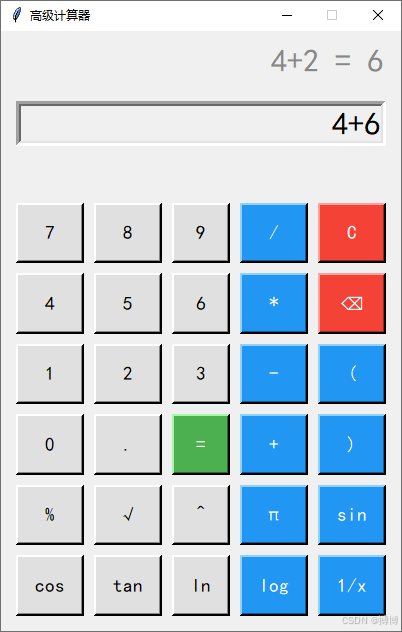
所有的按钮用列表保存。
def _create_buttons(self):
    button_frame = tk.Frame(self.root, bg="#f0f0f0")
    button_frame.pack(fill=tk.BOTH, expand=True, padx=10, pady=10)

    # 定义按钮布局
    buttons = [
        ("7", 1, 0), ("8", 1, 1), ("9", 1, 2), ("/", 1, 3), ("C", 1, 4),
        ("4", 2, 0), ("5", 2, 1), ("6", 2, 2), ("*", 2, 3), ("⌫", 2, 4),
        ("1", 3, 0), ("2", 3, 1), ("3", 3, 2), ("-", 3, 3), ("(", 3, 4),
        ("0", 4, 0), (".", 4, 1), ("=", 4, 2), ("+", 4, 3), (")", 4, 4),
        ("%", 5, 0), ("√", 5, 1), ("^", 5, 2), ("π", 5, 3), ("sin", 5, 4),
        ("cos", 6, 0), ("tan", 6, 1), ("ln", 6, 2), ("log", 6, 3), ("1/x", 6, 4)
    ]

    # 创建按钮
    for button_data in buttons:
        text, row, col = button_data

        # 设置按钮样式
        if text == "=":
            bg_color = "#4CAF50"  # 绿色
            fg_color = "white"
        elif text == "C" or text == "⌫":
            bg_color = "#f44336"  # 红色
            fg_color = "white"
        elif col == 3 or col == 4:
            bg_color = "#2196F3"  # 蓝色
            fg_color = "white"
        else:
            bg_color = "#e0e0e0"  # 灰色
            fg_color = "black"

        # 创建按钮并绑定事件
        ...
代码说明:
- 使用 6×5 网格布局所有按钮
- 不同功能的按钮使用不同颜色区分:
- 等号:绿色
- 清除和退格:红色
- 运算符和功能键:蓝色
- 数字键:灰色
- 使用
grid方法排列按钮,并设置sticky="nsew"使其填充整个单元格
def _calculate(self):
    # 计算表达式结果
    if not self.current_expression or self.is_new_calculation:
        return

    try:
        # 替换π和e
        expression = self.current_expression
        expression = re.sub(r'π', str(math.pi), expression)
        expression = re.sub(r'e', str(math.e), expression)

        # 计算结果
        result = eval(expression)

        # 格式化结果
        if isinstance(result, float):
            if result.is_integer():
                result = int(result)
            else:
                result = round(result, 10)

        # 更新历史记录和显示
        ...

    except Exception as e:
        self.display.configure(state="normal")
        self.display.delete(0, tk.END)
        self.display.insert(0, "错误")
        self.display.configure(state="readonly")
        self.current_expression = ""
        self.is_new_calculation = True
代码说明:
- 使用 Python 内置的
eval()函数计算表达式 - 支持 π 和 e 等数学常数
- 处理浮点数精度问题,避免显示过长的小数
- 包含异常处理,当表达式错误时显示 "错误"
计算器能实现多种基本的数学运算。
def _calculate_sqrt(self):
    # 计算平方根
    if not self.current_expression or self.is_new_calculation:
        return

    try:
        value = float(self.current_expression)
        if value < 0:
            raise ValueError("平方根不能为负数")

        result = math.sqrt(value)

        # 更新历史记录和显示
        ...

    except Exception as e:
        self.display.configure(state="normal")
        self.display.delete(0, tk.END)
        self.display.insert(0, "错误")
        self.display.configure(state="readonly")
        self.current_expression = ""
        self.is_new_calculation = True

def _calculate_trig(self, func):
    # 计算三角函数
    if not self.current_expression or self.is_new_calculation:
        return

    try:
        value = float(self.current_expression)
        # 假设输入是角度,转换为弧度
        radians = math.radians(value)

        if func == "sin":
            result = math.sin(radians)
        elif func == "cos":
            result = math.cos(radians)
        elif func == "tan":
            result = math.tan(radians)
        else:
            result = "错误"

        # 更新历史记录和显示
        ...

    except Exception as e:
        self.display.configure(state="normal")
        self.display.delete(0, tk.END)
        self.display.insert(0, "错误")
        self.display.configure(state="readonly")
        self.current_expression = ""
        self.is_new_calculation = True
代码说明:
- 平方根计算:检查输入是否为非负数
- 三角函数:将角度转换为弧度进行计算
- 所有高级功能都有错误处理机制
def _button_click(self, text):
    # 处理按钮点击事件
    if text == "C":
        self._clear_all()
    elif text == "⌫":
        self._backspace()
    elif text == "=":
        self._calculate()
    elif text == "π":
        self._append_value(str(math.pi))
    elif text == "√":
        self._calculate_sqrt()
    elif text == "^":
        self._append_value("**")
    elif text in ["sin", "cos", "tan"]:
        self._calculate_trig(text)
    elif text == "ln":
        self._calculate_ln()
    elif text == "log":
        self._calculate_log()
    elif text == "1/x":
        self._calculate_reciprocal()
    elif text == "%":
        self._calculate_percentage()
    else:
        self._append_value(text)

def _handle_key_event(self, event):
    # 处理键盘事件
    key = event.char

    if key.isdigit() or key in "+-*/().":
        self._append_value(key)
    elif key == "r" or key == "=":
        self._calculate()
    elif key == "x08":  # Backspace
        self._backspace()
    elif key.lower() == "c":
        self._clear_all()
代码说明:
- 按钮点击和键盘输入都有相应的处理函数
- 支持数字、运算符和特殊字符输入
- 回车键和等号都可以触发计算
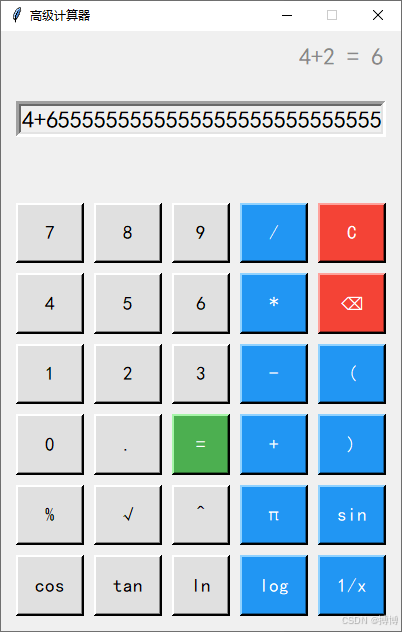
输入框长度是有限的,有时希望尽量能看清所有输入的字符,所以做了动态字体调整。
def _update_display(self):
    # 更新显示内容
    self.display.configure(state="normal")
    self.display.delete(0, tk.END)

    # 格式化显示内容
    display_text = self.current_expression

    # 检查表达式长度,如果太长则缩小字体
    if len(display_text) > 15:
        self.display_font.configure(size=18)
    else:
        self.display_font.configure(size=24)

    self.display.insert(0, display_text)
    self.display.configure(state="readonly")
代码说明:
- 当表达式长度超过 15 个字符时,自动缩小字体大小
- 保证长表达式也能完整显示在屏幕上
if __name__ == "__main__":
    root = tk.Tk()
    app = Calculator(root)
    root.mainloop()
代码说明:
- 创建主窗口并启动应用程序
- 通过
mainloop()方法进入事件循环,等待用户交互
- 添加记忆功能:增加 M+、M-、MR、MC 按钮用于存储和调用数值
- 支持科学计数法:对于极大或极小的计算结果,使用科学计数法显示
- 添加进制转换:支持二进制、八进制、十进制、十六进制之间的转换
- 增加括号匹配提示:在输入括号时,用不同颜色提示匹配的括号
- 历史记录扩展:保存多条历史计算记录,并支持查看和重复使用
这个计算器已经具备了基本和高级的计算功能,界面友好且易于使用。通过进一步扩展,可以使其成为更加强大的科学计算器。
以上就是基于Python的tkinter库开发一个计算器的完整代码的详细内容,更多关于Python tkinter计算器的资料请关注风君子博客其它相关文章!
您可能感兴趣的文章:
- 基于Python+tkinter实现简易计算器桌面软件
- python基于tkinter图形化编程实现简易计算器功能
- python tkinter实现简单计算器功能
- Python tkinter实现计算器功能
- 基于Python+Tkinter实现一个简易计算器