PythonExcel操作之将ISBN转条形码

Written by

in

文章目录
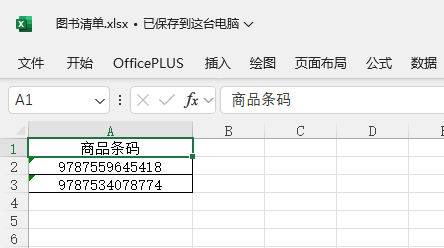
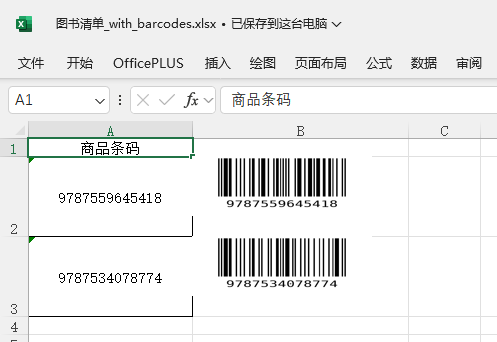
  • 原始文件: 输出文件:
  • import os import logging from openpyxl import load_workbook from openpyxl.drawing.image import Image as ExcelImage from barcode import EAN13 from barcode.writer import ImageWriter logging.basicConfig(level=logging.INFO, format=’%(asctime)s – %(levelname)s – %(message)s’) def delete_files(directory): file_list = os.listdir(directory) for file in file_list: file_path = os.path.join(directory, file) if os.path.isfile(file_path): os.remove(file_path) def generate_barcode_image_with_text(barcode_str, output_path_without_ext): # Generate barcode image without text ean = EAN13(barcode_str, writer=ImageWriter()) saved_path = ean.save(output_path_without_ext) return saved_path def insert_barcodes_to_excel(excel_file, ISBNCol, imgCol): logging.info(“开始处理”) if not os.path.exists(‘barcode_temp’): os.makedirs(‘barcode_temp’) wb = load_workbook(excel_file) ws = wb.active logging.info(f”加载工作表: {ws.title}”) img_height_in_points = 45 # 你设置的图片高度,单位是磅,1磅约等于1.33像素 for row in range(2, ws.max_row + 1): barcode_cell = ws.cell(row=row, column=ISBNCol) barcode_str = str(barcode_cell.value).strip() if not barcode_str or len(barcode_str) != 13 or not barcode_str.isdigit(): logging.warning(f”第{row}行条码格式不正确,跳过: {barcode_str}”) continue img_path_no_ext = os.path.join(‘barcode_temp’, f’barcode_{barcode_str}’) try: img_path = generate_barcode_image_with_text(barcode_str, img_path_no_ext) except Exception as e: logging.error(f”生成条码失败,行{row},条码{barcode_str},错误: {e}”) continue img_for_excel = ExcelImage(img_path) img_for_excel.width = 180 img_for_excel.height = 60 img_cell = f'{imgCol}{row}’ # # 设置列宽 ws.column_dimensions[imgCol].width = img_for_excel.width * 0.15 # # 设置行高 ws.row_dimensions[row].height = img_for_excel.height ws.add_image(img_for_excel, img_cell) # 调整当前行高,避免图片重叠 current_height = ws.row_dimensions[row].height if current_height is None or current_height < img_height_in_points: ws.row_dimensions[row].height = img_height_in_points # logging.info(f”插入条码图片到 {img_cell} 并调整行高”) new_file = os.path.splitext(excel_file)[0] + ‘_with_barcodes.xlsx’ try: wb.save(new_file) logging.info(f”保存新文件: {new_file}”) except PermissionError: logging.error(f”保存文件失败,可能文件被打开: {new_file}”) if os.path.exists(‘barcode_temp’): logging.info(“删除临时文件”) delete_files(‘barcode_temp’) logging.info(“完成处理!”) if __name__ == “__main__”: excel_path = ‘D:\temp\图书清单.xlsx’ insert_barcodes_to_excel(excel_path, 1, “B”)
  • 1、insert_barcodes_to_excel参数1:原始Excel表格文件绝对路径。 2、insert_barcodes_to_excel参数2:ISBN所在列,数字格式。例如:ISBN在A列则输入1,在B列则输入2。 3、insert_barcodes_to_excel参数3:生成的条形码需要放在第几列,大写字母格式。例如:需要放在第二列则输入B,第三列则输入C。 到此这篇关于Python Excel操作之将ISBN转条形码的文章就介绍到这了,更多相关Python ISBN转条形码内容请搜索风君子博客以前的文章或继续浏览下面的相关文章希望大家以后多多支持风君子博客! 您可能感兴趣的文章: python检查字符串是否是正确ISBN的方法 基于Python编写一个ISBN查询工具 Python使用OpenPyXL库操作Excel表的操作指南 Python进阶之Excel基本操作介绍 Python中高效处理Excel文件的10个常用库操作指南
  • 目录
    • 一、效果
    • 二、代码
    • 三、说明

    原始文件:

    输出文件:

    import os
    import logging
    from openpyxl import load_workbook
    from openpyxl.drawing.image import Image as ExcelImage
    from barcode import EAN13
    from barcode.writer import ImageWriter
     
    logging.basicConfig(level=logging.INFO, format='%(asctime)s - %(levelname)s - %(message)s')
     
     
    def delete_files(directory):
        file_list = os.listdir(directory)
        for file in file_list:
            file_path = os.path.join(directory, file)
            if os.path.isfile(file_path):
                os.remove(file_path)
     
     
    def generate_barcode_image_with_text(barcode_str, output_path_without_ext):
        # Generate barcode image without text
        ean = EAN13(barcode_str, writer=ImageWriter())
        saved_path = ean.save(output_path_without_ext)
     
        return saved_path
     
     
    def insert_barcodes_to_excel(excel_file, ISBNCol, imgCol):
        logging.info("开始处理")
     
        if not os.path.exists('barcode_temp'):
            os.makedirs('barcode_temp')
     
        wb = load_workbook(excel_file)
        ws = wb.active
        logging.info(f"加载工作表: {ws.title}")
     
        img_height_in_points = 45  # 你设置的图片高度,单位是磅,1磅约等于1.33像素
     
        for row in range(2, ws.max_row + 1):
            barcode_cell = ws.cell(row=row, column=ISBNCol)
            barcode_str = str(barcode_cell.value).strip()
            if not barcode_str or len(barcode_str) != 13 or not barcode_str.isdigit():
                logging.warning(f"第{row}行条码格式不正确,跳过: {barcode_str}")
                continue
     
            img_path_no_ext = os.path.join('barcode_temp', f'barcode_{barcode_str}')
            try:
                img_path = generate_barcode_image_with_text(barcode_str, img_path_no_ext)
            except Exception as e:
                logging.error(f"生成条码失败,行{row},条码{barcode_str},错误: {e}")
                continue
     
            img_for_excel = ExcelImage(img_path)
            img_for_excel.width = 180
            img_for_excel.height = 60
     
            img_cell = f'{imgCol}{row}'
     
            # # 设置列宽
            ws.column_dimensions[imgCol].width = img_for_excel.width * 0.15
            # # 设置行高
            ws.row_dimensions[row].height = img_for_excel.height
     
            ws.add_image(img_for_excel, img_cell)
     
            # 调整当前行高,避免图片重叠
            current_height = ws.row_dimensions[row].height
            if current_height is None or current_height < img_height_in_points:
                ws.row_dimensions[row].height = img_height_in_points
     
            # logging.info(f"插入条码图片到 {img_cell} 并调整行高")
     
        new_file = os.path.splitext(excel_file)[0] + '_with_barcodes.xlsx'
        try:
            wb.save(new_file)
            logging.info(f"保存新文件: {new_file}")
        except PermissionError:
            logging.error(f"保存文件失败,可能文件被打开: {new_file}")
     
        if os.path.exists('barcode_temp'):
            logging.info("删除临时文件")
            delete_files('barcode_temp')
     
        logging.info("完成处理!")
     
     
    if __name__ == "__main__":
        excel_path = 'D:\temp\图书清单.xlsx'
        insert_barcodes_to_excel(excel_path, 1, "B")

    1、insert_barcodes_to_excel参数1:原始Excel表格文件绝对路径。

    2、insert_barcodes_to_excel参数2:ISBN所在列,数字格式。例如:ISBN在A列则输入1,在B列则输入2。

    3、insert_barcodes_to_excel参数3:生成的条形码需要放在第几列,大写字母格式。例如:需要放在第二列则输入B,第三列则输入C。

    到此这篇关于Python Excel操作之将ISBN转条形码的文章就介绍到这了,更多相关Python ISBN转条形码内容请搜索风君子博客以前的文章或继续浏览下面的相关文章希望大家以后多多支持风君子博客!

    您可能感兴趣的文章:

    • python检查字符串是否是正确ISBN的方法
    • 基于Python编写一个ISBN查询工具
    • Python使用OpenPyXL库操作Excel表的操作指南
    • Python进阶之Excel基本操作介绍
    • Python中高效处理Excel文件的10个常用库操作指南

    站内搜索