 编程部落
编程部落文章目录
目录
- 问题
- 解决方案
执行命令conda init powershell会在 profile.ps1中添加conda初始化的命令。
即使用户不需要用到conda,也会初始化conda环境,拖慢PowerShell的启动速度。
本文展示了如何实现conda的懒加载,默认不加载conda环境,只有在用户执行conda命令时才加载。
(1) Path环境变量添加conda路径
- 添加conda3的本地路径:D:codeminiconda3
- 添加conda3的脚本路径:D:codeminiconda3Scripts
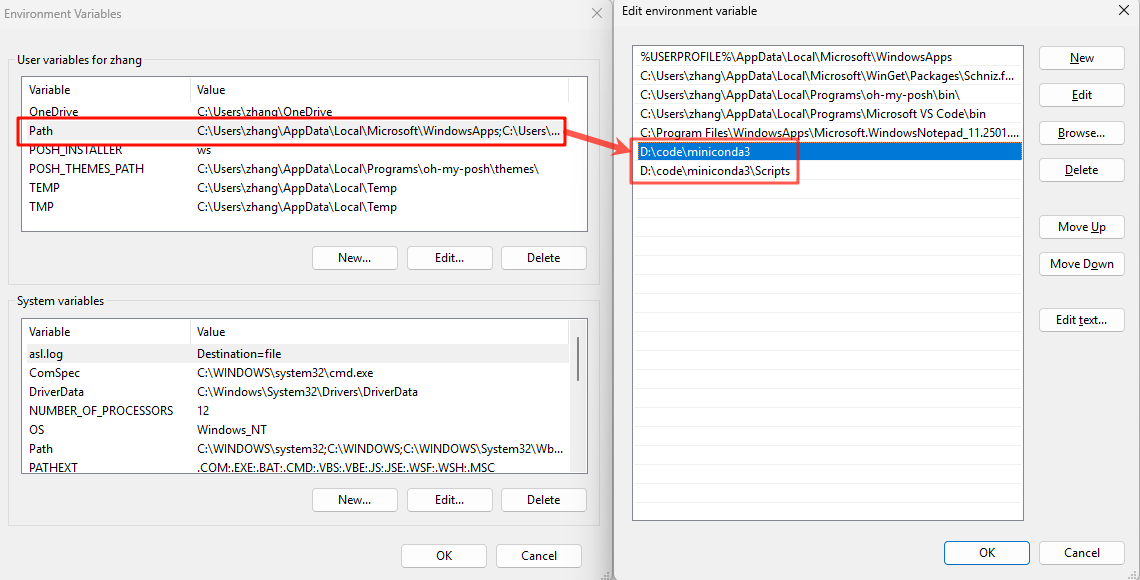
(2) 注销conda初始化命令
- 进入文件夹:C:Users<user_name>DocumentsWindowsPowerShell
- 编辑
profile.ps1文件,注释或删除conda初始化代码
#region conda initialize
# !! Contents within this block are managed by 'conda init' !!
# If (Test-Path "D:codeminiconda3Scriptsconda.exe") {
#    (& "D:codeminiconda3Scriptsconda.exe" "shell.powershell" "hook") | Out-String | ?{$_} | Invoke-Expression
# }
#endregion
(3) 封装conda命令,实现懒加载
- 进入文件夹:C:Users<user_name>DocumentsWindowsPowerShell
- 编辑
Microsoft.PowerShell_profile.ps1文件,添加代码。
function Load-Conda {
    If (Test-Path "D:codeminiconda3Scriptsconda.exe") {
        (& "D:codeminiconda3Scriptsconda.exe" "shell.powershell" "hook") | Out-String | ?{$_} | Invoke-Expression
    }
    conda @args
}
Set-Alias conda Load-Conda
到此这篇关于PowerShell 实现 conda 懒加载的文章就介绍到这了,更多相关PowerShell 实现 conda 懒加载内容请搜索风君子博客以前的文章或继续浏览下面的相关文章希望大家以后多多支持风君子博客!
您可能感兴趣的文章:
- Powershell直接脚本时出现无法加载文件因为禁止执行脚本