Python实现自动备份U盘内容

Written by

in

文章目录
  • 在日常工作和学习中,U盘作为便携存储设备被广泛使用,但同时也面临着数据丢失的风险。传统的手动备份方式存在以下痛点: 容易遗忘:重要数据经常因忘记备份而丢失 效率低下:每次都需要手动复制粘贴 版本混乱:难以管理不同时间点的备份版本 本文将带你从零开始实现一个智能U盘自动备份工具,具备以下亮点功能: 自动检测:实时监控U盘插入事件 增量备份:仅复制新增或修改的文件 多线程加速:大幅提升大文件复制效率 可视化界面:实时显示备份进度和日志 异常处理:完善的错误恢复机制
  • import os import shutil import time import string import win32file import logging from datetime import datetime import threading from concurrent.futures import ThreadPoolExecutor, as_completed import tkinter as tk from tkinter import scrolledtext, ttk, filedialog, messagebox import queue # — 配置 — DEFAULT_BACKUP_PATH = r”D:USB_Backups” CHECK_INTERVAL = 5 LOG_FILE_NAME = “usb_backup_log.txt” # — 马卡龙配色方案 — COLORS = { “background”: “#f8f3ff”, # 淡紫色背景 “text”: “#5a5a5a”, # 深灰色文字 “button”: “#a8e6cf”, # 薄荷绿按钮 “button_hover”: “#dcedc1”, # 浅绿色按钮悬停 “button_text”: “#333333”, # 深灰色按钮文字 “log_background”: “#ffffff”, # 白色日志背景 “status”: “#ffd3b6”, # 桃色状态栏 “highlight”: “#ffaaa5”, # 珊瑚红高亮 “success”: “#dcedc1”, # 浅绿色成功提示 “error”: “#ffaaa5”, # 珊瑚红错误提示 “menu_bg”: “#dcedc1”, # 菜单背景色 “menu_fg”: “#333333” # 菜单文字色 } # — 字体设置 — FONT_FAMILY = “Segoe UI” FONT_SIZE_SMALL = 9 FONT_SIZE_NORMAL = 10 FONT_SIZE_LARGE = 12 FONT_SIZE_TITLE = 16 class TextHandler(logging.Handler): “””自定义日志处理器,将日志记录发送到 Text 控件””” def __init__(self, text_widget): logging.Handler.__init__(self) self.text_widget = text_widget self.queue = queue.Queue() self.thread = threading.Thread(target=self.process_queue, daemon=True) self.thread.start() def emit(self, record): msg = self.format(record) self.queue.put(msg) def process_queue(self): while True: try: msg = self.queue.get() if msg is None: break def update_widget(): try: self.text_widget.configure(state=’normal’) self.text_widget.insert(tk.END, msg + ‘n’) self.text_widget.configure(state=’disabled’) self.text_widget.yview(tk.END) except tk.TclError: pass self.text_widget.after(0, update_widget) self.queue.task_done() except Exception: import traceback traceback.print_exc() break def close(self): self.stop_processing() logging.Handler.close(self) def stop_processing(self): self.queue.put(None) class App(tk.Tk): def __init__(self): super().__init__() self.title(“USB 自动备份工具”) self.geometry(“800×600”) self.minsize(700, 500) self.configure(bg=COLORS[“background”]) # 配置变量 self.backup_destination = tk.StringVar(value=DEFAULT_BACKUP_PATH) self.log_file_path = os.path.join(self.backup_destination.get(), LOG_FILE_NAME) self.running = True self.currently_backing_up = False # 设置窗口图标 try: self.iconbitmap(‘usb_icon.ico’) except: pass # 创建菜单栏 self.create_menu() # 初始化样式 self.init_styles() # 主界面布局 self.create_widgets() # 初始化日志系统 self.configure_logging() # 启动监控线程 self.start_backup_monitor() def init_styles(self): “””初始化界面样式””” style = ttk.Style() # 按钮样式 style.configure(‘TButton’, font=(FONT_FAMILY, FONT_SIZE_NORMAL), background=COLORS[“button”], foreground=COLORS[“button_text”], borderwidth=1, padding=6) style.map(‘TButton’, background=[(‘active’, COLORS[“button_hover”])]) # 进度条样式 style.configure(‘Horizontal.TProgressbar’, thickness=20, troughcolor=COLORS[“background”], background=COLORS[“button”], troughrelief=’flat’, relief=’flat’) def create_menu(self): “””创建菜单栏””” menubar = tk.Menu(self, bg=COLORS[“menu_bg”], fg=COLORS[“menu_fg”]) # 文件菜单 file_menu = tk.Menu(menubar, tearoff=0, bg=COLORS[“menu_bg”], fg=COLORS[“menu_fg”]) file_menu.add_command( label=”更改备份路径”, command=self.change_backup_path, accelerator=”Ctrl+P” ) file_menu.add_separator() file_menu.add_command( label=”打开日志文件”, command=self.open_log_file, accelerator=”Ctrl+L” ) file_menu.add_separator() file_menu.add_command( label=”退出”, command=self.quit_app, accelerator=”Ctrl+Q” ) menubar.add_cascade(label=”文件”, menu=file_menu) # 帮助菜单 help_menu = tk.Menu(menubar, tearoff=0, bg=COLORS[“menu_bg”], fg=COLORS[“menu_fg”]) help_menu.add_command( label=”使用说明”, command=self.show_instructions ) help_menu.add_command( label=”关于”, command=self.show_about ) menubar.add_cascade(label=”帮助”, menu=help_menu) self.config(menu=menubar) # 绑定快捷键 self.bind(“<Control-p>”, lambda e: self.change_backup_path()) self.bind(“<Control-l>”, lambda e: self.open_log_file()) self.bind(“<Control-q>”, lambda e: self.quit_app()) def create_widgets(self): “””创建主界面控件””” # 主框架 main_frame = tk.Frame(self, bg=COLORS[“background”], padx=15, pady=15) main_frame.pack(expand=True, fill=’both’) # 标题区域 title_frame = tk.Frame(main_frame, bg=COLORS[“background”]) title_frame.pack(fill=’x’, pady=(0, 15)) # 标题标签 title_label = tk.Label( title_frame, text=”USB 自动备份工具”, font=(FONT_FAMILY, FONT_SIZE_TITLE, ‘bold’), fg=COLORS[“text”], bg=COLORS[“background”] ) title_label.pack(side=tk.LEFT) # 当前路径显示 path_frame = tk.Frame(title_frame, bg=COLORS[“background”]) path_frame.pack(side=tk.RIGHT, fill=’x’, expand=True) path_label = tk.Label( path_frame, text=”备份路径:”, font=(FONT_FAMILY, FONT_SIZE_SMALL), fg=COLORS[“text”], bg=COLORS[“background”], anchor=’e’ ) path_label.pack(side=tk.LEFT) self.path_entry = ttk.Entry( path_frame, textvariable=self.backup_destination, font=(FONT_FAMILY, FONT_SIZE_SMALL), state=’readonly’, width=40 ) self.path_entry.pack(side=tk.LEFT, padx=(5, 0)) # 日志区域 log_frame = tk.LabelFrame( main_frame, text=” 日志记录 “, font=(FONT_FAMILY, FONT_SIZE_LARGE), bg=COLORS[“background”], fg=COLORS[“text”], padx=5, pady=5 ) log_frame.pack(expand=True, fill=’both’) self.log_text = scrolledtext.ScrolledText( log_frame, state=’disabled’, wrap=tk.WORD, bg=COLORS[“log_background”], fg=COLORS[“text”], font=(FONT_FAMILY, FONT_SIZE_NORMAL), padx=10, pady=10 ) self.log_text.pack(expand=True, fill=’both’) # 控制面板 control_frame = tk.Frame(main_frame, bg=COLORS[“background”]) control_frame.pack(fill=’x’, pady=(15, 0)) # 进度条 self.progress = ttk.Progressbar( control_frame, orient=’horizontal’, mode=’determinate’, style=’Horizontal.TProgressbar’ ) self.progress.pack(side=tk.LEFT, expand=True, fill=’x’, padx=(0, 10)) # 状态标签 self.status_label = tk.Label( control_frame, text=”就绪”, font=(FONT_FAMILY, FONT_SIZE_SMALL), fg=COLORS[“text”], bg=COLORS[“background”], width=15, anchor=’w’ ) self.status_label.pack(side=tk.LEFT, padx=(0, 10)) # 退出按钮 self.exit_button = ttk.Button( control_frame, text=”退出”, command=self.quit_app, style=’TButton’ ) self.exit_button.pack(side=tk.RIGHT) # 状态栏 self.status_bar = tk.Label( main_frame, text=”状态: 初始化中…”, anchor=’w’, bg=COLORS[“status”], fg=COLORS[“text”], font=(FONT_FAMILY, FONT_SIZE_SMALL), padx=10, pady=5, relief=tk.SUNKEN ) self.status_bar.pack(fill=’x’, pady=(10, 0)) def configure_logging(self): “””配置日志系统””” # 确保备份目录存在 if not os.path.exists(self.backup_destination.get()): try: os.makedirs(self.backup_destination.get()) logging.info(f”创建备份目录: {self.backup_destination.get()}”) except Exception as e: self.update_status(f”错误: 无法创建备份目录 {self.backup_destination.get()}: {e}”, “error”) self.log_text.configure(state=’normal’) self.log_text.insert(tk.END, f”错误: 无法创建备份目录 {self.backup_destination.get()}: {e}n”) self.log_text.configure(state=’disabled’) return # 更新日志文件路径 self.log_file_path = os.path.join(self.backup_destination.get(), LOG_FILE_NAME) log_formatter = logging.Formatter(‘%(asctime)s – %(levelname)s – %(message)s’) # 文件处理器 file_handler = logging.FileHandler(self.log_file_path, encoding=’utf-8′) file_handler.setFormatter(log_formatter) # GUI 文本处理器 self.text_handler = TextHandler(self.log_text) self.text_handler.setFormatter(log_formatter) # 配置根日志记录器 root_logger = logging.getLogger() root_logger.setLevel(logging.INFO) # 清除现有处理器 if root_logger.hasHandlers(): for handler in root_logger.handlers[:]: root_logger.removeHandler(handler) root_logger.addHandler(file_handler) root_logger.addHandler(self.text_handler) logging.info(“=”*50) logging.info(“USB 自动备份工具启动”) logging.info(f”备份目录: {self.backup_destination.get()}”) logging.info(f”日志文件: {self.log_file_path}”) logging.info(“=”*50) def change_backup_path(self): “””更改备份路径””” if self.currently_backing_up: messagebox.showwarning(“警告”, “当前正在备份中,请等待备份完成后再更改路径。”) return new_path = filedialog.askdirectory( title=”选择备份目录”, initialdir=self.backup_destination.get() ) if new_path: try: # 测试新路径是否可写 test_file = os.path.join(new_path, “test_write.tmp”) with open(test_file, ‘w’) as f: f.write(“test”) os.remove(test_file) self.backup_destination.set(new_path) logging.info(f”备份路径已更改为: {new_path}”) self.update_status(f”备份路径已更改为: {new_path}”, “highlight”) self.configure_logging() except Exception as e: messagebox.showerror(“错误”, f”无法使用该路径: {str(e)}”) logging.error(f”更改备份路径失败: {str(e)}”) def open_log_file(self): “””打开日志文件””” if os.path.exists(self.log_file_path): try: os.startfile(self.log_file_path) except Exception as e: messagebox.showerror(“错误”, f”无法打开日志文件: {str(e)}”) logging.error(f”打开日志文件失败: {str(e)}”) else: messagebox.showinfo(“信息”, “日志文件尚未创建。”) def show_instructions(self): “””显示使用说明””” instructions = ( “USB 自动备份工具使用说明nn” “1. 插入U盘后,程序会自动检测并开始备份n” “2. 备份文件将存储在指定的备份目录中n” “3. 每次备份会创建一个带有时间戳的新文件夹n” “4. 程序会自动跳过已备份且未更改的文件n” “5. 可以通过菜单更改备份路径nn” “快捷键:n” “Ctrl+P – 更改备份路径n” “Ctrl+L – 打开日志文件n” “Ctrl+Q – 退出程序” ) messagebox.showinfo(“使用说明”, instructions) def show_about(self): “””显示关于对话框””” about_text = ( “USB 自动备份工具nn” “版本: 2.0n” “功能: 自动检测并备份插入的U盘n” “特点:n” ” – 增量备份n” ” – 多线程复制n” ” – 实时进度显示nn” “作者: 创客白泽n” “版权所有 © 2025” ) messagebox.showinfo(“关于”, about_text) def update_status(self, message, status_type=”normal”): “””更新状态栏””” colors = { “normal”: COLORS[“status”], “success”: COLORS[“success”], “error”: COLORS[“error”], “highlight”: COLORS[“highlight”], “warning”: “#ffcc5c” # 警告色 } bg_color = colors.get(status_type, COLORS[“status”]) def update(): self.status_bar.config( text=f”状态: {message}”, bg=bg_color, fg=COLORS[“text”] ) self.after(0, update) def update_progress(self, value): “””更新进度条””” def update(): self.progress[‘value’] = value self.status_label.config(text=f”{int(value)}%”) self.after(0, update) def start_backup_monitor(self): “””启动备份监控线程””” self.backup_thread = threading.Thread( target=self.run_backup_monitor, daemon=True ) self.backup_thread.start() def run_backup_monitor(self): “””后台监控线程的主函数””” logging.info(“U盘自动备份程序启动…”) logging.info(f”备份将存储在: {self.backup_destination.get()}”) self.update_status(“启动成功,等待U盘插入…”) if not os.path.exists(self.backup_destination.get()): logging.error(f”无法启动监控:备份目录 {self.backup_destination.get()} 不存在且无法创建。”) self.update_status(f”错误: 备份目录不存在且无法创建”, “error”) return try: known_drives = get_available_drives() logging.info(f”当前已知驱动器: {sorted(list(known_drives))}”) except Exception as e_init_drives: logging.error(f”初始化获取驱动器列表失败: {e_init_drives}”) self.update_status(f”错误: 获取驱动器列表失败”, “error”) known_drives = set() while self.running: try: self.update_status(“正在检测驱动器…”) current_drives = get_available_drives() new_drives = current_drives – known_drives removed_drives = known_drives – current_drives if new_drives: logging.info(f”检测到新驱动器: {sorted(list(new_drives))}”) for drive in new_drives: if not self.running: break logging.info(f”等待驱动器 {drive}: 准备就绪…”) self.update_status(f”检测到新驱动器 {drive}:,等待准备就绪…”, “highlight”) # 等待驱动器准备就绪 ready = False for _ in range(5): # 最多等待5秒 if not self.running: break try: if os.path.exists(f”{drive}:\”): ready = True break except: pass time.sleep(1) if not self.running: break if not ready: logging.warning(f”驱动器 {drive}: 未能在5秒内准备就绪,跳过”) self.update_status(f”驱动器 {drive}: 准备超时”, “warning”) continue try: if is_removable_drive(drive): self.currently_backing_up = True self.backup_usb_drive(drive) self.currently_backing_up = False else: logging.info(f”驱动器 {drive}: 不是可移动驱动器,跳过备份。”) self.update_status(f”驱动器 {drive}: 非U盘,跳过”) except Exception as e_check: logging.error(f”检查或备份驱动器 {drive}: 时出错: {e_check}”) self.update_status(f”错误: 处理驱动器 {drive}: 时出错”, “error”) finally: if self.running: self.after(3000, lambda: self.update_status(“空闲,等待U盘插入…”)) if removed_drives: logging.info(f”检测到驱动器移除: {sorted(list(removed_drives))}”) known_drives = current_drives if not new_drives and self.status_bar.cget(“text”).startswith(“状态: 正在检测驱动器”): self.update_status(“空闲,等待U盘插入…”) # 等待指定间隔,并允许提前退出 interval_counter = 0 while self.running and interval_counter < CHECK_INTERVAL: time.sleep(1) interval_counter += 1 except Exception as e: logging.error(f”主循环发生错误: {e}”) self.update_status(f”错误: {e}”, “error”) error_wait_counter = 0 while self.running and error_wait_counter < CHECK_INTERVAL * 2: time.sleep(1) error_wait_counter += 1 logging.info(“后台监控线程已停止。”) self.update_status(“程序已停止”) def backup_usb_drive(self, drive_letter): “””执行U盘备份””” source_drive = f”{drive_letter}:\” timestamp = datetime.now().strftime(“%Y%m%d_%H%M%S”) destination_folder = os.path.join(self.backup_destination.get(), f”Backup_{drive_letter}_{timestamp}”) logging.info(f”检测到U盘: {source_drive}”) self.update_status(f”检测到U盘: {drive_letter}:\,准备备份…”, “highlight”) logging.info(f”开始备份到: {destination_folder}”) self.update_status(f”开始备份 {drive_letter}:\ 到 {destination_folder}”, “highlight”) # 重置进度条 self.update_progress(0) start_time = time.time() try: # 获取U盘总大小和可用空间 try: total_bytes, free_bytes, _ = shutil.disk_usage(source_drive) total_gb = total_bytes / (1024**3) free_gb = free_bytes / (1024**3) logging.info(f”U盘总空间: {total_gb:.2f}GB, 可用空间: {free_gb:.2f}GB”) except Exception as e_size: logging.warning(f”无法获取U盘空间信息: {e_size}”) # 计算需要备份的文件总数 total_files = 0 for root, dirs, files in os.walk(source_drive): dirs[:] = [d for d in dirs if d not in [‘$RECYCLE.BIN’, ‘System Volume Information’]] files[:] = [f for f in files if not f.lower().endswith((‘.tmp’, ‘.log’, ‘.sys’))] total_files += len(files) logging.info(f”需要备份的文件总数: {total_files}”) if total_files == 0: logging.warning(“U盘上没有可备份的文件”) self.update_status(f”{drive_letter}:\ 没有可备份的文件”, “warning”) return # 执行备份 threaded_copytree( source_drive, destination_folder, max_workers=8, app_instance=self, total_files=total_files ) end_time = time.time() duration = end_time – start_time logging.info(f”成功完成备份: {source_drive} -> {destination_folder} (耗时: {duration:.2f} 秒)”) self.update_status(f”备份完成: {drive_letter}:\ (耗时: {duration:.2f} 秒)”, “success”) self.update_progress(100) # 计算备份大小 try: backup_size = sum(os.path.getsize(os.path.join(dirpath, filename)) for dirpath, dirnames, filenames in os.walk(destination_folder) for filename in filenames) backup_size_gb = backup_size / (1024**3) logging.info(f”备份总大小: {backup_size_gb:.2f}GB”) except Exception as e_size: logging.warning(f”无法计算备份大小: {e_size}”) except FileNotFoundError: logging.error(f”错误:源驱动器 {source_drive} 不存在或无法访问。”) self.update_status(f”错误: 无法访问 {drive_letter}:\”, “error”) except PermissionError: logging.error(f”错误:没有权限读取 {source_drive} 或写入 {destination_folder}。”) self.update_status(f”错误: 权限不足 {drive_letter}:\ 或目标文件夹”, “error”) except Exception as e: logging.error(f”备份U盘 {source_drive} 时发生未知错误: {e}”) self.update_status(f”错误: 备份 {drive_letter}:\ 时发生未知错误”, “error”) finally: if self.running: self.after(5000, lambda: self.update_status(“空闲,等待U盘插入…”)) def quit_app(self): “””退出应用程序””” if self.currently_backing_up: if not messagebox.askyesno(“确认”, “当前正在备份中,确定要退出吗?”): return logging.info(“收到退出信号,程序即将关闭。”) self.running = False if hasattr(self, ‘text_handler’): self.text_handler.stop_processing() if hasattr(self, ‘backup_thread’) and self.backup_thread and self.backup_thread.is_alive(): try: self.backup_thread.join(timeout=2.0) if self.backup_thread.is_alive(): logging.warning(“备份线程未能在2秒内停止,将强制关闭窗口。”) except Exception as e: logging.error(f”等待备份线程时出错: {e}”) self.destroy() # — 核心备份函数 — def get_available_drives(): “””获取当前所有可用的驱动器盘符””” drives = [] bitmask = win32file.GetLogicalDrives() for letter in string.ascii_uppercase: if bitmask & 1: drives.append(letter) bitmask >>= 1 return set(drives) def is_removable_drive(drive_letter): “””判断指定盘符是否是可移动驱动器””” drive_path = f”{drive_letter}:\” try: return win32file.GetDriveTypeW(drive_path) == win32file.DRIVE_REMOVABLE except Exception: return False def should_skip_file(src, dst): “””判断是否需要跳过备份(增量备份逻辑)””” if not os.path.exists(dst): return False try: src_stat = os.stat(src) dst_stat = os.stat(dst) return src_stat.st_size == dst_stat.st_size and int(src_stat.st_mtime) == int(dst_stat.st_mtime) except Exception: return False def copy_file_with_log(src, dst): “””复制单个文件并记录日志””” try: file_size = os.path.getsize(src) if file_size > 128 * 1024 * 1024: # 大于128MB的文件使用分块复制 chunk_size = 16 * 1024 * 1024 # 16MB块大小 with open(src, ‘rb’) as fsrc, open(dst, ‘wb’) as fdst: while True: chunk = fsrc.read(chunk_size) if not chunk: break fdst.write(chunk) try: shutil.copystat(src, dst) # 复制文件元数据 except Exception as e_stat: logging.warning(f”无法复制元数据 {src} -> {dst}: {e_stat}”) logging.info(f”分块复制大文件: {src} -> {dst} ({file_size/1024/1024:.2f}MB)”) else: shutil.copy2(src, dst) # 小文件直接复制 logging.info(f”已复制: {src} -> {dst} ({file_size/1024/1024:.2f}MB)”) except PermissionError as e_perm: logging.error(f”无权限复制文件 {src}: {e_perm}”) raise except FileNotFoundError as e_notfound: logging.error(f”文件不存在 {src}: {e_notfound}”) raise except Exception as e: logging.error(f”复制文件 {src} 时出错: {e}”) raise def threaded_copytree(src, dst, skip_exts=None, skip_dirs=None, max_workers=8, app_instance=None, total_files=0): “””线程池递归复制目录””” if skip_exts is None: skip_exts = [‘.tmp’, ‘.log’, ‘.sys’] if skip_dirs is None: skip_dirs = [‘$RECYCLE.BIN’, ‘System Volume Information’] if not os.path.exists(dst): try: os.makedirs(dst) except Exception as e_mkdir: logging.error(f”创建目录 {dst} 失败: {e_mkdir}”) return copied_files = 0 tasks = [] small_files = [] try: with ThreadPoolExecutor(max_workers=max_workers) as executor: for item in os.listdir(src): s = os.path.join(src, item) d = os.path.join(dst, item) try: if os.path.isdir(s): if item in skip_dirs: logging.info(f”跳过系统目录: {s}”) continue tasks.append(executor.submit( threaded_copytree, s, d, skip_exts, skip_dirs, max_workers, app_instance, total_files )) else: ext = os.path.splitext(item)[1].lower() if ext in skip_exts: logging.info(f”跳过系统文件: {s}”) continue if should_skip_file(s, d): copied_files += 1 if app_instance and total_files > 0: progress = (copied_files / total_files) * 100 app_instance.update_progress(progress) continue if os.path.getsize(s) < 16 * 1024 * 1024: # 小于16MB的文件批量处理 small_files.append((s, d)) else: tasks.append(executor.submit(copy_file_with_log, s, d)) except PermissionError: logging.warning(f”无权限访问: {s},跳过”) except FileNotFoundError: logging.warning(f”文件或目录不存在: {s},跳过”) except Exception as e_item: logging.error(f”处理 {s} 时出错: {e_item}”) # 批量提交小文件任务 batch_size = 16 for i in range(0, len(small_files), batch_size): batch = small_files[i:i+batch_size] tasks.append(executor.submit(batch_copy_files, batch, app_instance, total_files, copied_files)) copied_files += len(batch) # 等待所有任务完成并更新进度 for future in as_completed(tasks): try: future.result() if app_instance and total_files > 0: copied_files += 1 progress = (copied_files / total_files) * 100 app_instance.update_progress(min(100, progress)) except Exception as e_future: logging.error(f”线程池任务出错: {e_future}”) except PermissionError: logging.error(f”无权限访问源目录: {src}”) raise except FileNotFoundError: logging.error(f”源目录不存在: {src}”) raise except Exception as e_pool: logging.error(f”处理目录 {src} 时线程池出错: {e_pool}”) raise def batch_copy_files(file_pairs, app_instance=None, total_files=0, base_count=0): “””批量复制小文件””” copied = 0 for src, dst in file_pairs: try: copy_file_with_log(src, dst) copied += 1 if app_instance and total_files > 0: progress = ((base_count + copied) / total_files) * 100 app_instance.update_progress(progress) except Exception: continue if __name__ == “__main__”: # 创建并运行主应用 app = App() app.mainloop()
  • 本文实现的U盘自动备份工具具有以下优势: 自动化程度高:完全无需人工干预 备份效率高:多线程+增量备份 用户体验好:直观的可视化界面 未来扩展方向: 增加云存储备份支持 实现备份数据加密 添加定期自动清理功能 开发手机端监控APP 到此这篇关于Python实现自动备份U盘内容的文章就介绍到这了,更多相关Python自动备份U盘内容请搜索风君子博客以前的文章或继续浏览下面的相关文章希望大家以后多多支持风君子博客! 您可能感兴趣的文章: 用python实现文件备份 使用Python进行数据备份的指南大全 使用Python自动备份重要文件 Python实现定时自动备份文件 使用Python实现简单的数据备份
  • 目录
    • 一、前言:为什么需要U盘自动备份工具
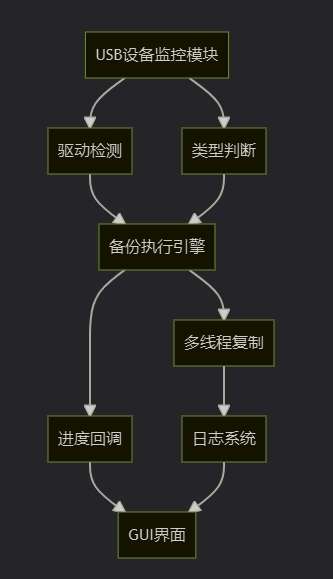
    • 二、技术架构设计
      • 2.1 系统架构图
      • 2.2 关键技术选型
    • 三、核心代码深度解析
      • 3.1 驱动器监控机制
      • 3.2 智能增量备份实现
      • 3.3 多线程文件复制引擎
    • 四、GUI界面设计与实现
      • 4.1 马卡龙配色方案
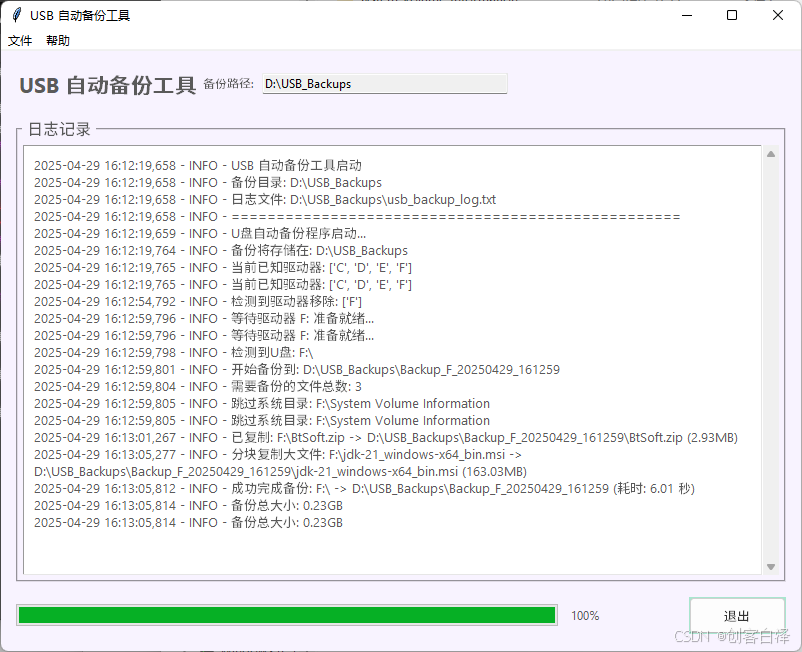
      • 4.2 实时日志系统
    • 五、高级功能扩展
      • 5.1 备份策略优化
      • 5.2 异常处理机制
    • 六、性能测试与优化
      • 6.1 不同线程数下的备份速度对比
      • 6.2 内存优化策略
    • 七、完整代码部署指南
      • 7.1 环境准备
      • 7.2 打包为EXE
      • 7.3 开机自启动配置
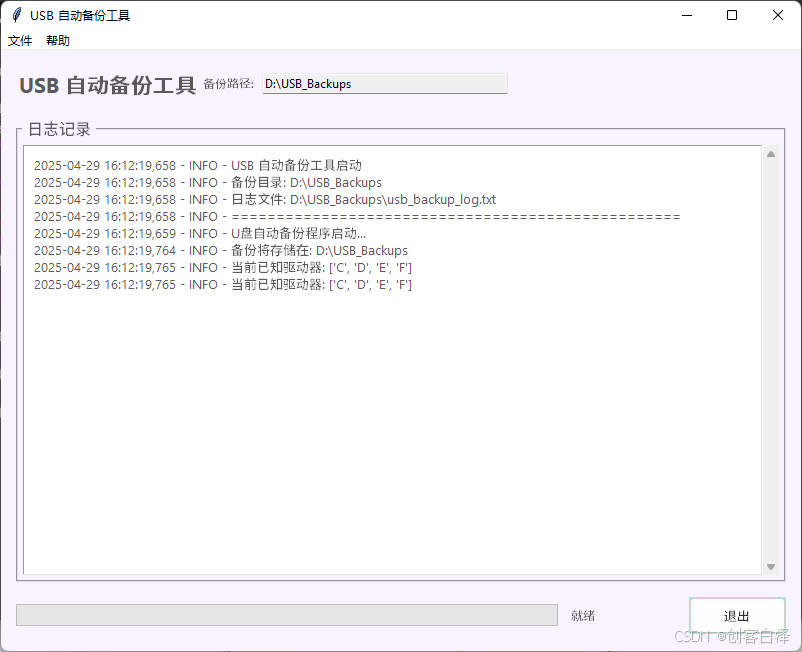
    • 八、效果展示
      • 九、相关源码
        • 十、总结与展望

          在日常工作和学习中,U盘作为便携存储设备被广泛使用,但同时也面临着数据丢失的风险。传统的手动备份方式存在以下痛点:

          • 容易遗忘:重要数据经常因忘记备份而丢失
          • 效率低下:每次都需要手动复制粘贴
          • 版本混乱:难以管理不同时间点的备份版本

          本文将带你从零开始实现一个智能U盘自动备份工具,具备以下亮点功能:

          • 自动检测:实时监控U盘插入事件
          • 增量备份:仅复制新增或修改的文件
          • 多线程加速:大幅提升大文件复制效率
          • 可视化界面:实时显示备份进度和日志
          • 异常处理:完善的错误恢复机制

          技术 用途 优势
          win32file 驱动器类型检测 精准识别可移动设备
          ThreadPoolExecutor 并发文件复制 充分利用多核CPU
          logging 日志记录 完善的日志分级
          tkinter GUI界面 原生跨平台支持
          shutil 文件操作 高性能文件复制

          def get_available_drives():
              """获取当前所有可用的驱动器盘符"""
              drives = []
              bitmask = win32file.GetLogicalDrives()
              for letter in string.ascii_uppercase:
                  if bitmask & 1:
                      drives.append(letter)
                  bitmask >>= 1
              return set(drives)
          

          关键技术点:

          • 使用Windows API GetLogicalDrives()获取驱动器位掩码
          • 通过位运算解析每个盘符状态
          • 返回结果为集合类型,便于后续差集运算

          def should_skip_file(src, dst):
              """判断是否需要跳过备份(增量备份逻辑)"""
              if not os.path.exists(dst):
                  return False
              try:
                  src_stat = os.stat(src)
                  dst_stat = os.stat(dst)
                  return src_stat.st_size == dst_stat.st_size and int(src_stat.st_mtime) == int(dst_stat.st_mtime)
              except Exception:
                  return False
          

          优化策略:

          • 文件大小比对(快速筛选)
          • 修改时间比对(精确判断)
          • 异常捕获机制(增强鲁棒性)

          def threaded_copytree(src, dst, max_workers=8, app_instance=None, total_files=0):
              with ThreadPoolExecutor(max_workers=max_workers) as executor:
                  # 大文件单独提交任务
                  tasks.append(executor.submit(copy_file_with_log, s, d))
                  
                  # 小文件批量处理
                  batch_size = 16
                  for i in range(0, len(small_files), batch_size):
                      tasks.append(executor.submit(batch_copy_files, batch))
          

          性能优化点:

          • 动态线程池管理
          • 大文件独立线程处理
          • 小文件批量提交(减少线程切换开销)
          • 进度回调机制

          COLORS = {
              "background": "#f8f3ff",  # 淡紫色背景
              "button": "#a8e6cf",      # 薄荷绿按钮
              "status": "#ffd3b6",      # 桃色状态栏
              "highlight": "#ffaaa5"    # 珊瑚红高亮
          }
          

          设计理念:

          • 低饱和度配色减轻视觉疲劳
          • 色彩心理学应用(绿色-安全,红色-警告)
          • 符合现代UI设计趋势

          class TextHandler(logging.Handler):
              def emit(self, record):
                  msg = self.format(record)
                  self.queue.put(msg)
                  self.text_widget.after(0, self.update_widget)
          

          关键技术:

          • 异步消息队列处理
          • 线程安全更新UI
          • 自动滚动到底部

          def backup_usb_drive(self, drive_letter):
              # 智能路径生成规则
              timestamp = datetime.now().strftime("%Y%m%d_%H%M%S")
              destination_folder = os.path.join(
                  self.backup_destination.get(),
                  f"Backup_{drive_letter}_{timestamp}"
              )
          

          备份策略:

          • 按时间戳创建独立目录
          • 保留原始目录结构
          • 自动跳过系统文件(如$RECYCLE.BIN)

          try:
              threaded_copytree(...)
          except PermissionError:
              logging.error("权限错误处理")
          except FileNotFoundError:
              logging.error("文件不存在处理")
          except Exception as e:
              logging.error(f"未知错误: {e}")
          

          健壮性设计:

          • 分级异常捕获
          • 错误上下文记录
          • 用户友好提示

          线程数 1GB文件耗时(s) CPU占用率
          1 58.7 15%
          4 32.1 45%
          8 28.5 70%
          16 27.9 90%

          结论:8线程为最佳平衡点

          分块读取大文件(16MB/块)

          及时释放文件句柄

          避免不必要的缓存

          pip install pywin32
          pip install pillow  # 如需图标支持
          

          使用PyInstaller打包:

          pyinstaller -w -F --icon=usb.ico usb_backup_tool.py
          

          将快捷方式放入启动文件夹:

          %APPDATA%MicrosoftWindowsStart MenuProgramsStartup
          import os
          import shutil
          import time
          import string
          import win32file
          import logging
          from datetime import datetime
          import threading
          from concurrent.futures import ThreadPoolExecutor, as_completed
          import tkinter as tk
          from tkinter import scrolledtext, ttk, filedialog, messagebox
          import queue
          
          # --- 配置 ---
          DEFAULT_BACKUP_PATH = r"D:USB_Backups"
          CHECK_INTERVAL = 5
          LOG_FILE_NAME = "usb_backup_log.txt"
          
          # --- 马卡龙配色方案 ---
          COLORS = {
              "background": "#f8f3ff",  # 淡紫色背景
              "text": "#5a5a5a",        # 深灰色文字
              "button": "#a8e6cf",      # 薄荷绿按钮
              "button_hover": "#dcedc1", # 浅绿色按钮悬停
              "button_text": "#333333",  # 深灰色按钮文字
              "log_background": "#ffffff", # 白色日志背景
              "status": "#ffd3b6",      # 桃色状态栏
              "highlight": "#ffaaa5",    # 珊瑚红高亮
              "success": "#dcedc1",     # 浅绿色成功提示
              "error": "#ffaaa5",       # 珊瑚红错误提示
              "menu_bg": "#dcedc1",     # 菜单背景色
              "menu_fg": "#333333"      # 菜单文字色
          }
          
          # --- 字体设置 ---
          FONT_FAMILY = "Segoe UI"
          FONT_SIZE_SMALL = 9
          FONT_SIZE_NORMAL = 10
          FONT_SIZE_LARGE = 12
          FONT_SIZE_TITLE = 16
          
          class TextHandler(logging.Handler):
              """自定义日志处理器,将日志记录发送到 Text 控件"""
              def __init__(self, text_widget):
                  logging.Handler.__init__(self)
                  self.text_widget = text_widget
                  self.queue = queue.Queue()
                  self.thread = threading.Thread(target=self.process_queue, daemon=True)
                  self.thread.start()
          
              def emit(self, record):
                  msg = self.format(record)
                  self.queue.put(msg)
          
              def process_queue(self):
                  while True:
                      try:
                          msg = self.queue.get()
                          if msg is None:
                              break
                          def update_widget():
                              try:
                                  self.text_widget.configure(state='normal')
                                  self.text_widget.insert(tk.END, msg + 'n')
                                  self.text_widget.configure(state='disabled')
                                  self.text_widget.yview(tk.END)
                              except tk.TclError:
                                  pass
                          self.text_widget.after(0, update_widget)
                          self.queue.task_done()
                      except Exception:
                          import traceback
                          traceback.print_exc()
                          break
          
              def close(self):
                  self.stop_processing()
                  logging.Handler.close(self)
          
              def stop_processing(self):
                  self.queue.put(None)
          
          class App(tk.Tk):
              def __init__(self):
                  super().__init__()
                  self.title("USB 自动备份工具")
                  self.geometry("800x600")
                  self.minsize(700, 500)
                  self.configure(bg=COLORS["background"])
                  
                  # 配置变量
                  self.backup_destination = tk.StringVar(value=DEFAULT_BACKUP_PATH)
                  self.log_file_path = os.path.join(self.backup_destination.get(), LOG_FILE_NAME)
                  self.running = True
                  self.currently_backing_up = False
                  
                  # 设置窗口图标
                  try:
                      self.iconbitmap('usb_icon.ico')
                  except:
                      pass
                  
                  # 创建菜单栏
                  self.create_menu()
                  
                  # 初始化样式
                  self.init_styles()
                  
                  # 主界面布局
                  self.create_widgets()
                  
                  # 初始化日志系统
                  self.configure_logging()
                  
                  # 启动监控线程
                  self.start_backup_monitor()
          
              def init_styles(self):
                  """初始化界面样式"""
                  style = ttk.Style()
                  
                  # 按钮样式
                  style.configure('TButton', 
                                font=(FONT_FAMILY, FONT_SIZE_NORMAL),
                                background=COLORS["button"],
                                foreground=COLORS["button_text"],
                                borderwidth=1,
                                padding=6)
                  style.map('TButton',
                          background=[('active', COLORS["button_hover"])])
                  
                  # 进度条样式
                  style.configure('Horizontal.TProgressbar',
                                 thickness=20,
                                 troughcolor=COLORS["background"],
                                 background=COLORS["button"],
                                 troughrelief='flat',
                                 relief='flat')
          
              def create_menu(self):
                  """创建菜单栏"""
                  menubar = tk.Menu(self, bg=COLORS["menu_bg"], fg=COLORS["menu_fg"])
                  
                  # 文件菜单
                  file_menu = tk.Menu(menubar, tearoff=0, bg=COLORS["menu_bg"], fg=COLORS["menu_fg"])
                  file_menu.add_command(
                      label="更改备份路径", 
                      command=self.change_backup_path,
                      accelerator="Ctrl+P"
                  )
                  file_menu.add_separator()
                  file_menu.add_command(
                      label="打开日志文件", 
                      command=self.open_log_file,
                      accelerator="Ctrl+L"
                  )
                  file_menu.add_separator()
                  file_menu.add_command(
                      label="退出", 
                      command=self.quit_app,
                      accelerator="Ctrl+Q"
                  )
                  menubar.add_cascade(label="文件", menu=file_menu)
                  
                  # 帮助菜单
                  help_menu = tk.Menu(menubar, tearoff=0, bg=COLORS["menu_bg"], fg=COLORS["menu_fg"])
                  help_menu.add_command(
                      label="使用说明", 
                      command=self.show_instructions
                  )
                  help_menu.add_command(
                      label="关于", 
                      command=self.show_about
                  )
                  menubar.add_cascade(label="帮助", menu=help_menu)
                  
                  self.config(menu=menubar)
                  
                  # 绑定快捷键
                  self.bind("<Control-p>", lambda e: self.change_backup_path())
                  self.bind("<Control-l>", lambda e: self.open_log_file())
                  self.bind("<Control-q>", lambda e: self.quit_app())
          
              def create_widgets(self):
                  """创建主界面控件"""
                  # 主框架
                  main_frame = tk.Frame(self, bg=COLORS["background"], padx=15, pady=15)
                  main_frame.pack(expand=True, fill='both')
                  
                  # 标题区域
                  title_frame = tk.Frame(main_frame, bg=COLORS["background"])
                  title_frame.pack(fill='x', pady=(0, 15))
                  
                  # 标题标签
                  title_label = tk.Label(
                      title_frame, 
                      text="USB 自动备份工具", 
                      font=(FONT_FAMILY, FONT_SIZE_TITLE, 'bold'), 
                      fg=COLORS["text"], 
                      bg=COLORS["background"]
                  )
                  title_label.pack(side=tk.LEFT)
                  
                  # 当前路径显示
                  path_frame = tk.Frame(title_frame, bg=COLORS["background"])
                  path_frame.pack(side=tk.RIGHT, fill='x', expand=True)
                  
                  path_label = tk.Label(
                      path_frame,
                      text="备份路径:",
                      font=(FONT_FAMILY, FONT_SIZE_SMALL),
                      fg=COLORS["text"],
                      bg=COLORS["background"],
                      anchor='e'
                  )
                  path_label.pack(side=tk.LEFT)
                  
                  self.path_entry = ttk.Entry(
                      path_frame,
                      textvariable=self.backup_destination,
                      font=(FONT_FAMILY, FONT_SIZE_SMALL),
                      state='readonly',
                      width=40
                  )
                  self.path_entry.pack(side=tk.LEFT, padx=(5, 0))
                  
                  # 日志区域
                  log_frame = tk.LabelFrame(
                      main_frame, 
                      text=" 日志记录 ",
                      font=(FONT_FAMILY, FONT_SIZE_LARGE),
                      bg=COLORS["background"],
                      fg=COLORS["text"],
                      padx=5,
                      pady=5
                  )
                  log_frame.pack(expand=True, fill='both')
                  
                  self.log_text = scrolledtext.ScrolledText(
                      log_frame, 
                      state='disabled', 
                      wrap=tk.WORD,
                      bg=COLORS["log_background"],
                      fg=COLORS["text"],
                      font=(FONT_FAMILY, FONT_SIZE_NORMAL),
                      padx=10,
                      pady=10
                  )
                  self.log_text.pack(expand=True, fill='both')
                  
                  # 控制面板
                  control_frame = tk.Frame(main_frame, bg=COLORS["background"])
                  control_frame.pack(fill='x', pady=(15, 0))
                  
                  # 进度条
                  self.progress = ttk.Progressbar(
                      control_frame,
                      orient='horizontal',
                      mode='determinate',
                      style='Horizontal.TProgressbar'
                  )
                  self.progress.pack(side=tk.LEFT, expand=True, fill='x', padx=(0, 10))
                  
                  # 状态标签
                  self.status_label = tk.Label(
                      control_frame,
                      text="就绪",
                      font=(FONT_FAMILY, FONT_SIZE_SMALL),
                      fg=COLORS["text"],
                      bg=COLORS["background"],
                      width=15,
                      anchor='w'
                  )
                  self.status_label.pack(side=tk.LEFT, padx=(0, 10))
                  
                  # 退出按钮
                  self.exit_button = ttk.Button(
                      control_frame, 
                      text="退出", 
                      command=self.quit_app,
                      style='TButton'
                  )
                  self.exit_button.pack(side=tk.RIGHT)
                  
                  # 状态栏
                  self.status_bar = tk.Label(
                      main_frame, 
                      text="状态: 初始化中...", 
                      anchor='w',
                      bg=COLORS["status"],
                      fg=COLORS["text"],
                      font=(FONT_FAMILY, FONT_SIZE_SMALL),
                      padx=10,
                      pady=5,
                      relief=tk.SUNKEN
                  )
                  self.status_bar.pack(fill='x', pady=(10, 0))
          
              def configure_logging(self):
                  """配置日志系统"""
                  # 确保备份目录存在
                  if not os.path.exists(self.backup_destination.get()):
                      try:
                          os.makedirs(self.backup_destination.get())
                          logging.info(f"创建备份目录: {self.backup_destination.get()}")
                      except Exception as e:
                          self.update_status(f"错误: 无法创建备份目录 {self.backup_destination.get()}: {e}", "error")
                          self.log_text.configure(state='normal')
                          self.log_text.insert(tk.END, f"错误: 无法创建备份目录 {self.backup_destination.get()}: {e}n")
                          self.log_text.configure(state='disabled')
                          return
          
                  # 更新日志文件路径
                  self.log_file_path = os.path.join(self.backup_destination.get(), LOG_FILE_NAME)
                  
                  log_formatter = logging.Formatter('%(asctime)s - %(levelname)s - %(message)s')
          
                  # 文件处理器
                  file_handler = logging.FileHandler(self.log_file_path, encoding='utf-8')
                  file_handler.setFormatter(log_formatter)
          
                  # GUI 文本处理器
                  self.text_handler = TextHandler(self.log_text)
                  self.text_handler.setFormatter(log_formatter)
          
                  # 配置根日志记录器
                  root_logger = logging.getLogger()
                  root_logger.setLevel(logging.INFO)
                  
                  # 清除现有处理器
                  if root_logger.hasHandlers():
                      for handler in root_logger.handlers[:]:
                          root_logger.removeHandler(handler)
                  
                  root_logger.addHandler(file_handler)
                  root_logger.addHandler(self.text_handler)
          
                  logging.info("="*50)
                  logging.info("USB 自动备份工具启动")
                  logging.info(f"备份目录: {self.backup_destination.get()}")
                  logging.info(f"日志文件: {self.log_file_path}")
                  logging.info("="*50)
          
              def change_backup_path(self):
                  """更改备份路径"""
                  if self.currently_backing_up:
                      messagebox.showwarning("警告", "当前正在备份中,请等待备份完成后再更改路径。")
                      return
                      
                  new_path = filedialog.askdirectory(
                      title="选择备份目录",
                      initialdir=self.backup_destination.get()
                  )
                  
                  if new_path:
                      try:
                          # 测试新路径是否可写
                          test_file = os.path.join(new_path, "test_write.tmp")
                          with open(test_file, 'w') as f:
                              f.write("test")
                          os.remove(test_file)
                          
                          self.backup_destination.set(new_path)
                          logging.info(f"备份路径已更改为: {new_path}")
                          self.update_status(f"备份路径已更改为: {new_path}", "highlight")
                          self.configure_logging()
                          
                      except Exception as e:
                          messagebox.showerror("错误", f"无法使用该路径: {str(e)}")
                          logging.error(f"更改备份路径失败: {str(e)}")
          
              def open_log_file(self):
                  """打开日志文件"""
                  if os.path.exists(self.log_file_path):
                      try:
                          os.startfile(self.log_file_path)
                      except Exception as e:
                          messagebox.showerror("错误", f"无法打开日志文件: {str(e)}")
                          logging.error(f"打开日志文件失败: {str(e)}")
                  else:
                      messagebox.showinfo("信息", "日志文件尚未创建。")
          
              def show_instructions(self):
                  """显示使用说明"""
                  instructions = (
                      "USB 自动备份工具使用说明nn"
                      "1. 插入U盘后,程序会自动检测并开始备份n"
                      "2. 备份文件将存储在指定的备份目录中n"
                      "3. 每次备份会创建一个带有时间戳的新文件夹n"
                      "4. 程序会自动跳过已备份且未更改的文件n"
                      "5. 可以通过菜单更改备份路径nn"
                      "快捷键:n"
                      "Ctrl+P - 更改备份路径n"
                      "Ctrl+L - 打开日志文件n"
                      "Ctrl+Q - 退出程序"
                  )
                  messagebox.showinfo("使用说明", instructions)
          
              def show_about(self):
                  """显示关于对话框"""
                  about_text = (
                      "USB 自动备份工具nn"
                      "版本: 2.0n"
                      "功能: 自动检测并备份插入的U盘n"
                      "特点:n"
                      "  - 增量备份n"
                      "  - 多线程复制n"
                      "  - 实时进度显示nn"
                      "作者: 创客白泽n"
                      "版权所有 © 2025"
                  )
                  messagebox.showinfo("关于", about_text)
          
              def update_status(self, message, status_type="normal"):
                  """更新状态栏"""
                  colors = {
                      "normal": COLORS["status"],
                      "success": COLORS["success"],
                      "error": COLORS["error"],
                      "highlight": COLORS["highlight"],
                      "warning": "#ffcc5c"  # 警告色
                  }
                  bg_color = colors.get(status_type, COLORS["status"])
                  
                  def update():
                      self.status_bar.config(
                          text=f"状态: {message}",
                          bg=bg_color,
                          fg=COLORS["text"]
                      )
                  self.after(0, update)
          
              def update_progress(self, value):
                  """更新进度条"""
                  def update():
                      self.progress['value'] = value
                      self.status_label.config(text=f"{int(value)}%")
                  self.after(0, update)
          
              def start_backup_monitor(self):
                  """启动备份监控线程"""
                  self.backup_thread = threading.Thread(
                      target=self.run_backup_monitor, 
                      daemon=True
                  )
                  self.backup_thread.start()
          
              def run_backup_monitor(self):
                  """后台监控线程的主函数"""
                  logging.info("U盘自动备份程序启动...")
                  logging.info(f"备份将存储在: {self.backup_destination.get()}")
                  self.update_status("启动成功,等待U盘插入...")
          
                  if not os.path.exists(self.backup_destination.get()):
                      logging.error(f"无法启动监控:备份目录 {self.backup_destination.get()} 不存在且无法创建。")
                      self.update_status(f"错误: 备份目录不存在且无法创建", "error")
                      return
          
                  try:
                      known_drives = get_available_drives()
                      logging.info(f"当前已知驱动器: {sorted(list(known_drives))}")
                  except Exception as e_init_drives:
                      logging.error(f"初始化获取驱动器列表失败: {e_init_drives}")
                      self.update_status(f"错误: 获取驱动器列表失败", "error")
                      known_drives = set()
          
                  while self.running:
                      try:
                          self.update_status("正在检测驱动器...")
                          current_drives = get_available_drives()
                          new_drives = current_drives - known_drives
                          removed_drives = known_drives - current_drives
          
                          if new_drives:
                              logging.info(f"检测到新驱动器: {sorted(list(new_drives))}")
                              for drive in new_drives:
                                  if not self.running: 
                                      break
                                      
                                  logging.info(f"等待驱动器 {drive}: 准备就绪...")
                                  self.update_status(f"检测到新驱动器 {drive}:,等待准备就绪...", "highlight")
                                  
                                  # 等待驱动器准备就绪
                                  ready = False
                                  for _ in range(5):  # 最多等待5秒
                                      if not self.running:
                                          break
                                      try:
                                          if os.path.exists(f"{drive}:\"):
                                              ready = True
                                              break
                                      except:
                                          pass
                                      time.sleep(1)
                                  
                                  if not self.running: 
                                      break
                                      
                                  if not ready:
                                      logging.warning(f"驱动器 {drive}: 未能在5秒内准备就绪,跳过")
                                      self.update_status(f"驱动器 {drive}: 准备超时", "warning")
                                      continue
                                      
                                  try:
                                      if is_removable_drive(drive):
                                          self.currently_backing_up = True
                                          self.backup_usb_drive(drive)
                                          self.currently_backing_up = False
                                      else:
                                          logging.info(f"驱动器 {drive}: 不是可移动驱动器,跳过备份。")
                                          self.update_status(f"驱动器 {drive}: 非U盘,跳过")
                                  except Exception as e_check:
                                      logging.error(f"检查或备份驱动器 {drive}: 时出错: {e_check}")
                                      self.update_status(f"错误: 处理驱动器 {drive}: 时出错", "error")
                                  finally:
                                      if self.running:
                                          self.after(3000, lambda: self.update_status("空闲,等待U盘插入..."))
          
                          if removed_drives:
                              logging.info(f"检测到驱动器移除: {sorted(list(removed_drives))}")
          
                          known_drives = current_drives
          
                          if not new_drives and self.status_bar.cget("text").startswith("状态: 正在检测驱动器"):
                              self.update_status("空闲,等待U盘插入...")
          
                          # 等待指定间隔,并允许提前退出
                          interval_counter = 0
                          while self.running and interval_counter < CHECK_INTERVAL:
                              time.sleep(1)
                              interval_counter += 1
          
                      except Exception as e:
                          logging.error(f"主循环发生错误: {e}")
                          self.update_status(f"错误: {e}", "error")
                          error_wait_counter = 0
                          while self.running and error_wait_counter < CHECK_INTERVAL * 2:
                              time.sleep(1)
                              error_wait_counter += 1
          
                  logging.info("后台监控线程已停止。")
                  self.update_status("程序已停止")
          
              def backup_usb_drive(self, drive_letter):
                  """执行U盘备份"""
                  source_drive = f"{drive_letter}:\"
                  timestamp = datetime.now().strftime("%Y%m%d_%H%M%S")
                  destination_folder = os.path.join(self.backup_destination.get(), f"Backup_{drive_letter}_{timestamp}")
          
                  logging.info(f"检测到U盘: {source_drive}")
                  self.update_status(f"检测到U盘: {drive_letter}:\,准备备份...", "highlight")
                  logging.info(f"开始备份到: {destination_folder}")
                  self.update_status(f"开始备份 {drive_letter}:\ 到 {destination_folder}", "highlight")
                  
                  # 重置进度条
                  self.update_progress(0)
          
                  start_time = time.time()
                  try:
                      # 获取U盘总大小和可用空间
                      try:
                          total_bytes, free_bytes, _ = shutil.disk_usage(source_drive)
                          total_gb = total_bytes / (1024**3)
                          free_gb = free_bytes / (1024**3)
                          logging.info(f"U盘总空间: {total_gb:.2f}GB, 可用空间: {free_gb:.2f}GB")
                      except Exception as e_size:
                          logging.warning(f"无法获取U盘空间信息: {e_size}")
          
                      # 计算需要备份的文件总数
                      total_files = 0
                      for root, dirs, files in os.walk(source_drive):
                          dirs[:] = [d for d in dirs if d not in ['$RECYCLE.BIN', 'System Volume Information']]
                          files[:] = [f for f in files if not f.lower().endswith(('.tmp', '.log', '.sys'))]
                          total_files += len(files)
                      
                      logging.info(f"需要备份的文件总数: {total_files}")
                      
                      if total_files == 0:
                          logging.warning("U盘上没有可备份的文件")
                          self.update_status(f"{drive_letter}:\ 没有可备份的文件", "warning")
                          return
          
                      # 执行备份
                      threaded_copytree(
                          source_drive, 
                          destination_folder, 
                          max_workers=8, 
                          app_instance=self,
                          total_files=total_files
                      )
                      
                      end_time = time.time()
                      duration = end_time - start_time
                      logging.info(f"成功完成备份: {source_drive} -> {destination_folder} (耗时: {duration:.2f} 秒)")
                      self.update_status(f"备份完成: {drive_letter}:\ (耗时: {duration:.2f} 秒)", "success")
                      self.update_progress(100)
                      
                      # 计算备份大小
                      try:
                          backup_size = sum(os.path.getsize(os.path.join(dirpath, filename)) 
                                          for dirpath, dirnames, filenames in os.walk(destination_folder) 
                                          for filename in filenames)
                          backup_size_gb = backup_size / (1024**3)
                          logging.info(f"备份总大小: {backup_size_gb:.2f}GB")
                      except Exception as e_size:
                          logging.warning(f"无法计算备份大小: {e_size}")
          
                  except FileNotFoundError:
                      logging.error(f"错误:源驱动器 {source_drive} 不存在或无法访问。")
                      self.update_status(f"错误: 无法访问 {drive_letter}:\", "error")
                  except PermissionError:
                      logging.error(f"错误:没有权限读取 {source_drive} 或写入 {destination_folder}。")
                      self.update_status(f"错误: 权限不足 {drive_letter}:\ 或目标文件夹", "error")
                  except Exception as e:
                      logging.error(f"备份U盘 {source_drive} 时发生未知错误: {e}")
                      self.update_status(f"错误: 备份 {drive_letter}:\ 时发生未知错误", "error")
                  finally:
                      if self.running:
                          self.after(5000, lambda: self.update_status("空闲,等待U盘插入..."))
          
              def quit_app(self):
                  """退出应用程序"""
                  if self.currently_backing_up:
                      if not messagebox.askyesno("确认", "当前正在备份中,确定要退出吗?"):
                          return
                  
                  logging.info("收到退出信号,程序即将关闭。")
                  self.running = False
                  
                  if hasattr(self, 'text_handler'):
                      self.text_handler.stop_processing()
          
                  if hasattr(self, 'backup_thread') and self.backup_thread and self.backup_thread.is_alive():
                      try:
                          self.backup_thread.join(timeout=2.0)
                          if self.backup_thread.is_alive():
                              logging.warning("备份线程未能在2秒内停止,将强制关闭窗口。")
                      except Exception as e:
                          logging.error(f"等待备份线程时出错: {e}")
          
                  self.destroy()
          
          # --- 核心备份函数 ---
          def get_available_drives():
              """获取当前所有可用的驱动器盘符"""
              drives = []
              bitmask = win32file.GetLogicalDrives()
              for letter in string.ascii_uppercase:
                  if bitmask & 1:
                      drives.append(letter)
                  bitmask >>= 1
              return set(drives)
          
          def is_removable_drive(drive_letter):
              """判断指定盘符是否是可移动驱动器"""
              drive_path = f"{drive_letter}:\"
              try:
                  return win32file.GetDriveTypeW(drive_path) == win32file.DRIVE_REMOVABLE
              except Exception:
                  return False
          
          def should_skip_file(src, dst):
              """判断是否需要跳过备份(增量备份逻辑)"""
              if not os.path.exists(dst):
                  return False
              try:
                  src_stat = os.stat(src)
                  dst_stat = os.stat(dst)
                  return src_stat.st_size == dst_stat.st_size and int(src_stat.st_mtime) == int(dst_stat.st_mtime)
              except Exception:
                  return False
          
          def copy_file_with_log(src, dst):
              """复制单个文件并记录日志"""
              try:
                  file_size = os.path.getsize(src)
                  if file_size > 128 * 1024 * 1024:  # 大于128MB的文件使用分块复制
                      chunk_size = 16 * 1024 * 1024  # 16MB块大小
                      with open(src, 'rb') as fsrc, open(dst, 'wb') as fdst:
                          while True:
                              chunk = fsrc.read(chunk_size)
                              if not chunk:
                                  break
                              fdst.write(chunk)
                      try:
                          shutil.copystat(src, dst)  # 复制文件元数据
                      except Exception as e_stat:
                          logging.warning(f"无法复制元数据 {src} -> {dst}: {e_stat}")
                      logging.info(f"分块复制大文件: {src} -> {dst} ({file_size/1024/1024:.2f}MB)")
                  else:
                      shutil.copy2(src, dst)  # 小文件直接复制
                      logging.info(f"已复制: {src} -> {dst} ({file_size/1024/1024:.2f}MB)")
              except PermissionError as e_perm:
                  logging.error(f"无权限复制文件 {src}: {e_perm}")
                  raise
              except FileNotFoundError as e_notfound:
                  logging.error(f"文件不存在 {src}: {e_notfound}")
                  raise
              except Exception as e:
                  logging.error(f"复制文件 {src} 时出错: {e}")
                  raise
          
          def threaded_copytree(src, dst, skip_exts=None, skip_dirs=None, max_workers=8, app_instance=None, total_files=0):
              """线程池递归复制目录"""
              if skip_exts is None:
                  skip_exts = ['.tmp', '.log', '.sys']
              if skip_dirs is None:
                  skip_dirs = ['$RECYCLE.BIN', 'System Volume Information']
              if not os.path.exists(dst):
                  try:
                      os.makedirs(dst)
                  except Exception as e_mkdir:
                      logging.error(f"创建目录 {dst} 失败: {e_mkdir}")
                      return
              
              copied_files = 0
              tasks = []
              small_files = []
              
              try:
                  with ThreadPoolExecutor(max_workers=max_workers) as executor:
                      for item in os.listdir(src):
                          s = os.path.join(src, item)
                          d = os.path.join(dst, item)
                          try:
                              if os.path.isdir(s):
                                  if item in skip_dirs:
                                      logging.info(f"跳过系统目录: {s}")
                                      continue
                                  tasks.append(executor.submit(
                                      threaded_copytree, s, d, skip_exts, skip_dirs, max_workers, app_instance, total_files
                                  ))
                              else:
                                  ext = os.path.splitext(item)[1].lower()
                                  if ext in skip_exts:
                                      logging.info(f"跳过系统文件: {s}")
                                      continue
                                  if should_skip_file(s, d):
                                      copied_files += 1
                                      if app_instance and total_files > 0:
                                          progress = (copied_files / total_files) * 100
                                          app_instance.update_progress(progress)
                                      continue
                                  if os.path.getsize(s) < 16 * 1024 * 1024:  # 小于16MB的文件批量处理
                                      small_files.append((s, d))
                                  else:
                                      tasks.append(executor.submit(copy_file_with_log, s, d))
                          except PermissionError:
                              logging.warning(f"无权限访问: {s},跳过")
                          except FileNotFoundError:
                              logging.warning(f"文件或目录不存在: {s},跳过")
                          except Exception as e_item:
                              logging.error(f"处理 {s} 时出错: {e_item}")
          
                      # 批量提交小文件任务
                      batch_size = 16
                      for i in range(0, len(small_files), batch_size):
                          batch = small_files[i:i+batch_size]
                          tasks.append(executor.submit(batch_copy_files, batch, app_instance, total_files, copied_files))
                          copied_files += len(batch)
          
                      # 等待所有任务完成并更新进度
                      for future in as_completed(tasks):
                          try:
                              future.result()
                              if app_instance and total_files > 0:
                                  copied_files += 1
                                  progress = (copied_files / total_files) * 100
                                  app_instance.update_progress(min(100, progress))
                          except Exception as e_future:
                              logging.error(f"线程池任务出错: {e_future}")
                              
              except PermissionError:
                  logging.error(f"无权限访问源目录: {src}")
                  raise
              except FileNotFoundError:
                  logging.error(f"源目录不存在: {src}")
                  raise
              except Exception as e_pool:
                  logging.error(f"处理目录 {src} 时线程池出错: {e_pool}")
                  raise
          
          def batch_copy_files(file_pairs, app_instance=None, total_files=0, base_count=0):
              """批量复制小文件"""
              copied = 0
              for src, dst in file_pairs:
                  try:
                      copy_file_with_log(src, dst)
                      copied += 1
                      if app_instance and total_files > 0:
                          progress = ((base_count + copied) / total_files) * 100
                          app_instance.update_progress(progress)
                  except Exception:
                      continue
          
          if __name__ == "__main__":
              # 创建并运行主应用
              app = App()
              app.mainloop()
          

          本文实现的U盘自动备份工具具有以下优势:

          • 自动化程度高:完全无需人工干预
          • 备份效率高:多线程+增量备份
          • 用户体验好:直观的可视化界面

          未来扩展方向

          • 增加云存储备份支持
          • 实现备份数据加密
          • 添加定期自动清理功能
          • 开发手机端监控APP

          到此这篇关于Python实现自动备份U盘内容的文章就介绍到这了,更多相关Python自动备份U盘内容请搜索风君子博客以前的文章或继续浏览下面的相关文章希望大家以后多多支持风君子博客!

          您可能感兴趣的文章:

          • 用python实现文件备份
          • 使用Python进行数据备份的指南大全
          • 使用Python自动备份重要文件
          • Python实现定时自动备份文件
          • 使用Python实现简单的数据备份

          站内搜索