 编程部落
编程部落文章目录
- 1、安装sidebery拓展插件 火狐浏览器打开 Sidebery – 下载 Firefox 扩展(zh-CN)并安装 2、解锁userChrome.css 浏览器网址输入 userChrome.css 再输入 toolkit.legacyUserProfileCustomizations.stylesheets 点一下右边的按钮修改为true 3、修改userChrome.css 浏览器帮助->更多排障信息->打开配置文件夹 打开后如果文件夹里面没有 chrome 文件夹就自己创建一个 然后再打开 chrome 文件夹,新建文件,取名为 userChrome.css 里面写入以下代码 /* #tabbrowser-tabs[orient=”horizontal”] { visibility: collapse !important; } */ :root { /* Delay before expanding tabs */ –delay: 0s; /* Time it takes for sidebar to expand. */ –transition-time: 0.2s; /* Width of expanded sidebar */ –expanded-width: 250px; } #TabsToolbar:not([customizing=”true”]) { visibility: collapse !important; } @media (-moz-platform: macos) { :root:not([customizing=”true”]) #nav-bar:not([inFullscreen]) { padding-left: 80px !important; } :root:not([customizing=”true”]) #TabsToolbar .titlebar-buttonbox-container { visibility: visible !important; position: absolute; top: 12px; left: 0px; display: block; } } /* Linux/GTK specific styles */ @media (-moz-gtk-csd-available), (-moz-platform: linux) { .browser-toolbar:not(.titlebar-color) { /* Fixes wrong coloring applied with –toolbar-bgcolor by Firefox (#101) */ background-color: transparent !important; box-shadow: none !important; } #TabsToolbar:not([customizing=”true”]) { visibility: collapse !important; } #toolbar-menubar { padding-top: 0px !important; } /* Fixes issue in FF 123 where minimize, close, and maximize buttons no longer work. */ :root[tabsintitlebar] #titlebar { will-change: auto !important; } :root:not([customizing=”true”]) #toolbar-menubar[inactive]+#TabsToolbar .titlebar-buttonbox-container { visibility: visible !important; position: absolute; top: var(–uc-win-ctrl-vertical-offset); display: block; z-index: 101; } /* enable rounded top corners */ :root[tabsintitlebar][sizemode=”normal”]:not([gtktiledwindow=”true”]):not([customizing=”true”]) #nav-bar { border-top-left-radius: env(-moz-gtk-csd-titlebar-radius); border-top-right-radius: env(-moz-gtk-csd-titlebar-radius); } /* window control padding values (these don’t change the size of the actual buttons, only the padding for the navbar) */ :root[tabsintitlebar]:not([customizing=”true”]) { /* default button/padding size based on adw-gtk3 theme */ –uc-win-ctrl-btn-width: 38px; –uc-win-ctrl-padding: 12px; /* vertical offset from the top of the window, calculation: (1/2 * (NAVBAR_HEIGHT – BUTTON_HEIGHT)) */ –uc-win-ctrl-vertical-offset: 8px; /* extra window drag space */ –uc-win-ctrl-drag-space: 20px; } :root[tabsintitlebar][lwtheme]:not([customizing=”true”]) { /* seperate values for when using a theme, based on the Firefox defaults */ –uc-win-ctrl-btn-width: 30px; –uc-win-ctrl-padding: 12px; /* vertical offset from the top of the window, calculation: (1/2 * (NAVBAR_HEIGHT – BUTTON_HEIGHT)) */ –uc-win-ctrl-vertical-offset: 5px; /* extra window drag space */ –uc-win-ctrl-drag-space: 20px; } /* setting the padding value for all button combinations */ @media (-moz-gtk-csd-minimize-button), (-moz-gtk-csd-maximize-button), (-moz-gtk-csd-close-button) { #nav-bar { –uc-navbar-padding: calc(var(–uc-win-ctrl-btn-width) * 1); } } @media (-moz-gtk-csd-minimize-button) and (-moz-gtk-csd-maximize-button), (-moz-gtk-csd-minimize-button) and (-moz-gtk-csd-close-button), (-moz-gtk-csd-maximize-button) and (-moz-gtk-csd-close-button) { #nav-bar { –uc-navbar-padding: calc(var(–uc-win-ctrl-btn-width) * 2); } } @media (-moz-gtk-csd-minimize-button) and (-moz-gtk-csd-maximize-button) and (-moz-gtk-csd-close-button) { #nav-bar { –uc-navbar-padding: calc(var(–uc-win-ctrl-btn-width) * 3); } } /* only applies padding/positioning if there is 1 or more buttons */ @media (-moz-gtk-csd-minimize-button), (-moz-gtk-csd-maximize-button), (-moz-gtk-csd-close-button) { /* window controls on the right */ @media not (-moz-gtk-csd-reversed-placement) { #nav-bar { padding-inline: 0 calc(var(–uc-navbar-padding, 0) + var(–uc-win-ctrl-padding) + var(–uc-win-ctrl-drag-space)) !important; } .titlebar-buttonbox-container { right: 0; } } /* window controls on the left */ @media (-moz-gtk-csd-reversed-placement) { #nav-bar { padding-inline: calc(var(–uc-navbar-padding, 0) + var(–uc-win-ctrl-padding) + var(–uc-win-ctrl-drag-space)) 0 !important; } .titlebar-buttonbox-container { left: 0; } } } /* Hide window buttons in fullscreen */ #navigator-toolbox[style*=”margin-top: -“] .titlebar-buttonbox-container, [inDOMFullscreen=”true”] .titlebar-buttonbox-container { transform: translateY(-100px) } } /* Windows specific styles */ @media (-moz-platform: windows), (-moz-platform: windows-win10) { /* Hide main tabs toolbar */ :root[tabsintitlebar] { –uc-window-control-width: 137px; } #nav-bar { border-inline: var(–uc-window-drag-space-width, 80px) solid var(–toolbar-bgcolor); border-inline-style: solid !important; border-right-width: calc(var(–uc-window-control-width, 0px) + var(–uc-window-drag-space-width, 0px)); /* This makes it possible to drag the maximized window. */ padding-top: .5px !important; /* Removes the space left when hiding .titlebar-buttonbox-container */ margin-left: -80px; } #back-button { margin-top: -.5px !important; } #forward-button { margin-top: -.5px !important; } #reload-button { margin-top: -.5px !important; } #PanelUI-button { margin-top: -.5px !important; } #nav-bar-overflow-button { margin-top: -.5px !important; } :root { –uc-toolbar-height: 32px; –chrome-content-separator-color: none !important; } :root:not([uidensity=”compact”]) { –uc-toolbar-height: 38px; } #TabsToolbar { visibility: collapse !important; } /* Hide the Windows controls on the left side. */ #TabsToolbar .titlebar-buttonbox-container { visibility: hidden !important; } /* Line up the Windows controls with the rest of the icons in the toolbar. */ :root:not([sizemode=”maximized”]) .titlebar-buttonbox-container { margin-top: 3px; } :root:not([inFullscreen]) #nav-bar { margin-top: calc(0px – var(–uc-toolbar-height)); z-index: 2; } #toolbar-menubar { min-height: unset !important; height: var(–uc-toolbar-height) !important; position: relative; } .titlebar-buttonbox { z-index: 3 !important; } .titlebar-buttonbox * { width: 35px; height: 38px; pointer-events: auto; } #titlebar { z-index: 3; pointer-events: none; } #main-menubar { -moz-box-flex: 1; background-color: var(–toolbar-bgcolor, –toolbar-non-lwt-bgcolor); background-clip: padding-box; border-right: 30px solid transparent; border-image: linear-gradient(to left, transparent, var(–toolbar-bgcolor, –toolbar-non-lwt-bgcolor) 30px) 20 / 30px; } #toolbar-menubar:not([inactive]) { z-index: 2; } #toolbar-menubar[inactive]>#menubar-items { opacity: 0; pointer-events: none; margin-left: var(–uc-window-drag-space-width, 0px); } :root[inFullscreen] #nav-bar { border-right: none !important; } } #sidebar-box[sidebarcommand=”_3c078156-979c-498b-8990-85f7987dd929_-sidebar-action”] #sidebar-header { visibility: collapse; } #sidebar-box[sidebarcommand=”_3c078156-979c-498b-8990-85f7987dd929_-sidebar-action”] { position: relative; min-width: 48px !important; width: 48px !important; max-width: 48px !important; z-index: 1; margin-top: -1px; transition: min-width var(–transition-time) linear !important; will-change: min-width; } /* positioned=true means sidebar docked to the right */ #sidebar-box[sidebarcommand=”_3c078156-979c-498b-8990-85f7987dd929_-sidebar-action”][positionend=”true”] { position: absolute; top: 0; bottom: 0; right: 0; } #browser:has(#sidebar-box[sidebarcommand=”_3c078156-979c-498b-8990-85f7987dd929_-sidebar-action”][positionend=”true”])>#appcontent { margin-right: 50px; } #sidebar-box[sidebarcommand=”_3c078156-979c-498b-8990-85f7987dd929_-sidebar-action”][positionend=”true”]:hover { min-width: var(–expanded-width) !important; } #sidebar-box[sidebarcommand=”_3c078156-979c-498b-8990-85f7987dd929_-sidebar-action”]>#sidebar { transition: min-width var(–transition-time) linear var(–delay) !important; will-change: min-width; } #sidebar-box[sidebarcommand=”_3c078156-979c-498b-8990-85f7987dd929_-sidebar-action”]:hover>#sidebar { min-width: var(–expanded-width) !important; transition: min-width var(–transition-time) linear var(–delay); clip-path: inset(0px -15px 0px -15px); } #sidebar, #sidebar-header { background-color: var(–toolbar-bgcolor) !important; border-inline: 1px solid var(–chrome-content-separator-color) !important; border-inline-width: 0px 1px !important; } #sidebar-box[sidebarcommand=”_3c078156-979c-498b-8990-85f7987dd929_-sidebar-action”]:not([positionend]):hover~#appcontent #statuspanel { inset-inline: auto 0px !important; } #sidebar-box[sidebarcommand=”_3c078156-979c-498b-8990-85f7987dd929_-sidebar-action”]:not([positionend]):hover~#appcontent #statuspanel-label { margin-inline: 0px !important; border-left-style: solid !important; } 4、修改sidebery拓展配置 浏览器中打开sidebery的设置页面 点击样式编辑器 在右边填入以下代码 #root.root { –tabs-font: 10pt sans-serif; –tabs-count-font: .625rem Segoe UI; –bookmarks-bookmark-font: .875rem Segoe UI; –bookmarks-folder-font: 9pt Segoe UI; –nav-btn-width: 42px; –nav-btn-height: 42px; –tabs-height: 40px; –tabs-inner-gap: 11px; –tabs-pinned-width: 42px; –tabs-pinned-height: 42px; –search-height: 36px; –search-icon-width: 42px; } @media (prefers-color-scheme:light) { #root { –tabs-activated-bg: white !important; –tabs-bg-active: var(–tabs-activated-bg) !important; –tabs-selected-fg: var(–tabs-activated-fg) !important; –tabs-selected-bg: var(–tabs-activated-bg) !important; –bg: #f9f9fb !important; –badge-bg: rgb(255 255 255 / 0.85); –border: #606060 !important; –ctx-menu-separator: rgb(204 204 204); } } @media (prefers-color-scheme:dark) { #root { –tabs-activated-bg: #42414d !important; –tabs-bg-active: var(–tabs-activated-bg) !important; –tabs-selected-fg: var(–tabs-activated-fg) !important; –tabs-selected-bg: var(–tabs-activated-bg) !important; –bg: #2b2a33 !important; –badge-bg: rgb(30 30 30 / 0.85); –border: #c0c0c0 !important; –ctx-menu-separator: rgb(51 51 62); –tabs-bg-hover: rgb(51 51 62) !important; } } .NavigationBar { background: transparent; border-bottom: 1px solid var(–ctx-menu-separator); } .NavigationBar[data-layout=”wrap”] .main-items { display: flex; justify-content: center; border: 1px solid red; } .NavigationBar[data-layout=”inline”] .main-items .nav-item[data-index=”-1″][data-active=”true”] { opacity: 1; z-index: 100; transform: scale(1, 1); } .NavigationBar .static-btns { transition: opacity 0.5s linear; } #root:not(:hover) .NavigationBar[data-layout=”inline”] .static-btns { opacity: 0; z-index: -1; transform: scale(0, 0);; } #root:not(:hover) .TabsPanel { –tabs-indent: 0px; } #root:not(:hover)[data-tabs-tree-lvl-marks=”true”] .Tab[data-pin=”false”]:not([data-lvl=”0″]) .body:after { display: none; } .Tab .close { margin: 0 5px; } .Tab .audio { position: absolute; top: unset !important; bottom: -2px; right: -2px; height: 16px !important; width: 16px !important; background: var(–badge-bg); border-radius: 3px; box-shadow: var(–nav-btn-active-shadow); } .Tab .t-box { –audio-btn-offset: 0; } #root:not(:hover) .SearchBar::before { background: transparent; } #root:not(:hover) .SearchBar .placeholder, #root:not(:hover) .SearchBar .input { opacity: 0; } #root:not(:hover) .SearchBar .clear-btn { display: none; } #root:not(:hover) .PanelPlaceholder { writing-mode: vertical-rl; text-orientation: mixed; } .BottomBar .tool-btn { min-width: var(–tabs-pinned-width); } 重启浏览器即可
- 1、安装Tree Style Tab插件 首先需要安装Tree Style Tab插件。可以将你的标签页以侧边栏的形式呈树状垂直展示。安装方法如下: 打开Firefox浏览器,访问Firefox浏览器扩展商店。在搜索框中输入“Tree Style Tab”。找到插件后,点击“添加到Firefox”,遵循提示完成安装。温馨提示:“Vertical Tabs Reloaded”插件也可以,不过“Tree Style Tab”树状结构的标签页看得更清晰 2、配置Tree Style Tab 安装完毕后,你可以根据自己的需要配置Tree Style Tab的设置,如标签的颜色、样式、行为等。这些设置可以在插件的选项中调整,使你的标签管理更加符合个人习惯。 3、隐藏默认的水平标签栏 为了让浏览器界面更加简洁,你可能想要隐藏顶部的默认标签栏。这可以通过修改Firefox的userChrome.css文件来实现: 在地址栏输入about:config,然后搜索并设置toolkit.legacyUserProfileCustomizations.stylesheets为true。 打开你的Firefox配置文件夹(可以在about:support页面找到),并在其中创建一个新的文件夹命名为chrome,如果已存在则无需创建。 在chrome文件夹中创建一个新文件,命名为userChrome.css,并输入以下代码: #TabsToolbar { visibility: collapse !important; } 保存并重启Firefox浏览器。 4、享受新的浏览体验 一切设置完成后,标签页以垂直方式排列在浏览器的一侧。这不仅使得每个标签的标题一目了然,还能有效地管理大量的标签页。
如何在Firefox中实现垂直标签页:改变你的浏览体验
经常用Microsoft浏览器的同学可能会习惯于它独特的竖直标签页,因为它允许用户更清楚地看到每个打开的标签页的标题。但是如果你是Firefox的用户,你可能已经知道,Firefox默认的标签页是水平显示的,但有一个方法可以将它们转换为垂直显示,大幅改善你的浏览体验。本文将向你展示如何通过使用Tree Style Tab插件以及一些简单的设置步骤,轻松实现垂直标签页。
引入垂直标签页布局! Firefox 136浏览器发布
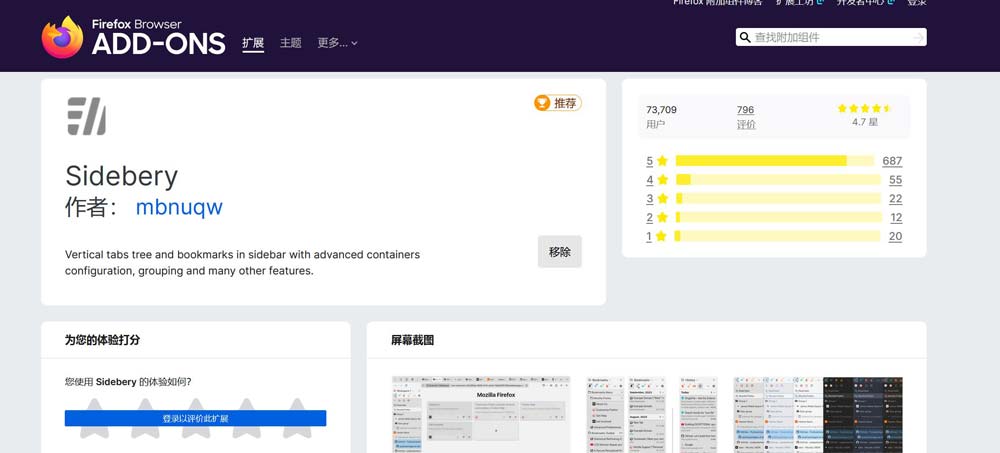
1、安装sidebery拓展插件
火狐浏览器打开 Sidebery – 下载 Firefox 扩展(zh-CN)并安装
2、解锁userChrome.css
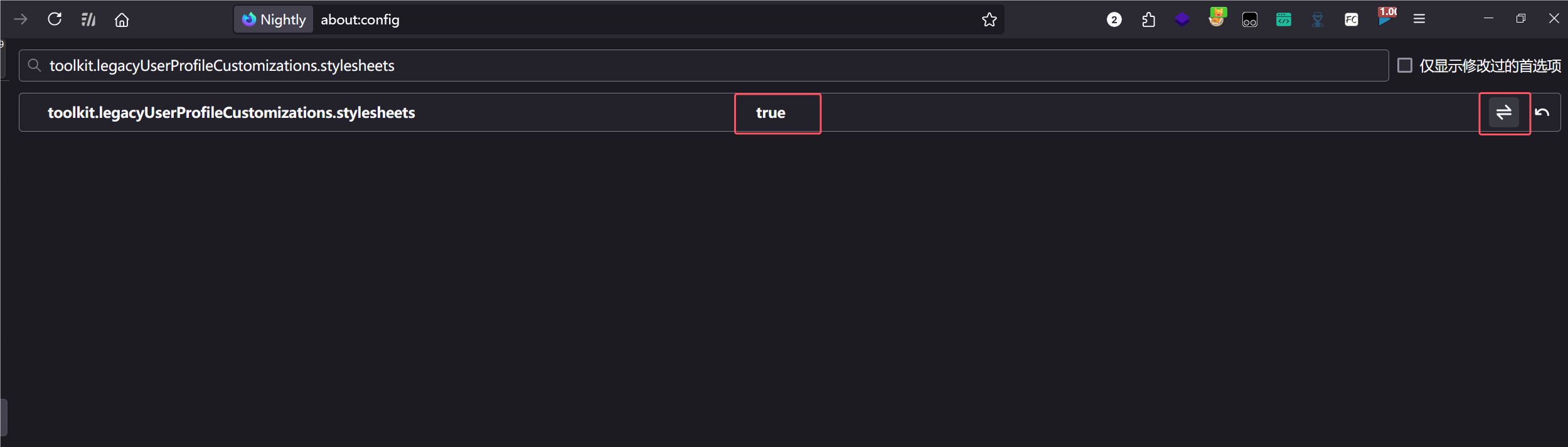
浏览器网址输入 userChrome.css
再输入 toolkit.legacyUserProfileCustomizations.stylesheets
点一下右边的按钮修改为true
3、修改userChrome.css
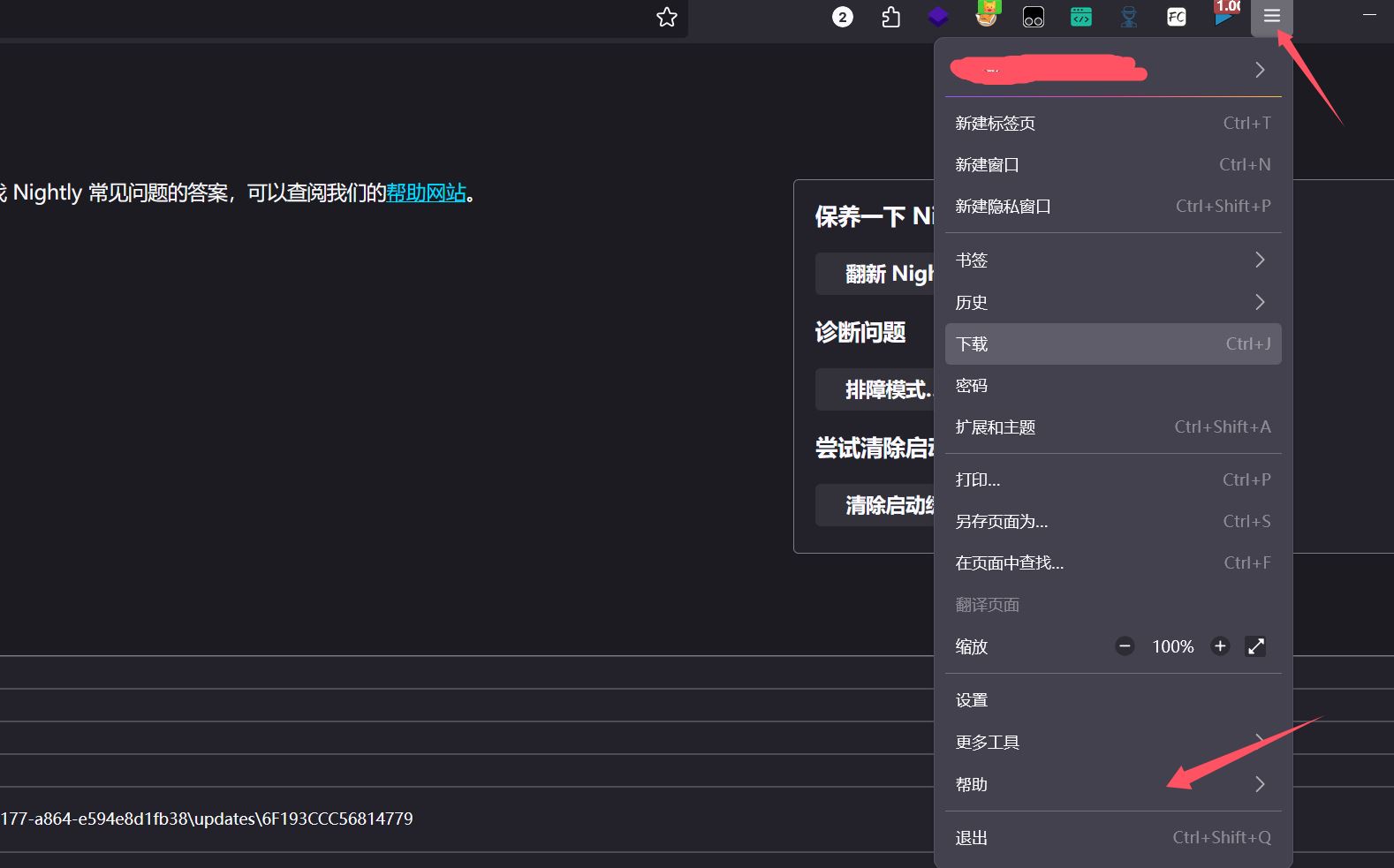
浏览器帮助->更多排障信息->打开配置文件夹
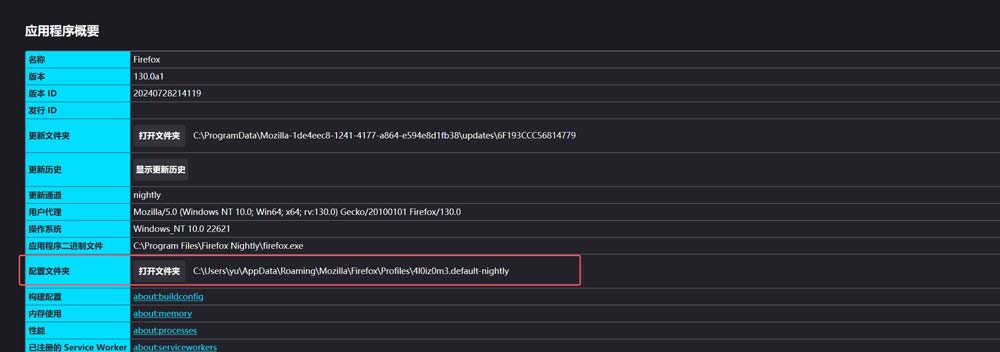
打开后如果文件夹里面没有 chrome 文件夹就自己创建一个
然后再打开 chrome 文件夹,新建文件,取名为 userChrome.css
里面写入以下代码
/* #tabbrowser-tabs[orient="horizontal"] {
    visibility: collapse !important;
} */
:root {
    /* Delay before expanding tabs */
    --delay: 0s;
    /* Time it takes for sidebar to expand. */
    --transition-time: 0.2s;
    /* Width of expanded sidebar */
    --expanded-width: 250px;
}
#TabsToolbar:not([customizing="true"]) {
    visibility: collapse !important;
}
@media (-moz-platform: macos) {
    :root:not([customizing="true"]) #nav-bar:not([inFullscreen]) {
        padding-left: 80px !important;
    }
    :root:not([customizing="true"]) #TabsToolbar .titlebar-buttonbox-container {
        visibility: visible !important;
        position: absolute;
        top: 12px;
        left: 0px;
        display: block;
    }
}
/* Linux/GTK specific styles */
@media (-moz-gtk-csd-available),
(-moz-platform: linux) {
    .browser-toolbar:not(.titlebar-color) {
        /* Fixes wrong coloring applied with --toolbar-bgcolor by Firefox (#101) */
        background-color: transparent !important;
        box-shadow: none !important;
    }
    #TabsToolbar:not([customizing="true"]) {
        visibility: collapse !important;
    }
    #toolbar-menubar {
        padding-top: 0px !important;
    }
    /* Fixes issue in FF 123 where minimize, close, and maximize buttons no longer work. */
    :root[tabsintitlebar] #titlebar {
        will-change: auto !important;
    }
    :root:not([customizing="true"]) #toolbar-menubar[inactive]+#TabsToolbar .titlebar-buttonbox-container {
        visibility: visible !important;
        position: absolute;
        top: var(--uc-win-ctrl-vertical-offset);
        display: block;
        z-index: 101;
    }
    /* enable rounded top corners */
    :root[tabsintitlebar][sizemode="normal"]:not([gtktiledwindow="true"]):not([customizing="true"]) #nav-bar {
        border-top-left-radius: env(-moz-gtk-csd-titlebar-radius);
        border-top-right-radius: env(-moz-gtk-csd-titlebar-radius);
    }
    /* window control padding values (these don't change the size of the actual buttons, only the padding for the navbar) */
    :root[tabsintitlebar]:not([customizing="true"]) {
        /* default button/padding size based on adw-gtk3 theme */
        --uc-win-ctrl-btn-width: 38px;
        --uc-win-ctrl-padding: 12px;
        /* vertical offset from the top of the window, calculation: (1/2 * (NAVBAR_HEIGHT - BUTTON_HEIGHT)) */
        --uc-win-ctrl-vertical-offset: 8px;
        /* extra window drag space */
        --uc-win-ctrl-drag-space: 20px;
    }
    :root[tabsintitlebar][lwtheme]:not([customizing="true"]) {
        /* seperate values for when using a theme, based on the Firefox defaults */
        --uc-win-ctrl-btn-width: 30px;
        --uc-win-ctrl-padding: 12px;
        /* vertical offset from the top of the window, calculation: (1/2 * (NAVBAR_HEIGHT - BUTTON_HEIGHT)) */
        --uc-win-ctrl-vertical-offset: 5px;
        /* extra window drag space */
        --uc-win-ctrl-drag-space: 20px;
    }
    /* setting the padding value for all button combinations */
    @media (-moz-gtk-csd-minimize-button),
    (-moz-gtk-csd-maximize-button),
    (-moz-gtk-csd-close-button) {
        #nav-bar {
            --uc-navbar-padding: calc(var(--uc-win-ctrl-btn-width) * 1);
        }
    }
    @media (-moz-gtk-csd-minimize-button) and (-moz-gtk-csd-maximize-button),
    (-moz-gtk-csd-minimize-button) and (-moz-gtk-csd-close-button),
    (-moz-gtk-csd-maximize-button) and (-moz-gtk-csd-close-button) {
        #nav-bar {
            --uc-navbar-padding: calc(var(--uc-win-ctrl-btn-width) * 2);
        }
    }
    @media (-moz-gtk-csd-minimize-button) and (-moz-gtk-csd-maximize-button) and (-moz-gtk-csd-close-button) {
        #nav-bar {
            --uc-navbar-padding: calc(var(--uc-win-ctrl-btn-width) * 3);
        }
    }
    /* only applies padding/positioning if there is 1 or more buttons */
    @media (-moz-gtk-csd-minimize-button),
    (-moz-gtk-csd-maximize-button),
    (-moz-gtk-csd-close-button) {
        /* window controls on the right */
        @media not (-moz-gtk-csd-reversed-placement) {
            #nav-bar {
                padding-inline: 0 calc(var(--uc-navbar-padding, 0) + var(--uc-win-ctrl-padding) + var(--uc-win-ctrl-drag-space)) !important;
            }
            .titlebar-buttonbox-container {
                right: 0;
            }
        }
        /* window controls on the left */
        @media (-moz-gtk-csd-reversed-placement) {
            #nav-bar {
                padding-inline: calc(var(--uc-navbar-padding, 0) + var(--uc-win-ctrl-padding) + var(--uc-win-ctrl-drag-space)) 0 !important;
            }
            .titlebar-buttonbox-container {
                left: 0;
            }
        }
    }
    /* Hide window buttons in fullscreen */
    #navigator-toolbox[style*="margin-top: -"] .titlebar-buttonbox-container,
    [inDOMFullscreen="true"] .titlebar-buttonbox-container {
        transform: translateY(-100px)
    }
}
/* Windows specific styles */
@media (-moz-platform: windows),
(-moz-platform: windows-win10) {
    /* Hide main tabs toolbar */
    :root[tabsintitlebar] {
        --uc-window-control-width: 137px;
    }
    #nav-bar {
        border-inline: var(--uc-window-drag-space-width, 80px) solid var(--toolbar-bgcolor);
        border-inline-style: solid !important;
        border-right-width: calc(var(--uc-window-control-width, 0px) + var(--uc-window-drag-space-width, 0px));
        /* This makes it possible to drag the maximized window. */
        padding-top: .5px !important;
        /* Removes the space left when hiding .titlebar-buttonbox-container */
        margin-left: -80px;
    }
    #back-button {
        margin-top: -.5px !important;
    }
    #forward-button {
        margin-top: -.5px !important;
    }
    #reload-button {
        margin-top: -.5px !important;
    }
    #PanelUI-button {
        margin-top: -.5px !important;
    }
    #nav-bar-overflow-button {
        margin-top: -.5px !important;
    }
    :root {
        --uc-toolbar-height: 32px;
        --chrome-content-separator-color: none !important;
    }
    :root:not([uidensity="compact"]) {
        --uc-toolbar-height: 38px;
    }
    #TabsToolbar {
        visibility: collapse !important;
    }
    /* Hide the Windows controls on the left side. */
    #TabsToolbar .titlebar-buttonbox-container {
        visibility: hidden !important;
    }
    /* Line up the Windows controls with the rest of the icons in the toolbar. */
    :root:not([sizemode="maximized"]) .titlebar-buttonbox-container {
        margin-top: 3px;
    }
    :root:not([inFullscreen]) #nav-bar {
        margin-top: calc(0px - var(--uc-toolbar-height));
        z-index: 2;
    }
    #toolbar-menubar {
        min-height: unset !important;
        height: var(--uc-toolbar-height) !important;
        position: relative;
    }
    .titlebar-buttonbox {
        z-index: 3 !important;
    }
    .titlebar-buttonbox * {
        width: 35px;
        height: 38px;
        pointer-events: auto;
    }
    #titlebar {
        z-index: 3;
        pointer-events: none;
    }
    #main-menubar {
        -moz-box-flex: 1;
        background-color: var(--toolbar-bgcolor, --toolbar-non-lwt-bgcolor);
        background-clip: padding-box;
        border-right: 30px solid transparent;
        border-image: linear-gradient(to left, transparent, var(--toolbar-bgcolor, --toolbar-non-lwt-bgcolor) 30px) 20 / 30px;
    }
    #toolbar-menubar:not([inactive]) {
        z-index: 2;
    }
    #toolbar-menubar[inactive]>#menubar-items {
        opacity: 0;
        pointer-events: none;
        margin-left: var(--uc-window-drag-space-width, 0px);
    }
    :root[inFullscreen] #nav-bar {
        border-right: none !important;
    }
}
#sidebar-box[sidebarcommand="_3c078156-979c-498b-8990-85f7987dd929_-sidebar-action"] #sidebar-header {
    visibility: collapse;
}
#sidebar-box[sidebarcommand="_3c078156-979c-498b-8990-85f7987dd929_-sidebar-action"] {
    position: relative;
    min-width: 48px !important;
    width: 48px !important;
    max-width: 48px !important;
    z-index: 1;
    margin-top: -1px;
    transition: min-width var(--transition-time) linear !important;
    will-change: min-width;
}
/* positioned=true means sidebar docked to the right */
#sidebar-box[sidebarcommand="_3c078156-979c-498b-8990-85f7987dd929_-sidebar-action"][positionend="true"] {
    position: absolute;
    top: 0;
    bottom: 0;
    right: 0;
}
#browser:has(#sidebar-box[sidebarcommand="_3c078156-979c-498b-8990-85f7987dd929_-sidebar-action"][positionend="true"])>#appcontent {
    margin-right: 50px;
}
#sidebar-box[sidebarcommand="_3c078156-979c-498b-8990-85f7987dd929_-sidebar-action"][positionend="true"]:hover {
    min-width: var(--expanded-width) !important;
}
#sidebar-box[sidebarcommand="_3c078156-979c-498b-8990-85f7987dd929_-sidebar-action"]>#sidebar {
    transition: min-width var(--transition-time) linear var(--delay) !important;
    will-change: min-width;
}
#sidebar-box[sidebarcommand="_3c078156-979c-498b-8990-85f7987dd929_-sidebar-action"]:hover>#sidebar {
    min-width: var(--expanded-width) !important;
    transition: min-width var(--transition-time) linear var(--delay);
    clip-path: inset(0px -15px 0px -15px);
}
#sidebar,
#sidebar-header {
    background-color: var(--toolbar-bgcolor) !important;
    border-inline: 1px solid var(--chrome-content-separator-color) !important;
    border-inline-width: 0px 1px !important;
}
#sidebar-box[sidebarcommand="_3c078156-979c-498b-8990-85f7987dd929_-sidebar-action"]:not([positionend]):hover~#appcontent #statuspanel {
    inset-inline: auto 0px !important;
}
#sidebar-box[sidebarcommand="_3c078156-979c-498b-8990-85f7987dd929_-sidebar-action"]:not([positionend]):hover~#appcontent #statuspanel-label {
    margin-inline: 0px !important;
    border-left-style: solid !important;
}
4、修改sidebery拓展配置
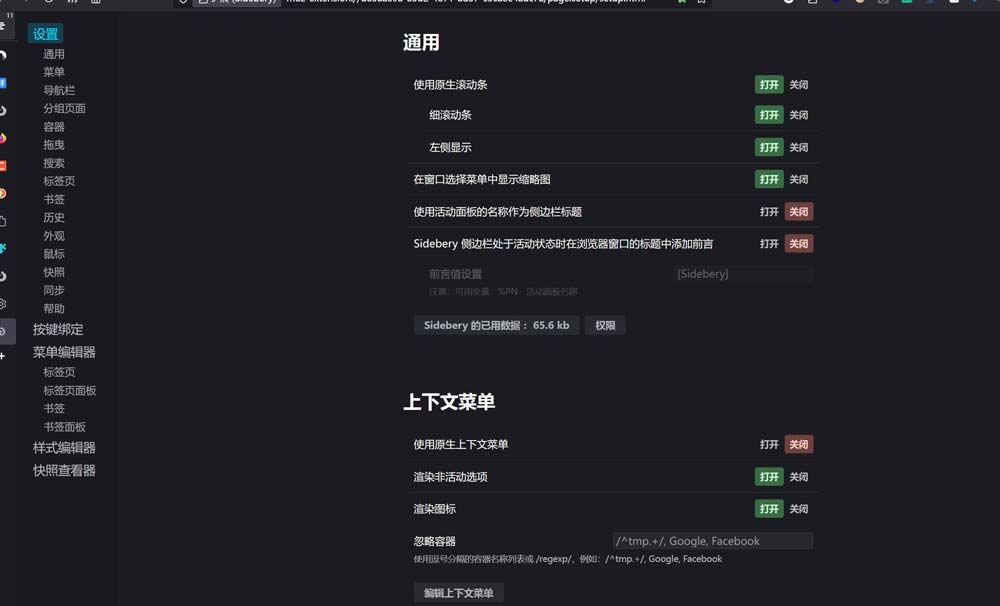
浏览器中打开sidebery的设置页面
点击样式编辑器
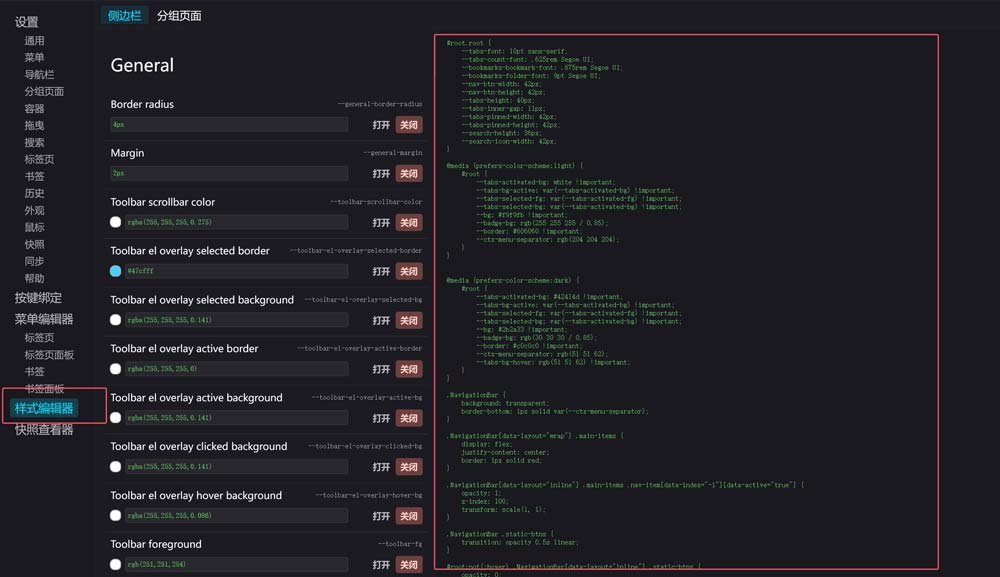
在右边填入以下代码
 #root.root {
    --tabs-font: 10pt sans-serif;
    --tabs-count-font: .625rem Segoe UI;
    --bookmarks-bookmark-font: .875rem Segoe UI;
    --bookmarks-folder-font: 9pt Segoe UI;
    --nav-btn-width: 42px;
    --nav-btn-height: 42px;
    --tabs-height: 40px;
    --tabs-inner-gap: 11px;
    --tabs-pinned-width: 42px;
    --tabs-pinned-height: 42px;
    --search-height: 36px;
    --search-icon-width: 42px;
}
@media (prefers-color-scheme:light) {
    #root {
        --tabs-activated-bg: white !important;
        --tabs-bg-active: var(--tabs-activated-bg) !important;
        --tabs-selected-fg: var(--tabs-activated-fg) !important;
        --tabs-selected-bg: var(--tabs-activated-bg) !important;
        --bg: #f9f9fb !important;
        --badge-bg: rgb(255 255 255 / 0.85);
        --border: #606060 !important;
        --ctx-menu-separator: rgb(204 204 204);
    }
}
@media (prefers-color-scheme:dark) {
    #root {
        --tabs-activated-bg: #42414d !important;
        --tabs-bg-active: var(--tabs-activated-bg) !important;
        --tabs-selected-fg: var(--tabs-activated-fg) !important;
        --tabs-selected-bg: var(--tabs-activated-bg) !important;
        --bg: #2b2a33 !important;
        --badge-bg: rgb(30 30 30 / 0.85);
        --border: #c0c0c0 !important;
        --ctx-menu-separator: rgb(51 51 62);
        --tabs-bg-hover: rgb(51 51 62) !important;
    }
}
.NavigationBar {
    background: transparent;
    border-bottom: 1px solid var(--ctx-menu-separator);
}
.NavigationBar[data-layout="wrap"] .main-items {
    display: flex;
    justify-content: center;
    border: 1px solid red;
}
.NavigationBar[data-layout="inline"] .main-items .nav-item[data-index="-1"][data-active="true"] {
    opacity: 1;
    z-index: 100;
    transform: scale(1, 1);
}
.NavigationBar .static-btns {
    transition: opacity 0.5s linear;
}
#root:not(:hover) .NavigationBar[data-layout="inline"] .static-btns {
    opacity: 0;
    z-index: -1;
    transform: scale(0, 0);;
}
#root:not(:hover) .TabsPanel {
    --tabs-indent: 0px;
}
#root:not(:hover)[data-tabs-tree-lvl-marks="true"] .Tab[data-pin="false"]:not([data-lvl="0"]) .body:after {
    display: none;
}
.Tab .close {
    margin: 0 5px;
}
.Tab .audio {
    position: absolute;
    top: unset !important;
    bottom: -2px;
    right: -2px;
    height: 16px !important;
    width: 16px !important;
    background: var(--badge-bg);
    border-radius: 3px;
    box-shadow: var(--nav-btn-active-shadow);
}
.Tab .t-box {
    --audio-btn-offset: 0;
}
#root:not(:hover) .SearchBar::before {
    background: transparent;
}
#root:not(:hover) .SearchBar .placeholder,
#root:not(:hover) .SearchBar .input {
    opacity: 0;
}
#root:not(:hover) .SearchBar .clear-btn {
    display: none;
}
#root:not(:hover) .PanelPlaceholder {
    writing-mode: vertical-rl;
    text-orientation: mixed;
}
.BottomBar .tool-btn {
    min-width: var(--tabs-pinned-width);
}
重启浏览器即可
1、安装Tree Style Tab插件
首先需要安装Tree Style Tab插件。可以将你的标签页以侧边栏的形式呈树状垂直展示。安装方法如下:
打开Firefox浏览器,访问Firefox浏览器扩展商店。在搜索框中输入“Tree Style Tab”。找到插件后,点击“添加到Firefox”,遵循提示完成安装。温馨提示:“Vertical Tabs Reloaded”插件也可以,不过“Tree Style Tab”树状结构的标签页看得更清晰
2、配置Tree Style Tab
安装完毕后,你可以根据自己的需要配置Tree Style Tab的设置,如标签的颜色、样式、行为等。这些设置可以在插件的选项中调整,使你的标签管理更加符合个人习惯。
3、隐藏默认的水平标签栏
为了让浏览器界面更加简洁,你可能想要隐藏顶部的默认标签栏。这可以通过修改Firefox的userChrome.css文件来实现:
- 在地址栏输入
about:config,然后搜索并设置toolkit.legacyUserProfileCustomizations.stylesheets为true。 - 打开你的Firefox配置文件夹(可以在about:support页面找到),并在其中创建一个新的文件夹命名为chrome,如果已存在则无需创建。
- 在chrome文件夹中创建一个新文件,命名为
userChrome.css,并输入以下代码:
#TabsToolbar {
    visibility: collapse !important;
}
- 保存并重启Firefox浏览器。
4、享受新的浏览体验
一切设置完成后,标签页以垂直方式排列在浏览器的一侧。这不仅使得每个标签的标题一目了然,还能有效地管理大量的标签页。